Author: Riyaz Daga

  • Startup Booted Fundraising Strategy: The Complete Founder’s Guide to Raising Capital Without Losing Control

    Startup Booted Fundraising Strategy: The Complete Founder’s Guide to Raising Capital Without Losing Control

    If you’ve typed “startup booted fundraising strategy” into Google, you’re probably trying to figure out one thing: how do founders raise money and grow without handing over their company to investors? The term is really shorthand for a bootstrapped approach to fundraising, building your business on your own terms first, then bringing in outside capital only when it actually helps you.

    This guide walks through what that looks like in practice. We’ll cover why founders choose this path, how it stacks up against traditional venture capital, the funding sources that actually work at each stage, and the financial numbers you need to track before you ever talk to an investor. As your business grows, you’ll also need to understand essential compliance topics such as Tax Deducted at Source (TDS) to stay on top of tax obligations and avoid penalties.

    A startup booted fundraising strategy means growing your company using your own revenue, savings, or small amounts of outside capital instead of relying on large venture rounds from day one. You keep more ownership, make your own calls, and raise money, if you raise at all, from a position of strength rather than need.

    How It Differs from Traditional Startup Fundraising

    Traditional fundraising usually follows a path. It starts with pre-seed, then seed, followed by Series A, Series B and so on. Each round reduces the founders’ share a bit.

    A different approach is to flip this order. First you show that your business works. You use money from customers or your own funds. Later you decide if taking outside money is an idea.

    This doesn’t mean that founders who bootstrap never get outside funding. Many do get it. The difference is that they choose when to get it. They don’t get it only when they are about to run out of money.

    They have control. They raise money on their terms. This gives them leverage. They are not forced to raise money because they need it away.

    Best Tools for Startup Financial Planning

    1. Carta
    Home page of carta

    Carta helps founders manage their company’s capitalization table (cap table), employee equity grants, stock options, and 409A valuations from a single platform. A cap table records who owns shares in the company, how much equity each founder, investor, and employee holds, and how ownership changes after fundraising rounds or stock option exercises. Keeping this information accurate is essential because even small errors can create legal, financial, or tax issues during future funding rounds or acquisitions.

    As your startup grows and you begin issuing shares or stock options to employees, advisors, or investors, managing equity manually in spreadsheets quickly becomes difficult. Carta automates these processes by tracking ownership changes, generating equity reports, managing vesting schedules, and supporting compliance requirements such as 409A valuations, which determine the fair market value of private company shares for stock option grants. By centralizing equity management, Carta helps founders stay organized, maintain accurate records, and prepare for fundraising, audits, and due diligence with greater confidence.

    2. Gust
    Home page  of gust

    Gust is a platform that helps startups connect with angel investors, startup accelerators, incubators, and venture capital networks looking for promising early-stage businesses. Instead of searching for investors individually, founders can create a detailed startup profile, showcase their business model, traction, financials, and growth plans, and submit applications to multiple funding programs through a single platform.

    Beyond investor discovery, Gust also provides tools to simplify the fundraising process itself. Founders can organize fundraising documents, track investor conversations, manage due diligence materials, monitor application progress, and keep all fundraising activities in one place. This makes it easier to stay organized throughout the investment journey, respond quickly to investor requests, and build stronger relationships with potential backers. For early-stage startups that are preparing to raise their first round of funding, Gust can streamline both investor outreach and fundraising management, saving valuable time and effort.

    3. AngelList

    Home page of  AngelList

    AngelList is a well-known platform that helps startups connect with angel investors and raise capital more efficiently. Founders can create detailed company profiles, share information about their product, team, traction, and funding goals, and reach a network of investors actively looking for early-stage investment opportunities. The platform is especially popular among startups seeking seed or pre-seed funding.

    One of AngelList’s standout features is its support for Special Purpose Vehicles (SPVs), which allow multiple investors to pool their money into a single investment entity. This simplifies the fundraising process by reducing the number of individual investors listed on a startup’s cap table while making it easier for founders to manage investments. In addition to fundraising, AngelList is also a popular hiring platform where startups post job openings and connect with talented professionals interested in working at fast-growing early-stage companies. This combination of fundraising and recruitment tools makes AngelList a valuable resource for startups looking to secure both capital and talent as they scale.

    4. Crunchbase
    Home page of crunchbase

    Crunchbase is a widely used research platform that helps founders identify the right investors before starting their fundraising efforts. It provides detailed information on startups, venture capital firms, angel investors, funding rounds, acquisitions, and industry trends. Instead of reaching out to investors randomly, founders can use Crunchbase to find investors who have previously funded companies in the same industry, business model, or growth stage.

    The platform also lets you analyze an investor’s portfolio, preferred investment size, geographic focus, and recent funding activity. For example, if you’re building a SaaS startup, you can identify venture capital firms or angel investors that have recently invested in other SaaS companies at the pre-seed or seed stage. This targeted approach helps founders prioritize the most relevant investors, personalize their outreach, and improve their chances of securing meetings. By understanding who invests in businesses like yours and when they typically invest, Crunchbase makes the fundraising process more strategic and data-driven.

    5. LivePlan

    Home page of  LivePlan

    LivePlan is a business planning and financial forecasting tool designed to help entrepreneurs create professional business plans and realistic financial projections without needing advanced finance or accounting expertise. It offers step-by-step guidance, customizable templates, and built-in forecasting tools that make it easier to estimate revenue, expenses, cash flow, profit and loss, and break-even points.

    For founders who have never built a financial model before, LivePlan simplifies what can otherwise be a complex process. It helps you organize your assumptions, generate investor-ready financial statements, and create clear projections that demonstrate how your business plans to grow over the next few years. These forecasts can be especially valuable when pitching to angel investors, banks, or venture capital firms, as they show that you understand your business economics and have a realistic plan for managing growth. By combining business planning with financial modeling, LivePlan helps founders present a more credible and well-prepared case when seeking funding.

    Why More Founders Are Choosing Bootstrapping

    Founders who’ve watched friends give up 20-30% of their company in a single seed round, only to lose control of major decisions two years later, are understandably cautious. A recurring theme in founder discussions on startups is regret over raising too early rather than too late. Bootstrapping lets you build proof points, paying customers, real revenue, a working product, before you ever negotiate a term sheet.

    Bootstrapping vs Venture Capital: Which Is Right for Your Startup?

    Comparison Table

    FactorBootstrappingVenture Capital
    OwnershipYou keep most or all equityYou give up equity for cash
    Growth speedUsually slower, tied to revenueCan scale faster with outside cash
    Decision-makingFounders keep full controlInvestors often get board seats and a say
    RiskPersonal financial riskRisk shared with investors
    PressurePressure to stay profitablePressure to hit growth targets for the next round
    Exit expectationsFlexible, on your timelineInvestors usually expect an exit event

    Advantage and Disadvantage of Bootstrapping

    Bootstrapped startup founder working independently versus pitching investors in a boardroom.
    Advantages of BootstrappingDisadvantages of Bootstrapping
    Complete ownership and control: Founders retain 100% ownership of the company and make all key decisions, including product development, pricing, hiring, marketing, and business strategy, without needing approval from investors or board members.Slower business growth: Expansion depends on the revenue the business generates. Without outside funding, it may take longer to hire employees, launch products, invest in marketing, or enter new markets compared to venture-backed competitors.
    No equity dilution: Since there are no external investors, founders do not have to give up shares of the company. They keep a larger portion of future profits and maintain full control over the company’s direction.Limited access to capital: Large projects such as research and development, manufacturing, international expansion, or major technology investments can be difficult to fund solely through business revenue.
    Financial discipline: Bootstrapped startups learn to manage expenses carefully because every dollar matters. This encourages efficient budgeting, better cash flow management, and sustainable growth rather than relying on continuous fundraising.Higher personal financial risk: Many founders use personal savings, loans, or credit cards to finance their startup. If the business struggles or fails, the founder remains personally responsible for those financial commitments.
    Customer-focused growth: Revenue comes directly from customers rather than investors, encouraging founders to build products that solve real problems and generate consistent income from the beginning.Harder to compete in capital-intensive industries: Startups in sectors such as biotechnology, artificial intelligence, hardware, or businesses with strong network effects often require significant upfront investment to compete effectively.
    Greater long-term financial rewards: If the company becomes highly profitable or is acquired, founders receive a much larger share of the financial returns because they have retained ownership throughout the company’s growth.Founder workload and burnout: With limited resources, founders often handle multiple responsibilities, including sales, marketing, finance, operations, and customer support, which can lead to stress and burnout over time.
    Long-term flexibility: Without investor pressure for rapid growth or quick exits, founders can grow the business at a pace that aligns with their vision, customer needs, and long-term sustainability.Less room for unexpected setbacks: Limited cash reserves make it more difficult to handle economic downturns, market changes, unexpected expenses, or temporary declines in revenue, increasing financial pressure on the business.

    Decision Framework

    Ask yourself three questions before choosing a path.

    Can you reach meaningful revenue within 6-12 months without outside funding? If yes, bootstrapping is worth trying first.

    Does your market reward speed over profitability, meaning a competitor with more capital could out-scale you before you build a moat? If yes, you may need to raise sooner.

    Would giving up 15-25% equity now buy you enough speed to matter later? If the math doesn’t clearly favor dilution, hold off.

    Why Founders Choose a Booted Fundraising Strategy

    1. Maintain Ownership

    Every percentage point of equity you keep is a percentage point of future upside and control. Founders who bootstrap through their first $1-2 million in revenue often raise later at a higher valuation, meaning the same investor check buys less of the company.

    2. Financial Discipline

    When there’s no investor money cushioning mistakes, founders tend to watch spending closely. This isn’t a personality trait, it’s a structural incentive. Basecamp’s founders have written openly on their company blog about how the absence of outside funding forced them to build a business that had to work, not just grow.

    3. Better Valuation

    A company with real revenue, retained customers, and healthy margins commands a stronger valuation than one with just a pitch deck and a prototype. Bootstrapped founders who eventually raise often negotiate from a position where investors are competing for the deal, not the other way around.

    4. Customer-Driven Growth

    Without VC money to burn on paid acquisition, bootstrapped startups usually build products people are willing to pay for right away. That customer feedback loop tends to produce a more durable business, even if it grows more slowly at first.

    Different Ways Bootstrapped Startups Raise Capital

    1. Personal Savings

    Most founders who start a company with their money begin this way. This kind of money is really simple. It is also the most dangerous, for the founder themselves, so it is best when the founder does not have to spend a lot of money to try out an idea. The founder can use their money to test the idea when the cost is low. 

    2. Friends and Family

    Small loans or investments from friends and family can help you get started. Think of these as financial deals. Write down the terms even if it’s a small amount. This way you can avoid hurting relationships.

    These small loans or investments are really helpful. You can ask people you know. Trust, for help. Make sure you put the agreement in writing.This will help prevent problems.

    3. Revenue Reinvestment

    This is how it works at its core. You take the money that customers give you and reinvest it into your business instead of relying on outside investors for funding.

    One of the biggest advantages of this approach is that your business grows based on what customers actually want. Customers pay for your product or service, and you use that revenue to improve and expand your business.

    This creates a sustainable growth cycle where every improvement is backed by real customer demand. As your revenue increases, it’s also important to stay compliant with applicable tax rules so your growing business can avoid penalties and manage its finances effectively.

    4. Angel Investors

    Angels typically write smaller checks than VC firms and often bring industry experience along with the money. Platforms like AngelList make it easier to find angels who invest in early-stage, capital-efficient companies.

    5. Crowdfunding

    Kickstarter and Indiegogo work well for product-based startups that can show a prototype and pre-sell to backers. Equity crowdfunding platforms, such as Republic and SeedInvest, let non-accredited investors buy small equity stakes, which can work for consumer brands with an engaged audience.

    6. Revenue-Based Financing

    You do not have to give up part of your company when you borrow money this way. Instead, you repay the lender with a percentage of your company’s monthly revenue until you reach the agreed repayment amount, which is usually 1.5 to 2 times the amount you borrowed. This financing model works well for Software as a Service (SaaS) and subscription-based businesses because they generate predictable recurring revenue. If revenue falls in a particular month, the repayment amount also decreases since payments are tied to earnings. As your business expands and hires employees, it’s equally important to understand compliance requirements such as Provident Fund (PF) to ensure you meet employee benefit and payroll obligations alongside managing business financing.

    7. Venture Debt

    Venture debt is a kind of loan. This loan is often given with warrants. Venture debt is for companies that are already making some money or have gotten money from investors before. Venture debt helps these companies by giving them time to grow without having to give up too much of their company. However companies that get venture debt have to pay it back no matter how well or poorly their business is doing. Venture debt is still a loan that needs to be repaid. 

    8. Startup Grants

    Government and nonprofit grants, including programs through the U.S. Small Business Administration, provide non-dilutive funding, though the application process can be slow and competitive. Grants tend to suit startups in research-heavy fields like biotech, cleantech, or hardware.

    9. Accelerators

    Programs like Y Combinator and Techstars give you some money, not a lot and, in return they get a part of your company. They also help you out with advice. Connect you with investors who can give you more money later on. The part of your company you give up is usually not too big compared to what you would have to give up if you were trying to get a lot of money from investors. 

    10. Strategic Partnerships

    Big companies sometimes give money, cheaper equipment or help with marketing to companies that make things that go well with the big company’s products. The big company and the small company can work together. This can be very helpful. These deals can give the company money without taking away any ownership but the small company should look at the deals very carefully. The small company should check if the deal says they can only work with the company because that might stop them from working with other companies in the future. The small company should think about this carefully because it is very important for their business. 

    Startup Fundraising Strategy by Growth Stage

    Startup founder evaluating funding options including savings, investors, grants, crowdfunding, and business growth.

    1. Idea Stage

    At this point, you’re validating whether anyone wants what you’re building. Personal savings, friends and family, or a small grant are usually the only capital sources that make sense — there’s rarely enough proof yet to attract angels or VCs.

    2. MVP Stage

    Once you have a minimum viable product, focus on getting a handful of paying customers rather than raising money. Their willingness to pay is the strongest signal you can bring to any future investor conversation.

    3. Early Revenue

    With consistent monthly revenue, you can start exploring revenue-based financing or angel checks to speed up hiring or marketing. This is also a reasonable point to apply to an accelerator if you want structured mentorship.

    4. Pre-Seed

    If you do decide to raise, pre-seed rounds ($100K-$500K typically) often come from angels or small funds and are meant to extend runway while you refine product-market fit, not to fund aggressive scaling.

    5. Seed

    By seed stage, investors expect some combination of user growth, revenue, or retention data. Bootstrapped founders who reach seed with real traction generally raise at better terms than those raising purely on an idea.

    6. Growth Stage

    At this stage, capital is usually about accelerating something that’s already working, whether that’s expanding into new markets, building out a sales team, or investing in infrastructure. Founders who bootstrapped through earlier stages often raise a single, larger round here instead of several smaller dilutive ones.

    How to Build a Startup Booted Fundraising Strategy

    1. Validate Demand

    Talk to potential customers before writing a line of code if you can. Pre-sales, waitlists, or paid pilots tell you more than any survey.

    2. Estimate Startup Costs

    List out what it actually costs to build and launch a minimum version of your product: tools, hosting, contractor fees, basic legal setup. Most first-time founders underestimate this by a wide margin.

    3. Calculate Runway

    Runway is simply how many months you can operate before running out of cash, based on your current spending. Divide your available cash by your monthly burn rate to get this number.

    4. Reduce Burn Rate

    Burn rate is how much cash your business spends each month beyond what it brings in. Cutting unnecessary tools, deferring non-essential hires, and negotiating vendor terms can stretch your runway by months.

    5. Improve Unit Economics

    Unit economics means understanding whether you make money on each customer, once you account for the cost of acquiring and serving them. If your cost to acquire a customer is close to or higher than what that customer pays you, your growth model needs work before you scale it further.

    6. Generate Revenue Early

    Even a small amount of paying customers changes the conversation with any future investor. It proves the product solves a real problem people will pay to fix.

    7. Prepare Financial Documents

    Keep clean records from day one: a simple profit-and-loss statement, a cash flow summary, and a basic cap table if you’ve issued any equity. Waiting until you need to raise to organize these is a common, avoidable mistake.

    8. Build Investor Readiness

    Even if you don’t plan to raise soon, understanding what investors look for, including growth rate, margins, and market size, helps you build a business that would be fundable if you ever changed your mind.

    Financial Metrics Every Founder Should Track

    1. Burn Rate

    The amount of cash your company spends each month, net of revenue. Track this monthly, not quarterly, so you catch problems early.

    2. Runway

    Cash on hand divided by monthly burn rate, expressed in months. Most investors want to see at least 12-18 months of runway after any round closes.

    3. ARR (Annual Recurring Revenue)

    Your predictable subscription or contract revenue, annualized. This is the headline number most SaaS investors care about.

    4. MRR (Monthly Recurring Revenue)

    The monthly version of ARR, useful for tracking short-term trends and month-over-month growth.

    5. CAC (Customer Acquisition Cost)

    Total sales and marketing spend divided by the number of new customers acquired in that period. A rising CAC without a corresponding rise in customer value is a warning sign.

    6. LTV (Lifetime Value)

    The total revenue you expect to earn from a customer over the life of their relationship with you. A healthy business usually has an LTV to CAC ratio of at least 3:1.

    7. Gross Margin

    Revenue minus the direct cost of delivering your product or service, shown as a percentage. Software businesses typically aim for 70-85% gross margins; anything much lower deserves a closer look.

    8. Cash Flow

    The actual movement of money in and out of your business, which can look different from your reported profit due to timing of payments. Positive cash flow, even modest, is what lets a bootstrapped company survive without outside funding.

    Investor Readiness Checklist

    Startup founder reviewing a pitch deck and financial charts before an investor meeting.

    1. Pitch Deck

    A clear, concise deck covering the problem, your solution, market size, traction, team, and what you’re asking for. Ten to fifteen slides is usually enough,  investors read hundreds of these and reward clarity over length. The best PowerPoint agents can help assemble an investor-ready deck from existing notes and metrics, pulling structure, charts, and narrative flow into a coherent pitch instead of starting from a blank canvas.

    2. Financial Statements

    Basic profit-and-loss, balance sheet, and cash flow statements, even if they’re simple. Investors want to see that you understand your own numbers, not that you have Wall Street-grade reporting.

    3. Customer Metrics

    Retention rate, churn, and growth trends matter more than vanity metrics like total signups. Be ready to explain both your wins and your weak spots honestly.

    4. Market Validation

    Evidence that a real, sizable market wants what you’re building: customer interviews, sales data, or comparable companies that have proven the category works.

    5. Cap Table

    A clear record of who owns what percentage of your company, including any options or convertible instruments outstanding. Tools like Carta make this straightforward to maintain and share with prospective investors.

    Common Startup Fundraising Mistakes

    1. Raising Too Early

    Raising before you’ve proven anything means giving up more equity for less leverage, and it can also mask problems in your business model that money temporarily hides.

    2. Raising Too Late

    On the other end, waiting until you’re nearly out of cash puts you in a weak negotiating position and limits your options to whoever will fund you fastest, on whatever terms they offer.

    3. Poor Financial Planning

    Founders who don’t track burn rate or runway closely are often surprised by how little time they have left, which forces rushed, unfavorable fundraising decisions.

    4. Weak Product Validation

    Pitching investors on an idea instead of evidence, such as customer conversations, pre-sales, or usage data, is one of the most common reasons early meetings go nowhere.

    5. Giving Away Too Much Equity

    Early rounds sometimes trade too much ownership for too little capital, especially when founders are desperate to close a round quickly. Every early equity decision compounds through every future round.

    Real Examples of Successful Bootstrapped Startups

    1. Mailchimp

    Mailchimp grew for close to two decades without taking venture funding, eventually selling to Intuit for around $12 billion in 2021. Its founders have spoken publicly about how staying independent lets them build features for customers rather than for the next funding round.

    2. Basecamp

    Basecamp (formerly 37signals) has operated profitably for over 20 years without outside investment, and its founders have written extensively about the case for staying small and sustainable rather than chasing hypergrowth.

    3. Zapier

    Zapier scaled to a large, distributed team and significant revenue without raising a traditional venture round, relying instead on early revenue from its automation product.

    4. Atlassian

    Atlassian bootstrapped for roughly a decade, using cash flow from paying customers to grow, before eventually taking outside capital and going public in 2015.

    5. Canva

    Canva did raise venture capital, but its founders bootstrapped the earliest validation of the idea and were notably disciplined about capital efficiency relative to its valuation growth. Founder interviews shared on LinkedIn have discussed this discipline in more detail.

    Future Trends in Startup Fundraising

    1. AI-Powered Investing

    Investors increasingly use AI tools to screen deal flow, analyze market data, and even assess founder communication patterns before a first meeting, which means founders should expect more data-driven scrutiny earlier in the process.

    2. Revenue-Based Capital

    As more lenders offer revenue-based financing, it’s becoming a mainstream middle ground between pure bootstrapping and traditional equity fundraising, particularly for SaaS companies with steady recurring revenue.

    3. Alternative Financing

    Options like venture debt, invoice financing, and revenue-based loans are growing in popularity as founders look for ways to fund growth without diluting ownership.

    4. Global Startup Ecosystems

    Fundraising is no longer concentrated in a handful of hubs. Founders in emerging startup ecosystems increasingly have access to local angel networks, government-backed funds, and remote-first accelerators.

    Frequently Asked Questions

    What is a startup booted fundraising strategy?

    It’s an approach to building and funding a company primarily through revenue, savings, and modest outside capital, rather than depending on large venture rounds from the start.

    How do bootstrapped startups raise money?

    Through personal savings, revenue reinvestment, angel investment, crowdfunding, revenue-based financing, grants, and accelerator programs.

    What is the difference between bootstrapping and venture capital? 

    Bootstrapping relies on your own resources and keeps ownership concentrated with founders, while venture capital provides larger sums of cash in exchange for equity and, often, a say in major decisions.

    Can startups succeed without investors?

    Yes. Companies like Basecamp and Mailchimp built large, profitable businesses without traditional venture funding.

    When should a startup raise funding?

    Generally, once you have evidence the business works, such as paying customers, retention, or clear demand, and when outside capital would meaningfully speed up growth you couldn’t achieve on your own.

    What is revenue-based financing?

    A funding model where you repay a lender a percentage of monthly revenue until you’ve paid back an agreed multiple of the original amount, without giving up equity.

    Conclusion

    A startup that does its fundraising is not about never talking to investors. It is about making sure the startup is strong and has a plan so that when it does get money from investors the startup is in charge.

    The startup should first make sure people really want what it is selling and keep an eye on how much money it has and how fast it is spending that money. The startup should also try to make money as soon as it can.

    If the startup does decide to get money from investors it will be able to talk to them in a strong position with a business that investors really want to give money to, rather than a business that is struggling and needs to be saved.

    This is the reason why startups do their own fundraising to have control over the money they get from investors and to have a startup that investors want to fund, which is the whole point of doing things this way.

  • Periodic Inventory System: Definition, Benefits, Formula, Examples, and How It Works

    Periodic Inventory System: Definition, Benefits, Formula, Examples, and How It Works

    If you have ever counted stock by hand at the end of the month and used that count to figure out what you sold, you have already used an inventory system. You may not have called it that, but you have still used it. A periodic inventory system is one of the two main ways businesses track what is on their shelves and what it costs them. Many small and mid-sized companies continue to rely on this method because it is simple and cost-effective. If your business still tracks stock using spreadsheets, our guide on Inventory Management in Excel can help you organize inventory records more efficiently before moving to advanced inventory software.

    This guide will explain what a periodic inventory system is, how it works, and when it makes sense to use one. You will learn the formulas, journal entries, and inventory valuation methods involved. We will also look at practical examples from different industries and discuss the software that supports periodic inventory systems today.

    A periodic inventory system is a method of tracking inventory where records are updated at specific intervals, such as monthly, quarterly, or annually. Unlike a perpetual inventory system, inventory levels are not updated after every sale or purchase. Instead, purchases are recorded throughout the period, and the actual inventory balance is determined after a physical stock count.

    Think of a periodic inventory system like checking your pantry once a week. You do not record every spoonful of flour you use. Instead, you buy groceries as needed and count what is left at the end of the week. Businesses using a periodic inventory system follow the same approach, except they count products instead of pantry items.

    Why Businesses Use It

    Small businesses and companies with a limited number of Stock Keeping Units (SKUs) often choose a periodic inventory system because it is affordable and easy to manage. Since inventory is counted only at specific intervals, businesses do not need to invest in expensive barcode scanners or advanced inventory tracking systems. This makes the method a practical choice for organizations with relatively simple inventory needs. As a business grows, however, many companies transition to Industrial Inventory Management Software to gain real-time inventory visibility, automate stock tracking, and improve operational efficiency.

    Many businesses use spreadsheets or notebooks to track their SKUs, while others rely on accounting software and perform physical inventory counts at the end of each week or month. This approach works well for retailers, small wholesalers, and businesses with lower sales volumes because it keeps operating costs low while still providing an accurate inventory count at regular intervals.

    However, a periodic inventory system also has its limitations. Since inventory records are not updated continuously, businesses may not know their exact stock levels between physical counts. This can lead to stockouts, excess inventory, or delayed purchasing decisions. The lack of real-time inventory visibility can also make it more difficult to respond quickly to changes in customer demand. We will explore these challenges in more detail later in this guide.

    Key Characteristics

    A few things set periodic inventory apart from other approaches:

    • Inventory counts happen physically, usually by hand or with basic scanning tools, at fixed intervals.
    • Purchases are recorded in a “Purchases” account rather than directly updating inventory.
    • Cost of Goods Sold (COGS) isn’t calculated per transaction, it’s calculated once, at period-end, using a formula.
    • There’s no real-time visibility into stock levels between counts.

    How Does a Periodic Inventory System Work?

    1. Inventory Purchase Process

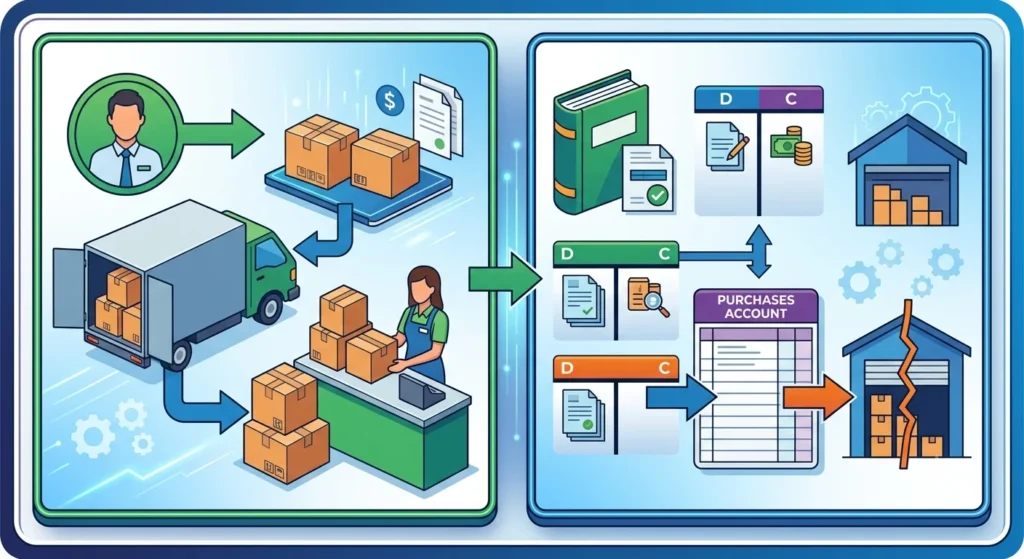
    Illustration of a periodic inventory system showing the inventory purchase workflow from supplier to warehouse and retail store, alongside accounting journal entries, purchase records, inventory adjustments, and end-of-period stock reconciliation.

    When a business buys stock, the purchase gets recorded in a Purchases account instead of directly increasing the Inventory account. This is one of the biggest differences from a perpetual system, where every purchase immediately updates inventory in real time.

    2. Physical Inventory Counts

    At the end of the chosen period, someone on the team physically counts everything on hand, every unit, every SKU, every location if there’s more than one. This is usually the most labor-intensive part of the whole process, and it’s often done after hours or over a weekend to avoid disrupting sales.

    3. Recording Purchases

    Throughout the period, purchases, purchase returns, and freight-in costs accumulate in separate accounts. None of these touch the main Inventory account until the period closes.

    4. Updating Inventory at Period End

    Once the physical count is done, the business assigns a dollar value to what’s left using an inventory valuation method (FIFO, LIFO, or weighted average, more on this below). That value becomes the new Ending Inventory figure.

    5. Calculating Ending Inventory

    With the count finished and valued, the accounting team plugs the numbers into the COGS formula to see what was sold during the period. This is the step that actually tells the business how much inventory left the building, not through tracking, but through subtraction.

    Periodic Inventory Formula

    1. Cost of Goods Sold Formula

    This is the core calculation behind the entire system:

    Beginning Inventory + Purchases − Ending Inventory = Cost of Goods Sold

    If a business started the month with $10,000 in inventory, bought $15,000 more, and counted $8,000 left at month-end, then COGS = $10,000 + $15,000 − $8,000 = $17,000.

    2. Inventory Calculation Formula

    Rearranged, the same formula tells you ending inventory if you already know COGS:

    Ending Inventory = Beginning Inventory + Purchases − COGS

    3. Worked Example with Numbers

    Say a small hardware store starts the quarter with $40,000 in inventory. Over three months, it buys another $60,000 worth of stock. At quarter-end, the physical count comes to $35,000.

    COGS = $40,000 + $60,000 − $35,000 = $65,000

    That $65,000 is what the store reports as the cost of goods sold on its income statement for the quarter, even though nobody tracked a single sale transaction-by-transaction.

    Journal Entries in a Periodic Inventory System

    Because a periodic inventory system updates inventory only at the end of an accounting period, businesses record purchases and related costs in temporary accounts throughout the period. Once a physical inventory count is completed, these accounts are adjusted to determine the final inventory value and the cost of goods sold (COGS).

    1. Recording Purchases

    When a business purchases inventory on credit, the purchase is recorded in a Purchases account rather than directly increasing the Inventory account. This is one of the key differences between periodic and perpetual inventory systems.

    Journal Entry:

    • Debit: Purchases
    • Credit: Accounts Payable

    If the purchase is made with cash instead of on credit, Cash is credited instead of Accounts Payable. Since the Inventory account is not updated with every purchase, businesses rely on a physical inventory count at the end of the period to determine the actual inventory on hand.

    2. Purchase Returns and Allowances

    Sometimes businesses return damaged, defective, or incorrect goods to suppliers or receive a price reduction. Instead of reducing the Purchases account directly, these transactions are recorded in a separate Purchase Returns and Allowances account.

    Journal Entry:

    • Debit: Accounts Payable
    • Credit: Purchase Returns and Allowances

    Keeping purchase returns separate provides a clearer picture of total purchases made during the accounting period and helps businesses analyze supplier performance.

    3. Recording Freight Costs

    Shipping or transportation costs incurred to bring inventory to the business are treated as part of the cost of acquiring inventory. Under the periodic inventory system, these costs are recorded in a separate Freight-In (or Transportation-In) account.

    Journal Entry:

    • Debit: Freight-In
    • Credit: Cash or Accounts Payable

    At the end of the accounting period, Freight-In is included when calculating the total cost of goods available for sale, ensuring inventory costs are measured accurately.

    4. Closing Entries at the End of the Period

    Once the accounting period ends, the business performs a physical inventory count to determine the value of inventory remaining on hand. The balances in the Purchases, Purchase Returns and Allowances, and Freight-In accounts are then combined to calculate the total cost of goods available for sale.

    Using this information, the business calculates Cost of Goods Sold (COGS) and updates the Inventory account to match the physical count. Temporary accounts used throughout the period are closed, and the necessary adjusting entries are made so that the financial statements accurately reflect ending inventory and the cost of inventory sold during the period.

    This end-of-period adjustment is what makes the periodic inventory system simpler to maintain during the accounting period but more dependent on accurate physical inventory counts.

    Inventory Valuation Methods

    Once you’ve got a physical count, you still need to know what that inventory is worth in dollars. That’s where valuation methods come in.

    1. FIFO

    Illustration of the FIFO (First-In, First-Out) inventory method showing warehouse shelves with stored boxes and a conveyor belt moving the oldest inventory out first, representing the order in which stock is sold or used.

    First-In, First-Out assumes the oldest inventory is sold first. In periods of rising prices, FIFO tends to show higher ending inventory value and lower COGS, which usually means higher reported profit.

    2. LIFO

    Last-In, First-Out assumes the newest inventory is sold first. It’s allowed under U.S. GAAP but not under IFRS, so companies operating internationally often steer clear of it. LIFO tends to show lower reported profit during inflation, which can reduce taxable income.

    3. Weighted Average Cost

    This method averages the cost of all units available during the period and applies that average to both COGS and ending inventory. It smooths out price swings and is simpler to apply than tracking specific cost layers.

    Which Method Works Best?

    There’s no universal answer. Retailers dealing with fast-moving, similar-cost goods often prefer weighted average for simplicity. Businesses wanting to match current costs to current revenue during inflation might lean FIFO. The choice also affects taxes, so it’s worth a conversation with an accountant before locking one in,  and once chosen, switching methods later can trigger extra reporting requirements.

    Advantages of a Periodic Inventory System

    1. Lower Setup Costs

    No inventory software, no barcode hardware, no integration work. For a business just getting started, that’s real money saved.

    2. Easier for Small Businesses

    A shop with a few hundred SKUs and low transaction volume can manage a monthly count without much disruption. The same approach would be a nightmare for a warehouse moving thousands of units a day.

    3. Simpler Accounting

    Fewer accounts to reconcile day-to-day means less bookkeeping overhead between counts. Purchases just get logged and left alone until period-end.

    4. Less Technology Required

    A spreadsheet and a clipboard are enough to run this system. That matters for businesses in areas with limited access to reliable software or IT support.

    Disadvantages of a Periodic Inventory System

    1. Inventory Shrinkage

    Because there’s no ongoing tracking, theft, damage, or spoilage often gets buried inside the COGS figure instead of being identified separately. A business might think it sold more than it did, when in fact some inventory just disappeared.

    2. Delayed Reporting

    Managers don’t know their exact stock levels between counts. That makes it harder to catch a stockout or reorder in time, and it delays financial reporting until the count is finished.

    3. Manual Counting Errors

    Physical counts are done by people, and people miscount, mislabel, or skip items. A single counting mistake can throw off the COGS calculation for the entire period.

    4. Limited Visibility

    If a manager wants to know today’s inventory value, a periodic system simply can’t answer that question without a fresh count. That’s a real problem for businesses trying to make fast purchasing or pricing decisions.

    Periodic vs Perpetual Inventory System

    1. Feature Comparison Table

    FeaturePeriodic InventoryPerpetual Inventory
    Inventory updatesAt set intervalsIn real time, after every transaction
    Technology neededMinimalPOS, barcode/RFID, inventory software
    COGS calculationFormula at period-endCalculated per sale
    Setup costLowHigher
    AccuracyLower, prone to shrinkage going unnoticedHigher, discrepancies caught faster
    Best suited forSmall businesses, low SKU countHigh-volume retailers, ecommerce, warehouses

    2. Cost Comparison

    Periodic systems cost less to set up but can cost more in the long run through undetected shrinkage and stockouts. Perpetual systems require an upfront investment in software and hardware but usually pay for themselves through tighter inventory control.

    3. Accuracy Comparison

    Perpetual inventory wins here by a wide margin. Every transaction updates the count automatically, so discrepancies show up almost immediately instead of sitting unnoticed for a month or a quarter.

    4. Reporting Differences

    A perpetual system gives management live inventory reports on demand. A periodic system gives accurate numbers only right after a physical count, and those numbers age quickly as new sales and purchases pile up.

    5. Best Use Cases

    Periodic inventory tends to fit businesses with a small number of products, low transaction volume, and tight budgets. Perpetual inventory fits businesses with high sales volume, multiple locations, or thin margins where knowing exact stock in real time actually changes decisions. For a deeper technical comparison, Wikipedia’s overview of inventory and inventory accounting methods is a solid starting reference.

    Which Businesses Should Use a Periodic Inventory System?

    1. Retail

    Small retail boutique with organized clothing and merchandise for periodic inventory management.

    Small boutiques and specialty stores with a manageable product range often stick with periodic counts, especially if they’re not running high transaction volume.

    2. Wholesale

    Smaller wholesalers dealing in bulk, low-SKU-count goods can track inventory periodically without much trouble, since the number of distinct items to count stays low.

    3. Restaurants

    Many restaurants count food and beverage inventory weekly rather than tracking every ingredient transaction, since ingredient-level perpetual tracking is often more effort than it’s worth for perishable goods.

    4. Manufacturing

    Small manufacturers with simple bills of materials sometimes use periodic inventory for raw materials, though larger manufacturers usually move to perpetual systems once production complexity grows.

    5. Small Businesses

    In general, if a business has a low volume of transactions and a limited product line, periodic inventory keeps accounting simple without sacrificing much accuracy. Once transaction volume climbs, most owners start looking at perpetual systems instead — a shift discussed often in small-business communities like smallbusiness and Bookkeeping on Reddit.

    Real-World Example

    1. Small Retail Store Example

    An independent bookstore counts inventory every quarter. It starts Q1 with $25,000 in books, buys another $12,000 during the quarter, and counts $20,000 remaining at quarter-end. COGS comes to $17,000 for the period,  the number the owner uses to price the next season’s orders.

    2. Grocery Store Example

    A neighborhood grocery counts shelf-stable goods monthly, since spoilage risk on those items is low. Perishables, on the other hand, often get tracked more frequently or even daily, because the cost of letting spoilage go unnoticed for a month is too high.

    3. Warehouse Example

    A small regional warehouse handling seasonal goods might do a full periodic count twice a year, paired with lighter spot checks in between to catch major discrepancies early.

    How to Implement a Periodic Inventory System

    1. Planning

    Decide on the counting interval, monthly, quarterly, or annually, based on how fast inventory moves and how much risk the business can tolerate between counts.

    2. Choosing Inventory Valuation

    Pick FIFO, LIFO, or weighted average based on tax strategy, industry norms, and whether the business reports under GAAP or IFRS. LIFO isn’t an option for IFRS reporters.

    3. Scheduling Physical Counts

    Set a fixed schedule and stick to it. Counts done “whenever there’s time” tend to slip, and a skipped count throws off an entire period’s COGS calculation.

    4. Training Staff

    Whoever does the counting needs a clear process, count sheets, item codes, and a method for handling damaged or unsellable stock. Untrained counters are the single biggest source of shrinkage-related errors.

    5. Maintaining Records

    Keep purchase invoices, freight bills, and return documentation organized throughout the period. When count day arrives, disorganized records make reconciliation painful.

    Common Mistakes to Avoid

    1. Counting Errors

    Double-counting, skipped shelves, and mislabeled SKUs are the most common issues. A second counter cross-checking totals catches most of these before they hit the books.

    2. Poor Documentation

    Missing purchase invoices or freight receipts make it impossible to verify the numbers going into the COGS formula. Keep documentation as tight as the count itself.

    3. Missed Purchases

    If a purchase gets recorded in the wrong period, the COGS calculation for both periods ends up wrong. Cut-off procedures around period-end matter more than most businesses realize.

    4. Incorrect Valuation Method

    Switching valuation methods without proper disclosure, or applying one method inconsistently across product lines, can distort both financial statements and tax filings.

    Best Practices

    1. Inventory Audits

    Even with a periodic system, occasional surprise audits between scheduled counts help catch shrinkage before it grows into a bigger problem.

    2. Barcode Support

    Adding barcode scanning to the counting process, even without going fully perpetual, speeds up counts and cuts down on manual entry errors.

    3. RFID Integration

    For businesses with higher-value inventory, RFID tags can make physical counts faster and more accurate, without requiring a full perpetual system overhaul.

    4. Internal Controls

    Separate the person doing the counting from the person responsible for purchasing and record-keeping. That separation of duties is one of the simplest ways to reduce the risk of internal theft going unnoticed.

    5. Inventory Reconciliation

    Compare each period’s physical count against expected inventory based on purchases and estimated sales. Large, unexplained gaps are usually the first sign of a shrinkage problem worth investigating.

    Inventory Software That Supports Periodic Inventory

    Periodic inventory doesn’t have to mean pen and paper forever. Several platforms support periodic counting alongside broader accounting functions:

    • QuickBooks: widely used by small businesses for basic inventory and accounting together.
    • Zoho Inventory: a lightweight option for small teams needing periodic or light perpetual tracking.
    • Odoo: modular software that can run periodic counts today and scale toward perpetual tracking later.
    • Oracle NetSuite, SAP Business One, and Microsoft Dynamics 365: ERP systems generally aimed at larger businesses, though they can be configured to support periodic processes during a transition phase.
    • Fishbowl Inventory and Cin7: inventory-focused platforms that bridge the gap between periodic and perpetual approaches.

    Accounting and finance professionals frequently compare these tools in discussions on forums like Accounting, which can be a useful gut-check before committing to a platform.

    Frequently Asked Questions

    1. What is a periodic inventory system? 

    It’s a method of tracking inventory where stock levels and cost of goods sold are updated at fixed intervals, based on a physical count, rather than continuously after every transaction.

    2. What is the periodic inventory formula?

     Beginning Inventory + Purchases − Ending Inventory = Cost of Goods Sold.

    3. How is COGS calculated?

     By adding beginning inventory to purchases made during the period, then subtracting the ending inventory value determined by the physical count.

    4. Which inventory system is better?

     Neither is universally better. Periodic suits small, low-volume businesses; perpetual suits high-volume operations that need real-time stock visibility.

    5. Can periodic inventory use FIFO?

     Yes. FIFO, LIFO, and weighted average can all be applied under a periodic system, though LIFO isn’t permitted under IFRS.

    6. Is periodic inventory still used today?

     Yes, especially by small businesses, restaurants, and low-SKU retailers where the cost of perpetual tracking isn’t justified by the transaction volume.

    Conclusion

    A periodic inventory system is a choice for businesses that want to keep things simple. This is especially true for retailers, restaurants and low-volume wholesalers. The reason is that it does not cost a lot to set up and the accounting is easy to do. However it does have some downsides. For example you might not catch mistakes or missing items away.

    When you are trying to decide between a perpetual inventory system you need to think about how many transactions you have, how much money you have to spend and what it would really cost you if you did not have up to date information about your stock. For a lot of businesses a periodic inventory system is a good place to start.. It is something you can look at again as your business gets bigger. You can use an inventory system and then switch to a different system later if you need to. This is because a periodic inventory system is a system for small businesses.

  • Client Portal Software: Complete Guide to Features, Benefits, Pricing & Best Solutions

    Client Portal Software: Complete Guide to Features, Benefits, Pricing & Best Solutions

    If you have ever had to chase a client for a signature, search through a long email conversation to find an important file, or answer the same project status question over and over again, then you already know the problem client portal software solves. Client portal software gives your clients a secure place to log in, check project updates, upload or download files, communicate with your team, and complete approvals without relying on endless email threads.

    This guide explains what client portal software is, how it works, and what features you should look for when choosing the right solution. It also covers topics that many articles overlook, including implementation, security best practices, cost savings, and the growing role of artificial intelligence in modern client portals. If your business also manages rental properties, combining a client portal with Short Term Rental Accounting Software can simplify owner communication, securely share financial reports, invoices, tax documents, and booking statements, while keeping accounting records organized in one place.

    Client portal software is a secure online platform where businesses and clients can share files, exchange messages, track projects, complete approvals, sign documents electronically, and manage tasks. Think of it as a private digital workspace that only authorized users can access. Every interaction, document, and update is stored in one centralized location, making collaboration simple and transparent.

    Instead of sending repeated emails for updates or searching through cloud storage folders for documents, clients can log in to their personalized portal and find everything they need in one place. This improves communication, reduces administrative work, and creates a better client experience. For businesses of all sizes, client portal software is an effective way to streamline collaboration, improve efficiency, and build stronger client relationships.

    How Client Portal Software Works

    Illustration showing how client portal software works, featuring a secure online dashboard with document management, file sharing, messaging, task tracking, calendar scheduling, user profiles, analytics, cloud storage, and clients collaborating remotely through laptops

    The client portal software that most businesses use is designed to make sharing information and collaborating with clients simple. A business first sets up the portal, customizes it with its branding, and invites clients to join. Each client receives secure login credentials and role-based permissions that determine exactly what they can view and access. This ensures every client only sees the files, projects, and information intended for them.

    Once clients log in, they can complete many tasks without relying on lengthy email conversations. They can view and download documents, track project progress, send messages, approve contracts, pay invoices, fill out forms, schedule meetings, and access helpful resources whenever they need them. Businesses that use cloud-based financial systems can also connect their portal with modern accounting platforms. For example, How Cloud Accounting Helps Businesses explains how cloud accounting enables real-time financial data sharing, making it easier to provide clients with invoices, payment updates, and financial reports directly through a secure client portal.

    Client portal software also integrates with the tools businesses already use, including customer relationship management (CRM) systems, accounting software, project management platforms, cloud storage, and communication applications. Information is synchronized automatically, ensuring both employees and clients always have access to the latest updates without manual data entry.

    Many client portals also include workflow automation. For example, when a new client signs a contract, the portal can automatically create a project, generate task lists, request required documents, send a welcome message, and notify the appropriate team members. These automated workflows save time, reduce manual errors, and provide a smoother onboarding experience for clients.

    Some client portals are built into larger software platforms such as CRM or project management systems, while others are standalone solutions that integrate with a wide range of business applications. This flexibility allows businesses to choose a client portal that fits seamlessly into their existing technology stack without disrupting established workflows. As a result, client portal software makes it easier to collaborate with clients, centralize information, and deliver a more efficient and professional client experience.

    Client Portal vs Customer Portal

    FeatureClient PortalCustomer Portal
    PurposeDesigned for businesses that provide ongoing, personalized services to clients and need a secure space for collaboration.Designed to help large numbers of customers access information and complete tasks independently.
    Primary FocusLong-term collaboration, secure communication, and relationship management.Self-service, convenience, automation, and scalability.
    Relationship TypeOne-to-one or one-to-few client relationships with continuous interaction.One-to-many customer relationships with minimal direct interaction.
    Typical UsersLaw firms, accounting firms, marketing agencies, consulting companies, financial advisors, healthcare providers, and IT service providers.E-commerce businesses, SaaS companies, telecommunications providers, utilities, and other organizations serving large customer bases.
    Main FunctionsShare confidential documents, collaborate on projects, exchange secure messages, sign contracts, manage invoices, and track project progress.Check order status, download invoices, renew subscriptions, submit support tickets, track shipments, and access product information.
    PersonalizationHighly personalized based on each client’s projects, documents, and communication.Standardized experience designed for all customers.
    CollaborationExtensive collaboration between the business and each client.Limited collaboration, with an emphasis on customer self-service.
    Security NeedsHigh level of security for confidential documents, contracts, and sensitive communications.Secure account access, but primarily focused on protecting customer account information.
    Common FeaturesProject management, document approvals, secure messaging, file sharing, task management, contract signing, billing, and reporting.Account management, FAQs, order history, subscription management, billing, support resources, and ticket tracking.
    Best ForBusinesses that provide customized services and maintain ongoing relationships with clients.Businesses that need to efficiently support a large number of customers through self-service.
    Key BenefitStrengthens collaboration and improves client relationship management.Reduces support workload while providing customers with fast, convenient access to services.
    Can They Be Combined?Yes. Some modern platforms include both client portal and customer portal capabilities, allowing businesses to collaborate with service clients while also offering self-service options for customers.

    Client Portal vs CRM

    Comparison illustration of a client portal and CRM system, showing a CRM dashboard for customer management, analytics, and sales tracking alongside a secure client portal for document sharing, messaging, task management, scheduling, and file collaboration
    FeatureClient PortalCustomer Relationship Management (CRM) System
    PurposeProvides clients with secure access to information, documents, and collaboration tools.Helps businesses manage customer relationships, sales, marketing, and support activities internally.
    Primary UsersClients and customers.Employees, including sales, marketing, customer success, and support teams.
    Main FocusClient collaboration, communication, and self-service.Managing customer data, interactions, and business processes.
    AccessExternal access for clients through a secure login.Internal access for company employees.
    Information StoredProject updates, shared files, invoices, contracts, forms, messages, and client-specific documents.Customer contact details, sales history, communication records, follow-up reminders, tasks, and analytics.
    Key FunctionsView project progress, download files, approve documents, submit requests, sign contracts, pay invoices, and communicate with the business.Track leads, manage sales pipelines, automate workflows, assign tasks, monitor customer interactions, and generate reports.
    CommunicationEnables secure communication between clients and the business.Helps employees track and manage customer communications internally.
    AutomationAutomates client-facing tasks such as document sharing, approvals, notifications, and status updates.Automates sales, marketing, customer support, task assignments, and follow-up reminders.
    Primary BenefitImproves client experience by offering transparency, collaboration, and easy access to information.Improves operational efficiency by centralizing customer data and streamlining internal processes.
    VisibilityClients can only access information relevant to their own accounts or projects.Employees can view and manage customer records across the organization, based on permissions.
    Examples of ActivitiesViewing project status, uploading documents, signing contracts, downloading invoices, submitting forms, and sending secure messages.Managing leads, tracking sales opportunities, recording customer interactions, scheduling follow-ups, and analyzing customer behavior.
    IntegrationOften integrates with CRM systems to display relevant client information automatically.Can sync with client portals to share updates, documents, contracts, and client activity with employees.
    How They Work TogetherClients upload files, sign contracts, submit requests, or send messages through the portal, which can automatically sync with the CRM.Employees update customer records, project status, or contracts in the CRM, and relevant information is automatically shared with the client portal.
    Business ValueEnhances client satisfaction through secure collaboration and self-service.Improves customer relationship management, team productivity, and business decision-making.
    Best ForService-based businesses that collaborate closely with clients.Businesses of all sizes that need to manage customer relationships, sales, and support operations.
    Can They Be Used Together?Yes. Modern client portal software often integrates with CRM systems to synchronize data, reduce manual work, minimize errors, and ensure both employees and clients always have access to the latest information.

    Why Businesses Use Client Portal Software

    1. Secure Collaboration

    Email was never designed to be a secure file-sharing system, yet a huge amount of sensitive client data still travels through it. A client portal replaces that with encrypted, permission-controlled access, so financial documents, contracts, or health records stay where they belong.

    2. File Sharing

    Instead of version confusion across email attachments and shared drives, clients and staff work from a single source of truth. Everyone sees the same, current version of every file.

    3. Client Communication

    Portals centralize messaging so conversations about a specific project or matter stay attached to that project, not buried in a personal inbox. This also creates a clean audit trail if a dispute or question comes up later.

    4. Workflow Automation

    Good portals automate repetitive steps: sending a reminder when a document is due, triggering a notification when a task is completed, or moving a project to the next stage automatically once an approval comes in.

    5. Self-Service Support

    Clients can check status, download invoices, or find answers without opening a support ticket. That reduces the load on your team and gives clients faster answers, which tends to improve satisfaction on both sides.

    Key Features to Look For in Client Portal Software

    Not every business needs every feature, but understanding the core capabilities of client portal software makes it much easier to compare solutions and choose one that meets your current and future needs. The best client portals go beyond simple file sharing by improving collaboration, automating routine tasks, and delivering a secure, professional experience for both your team and your clients.

    1. Secure Document Management

    When we talk about client portals, document management is really important. We need a place where we can keep all our documents safe and organized. This way, businesses and clients can easily. Share files without having to send them as email attachments.

    We should look for key things in a document management system. These include a place to store our documents, the ability to see what changes have been made and control over who can access certain files. It is also nice to be able to look at files without having to download them and to see what people are doing with the documents.

    The document management system should keep our documents safe by using encryption. This means that our documents are protected when they are stored and when they are being sent to someone. This is important because it helps keep our information from being seen by people who should not see it. Document management is a part of any client portal and we should make sure it is done well.

    2. Messaging

    Built-in messaging helps businesses and clients talk directly within the portal. This way they do not have to look through emails to find what they need. Conversations stay with the project, document or task so it is easy for everyone to keep track.Many platforms also allow for chat,   and sharing files.

    They also have discussion threads. This helps teams answer quickly and keep a record of all communication. The messaging keeps conversations with the project, document or task. This makes it easier for businesses and clients to communicate.

    3. Task Management

    Task management features are really useful for businesses because they can give work to employees and clients. For instance an accounting firm can ask someone to send in their tax documents. A marketing agency can also ask a client to look over some campaign assets.. A legal firm can give clients forms that they need to fill out. When you make a task you usually set a date, decide how important it is and get reminders. 

    You can also track what is happening with the task and get notifications. This makes it a lot easier to see how things are going. Stop things from getting delayed. Task management features like these really help with tasks and make sure everything runs smoothly with tasks. 

    4. Project Tracking

    When you use project tracking clients can see what is going on with their work at any time. They do not have to call your team to ask how things are going. Clients can just log in. Look at the important points like when things are due, what has been done and what still needs to be done. A lot of client portal platforms have things, like dashboards, Gantt charts, Kanban boards and progress bars that help clients see what is happening with project tracking. This makes clients trust you more because they can see what is going on with project tracking. 

    5. Calendars

    Calendars that are all in one place make it a lot easier to keep track of schedules and deadlines. This means businesses can use the calendar to set up meetings and keep track of project milestones and when payments are due. They can also use the calendar to remember when documents are due and when they have appointments.

     A lot of these calendars work with popular calendars like Google Calendar and Microsoft Outlook and Apple Calendar. This way all of their schedules are always up to date on all of their devices. Integrated calendars like these are really helpful, for keeping track of dates and schedules. 

    6. E-signatures

    Electronic signature functionality speeds up approval processes by allowing clients to sign contracts, proposals, agreements, onboarding documents, and other forms digitally. Some client portal solutions include built-in e-signature tools, while others integrate with platforms such as DocuSign or Adobe Acrobat Sign. Digital signatures eliminate paperwork, reduce turnaround time, and simplify document management.

    7. White-Label Branding

    A white-label client portal is really helpful, for businesses. It lets them make the platform their own by adding their company logo and brand colors. They can also use their domain and make email notifications sound like they are coming from the company.

     The login pages can be branded too. This makes the client experience feel more professional and consistent. The white-label client portal helps businesses show off their brand identity. It makes clients think that the portal is a part of the business, which’s a good thing. 

    8. User Permissions

    Role-based access control lets companies decide what each user can see and do on their website. The people in charge can give levels of access to employees, managers, clients, contractors or people they work with outside the company. This helps keep information safe. By setting what each person can and cannot do, companies can lower the chance of security problems and follow the rules about keeping personal information private. Role-based access control is important for companies to protect their information 

    9. Mobile Access

    Modern businesses and clients expect access from anywhere. A responsive web portal or dedicated mobile app allows users to upload documents, review projects, respond to messages, approve requests, and access important information from smartphones and tablets. Mobile accessibility improves convenience, increases engagement, and supports remote work environments.

    10. API Integrations

    The client portal software is really useful when it works with the systems you already have in your business. This means it can connect with things like CRM platforms, accounting software and project management tools. It can also work with cloud storage services, communication apps and automation platforms.

     When the client portal software connects with these systems it helps to keep all the information up to date. This means you do not have to do the work twice which saves time. The client portal software also helps to make your business run smoothly by making sure everything works well together. The client portal software is very good at doing this. 

    11. Workflow Automation

    Workflow automation reduces repetitive manual work by automatically triggering actions based on predefined rules. For example, the portal can send reminders before deadlines, notify team members when documents are uploaded, generate invoices after project completion, assign onboarding tasks to new clients, or update project statuses automatically. Automation improves operational efficiency while reducing the risk of human error.

    12. AI Features

    Illustration of AI-powered client portal software featuring intelligent document search, automated file organization, document summarization, AI chatbot support, task management, analytics dashboard, workflow automation, and secure client collaboration.

    Client portal software is getting better with the help of intelligence. Artificial intelligence can do a lot of things to make life easier for clients. For example artificial intelligence can help clients find documents they need using a search. Artificial intelligence can also make a version of long documents so clients do not have to read the whole thing.

    Artificial intelligence can even answer questions that clients have using a chat assistant. When clients upload documents artificial intelligence can sort them out automatically. Artificial intelligence can also tell clients what to do based on what they are doing. Some software uses intelligence to make workflows automatically find mistakes and give ideas about what might happen in the future. This helps businesses give clients an experience that is just, for them and it is faster.

    As artificial intelligence keeps getting better we can expect to see these features in all the best client software. Artificial intelligence is really changing the way client portal software works. It is making artificial intelligence a very important part of it.

    Benefits of Client Portal Software

    1. Better Client Experience

    Clients get a modern, self-service experience instead of waiting on email replies. That difference is often what separates a business that feels “on top of it” from one that feels chaotic.

    2. Faster Communication

    Questions get answered inside the context of the relevant document or project, cutting down the back-and-forth that email requires.

    3. Increased Productivity

    Your team spends less time forwarding files, answering repeat questions, and chasing signatures, freeing up hours for actual client work.

    4. Improved Collaboration

    Shared visibility means fewer surprises. Clients see progress in real time instead of finding out about delays after the fact.

    5. Reduced Administrative Work

    Automated reminders, status updates, and document requests cut down on manual admin tasks considerably.

    6. Stronger Security

    Centralizing sensitive data in one access-controlled system is safer than scattering it across email attachments and personal cloud drives.

    Best Client Portal Software

    There’s no single “best” client portal, the right choice depends on your industry, team size, and existing tech stack. That said, a few categories consistently come up in evaluations:

    • All-in-one practice management platforms (common in accounting and legal) that bundle a portal with billing and workflow tools.
    • Project-management-native portals, where the client-facing view is layered on top of tools like Asana, Monday.com, or ClickUp.
    • Standalone, dedicated client portal products built specifically for agencies, consultants, and professional services firms.
    • Enterprise document and collaboration suites, like Microsoft 365 or Google Workspace, extended with permission controls for external sharing.

    When comparing options, evaluate each on the same criteria: best for (which business size/industry), core features, integrations, pricing model, and the honest pros and cons for your specific use case. A useful practice, borrowed from how procurement teams evaluate SaaS generally, is to build a simple scoring matrix, weight security, ease of use, integrations, and cost based on what matters most to your business, then score each shortlisted tool against it.

    Best Client Portal Software by Industry

    1. Accounting

    Accounting firms need secure document exchange for tax documents, e-signature support for engagement letters, and integrations with tools like QuickBooks or Xero. Client portals here often double as a secure alternative to emailing sensitive financial statements.

    2. Law Firms

    Law firms prioritize confidentiality, audit trails, and matter-based organization. A portal that logs every access event is valuable if client confidentiality is ever questioned.

    3. Marketing Agencies

    Agencies lean on portals for approvals, creative sign-off, campaign reports, and deliverable tracking, plus white-label branding so the portal reflects the agency, not the software vendor.

    4. Healthcare

    Healthcare portals must meet HIPAA requirements, with strict access controls and encrypted messaging for anything touching protected health information.

    5. Financial Services

    Financial advisors need strong compliance features, document retention policies, and secure statement or plan-sharing capabilities.

    6. Consulting

    Consultants use portals to share deliverables, collect client input, and manage multi-phase engagements with clear milestone tracking.

    7. SaaS

    SaaS companies often use portals for customer onboarding, contract management, and support ticket visibility layered on top of their product.

    8. Construction

    Construction firms use portals to share blueprints, permits, change orders, and progress photos with clients and subcontractors alike.

    7. Real Estate

    Real estate professionals use portals for document collection (offers, disclosures), e-signatures, and transaction status tracking.

    8. IT Services

    IT service providers rely on portals for ticket visibility, SLA tracking, and secure sharing of credentials or configuration documents.

    Client Portal Software Pricing

    1. Pricing Models

    Most client portal software follows one of a few models: per-user/per-month subscriptions, flat monthly fees with unlimited clients, or tiered plans based on storage and feature access. Enterprise deployments sometimes move to custom, negotiated pricing.

    2. Hidden Costs

    Watch for costs that don’t show up on the pricing page: storage overage fees, charges for white-label branding, per-integration fees, or extra costs for e-signature volume beyond a set limit. Implementation and training time also counts as a real cost, even if it’s not a line item.

    3. ROI

    Measuring return on investment doesn’t have to be complicated. Track a few concrete metrics before and after rollout:

    • Client satisfaction scores or feedback trends
    • Response time to client questions
    • File retrieval time for staff and clients
    • Support ticket volume related to status or document requests
    • Revenue impact, such as faster payment cycles from easier invoice access

    If support tickets about “where’s my document” drop by half after launch, that’s a tangible, defensible ROI data point you can bring to leadership.

    How to Choose Client Portal Software

    1. Business Size

    A five-person consultancy has very different needs than a 200-person accounting firm. Smaller teams usually do better with simpler, faster-to-deploy tools; larger organizations need more robust permissioning and admin controls.

    2. Security

    Confirm encryption standards, access logging, and whether the vendor supports the compliance certifications relevant to your industry (more on this below).

    3. Integrations

    List the tools you already depend on — CRM, accounting, project management — and confirm native or API-based integration before you commit.

    4. Scalability

    Ask what happens as your client count grows. Some pricing models scale painfully; others are built for growth.

    5. Ease of Use

    A portal only helps if clients actually use it. If it’s confusing, clients will default back to email, and you’ll be maintaining two systems instead of one.

    6. Vendor Support

    Check response times, available support channels, and whether onboarding assistance is included or a paid add-on.

    Build vs Buy Client Portal Software

    1, Advantages of Building

    A custom-built portal can match your exact workflow and branding, with no recurring per-user licensing costs long-term. It also avoids depending on a third-party vendor’s roadmap.

    2. Disadvantages of Building

    Custom development means upfront cost, ongoing maintenance, and security responsibility all fall on you. Most businesses underestimate how much post-launch maintenance a custom system demands — bug fixes, security patches, and feature requests don’t stop after launch.

    3. Cost Comparison

    Buying software typically means predictable monthly or annual costs and faster time to launch,  often weeks instead of months. Building custom software usually means a larger upfront investment, plus ongoing developer time, but no per-seat licensing fees down the road.

    4. Best Choice by Business Type

    For most small and mid-sized businesses, buying an established client portal platform is the more practical choice. It is faster to deploy, involves less risk, and eliminates the need to build and maintain complex infrastructure. The software vendor handles security updates, bug fixes, feature improvements, and ongoing maintenance, allowing businesses to focus on serving their clients instead of managing technology.

    Organizations in specialized industries can also benefit from integrating their portal with industry-specific solutions. For example, Accounting Software for Educational Institutions can be connected to a client portal so schools, colleges, and universities can securely share invoices, fee statements, financial reports, and important documents with students, parents, or other stakeholders.

    Building a custom client portal generally makes sense only for larger organizations with highly specialized workflow requirements, dedicated engineering teams, and the budget to support long-term development and maintenance. Custom platforms often require significant time and resources before they begin delivering a return on investment.

    For most businesses, an established client portal platform provides the right balance of functionality, security, scalability, and cost-effectiveness. It can be launched quickly, integrates with existing business applications, and continues to improve through regular vendor updates, making it a practical solution for growing businesses.

    Implementation Guide

    1. Planning

    Start by mapping your current client communication process, every email, file share, and phone call,  so you know exactly what the portal needs to replace. Skipping this step is the most common reason rollouts stall.

    2. Data Migration

    Decide what historical files and records need to move into the new system, and set a cutoff date after which all new activity happens in the portal, not the old system.

    3. User Roles

    Define roles before you invite a single client , who sees what, who can upload versus only view, and who has admin rights internally.

    4. Staff Training

    Your team needs to be comfortable in the portal before clients arrive. A confused staff member creates a confused client experience.

    5. Client Onboarding

    Build a simple onboarding flow: a welcome message explaining the portal, a request for any initial documents, e-signature for onboarding paperwork, and a first milestone so clients see immediate value.

    6. Measuring Adoption

    Track login frequency, message response times, and how many clients still email instead of using the portal. Low adoption in the first 60 days is a signal to simplify the onboarding, not to add more features.

    Security & Compliance

    Security is where a lot of comparison articles stay shallow, but it’s often the deciding factor for regulated industries.

    1. Encryption

    Look for encryption both at rest (data stored on servers) and in transit (data moving between the client’s browser and the server). This is table stakes, not a premium feature.

    2. MFA

    Multi-Factor Authentication requires a second verification step beyond a password, a code sent to a phone, for example. It’s one of the single most effective protections against account takeover.

    3. SSO

    Single Sign-On lets users log in with credentials they already use (like a Microsoft or Google account), reducing password fatigue and centralizing access control for your IT team.

    4. Audit Logs

    An audit log records who accessed what, and when. This matters enormously for law firms, healthcare providers, and financial advisors who may need to prove exactly who viewed a document.

    5.GDPR

    The General Data Protection Regulation governs how businesses handle personal data for individuals in the EU. If you serve any EU-based clients, your portal vendor needs to support GDPR-compliant data handling, including the right to access and delete personal data.

    6. HIPAA

    The Health Insurance Portability and Accountability Act sets requirements for handling protected health information in the US. Healthcare-adjacent businesses should confirm the vendor offers a signed Business Associate Agreement (BAA), not just a general claim of “HIPAA compliance.”

    7. SOC 2

    SOC 2 is an auditing standard that evaluates how a company manages customer data based on security, availability, and confidentiality principles. A vendor’s SOC 2 report (Type II especially) is a meaningful trust signal, since it reflects an actual independent audit rather than a marketing claim.

    8. ISO 27001

    ISO 27001 is an international standard for information security management systems. It’s a strong indicator of mature internal security practices, especially relevant if you work with enterprise or international clients.

    AI in Client Portal Software

    Artificial intelligence is starting to reshape what client portals can do, moving them from passive file repositories into more active assistants.

    1. AI Chatbots

    AI-powered chat assistants inside a portal can answer routine client questions instantly , “where’s my invoice,” “has my document been received”,  without waiting on a human response.

    2. Intelligent Search

    Instead of manually browsing folders, clients can search in plain language (“show me last quarter’s contract”) and get the right document surfaced immediately, powered by AI document retrieval.

    3. Workflow Automation

    AI can go beyond simple rule-based triggers, flagging unusual activity, prioritizing tasks, or predicting where a project might stall based on patterns in past engagements.

    4. AI Summaries

    Long documents, message threads, or project histories can be condensed into short summaries, saving clients (and your team) time when catching up.

    5. Predictive Insights

    Some newer platforms use AI to flag at-risk client relationships, for example, a client who hasn’t logged in for weeks, so account managers can step in proactively.

    Community discussions on platforms like Reddit’s r/smallbusiness and r/msp regularly touch on how firms are experimenting with AI-assisted client communication tools, which is worth a look if you want unfiltered, practitioner-level opinions rather than vendor marketing.

    Common Mistakes to Avoid

    • Choosing features over adoption. A portal packed with features nobody uses is worse than a simple one everyone actually opens.
    • Skipping client training. Even an intuitive portal needs a short walkthrough for less tech-savvy clients.
    • Ignoring integrations. A portal that doesn’t talk to your CRM or accounting software creates duplicate data entry, which defeats the purpose.
    • Underestimating security requirements. Don’t wait until a compliance audit to discover your portal doesn’t meet the standard you need.
    • No clear migration cutoff. Running the old process and the new portal in parallel indefinitely just doubles the work.

    Future Trends

    1. AI Agents

    Expect portals to move beyond chatbots toward AI agents that can actually complete tasks, drafting a document, scheduling a follow-up, or compiling a status report,  rather than just answering questions.

    2. Hyper Automation

    Combining AI with workflow automation will let portals handle more complex, multi-step processes end-to-end, not just single triggers.

    3. Personalized Client Experiences

    Portals will likely become more adaptive, surfacing the specific documents, tasks, or updates most relevant to each individual client automatically.

    4. No-Code Portal Builders

    More vendors are offering drag-and-drop customization, letting non-technical teams build tailored client experiences without developer involvement.

    Frequently Asked Questions

    What is client portal software?

     It’s a secure, web-based platform that lets businesses and clients share files, communicate, and manage tasks in one branded, login-protected space.

    How does a client portal work?

     Clients log in through a secure, branded URL to view files, messages, and project status, while the software syncs relevant data with tools like a CRM behind the scenes.

    Why do businesses use client portals? 

    To replace insecure, fragmented communication (email, generic file-sharing links) with a single, secure, organized system that improves both security and client experience.

    What are the benefits of client portal software?

     Faster communication, stronger security, reduced admin work, better collaboration, and an improved overall client experience.

    Is a client portal different from a customer portal?

     Yes. Client portals typically support ongoing, personalized relationships (like a law firm’s clients), while customer portals serve large-scale, self-service use cases.

    Conclusion

    Client portal software is not something you add to the things you already use. When you do it right it becomes the way you interact with your clients. It gets rid of all the emails and files that’re all over the place and gives you one safe and organized place where clients can find what they need on their own. This means your team does not have to spend much time doing the same things over and over.

    The client portal software you choose depends on what kind of business you’re in, how many people are on your team and how much it needs to work with the other tools you use. No matter what you pick you should think about how safe it’s if people will actually use it. This is more important than having a lot of features. Client portal software only works if your clients actually use it. So you should start by looking at how you work with clients. Then you can compare that to the features and pricing of the client portal software. This will help you choose client portal software that’s right for your business.

    For further reading on data security standards referenced in this guide, see the Wikipedia overview of ISO/IEC 27001 and the SOC 2 overview on Wikipedia.

  • Short Term Rental Accounting Software: Complete Guide to Features, Pricing & Best Solutions

    Short Term Rental Accounting Software: Complete Guide to Features, Pricing & Best Solutions

    If you have one Airbnb or Vrbo listing, you already know that the money side can get really confusing really fast. The payouts you get have fees taken out already, and the cleaning charges are listed separately. By the time tax season comes around, you are trying to figure out what actually happened with your money. This is the problem that short term rental accounting software is made to solve.

    This guide will show you how short term rental accounting software actually works, what you should look for, how it is different from the accounting tools that small businesses use, and which platforms are worth using. Whether you are in charge of one property or fifty short-term rental properties, you will have an idea of how to make the right choice. If you also manage finances in other industries, you may want to explore accounting software for educational institute to see how accounting solutions are tailored to different operational and compliance needs.

    Short term rental accounting software is a tool that keeps track of the money you make, the money you spend, the taxes you pay, and the payouts you get for your vacation rental properties. It is different from bookkeeping software because it is designed to work with how Airbnb and Vrbo actually pay you, which is in grouped payouts that include fees, taxes, and other adjustments. Unlike accounting software for educational institute, which focuses on student fee management, fund accounting, and institutional financial reporting, short-term rental accounting software is built to reconcile booking platform payouts, occupancy taxes, cleaning fees, and property-specific expenses.

    How It Works

    Illustration showing how short-term rental accounting software reconciles an Airbnb payout by automatically separating reservation income, host fees, and cleaning fees into categorized accounting transactions.

    The software connects directly to your booking platforms, bank accounts, payment gateways, and payment processors. This helps automate the accounting process for your short-term rentals. If you want to understand the broader advantages of online financial management, our guide on How Cloud Accounting Helps Businesses explains how cloud-based accounting improves accessibility, automation, and real-time financial visibility across different industries.

    When people make reservations through platforms like Airbnb, Vrbo, or Booking.com, the software automatically imports the booking details. It also imports guest payments, cancellations, refunds, and payout information.

    The software then matches these transactions with the deposits received in your bank account. This means you do not have to compare records manually, which can be very time-consuming.

    Instead of using a spreadsheet to record every transaction, the software automatically separates gross booking revenue from platform commissions, payment processing fees, cleaning fees, occupancy taxes, refunds, and other deductions.

    Each transaction is categorized into the appropriate accounting accounts. This makes your bookkeeping more accurate, organized, and consistent.

    Many short-term rental accounting solutions also automate bank reconciliation, flag missing or duplicate entries, generate financial reports, and sync data with accounting platforms such as QuickBooks or Xero.

    This automation significantly reduces manual work, minimizes accounting errors, and provides property owners with an up-to-date view of income, expenses, cash flow, and overall business performance throughout the year. Similar to the benefits discussed in How Cloud Accounting Helps Businesses, cloud-based short-term rental accounting software gives you secure, real-time access to your financial data from anywhere, helping you make informed decisions whenever you need them.

    Why Vacation Rental Owners Need It

    Traditional accounting software is made for businesses where one customer pays for one thing they bought.. Short-term rental businesses do things very differently. When you get paid by Airbnb or Vrbo it is not just for one rental. The money they send you can be for rentals and they also take out fees for their services, money for cleaning, taxes money they have to give back to guests, discounts and other changes. This makes it hard to figure out how much money you really made from each rental.

    For example one time Airbnb sends you money it might be for three rentals. They take out their fee, the cost of processing the payment and some money they have to give back to a guest. You might also get some money back from Airbnb because a guest damaged something. If you just count this as one payment your financial records will not be correct you might report the things on your taxes and it will be hard to know if each property is making money.

    Software for term rental accounting is designed to handle all these complicated things automatically. It breaks down each payment into parts, sorts out the money you made and the money you spent makes sure the money in your bank account matches the payments you got and gives you accurate financial reports.

    This saves people who own properties a lot of time they would have spent doing bookkeeping by hand. It also reduces mistakes in accounting, makes it easier to do taxes and gives you a picture of how much money you have, how much you are spending and how much cash you have across all your rental properties. Whether you have one vacation rental or many, using accounting software helps keep your money organized and following the rules all year.

    Who Should Use It

    If you earn money from vacation rentals you need software that makes bookkeeping easy. This kind of software is great for anyone who wants to keep their finances in order no matter how big or small their business is.

    You can be a person who rents out one house or a company that manages lots of properties. The software helps you with things like tracking the money you make from bookings, keeping an eye on what you spend and getting ready for tax time. You do not have to use spreadsheets. As accounting technology continues to evolve, many of these features are becoming more intelligent through automation and artificial intelligence. Our guide on Will Accounting Be Replaced by AI or Transformed by It? explores how AI is changing modern accounting without replacing the need for human oversight.

    If you have one or two vacation rentals the software can help you automatically keep track of how much money you make, what you spend and how much money you get from websites like Airbnb or Vrbo.

    People who manage many vacation rentals like that the software puts all their financial information in one place. They can see how money each property makes and the software automatically sorts out expenses. This makes it easy to understand how well each property is doing.

    Companies that manage properties and people who help hosts can use software to keep track of money for many property owners. They can make reports for each owner, calculate their fees, track how much they spend on maintenance and cleaning and make financial reports for each property.

    People who invest in rental properties like that the software can handle many properties at once, analyze cash flow and make reports for their whole portfolio. This helps them plan and make financial decisions.

    The best software for you depends on how many properties you have, how many properties you manage, which booking websites you use and how much automation you need.

    In the section we will compare different software options to see which ones are best, for people who rent out one house, property managers, people who help hosts and big vacation rental businesses.

    How Short Term Rental Accounting Software Works

    It helps to think of the process as a pipeline. Money moves through several stages before it lands as a clean number on your profit and loss statement.

    1. Reservation to Revenue Workflow

    When a guest makes a booking they pay the platform then they. Check out. The platform pays the host a few days later. The platform takes out its service fee and any occupancy tax it has to collect for the host. A good system keeps track of the booking from the start and it makes sure to match it with the payment the host gets so the host gets what they are supposed to get from the booking 

    2. Expense Tracking

    Cleaning fees, supplies, repairs, mortgage interest and property management commissions need to be sorted. It would be best if you could categorize them by property, especially if you have more than one property.

    Connecting your bank feed and scanning receipts can help reduce the work involved in entering this information.

    3. Bank Reconciliation

    This is the step that a lot of owners miss. It is the one that helps find mistakes. Reconciliation means you check every transaction in your books to make sure it matches what is on your bank statement. This way you know the numbers you are reporting are actually real, not a guess.

     You want to make sure the numbers in your books match the reconciliation so you can be sure the numbers are correct. Reconciliation is important because it helps you find errors in your books.

    4. Owner Distributions

    If you manage properties for other owners, the software needs to calculate what each owner is owed after deducting management fees and expenses, then generate a statement they can actually understand.

    5. Tax Reporting

    At year-end, the software should be able to produce the reports your accountant needs, income by property, deductible expenses, and depreciation schedules, without you rebuilding everything from scratch.

    Benefits of Using Accounting Software for Vacation Rentals

    1. Automated Bookkeeping

    One of the advantages of short-term rental accounting software is that it does the bookkeeping for you. You do not have to enter every booking, payout, expense and bank transaction by hand. The software gets the information from your booking platforms and bank accounts all by itself.

    It uses the information from your bank. 

    Some rules to sort the regular transactions like cleaning fees, utility bills and mortgage payments into the right categories. For example, term rental accounting software puts cleaning fees into the cleaning category and utility bills into the utility category. Once you set up these rules the software keeps on handling transactions all by itself. This really cuts down on the amount of work you have to do to enter information by hand. It also makes sure your financial records are accurate. Term rental accounting software is very helpful, with this.

    2. Faster Tax Preparation

    Preparing taxes is a lot easier when you have your money matters in order all year round. If you use software for your vacation rental business it helps you keep track of what you make and what you spend on each property. This software also helps you find expenses that you can deduct from your taxes, stores receipts and other papers and makes reports that’re ready for taxes.

    By wasting a lot of time going through receipts and spreadsheets before taxes are due you can give your accountant neat and organized books. This saves you time. Also helps you find things that you can deduct from your taxes. It also makes it less likely that you will make mistakes when you report your taxes and it can even save you money on accounting because it takes work to get everything in order.

    3. Improved Cash Flow Visibility

    The money you get from booking a vacation rental is not the thing that decides if it is making a profit. You need to know what is coming in and what is going out. That is where special software for short-term rentals comes in. It helps you see how your money is moving in time.

    You can use this software to see how much money you really have after you pay for things like your mortgage fees for managing the property, cleaning, maintenance, insurance, utilities, taxes and commissions to the platform. This information is really helpful because it lets you see if your rental is making money, find expenses that you do not need and make decisions about money that will help your rental business do well in the long run. Vacation rental is a business. You need to keep track of your vacation rental finances to make sure it is profitable.

    4. Multi-Property Management

    Managing multiple vacation rentals becomes increasingly complex as your portfolio grows. Accounting software designed for short-term rentals allows you to track income, expenses, occupancy costs, and profitability separately for each property while also providing consolidated financial reports across your entire portfolio. 

    This makes it easy to compare property performance, monitor cash flow, generate owner statements, and manage finances from a single dashboard. Whether you own several Airbnb properties or manage listings for multiple clients, centralized accounting improves efficiency and simplifies financial reporting.

    5. Reduced Manual Errors

    Manual bookkeeping often makes mistakes. These mistakes include income entries, expenses that are not categorized by wrong calculations and missed tax deductions. Term rental accounting software helps to minimize these risks. It does this by importing transactions, reconciling bank statements and matching payouts with reservations.

    The software can spot transactions, duplicate records and discrepancies in reconciliation. It does this before they become accounting problems. By reducing error property owners can keep accurate financial records. This also makes audits simpler. Ensures reports are reliable all year round.

    They can trust their records because the software helps to prevent errors.This helps property owners to make decisions about their business. Accurate financial records also help in planning for the future.

    Best Short Term Rental Accounting Software

    The best short-term rental accounting software depends on the size of your portfolio, the number of properties you manage, and the level of automation you need. Some platforms are built specifically for vacation rental accounting, while others are general accounting solutions that can be customized with integrations. Below is a closer look at some of the most popular options and the types of users they are best suited for.

    1. REI Hub

    REI Hub is purpose-built for rental property accounting, making it one of the strongest choices for short-term rental owners. It automatically imports reservation data from platforms like Airbnb and Vrbo, categorizes rental income, and separates platform fees, occupancy taxes, cleaning fees, and net payouts with minimal manual configuration.

     The software also provides property-level financial reporting, making it easy to track profitability across multiple rentals. It is particularly well suited for landlords and investors who want dedicated rental accounting without having to customize a general bookkeeping platform.

    2. QuickBooks Online

    QuickBooks Online is one of the most widely used accounting solutions for small businesses and remains a popular choice for vacation rental owners. Although it is not specifically designed for short-term rentals, it offers robust bookkeeping, invoicing, expense tracking, payroll, and financial reporting features. With the right chart of accounts and integrations through bank feeds or third-party connectors, QuickBooks can effectively manage Airbnb and Vrbo transactions. It is an excellent option for businesses that need comprehensive accounting capabilities beyond rental income management.

    3. Stessa

    Stessa is widely recognized among real estate investors for its simple and user-friendly approach to property accounting. While it was originally designed for long-term rental properties, many short-term rental owners use it to monitor rental income, track operating expenses, and generate financial reports. The platform offers an intuitive interface with minimal setup, making it a good choice for individual hosts or investors who prioritize simplicity over advanced automation. However, it offers fewer short-term rental-specific automation features compared to specialized platforms.

    4. Xero

    Xero is a cloud-based accounting platform known for its strong bank reconciliation capabilities, automation tools, and clean user interface. It is particularly popular among businesses operating outside the United States and supports multiple currencies, making it suitable for international vacation rental operators. Although Xero does not include built-in features for Airbnb or Vrbo accounting, it can be customized through third-party integrations to manage reservation income, platform fees, and payout reconciliation effectively.

    5. Hostaway

    Hostaway is primarily a property management system (PMS) that includes accounting and financial reporting capabilities alongside booking management. It supports channel management across Airbnb, Vrbo, Booking.com, and other platforms while generating owner statements, tracking revenue, and simplifying financial reporting. Hostaway is best suited for professional property managers who oversee multiple vacation rentals and require both operational management and accounting functionality within a single platform.

    6. Hostfully

    Hostfully combines property management, guest communication, direct booking tools, and financial reporting in one platform. While its accounting features are not as comprehensive as dedicated accounting software, it provides useful owner payout reports, booking revenue summaries, and operational insights. It is an excellent choice for hosts who want an all-in-one solution that manages reservations, guest experiences, and basic financial reporting without relying on multiple software applications.

    6. Guesty

    Guesty is an enterprise-level property management platform designed for large vacation rental businesses and professional management companies. In addition to managing bookings across multiple channels, it offers advanced financial reporting, automated owner statements, revenue tracking, and operational automation. Guesty is ideal for organizations managing dozens or even hundreds of properties that require scalable financial management and centralized business operations.

    7. Lodgify

    Lodgify focuses on helping vacation rental owners build direct booking websites while managing reservations from multiple online travel agencies. It also provides basic financial reporting, booking summaries, and payment tracking. Although it does not offer the depth of a dedicated accounting platform, it serves smaller property owners who prefer an all-in-one solution for bookings, website management, and essential financial oversight.

    8. Zoho Books

    Zoho Books is an affordable cloud accounting platform that provides invoicing, expense management, bank reconciliation, tax management, and financial reporting. Its automation capabilities and support for multiple currencies make it particularly useful for hosts operating internationally or managing guests from different countries. While additional setup is required for vacation rental workflows, Zoho Books offers excellent value for businesses seeking flexible accounting software at a competitive price.

    9. FreshBooks

    FreshBooks is known for its clean interface and ease of use, making it an attractive option for hosts who are new to accounting software. It excels at invoicing, expense tracking, time tracking, and financial reporting but includes fewer vacation rental-specific features than specialized platforms. Small-scale hosts and co-hosts who primarily need straightforward bookkeeping and basic financial management may find FreshBooks to be an affordable and easy-to-learn solution.

    Software Comparison Table

    SoftwareBest ForPricing ModelFree TrialSTR-Specific AutomationOwner StatementsTax Support
    REI HubSTR-focused bookkeepingMonthly subscriptionYesHighYesStrong
    QuickBooks OnlineGeneral small businessMonthly subscriptionYesLow (needs setup)With add-onsStrong
    StessaSimple rental trackingFree/paid tiersN/AMediumBasicModerate
    XeroInternational hostsMonthly subscriptionYesLow (needs setup)With add-onsStrong
    HostawayProperty managersCustom pricingDemo-basedMediumYesModerate
    HostfullyPMS + light accountingMonthly subscriptionYesMediumYesBasic
    GuestyLarge management companiesCustom/enterpriseDemo-basedHighYesModerate
    LodgifySmall all-in-one operatorsMonthly subscriptionYesLowBasicBasic
    Zoho BooksMulti-currency hostsMonthly subscriptionYesMediumWith setupModerate
    FreshBooksSimple invoicing needsMonthly subscriptionYesLowBasicBasic

    Pricing changes often, so always check each provider’s site directly before deciding, the table above reflects general positioning, not exact dollar figures.

    Essential Features to Look For

    • Income tracking that separates gross booking revenue from fees and taxes at the reservation level.
    • Expense tracking with the ability to tag costs to a specific property.
    • Bank feeds that pull transactions automatically instead of requiring manual uploads.
    • Automated reconciliation that flags mismatches between bookings and bank deposits.
    • Multi-property accounting with both per-property and portfolio-level views.
    • Tax management tools for occupancy tax, 1099 reporting, and deductible expense tracking.
    • Receipt scanning so paper receipts don’t get lost before tax time.
    • AI categorization that learns your spending patterns and reduces manual coding over time.
    • Financial dashboards showing occupancy, revenue, and expenses at a glance.
    • Owner statements if you manage properties on behalf of others.

    Integrations That Matter

    1. Airbnb

    Airbnb is what most people use to book vacation rentals. So it is really important that the accounting software you use works with Airbnb.

    If the accounting software can connect directly to Airbnb it will automatically add all the details to your accounts. This includes things like who booked a room, how much they paid what fees Airbnb charged. If anyone cancelled.

    You will not have to spend time downloading files or typing everything in by hand. The accounting software will also help make sure the money Airbnb pays you matches what’s in your bank account. This way you can be sure your money records are correct and current.

    Airbnb integration is a help because it saves you time and reduces errors. You can just focus on managing your vacation rentals and Airbnb will take care of the rest.

    2. Vrbo

    Vrbo integration helps in ways by bringing reservation and payment details straight into your accounting system. You do not have to get payout reports and then manually note down the income.

    The software sorts out the transactions, keeps track of what Vrbo charges and matches payouts, with your bank account. This makes things easier as it saves a lot of time, cuts down on mistakes when keeping records and gives a view of how much you earn from renting out on different platforms.

    3. Booking.com

    If you get a lot of your bookings from Booking.com you should pick software that works directly with Booking.com. Not as many accounting programs work with Booking.com like they do with Airbnb or Vrbo.. If you have a direct connection it can automatically bring in the money from bookings, the fees you have to pay, taxes, refunds and payments from guests.

    If you do not have this connection, people who own properties often have to spend time moving booking information by hand. This means they are more likely to make mistakes with their accounting and enter things twice.

    4. Stripe

    Lots of people who own vacation rentals like to get bookings through their own websites. This way they do not have to rely much on online travel agencies. Stripe is a popular way for them to get paid.

    An accounting platform that works with Stripe can do lots of things automatically. It can record what customers pay the fees for processing payments, refunds and chargebacks. It can also match these things with invoices or reservations, for vacation rentals. This helps people who own vacation rentals keep track of their money accurately without having to do a lot of work to make sure everything is correct.

    5. PayPal

    Although not as widely used as Stripe, PayPal is still a favorite among hosts, co-hosts and businesses. They often use it to collect security deposits, charges from guests or direct payments, for bookings.

    PayPal can be linked to your accounting software. This way all your transactions are automatically imported, put into the categories and matched with your financial records.

    This helps reduce the amount of time spent on bookkeeping and makes sure that all your payment information is correct.

    6. Zapier

    So you have a booking platform and a payment provider.. Sometimes they do not work well with your accounting system. That is where Zapier comes in. Zapier helps your different systems talk to each other. It can move booking information, payment notifications, invoices and guest details from one system to another. For example it can move this information from your property management system to your booking platforms and accounting software.

    Zapier does this automatically. This means you do not have to do these tasks by hand. Zapier helps you keep all your systems up to date. You can make custom workflows with Zapier. These workflows help you avoid doing the tasks over and over. They also help keep your data synchronized across all your business systems. Zapier is like a bridge between your systems. It makes sure that your booking platforms and payment providers work well with your accounting system.

    7. Property Management System (PMS) Platforms

    Many vacation rental businesses use a Property Management System (PMS) to handle tasks like reservations, calendars, talking to guests, housekeeping and working with booking channels. Before picking accounting software check if your PMS has a built-in accounting tool or if it works directly with the accounting software you like.

    Native integrations help move booking information, owner statements, payouts and financial reports, between systems. This reduces the need to enter data twice and makes it less likely to make mistakes when reconciling accounts. Choosing software that works well with your PMS makes everyday financial management easier. Creates a more efficient workflow.

    Accounting Workflows Explained

    1. Airbnb Payout Reconciliation

    This is where most hosts get stuck. Airbnb doesn’t pay out the full booking amount,  it deducts its host service fee and, in many jurisdictions, collects and remits occupancy tax on your behalf before the payout even hits your account. Reconciliation means confirming that the payout amount, minus fees and taxes, matches what you’d expect from the underlying reservations. According to discussions among hosts on r/AirBnBHosts, this mismatch is one of the most frequent sources of bookkeeping confusion for new hosts.

    2. Booking Revenue

    Revenue should be recognized based on the stay dates, not the date payment was received, if you’re using accrual accounting (more on that below).

    3. Security Deposits

    Deposits held and later refunded aren’t income, they should sit in a separate liability account until they’re either returned or retained for damages.

    4. Cleaning Fees

    These are usually passed through to a cleaner as a cost, so it’s worth tracking them separately from your actual rental income to see true profitability.

    5. Refunds

    Refunds need to be recorded against the original booking, not just as a generic expense, or your revenue reports will overstate actual income.

    6. Owner Payments

    For property managers, owner payouts should reflect gross revenue minus management fees and reimbursable expenses, clearly broken out on the statement.

    Accounting Methods

    Property manager reviewing financial documents while using short-term rental accounting software to analyze rental income, expenses, and financial reports.

    1. Cash Basis

    You record income when money hits your account and expenses when you pay them. It’s simpler, and many small hosts start here.

    2. Accrual Basis

    You record income when it’s earned (the stay occurs) and expenses when they’re incurred, regardless of when cash moves. This gives a more accurate month-to-month picture, especially with bookings made far in advance.

    3. Which Is Better?

    There’s no universal answer,  it depends on your scale and what your accountant recommends. The Wikipedia entry on accrual accounting is a solid plain-English starting point if you want the underlying concept before discussing it with a tax professional.

    Financial Reports Every Host Should Monitor

    1. Profit & Loss (P&L) Report

    The Profit & Loss (P&L) report is one of the most important financial statements for any vacation rental business. It summarizes your total revenue and expenses over a specific period, such as a month, quarter, or year, to show whether your business is making a profit or operating at a loss. 

    This report includes rental income, cleaning fees, platform commissions, maintenance costs, utilities, insurance, mortgage interest, and other operating expenses. Reviewing your P&L regularly helps you evaluate the financial performance of each property and identify opportunities to increase profitability.

    2. Balance Sheet

    A Balance Sheet provides a snapshot of your financial position at a specific point in time. It shows what your business owns (assets), what it owes (liabilities), and the owner’s equity remaining after liabilities are deducted.

     Assets may include cash, bank balances, property improvements, equipment, and security deposits, while liabilities can include mortgages, loans, credit card balances, and unpaid expenses. Monitoring your balance sheet helps you understand the overall financial health and long-term stability of your vacation rental business.

    3. Cash Flow Report

    Profit does not always mean you have cash available to cover your expenses. A Cash Flow report tracks the actual movement of money into and out of your business during a given period. It records income from bookings as well as payments for mortgages, maintenance, utilities, taxes, cleaning services, and other operating costs. 

    Since booking platforms sometimes delay payouts or guests may pay in advance, cash flow can differ significantly from reported profits. Monitoring this report helps ensure you have enough cash to meet your financial obligations and plan for future investments.

    4. Occupancy Reports

    Occupancy reports measure how efficiently your rental properties are being utilized by showing the percentage of available nights that were booked during a specific period. Although occupancy is primarily an operational metric, it has a direct impact on revenue and profitability. 

    These reports help you identify seasonal trends, evaluate pricing strategies, and compare the performance of different properties. When combined with revenue data, occupancy reports provide valuable insights that can help maximize booking rates and improve overall business performance.

    5. Revenue Reports

    Revenue reports provide a detailed breakdown of your rental income, allowing you to analyze earnings by property, booking platform, date range, or revenue source. You can compare income generated through Airbnb, Vrbo, Booking.com, direct website bookings, or other channels to determine which platforms deliver the highest returns.

     These reports also help identify seasonal demand patterns, monitor booking trends, and evaluate the effectiveness of marketing and pricing strategies, enabling better business planning and forecasting.

    6. Expense Reports

    Expense reports organize all business expenses into categories such as cleaning, maintenance, repairs, utilities, insurance, supplies, property management fees, mortgage interest, platform commissions, and marketing costs.

     Regularly reviewing these reports makes it easier to identify areas where expenses are increasing unexpectedly and uncover opportunities to reduce costs. Well-organized expense reports also simplify tax preparation by ensuring deductible business expenses are accurately recorded and readily available when filing tax returns.

    Tax Considerations

    1. Occupancy Taxes

    Many cities and counties require lodging or occupancy tax on short-term stays. In some cases the platform collects and remits this automatically; in others, the host is responsible.

    2. VAT/GST

    Relevant for hosts operating outside the US, where value-added tax or goods and services tax may apply to rental income.

    3. 1099 Reporting

    US-based hosts may receive a 1099-K from Airbnb or Vrbo summarizing gross payment volume,  worth reconciling against your own books rather than assuming it’s automatically correct.

    4. Deductible Expenses

    Cleaning, repairs, supplies, a portion of mortgage interest, and property management fees are commonly deductible, though rules vary by country and property use.

    5. Year-End Tax Preparation

    For general guidance on rental income reporting in the US, the IRS Topic on Renting Residential and Vacation Property is the authoritative starting point, always verifying specifics with a licensed tax professional since rules change and vary by situation.

    Common Accounting Mistakes

    1. Mixing Personal and Business Expenses

    One of the most common mistakes made by vacation rental owners is using the same bank account or credit card for both personal and business transactions. Paying for groceries, household expenses, or personal travel from the same account used for rental operations makes bookkeeping much more complicated. It becomes difficult to identify legitimate business expenses, reconcile bank statements, and generate accurate financial reports. Maintaining separate business accounts not only simplifies accounting but also creates a clear audit trail, improves tax compliance, and makes it easier to claim eligible deductions during tax season.

    2. Poor Expense Categorization

    Accurately categorizing expenses is essential for understanding where your money is going. Placing every expense under a generic category such as “Miscellaneous” may seem convenient, but it reduces the value of your financial reports and makes it difficult to analyze spending patterns. Expenses such as cleaning services, maintenance, repairs, utilities, insurance, marketing, property management fees, and platform commissions should each have their own category. Proper categorization provides better visibility into operating costs, helps identify opportunities to reduce expenses, and makes tax preparation much faster and more accurate.

    3. Missing Reconciliation

    Bank reconciliation is the process of matching your accounting records with your actual bank deposits and payment transactions. Skipping monthly reconciliation can cause small bookkeeping mistakes to accumulate over time, making them much harder to identify later. Missing payouts, duplicate transactions, incorrect booking entries, or overlooked refunds may go unnoticed for months, leading to inaccurate financial reports and unnecessary stress during tax season. Regular reconciliation ensures every reservation, payout, and expense has been properly recorded, helping maintain accurate books and preventing costly accounting errors.

    4. Ignoring OTA Fees

    Online Travel Agencies (OTAs) such as Airbnb, Vrbo, and Booking.com deduct various charges before sending your final payout. These may include service fees, payment processing fees, host commissions, occupancy taxes, and other platform deductions. A common mistake is recording the full booking amount as revenue without accounting for these deductions separately. This overstates your actual income and distorts your profitability reports. Short-term rental accounting software automatically separates gross booking revenue from platform fees and taxes, giving you a more accurate picture of your true earnings while simplifying financial reporting and tax preparation.

    AI and Automation in Rental Accounting

    AI-powered short-term rental accounting software dashboard displaying revenue, expenses, cash flow, financial analytics, and performance reports for vacation rental properties

    AI-powered categorization is becoming standard rather than a premium feature. Instead of manually tagging every transaction, the software learns from past behavior and suggests, or automatically applies, the correct category. Some platforms now also flag anomalies, like a payout that doesn’t match expected reservation totals, before they become a bigger reconciliation headache. This is still an evolving space, and it’s worth checking a provider’s current feature set directly rather than relying on marketing claims from a year or two ago.

    How to Choose the Right Software

    Start with your scale. A single host with one property has very different needs than a manager running forty listings for multiple owners. From there, weigh:

    1. Direct integrations with the platforms you actually use (Airbnb, Vrbo, your PMS).
    2. Owner statement capability, if you manage properties for others.
    3. Tax reporting features relevant to your country and local jurisdiction.
    4. Cost relative to your portfolio size, enterprise tools rarely make sense for a single-property host.
    5. Ease of use, since a powerful tool you never open isn’t actually helping you.

    It’s also worth reading real host discussions , communities like r/AirBnBHosts and property management groups on LinkedIn often surface practical pros and cons that marketing pages leave out.

    Frequently Asked Questions

    What is short term rental accounting software? 

     It’s software designed to track income, expenses, taxes, and owner payouts specifically for vacation rental properties, with built-in support for how platforms like Airbnb structure payouts.

    Can QuickBooks manage Airbnb rentals? 

    Yes, with the right chart of accounts setup and possibly a connector app, though it requires more manual configuration than a purpose-built STR tool like REI Hub.

    Is Xero good for vacation rentals?

     Xero handles general bookkeeping well and works internationally, but like QuickBooks, it isn’t built specifically for STR fee structures out of the box.

    How do I reconcile Airbnb payouts?

     Match each payout against the underlying reservations, subtracting host service fees and any taxes the platform collected, to confirm the net amount lines up with your records.

    Do I need separate accounting software for vacation rentals?

     Not always, it depends on how many properties you manage and how much manual reconciliation you’re willing to do versus automate.

    What accounting method is best for rental properties?

     Cash basis is simpler for small hosts; accrual basis gives a more accurate picture for owners managing multiple properties or larger portfolios. A licensed accountant can advise based on your specific situation.

    What KPIs should Airbnb hosts monitor?

     Occupancy rate, average daily rate (ADR), revenue per available rental (RevPAR), net operating income (NOI), and cash flow are the core metrics worth tracking monthly.

    How much does short term rental accounting software cost?

     Pricing varies widely by provider and portfolio size, check each vendor’s current pricing page directly, since costs and tiers change over time.

    Conclusion

    There’s no single best short term rental accounting software for every owner. A single-property host might do fine with Stessa or a well-configured QuickBooks setup. A property manager running dozens of units across multiple owners will likely need something closer to REI Hub, Hostaway, or Guesty, where owner statements and multi-property reporting are built in rather than bolted on.

    What matters most is picking a tool that matches your actual workflow, how you receive payouts, how many properties you run, and whether you need to report back to other owners, rather than just the platform with the longest feature list.

  • Tax Deducted at Source (TDS): Complete Guide to Rates, Rules, Filing and Refunds in India

    Tax Deducted at Source (TDS): Complete Guide to Rates, Rules, Filing and Refunds in India

    If you have ever seen your salary slip or a freelance invoice and wondered why the amount you received was lower than expected, the reason is often Tax Deducted at Source (TDS). This guide explains what TDS is, why it is deducted, how much tax may be withheld, how to check your TDS details, claim a refund if applicable, and reduce TDS legally where permitted. It also covers how you can verify your tax deductions through TRACES and other official tax records.

    TDS, or Tax Deducted at Source, is a system in which the person or organization making a payment, such as an employer, bank, or company, deducts a portion of tax before paying you the remaining amount. You can also read clear explaination though Tax deduction at source. The deducted tax is then deposited with the Income Tax Department on your behalf. Later, you can verify these deductions through TRACES (TDS Reconciliation Analysis and Correction Enabling System), Form 26AS, and the Annual Information Statement (AIS) to ensure the tax has been correctly credited to your PAN.

    For example, if your bank pays you ₹50,000 as Fixed Deposit interest and the applicable TDS rate is 10%, the bank will credit ₹45,000 to your account and deposit ₹5,000 with the Income Tax Department using your PAN. Once the deduction is reported, you can view it through TRACES (TDS Reconciliation Analysis and Correction Enabling System) and your tax statements before filing your Income Tax Return (ITR).

    Purpose of TDS

    Illustration explaining Tax Deducted at Source (TDS) in India, showing tax deduction from payments, Form 26AS, AIS, government verification, payment schedule, and income sources including salary, interest, rent, professional fees, contract payments, commission, and dividends.

    The main reason for Tax Deducted at Source (TDS) is that income tax is collected when people earn their income rather than at the end of the financial year. When someone makes a payment, they deduct a portion as tax and pay the remaining amount to the recipient, known as the deductee. The deducted tax is then deposited with the Income Tax Department on behalf of the deductee. This pay-as-you-earn system ensures that tax is collected throughout the year instead of being paid in one lump sum when filing an Income Tax Return. It helps the government maintain a steady flow of revenue while making tax payments easier for taxpayers to manage. In the same way that a Performance Improvement Plan helps organizations monitor employee progress through regular reviews and measurable goals, the TDS system enables continuous tax collection and better financial compliance throughout the year. Tax Deducted at Source also promotes transparency because every deduction is linked to the taxpayer’s Permanent Account Number (PAN) and is reflected in official records such as Form 26AS and the Annual Information Statement (AIS). Taxpayers can verify the tax deducted and claim the appropriate credit when filing their income tax returns. TDS applies to a wide range of payments, including salaries, bank interest, rent, professional fees, contractor payments, commissions, dividends, and certain property transactions. By deducting tax at the source of income, the government ensures timely, consistent, and accurate tax collection across different income sources.

    Why the Government Collects TDS

    The Government of India brought in Tax Deducted at Source or TDS to make it easier for people to pay taxes. This way the Government of India gets taxes from people when they get their money not later. The Government of India does this to make sure people pay taxes. The Government of India. People who pay taxes both like this system. The Tax Deducted at Source system helps the Government of India get taxes on time. People who pay taxes also, like the Tax Deducted at Source system because it helps them. 

    1. Ensures a Steady Flow of Revenue

    The thing about TDS is that it helps the government get money all year round. If people only paid taxes when they filed their income tax the government would not have a flow of money. TDS is good because businesses and employers put in taxes every month when they make payments. This means the government always has money to pay for things, like roads, schools, hospitals and defense. TDS is really helpful because it gives the government a stream of money to use for important things. The government can use TDS money for things including taking care of people and building new things and it does not have to wait for a certain time of year to get the money. 

    2. Reduces Tax Evasion

    The Tax Deducted at Source or TDS really helps to cut down on tax evasion. This is because every single deduction is connected to the person’s Permanent Account Number or PAN and it gets reported to the Income Tax Department online. So the department has a record of all the income that people and businesses get.

    For instance let us say a company hires a consultant and takes out the TDS before they pay them. That transaction gets recorded in the consultants tax records. Now if the consultant does not tell the department about that income when they file their tax return the department can still check the income they reported against the TDS information that’s, in Form 26AS and AIS. This makes everything more open and honest. 

    It helps people to report their taxes correctly. The TDS is a part of this and it really helps the Income Tax Department to keep track of the Tax Deducted at Source.

    3. Simplifies Tax Compliance for Taxpayers

    Tax Deductions at Source or TDS makes it easier for people to pay their taxes on time. This is because a big part of the income tax that a taxpayer has to pay is already paid before the end of the year. For example people who get a salary usually have Tax Deducted at Source taken out by their employer every month.

    Similarly when you put your money in a fixed deposit at a bank the bank takes out Tax Deducted at Source on the interest you earn.. When businesses pay money to contractors and professionals they also take out Tax Deducted at Source.

    When it is time to file your Income Tax Return you can get credit for all the Tax Deducted at Source that has already been taken out and paid for you. If the total Tax Deducted at Source is more than the tax you actually have to pay then you can even get a tax refund.. If the Tax Deducted at Source is less than the tax you owe then you just have to pay the rest of the tax. This way Tax Deducted at Source helps people because they do not have to pay a lot of tax all at once. It also makes it easier to figure out your taxes at the end of the year.

    4. Improves Transparency in the Tax System

    The Tax Deducted at Source (TDS) makes sure that there is a record of all financial transactions. Every time some money is deducted, the person responsible for the deduction reports it to the government. It is also reflected in the tax records of the person receiving the payment. Similar to contributions made toward a Provident Fund, TDS helps maintain transparent financial records and ensures compliance with tax regulations.

    People who pay taxes can verify whether the correct amount has been deducted by checking Form 26AS, the Annual Information Statement (AIS), and the TRACES portal. This allows them to match the tax deducted with the tax deposited on their behalf and identify any discrepancies.

    This transparency helps prevent errors, reduces the risk of tax-related disputes, and ensures accountability for both deductors and deductees. Along with systems such as the Provident Fund, which promote financial security through regulated contributions, TDS plays an important role in strengthening India’s tax administration and improving trust in the overall financial system.

    5. Encourages Timely Tax Collection

    The government gets taxes from people when they are paid. This way the government does not have to wait for people to pay their taxes later. The person who is supposed to take out the taxes called the deductor has to do it on time.

     They have to put the taxes into the government account when they are supposed to. This helps the government get its taxes earlier. It also helps people pay their taxes on time. So there are cases where people do not pay their taxes. This makes the whole system of paying taxes work better. The government calls this system Tax Deducted at Source or TDS. 

    How Does TDS Work?

    Step-by-step infographic of the TDS process in India, showing payment to the deductee, TDS deduction, government deposit, TDS return filing, Form 26AS and AIS reflection, ITR filing, and tax refund or balance tax payment

    The government gets taxes from people when they are paid. This way the government does not have to wait for people to pay their taxes later. The person who is supposed to take out the taxes called the deductor has to do it on time. They have to put the taxes into the government account when they are supposed to. This helps the government get its taxes earlier. It also helps people pay their taxes on time. So there are cases where people do not pay their taxes. This makes the whole system of paying taxes work better. The government calls this system Tax Deducted at Source or TDS. 

    Step-by-Step TDS Process

    1. You Earn Taxable Income

    The TDS process begins when you earn income that falls under the provisions of the Income Tax Act. Depending on the nature of the payment, TDS may apply to:

    • Salary received from an employer
    • Interest earned on fixed deposits or other investments
    • Rent received from tenants
    • Professional or consultancy fees
    • Contractor payments
    • Commission or brokerage
    • Dividend income
    • Certain property transactions
    • E-commerce payments and other specified transactions

    Not every payment attracts TDS. Tax is deducted only when the payment exceeds the threshold limit prescribed under the relevant section of the Income Tax Act.

    2. The Payer Determines Whether TDS Applies

    Before making the payment, the payer (also known as the deductor) checks whether TDS is applicable based on several factors, including:

    • The type of payment being made
    • The applicable section of the Income Tax Act
    • The threshold limit for that payment
    • Whether the recipient has provided a valid PAN
    • The applicable TDS rate

    For example, an employer deducts TDS from salary under Section 192, while a bank may deduct TDS on eligible fixed deposit interest under Section 194A.

    3. TDS Is Deducted Before Payment

    Once the applicable rate is determined, the payer deducts the required tax amount before making the payment.

    For example, if a consultant invoices a company ₹1,00,000 and the applicable TDS rate is 10%, the company deducts ₹10,000 as TDS and pays ₹90,000 to the consultant. Although the consultant receives ₹90,000, the deducted ₹10,000 is treated as tax already paid on their behalf.

    4. The Deducted Tax Is Deposited with the Government

    "Infographic of TDS deposit with the Income Tax Department, highlighting electronic payment through Challan 281, the 7th-day due date, secure tax payment, and PAN linkage for Tax Deducted at Source (TDS

    After deducting TDS, the payer must deposit the deducted amount with the Income Tax Department within the prescribed due date, generally by the 7th day of the following month (subject to applicable rules and exceptions).

    The payment is made electronically using Challan 281, ensuring that the tax reaches the government and is properly linked to the dedutee’s PAN.

    5. The Payer Files Quarterly TDS Returns

    Merely depositing the tax is not enough. The deductor must also submit quarterly TDS returns to the Income Tax Department.

    These returns contain details such as:

    • Name and PAN of the deductee
    • Nature of payment
    • Amount paid
    • Amount of TDS deducted
    • Date of deduction
    • Date of deposit

    This information allows the Income Tax Department to accurately credit the deducted tax to the recipient’s account.

    6. The TDS Appears in Your Tax Records

    After the deductor files the TDS return, the deducted amount is reflected in the recipient’s tax records, including:

    • Form 26AS
    • Annual Information Statement (AIS)

    Taxpayers should regularly verify these records to ensure that the deducted tax has been correctly deposited and reported. Any mismatch should be resolved with the deductor before filing the Income Tax Return.

    7. You File Your Income Tax Return (ITR)

    At the end of the financial year, you calculate your total taxable income from all sources and file your Income Tax Return.

    While filing your return, you receive credit for every TDS amount that has been deposited against your PAN. Since part of your tax liability has already been paid through TDS, you only need to pay any remaining balance, if applicable.

    8. Refund or Additional Tax Is Determined

    Once your final tax liability is calculated, one of two outcomes occurs:

    • If the total TDS deducted is greater than your actual tax liability, the excess amount is refunded by the Income Tax Department directly to your registered bank account after your return is processed.
    • If your actual tax liability exceeds the TDS already deducted, you must pay the remaining balance before completing the filing process.

    This ensures that taxpayers ultimately pay only the amount of tax they actually owe.

    Complete TDS Workflow Diagram

    Income Earned

          │

          ▼

    Payer Determines Whether TDS Applies

          │

          ▼

    TDS Deducted Before Payment

          │

          ▼

    Tax Deposited with Government (Challan 281)

          │

          ▼

    Quarterly TDS Return Filed

          │

          ▼

    TDS Reflected in Form 26AS and AIS

          │

          ▼

    Recipient Files Income Tax Return (ITR)

          │

          ▼

    Tax Liability Calculated

          │

          ├───────────────┐

          ▼               ▼

    Refund Issued     Balance Tax Paid

    Real-Life Example of TDS Deduction

    Imagine Priya, who works for a company and gets a salary earns twelve lakh rupees every year. At the start of the year her company looks at her investments and the tax rules she follows to figure out how much tax she has to pay. They think she will have to pay eighty four thousand rupees in tax for the year.

    Instead of making Priya pay this big amount at the end of the year her company takes out around seven thousand rupees every month from her salary as Tax Deducted at Source which is also called TDS under Section 192. Over twelve months they take out a total of eighty four thousand rupees. Give it to the Income Tax Department for Priya.

    When the financial year is over Priya gets all her money information together to file her Income Tax Return. She tells them about the things she can deduct like the money she put into her Public Provident Fund, the health insurance premiums she paid under Section 80D and the other tax-saving things she did that her company did not think about when they first estimated her tax.

    After looking at all these things Priya’s real income tax liability is calculated to be sixty nine thousand rupees, for income tax.

    Here’s what happens:

    ParticularsAmount
    Annual Salary₹12,00,000
    Total TDS Deducted During the Year₹84,000
    Actual Income Tax Liability₹69,000
    Excess TDS Paid₹15,000
    Refund Received₹15,000

    So Priya paid eighty four thousand rupees through TDS. She only had to pay sixty nine thousand rupees. This means she paid fifteen thousand rupees more than she had to.

    When the Income Tax Department looks at her return they will send this money back to her bank account.

    Now let us say Priya had to pay ninety thousand rupees. In this case the eighty four thousand rupees she already paid through TDS will be considered. So she will only have to pay six thousand rupees when she files her return.

    This shows how TDS helps the government get tax money easily. It also helps people like Priya because they do not have to pay a lot of money for tax at the end of the year. TDS is like paying tax in advance, which makes things easier for everyone, including the Income Tax Department and taxpayers, like Priya who pay income tax.

    Who Is Required to Deduct TDS?

    1. Employers

    Every employer deducts TDS on salary under Section 192 based on the employee’s estimated annual tax liability, spread across the months remaining in the financial year.

    2. Banks

    Banks deduct TDS on fixed deposit interest, recurring deposit interest, and similar payments once the interest earned crosses the prescribed annual threshold.

    3. Businesses

    Companies and firms deduct TDS on contractor payments, professional fees, rent, commission, and purchase of goods once the payment crosses the relevant threshold for that category.

    4. Individuals and Professionals

    Individuals and HUFs are generally not required to deduct TDS unless they are subject to a tax audit, or unless they are paying rent above ₹50,000 a month, buying property above ₹50 lakh, or paying a resident contractor or professional above the specified limits.

    When Is TDS Applicable?

    Tax Deducted at Source (TDS) is applicable when certain types of payments exceed the threshold limits prescribed under the Income Tax Act. The responsibility for deducting TDS generally lies with the person or organization making the payment, known as the deductor. However, not every payment attracts TDS, deduction is required only when the payment falls under a specified section of the Income Tax Act and exceeds the applicable monetary limit.

    The nature of the payment, the amount involved, the recipient’s PAN status, and the relevant TDS section all determine whether tax must be deducted. Below are the payment categories where most individuals and businesses commonly encounter TDS.

    1. Salary

    Employers deduct TDS from an employee’s monthly salary under Section 192 if the employee’s estimated annual taxable income exceeds the basic exemption limit after considering the chosen tax regime, eligible deductions, exemptions, and declared investments. Rather than deducting tax in one installment, the employer estimates the employee’s annual tax liability and spreads the deduction evenly across the financial year. This helps employees pay their taxes gradually while ensuring timely tax collection.

    2. Interest Income

    Banks, post offices, and certain financial institutions deduct TDS on interest earned from Fixed Deposits (FDs), Recurring Deposits (RDs), and similar investments once the interest exceeds the prescribed threshold during a financial year. For individuals below 60 years of age, the current threshold is ₹40,000, while senior citizens enjoy a higher exemption limit. If the total interest remains below the applicable threshold, TDS is generally not deducted. However, even if no TDS is deducted, the interest may still be taxable depending on the individual’s total income.

    3. Rent

    TDS applies to rent payments made for land, buildings, plant, machinery, or equipment once the payment exceeds the threshold specified under the relevant provisions of the Income Tax Act. Businesses and organizations are generally required to deduct TDS before paying rent to landlords. Additionally, individuals or Hindu Undivided Families (HUFs) paying monthly rent exceeding ₹50,000 for residential or commercial property must deduct TDS under the applicable provisions, even if they are not subject to a tax audit. This ensures that high-value rental income is reported to the Income Tax Department.

    4. Professional Fees

    Businesses and other specified payers must deduct TDS when making payments for professional or technical services after the prescribed annual threshold is crossed. This commonly applies to payments made to consultants, chartered accountants, doctors, architects, lawyers, engineers, designers, IT professionals, freelancers, digital marketers, and other technical experts. The deduction helps ensure that tax is collected on professional income before the recipient files their income tax return.

    5. Contract Payments

    TDS is applicable on payments made to contractors and sub-contractors for carrying out work contracts, including construction, transportation, manufacturing, advertising, catering, and maintenance services. The applicable TDS rate depends on factors such as whether the contractor is an individual, a Hindu Undivided Family (HUF), or another type of business entity. The deduction applies only when the payment exceeds the threshold specified under the relevant section of the Income Tax Act.

    6. Commission

    Commission and brokerage payments are also subject to TDS once they exceed the prescribed annual threshold. This includes insurance commission, brokerage on property transactions, sales commission, referral commission, and other commission-based earnings. Businesses making such payments are responsible for deducting and depositing the applicable TDS before releasing the balance amount to the recipient.

    7. E-commerce Transactions

    With the growth of online marketplaces, TDS also applies to certain e-commerce transactions. Under the applicable provisions, e-commerce operators are required to deduct TDS when facilitating the sale of goods or services through their digital platforms on behalf of sellers. This provision improves tax reporting and ensures that income earned through online marketplaces is properly captured by the Income Tax Department.

    8. Cash Withdrawals

    TDS may also apply to large cash withdrawals from bank accounts during a financial year under specified conditions. If the total cash withdrawn exceeds the prescribed limit, banks are required to deduct TDS before releasing the funds. Higher TDS rates may apply to individuals or entities that have not filed their income tax returns for the specified previous years. This provision is intended to discourage excessive cash transactions and promote greater transparency in financial dealings.

    Latest TDS Rates and Threshold Limits (FY 2026-27)

    Note: With effect from 1 April 2026, the Income Tax Act, 2025 consolidated most non-salary TDS provisions into Section 393, with numeric payment codes replacing the older 194-series section numbers. The familiar section names (194C, 194J, 194I, and so on) are still widely used and referenced by tax professionals and software, so this guide lists both for clarity.

    1. Comprehensive TDS Rate Table

    Nature of PaymentOld SectionRateThreshold
    Salary192As per slab/regimeBasic exemption limit
    Interest on FD/RD (non-senior)194A10%₹40,000 p.a.
    Interest on FD/RD (senior citizen)194A10%₹1,00,000 p.a.
    Contractor payment (individual/HUF)194C1%₹30,000 single / ₹1,00,000 aggregate
    Contractor payment (others)194C2%Same as above
    Commission or brokerage194H2%₹20,000 p.a.
    Insurance commission (individual)194D2%₹20,000 p.a.
    Rent on machinery/equipment194I2%₹50,000 per month
    Rent on land/building194I10%₹6,00,000 p.a.
    Professional/technical fees194J10%₹50,000 p.a.
    Purchase of goods194Q0.1%₹50 lakh p.a.
    E-commerce transactions194O0.1% to 1%No minimum for some categories
    Purchase of immovable property194IA1%₹50 lakh
    Cash withdrawal194N2% or 5%Varies by return-filing status
    Virtual digital assets (crypto, NFTs)194S1%₹50,000/₹10,000 depending on payer
    Lottery, card games, gambling194B30%₹10,000 per payout
    Online gaming winnings194BA30%No threshold

    Rates and thresholds change periodically through Union Budget amendments. Always check the current chart on the Income Tax Department portal or TRACES portal before filing.

    2. Section-wise Rates

    Government-notified rates are flat percentages of the gross payment for most non-salary categories. Salary alone is calculated at the recipient’s average tax rate rather than a fixed percentage.

    3. Threshold Limits

    Thresholds decide when TDS kicks in at all. Below the threshold, no tax is deducted even if the payment falls under a taxable category. Crossing the threshold usually triggers TDS on the entire amount, not just the excess, though a few sections like purchase of goods and property only tax the amount above the limit.

    Major TDS Sections Every Taxpayer Should Know

    1. Section 192

    Covers TDS on salary. The employer calculates your annual tax liability based on your declared investments and deducts it in monthly installments.

    2. 194A

    Covers TDS on interest other than securities, most commonly bank FD and RD interest.

    3. 194C

    Covers payments to contractors and sub-contractors for carrying out any work, including supply of labour.

    4. 194H

    Covers commission or brokerage payments, excluding insurance commission and brokerage on securities transactions.

    5. 194I

    Covers rent payments for land, building, furniture, plant, or machinery, split into two different rates depending on the asset type.

    6. 194J

    Covers fees for professional or technical services, royalty, and remuneration to directors who are not employees.

    7. 194N

    Covers TDS on cash withdrawals beyond specified limits, intended to discourage large unaccounted cash transactions.

    8. 194O

    Covers TDS deducted by e-commerce operators on payments to e-commerce participants selling through their platform.

    9. 194Q

    Covers TDS on purchase of goods by a buyer whose turnover exceeds ₹10 crore in the preceding year, once purchases from a single seller cross ₹50 lakh.

    TDS Calculation Examples

    1. Salary

    Annual salary ₹12,00,000. After standard deduction and other exemptions, taxable income works out to ₹9,50,000. Estimated annual tax: ₹84,000. Monthly TDS deducted by employer: approximately ₹7,000.

    2. Fixed Deposit

    FD interest earned in a year: ₹80,000. Since this crosses the ₹40,000 threshold, the bank deducts 10% TDS, which is ₹8,000, and credits ₹72,000 as interest.

    3. Freelancer

    A freelance graphic designer receives ₹1,20,000 from a company for design work. Since this crosses the professional fees threshold, the company deducts 10% TDS (₹12,000) under Section 194J and pays ₹1,08,000.

    4. Consultant

    A management consultant bills ₹5,00,000 for a project. TDS at 10% under 194J amounts to ₹50,000, leaving a net payment of ₹4,50,000.

    5. Landlord

    A company rents office space for ₹80,000 per month, totalling ₹9,60,000 a year. TDS at 10% under 194I amounts to ₹96,000 for the year, deducted proportionately each month.

    Important TDS Forms Explained

    1. Form 16

    Issued annually by an employer to an employee, summarising salary paid and TDS deducted through the year. Used as the primary reference while filing an ITR for salaried individuals.

    2. Form 16A

    Issued by any deductor other than an employer, such as a bank or client, for non-salary TDS deductions like interest or professional fees.

    3. Form 24Q

    The quarterly TDS return filed by employers reporting salary TDS.

    4. Form 26Q

    The quarterly TDS return filed for TDS on payments other than salary made to residents.

    5. Form 27Q

    The quarterly TDS return filed for TDS on payments made to non-residents.

    6. Form 26AS

    A consolidated statement showing all tax credited against your PAN, including TDS, advance tax, and self-assessment tax.

    AIS

    The Annual Information Statement gives a broader view than Form 26AS, covering TDS along with other financial transactions like mutual fund purchases, share transactions, and foreign remittances reported to the tax department.

    How to Check Your TDS Online

    Checking your Tax Deducted at Source (TDS) online is important to ensure that the tax deducted by your employer, bank, or any other deductor has been correctly deposited with the Income Tax Department. Verifying your TDS before filing your Income Tax Return (ITR) helps you claim the correct tax credit, avoid mismatches, and reduce the chances of notices or delays in receiving refunds.

    The Income Tax Department provides multiple online platforms where taxpayers can view their TDS details.

    1. Income Tax Portal

    The Income Tax e-Filing Portal is the primary platform for checking your TDS details. After logging in using your PAN or Aadhaar credentials, you can access your tax information through Form 26AS and the Annual Information Statement (AIS).

    To check your TDS:

    1. Log in to the Income Tax e-Filing Portal.
    2. Navigate to the relevant tax information section.
    3. Open Form 26AS or AIS.
    4. Review the TDS entries reported against your PAN.

    The portal displays tax deducted by employers, banks, companies, and other deductors. Before filing your Income Tax Return, compare these records with your salary slips, interest certificates, and other income documents to ensure all deductions have been correctly reported.

    2. TRACES Portal

    The TRACES (TDS Reconciliation Analysis and Correction Enabling System) portal is a dedicated platform for managing TDS-related information. It serves both deductees (taxpayers whose tax has been deducted) and deductors (those responsible for deducting and depositing TDS).

    Using the TRACES portal, taxpayers can:

    • View and download Form 26AS
    • Verify TDS credits against their PAN
    • Check whether TDS has been deposited by the deductor
    • Review challan information and tax deduction details

    Deductors can also use the portal to reconcile TDS challans, file corrections, generate TDS certificates, and manage compliance requirements.

    3. Form 26AS

    Form 26AS is your consolidated annual tax statement and one of the most important documents to review before filing your Income Tax Return. It provides a detailed record of every TDS deduction reported against your PAN during the financial year.

    Form 26AS typically includes:

    • TDS deducted from salary
    • TDS on bank interest
    • TDS on professional or contract payments
    • Tax collected at source (TCS)
    • Advance tax and self-assessment tax payments
    • Challan details of taxes deposited

    If you notice that an expected TDS entry is missing or incorrect, contact the deductor immediately so they can rectify the error before you file your return.

    4. Annual Information Statement (AIS)

    The Annual Information Statement (AIS) offers a more comprehensive view of your financial transactions than Form 26AS. While Form 26AS primarily focuses on taxes deducted and collected, AIS includes a wider range of information reported to the Income Tax Department.

    In addition to TDS details, AIS may display:

    • Interest income from banks and financial institutions
    • Dividend income
    • Securities and mutual fund transactions
    • Property transactions
    • Foreign remittances
    • High-value financial transactions
    • Tax payments and refunds

    Before filing your Income Tax Return, compare the information in AIS with your own financial records. This helps identify discrepancies, ensures that all taxable income has been reported accurately, and reduces the risk of processing delays, notices, or incorrect tax calculations. Together, Form 26AS and AIS provide a complete picture of your tax deductions and financial information, making them essential tools for accurate tax filing.

    How to File TDS Returns

    1. Due Dates

    Quarterly TDS returns are generally due by the 31st of the month following each quarter, except for the January to March quarter, which is typically due by 31st May. Since due dates can shift with government notifications, always confirm the current schedule on the income tax portal before filing.

    2. Required Documents

    Filing a TDS return requires the deductor’s TAN, challan details for tax deposited, PAN of all deductees, and payment-wise details of amounts paid and tax deducted.

    3. Late Filing Penalties

    Late filing attracts a fee under Section 234E of ₹200 per day until the return is filed, capped at the TDS amount. Separately, failure to deduct or deposit TDS on time attracts interest, and prolonged default can lead to penalties and prosecution in serious cases.

    How to Claim a TDS Refund

    1. Eligibility

    You are eligible for a refund whenever the TDS deducted through the year exceeds your final tax liability calculated after filing your ITR.

    2. Refund Process

    File your ITR with accurate income details, deductions, and the TDS already reflected in Form 26AS. The return is processed by the Centralized Processing Centre (CPC), and any excess tax is refunded directly to your bank account.

    3. Refund Timeline

    Refunds are typically processed within four to six weeks of e-verifying your return, though this can extend depending on return complexity and verification checks.

    4. Common Reasons for Delay

    • Bank account not pre-validated on the income tax portal
    • Mismatch between TDS claimed and TDS reflected in Form 26AS
    • Return selected for scrutiny or additional verification
    • Incorrect bank details or IFSC code

    TDS vs Income Tax

    Although Tax Deducted at Source (TDS) and Income Tax are closely related, they are not the same. Many taxpayers assume that TDS is a separate tax, but in reality, it is simply a method of collecting income tax in advance.

    TDS is deducted by the payer, such as an employer, bank, company, or other specified entity, at the time a payment is made. Instead of paying the entire amount to the recipient, the payer deducts a prescribed percentage as tax and deposits it with the Income Tax Department on the recipient’s behalf. This ensures that tax is collected throughout the financial year as income is earned.

    Income Tax, on the other hand, is the total tax liability calculated on your overall annual taxable income after considering all eligible deductions, exemptions (where applicable), rebates, and the tax regime you have chosen. It is determined only after taking into account income from all sources, such as salary, business income, house property, capital gains, and other income.

    Think of TDS as an advance payment of your income tax, not an additional tax. When you file your Income Tax Return (ITR), the TDS already deducted is automatically adjusted against your final tax liability.

    For example, suppose your employer deducts ₹75,000 as TDS during the financial year. After calculating your total taxable income while filing your ITR, your actual income tax liability comes to ₹65,000. Since you have already paid ₹75,000 through TDS, you are eligible to receive a refund of ₹10,000 from the Income Tax Department.

    Conversely, if your final income tax liability is ₹90,000 and only ₹75,000 was deducted as TDS, you will receive credit for the TDS already paid but must pay the remaining ₹15,000 before completing your tax filing.

    TDS vs Income Tax: Key Differences

    BasisTDSIncome Tax
    MeaningA mechanism for collecting tax at the time income is paidThe total tax payable on your annual taxable income
    When It Is PaidThroughout the financial year as payments are madeCalculated after the end of the financial year while filing the ITR
    Who Pays ItDeducted and deposited by the payer on behalf of the recipientUltimately paid by the taxpayer based on total taxable income
    PurposeEnables advance collection of tax and reduces tax evasionDetermines the taxpayer’s final tax liability
    CalculationBased on prescribed TDS rates under specific sections of the Income Tax ActBased on total income, applicable tax slabs, deductions, rebates, and exemptions
    AdjustmentCredited against the final income tax liabilityReduced by the amount of TDS already paid
    Refund EligibilityExcess TDS can be claimed as a refund through the ITRFinal tax calculation determines whether a refund or additional tax payment is required

    In short, TDS is not a separate tax, it is one of the ways your income tax is collected in advance. When you file your Income Tax Return, all the TDS credited to your PAN is adjusted against your total income tax liability, ensuring that you pay only the tax you actually owe.

    TDS vs TCS

    Tax Deducted at Source (TDS) and Tax Collected at Source (TCS) are both mechanisms introduced by the Income Tax Department to collect tax in advance. While they share the common objective of ensuring timely tax collection and improving compliance, they differ in who collects the tax, when it is collected, and the types of transactions to which they apply.

    TDS is deducted by the person or organization making a specified payment, such as an employer paying salary, a bank paying interest, or a business paying professional fees, rent, commission, or contractor charges. Before releasing the payment, the payer deducts the applicable tax and deposits it with the Income Tax Department on behalf of the recipient.

    TCS, on the other hand, is collected by the seller from the buyer at the time of selling specified goods or services. The seller adds the applicable TCS amount to the invoice, collects it from the buyer along with the sale consideration, and deposits it with the government. TCS applies only to transactions notified under the Income Tax Act, including the sale of certain goods and specified financial transactions.

    For example, when a company pays a consultant ₹1,00,000, it may deduct TDS before making the payment. Conversely, if a seller sells a specified product or facilitates a transaction that attracts TCS, the seller collects the prescribed tax amount from the buyer in addition to the purchase price and deposits it with the government.

    Like TDS, the amount collected as TCS is linked to the taxpayer’s PAN and appears in Form 26AS and the Annual Information Statement (AIS). Taxpayers can claim credit for TCS while filing their Income Tax Return, just as they can for TDS.

    TDS vs TCS: Key Differences

    BasisTDSTCS
    Full FormTax Deducted at SourceTax Collected at Source
    Who Collects the Tax?The payer (deductor) deducts tax before making the paymentThe seller collects tax from the buyer at the time of sale
    When Is It Applied?At the time of making specified paymentsAt the time of selling specified goods or services
    Applicable OnSalary, interest, rent, professional fees, contractor payments, commission, and other notified paymentsSpecified goods, certain high-value transactions, e-commerce transactions, and foreign remittances under applicable provisions
    Who Deposits the Tax?The deductor deposits the deducted amount with the governmentThe seller deposits the collected amount with the government
    Tax CreditAvailable to the recipient while filing the ITRAvailable to the buyer while filing the ITR
    PurposeCollects tax in advance on income paymentsCollects tax in advance on specified sales and transactions

    Although both systems serve as advance tax collection mechanisms, their scope is different. TDS primarily applies to payments made for earning income, whereas TCS applies to specified sales transactions where the seller collects tax from the buyer.

    For instance:

    • If an employer pays salary to an employee, TDS is deducted before the salary is credited.
    • If a bank pays interest on a fixed deposit above the prescribed threshold, TDS may be deducted.
    • If a seller receives payment for certain notified goods or collects tax on eligible foreign remittances under the Liberalised Remittance Scheme (LRS), TCS may apply.
    • In both cases, the tax collected or deducted is reflected in the taxpayer’s records and can be adjusted against their final income tax liability when filing the Income Tax Return.

    In simple terms, TDS is deducted on specified payments made by the payer, while TCS is collected on specified sales transactions by the seller. Both help the government collect taxes throughout the financial year, reduce tax evasion, and ensure that taxpayers receive appropriate tax credit when filing their returns.

    Can You Reduce or Avoid TDS Legally?

    1. Form 15G

    Individuals below 60 years with income below the taxable limit can submit Form 15G to the deductor to prevent TDS deduction on interest income.

    2. Form 15H

    Senior citizens can submit Form 15H for the same purpose, applicable specifically to those aged 60 and above.

    3. Lower Deduction Certificate

    Taxpayers who expect their actual tax liability to be lower than the standard TDS rate can apply to the Assessing Officer under Section 197 for a certificate allowing TDS at a lower or nil rate.

    Common TDS Mistakes to Avoid

    • Not submitting PAN to the deductor, resulting in TDS at the higher rate of 20%
    • Forgetting to submit Form 15G or 15H despite being eligible
    • Assuming TDS deduction means no ITR filing is needed
    • Not cross-checking Form 26AS or AIS before filing a return
    • Businesses missing quarterly return deadlines and incurring late fees
    • Deducting TDS at the wrong section or rate due to misclassifying a payment
    • Not accounting for aggregate threshold limits across multiple payments to the same person

    Compliance Checklist for Businesses

    Monthly

    • Deduct TDS on all applicable payments
    • Deposit TDS with the government by the 7th of the following month

    Quarterly

    • File TDS returns (Form 24Q, 26Q, or 27Q as applicable)
    • Issue TDS certificates to deductees within the prescribed time after filing

    Annual

    • Reconcile total TDS deducted and deposited against returns filed
    • Verify PAN validity and deductee details for the coming financial year
    • Review any new thresholds or rate changes announced in the Union Budget

    Latest TDS Updates and Amendments

    The most significant recent change is the consolidation of TDS provisions under the Income Tax Act, 2025, effective from 1 April 2026. Section 393 now houses most non-salary TDS provisions through a single rate table with numeric payment codes, replacing the older scattered 194-series sections, while Section 392 covers salary TDS and Section 394 covers TCS. Underlying rates and thresholds have largely carried over from the previous framework, though several thresholds, including those for rent and senior citizen interest income, have been increased to ease compliance for smaller taxpayers. Since these limits are revised periodically, it is worth checking the current chart on the income tax portal before relying on any specific figure.

    Conclusion

    Tax Deducted at Source or TDS is a part of India’s income tax system. It helps make sure that taxes are paid as you earn money, not all once at the end of the year. If you have a job or you work on your own or you own a business or you rent out a place or you invest in things or you give advice to people then you need to know how Tax Deducted at Source works. This way you can take care of your money better. Avoid problems with taxes.

    Tax Deducted at Source helps because you do not have to pay a lot of tax at one time.. You should remember that Tax Deducted at Source is not a separate tax. It is like paying some of your tax and then it gets added to your final tax bill when you file your Income Tax Return. You should check your Form 26AS and your Annual Information Statement regularly to make sure everything is correct. You should also make sure that the people who are taking out tax from your money are doing it right. Then you should file your Income Tax Return on time. This way you can get the tax credit and get your refund without waiting.

    For businesses it is very important to take out Tax Deductions at Source on time and to put that money in the bank on time and to tell the government about it on time. This helps businesses follow the rules and avoid paying money because they did something wrong. Businesses should also keep up with the Tax Deducted at Source rates and rules because these can change from year to year.

    If you know the rules of Tax Deducted at Source and you keep records and you do what you are supposed to do then you can file your taxes easily and avoid making mistakes. Tax Deducted at Source helps you follow the rules and plan your taxes better and not be surprised when it is time to file your taxes. By knowing how Tax Deducted at Source works you can stay out of trouble. Make the most of the Tax Deducted at Source system.

    Frequently Asked Questions

    1. What is TDS in simple words? 

    TDS is tax cut directly from your income by the person paying you, before the money reaches you, and deposited with the government on your behalf.

    2. Why is TDS deducted?

     It ensures the government collects tax throughout the year and keeps a PAN-linked record of income, reducing scope for tax evasion.

    3. Can I get TDS refunded?

     Yes, if the TDS deducted is more than your actual tax liability, you can claim the difference as a refund by filing your ITR.

    4. How do I check my TDS online?

     Log in to the income tax e-filing portal and view Form 26AS or AIS under your account dashboard.

    5. Is TDS mandatory?

     Yes, deductors are legally required to deduct TDS once a payment crosses the applicable threshold.

    6. What happens if TDS is not deducted?

     The deductor becomes liable for interest, penalties, and disallowance of the expense in their own tax computation.

  • RFID Tags: Complete Guide to Types, How They Work, Applications & Buying Tips 

    RFID Tags: Complete Guide to Types, How They Work, Applications & Buying Tips 

    RFID tags are really important for keeping track of inventory and managing assets and supply chains. They are used in lots of places like stores that scan tons of items really fast and hospitals that need to keep track of equipment. RFID technology is used all over the world and it is one of the most common ways to identify things.

    This guide will tell you everything you need to know about RFID tags. You will learn what RFID tags are, how they work, which kind is best for your needs and how to use them without making mistakes.

    An RFID tag is a device that stores information and sends it out using radio waves. When an RFID reader sends out a signal the RFID tag gets turned on and sends back the information it has stored. This all happens without anyone touching the RFID tag or even seeing it.

    This is really different from barcodes. With barcodes you have to point a scanner at each item one at a time.. With RFID tags one reader can find lots of tagged items all at once even if they are inside boxes or under clothes.

    Components of an RFID Tag

    Close-up of a passive RFID tag showing the integrated microchip and copper antenna used for wireless identification, inventory tracking, and asset management.

    Every RFID tag has three core parts:

    Microchip (IC): Stores the tag’s unique identifier and any additional data. Chip capacity ranges from a few bits on simple tags to several kilobytes on advanced ones.

    Antenna: The coiled wire or printed circuit that captures energy from the reader’s signal and transmits the tag’s data back. Antenna size directly affects read range.

    Substrate: The material the chip and antenna are mounted on. This can be paper, plastic, foam, ceramic, or metal depending on the application.

    RFID Tag vs RFID Label

    These terms are often used in this way but they are not exactly the same. An RFID tag is the part itself which includes a chip and an antenna. An RFID label is a tag that is put into a label that you can print on and stick somewhere.

    This label does two things: it has the part and a surface where you can print barcodes, text or pictures. Most stores and delivery companies use RFID labels because they are useful for two things. They help with the tracking and they have space for labels and other information. RFID labels are really common, in retail and logistics.

    How RFID Tags Work

    1. RFID System Components

    A working RFID system has four parts working together:

    1. RFID Tags attached to items, assets, or people
    2. RFID Antennas that emit radio frequency fields
    3. RFID Readers that send signals and receive tag data
    4. Backend Software that processes, stores, and acts on the data

    2. Data Transmission Process

    Here is how a read cycle works:

    1. The reader powers its antenna and emits a continuous or pulsed radio frequency field.
    2. When a passive RFID tag enters this field, the antenna harvests enough energy from the radio waves to power the microchip.
    3. The chip wakes up and modulates the reflected radio signal with its stored data.
    4. The reader’s antenna picks up this modulated signal and decodes the tag ID and any associated data.
    5. The reader sends the data to backend software over a network connection.

    The entire process happens in milliseconds. Active tags skip the energy harvesting step because they have their own power source.

    3. Role of RFID Readers and Antennas

    The reader is the brain of the system. It decides when to read something, it handles how things talk to each other, it removes reads and it sends the information to your inventory or the place where you keep track of your things.

    There are two kinds of antennas: ones that stay in one place and ones that you can move around. The ones that stay in one place are put up at doors on conveyor belts or at entrances. Then there are readers that have the antenna and the reader all in one thing so you can use it to scan things by hand.

    How far the reader can read things depends on things: how strong the antenna is, how powerful the reader is, how the tag antenna is designed and what frequency it uses. The reader and the antennas and the tags all work together to make the system work properly. The reader and the antennas and the tags are all important.

    4. Anti-Collision Technology

    When there are a lot of tags around a reader at the time they can all start talking at once and cause problems. The reader gets confused because it hears all the tags talking at the time. This is called interference.

    To solve this problem we use something called -collision protocols. These protocols make the reader talk to the tags one at a time. It does this by using a system to decide which tag to talk to next.

    This system is like a game where the reader says “okay now it is your turn, tag number one” and then “now it is your turn, tag number two”. Modern UHF readers are really good at this game. Can talk to over 1,000 tags in just one second.

    This is because they have good anti-collision handling. The tags and the reader work together to make sure everything runs smoothly. UHF readers can do this because of how they handle anti-collision problems.

    Types of RFID Tags

    RFID apparel tags attached to denim jeans in a retail store, enabling inventory tracking, stock management, and faster checkout using RFID technology.

    1. Passive RFID Tags

    Passive tags have no internal battery. They harvest all operating power from the reader’s radio field. Because of this, they only function when within range of a reader.

    Advantages: Low cost (often under $0.10 per tag in volume), no maintenance, indefinite lifespan (no battery to replace), very thin and flexible form factors.

    Limitations: Shorter read range (typically up to 12 meters for UHF passive), dependent on reader signal strength, can be affected by metal and liquid nearby.

    Best for: Retail inventory, supply chain, library books, access cards, product authentication.

    2. Active RFID Tags

    Active tags carry their own battery and continuously broadcast a signal. They do not wait for a reader to activate them.

    Advantages: Much longer read range (up to 100+ meters), can work in areas without dense reader infrastructure, capable of hosting onboard sensors (temperature, humidity, shock, vibration).

    Limitations: Higher cost ($15 to $100+ per tag), finite battery life (typically 3 to 7 years), larger form factor, requires battery replacement or disposal.

    Best for: Vehicle tracking, shipping container monitoring, high-value asset tracking, cold chain monitoring, construction equipment.

    3. Battery-Assisted Passive (BAP) RFID Tags

    BAP tags occupy the middle ground. They use a small battery to power the microchip and sensor functions but do not actively transmit. They still rely on a reader’s signal to initiate communication, which extends their battery life considerably compared to fully active tags.

    Best for: Temperature-sensitive pharmaceutical shipping, perishable food transport, and any application needing sensor data with moderate read range.

    Read-Only vs Read-Write RFID Tags

    Read-only tags are programmed at manufacture with a fixed ID that cannot be changed. They are cheaper and simpler.

    Read-write tags allow data to be written, updated, or erased by an authorized reader. This is useful when you need to update tag data throughout a product’s lifecycle, such as recording inspection timestamps or updating location data.

    WORM (Write Once, Read Many) tags allow a single programming event after manufacture, useful for serialization with tamper-evident requirements.

    RFID Frequency Types

    Frequency determines read range, data transfer speed, and which environments the tag performs well in.

    1. Low Frequency (LF): 125 kHz to 134 kHz

    Low Frequency Radio Frequency Identification works at short distances usually one to ten centimeters. Low Frequency Radio Frequency Identification is the slowest when it comes to transferring data. It works well around metal and liquids. This makes Low Frequency Radio Frequency Identification a good choice, for tracking animals and access control fobs, where we want something to work only when it is very close. For example Low Frequency Radio Frequency Identification is used for animal tracking, which follows the standards set by ISO 11784 and ISO 11785. 

    2. High Frequency (HF): 13.56 MHz

    High frequency radio frequency identification or HF RFID for short can read things from far away like up to one meter. HF RFID uses the frequency as Near Field Communication, which is also called NFC and those contactless smart cards you see everywhere. It can handle some interference from liquids. It does not like metal surfaces at all.

    You can find HF RFID in a lot of things like library management systems, which use something called ISO 15693 and payment cards and hotel key cards and even event ticketing.

    3. Ultra High Frequency (UHF): 860 to 960 MHz

    UHF is the workhorse of modern RFID. Passive UHF tags can be read at distances of 1 to 12 meters, and active UHF systems extend this further. Data transfer rates are fast, and readers can process hundreds of tags per second.

    The EPC Gen2 standard (also known as ISO 18000-63) governs most UHF deployments globally. UHF is the dominant choice for retail inventory, warehouse logistics, and supply chain applications.

    The key challenge with UHF is that it is sensitive to liquids (which absorb the signal) and metals (which reflect it). Specialized on-metal and near-liquid tags address this through modified antenna designs and spacing materials.

    4. Microwave RFID: 2.45 GHz and 5.8 GHz

    Microwave RFID is used in specific applications like electronic toll collection and some real-time location systems. It offers high data transfer rates but has a narrower read zone and higher sensitivity to environmental interference.

    RFID Tag Materials and Form Factors

    The physical form of an RFID tag matters as much as its electronic specifications, particularly in industrial environments.

    1. Labels

    Thin adhesive RFID labels are the most common form factor in retail and logistics. They can be applied to cartons, pallets, and individual products. Most labels are paper-face and can be printed with barcodes or human-readable text using an RFID printer.

    2. Hard Tags

    Rigid ABS or polycarbonate housing protects the antenna and chip. Hard tags are reusable and suited to environments with physical contact, repeated handling, or exposure to chemicals.

    3. On-Metal Tags

    Standard RFID antennas detune when placed directly on metal surfaces because the metal reflects and distorts the radio signal. On-metal tags use a ferrite spacer layer or specially designed antenna geometry to isolate the chip from the metal and maintain reliable performance. Applications include IT asset tracking, tooling management, and industrial equipment.

    4. Flexible Tags

    Thin, bendable tags conform to curved or irregular surfaces. These are common in healthcare (wristbands, IV bags) and apparel (sewn-in garment tags).

    5. Printable RFID Labels

    RFID printers from manufacturers such as Zebra, SATO, and Honeywell encode the chip and print a label in one pass. This lets operations encode unique EPCs at the point of application rather than ordering pre-encoded labels.

    6. Waterproof and Rugged Tags

    IP67 and IP68-rated tags are sealed against dust and water immersion. Rugged versions are molded in enclosures that withstand high-pressure washing, extreme temperatures, UV exposure, and mechanical impact. These are standard in outdoor logistics, cold storage, and manufacturing.

    RFID Tags vs Other Tracking Technologies

    FeatureRFIDBarcodeQR CodeNFCBLE BeaconGPS
    Line of sight requiredNoYesYesNoNoNo
    Read range0.1 m to 100+ mUp to 10 mUp to 10 mUp to 0.1 mUp to 100 mGlobal
    Bulk readingYes (100s/sec)One at a timeOne at a timeOne at a timeMultipleOne at a time
    Tag cost$0.05 to $100+Near zeroNear zero$0.10 to $5$5 to $30$20 to $200
    Infrastructure neededYesScannerCamera/scannerSmartphoneGatewaySatellite + device
    Best use caseInventory, assetsPoint of saleConsumer infoPayments, accessIndoor locationVehicle tracking

    RFID vs Barcode

    Barcodes require a direct line of sight and one-at-a-time scanning. RFID reads multiple items simultaneously without requiring the item to be visible or oriented correctly. For high-volume environments, RFID dramatically reduces labor costs. The tradeoff is higher infrastructure investment.

    RFID vs QR Codes

    QR codes store more human-readable data cheaply and can be printed on any surface. They require a camera or dedicated scanner and cannot be read in bulk. RFID is preferable for automated operations; QR codes are better for consumer-facing product information.

    RFID vs NFC

    NFC is a subset of HF RFID operating at 13.56 MHz, designed for very short-range, secure communication with smartphones. NFC is preferred for contactless payments, access control, and consumer authentication. Standard HF or UHF RFID is better for inventory and logistics at longer ranges.

    RFID vs BLE Beacons

    BLE beacons broadcast their ID continuously and work with smartphones or dedicated gateways for indoor positioning. They are better suited for real-time location tracking within a building. RFID excels at item-level identification in defined read zones like dock doors or shelving aisles.

    RFID vs GPS

    GPS provides outdoor location globally but requires significant hardware, battery power, and data connectivity on each tracked asset. RFID does not provide location in the same way; it tells you when a tagged item passes through a read zone. For vehicle or high-value outdoor asset tracking, GPS or combined GPS/RFID systems are appropriate.

    RFID Tag Applications by Industry

    Retail employee using a handheld RFID reader to scan clothing on store racks for fast inventory management, stock tracking, and retail asset visibility.

    1. Retail

    Retailers use UHF RFID to achieve item-level inventory accuracy. When every garment, shoe, or accessory carries a tag, staff can complete a full store inventory count in minutes instead of hours. Accurate inventory means fewer out-of-stock events and fewer missed sales. Loss prevention is another benefit: tagged items trigger alerts at exit portals if not properly deactivated at purchase.

    2. Warehousing

    RFID automates receiving, put-away, and outbound shipping. Fixed readers at dock doors read entire pallets in seconds, updating the WMS (Warehouse Management System) automatically. This reduces manual scanning labor and provides a timestamped record of every movement.

    3. Manufacturing

    On the factory floor, RFID tracks work-in-progress through production stages. Each product carrier or tote carries a tag that reads at each workstation, giving managers real-time visibility into line throughput and bottlenecks. Tool and fixture tracking reduces time lost searching for equipment.

    4. Healthcare

    Hospitals use RFID to track medical equipment (infusion pumps, wheelchairs, portable monitors) across large facilities, reducing time staff spend searching for assets. Wristband RFID ensures patient identification accuracy during medication administration and surgical procedures. Pharmaceutical authentication uses HF RFID to verify drug authenticity and prevent counterfeiting.

    5. Logistics

    Shipping companies embed RFID in cartons and pallets to maintain chain-of-custody records across the supply chain. RFID at distribution center portals creates automatic proof-of-departure and proof-of-arrival records without any manual scanning.

    6. Construction

    Heavy equipment, power tools, and safety gear are tagged and tracked on job sites. This reduces theft, ensures safety inspections are current, and helps project managers allocate equipment across sites efficiently.

    7. Libraries

    HF RFID tags embedded in books allow self-checkout kiosks and automated return sorting. Staff can inventory entire shelving sections quickly, and anti-theft detection gates catch items that leave without being checked out.

    8. Aviation

    Airlines use RFID for baggage tracking under IATA Resolution 753. Tags on bags are read automatically at check-in, aircraft loading, and baggage claim, dramatically reducing mishandled baggage rates. Aircraft component tracking also uses RFID to maintain maintenance records for individual parts.

    9. Agriculture

    Livestock tracking uses LF RFID ear tags and injectable microchips to maintain individual animal records for health management, breeding, and regulatory compliance. In produce supply chains, RFID supports lot-level traceability from field to retailer.

    10. Cold Chain Monitoring

    Battery-assisted passive RFID tags with temperature sensors record ambient conditions throughout refrigerated shipments. Unlike passive data loggers, RFID-enabled sensors can be read automatically at each handoff point without manually connecting a device.

    Advantages of RFID Tags

    No line-of-sight scanning: Tagged items can be read through packaging, boxes, or even pallets, removing the need to orient or expose each item.

    Bulk reading: A single reader can identify hundreds of tags simultaneously, enabling rapid inventory counts and automated gate reads.

    Data capacity: RFID chips store more information than barcodes and can be updated (on read-write tags) throughout a product’s life.

    Durability: Hard RFID tags survive harsh environments including heat, chemicals, UV exposure, and mechanical stress that would destroy a printed barcode label.

    Automation compatibility: RFID integrates directly with WMS, ERP, and RTLS platforms, enabling automated workflows without human intervention at each read point.

    Audit trail: Every read event is timestamped, creating an automatic record of when and where items were detected.

    Limitations of RFID Tags

    Metal and liquid interference: UHF signals are absorbed by liquids and reflected by metals, causing missed reads. Specialized tags and careful antenna placement are required in these environments.

    Tag cost: While passive UHF labels cost as little as $0.05 to $0.15 each at high volumes, active tags can cost tens of dollars per unit, making full deployment expensive at scale.

    Reader infrastructure cost: Fixed readers and antennas require capital investment. Entry-level UHF readers start around $500; enterprise systems with multiple antenna ports cost significantly more.

    Privacy concerns: Without proper security measures, RFID tags can be read by unauthorized readers, raising data privacy issues in consumer applications.

    Frequency interference: Dense deployments with multiple readers require careful frequency coordination to avoid readers interfering with each other.

    Read accuracy in challenging environments: Air pockets, dense stacking, and tag orientation all affect read rates. Achieving 99%+ read accuracy requires careful system tuning.

    How to Choose the Right RFID Tag

    1. Environment

    When you are thinking about where to put the tag you need to consider things. If the tag is going to be outside it needs to be in a box that can handle the sun and water. This is because the sun and water can really hurt the tag. If the tag is going to be in a place like a freezer it needs to be able to work well in the cold. Some places, like where food’s made or in hospitals need tags that can get washed a lot and still work. These tags need to be sealed well so water cannot get in. If the tag is going to be on a metal surface you need to use a kind of tag that is made for metal. These tags are called on-metal tags. They work well on metal surfaces. 

    2. Read Range

    You need to decide how away you want to be able to read the tag. If you are talking about access control points you probably only need to read the tag from a few centimeters and that is where LF or HF tags are useful.

    For things like dock doors or conveyor belts you need to read the tag from one to twelve meters away so you should use UHF tags. If you need to read the tag from really far away like over twelve meters that is when you should use active or semi-active tags because they are good for things, like yard management or vehicle tracking.

    3. Surface Material

    The thing that the tag sticks to is really important. If you are talking about metal or things that have liquid in them you need tags.. If you are talking about cardboard or plastic or fabric it is easy to use the regular sticky labels. The substrate, like cardboard or fabric, is simple to work with when you use adhesive labels. The substrate, such as plastic, is also easy to use with these labels. 

    4. Memory Requirements

    Determine what data should be on the tag and what should be in your software database. EPC Gen2 tags usually have 96-bit or 128-bit EPCs.

    You need to check if the tag chip has user memory if you want to store extra data, like production dates, batch numbers or inspection records. The data you want to store on the tag is important.

    EPC Gen2 tags are commonly used. They have space. So you must choose what data to store on the tag carefully. Check the chip’s user memory to be sure. It will tell you how data the tag can hold.

    5. Frequency

    Match frequency to your application based on the read range and environment analysis above. If your supply chain partners have existing UHF infrastructure, align with their standards to ensure interoperability.

    6. Durability

    Estimate the tag’s expected lifespan and the stresses it will face. A tag on a shipping carton may survive one transit cycle. A tag on a returnable container needs to withstand years of use, washing, and mechanical handling.

    7. Budget

    Calculate the total cost: tags, readers, antennas, mounting hardware, software integration, and ongoing maintenance. Balance tag unit cost against read accuracy and operational savings.

    8. Compliance Standards

    Some industries mandate specific RFID standards. Retail supply chains typically require GS1 EPC encoding. Defense contractors in the US must meet MIL-STD-129 requirements. Healthcare supply chains may follow GS1 Healthcare guidelines. Confirm requirements before selecting a tag.

    RFID Standards and Compliance

    EPC Gen2 (ISO 18000-63)

    EPC Gen2 is the dominant global standard for UHF RFID in retail and supply chain applications. It defines the air interface protocol between readers and tags, ensuring interoperability across manufacturers. The Gen2 standard supports dense reader environments, fast read rates, and a tiered security model for tag access control.

    ISO 18000 Series

    The ISO 18000 series covers RFID air interface standards across all frequency bands:

    • ISO 18000-2: LF (125/134 kHz)
    • ISO 18000-3: HF (13.56 MHz, used in library and ticketing applications)
    • ISO 18000-63: UHF (860-960 MHz, the EPC Gen2 standard)

    Specifying ISO 18000 compliance ensures your hardware and tags will work across vendor ecosystems.

    GS1 EPCglobal

    GS1 EPCglobal takes care of the EPC numbering system and EPCIS, which’s a standard for sharing events. This standard helps supply chain partners share data read from RFID tags. GS1 also looks after the SGTIN encoding scheme. This scheme connects an RFID tags EPC to a GTIN barcode.

    The EPC numbering system and EPCIS are important for tracking products. GS1 EPCglobal and EPCIS help make supply chains more efficient. The SGTIN encoding scheme is used to link RFID tags to products.

    RFID Deployment Best Practices

    1. Site Assessment

    Before purchasing hardware, map out where tags will be applied, where read zones need to be created, and what the RF environment looks like. Conduct a radio frequency survey to identify existing interference sources such as metal structures, Wi-Fi access points, and other RF equipment.

    2. Reader Placement

    Position antennas to get the coverage for tag orientation. At dock doors one common way is to use four antennas in a setup. This setup covers all sides of a pallet as it passes through.

    When placing antennas do not point them directly at each other. This is unless you are using a controlled configuration. Pointing antennas at each other can cause interference.

    3. Pilot Testing

    So you want to try out the system before you use it everywhere. Do a test with the system and a few items and only let a few people use it. Also pick an area where the system will be used. See how well the system works when people are actually using it, not just when it is being tested in a lab.

    You need to figure out what can go wrong with the system. For example what happens if the tags are not facing the way will the system still work? Are there any places where the system does not work well because of interference? Are there types of items that the system has trouble with? You need to know these things, about the system, about the tags and the read zone.

    4. System Integration

    You can connect the RFID middleware to your system for managing warehouses or to the system that manages your company’s resources or to the system that keeps track of your assets. The RFID middleware does a few things. It removes reads, which is when it reads the same tag many times in a row. It also makes the data look nice and neat. Then it sends the events to the system in your company. There are platforms that can do this like Impinj Speedway Connect or Zebra FX Series middleware or you can even use custom connections, like MQTT or REST to make it work. 

    5. Performance Optimization

    After the system goes live, keep an eye on how the data is read correctly. If there is a drop in accuracy at one portal it could mean there’s a problem with the hardware like the antenna cable is disconnected or the reader’s software needs to be updated. It could also be because something in the environment has changed, like new metal shelves were put in nearby.

    Set up notifications when the read rates go below what you think is acceptable.

    Check the read rate metrics often to catch any issues early.

    This way you can fix any problems with the hardware. Adjust for environmental changes quickly.

    RFID Costs and ROI

    Tag Costs

    Tag TypeTypical Cost Range
    Passive UHF inlay (volume)$0.05 to $0.15 each
    Passive UHF label (printed)$0.10 to $0.50 each
    On-metal passive UHF$0.50 to $5.00 each
    Hard passive UHF tag$1 to $15 each
    BAP tag with sensor$5 to $30 each
    Active UHF tag$15 to $100+ each

    Reader Costs

    Reader TypeTypical Cost Range
    Fixed UHF reader (4-port)$500 to $3,000 each
    Handheld UHF reader$1,500 to $5,000 each
    Integrated RFID printer-encoder$1,000 to $5,000 each

    Antennas cost $50 to $500 each depending on gain and housing type.

    Software Costs

    The cost of RFID software can be very different. You can get some RFID software for free because it is the source. On the other hand you have to pay a lot of money for other RFID software. This can cost tens of thousands of dollars every year.

    Then you have to think about how it takes to set it up. Connecting the RFID data to your Warehouse Management System or your Enterprise Resource Planning system usually takes the time and this is a big extra cost.

    Infrastructure Costs

    Cabling, mounting hardware, network switches, and power-over-Ethernet infrastructure add to total deployment cost. A full dock-door portal (reader, four antennas, cabling, mounting) typically runs $3,000 to $8,000 installed.

    ROI Calculation Example

    A distribution center processing 5,000 cartons per day currently spends 4 minutes per pallet manually scanning barcodes at receiving. With RFID portals, each pallet reads automatically in under 5 seconds. At a fully-loaded labor cost of $25 per hour:

    • Manual scanning: 40 pallets per day x 4 minutes = 160 minutes = 2.67 hours = $66.67 per day
    • RFID scanning: near-zero labor at the dock door
    • Annual saving: approximately $24,000 per dock door
    • Two portal installs: $14,000 investment

    Payback period: under 8 months, before accounting for reduced receiving errors and improved inventory accuracy.

    Common RFID Challenges and Solutions

    1. Metal Interference

    Metal reflects UHF signals rather than absorbing them, causing multipath interference where reflected signals cancel each other out. Solutions include on-metal tags with ferrite isolators, antenna placement that angles away from large metal surfaces, and increasing antenna diversity (more antennas at different orientations).

    2. Liquid Interference

    Liquids absorb UHF radio energy. Products containing significant water content (beverages, fresh produce, pharmaceutical solutions) are challenging. Solutions include placing tags on the top or side of packaging away from liquid content, using HF (13.56 MHz) instead of UHF for these applications, and spacing tags slightly off the surface using foam standoffs.

    3. Read Accuracy

    Sub-100% read rates in UHF deployments often come from tag orientation (tags perpendicular to antenna polarization read poorly), tag density (too many tags tightly packed), or environmental changes. Solutions include using circular polarization antennas (which read tags regardless of orientation), slowing conveyor speeds, spreading tags spatially, and running read cycles multiple times.

    4. Security Risks

    RFID signals can be intercepted by unauthorized readers, and passive tags cannot authenticate the reader before responding. Security measures include:

    • Kill commands: Permanently disable tags after sale (used in retail EAS applications)
    • Password protection: Lock tag memory with read/write passwords
    • Encrypted data: Store only encrypted or tokenized identifiers on the tag, keeping sensitive data in a secure backend
    • Mutual authentication: HF and UHF Gen2 tags support authentication protocols that verify both tag and reader before data is exchanged

    RFID Security and Privacy

    Encryption

    Tag data itself is not encrypted in basic EPC Gen2 implementations. The EPC number is a reference key that links to data stored in a backend database. Keeping sensitive information in the database rather than on the tag is the simplest security approach. Advanced implementations use crypto-enabled chips that require authentication before any data is accessible.

    Authentication

    Reader authentication prevents rogue readers from harvesting tag data. This is particularly important in consumer-facing applications where tagged products leave the controlled supply chain environment. GS1’s Digital Link standard is evolving toward authenticated, consumer-safe tag interactions.

    Data Protection

    RFID data collected in the supply chain constitutes operational data about inventory levels, shipment timing, and product locations. Treat this data with the same security controls as other business-critical data: encrypted transit, access controls, audit logging.

    Regulatory Compliance

    RFID deployments handling personal data (employee tracking, patient monitoring, consumer product interactions) may fall under GDPR, HIPAA, or equivalent regional regulations. Conduct a privacy impact assessment before deploying RFID in contexts where tag reads could be linked to individuals.

    Future Trends in RFID

    1. AI-Powered RFID

    Machine learning is being used with the data from RFID readers to figure out where things are in stock to find out if something is wrong with the way things are being read like if someone’s stealing or if there is a problem with the process and to make the readers work better. Companies like Impinj and Sensormatic are using machine learning to make their systems smarter so they can tell what is going to happen, not just what has already happened. They are using machine learning to make their RFID readers better, at finding problems and fixing them. 

    2. IoT Integration

    Radio Frequency Identification is becoming a part of the Industrial Internet of Things. When Radio Frequency Identification tags are read the information goes into computer screens along with data, from sensors, cameras and Warehouse Management Systems. Some computers are set up to process Radio Frequency Identification events right where they happen which means it takes time to get the information and uses less internet bandwidth to send it to the cloud. 

    3. Digital Twins

    A digital twin is a copy of a real thing or place that is updated all the time. The digital twin gets the information it needs from RFID tags that tell it where something is. This is really useful in manufacturing because it means that every single part of a product has a digital twin that shows exactly where it is and what it is doing. This digital twin of the product lets people try out changes to the production process before they actually happen to the product. 

    4. Smart Warehouses

    Warehouse automation is really focusing on RFID, robotics and computer vision. Robots that move around on their own called Autonomous Mobile Robots or AMRs are being used with RFID readers. These robots do checks of what’s in stock without needing people to help.

    There are also shelving systems that can tell exactly where things are on the shelves right now. All this information then goes into computer programs that use artificial intelligence AI to figure out when to get more stock. These programs are called AI-driven replenishment engines.

    They help make sure everything runs smoothly in the warehouse. The robots and smart shelves work together to make the warehouse more efficient.This all helps to make sure that the right products are on the shelves, at the time.

    5. Sustainable RFID

    Tag manufacturers are making tags that can be recycled. They are using materials that can break down naturally and designing tags that use material. This means that tags are better for the environment.

    Industry groups are working on ways to recycle tags that are no longer needed. They want to be able to reuse the parts of the tag.

    Tag manufacturers are also making tags that do not need batteries. These tags are better than tags that need batteries because they do not add to the amount of waste. Tag manufacturers are trying to make tags that’re better for the environment and that is why they are making battery-free tags. RFID tag manufacturers are doing a lot of things to reduce waste and make tag recycling easier. Tag recycling is important and tag manufacturers are working hard to make sure that tags can be recycled.

    Conclusion

    RFID technology is a way to identify things automatically and it is not very expensive. This makes it a good choice for companies that need to keep track of a lot of items. To make it work well you need to choose the kind of tag and make sure it is the right size for what you are using it for. You cannot just use the tag for everything.

    First you need to think about where you will be using the tags and what they will be attached to. Then you should try it out on a scale before you spend a lot of money on it. It is also an idea to connect the RFID system to the other systems you are already using like the one that manages your inventory. This will help you to avoid doing things by hand and make your operations more efficient.

    RFID is getting better and better. Soon it will be able to do a lot more than just track things. It will be able to work with technologies, like artificial intelligence and the internet of things. If you start using RFID you will be ready to take advantage of these new capabilities when they become available. Companies that start using RFID now will be in a position to use these new technologies when they are ready. RFID will help these companies to be more efficient and effective.

    Frequently Asked Questions

    What are RFID tags used for?

     RFID tags are used for inventory tracking, asset management, access control, supply chain visibility, theft prevention, patient tracking in healthcare, library book management, livestock identification, and baggage tracking in aviation, among many other applications.

    How do RFID tags work?

     An RFID reader emits a radio frequency field. When a passive tag enters this field, it harvests energy from the signal to power its microchip. The chip transmits its stored ID back to the reader. Active tags use an onboard battery to transmit without needing to harvest energy.

    What is the difference between RFID and NFC?

     NFC is a subset of HF RFID operating at 13.56 MHz and defined by the NFC Forum standards. NFC is designed for very short-range (under 10 cm), secure, two-way communication, often with consumer smartphones. Standard RFID covers a broader range of frequencies and longer read distances.

    Can RFID tags be tracked without the owner’s knowledge? 

    Passive RFID tags can only be read when within range of an authorized reader, typically a few meters at most for UHF. They do not continuously broadcast. Active RFID devices do broadcast continuously but still require infrastructure to detect them. Tags can be deactivated with kill commands or shielded with RFID-blocking materials.

    What is the read range of RFID tags? 

    It depends on frequency and tag type. LF tags: up to 10 cm. HF tags: up to 1 meter. Passive UHF tags: 1 to 12 meters. Active UHF tags: up to 100+ meters.

    Which RFID frequency is best?

     There is no single best frequency. UHF (860 to 960 MHz) is best for long-range inventory and supply chain work. HF (13.56 MHz) is best for access control, payments, and library applications. LF (125 to 134 kHz) is best for animal tracking and applications requiring performance through metal or liquids at very short range.

  • Performance Improvement Plan (PIP): Complete Guide, Examples & Templates

    Performance Improvement Plan (PIP): Complete Guide, Examples & Templates

    A Performance Improvement Plan is an important document at work. Most people whether they are managers writing one or employees getting one do not know how to deal with it

    This guide will cover what a Performance Improvement Plan actually is. It will also cover how to create one. You will learn how to survive one and check if it worked.

    A Performance Improvement Plan is a document. It finds out what an employee needs to improve on. It sets goals that can be measured. It also sets a timeline for getting better. The plan includes support that’s available.

    There are rules for success. A Performance Improvement Plan is not like a warning. It is not, like a performance review. It makes a record. The manager and employee agree on the problem. They agree on what success looks like. They agree on a review process. The manager and the employee commit to it.

    Purpose of a PIP

    The core purpose of a PIP is to give an underperforming employee a documented, structured path to meet job expectations before more serious action is considered.

    Organizations use PIPs to:

    • Create a clear record of the performance issue and the steps taken to address it
    • Give the employee a fair opportunity to course-correct
    • Protect the organization legally if termination becomes necessary
    • Maintain consistency across teams and departments

    When Organizations Use PIPs

    PIPs are an option when an employee keeps missing their targets and casual guidance hasn’t worked.

    They are not meant for one-time mistakes or small errors.

    Some common reasons for PIPs include:

    •  failing to meet key targets
    •  Constant attendance problems
    •  Work quality that is not up to par
    •  Behavioral issues that impact the team

    These performance issues should be addressed with a PIP to get the employee back on track.

    Why Performance Improvement Plans Matter

    Manager conducting an employee performance review with a team member, discussing evaluation ratings on a digital performance assessment dashboard in a modern office.

    Benefits for Employers

    A Performance Improvement Plan or PIP helps a company in two ways: managing employee performance and reducing legal risks. By writing down the problems, goals, support provided and results employers make a record.

    This record protects them if an employee disputes their termination later. PIPs also help managers have conversations with employees. They provide a plan to follow.

    Without a PIP performance problems can drag on. Affect how the team works together and how much they get done. It impacts team morale and productivity. Managers use PIPs to handle conversations in a structured way. A PIP makes it easier to manage performance issues.

    Benefits for Employees

    From the employee side a Performance Improvement Plan while it can be uncomfortable gives the employees something they really need: clarity. A lot of employees who are not doing well just do not know what they are doing wrong. A Performance Improvement Plan helps by saying what the employees need to do and when they need to do it.

    It also tells the employees that the organization has not decided to let them go yet. If the organization had already decided to fire someone then a Performance Improvement Plan would not make sense.

    Risks of Not Using a PIP

    When you do not use the PIP process and there are performance issues this creates problems. The managers might put off having talks with the employees until the situation gets really bad. If you do not write down what is happening it can be hard to let someone go without getting into trouble.. If you do not have a plan to help the employees get better some of them will not get the chance to succeed even though they could have if they were given the chance. The PIP process is important because it helps the managers and the employees. Without the PIP process things can get out of hand. The PIP process is a way to help the employees who are not doing well. It is also a way to protect the company. 

    Common Reasons Employees Are Put on a PIP

    A stressed office employee sits at a desk holding their head while a colleague places a stack of binders on the desk, illustrating heavy workload, workplace pressure, and performance management challenges.

    Productivity Issues

    This employee is really struggling. They are not getting work done quickly as we expect. They often miss deadlines. They need a lot of supervision to stay focused.

    This is the common reason for concern. The employee is not completing work at the expected rate. They are missing deadlines regularly. They require a lot of supervision.

    Attendance Problems

    Patterns of missing work without a reason being late all the time or leaving early without telling anyone are in this category. Note that absences, for reasons or protected leave must be handled separately under the laws that apply to employment.

    Quality Concerns

    When the work that someone does is not good enough. It makes customers unhappy or it is not as good as what the team usually does. That is a common reason for a Performance Improvement Plan in jobs where getting things right and doing high quality work are very important. This kind of thing happens in roles where accuracy and quality’re central to the job. If the output is bad and it keeps happening it can cause a lot of problems. The team standard is what matters. If someone’s work is not meeting that standard it can be a big issue. In jobs where accuracy and quality’re central this kind of thing is especially important. 

    Behavioral Issues

    When people at work do not get along or when someone does not follow the rules or when their actions cause problems for the team they may need a Performance Improvement Plan. This is especially true when we have already talked to them about the problem, in a way and they still do not change their behavior. The Performance Improvement Plan is used to help the person understand what they need to do to improve. The Performance Improvement Plan is a way to help people at work do their jobs better. 

    Missed KPIs

    When you are working in sales or customer service or operations the company sets numbers you need to meet. These numbers are, like goals that you have to reach. If you do not meet these numbers all the time the company may ask you to follow a plan, which is called a PIP. This plan is made for you. It tells you what you need to do to get better at meeting those customer service numbers or sales numbers or operations numbers. The plan helps you improve so you can reach the targets that the company sets for customer service or sales or operations. 


    Key Components of an Effective PIP

    A PIP is only as useful as what it contains. Vague plans with no measurable targets almost always fail to produce change and often create legal exposure.

    Performance Issues

    Describe the specific gap clearly and factually. Avoid general language like “attitude problems” or “not meeting expectations.” Instead, state what was expected, what actually occurred, and the measurable difference between the two.

    Example: “The sales target for Q2 was 40 closed deals. The employee closed 18, a shortfall of 55%.”

    SMART Goals

    Every improvement goal should be clear, trackable, doable matter. Have a deadline. These are called goals. They are the base of any Performance Improvement Plan. Here is an example of a goal:

    “Improve sales performance.”

    A SMART goal example is:

    “Get at least 30 deals done per month for the next 90 days. This starts on July 1.

    Timeline

    Most PIPs run 30, 60, or 90 days. The right length depends on the complexity of the improvement required. A behavioral issue may be addressable in 30 days. A skills gap that requires training may need 90 days or longer.

    Success Metrics

    Define exactly what successful completion looks like. This removes subjectivity when the evaluation period ends. If the metrics are met, the PIP is resolved. If they are not, the next step, whether extension, reassignment, or termination, follows logically.

    Support Resources

    List everything the organization will provide to help the employee succeed: training, coaching, additional supervision, mentoring, tools, or adjusted workload. A PIP without a support plan looks punitive rather than corrective.

    Review Schedule

    Include specific checkpoint dates, not just a final evaluation. Weekly or bi-weekly check-ins allow managers to course-correct early and give employees the feedback they need to stay on track.

    How to Create a Performance Improvement Plan

    Step 1: Identify the Problem

    Before you start writing anything you need to gather all the facts. Look at things like performance data, email records, the work that has been completed, attendance logs and what the customers have to say. The problem statement in the Performance Improvement Plan must be based on things that are actually written down, not just what you think. It has to be based on evidence like the data and records, not just what you feel or think about the situation. The Performance Improvement Plan needs to have a problem statement that is based on documented evidence. 

    Step 2: Gather Documentation

    To really show the difference in performance we need to find examples. It is better to use dates, numbers and things that have been written down to prove a point. These things are more believable. Will hold up better if there is a problem. We should use these examples to show the performance gap because they are more credible than just saying something general. The performance gap is what we are trying to show so we need to use these examples to make our point about the performance gap. 

    Step 3: Define Measurable Goals

    We need to set goals using the SMART criteria. These goals should be things that we can achieve. When we do it will show that the performance gap has been resolved. Let us keep the number of goals, like two to five so the employee can really focus on them.

    We want to make sure the employee can do a job so we do not want to give them too many things to work on at the same time. If we use the SMART criteria to write our goals we can make sure they are clear and easy to understand. This way the employee will know what the performance gap goals are. They can work to meet them. The SMART criteria performance gap goals are important because they will help us see if the employee is doing a job.

    Step 4: Create an Action Plan

    The employee needs to take some steps. The manager and the organization will also do things to help the employee. This part of the document changes the Performance Improvement Plan from a warning, to a real tool to help the employee get better. The Performance Improvement Plan is supposed to help the employee so the employee and the Performance Improvement Plan will work together. The manager and the organization will support the employee and the Performance Improvement Plan. 

    Step 5: Establish Checkpoints

    Set dates for progress reviews, throughout the plan period. These dates should be fixed in the calendar at the beginning.

    That way both parties are committed to them. The progress reviews help to track progress.

    Step 6: Monitor Progress

    At each checkpoint write down what the employee has done far and what they have not done yet. If the employee is doing a job and is on track let them know that they are doing well. If the employee is falling behind, talk to them about it and do not wait until the very end to say something. This way the employee and you can figure out what the employee needs to do to get on track, with the employee’s work. 

    Step 7: Conduct Final Evaluation

    At the end of the Performance Improvement Plan period we review how the employee did compared to the goals we set. We write down the results in a document. If the employee did well, needed time or did not meet the goals our decision should be based on the facts we collected during the plan period. The employee’s performance is evaluated against the stated metrics.

    The outcome of this evaluation determines the steps. We make sure our decision is fair and directly supported by the evidence gathered.

    Performance Improvement Plan Template

    Basic PIP Template

    Employee Name: Job Title: Department: Manager Name: PIP Start Date: PIP End Date:

    Performance Issue: [Describe the specific performance gap with dates and data]

    Improvement Goals:

    1. [SMART Goal 1]
    2. [SMART Goal 2]
    3. [SMART Goal 3]

    Action Plan: [Steps the employee will take / support the organization will provide]

    Checkpoint Schedule:

    • Week 2: [Date]
    • Week 4: [Date]
    • Final Review: [Date]

    Success Criteria: [What must be achieved for the PIP to be resolved]

    Signatures: Employee: _______________ Date: ___________ Manager: _______________ Date: ___________ HR Representative: _______________ Date: ___________


    Manager Template (Condensed)

    For managers creating PIPs in high-volume departments, a condensed template focuses on three fields: the documented performance gap, two to three SMART goals with a 90-day timeline, and a bi-weekly check-in schedule with a final evaluation meeting.

    Remote Employee Template

    Remote PIPs require additional specificity around how performance will be tracked. Include:

    • Communication expectations (response time, availability windows)
    • Output tracking method (project management tool, weekly deliverables report)
    • Virtual check-in schedule with video meeting links
    • Documentation of how the employee’s work output will be measured independently of in-office visibility

    Real Performance Improvement Plan Examples

    Sales Representative Example

    Performance Issue: The employee achieved 42% of their monthly quota over three consecutive months (January through March), against a target of $80,000 per month.

    Goals:

    • Achieve a minimum of $60,000 in closed revenue in Month 1 of the PIP period
    • Achieve a minimum of $70,000 in Month 2
    • Complete two sales skills training sessions within the first 30 days

    Support: Weekly pipeline review with sales manager, access to sales training platform, and bi-weekly role-play coaching sessions.

    Customer Service Example

    Performance Issue: The employee received satisfaction scores of 52% over 60 days, against a department standard of 80%. Twelve escalations were attributed to this employee during the same period, compared to a team average of three.

    Goals:

    • Achieve a minimum satisfaction score of 72% by Day 45
    • Reduce escalations to five or fewer per month within 60 days
    • Complete one customer communication skills course within the first two weeks

    Software Developer Example

    Performance Issue: The employee has missed four of six sprint delivery commitments in the current quarter, with incomplete code reviews cited in two retrospectives.

    Goals:

    • Deliver all committed sprint tasks on time for four consecutive sprints
    • Complete code reviews within 24 hours of assignment for the PIP period
    • Attend two structured pair-programming sessions per week for 30 days

    Team Leader Example

    Performance Issue: Team engagement scores for this leader’s group dropped to 54% in the Q1 survey, the lowest in the department. Three team members filed informal concerns about unclear communication and missed one-on-ones.

    Goals:

    • Hold all scheduled one-on-ones without cancellation for 60 consecutive days
    • Achieve a team engagement score of at least 65% in the Q3 survey
    • Complete a leadership communication workshop within the first 30 days

    PIP Goals Examples by Job Function

    Sales Goals

    • Close a minimum of [X] deals per month
    • Maintain a pipeline of at least [X] active opportunities at all times
    • Achieve an average deal size of [X] by end of the plan period

    Customer Support Goals

    • Achieve a first-call resolution rate of [X]%
    • Maintain an average handle time at or below [X] minutes
    • Receive a customer satisfaction rating of [X]% or higher

    Marketing Goals

    • Deliver campaign assets on time for [X]% of projects
    • Achieve a lead generation target of [X] per month
    • Reduce copy revision cycles to no more than two rounds per deliverable

    Engineering Goals

    • Achieve on-time sprint delivery for [X] consecutive sprints
    • Reduce bug recurrence rate by [X]% within 60 days
    • Maintain test coverage at or above [X]% for all submitted code

    Operations Goals

    • Reduce processing errors to below [X]% per week
    • Complete all daily workflow tasks without escalation for [X] consecutive days
    • Submit all reports by the stated deadline for the duration of the plan period

    What Employees Should Do After Receiving a PIP

    First 24 Hours

    Read the document carefully before you sign it. When you sign the document it means you got the document it does not mean you agree with everything in the document. If something in the PIP is not correct, write it down in a few days. Take your time to understand what the PIP is really asking for before you get upset about the PIP. 

    Meeting With Your Manager

    Prepare questions before this conversation. Ask for clarification on any goal you do not understand. Ask how progress will be measured and who will be evaluating it. Request all agreed-upon support resources in writing.

    Creating a Success Strategy

    Treat the PIP goals as your actual job for the duration of the plan. Break each goal into weekly sub-targets so you can track your own progress independently, not just wait for manager feedback. Log your own work daily.

    Tracking Progress

    Keep a record of your performance metrics throughout the PIP period. Write down when you are doing well and meeting or exceeding expectations. If you are not doing well as you should be, at any checkpoint tell your manager about it. Do not wait for your manager to notice that you are having trouble. Tell your manager away. This way Performance Improvement Plan issues can be fixed quickly. Performance Improvement Plan progress is very important. 
    What Managers Should Avoid

    Vague Expectations

    When we think about goals, things like being more professional or improving your attitude are really tough to measure. These goals will not work if we need to prove something in court or in a real life situation. Every single thing we expect from someone has to be clear enough so that someone else who is not involved can easily say yes or no it was done. We need to make sure our goals are specific like the goal of improving your skills or the goal of improving your attitude so that a neutral third party can look at them and say if they were met or not. This is important for goals, like improving your skills and improving your attitude. 

    Unrealistic Timelines

    A thirty-day plan to fix a skills gap that took years to form is unrealistic. It sets the employee up for failure. This implies the Performance Improvement Plan or PIP was never meant to work. A realistic timeline should match the complexity of the required improvement.

    •  The timeline should be long enough to allow for growth and development.
    •  It should consider the years it took to create the skills gap.
    •  A proper PIP should have goals and a fair timeline.
    •  This way the employee has a chance to improve and succeed.

    Lack of Documentation

    Verbal check-ins are basically useless if they are not written down. So make sure to document every checkpoint.

    • Write down what was talked about
    • Note the progress made
    • Also note what needs to be done next

    This way both the manager and the organization are protected.

    Inconsistent Reviews

    If you are going to schedule a review then you should really stick to it. Canceling or rescheduling check-ins a lot is not an idea. It can actually cause some problems and the organization may get in trouble with the law. So it is very important to keep the schedule you set for these reviews. Sticking to the review schedule is crucial because canceling or rescheduling check-ins repeatedly can undermine the process and may expose the organization to legal risk. 

    PIP vs Other Performance Management Tools

    ToolPurposeFormalityTypical Trigger
    PIPCorrect a specific performance gapHighPersistent underperformance
    Coaching PlanDevelop skills or capabilitiesLow to mediumGrowth or development need
    Performance ReviewEvaluate overall performanceMediumScheduled cycle
    Corrective Action PlanAddress policy or conduct violationsHighPolicy breach
    Employee Development PlanBuild future capabilitiesLowCareer planning

    A PIP is the most formal option in this list. A coaching plan is appropriate before performance issues become serious. A corrective action plan may run alongside a PIP if the performance issue involves policy violations. An employee development plan is not a remediation tool at all.

    Legal Considerations for Performance Improvement Plans

    Documentation Requirements

    When someone’s job is ended the company usually needs to show that the employee knew about the problem with their work, had a chance to get better and got the help they needed to improve. A good Performance Improvement Plan or PIP does all of these things.

    The company should keep every piece of paper from the time the PIP was used: the plan that was signed, notes from meetings to check on progress information, about how the employee was doing and the last review of how they did.

    Equal Treatment

    PIPs need to be applied. Putting employees from groups on PIPs more often or expecting them to meet different standards can lead to serious discrimination issues.

    HR teams must review how PIPs are being used to make sure they are being applied equally across all groups.

    Termination Risks

    If an employee loses their job after going through a Performance Improvement Plan and the paperwork is not done correctly or it does not make sense or it shows that the goals they were given were never something they could really achieve then the company is, in trouble. The company has to make sure the Performance Improvement Plan is real and not a bunch of papers to make it look like they tried to help the employee before they decided to let them go. The Performance Improvement Plan has to be fair and honest not something the company does because they have already decided to fire the employee. 

    HR Compliance Best Practices

    HR must check every Performance Improvement Plan (PIP) before giving it to the employee.

    This check helps find goals that’re hard to measure timelines that are too tight and words that could be seen as unfair. It also helps to make sure the language used is not biased or unfair to groups of people.

    Many companies also make HR agree with the result before making any decision, about firing someone. HR review is important to make sure everything is fair and correct. It helps to protect the company and the employee.

    Measuring PIP Success

    Success Metrics

    PIP success should be measured at the individual level (did this employee meet the stated goals?) and the program level (are our PIPs producing lasting improvement?). Both require data.

    At the individual level, success means the stated metrics were met by the final evaluation date. At the program level, success means employees who complete PIPs are still performing at standard six months and twelve months later.

    Completion Rates

    Organizations that track PIP data typically find that completion rates vary widely by manager, department, and how the plan was written. Low completion rates in a specific team often indicate that PIPs are being used as a termination process rather than a genuine improvement process.

    Retention Impact

    Employees who complete a PIP successfully and remain with the organization often become reliable long-term contributors. The improvement process, when handled well, can strengthen commitment by demonstrating that the organization invested in them rather than replacing them.

    Long-Term Performance Tracking

    Set a reminder to review the performance of PIP completers at six months and twelve months post-completion. This data is valuable both for refining how PIPs are written and for identifying managers who need coaching on performance conversations.

    The Future of Performance Improvement Plans

    A team of professionals reviews AI-powered performance analytics on multiple computer screens, with a dashboard displaying employee metrics, trends, and performance insights during a collaborative office meeting.

    AI in Performance Management

    HR platforms like Workday, BambooHR, and SAP SuccessFactors now offer continuous performance tracking features that flag performance trends before they become serious enough to require a PIP. AI-assisted tools can identify patterns in output data, project completion rates, and feedback scores that a manager reviewing spreadsheets might miss.

    The practical implication is that organizations with strong performance management technology may use fewer traditional PIPs, replacing them with real-time coaching prompts and micro-feedback loops that address issues earlier.

    Continuous Feedback Models

    Many organizations are moving away from annual reviews and toward continuous feedback cycles. In this model, performance expectations are revisited quarterly, and course corrections happen in smaller increments. This does not eliminate PIPs, but it means that fewer employees should reach the point where a formal 90-day improvement plan is the first structured intervention they have received.

    Remote Workforce Challenges

    Managing remote employee performance requires different tools than managing in-office performance. Output-based metrics matter more when direct observation is not possible. For remote PIPs specifically, managers need to be especially precise about how performance will be tracked and documented, since proximity-based assessments are unavailable.

    Building a Fair and Effective PIP Process

    A PIP is only as effective as the process around it. Organizations that use PIPs well share a few common practices: they involve HR before presenting the plan, they set goals that are genuinely achievable, they provide the stated support resources, and they document every step.

    For managers, the hardest part is often the initial conversation. Being direct about the performance gap while remaining respectful and focused on improvement is a skill that takes practice. The goal of that conversation is not to make the employee feel judged but to make them understand exactly what needs to change and that you are invested in helping them change it.

    For employees, the best response to receiving a PIP is to treat it as the serious professional signal it is. Whether the outcome is success or eventual departure, responding with professionalism and effort protects your reputation and maximizes your options.

    Performance improvement plans, when designed and executed well, are one of the few HR tools that can genuinely benefit both parties. The organization retains an employee it has invested in. The employee gets a clear path to meeting expectations rather than a sudden termination. Getting that balance right is what separates a well-run PIP process from one that is simply a paper trail for a decision already made.

    Frequently Asked Questions

    Does a PIP Mean You Are Getting Fired?

    Not necessarily. A PIP means the organization has identified a performance gap and is taking a formal step to address it. Whether it leads to termination depends on whether the employee meets the stated goals. Some PIPs lead to full resolution. Others lead to termination. The outcome depends on the individual’s response to the plan.

    Can You Negotiate a PIP?

    You can, and in many cases you should. If a goal is unclear or a timeline seems unrealistic, raising that professionally and in writing is appropriate. Most managers would rather adjust a goal than have it fail for the wrong reasons. The best time to raise concerns is before the plan period starts, not after.

    How Long Should a PIP Last?

    Thirty days is typical for behavioral issues or clear attendance problems. Sixty to ninety days is more appropriate for performance gaps that require skills development or behavior change. Plans longer than ninety days are uncommon but not unheard of for complex situations.

    What Happens If You Fail a PIP?

    Outcomes vary. In most cases, failing to meet the stated goals results in termination. In some cases, the organization may extend the plan, reassign the employee to a different role, or reduce their responsibilities. The outcome depends on the organization, the role, and whether partial progress was made.

    Can HR Remove a PIP?

    Yes. If an HR review determines that the goals were unrealistic, the process was applied inconsistently, or the documentation does not support the stated concerns, the PIP can be voided. This is relatively rare but does happen, particularly when an employee formally disputes the plan and HR investigates.

  • Accounting Software for Educational Institutions: Features, Benefits, Pricing & Best Solutions.

    Accounting Software for Educational Institutions: Features, Benefits, Pricing & Best Solutions.

    Managing school money is very different from managing a store or a law office. Schools have to deal with money that’s only for certain things: government money, tuition payments and budgets for many campuses. They also have to follow a lot of rules. Regular accounting tools are often not good enough. That is why schools, colleges and universities are investing in accounting software just for education.

    This guide will tell you everything you need to know about education accounting software. You will learn what it is, why schools need it, which software is good, how much it costs and how to pick the one for your school.

    Education accounting software is a system that helps schools manage their money. It is made for schools, colleges and universities. It can handle the way that schools deal with money including separate accounts for different things tracking government money, sending tuition bills and following government rules.

    This software is different from accounting tools that are made for other businesses. Education accounting software keeps track of money by accounts, programs, departments or government money not just by how much money is coming in and going out. Education accounting software is made to help schools, colleges and universities manage their money in a way that works for them.

    How It Works

    The software brings all activity across an institution into one system. When a grant is received it is tracked separately from operating funds. For example a department gets a grant. The software keeps track of it separately.

    The system checks if a department has a budget before approving a spend. Every dollar has a purpose. The software can generate reports by fund, department, campus or time period. Most modern platforms are on the cloud. This means administrators can access data from anywhere.

    The systems update automatically. No manual IT work is needed to keep the systems updated.

    Who Uses It

    Education administrators using accounting software to manage school finances and budgets.

    1. K-12 Schools

    Public school districts use education accounting software to manage the money they get from the state and federal government. They use this software to keep track of how much they spend on each student. The software also helps them pay the teachers and other staff members. Public school districts have to report to the school boards and government agencies and the education accounting software makes it easier for them to do that. They have to give these reports to the school boards and government agencies to show how the public school districts are using the education accounting software to manage the state and federal funding. 

    2. Private Schools

    Private K-12 schools manage tuition revenue, endowments, scholarship funds, and donor contributions. They need software that separates restricted donations from general operating funds.

    3. Charter Schools

    Charter schools get money from the government. Work on their own.They have to follow the rules as regular public schools when it comes to reporting to the government.

    This can be tough for them because they have complicated systems to manage.It’s extra important for them to keep their finances separate and be ready for audits.

    4. Colleges

    Community colleges and two-year institutions deal with a mix of state appropriations, federal financial aid, tuition revenue, and workforce development grants. Budget management across multiple departments and programs is a primary challenge.

    5. Universities

    Big universities have to deal with a lot of money, billions of dollars that is spread out across departments, research grants, endowments, sports programs and other services. These universities need computer systems that can handle all the accounting and also work with the human resources, procurement and student information systems. They need these systems to work together so that the universities can manage their money and people in a way. Universities like these have different parts, like research grants, endowments and athletic programs and they all need to be managed properly. 

    Best Accounting Software for Educational Institutions in [this_year]

    1. MIP Fund Accounting

    Best For: Small to mid-sized K-12 districts, nonprofits, and government entities

    MIP Fund Accounting (now part of Community Brands) has been built specifically for fund accounting environments for decades. It supports unlimited funds, grant tracking, encumbrance accounting, and government reporting standards. It is one of the most widely used platforms among public school districts.

    Key Features: Multi-fund general ledger, grant management, fixed assets, payroll integration, customizable reporting, audit trails

    Pros: Purpose-built for fund accounting; strong compliance reporting; widely understood by school finance staff; affordable for smaller institutions

    Cons: Older interface compared to newer cloud platforms; limited ERP capabilities; may require additional modules for full functionality

    2. Sage Intacct

    Best For: Growing school districts and colleges that need cloud-based fund accounting with strong reporting

    Sage Intacct is a cloud-native accounting platform with a strong nonprofit and education focus. It offers multi-dimensional reporting, meaning you can report by fund, department, program, location, and grant simultaneously without running separate reports.

    Key Features: Multi-dimensional general ledger, automated AP processing, real-time dashboards, grant management, strong API for integrations

    Pros: Modern cloud interface; excellent reporting flexibility; strong integration ecosystem; scales well as institutions grow

    Cons: Higher price point than some competitors; implementation requires experienced consultants; not purpose-built for education (requires configuration)

    3. QuickBooks

    Best For: Very small private schools or charter schools with simple financial structures

    QuickBooks can be used by schools but requires significant configuration to approximate fund accounting. It works for small institutions with limited grants and a simple fund structure but becomes difficult to manage as complexity grows.

    Key Features: Standard accounting, invoicing, payroll (add-on), basic reporting, bank reconciliation

    Pros: Low cost; widely known; easy to find bookkeepers familiar with it

    Cons: Not built for fund accounting; limited grant management; does not meet government reporting requirements without manual workarounds; not scalable for growing institutions

    4. Blackbaud Financial Edge NXT

    Best For: Private schools, independent schools, and nonprofits with fundraising and development programs

    Blackbaud Financial Edge NXT is built specifically for nonprofits and educational institutions. It integrates directly with Blackbaud’s fundraising and donor management tools, making it an excellent choice for private schools that rely on development programs.

    Key Features: Fund accounting, grant management, accounts payable, fixed assets, integration with Raiser’s Edge NXT for donor management

    Pros: Purpose-built for education and nonprofits; strong fund accounting; excellent for donor-funded institutions; cloud-based

    Cons: Higher cost; best value when combined with other Blackbaud products; less suitable for public schools

    5. Oracle NetSuite

    Best For: Universities and large multi-campus institutions needing a full ERP

    Oracle NetSuite is a comprehensive cloud ERP used by large organizations including universities. It covers accounting, HR, procurement, and financial planning in a single system. It requires significant implementation investment but delivers deep functionality.

    Key Features: Full ERP suite, multi-entity management, advanced reporting, grant management, procurement, HR integration

    Pros: Highly scalable; extensive integration capabilities; strong analytics; single platform for all financial operations

    Cons: High cost; long implementation timeline; requires dedicated IT and consulting resources; complex for smaller institutions

    6. Microsoft Dynamics 365

    Best For: Universities and institutions already invested in the Microsoft ecosystem

    Microsoft Dynamics 365 Finance integrates with the broader Microsoft stack including Teams, SharePoint, and Power BI. It offers strong financial management capabilities and is a natural fit for institutions that rely on Microsoft tools.

    Key Features: Fund accounting (with configuration), advanced financial reporting, Power BI integration, procurement, HR integration, AI-driven insights

    Pros: Deep Microsoft integration; strong analytics through Power BI; flexible and customizable; familiar interface for Microsoft users

    Cons: Requires significant implementation and configuration; not purpose, built for education; expensive; needs specialist consultants

    7. Workday

    Best For: Large universities needing fully integrated finance and HR in a single cloud platform

    Workday is a cloud-native ERP platform that combines financial management with human capital management. It is widely used by large universities because it eliminates the integration challenges between HR and finance systems.

    Key Features: Fund accounting, grant management, procurement, HR and payroll, student financial aid integration, real-time analytics

    Pros: Unified platform for finance and HR; strong reporting; modern cloud interface; widely adopted by higher education

    Cons: Very high cost; multi-year implementation; not suitable for small or mid-sized institutions

    8. Ellucian Banner

    Best For: Community colleges and universities that need deep student information system integration

    Ellucian Banner is one of the most widely used ERP platforms in higher education. It connects financial management with student information, financial aid, HR, and advancement in a single system. It is especially common among community colleges and regional universities.

    Key Features: Student information system, fund accounting, financial aid management, HR and payroll, advancement, procurement

    Pros: Deep integration between student and financial data; widely understood by higher education staff; strong implementation support network

    Cons: Legacy interface; high cost; long implementation timelines; upgrade cycles can be disruptive

    9. Tipalti

    Best For: Institutions with high-volume accounts payable and payment processing needs

    Tipalti is an accounts payable automation platform rather than a full accounting system. It excels at automating invoice processing, supplier payments, and payment compliance. Schools with large vendor bases or grant-funded programs with many subrecipients may find it valuable as a complement to their primary accounting system.

    Key Features: Automated invoice processing, global payment processing, supplier management, payment compliance, integration with major accounting systems

    Pros: Excellent AP automation; reduces manual invoice processing; strong compliance for international payments

    Cons: Not a standalone accounting system; requires integration with a primary platform; best for specific use cases rather than full financial management

    Why Educational Institutions Need Specialized Accounting Software

    1. Financial Complexity in Education

    Schools do not get money in a way like other businesses do. They get money from a lot of places and each place has its own set of rules about how the money can be used like that of Accounting software used for Travel agencies, and when it needs to be reported. For example a single school district has to deal with money from the state, money from property taxes, money from the federal government for Title I, money for special education, money for the cafeteria and money for sports teams all, at the same time.

    Using a spreadsheet or a regular accounting tool to keep track of education finance is not an idea. It can lead to mistakes, waste a lot of time and cause problems with following the rules. Education finance is a thing and it needs a better way to be managed.

    2. Fund Accounting Requirements

    Fund accounting is the practice of tracking each pool of money separately based on its source and intended use. It is the core financial model used by schools, nonprofits, and government agencies.

    In fund accounting, you cannot simply mix all incoming money together and report a single profit or loss. Each fund must be balanced individually. If a school receives a grant restricted to technology purchases, that money cannot be used for staff salaries, even if the general budget is running short. Software must enforce these restrictions automatically.

    Standard business accounting software is not built for this. QuickBooks, for example, can be configured to approximate fund accounting, but it requires workarounds that are difficult to maintain and prone to error as the institution grows.

    3. Grant Management Challenges

    Schools and universities rely heavily on grants, but managing grant funds is one of the most administratively demanding tasks in education finance. Each grant has its own budget, expense categories, reporting deadlines, and allowable costs.

    Without specialized software, grant managers rely on spreadsheets and manual tracking, which increases the risk of spending errors, missed reporting deadlines, and failed audits. Federal grants like Title I, IDEA, and Perkins each come with their own compliance requirements.

    Education accounting software automates grant budget tracking, flags when spending approaches limits, and generates the reports required by funding agencies.

    4. Compliance and Audit Demands

    Public schools are subject to annual audits. Universities that receive federal funding must comply with the Uniform Guidance (2 CFR Part 200), which sets strict requirements for how grant money is tracked, documented, and reported. FERPA governs how student data is handled, including financial data tied to student records.

    These requirements demand a complete and reliable audit trail. Every transaction must be documented, approvals must be recorded, and reports must match the underlying data exactly. Specialized software builds this audit trail automatically.

    5. Multi-Campus Financial Management

    School districts usually handle buildings. Big universities have lots of campuses, in parts of a state or area. Each place might have its money plan, cost center and reporting needs.. The finance team wants to see everything together for the whole organization.

    Specialized software helps with accounting for places and campuses right away. This lets each campus manage its money. At the time it gives leaders a full view of everything at any time.

    Key Features of Education Accounting Software

    Core accounting features including reporting, payroll, and accounts payable.

    1. Fund Accounting

    The ability to set up and manage multiple funds, enforce spending restrictions by fund, and report on each fund separately. This is the foundational feature that distinguishes education accounting software from general business tools.

    2. Budget Planning

    Budgeting tools that allow administrators to set annual budgets by department, program, fund, or grant. Advanced platforms support multi-year budgeting and allow staff to submit budget requests that flow through an approval process before being finalized.

    3. Accounts Payable and Receivable

    Automated invoice processing, vendor payment management, and tuition billing. For schools, the receivable side includes tuition, fees, and student account management. The payable side covers vendor invoices, purchase orders, and reimbursements.

    4. General Ledger Management

    The central record of all financial transactions, organized by chart of accounts that reflects the institution’s fund structure. A strong general ledger module supports multi-dimensional reporting, meaning you can slice financial data by fund, department, location, grant, or program simultaneously.

    5. Payroll Processing

    Staff payroll is typically the largest expense for any school. Education accounting software either includes payroll processing or integrates directly with dedicated payroll systems. Payroll must be allocated correctly across funds when employees work across multiple programs or grants.

    6. Grant Accounting

    Dedicated tools for managing grant budgets separately from operating funds, tracking allowable costs, generating grant-specific financial reports, and managing grant closeout procedures. This feature is essential for any institution that receives federal or state grant funding.

    7. Fixed Asset Tracking

    Schools own significant physical assets including buildings, equipment, vehicles, and technology. Fixed asset tracking records the value, depreciation, and location of each asset and supports the reporting required for government financial statements.

    8. Procurement Management

    Purchase order creation, approval workflows, and vendor management. Encumbrance accounting, which reserves funds when a purchase order is created rather than when the invoice is paid, is a standard requirement in government and education finance.

    9. Financial Reporting

    Pre-built and custom reports including balance sheets, income statements, budget vs. actual comparisons, and government-required financial statements. Education-specific reports should meet state and federal reporting formats without manual rework.

    10. Audit Trails

    A complete, tamper-proof record of every transaction, approval, and change in the system. This feature is not optional for any institution subject to external audit.

    11. Multi-Entity Management

    The ability to manage finances for multiple schools, departments, or campuses within a single system while maintaining appropriate separation between entities.

    12. Mobile Access

    Cloud-based platforms allow administrators, department heads, and approvers to access financial data and approve transactions from any device. This is increasingly important for institutions with distributed teams.

    13. AI-Powered Automation

    Newer platforms include automation features such as intelligent invoice matching, anomaly detection that flags unusual transactions, predictive budget variance alerts, and automated report generation. These tools reduce manual work and improve financial oversight.

    Education Accounting Software vs. Generic Accounting Software vs. ERP

    Major Differences

    A. Accounting Software

    General accounting tools like QuickBooks or Xero are made for mid-sized businesses. These businesses use QuickBooks or Xero to track the money that comes in and the money that goes out. They also track what the business owns and what it owes to others. QuickBooks or Xero can make financial reports.

    They are good for organizations that do not have complicated setups. However QuickBooks or Xero do not have built-in support for types of accounting like fund accounting, managing grants or making reports that the government needs.

    B. Education Accounting Software

    Some platforms, like MIP Fund Accounting or Blackbaud Financial Edge NXT are made for schools and nonprofits and government entities. MIP Fund Accounting and Blackbaud Financial Edge NXT have a feature which is fund accounting. They also help with managing grants. Have special templates for government reports. The good thing about MIP Fund Accounting and Blackbaud Financial Edge NXT is that they are usually cheaper than systems that do everything. MIP Fund Accounting and Blackbaud Financial Edge NXT are also quicker to set up. 

    C. ERP Systems

    Enterprise Resource Planning systems, such as Oracle NetSuite, Microsoft Dynamics 365 Workday or Ellucian Banner are really good at bringing lots of different things like accounting and human resources and payroll and buying supplies and student records all in one place.

    These Enterprise Resource Planning systems have a lot of features. They work well together. However it takes a long time to get them set up and it costs a lot of money and you need people who know about computers to help you.

    So Enterprise Resource Planning systems are probably best, for universities that have many campuses.

    Comparison Table

    FeatureGeneric AccountingEducation AccountingERP System
    Fund AccountingNoYesYes
    Grant ManagementLimitedYesYes
    Government ReportingNoYesYes
    Student IntegrationNoVariesYes
    PayrollAdd-onVariesYes
    Implementation ComplexityLowMediumHigh
    CostLowMediumHigh
    Best ForVery small schoolsK-12, collegesUniversities

    Benefits of Accounting Software for Educational Institutions

    1. Improved Financial Visibility

    Administrators can see the financial position of every fund, department, and program in real time without waiting for month-end reports. This visibility supports faster and better decisions.

    2. Better Budget Control

    Encumbrance accounting and real-time budget tracking prevent overspending. Department heads can see available balances before submitting purchase requests. Finance teams get alerts before budgets are exhausted.

    3. Faster Reporting

    Month-end and year-end financial reports that used to take days of manual work can be generated in hours. Government-required reports are produced directly from the system without reformatting.

    4. Simplified Grant Tracking

    Each grant lives in its own fund with its own budget and expense categories. The system tracks spending against grant limits automatically and generates the reports required by funding agencies.

    5. Stronger Compliance

    Built-in controls enforce spending restrictions, approval requirements, and documentation standards. This makes compliance with FERPA, Uniform Guidance, and state requirements part of the normal workflow rather than an after-the-fact burden.

    6. Reduced Administrative Work

    Automation handles routine tasks like invoice matching, recurring payments, and report generation. Staff spend less time on data entry and more time on analysis and planning.

    7. Improved Audit Readiness

    A complete audit trail means auditors can trace any transaction from beginning to end. Audit preparation time drops significantly, and the risk of findings decreases.

    Accounting Software Pricing for Educational Institutions

    Education accounting software pricing varies significantly based on institution size, features required, and deployment model. Here are realistic ranges.

    1. Small Schools

    Small private schools, charter schools, and small school districts typically spend between $3,000 and $15,000 per year on accounting software. Platforms like MIP Fund Accounting and QuickBooks (with configuration) fall in this range for basic functionality.

    2. Mid-Sized Institutions

    Mid-sized school districts, community colleges, and private schools with more complex needs typically spend between $15,000 and $75,000 per year. Sage Intacct and Blackbaud Financial Edge NXT are commonly used at this level.

    3. Universities

    Large universities that use ERP systems need to plan for a big budget. They should expect to pay between $100,000 and $500,000 or more each year for licensing fees. The total cost of owning such a system is even higher.

    When you add up the costs of implementation, customization, training and ongoing support it can be million dollars for big projects like Workday or Oracle NetSuite. These costs are in addition to the licensing fees. Large universities should be prepared for these expenses when implementing an ERP system, like Workday or Oracle NetSuite.

    4. Hidden Costs

    Implementation

    Most enterprise platforms require professional services for implementation. Expect to pay 50% to 150% of annual license fees for initial setup, data migration, and configuration.

    Migration

    Moving financial data from an old system requires careful planning and data cleansing. This is often underestimated in initial budgets.

    Training

    Staff training is essential for adoption. Budget for both initial training and ongoing training as new staff join or features are updated.

    Integrations

    Connecting accounting software to payroll systems, student information systems, or HR platforms often requires additional development work or third-party connectors.

    How to Choose the Right Education Accounting Software

    1. Define Financial Goals

    Start by identifying the specific problems you are trying to solve. Are you struggling with grant tracking? Is your month-end close taking too long? Do you lack visibility into department budgets? Your top pain points should drive your software evaluation.

    2. Assess Fund Accounting Needs

    How many funds do you manage? How complex is your chart of accounts? How many grants are active at any given time? Institutions with many restricted funds and active federal grants need purpose-built fund accounting, not a generic tool.

    3. Evaluate Integrations

    Identify the systems your accounting software will need to connect with. This typically includes your payroll system, student information system, HR platform, and any learning management or procurement tools. Ask vendors specifically about integration with the systems you use.

    4. Consider Security

    Educational institutions hold sensitive financial and student data. Evaluate each vendor’s security certifications (SOC 2, ISO 27001), data encryption practices, access control options, and data backup procedures. FERPA compliance should be confirmed in writing.

    5. Request a Demo

    Never select accounting software based on marketing materials alone. Request a live demo using scenarios specific to your institution. Ask vendors to show you how their platform handles a grant budget transfer, a multi-fund budget report, or an audit trail review.

    6. Run a Pilot Program

    For larger implementations, negotiate a pilot period with a subset of departments or funds before full deployment. This reveals integration gaps, training needs, and workflow issues before they affect the entire institution.

    Essential Integrations for Educational Institutions

    1. Student Information Systems

    The connection between student data and financial data is critical, especially for tuition billing, financial aid management, and per-pupil expenditure reporting. Common student information systems include PowerSchool, Infinite Campus, and Skyward for K-12, and Ellucian Banner or PeopleSoft for higher education.

    2. Learning Management Systems

    While LMS platforms like Canvas or Blackboard are primarily academic tools, they increasingly connect to financial systems for billing, program cost tracking, and reporting on grant-funded instructional programs. Many institutions also integrate digital assessment platforms such as AssessPrep to streamline testing, measure learning outcomes, and centralize assessment data.

    3. Payroll Systems

    Payroll is typically the largest budget item for schools. Your accounting software must either handle payroll directly or integrate cleanly with your payroll provider. Payroll entries must post to the correct funds and cost centers automatically.

    4. Platforms

    Position control, where the accounting system tracks budgeted positions and flags when hiring decisions exceed budgeted headcount, requires tight integration between HR and finance. Workday’s unified approach is one reason it is popular among large universities.

    5. ERP Platforms

    For institutions using a broader ERP, accounting is typically a module within the larger system. The integration between financial management and procurement, HR, and student services is a core feature of platforms like Ellucian Banner, Oracle NetSuite, and Microsoft Dynamics 365.

    Industry-Specific Recommendations

    1. Public Schools

    Public school districts need to think about using platforms that’re good at helping with government reports, keeping track of money that is already promised to be spent, paying people who work for the school and managing many different funds. MIP Fund Accounting and Infinite Visions are two platforms that a lot of schools use. When a school is looking to buy a platform they should make sure to ask the company about the specific reporting rules for their state. 

    2. Private Schools

    Private schools that teach kids from kindergarten to grade can really use platforms that help them manage their money and also handle donations and other things. A lot of these schools use Blackbaud Financial Edge NXT along with Raisers Edge NXT. Some schools also like to use Sage Intacct because it’s good for schools that are getting bigger and more complicated. 

    3. Charter Schools

    Charter schools face dual reporting requirements, submitting both to their authorizing agency and to state education departments. They need platforms with strong fund separation, audit trail capabilities, and flexible reporting. MIP Fund Accounting and Sage Intacct both serve this market well.

    4. Community Colleges

    Community colleges typically need a platform that connects financial management with student financial aid, HR, and state reporting. Ellucian Banner and Colleague are widely used. Sage Intacct is increasingly popular as a modern, cloud-based alternative for mid-sized colleges.

    5. Universities

    Big universities need a system to manage everything. Workday is now the choice for cloud based systems in universities. Some universities still use Oracle PeopleSoft and Ellucian Banner. Many are trying to update and move away from old systems. Workday is the system that many universities are turning to because it is an ERP platform. Universities like to use Workday for their ERP needs. 

    Implementation Best Practices

    1. Migration

    Data migration is one of the most time-consuming and risk-prone parts of any accounting software implementation. Before migrating data from your old system, audit it for completeness and accuracy. Clean up duplicate vendors, correct account coding errors, and document your chart of accounts in detail. Work with your vendor’s implementation team to map old data structures to the new system.

    2. Staff Training

    Training is not a one-time event. Plan for role-based training that teaches each staff member only what they need to know for their specific responsibilities. After go, live, budget for refresher training, training for new hires, and training when new features are released. Untrained users create data quality problems that undermine the value of the software.

    3. Change Management

    Finance staff often have deep institutional knowledge embedded in their current processes. Changing those processes requires communication, involvement, and support from leadership. Identify internal champions in each department who can support their colleagues through the transition.

    4. Workflow Optimization

    Do not simply recreate your old processes in the new system. Use the implementation as an opportunity to redesign workflows. Ask where approvals add delays without adding value, where data is entered more than once, and where reports require manual assembly. Modern platforms can automate many of these steps.

    AI and the Future of Education Accounting

    AI-powered financial analytics and predictive budgeting for educational institutions.

    1. Predictive Budgeting

    AI-powered budgeting tools analyze historical spending patterns to project future expenditures with greater accuracy. For schools with cyclical budget processes, predictive tools can identify likely budget variances months in advance, giving administrators time to make adjustments.

    2. AI Reporting

    Natural language interfaces allow finance staff to generate reports by describing what they need in plain language rather than navigating complex report builders. Some platforms now allow users to ask questions like “show me grant spending by department for the current fiscal year” and receive an immediate report.

    3. Automated AP Processing

    Optical character recognition and machine learning can extract data from paper or PDF invoices, match them to purchase orders, route them for approval, and post them to the correct funds automatically. This dramatically reduces the manual workload in accounts payable.

    4. Fraud Detection

    AI systems can monitor transaction patterns and flag anomalies that may indicate errors or fraud. For educational institutions handling public funds, early detection of irregularities is essential for both financial integrity and audit compliance.

    5. Financial Forecasting

    Beyond annual budgets, AI forecasting tools model scenarios across multiple time horizons. A university finance team can model the impact of enrollment changes, state funding cuts, or grant losses on long-term financial sustainability.

    Education Accounting Software ROI Calculator Framework

    Before investing in accounting software, estimate the return on that investment across four categories.

    1. Cost Savings

    Estimate current costs of manual processes. This includes staff hours spent on data entry, report preparation, and reconciliation. A school that spends 40 hours per month on manual reporting and moves to automated reporting at 4 hours per month saves 36 hours multiplied by the average hourly cost of finance staff.

    2. Productivity Gains

    Identify processes that currently take multiple days and estimate how much time the new system would save. Faster month-end close, automated grant reporting, and real-time budget dashboards all have measurable productivity value.

    3. Audit Reduction

    Audit preparation is expensive in staff time and external audit fees. Institutions that reduce audit prep time by 50% and reduce findings that require remediation generate measurable savings. Ask vendors for specific case studies from comparable institutions.

    4. Reporting Efficiency

    Government reporting requirements take significant staff time when reports must be manually assembled from multiple sources. Quantify the hours currently spent on state and federal reports and estimate how much of that time automated reporting would eliminate.

    Frequently Asked Questions

    What is accounting software for educational institutions?

    It is a financial management system designed specifically for schools, colleges, and universities. It handles fund accounting, grant tracking, government compliance reporting, and the specific financial workflows found in education, unlike general business accounting software.

    What is fund accounting?

    Fund accounting is a method of tracking money based on the source and intended purpose of each dollar rather than simply tracking total revenue and expenses. Each fund is managed separately, and spending restrictions are enforced by the fund. It is the standard financial model for schools, governments, and nonprofits.

    Which software is best for schools?

    There is no single best option for all schools. Small public schools and districts often use MIP Fund Accounting. Private schools frequently use Blackbaud Financial Edge NXT. Growing institutions often choose Sage Intacct. Universities use full ERP platforms like Workday or Ellucian Banner. The right choice depends on institution size, complexity, budget, and integration requirements.

    Can QuickBooks work for schools?

    QuickBooks can work for very small private schools with simple financial structures. However, it is not designed for fund accounting and requires significant manual configuration to meet government reporting requirements. As institutions grow in complexity, QuickBooks becomes increasingly difficult to maintain for education finance purposes.

    How much does education accounting software cost?

    Costs range from around $3,000 per year for small institutions using entry-level platforms to more than $500,000 per year for large universities using full ERP systems. Total cost of ownership, including implementation, training, and integrations, is typically two to three times the annual license fee in the first year.

    What integrations are essential?

    The most critical integrations are with your payroll system, student information system, and HR platform. For higher education, financial aid system integration is also essential. The specific systems in your technology environment should be confirmed as compatible with any accounting platform before purchase.

    How long does implementation take?

    Implementation timelines range from 3 to 6 months for smaller platforms like MIP Fund Accounting or Sage Intacct to 18 to 36 months for full ERP implementations at large universities. Data migration complexity, staff availability, and customization requirements are the primary factors that extend timelines.

    What compliance requirements apply?

    Public schools must comply with government accounting standards set by the Governmental Accounting Standards Board (GASB). Institutions receiving federal funding must comply with the Uniform Guidance (2 CFR Part 200). All institutions handling student financial data must comply with FERPA. State-specific reporting requirements vary and should be verified for your location.

    Final Verdict: Which Accounting Software Is Best?

    Best for Small Schools

    MIP Fund Accounting is the strongest choice for small to mid-sized public schools, school districts, and charter schools. It is purpose-built for fund accounting, widely understood by school finance professionals, and more affordable than enterprise platforms. Its government reporting capabilities and encumbrance accounting make it a practical fit for institutions managing public funds.

    Best for Growing Institutions

    Sage Intacct is the best choice for private schools, community colleges, and mid-sized districts that have outgrown simpler tools. Its modern cloud interface, flexible multi-dimensional reporting, and strong integration ecosystem make it well-suited for institutions that need more than basic fund accounting but are not yet ready for a full ERP.

    Best for Universities

    Workday has become the leading cloud ERP for higher education. Its unified approach to finance and HR, modern interface, and strong analytics capabilities make it the top choice for large universities undertaking platform modernization. For institutions deeply embedded in legacy systems, Ellucian Banner remains a widely supported option during transition planning.

    Best Overall

    For educational institutions that need a platform balancing purpose-built fund accounting capabilities, modern cloud access, and a reasonable implementation timeline, Sage Intacct offers the best combination of capability, usability, and scalability. It serves a wide range of institution types and grows with the organization’s needs.

    This article reflects research completed in 2026. Software features, pricing, and market positions change regularly. Request current pricing and feature details directly from vendors before making a purchasing decision.

  • What Are Warehouse Operations? Processes, Workflow, Best Practices, and Technology

    What Are Warehouse Operations? Processes, Workflow, Best Practices, and Technology

    Warehouse operations are really important for businesses that sell things. If a company sells stuff online or makes things the warehouse is where everything gets sorted out. The people in charge of the warehouse make sure that products get to the customers quickly.

    This is a deal because people want their stuff fast. So companies have to make their warehouses work well if they want to stay in business.

    Warehouse operations are all about getting things in storage, keeping track of them and then sending them out to people who ordered them. This includes things like counting how much stock we have and filling customer orders. Every single thing that happens in the warehouse helps the business run smoothly. Makes customers happy.

    This guide is about warehouse operations, what they are and how they work. It also talks about the parts of warehouse operations, the good things about them, the problems and the best ways to make warehouses work better. Warehouse operations are the key to making sure that products move smoothly from the people who make them to the customers who buy them. By understanding how warehouse operations work businesses can improve their warehouse performance. Make their customers happy.

    Why Warehouse Operations Matter

    Spacious Warehouse Interior With Shelving Systems and Organized Stock

    When a warehouse does not run well it costs a business a lot of money. Orders get to the customers late. Sometimes products even get lost in the warehouse. This makes the customers very frustrated. The costs just keep going up.

    On the other hand , a warehouse that runs well does the exact opposite. It helps the business get orders to the customers faster, it reduces mistakes and it helps control the costs. It keeps the customers happy. These days people who shop expect to get their things in two days or even on the day. This means that warehouses have a lot of pressure on them to perform well.

    For businesses that sell things online the warehouse is an important place. This is where the business can either make the customer happy or unhappy. If the warehouse is run well then the orders will go out on time, they will be in condition and they will have the right things inside. The warehouse is really where the customer experience is made or broken for ecommerce businesses.

    Role in the Supply Chain

    A warehouse is right in the middle of the supply chain. It is between the people who make things and the people who buy them. Things come into the warehouse from the people who make them or the people who sell them. Then they get put away. Organized. After that they go out to the stores to warehouses or right to the people who are going to use them.

    The warehouse helps when people want more or less of something. If a factory makes much of something the warehouse holds onto the extra. When people want a lot of something all of a sudden the warehouse can send it out quickly.

    The warehouse is very important to the supply chain. Without a warehouse it would be hard for businesses to get things to people when they need them.. With a warehouse businesses can make plans and get things ready. They can also deal with problems when they happen. This makes it easier for them to do business with confidence.

    Warehouse Operations vs Warehouse Management

    Warehouse attendant Inspect, receive, and place products on shelves within the warehouse. Manage together with forklift drivers

    These two terms are related but not the same. Understanding the difference helps businesses make better decisions about tools, processes, and staffing.

    Key Differences

    Warehouse operations refers to the physical, day-to-day activities in the warehouse — receiving, picking, packing, shipping, and so on. It’s about what happens on the floor.

    Warehouse management refers to the planning, oversight, and strategy that makes those operations possible. It includes staffing decisions, technology selection, performance monitoring, layout planning, and process improvement. It’s about how the floor is organized and led.

    In short: operations is the doing, management is the directing.

    Comparison Table

    FactorWarehouse OperationsWarehouse Management
    FocusDay-to-day tasksStrategy and oversight
    Who does itWarehouse staffManagers and supervisors
    Time horizonImmediateShort to long term
    ExamplesPicking orders, scanning barcodesSetting KPI targets, choosing WMS software
    GoalExecute accurately and quicklyImprove efficiency and reduce costs

    When Each Becomes Important

    When orders are coming in like during the season or when a lot of products are being sold warehouse operations are really important. If something goes wrong with the operations the shipments just stop.

    Warehouse management is important when a company is growing, changing how it does things or trying to spend money. If the warehouse company is not doing well as it should be or if it has been a long time since anyone looked at how things are done then the people in charge need to think about how to fix things.

    Most companies need to have both operations and good management at the same time. When the management is good it helps the operations run smoothly. Warehouse management and warehouse operations are like two things that go together. Strong warehouse management helps make warehouse operations.

    The Complete Warehouse Operations Workflow

    A warehouse doesn’t work in isolated steps, it’s a continuous flow. Here’s how goods move through a warehouse from arrival to delivery (and sometimes back again).

    1. Receiving Inventory

    When a shipment gets to the warehouse that is when everything starts. The people who work at the warehouse take the goods out of the trucks or containers. They count all the items. Check them to make sure they match what was ordered. This part is very important. If the warehouse staff make mistakes here it will cause problems with the shipment.

    A good system for getting the goods into the warehouse captures all the information, like the SKU, how many items there are and what kind of condition they are in. It does this quickly and correctly. A lot of warehouses use scanners that read barcodes or RFID readers to make this process go faster with the shipment and the warehouse staff.

    2. Quality Inspection

    Before inventory goes to storage, it needs to pass a basic quality check. Are the items undamaged? Do they match the specifications? Is the quantity correct?

    This step catches problems at the source. Discovering a defective shipment is far better than discovering it when a customer opens their order.

    3. Putaway

    Once goods are checked and accepted, they move to their designated storage location. This process, called putaway,  sounds simple but has a big impact on efficiency.

    Smart putaway places fast-moving items close to packing and shipping areas. Slower-moving inventory goes further back. Done well, putaway reduces the travel time pickers spend walking the warehouse floor later.

    4. Storage

    Goods stay in their assigned places until the company needs them. Storage is not about putting things away, it needs to be organized. Each location has to have a label on it. The inventory system has to show what is where. The company has to use the space in a way.

    Different products need to be stored in different ways. Big items are stored on pallet racks that’re on the floor. Small items that are used a lot are often stored in bins. Goods that are sensitive to temperature need to be stored in a place with controlled temperature.

    Receiving is where all the inventory comes into the company. The staff checks the shipments that come in against the orders that were placed. They write down how many items were received and what kind of condition they are in. They also make a note if something is not right. A good receiving process is the step to preventing mistakes with the inventory.

    It is an idea to use a barcode scanner to record every item as it comes in and to check it against the order that was placed using a computer instead of using paper.

    5. Inventory Tracking

    Throughout storage, the warehouse must know exactly what it has and where it is. Inventory tracking can be done with a spreadsheet (in very small operations), a warehouse management system (WMS), barcode scanning, or RFID, often a combination.

    Accurate inventory tracking prevents two major problems: stockouts (running out of something customers need) and overstock (holding too much of something that isn’t moving).

    6. Order Picking

    When a customer places an order, someone (or something) needs to go find the items and retrieve them. This is picking  and it’s often the most labor-intensive part of warehouse operations.

    Pickers work from pick lists or handheld devices that guide them to the right location. Accuracy here is everything. Picking the wrong item means a wrong order, a return, and an unhappy customer.

    7. Packing

    After picking, items are packed for shipment. This involves selecting the right packaging (box, bubble mailer, poly bag), protecting the contents, and inserting any required documentation like packing slips.

    Good packing minimizes damage in transit and keeps shipping costs down by avoiding unnecessarily large or heavy boxes.

    8. Shipping

    Packed orders move to a shipping area where they’re labeled, sorted by carrier, and loaded onto outbound trucks. This step often includes carrier integration where the WMS or shipping software communicates with UPS, FedEx, or other carriers to generate labels and schedule pickups.

    Timing matters. Miss a carrier cutoff and the order is a day late before it even leaves the building.

    9. Returns Processing

    Warehouse staff inspecting returned products during reverse logistics processing.

    When customers send items back, the warehouse processes those returns. Items are inspected, sorted, and either restocked, refurbished, or written off. Returns are a significant part of ecommerce  especially in fashion and electronics  and managing them well protects both inventory accuracy and margin.

    Core Warehouse Operations Explained

    1. Putaway

    Putaway determines where inventory lives in the warehouse. Effective putaway strategies consider pick frequency (fast movers near the front), product weight (heavy items at floor level), and product family (related items near each other).

    Best practice: use a WMS to direct putaway rather than letting staff choose storage locations. This ensures consistent, optimized placement.

    2. Storage

    Storage is about keeping inventory in condition and, in places that are organized and easy to access.This means using the storage systems labeling where things are stored so it’s clear and keeping walkways clear so people can move around safely.

    Best practice: do checks to make sure the actual stock matches what’s on the records. If small mistakes are not fixed they can add up quickly.

    3. Inventory Management

    Inventory management helps to keep the stock levels accurate and optimal so that we can fulfill the demand for the inventory without using much money. This is done by doing things like counting parts of the inventory on a basis, which is called cycle counting instead of counting everything at once every year. We also need to set points at which we should reorder the inventory and keep track of the expiry dates of the inventory when it is necessary.

    Best practice is to stop doing physical counts of the inventory and start doing continuous cycle counting of the inventory instead. This way is less disruptive to our work. It helps us to find mistakes faster. We can move to cycle counting of the inventory to make things better. Inventory management and cycle counting of the inventory are important, for keeping the inventory levels accurate.

    4. Picking

    Picking is retrieving ordered items from storage. There are several picking methods: single-order picking (one picker per order), batch picking (one picker handles multiple orders at once), zone picking (each picker works a defined area), and wave picking (orders are grouped and released in timed batches).

    Best practice: match the picking method to your order profile. High volumes of small orders often benefit from batch or zone picking.

    5. Packing

    Packing is preparing picked items for safe transport. It involves selecting the right packaging size, cushioning fragile items, and ensuring the right packing slip or documentation is included. Packing also has a direct impact on shipping costs; dimensional weight pricing means oversized boxes cost more to ship.

    Best practice: use packaging automation or pack station guidance software to standardize box selection and reduce waste.

    6. Shipping

    Shipping is the final handoff from warehouse to carrier. Labels are generated, packages are sorted by carrier or destination zone, and trucks are loaded. Many warehouses have carrier cutoff windows  times by which orders must be ready for pickup to make same-day or next-day delivery commitments.

    Best practice: integrate your WMS with carrier systems so labels are generated automatically at the pack station, reducing the risk of labeling errors.

    7. Reverse Logistics

    Reverse logistics covers everything that flows backward  returns, exchanges, recalls, and end-of-life products. Efficient reverse logistics reduces the cost of returns and allows sellable items to be restocked quickly.

    Best practice: create a dedicated returns processing area and a clear decision workflow (restock, refurbish, or dispose) for each returned item category.

    8. Receiving

    Receiving is the first step in warehouse operations and sets the foundation for everything that follows. It involves unloading incoming shipments, inspecting products for damage, verifying quantities against purchase orders, and recording inventory into the warehouse management system (WMS). Accurate receiving helps prevent inventory discrepancies, stock shortages, and fulfillment errors later in the process.

    Best practice: Implement barcode scanning or RFID technology during receiving to verify products quickly and accurately. This reduces manual data entry errors and ensures inventory records are updated in real time.

    Warehouse Organizational Structure

    A well-run warehouse has clear roles and responsibilities. Here’s who typically works in a warehouse and what each person does.

    1. Warehouse Manager

    The warehouse manager oversees the entire operation. They’re responsible for hitting performance targets, managing staff, controlling costs, ensuring safety compliance, and coordinating with other departments (procurement, logistics, customer service). In larger operations, they may also be responsible for technology decisions and long-term capacity planning.

    2. Operations Supervisor

    The operations supervisor is the manager’s right hand on the floor. They translate high-level goals into daily execution, assign tasks to teams, handle shift handovers, and troubleshoot problems in real time. In many warehouses, supervisors manage specific departments (inbound, outbound, returns).

    3. Inventory Controller

    The inventory controller is responsible for the accuracy of stock records. They manage cycle counts, investigate discrepancies, coordinate with purchasing and sales, and maintain the integrity of the WMS. This role is often underestimated but critical  inventory errors cascade through the entire operation.

    4. Pickers and Packers

    Pickers locate and retrieve items from storage to fulfill orders. Packers prepare those items for shipment. In smaller warehouses, one person may do both. In larger facilities, they’re often separate roles with dedicated workstations and equipment.

    Speed and accuracy are the key metrics for pickers and packers. Both matter  fast but error-prone performance is ultimately more costly than slightly slower, highly accurate work.

    5. Forklift Operators

    Forklift operators move bulk inventory, load and unload trucks, and handle pallet-level storage and retrieval. They require formal training and certification in most jurisdictions. In larger warehouses, forklift operators may specialize some work exclusively in receiving, others in bulk storage or trailer loading.

    Types of Warehouse Operations

    Not all warehouses are built the same. The type of goods, customer base, and supply chain requirements shape how operations are structured.

    1. Ecommerce Warehouses

    Ecommerce warehouses (sometimes called fulfillment centers) are built around speed and order accuracy. They handle huge numbers of small, individual orders destined for consumers. The focus is on fast picking, same-day or next-day shipping, and managing returns. Space efficiency and technology adoption are especially important here.

    2. Retail Warehouses

    Retail warehouses (or distribution centers) supply stores rather than individual consumers. They handle larger shipments in case quantities or pallets  rather than single-unit picks. The emphasis is on accurate, timely replenishment of retail locations rather than rapid individual order fulfillment.

    3. Manufacturing Warehouses

    Manufacturing warehouses store raw materials, work-in-progress inventory, and finished goods. They work closely with production schedules and inventory must arrive just in time to feed the production line without creating excessive stockpiles. Inventory accuracy is critical because a missing component can halt production entirely.

    4. Cold Storage Warehouses

    Cold storage warehouses maintain controlled temperatures for perishable goods: food, pharmaceuticals, flowers, and other temperature-sensitive products. Operations here must be especially precise and fast goods can’t sit in a warm staging area while paperwork is sorted out. Energy management is also a major operational consideration.

    5. Pharmaceutical Warehouses

    Pharmaceutical warehouses operate under strict regulatory requirements. Temperature and humidity must be monitored and logged. Lot numbers and expiry dates must be tracked meticulously. Access is controlled. Handling protocols are designed to prevent contamination or mix-ups. Compliance with standards like GDP (Good Distribution Practice) is non-negotiable.

    6. Third-Party Logistics Warehouses

    Third-party logistics (3PL) warehouses operate on behalf of multiple clients. Rather than owning a warehouse, a brand outsources its storage and fulfillment to a 3PL. The 3PL must manage multiple inventories, multiple workflows, and often multiple carrier relationships simultaneously. Flexibility, technology, and client reporting are key operational priorities. Providers like Agile 3PL fulfillment company build their entire operation around exactly this model, coordinating storage, shipping, and client reporting so brands never have to run warehouse operations themselves.

    Warehouse Technology and Systems

    Technology is transforming what warehouses can do  and how efficiently they can do it.

    Warehouse Management Systems (WMS)

    A warehouse management system (WMS) is software that controls and monitors warehouse operations. It tracks inventory locations, directs staff to putaway and pick locations, manages receiving and shipping workflows, and provides reporting on performance.

    Benefits of WMS

    A WMS reduces errors, speeds up operations, and provides real-time visibility into inventory. It replaces paper-based processes with digital workflows, making it easier to train new staff and standardize processes. A WMS also enables more sophisticated strategies like wave picking, slotting optimization, and multi-location inventory management.

    Popular WMS Platforms

    Well-known WMS platforms include Manhattan Associates, Blue Yonder, SAP Extended Warehouse Management, Oracle Warehouse Management, and Fishbowl (popular for smaller businesses). Many ecommerce businesses also use purpose-built fulfillment platforms like ShipBob, Linnworks, or Extensiv.

    Barcode Scanning

    Barcode scanning is the backbone of modern warehouse data collection. Handheld scanners or wearable ring scanners allow staff to capture item data instantly and accurately at every step — receiving, putaway, picking, packing, and shipping. Scanning eliminates manual data entry errors and creates an automatic audit trail of every inventory movement.

    RFID Tracking

    RFID (Radio Frequency Identification) goes further than barcodes. RFID tags can be read without line-of-sight, meaning multiple items can be scanned simultaneously as they pass through a reader gate. This speeds up receiving, enables real-time inventory tracking throughout the warehouse, and can eliminate entire manual scanning steps. RFID is more expensive to implement than barcodes but delivers much richer data.

    IoT Sensor

    IoT (Internet of Things) sensors monitor warehouse conditions in real time  temperature, humidity, light levels, door status, and equipment performance. In cold storage and pharmaceutical warehouses, IoT sensors are essential for compliance. More broadly, IoT data can be used to optimize energy consumption, predict equipment failures, and monitor environmental conditions.

    Warehouse Robotics

    Robots are increasingly common in warehouses. Goods-to-person systems bring shelving units to stationary pickers, dramatically cutting travel time. Automated conveyor and sorting systems route packages to the right packing or staging area. Robotic picking arms handle repetitive pick-and-place tasks. These systems improve speed and consistency and help address labor shortages.

    AI-Powered Operations

    Artificial intelligence is making warehouses smarter. AI can forecast demand to optimize inventory levels, suggest optimal slotting arrangements based on order patterns, identify picking route inefficiencies, and flag inventory anomalies before they become problems. As AI tools mature, they’re becoming more accessible to warehouses of all sizes, not just large enterprises.

    Warehouse Layout and Space Optimization

    How a warehouse is laid out has a direct impact on how efficiently it operates. The layout determines travel distances, traffic flow, safety, and how easily the operation can scale.

    1. U-Shaped Layout

    In a U-shaped layout, receiving and shipping docks are on the same wall, with storage in between. Staff and goods flow in a U-pattern. This layout is efficient for cross-docking (moving goods directly from inbound to outbound), keeps dock areas close together for easier management, and works well for facilities where space is limited.

    2. I-Shaped Layout

    In an I-shaped (or through-flow) layout, receiving is on one end of the building and shipping is on the opposite end. Inventory flows in a straight line from arrival to departure. This layout separates inbound and outbound traffic completely, which reduces congestion. It works best in large, rectangular facilities with high throughput.

    3. L-Shaped Layout

    In an L-shaped layout, receiving and shipping are on adjacent walls rather than opposite or same walls. This configuration suits irregular building footprints and can work well when the facility needs to accommodate both large inbound shipments and many small outbound orders simultaneously.

    4. Slotting Optimization

    Slotting is the process of assigning SKUs to the most efficient storage locations based on pick frequency, order patterns, product dimensions, and weight. A well-slotted warehouse places top-selling items close to packing stations, groups frequently co-ordered items near each other, and keeps heavy items at ergonomic heights. Slotting should be reviewed regularly; seasonal demand shifts mean the optimal arrangement changes over time.

    Warehouse Operations KPIs

    Key performance indicators (KPIs) tell you whether your warehouse is working well or falling short. The most important ones focus on accuracy, speed, and cost.

    1. Inventory Accuracy

    Inventory accuracy measures how closely your system records match physical stock. It’s usually expressed as a percentage: (system count / physical count) × 100. Best-in-class warehouses target 99%+ inventory accuracy. Anything below 95% is a serious problem.

    2. Order Accuracy

    Order accuracy measures how often the right items, in the right quantities, are shipped to the right customers. Again expressed as a percentage. Order errors are expensive  they trigger returns, replacements, and customer service costs, and they damage customer trust.

    3. Dock-to-Stock Time

    Dock-to-stock time measures how long it takes from when a shipment arrives at the dock to when its items are available in the system and physically stored. Faster dock-to-stock means inventory is available for sale sooner, reducing the risk of stockouts.

    4. Picking Productivity

    Picking productivity measures how many picks (or order lines) a picker completes per hour. This KPI helps managers identify top performers, spot training needs, and evaluate the impact of process or technology changes.

    5. On-Time Shipment Rate

    On-time shipment rate tracks what percentage of orders are shipped by the promised carrier cutoff time. Late shipments are one of the most common causes of customer complaints in ecommerce. This KPI should be monitored daily.

    6. Cost Per Order

    Cost per order divides total warehouse operating costs by the number of orders processed. It’s the most comprehensive cost efficiency metric. Breaking it down further (cost per pick, cost per ship) helps identify where inefficiencies are costing the most.

    Common Warehouse Operations Challenges

    Every warehouse faces operational challenges. Knowing what they are and why they happen  is the first step to solving them.

    1. Inventory Inaccuracies

    Misscanned items, unrecorded movements, returns that weren’t restocked correctly, and cycle count errors all contribute to inventory inaccuracies. Over time, small errors compound. The result is stock the system says you have but you don’t  and vice versa.

    2. Labor Shortages

    Warehousing is physically demanding work. Many regions face persistent shortages of warehouse labor, which drives up wages, reduces operational capacity, and increases reliance on temporary staffing that requires ongoing training. Labor challenges have accelerated interest in automation across the industry.

    3. Seasonal Demand Fluctuations

    Many warehouses see dramatic swings in volume  holiday peaks, promotional events, seasonal product cycles. Scaling up quickly (hiring, training, expanding capacity) is difficult. Scaling down afterward can mean excess staffing costs. Forecasting and planning for these swings is a constant challenge.

    4. Space Constraints

    As businesses grow, warehouses fill up. Poor slotting, excess slow-moving inventory, and inefficient racking configurations all waste space. When physical expansion isn’t an option, better space utilization  through vertical storage, mezzanine floors, or tighter slotting becomes critical.

    5. Order Errors

    Wrong items, wrong quantities, wrong addresses  order errors are costly in multiple ways. They trigger returns and replacements, generate customer service work, and damage brand reputation. Most order errors trace back to picking mistakes, labeling problems, or poor quality checks.

    6. Rising Fulfillment Costs

    Labor costs, carrier rate increases, packaging costs, and returns handling all push the cost of fulfilling an order upward. As customer expectations for fast, free shipping grow, margin pressure intensifies. Warehouses must find ways to reduce cost per order while maintaining or improving service levels.

    Best Practices for Efficient Warehouse Operations

    Improving warehouse operations doesn’t always require big technology investments. Often, the biggest gains come from process discipline and consistency.

    1. Standardize Processes

    Document how each operation should be performed and make sure every team member follows the same process. Standardization reduces variability, makes training easier, and ensures that quality doesn’t depend on who’s working that day. Standard operating procedures (SOPs) are the foundation of a scalable warehouse.

    2. Optimize Picking Routes

    Picking routes that crisscross the warehouse waste time. Optimize routes so pickers move through the warehouse in a logical, efficient path  typically a serpentine (back and forth) pattern through aisles. A WMS can generate optimized pick sequences automatically.

    3. Use Real-Time Inventory Tracking

    Don’t wait for the end of the day or the end of the week to update inventory records. Real-time tracking through scanning at every movement  gives you an accurate picture of inventory at any moment. This prevents stockouts, reduces overstock, and makes cycle counting much more manageable.

    4. Train Warehouse Staff

    Untrained or undertrained staff make more errors, work more slowly, and have more accidents. Invest in proper onboarding and ongoing training. Cross-train staff to handle multiple functions  this creates flexibility during absences and peak periods.

    5. Adopt Automation Strategically

    Automation is valuable, but not every warehouse needs the same level of it. Identify your highest-cost, highest-error, or most labor-intensive processes and evaluate automation there first. Start with the basics (barcode scanning, WMS) before investing in robotics or AS/RS systems.

    6. Monitor KPIs Regularly

    KPIs only improve if they’re tracked and acted on. Review key metrics daily (shipment rates, order accuracy) and weekly (productivity, cost per order). Share results with the team staff who see the numbers and understand what they mean and tend to care about them more.

    Warehouse Automation: The Future of Operations

    Automation is no longer a luxury for large enterprises only. As technology costs fall and labor challenges persist, more warehouses of all sizes are adopting automated systems.

    1. Automated Storage and Retrieval Systems

    Automated Storage and Retrieval Systems (AS/RS) use mechanical systems to store and retrieve inventory without human involvement. Goods-to-person systems bring storage bins or shelving units to stationary pick stations. Vertical carousels and vertical lift modules make efficient use of ceiling height. AS/RS dramatically reduces travel time and enables very high pick rates in compact spaces.

    2. Autonomous Mobile Robots

    Autonomous Mobile Robots (AMRs) navigate warehouse floors independently, using sensors and mapping technology to avoid obstacles and find efficient routes. They can carry inventory to pickers, transport goods between zones, and assist with putaway. Unlike traditional conveyor-based automation, AMRs are flexible and can be redeployed as warehouse layouts change.

    3. AI Demand Forecasting

    AI-driven demand forecasting analyzes historical sales patterns, seasonal trends, promotional calendars, and external data (like weather or economic indicators) to predict what inventory will be needed and when. More accurate forecasting reduces both stockouts and overstock, improving both service levels and cash flow.

    4. Predictive Maintenance

    Instead of scheduling maintenance on a fixed calendar, predictive maintenance uses sensor data and machine learning to anticipate when equipment is likely to fail. This reduces unexpected downtime on forklifts, conveyors, and other critical equipment, keeping operations running smoothly.

    5. Smart Warehousing

    Smart warehousing integrates all these technologies, WMS, IoT sensors, robotics, AI, and real-time data dashboards, into a connected, self-optimizing system. A smart warehouse doesn’t just execute processes; it continuously learns from operational data and adjusts to improve performance. This is where warehouse operations are heading, and the pace of adoption is accelerating.

    Real-World Warehouse Operations Example

    How an Ecommerce Warehouse Processes an Order

    Let’s walk through exactly what happens when a customer places an online order with a mid-sized ecommerce retailer.

    Step 1 – Order received. The customer clicks “buy.” The order flows from the website into the order management system (OMS), which communicates with the WMS.

    Step 2 – Pick list generated. The WMS creates a pick task and assigns it to an available picker. The picker receives a task on their handheld scanner showing item locations.

    Step 3 – Picking. The picker walks to the bin location, scans the barcode on the item, and confirms the pick. If there’s a mismatch, the scanner alerts them. If the location is empty, a stock discrepancy alert is triggered.

    Step 4 – Packing. The picker brings the item to a pack station (or a packer retrieves it from a consolidation area). The packer scans the order, selects the right box size, places the item inside with cushioning, prints and inserts the packing slip, seals the box, and applies the shipping label.

    Step 5 – Shipping. The packed order moves to a carrier sort lane. The warehouse’s shipping software has already communicated with the carrier to confirm pickup. At cutoff time, the truck is loaded and departs.

    Step 6 – Tracking update. The WMS sends a shipment confirmation to the OMS, which triggers an automated email to the customer with a tracking number.

    Step 7 (if needed) – Returns. The customer initiates a return. The package arrives back at the warehouse, is inspected, scanned, and either restocked, set aside for quality review, or marked for disposal.

    Example Workflow Diagram

    The high-level flow looks like this:

    Order Placed → Pick Task Created → Item Picked → Item Packed → Label Applied → Shipped → Delivered

                                                                                            ↓

                                                                                  Return (if needed)

                                                                                            ↓

                                                                                Inspect → Restock or Dispose

    Key Lessons

    A few things stand out from this workflow. First, every step involves a scan  technology that makes accuracy possible at speed. Second, the WMS connects every step; without it, each step would be isolated and error-prone. Third, the process only works well if the inventory data going in is accurate  garbage in, garbage out. Finally, returns are part of the process, not an afterthought. Building returns handling into the operation from the start saves significant cost and chaos later.

    Warehouse Operations Checklist

    Running a tight operation means staying on top of tasks at every time horizon  daily, weekly, and monthly.

    Daily Checklist

    • Confirm all inbound shipments for the day are expected and dock appointments are confirmed
    • Verify sufficient pick and pack staffing for projected order volume
    • Check that all handheld scanners and workstations are charged and functional
    • Review previous day’s order accuracy and shipment rate
    • Clear any open discrepancy alerts from receiving or inventory
    • Confirm carrier cutoff times and ensure outbound staging is on track
    • Inspect dock doors, forklifts, and conveyor equipment for obvious issues
    • Ensure aisles are clear and safety equipment (fire exits, emergency stops) is accessible

    Weekly Checklist

    • Conduct cycle counts for the designated SKU group of the week
    • Review picking productivity by individual and team
    • Audit top-moving SKU storage locations  are fast movers slotted optimally?
    • Check packaging supply levels and reorder if needed
    • Review open returns and clear backlog
    • Hold a brief team meeting to share performance data and address any issues
    • Review staffing levels for the coming week relative to projected order volume
    • Check and log equipment maintenance logs

    Monthly Checklist

    • Full review of all major KPIs against targets (inventory accuracy, order accuracy, cost per order, on-time shipment rate)
    • Slotting review  identify SKUs that should be repositioned based on last month’s pick frequency
    • Review and update all SOPs for any processes that have changed
    • Assess any recurring error patterns and trace root causes
    • Evaluate technology performance  any WMS issues, scanner downtime, or integration failures to address
    • Review staffing capacity relative to projected growth
    • Check compliance requirements  safety training records, temperature logs (if applicable), equipment certifications
    • Budget review  compare actual costs against plan

    Frequently Asked Questions

    What are warehouse operations?

    Warehouse operations are all the activities involved in receiving, storing, managing, and shipping goods within a warehouse. This includes receiving inventory from suppliers, inspecting it, putting it away in the right location, tracking it throughout its time in storage, picking items to fulfill orders, packing them securely, shipping them to customers, and processing any returns. Essentially, warehouse operations are everything that happens between goods arriving at the facility and leaving it.

    What are the main warehouse processes?

    The main warehouse processes are receiving, quality inspection, putaway, storage, inventory management, order picking, packing, shipping, and returns processing. Each process feeds into the next a problem in one step (like a receiving error) creates problems in steps that follow (like inaccurate inventory data). Running each process cleanly and consistently is what makes the overall operation work.

    What is warehouse workflow?

    Warehouse workflow refers to the sequence of steps goods and information follow as they move through the warehouse. A typical workflow starts when a purchase order is placed with a supplier and ends when the customer receives their order. In between, it flows through receiving, putaway, storage, picking, packing, and shipping. Workflows also exist for exceptions and special cases like returns, damaged goods, or rush orders. A well-designed workflow minimizes handoffs, reduces waiting time, and ensures nothing falls through the cracks.

    What is warehouse optimization?

    Warehouse optimization is the ongoing process of improving warehouse operations to increase efficiency, reduce costs, and improve accuracy. It can involve physical changes (redesigning the layout, improving slotting), process changes (adopting new picking methods, standardizing SOPs), technology improvements (implementing a WMS, adding barcode scanning), or staffing improvements (better training, smarter scheduling). Optimization is not a one-time project the best warehouses review and improve their operations continuously.

    What technologies improve warehouse operations?

    The most impactful warehouse technologies include warehouse management systems (WMS), barcode scanning, RFID tracking, IoT sensors, conveyor and sorting systems, autonomous mobile robots (AMRs), automated storage and retrieval systems (AS/RS), and AI-powered forecasting and analytics. The right technology for any given warehouse depends on its size, order volume, product mix, and budget. Most warehouses start with a WMS and barcode scanning, then add more advanced technologies as they scale.

  • What Companies Are in the Consumer Services Field? Top Examples, Industries, and Career Opportunities

    What Companies Are in the Consumer Services Field? Top Examples, Industries, and Career Opportunities

    You might have thought about what kind of companies are in the consumer services field. The simple answer is that you deal with a lot of them before lunch. Like when you buy a coffee book or a flight watch a show online. Use a credit card to pay for something. You are using a consumer services company every time you do these things. The consumer services field is a part of everything we do every day. It is also one of the places where people work.

    This guide will tell you what the consumer services industry really is. It will give you the names of the companies that are leading the consumer services industry. It will explain the jobs you can have in the consumer services industry. It will also look at how technology’s changing the way people work in the consumer services industry. If you are doing a school project, in the consumer services industry or if you are trying to decide on a career or if you just want to know what kinds of businesses are part of the consumer services field you will find the answers you need here. The consumer services industry is a part of our daily lives and the consumer services companies are always coming up with new ways to make our lives easier.

    What Is the Consumer Services Industry?

    Group of customer service operators

    Definition of Consumer Services 

    When you think about consumer services you are talking about businesses that sell things you can not touch like a service to people. These companies do not make things you can take home, instead they give you something to do or a way to do something: you can stay in a hotel, eat a meal, take a ride, watch a movie on a streaming service or have an account at a bank. What is important is what the company does for you, not what you get to keep.

    This is what makes consumer services different from companies that make things, like cars or food. If a company makes cars it is considered a company that makes things for people to use. If the same company has a program to help you on the side of the road that is a consumer service. A lot of companies do both which is why it can be hard to figure out what kind of company they are. Consumer services are all about what the company does, for the consumer services user. That is what makes them special and business software play a crucial role altogether.

    Why Consumer Services Matter in the Economy

    Consumer services are a big part of the economy in developed countries. In the United States consumer services make up a part of the economy. Things like stores, hotels, restaurants and beauty shops are all part of consumer services. This area also gives a lot of people jobs from people who ring up purchases to people who plan business moves.

    Consumer services are closely tied to what people spend their money on. So they can be a way to tell how people feel about their money. When people take trips, go out to eat more often and sign up for more streaming services it usually means the economy is doing well. On the other hand when people start spending less money, companies that provide consumer services are usually the first to notice it. Consumer services are very sensitive to changes in how people spend their money. They can be a good indicator of the overall health of the economy and consumer services play a big role in this.

    Consumer Services vs Consumer Goods

    The easiest way to separate the two is to ask whether you can hold the thing in your hands. A pair of running shoes is a consumer good. A personal training session is a consumer service. A smartphone is a consumer good. The wireless plan that keeps it connected is a consumer service.

    Some companies blur this line on purpose. Amazon sells consumer goods through its marketplace which is one of the best platforms to sell e-books and other digital or physical products, but it also runs Prime, customer support, delivery logistics, and cloud services, all of which are consumer or business services. Apple sells hardware, but Apple Music, iCloud, and AppleCare are services. Understanding this overlap helps explain why a company can appear on both a “top consumer goods” list and a “top consumer services” list.

    What Companies Are in the Consumer Services Field?

    Quick List of Leading Consumer Services Companies

    Here is a fast snapshot of well-known names across the consumer services world:

    • Amazon
    • Walmart
    • Costco
    • Target
    • Marriott International
    • Hilton Hotels
    • Airbnb
    • Booking Holdings
    • Starbucks
    • McDonald’s
    • Chipotle
    • Uber
    • Delta Air Lines
    • American Airlines
    • American Express
    • PayPal
    • Disney
    • Netflix
    • Spotify

    Each of these companies sells a service experience, whether that is getting you somewhere, feeding you, entertaining you, housing you for a night, or moving your money.

    Consumer Services Companies by Industry

    Consumer services companies generally fall into a handful of recognizable groups:

    • Retail and e-commerce: Amazon, Walmart, Costco, Target, Upstore
    • Hospitality and travel: Marriott, Hilton, Airbnb, Booking Holdings
    • Food and restaurant services: Starbucks, McDonald’s, Chipotle
    • Transportation: Uber, Delta, American Airlines
    • Financial services: American Express, PayPal
    • Entertainment and media: Disney, Netflix, Spotify
    • Healthcare and personal services: insurers, clinics, salons, fitness studios, and similar businesses

    This grouping matters because it shapes the kinds of jobs available, the skills employers look for, and how each industry is being changed by technology.

    Top Consumer Services Companies in [this_year]

    Retail and E-Commerce

    1. Amazon

    Home page of amazon

    Amazon made a lot of money in 2025, 717 billion dollars. This was possible because Amazon had around 1.58 million employees working for Amazon over the world. Amazon is a company that sells things you can hold in your hand. Amazon is also really good at providing services to people. These services include things, like Amazon Prime membership, getting things delivered on the day you order them, people who help you when you have a problem and Amazon Web Services. When people think about what it means to provide services to a lot of people they often think of Amazon as an example of how to do it. Amazon is a big company and people look at Amazon when they want to see how to provide services to a lot of people at the time. 

    2. Walmart

    Home page of walmart

    Walmart pulled in around $681 billion in revenue for its 2025 fiscal year and employs about 2.1 million people globally, making it one of the largest private employers on the planet. Its grocery delivery, pickup services, membership perks, and in-store pharmacy operations are all consumer services layered on top of its retail business.

    3.Costco

    Home page of costco

    Costco made a lot of money, 275 billion dollars and they have around 341,000 people working for them. The thing that really stands out about Costco is the way they do membership. People pay a fee every year to be a member of Costco. When you are a member of Costco you get to buy things in bulk for prices. You can also use their services to book trips, get your eyes checked at their place and get medicine at their pharmacy. Costco gives you a lot of benefits that you do not get when you just buy things from other stores.

     4.Target

    Home page of target

    Target makes around $105 billion in revenue. Has about 415,000 employees.

    They are doing same-day delivery, with Shipt.They also offer pickup.Target changed their loyalty program too.All these services help Target get into the services part of retail, not just selling goods.

    Hospitality and Travel

    5.Marriott International

    Marriott. Franchises many hotels all over the world. They made around $20 billion in revenue. They have a lot of employees, hundreds of thousands working at their hotels.

    Their Bonvoy loyalty program is really big, in the hotel business. It has hundreds of millions of members. Marriott hotels are everywhere.

    6.Hilton Hotels

    Hilton has a hotel network with thousands of properties. It has over 100,000 rooms in more than 100 countries.Most people who wear a Hilton name tag do not actually work for Hilton. They work for a franchise owner. This is common in the hotel industry.Marriott has a setup.

    7.Airbnb

    Airbnb changed the way people think about hospitality. It did this by making it possible for people to book homes and apartments. This service makes a lot of money every year. Airbnb generates billions of dollars in revenue each year. It does this by charging a fee, for every booking. The company does not own any properties itself. This makes Airbnb a great example of a business that does not need to own a lot of assets to make money. Airbnb is a consumer services business that works in a simple way. 

    8.Booking Holdings

    Booking Holdings, which is the parent of Booking.com, Priceline and Kayak made more than twenty billion dollars in one year. This company helps people find places to stay and things to do when they travel. Booking Holdings does this by connecting travelers with accommodations and travel services. The company Booking Holdings does not own any hotels or planes. It just helps people, like travelers, find what they need when they are traveling with Booking.com, Priceline and Kayak. 

    Food and Restaurant Services

    9.Starbucks

    Home page of starbucks

    Starbucks made about 37 billion dollars in 2025. They have a lot of employees, hundreds of thousands of them who work at Starbucks stores that the company owns and at stores that other people own but have a Starbucks in them. The Starbucks app on your phone, the rewards you get for buying coffee and being able to make your drink just the way you like it are all parts of what Starbucks does. The coffee is a part of Starbucks and so are these other things. Starbucks is really good at letting you buy coffee and other things from them using your phone and at giving you rewards, for buying from them and at making your drinks right. Starbucks does all of these things including making coffee. 

    10.McDonald’s

    Home page of McDonald's

    McDonalds makes most of its money from fees that it gets from the people who own McDonalds restaurants and from rent. It does not make most of its money from selling burgers. This is because most McDonalds restaurants are owned by people who are not directly employed by McDonalds.

    McDonalds restaurants all over the world sell more than $100 billion worth of food every year. The people at McDonalds are always trying to make the drive-through and the digital ordering systems better. They want to make each transaction a bit faster. They are trying to save a second on each order, at McDonalds.

    11.Chipotle

    Chipotle makes a lot of money, $12 billion.It builds this money from its own restaurants, not from franchises.The company has an online ordering system now.Many sales come from this system.

    Because of this Chipotle is changing how its kitchens are set up.

    They want it to be easy for people to pick up their food when they order on their phone.

    Chipotle is making these changes because of how people use mobile pickup.

    Transportation Services

    12. Uber

    Home page of uber

    Uber reported roughly $52 billion in revenue with a relatively small core employee base of around 34,000, since most of the people doing the actual driving and delivering are independent contractors rather than employees. The company has expanded well beyond ride-hailing into food delivery, freight, and even parking reservations.

    13. Delta Air Lines

    Delta posted around $63 billion in revenue, and a notable chunk of that now comes from its co-branded credit card partnership rather than ticket sales alone. Its loyalty program, SkyMiles, has become almost as important to the business as the planes themselves.

    14. American Airlines

    American Airlines generated roughly $55 billion in revenue, operating one of the largest fleets and route networks in the world. Like Delta, loyalty programs and premium cabin upgrades have become a growing share of how airlines make money beyond the basic seat.

    Financial Consumer Services

    Digital online payment concept, Business with online payment and shopping online payment, banking, Online Money Transfer Confirmed, Concept online banking, payment transfer.

    15. American Express

    American Express reported about $72 billion in revenue with roughly 77,000 employees. Its business model leans heavily on premium membership fees and rewards programs, which is why Amex cardholders tend to pay more in annual fees in exchange for travel perks, concierge service, and purchase protection.

    16. PayPal

    PayPal generated around $33 billion in revenue with about 24,000 employees. It built its business on making online and peer-to-peer payments simple, and it now competes with banks, card networks, and newer fintech apps for a slice of everyday consumer spending.

    Entertainment and Media Services

    17. Disney

    Disney reported around $94 billion in revenue for its 2025 fiscal year, with roughly 231,000 employees spanning theme parks, streaming, television, and film. Few companies blend consumer services this broadly, covering everything from a cruise ship vacation to a Disney+ subscription.

    18. Netflix

    Netflix generated about $45 billion in revenue with a comparatively lean workforce of around 14,000 employees. Its entire business is a recurring subscription service, which makes it a textbook example of consumer services built around content rather than physical goods.

    19. Spotify

    Spotify earned around €15.7 billion in revenue with a workforce of roughly 7,000 people, one of the leanest staff counts relative to revenue on this list. Its freemium model, offering a free ad-supported tier alongside paid subscriptions, has become a blueprint that other consumer services companies have copied.

    Types of Consumer Services Companies

    Retail Services

    Retail services cover everything from grocery delivery to personal shopping assistance. While retail is often grouped with consumer goods, the service layer, customer support, loyalty programs, returns handling, and delivery logistics, is what actually keeps shoppers coming back.

    Hospitality Services

    Hotels, resorts, vacation rentals, and cruise lines fall under hospitality. This category is built almost entirely around the guest experience, which is why hospitality companies invest so heavily in staff training, loyalty programs, and personalized service touches.

    Transportation Services

    Airlines, ride-hailing apps, public transit operators, and car rental companies move people and goods from one place to another. Pricing, scheduling reliability, and customer communication tend to matter as much as the physical vehicle itself.

    Financial Services

    Banks, credit card companies, insurance providers, and payment platforms handle the money side of consumer life. Trust and security are the core product here, since customers are handing over sensitive financial information in exchange for convenience.

    Healthcare Services

    Clinics, telehealth platforms, dental offices, and health insurers fall into this category. Consumer healthcare services have grown quickly as telemedicine and app-based scheduling have made it easier to access care without an in-person visit.

    Entertainment Services

    Streaming platforms, theme parks, live event venues, and gaming companies sell experiences rather than objects. This category has expanded rapidly as subscription models replaced one-time purchases like DVDs or physical game discs.

    Personal Services

    Salons, fitness studios, tutoring platforms, and home cleaning services round out the consumer services picture. These businesses are often smaller and more local, but collectively they employ millions of people and represent a huge share of everyday consumer spending.

    Largest Consumer Services Companies by Revenue

    Revenue Comparison Table

    CompanyApproximate Annual RevenueIndustry
    Amazon$717 billionRetail and e-commerce
    Walmart$681 billionRetail
    Disney$94 billionEntertainment and media
    American Express$72 billionFinancial services
    Delta Air Lines$63 billionTransportation
    American Airlines$55 billionTransportation
    Uber$52 billionTransportation
    Netflix$45 billionEntertainment and media
    Starbucks$37 billionFood and restaurant services
    PayPal$33 billionFinancial services
    Costco$275 billionRetail (membership warehouse)
    Target$105 billionRetail

    Employee Count Comparison

    CompanyApproximate Employees
    Walmart2.1 million
    Amazon1.58 million
    Target415,000
    Disney231,000
    Costco341,000
    American Express77,000
    PayPal24,000
    Uber34,000
    Netflix14,000
    Spotify7,000

    Notice the gap between revenue and headcount. Companies like Walmart and Amazon employ enormous workforces because their services rely heavily on physical labor in stores and warehouses. Netflix and Spotify, by contrast, generate billions in revenue with a fraction of the staff, because their services are delivered through software rather than people on the ground.

    Market Influence Comparison

    Revenue and employee counts only tell part of the story. Market influence also depends on brand recognition, customer loyalty, and how deeply a company is woven into daily routines. Amazon’s Prime membership, Starbucks’ rewards app, and Delta’s SkyMiles program are examples of loyalty systems that lock in repeat customers far more effectively than price alone ever could.

    Some companies also exert influence by setting industry standards that competitors are forced to follow. Uber redefined how people expect to hail a ride. Netflix reset expectations around binge-watching and ad-free viewing. Spotify’s freemium model became the default playbook for music and even some news and education apps. Influence like this often matters more than raw revenue when it comes to shaping where an entire industry is headed.

    What Jobs Are Available in Consumer Services?

    Entry-Level Positions

    Most people enter the consumer services field through customer-facing roles: cashier, barista, front desk agent, call center representative, or delivery driver. These jobs usually require minimal prior experience and offer flexible scheduling, which makes them a common starting point for students and career changers alike.

    Mid-Level Roles

    After a year or two of experience, workers often move into roles like shift supervisor, team lead, account manager, or specialist positions in areas like customer success or quality assurance. These jobs typically involve more responsibility for solving problems and training newer staff, without yet stepping into full management.

    Management Careers

    Management careers in consumer services include store manager, hospitality manager, branch manager, and operations manager. These roles focus on staffing, budgets, customer satisfaction targets, and coordinating between frontline staff and corporate leadership.

    Remote Consumer Service Jobs

    Remote work has expanded significantly in consumer services, especially in customer support, technical help desks, and account management. Companies like American Express, PayPal, and various airlines and hotel chains now hire remote agents to handle phone, chat, and email support, which has opened the field to people outside major metro areas.

    Salary Expectations in Consumer Services

    Pay varies widely based on location, company size, and experience level. The figures below reflect typical ranges in the United States and should be treated as general benchmarks rather than guarantees.

    RoleTypical Annual Salary Range
    Customer Service Representative$32,000 to $45,000
    Hospitality Manager$50,000 to $75,000
    Retail Manager$45,000 to $65,000
    Customer Experience Manager$70,000 to $100,000+

    Customer Service Representative

    Customer service representatives handle inquiries, complaints, and basic troubleshooting. Entry-level pay is modest, but representatives who specialize in technical support or financial services can earn meaningfully more than those in general retail support.

    Hospitality Manager

    Hospitality managers oversee daily operations at hotels, resorts, or event venues. Pay tends to scale with the size and prestige of the property, and managers at luxury brands or large convention hotels often earn well above the lower end of the range.

    Retail Manager

    Retail managers are responsible for staffing, inventory, and store performance targets. Salaries vary by retailer and region, with managers at large warehouse clubs or big-box chains generally earning more than those at smaller specialty shops.

    Customer Experience Manager

    Customer experience managers focus on the bigger picture: mapping the customer journey, reducing friction points, and improving satisfaction scores across an entire company. This is one of the higher-paying tracks in consumer services because it blends customer insight with strategic decision-making.

    Skills Needed for Success in Consumer Services

    Communication

    Clear, patient communication is the backbone of nearly every consumer services job. Whether someone is explaining a return policy or de-escalating an angry phone call, the ability to listen and respond calmly makes a measurable difference in customer satisfaction.

    Problem Solving

    Customers rarely contact a company when everything is going well. Strong problem solvers can diagnose what actually went wrong, weigh the options available, and pick a solution that satisfies the customer without overpromising what the company can deliver.

    Digital Literacy

    From point-of-sale systems to CRM software to chatbots, nearly every consumer services role now involves some form of technology. Comfort learning new tools quickly has become almost as important as the soft skills that used to define this field.

    Customer Relationship Management

    Understanding how to use CRM platforms to track customer history, preferences, and past issues helps employees deliver more personalized service. This skill has become especially valuable as companies lean harder into loyalty programs and repeat-customer retention.

    Adaptability

    Consumer services schedules, policies, and tools change often, and customer moods can shift in seconds. Workers who adjust quickly to new procedures, busy periods, or unexpected requests tend to advance faster than those who need everything to stay the same.

    How Technology Is Transforming Consumer Services

    Artificial Intelligence

    AI now helps companies predict what customers want before they ask for it, flag likely complaints before they escalate, and route support tickets to the right specialist automatically. Once a call is connected, real-time transcription turns the conversation into structured data that the same routing logic can act on mid-call, escalating a frustrated caller to a specialist before the issue compounds. Retailers use AI to forecast demand, while airlines and hotels use it to adjust pricing in real time based on booking patterns.

    Chatbots

    Chatbots handle a growing share of routine questions, like order status, return policies, or account balances, freeing human agents to focus on more complicated issues. The best implementations hand off smoothly to a real person when a conversation gets too complex for automation.

    Self-Service Platforms

    Self-checkout kiosks, mobile ordering apps, and account management portals let customers solve simple tasks without waiting for an agent. This shift has reduced wait times significantly, though it has also changed the kinds of jobs available on the front line.

    Omnichannel Customer Support

    Customers now expect to start a conversation on chat, continue it by phone, and finish it over email without repeating themselves. Companies that connect these channels into one unified system tend to score noticeably higher on customer satisfaction surveys than those running disconnected support tools.

    Personalization

    Streaming recommendations, tailored coupons, and customized loyalty offers all rely on personalization engines that analyze past behavior. When done well, personalization feels like good service. When done poorly, it feels invasive, which is why companies are increasingly transparent about how customer data gets used.

    Consumer Services Industry Statistics and Market Size

    Industry Growth Trends

    Consumer services have grown steadily as economies shift away from manufacturing toward experience-based spending. Travel, dining out, streaming subscriptions, and on-demand delivery have all expanded faster than traditional retail in recent years, reflecting a broader preference for convenience and experiences over ownership.

    Employment Statistics

    In the United States, retail trade and leisure and hospitality together employ tens of millions of workers, making consumer services one of the largest employment categories in the country. These sectors also tend to recover jobs quickly after economic downturns, since demand for everyday services rebounds as soon as consumer confidence returns.

    Future Market Forecast

    Analysts generally expect continued growth in subscription-based services, on-demand delivery, and digital financial services, while traditional brick-and-mortar retail growth stays comparatively slower. Companies that successfully blend physical presence with strong digital tools, think curbside pickup paired with a smooth app, tend to outperform competitors that lean entirely on one channel or the other.

    Advantages and Challenges of Consumer Services Businesses

    Key Benefits

    Consumer services businesses benefit from recurring revenue models, strong brand loyalty when done well, and relatively low barriers to entry compared to manufacturing, since many service businesses can start small and scale gradually. Subscription and membership models, in particular, create predictable cash flow that makes long-term planning easier.

    Common Challenges

    High employee turnover, thin profit margins in industries like food service and retail, and intense price competition are persistent challenges. Customer expectations have also risen sharply, partly because companies like Amazon have trained shoppers to expect fast, frictionless service everywhere they go.

    Future Opportunities

    Companies that invest in personalization, flexible delivery options, and genuinely helpful AI tools have room to differentiate themselves even in crowded markets. There is also growing opportunity in underserved areas like rural telehealth, accessible financial services, and sustainable hospitality, where demand is rising but competition remains relatively thin.

    Is Consumer Services a Good Career Path?

    Pros

    Consumer services offer low barriers to entry, transferable skills, and a wide variety of career tracks within a single industry. It is also one of the more recession-resilient sectors for employment, since people keep needing groceries, healthcare, and basic financial services even when discretionary spending tightens.

    Cons

    Many entry-level roles come with modest pay, irregular hours, and emotionally taxing interactions with frustrated customers. Burnout is a real risk in customer-facing positions, particularly in retail and food service, where staffing shortages can leave remaining workers covering extra shifts.

    Best Career Tracks

    When you work in customer experience management or hospitality leadership you can make a lot of money in the run. This is also true for financial services roles. They are all part of the consumer services field. Tend to pay well.

    Some jobs that offer a lot of support are also very profitable. This is especially true for jobs, in fintech or healthcare tech. As these industries start to offer digital services they need people who can help with the technology. Customer experience management roles and hospitality leadership roles are still good options if you want to make a lot of money. Financial services roles are also a choice.

    Future Demand Outlook

    Demand for consumer services workers is expected to stay strong, even as automation handles more routine tasks. Roles that require judgment, empathy, and the ability to manage complex customer relationships are proving harder to automate, which keeps human workers central to the industry’s future.

    Frequently Asked Questions

    What is considered a consumer services company?

    A consumer services company sells a service, rather than a physical product, directly to individual customers. Examples include airlines, hotels, streaming platforms, banks, and retailers that focus heavily on customer experience and support.

    Which company is the largest consumer services company?

    By revenue, Walmart and Amazon are typically the largest companies that include significant consumer services operations, though both also sell physical goods. Among companies built almost entirely around service delivery, Disney and American Express rank among the largest by revenue.

    What industries fall under consumer services?

    Major industries include retail, hospitality and travel, food and restaurant services, transportation, financial services, healthcare, entertainment and media, and personal services like salons and fitness studios.

    Is consumer services a growing industry?

    Yes. Spending on travel, dining, streaming, and digital financial services has grown steadily, often outpacing growth in traditional manufacturing and retail of physical goods. Subscription and on-demand models in particular continue to expand.

    What jobs pay the most in consumer services?

    Customer experience management, financial services leadership, and senior hospitality management roles tend to offer the highest salaries within consumer services, often exceeding $70,000 to $100,000 a year depending on company size and location.

    What skills are most important in consumer services?

    Communication, problem solving, digital literacy, customer relationship management, and adaptability are consistently the most valued skills across consumer services roles, regardless of industry.

    How is AI affecting consumer services?

    AI is helping everyday customer support tasks using chatbots. This technology is also getting better at predicting demand.It powers systems that personalize recommendations and offers for each customer.The use of AI is changing frontline jobs. Not replacing human workers completely.

    Human skills, like solving problems and understanding emotions are still hard to automate.