

Businesses today rely heavily on accounting software to manage finances, track expenses, generate invoices, handle taxes, and improve financial reporting. However, not every accounting solution is built the same. Different industries have different financial workflows, compliance requirements, operational structures, and reporting needs. This is where accounting software business vertical classification becomes important.
Understanding how accounting software is classified across business verticals helps companies choose the right platform for their industry. A retail business may need inventory-focused accounting features, while a healthcare organization may require billing compliance and patient payment tracking. Similarly, construction companies often need project-based accounting tools that are very different from what a SaaS company uses.
In this guide, we will explore accounting software business vertical classification in detail, including types of verticals, industry-specific requirements, benefits, examples, trends, and how to choose the right accounting software for your business.
What Is Accounting Software Business Vertical Classification?

Accounting software business vertical classification refers to the process of categorizing accounting software based on the industries or business sectors they are designed to serve.
Instead of offering generic accounting functions only, many modern accounting platforms are tailored for specific industries. These vertical-specific solutions include features, workflows, automation tools, and compliance systems that match the operational requirements of a particular sector.
For example:
- Retail accounting software focuses on inventory management and POS integration.
- Manufacturing accounting software supports production costing and supply chain tracking.
- Healthcare accounting software includes insurance billing and compliance management.
- Real estate accounting software handles rent tracking and property management.
This classification helps businesses identify solutions that align with their operational goals.
Why Business Vertical Classification Matters in Accounting Software
Many businesses make the mistake of selecting accounting software solely based on price or popularity. However, choosing software without considering industry-specific requirements often leads to inefficiencies.
Here are the main reasons why vertical classification matters.
1. Industry-Specific Features
Every industry follows a different financial workflow, which means accounting requirements also vary from one sector to another. Vertical-specific accounting software is designed to support these unique processes in a more efficient way. For example, restaurants often require ingredient cost tracking and food inventory management, while construction firms depend heavily on job costing and project-based accounting. E-commerce businesses need seamless integrations with online marketplaces and payment gateways, whereas healthcare organizations require patient billing systems and insurance claim management. Using accounting software tailored to a specific industry reduces manual work, improves financial accuracy, and helps businesses operate more efficiently.
2. Regulatory Compliance
Many industries operate under strict regulatory frameworks and financial reporting standards. Businesses in healthcare, finance, manufacturing, and payroll-intensive sectors must comply with various tax laws, auditing procedures, and compliance regulations. Vertical accounting software often comes with built-in compliance tools that simplify reporting and reduce the risk of legal penalties. These features help organizations maintain accurate records while staying aligned with industry-specific standards and government requirements.
3. Better Reporting and Analytics
Accounting software designed for specific industries provides more meaningful reports and business insights. Retail companies often focus on inventory turnover and sales performance, while SaaS businesses monitor recurring revenue, customer churn, and subscription growth. Construction companies, on the other hand, need detailed project profitability reports and labor cost analysis. These specialized reporting capabilities allow businesses to make smarter financial decisions and improve overall performance.
4. Workflow Automation
Industry-based accounting solutions automate repetitive tasks that are common in a specific sector.
Examples include:
- Automated subscription billing
- Payroll automation
- Inventory synchronization
- Purchase order processing
- Vendor payment workflows
Automation saves time and reduces operational costs.
Major Business Verticals in Accounting Software Classification
Accounting software can be classified into several major business verticals. Each vertical comes with specialized features and financial management requirements.
1. Retail Accounting Software
Retail businesses deal with inventory management, customer transactions, supplier payments, and multi-channel sales.
Key Features
- Inventory tracking
- POS integration
- Barcode management
- Supplier management
- Sales reporting
- Multi-store support
- Tax management
Best For
- Supermarkets
- Fashion stores
- Electronics retailers
- Grocery stores
- Franchise businesses
Common Challenges Solved
- Inventory discrepancies
- Real-time stock updates
- Sales tax calculation
- Profit margin tracking
Retail accounting software integrates financial management with sales and inventory systems.
2. Manufacturing Accounting Software
Manufacturing businesses require advanced accounting capabilities due to production costs, raw material management, and supply chain operations.
Key Features
- Bill of materials management
- Production costing
- Inventory valuation
- Warehouse management
- Purchase order tracking
- Vendor management
- Supply chain reporting
Best For
- Factories
- Industrial manufacturers
- Automotive manufacturers
- Food production companies
- Textile industries
Common Challenges Solved
- Production cost calculation
- Material wastage tracking
- Supply chain visibility
- Cost optimization
Manufacturing accounting software helps businesses maintain profitability while managing operational complexity.
3. Healthcare Accounting Software
Healthcare organizations operate in a highly regulated environment and require specialized financial systems.
Key Features
- Patient billing
- Insurance claims processing
- HIPAA-compliant reporting
- Revenue cycle management
- Payroll management
- Appointment payment tracking
- Medical inventory management
Best For
- Hospitals
- Clinics
- Dental practices
- Medical laboratories
- Healthcare networks
Common Challenges Solved
- Insurance billing complexity
- Compliance management
- Delayed payments
- Revenue leakage
Healthcare accounting software improves financial transparency while ensuring regulatory compliance.
4. Construction Accounting Software
Construction businesses require project-based accounting systems to manage contracts, labor costs, equipment expenses, and job profitability.
Key Features
- Job costing
- Progress billing
- Contractor payroll
- Equipment tracking
- Project budgeting
- Expense tracking
- Retainage management
Best For
- Construction companies
- Infrastructure firms
- Contractors
- Engineering companies
- Architecture firms
Common Challenges Solved
- Cost overruns
- Project profitability tracking
- Labor cost management
- Multi-project accounting
Construction accounting software helps businesses monitor project finances accurately.
5. Real Estate Accounting Software
Real estate businesses need financial systems capable of handling rental income, property expenses, and tenant management.
Key Features
- Rent collection
- Property management
- Lease tracking
- Expense management
- Tenant billing
- Maintenance tracking
- Tax reporting
Best For
- Property management companies
- Real estate agencies
- Commercial property owners
- Residential landlords
- Real estate investors
Common Challenges Solved
- Late rent tracking
- Property expense monitoring
- Lease management
- Cash flow reporting
Real estate accounting software simplifies property-related financial operations.
6. E-commerce Accounting Software
E-commerce businesses operate across multiple online channels, payment gateways, and marketplaces.
Key Features
- Marketplace integrations
- Payment gateway synchronization
- Inventory tracking
- Multi-currency support
- Tax automation
- Shipping cost tracking
- Revenue reporting
Best For
- Online stores
- Shopify sellers
- Amazon sellers
- Dropshipping businesses
- Direct-to-consumer brands
Common Challenges Solved
- Multi-channel reconciliation
- International tax management
- Order tracking
- Payment synchronization
E-commerce accounting software supports high-volume digital transactions.
7. Hospitality Accounting Software
The hospitality industry includes hotels, restaurants, resorts, and travel businesses.
Key Features
- Reservation billing
- Restaurant POS integration
- Payroll management
- Expense tracking
- Inventory management
- Guest billing
- Revenue management
Best For
- Hotels
- Restaurants
- Resorts
- Cafes
- Travel agencies
Common Challenges Solved
- Seasonal revenue fluctuations
- Staff payroll complexity
- Food cost tracking
- Guest transaction management
Hospitality accounting software improves operational efficiency and customer service.
8. SaaS and Technology Accounting Software
Software-as-a-Service companies and tech startups have unique accounting needs related to recurring revenue models.
Key Features
- Subscription billing
- Revenue recognition
- Recurring invoicing
- Financial forecasting
- Investor reporting
- Expense management
- Multi-currency billing
Best For
- SaaS startups
- IT companies
- App development firms
- Cloud service providers
- Software companies
Common Challenges Solved
- Monthly recurring revenue tracking
- Churn analysis
- Subscription renewals
- Revenue forecasting
Technology accounting software helps businesses scale rapidly while maintaining financial control.
Popular Accounting Software by Business Vertical
Here are some common examples of accounting software used across industries.
Retail
- QuickBooks Commerce
- Lightspeed
- Zoho Inventory
Manufacturing
- NetSuite ERP
- Sage Intacct
- Acumatica
Healthcare
- Kareo
- AdvancedMD
- FreshBooks Healthcare Solutions
Construction
- Procore
- Sage 300 Construction
- Buildertrend
Real Estate
- Buildium
- AppFolio
- Yardi
E-commerce
- Xero
- A2X
- QuickBooks Online
Hospitality
- Oracle Hospitality
- Restaurant365
- M3 Accounting
SaaS
- Chargebee
- Zuora
- Stripe Billing
Each solution addresses unique industry challenges.
Horizontal vs Vertical Accounting Software
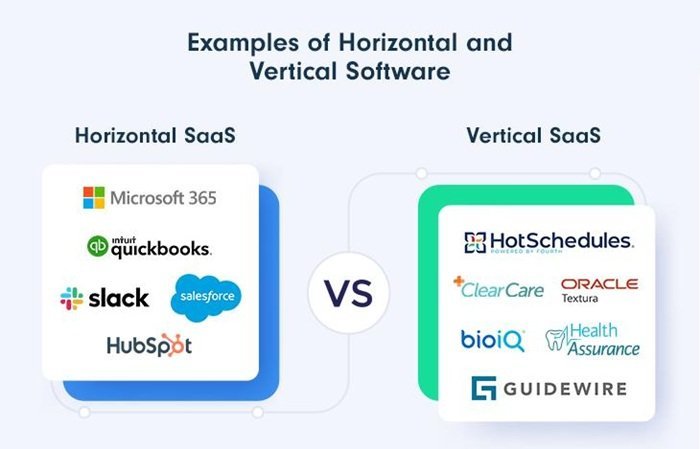
| Feature | Horizontal Accounting Software | Vertical Accounting Software |
| Definition | Designed for general business use across multiple industries | Built specifically for a single industry or business sector |
| Primary Focus | Basic accounting functions for broad usage | Industry-specific financial workflows and operations |
| Examples | Basic bookkeeping platforms, small business accounting tools, generic invoicing systems | Construction accounting software, healthcare billing systems, retail inventory accounting platforms |
| Cost | Usually lower cost | Generally higher cost due to specialized features |
| Setup Process | Easy and quick to implement | More complex implementation process |
| Customization | Requires customization for industry-specific needs | Comes with built-in industry-focused features |
| Compliance Support | Limited compliance capabilities | Includes industry-specific compliance tools |
| Reporting | General financial reports | Advanced and industry-specific reporting |
| Automation | Basic automation features | Specialized automation for industry workflows |
| Flexibility | Flexible across different industries | Less flexible outside its target industry |
| Best For | Startups and small businesses with simple operations | Businesses with complex or industry-specific operations |
| Main Advantage | Affordable and easy to use | Improves efficiency with tailored features |
| Main Limitation | May lack advanced industry-specific tools | Higher cost and limited cross-industry adaptability |
Key Features Used in Accounting Software Classification
Several important features determine how accounting software is classified across industries.
1. Industry Compliance Support
Compliance features vary depending on industry requirements.
Examples include:
- Tax compliance
- Financial reporting standards
- Data security regulations
- Payroll compliance
2. Integration Capabilities
Different industries require integrations with specialized systems.
Examples:
- POS systems
- CRM platforms
- Inventory software
- ERP systems
- Payroll systems
3. Reporting Structure
Reporting requirements differ significantly between industries.
For example:
- Retail focuses on sales reports.
- Manufacturing focuses on production costs.
- SaaS focuses on recurring revenue.
4. Workflow Automation
Automation capabilities influence software classification.
Examples:
- Automated invoicing
- Recurring billing
- Expense approvals
- Inventory synchronization
5. Scalability
Some industries require enterprise-grade accounting systems capable of handling high transaction volumes.
Scalable software supports business growth without affecting performance.
Benefits of Using Industry-Specific Accounting Software

Choosing accounting software based on business vertical classification offers several advantages.
Improved Operational Efficiency
Industry-focused tools reduce manual processes and improve productivity.
Better Financial Accuracy
Automated workflows minimize human errors in calculations and reporting.
Faster Decision-Making
Real-time dashboards and analytics help businesses make data-driven decisions.
Enhanced Compliance
Built-in compliance features reduce legal and regulatory risks.
Higher Profitability
Businesses can identify cost-saving opportunities and improve financial planning.
How to Choose the Right Accounting Software by Business Vertical
Selecting the right accounting software requires careful evaluation.
Step 1: Identify Your Industry Requirements
The first step in choosing accounting software is understanding your business operations and financial challenges. Some businesses require inventory management, while others depend on project-based accounting or recurring billing systems. Certain industries also have strict compliance and reporting requirements that generic software may not support effectively. Evaluating these operational needs helps businesses select software that aligns with their workflow and long-term goals.
Step 2: Define Your Budget
Accounting software pricing can vary greatly depending on the features, deployment model, and level of customization required. Businesses should look beyond the monthly subscription fee and also consider implementation costs, employee training, integration expenses, and ongoing maintenance fees. Choosing software solely based on low pricing can lead to operational limitations in the future, so it is important to balance affordability with functionality.
Step 3: Evaluate Integration Needs
Modern businesses use multiple digital tools to manage operations, which makes software integration extremely important. Your accounting software should connect smoothly with platforms such as CRM systems, payroll applications, ERP software, and e-commerce tools. Strong integration capabilities reduce data duplication, improve workflow efficiency, and create a centralized financial management system.
Step 4: Check Scalability
Choose software that can grow with your business.
Scalable systems support:
- Additional users
- Multiple locations
- International operations
- Increased transaction volumes
Step 5: Analyze Customer Support
Reliable customer support is critical for smooth implementation and troubleshooting.
Look for:
- 24/7 support
- Live chat
- Knowledge base
- Training resources
- Dedicated account managers
Emerging Trends in Accounting Software Classification
The accounting software industry continues to evolve rapidly.
1. AI-Powered Automation
Artificial intelligence is transforming financial management.
AI features include:
- Predictive analytics
- Automated reconciliation
- Fraud detection
- Smart expense categorization
2. Cloud-Based Accounting
Cloud accounting software offers:
- Remote accessibility
- Automatic updates
- Data security
- Real-time collaboration
Cloud adoption continues to grow across all business verticals.
3. Industry-Specific Customization
Modern platforms provide deeper customization options tailored to industry workflows.
4. Real-Time Financial Reporting
Businesses increasingly demand instant access to financial insights.
Real-time dashboards improve strategic planning.
5. Mobile Accounting Solutions
Mobile-friendly accounting platforms allow businesses to manage finances on the go.
Common Mistakes Businesses Make When Choosing Accounting Software
Many companies fail to evaluate accounting software properly.
- Choosing Generic Software for Complex Operations. Generic solutions may lack essential industry-specific features.
- Ignoring Scalability. Some businesses outgrow their accounting systems quickly.
- Overlooking Integration Requirements. Poor integrations create data silos and operational inefficiencies.
- Focusing Only on Price. Low-cost software may result in long-term productivity losses.
- Neglecting User Training. Even the best accounting software fails without proper employee training.
Final Thoughts
Accounting software business vertical classification plays a critical role in helping businesses select the right financial management solution.
Different industries have unique workflows, compliance requirements, operational challenges, and reporting standards. A one-size-fits-all accounting system often fails to deliver the efficiency and insights modern businesses need.
By understanding vertical classification, businesses can choose software that aligns with their industry-specific operations. Whether you run a retail store, construction company, healthcare organization, SaaS startup, or manufacturing business, selecting industry-focused accounting software can improve accuracy, streamline operations, enhance compliance, and support long-term growth.
Frequently Asked Questions (FAQs)
What is accounting software business vertical classification?
It refers to categorizing accounting software based on the industries or sectors they are designed to serve.
Why is industry-specific accounting software important?
Industry-specific software includes features, compliance tools, and workflows tailored to particular business operations.
Which industries use vertical accounting software?
Common industries include retail, healthcare, manufacturing, construction, real estate, hospitality, e-commerce, and SaaS.
What is the difference between horizontal and vertical accounting software?
Horizontal software serves multiple industries with general features, while vertical software is customized for specific industries.
How do I choose the right accounting software?
Evaluate your industry requirements, scalability needs, integration capabilities, compliance requirements, and budget before selecting a solution.
Is cloud accounting software better?
Cloud accounting software offers flexibility, remote access, real-time collaboration, and automatic updates, making it suitable for modern businesses.
