Most B2B buyers now expect the same speed and clarity they get from consumer shopping sites, but the systems running behind a wholesale or manufacturing storefront rarely make that easy.
Product data lives in an ERP, images and spec sheets sit in shared drives, and pricing rules change by customer tier. Every serious b2b ecommerce store development project eventually runs into the same question: how do we get these systems to talk to each other without breaking daily operations?
That question usually comes down to three platforms: ERP, PIM, and DAM. Each does a specific job, and B2B integration problems almost always trace back to how these three interact, or fail to.
ERP: The System of Record for the Business
An Enterprise Resource Planning system handles the operational backbone: inventory levels, order processing, pricing, invoicing, and financials. For most B2B companies, the ERP has been in place for years and holds data that the rest of the business depends on to run.
The trouble starts when a company tries to expose ERP data to a storefront. ERPs were built for internal operations, not for public-facing web pages. Fields are often coded in ways only internal staff understand, product descriptions are minimal or missing, and the system was never designed to sync in real time with a website that customers are actively browsing.
PIM: Where Product Data Gets Organized
A Product Information Management system exists to solve the gap the ERP leaves behind. It centralizes product attributes, descriptions, categories, and specifications in one governed location, then distributes that information consistently across the website, marketplaces, and sales channels.
This matters most for companies with large or technical catalogs, distributors, manufacturers, and industrial suppliers among them, where a single product might carry dozens of attributes, multiple compliance documents, and regional variations. Platforms built for this, such as those delivered through dedicated Pimcore development services, give teams a structured way to manage that complexity instead of maintaining parallel spreadsheets that fall out of sync within weeks.
Without a PIM layer, product data tends to live in whichever system touched it last. Marketing edits descriptions in one place, sales updates specs in another, and the storefront ends up displaying whatever version happened to sync most recently. Customers notice the inconsistency before anyone internally does.
DAM: Managing the Assets Behind the Data
Digital Asset Management handles the media side of the equation: product photography, technical drawings, installation guides, certifications, and marketing files. For B2B sellers with large or regulated catalogs, this library can run into the tens of thousands of files, and version control quickly becomes a real problem.
A DAM system gives every asset a single source of truth, complete with metadata, approval status, and usage rights. Without one, teams end up emailing files back and forth, uploading outdated spec sheets, or duplicating the same image across a dozen folders with slightly different file names. When a product changes, there is no reliable way to know which files are current.
Why Integration Is Harder Than It Looks
Each system on its own is manageable. The difficulty appears when ERP, PIM, and DAM need to function as one connected pipeline, feeding accurate, current information to a storefront that customers are actively using to place orders. A few patterns show up repeatedly:
Data ownership disputes. Sales, marketing, and operations each treat a different system as the source of truth, and nobody agrees on which record wins when they conflict.
One-way syncs. Data flows from ERP to the website, but updates made on the storefront never make it back, creating a permanent gap between systems.
Manual re-entry. Without proper integration, staff copies data between systems by hand, which introduces errors and does not scale as the catalog grows.
Inconsistent formats. ERPs, PIMs, and DAMs rarely share a common data structure out of the box, so integration requires mapping and transformation work that is easy to underestimate.
Real-time expectations versus batch systems. Customers expect live inventory and pricing, but many legacy ERPs were only ever designed to update in scheduled batches.
The pressure to solve these problems is not theoretical. Forrester projected that by 2025, more than half of large B2B purchases worth $1 million or more would move through digital self-serve channels such as vendor websites and marketplaces, according to Virto Commerce’s analysis of PIM and ecommerce architecture. That kind of buying behavior leaves little room for a storefront running on stale or incomplete data, since a buyer placing a seven-figure order rarely tolerates a wrong price or an out-of-stock item that was actually available.
What a Working Integration Actually Looks Like
Solving this is less about picking the right software and more about establishing a clear data flow with defined ownership at each step. A few principles hold up across most successful projects.
For organizations managing complex product catalogs, dedicated Pimcore development services can help establish a more structured approach to product information, digital assets, and connected commerce workflows.
Treat the ERP as the source of truth for transactional data. Inventory, pricing, and order status should flow from the ERP outward, not be re-entered manually on the storefront.
Let the PIM own product content. Descriptions, categories, and specifications should be created and approved once, then pushed everywhere they are needed, rather than edited separately in five different places.
Connect the DAM at the attribute level. Images and documents should be linked directly to the product records they describe, so a single update propagates automatically instead of requiring someone to hunt down every reference.
Build with APIs, not exports. Scheduled CSV exports and manual uploads might work for a pilot, but they break down quickly at scale. API based integration keeps systems synchronized without constant manual intervention.
Phase the rollout. Attempting to connect all three systems at once, across every product category, is where most integration projects stall. Starting with a single product line or region, proving the workflow, and expanding from there tends to produce more durable results.
This shift toward connected, self-serve buying experiences is accelerating. Gartner’s 2025 Magic Quadrant research found the digital commerce market reached $10.2 billion in 2024, growing 14 percent year over year, and the firm expects most B2B organizations to complete their highest value deals through digital channels within the next few years, as summarized by Business Central consultancy TINX IT. Businesses still relying on manual data handoffs between ERP, PIM, and DAM will find that gap increasingly difficult to close as buyer expectations rise.
Bringing It Together
None of this requires replacing existing systems. Most B2B companies already have a capable ERP and, in many cases, source data scattered across DAM like folders and spreadsheets that could be consolidated. The real work is in architecture: deciding what data lives where, how it moves, and who owns each step of that journey.
Getting ERP, PIM, and DAM to function as a single, reliable pipeline is what separates a storefront that customers trust from one that quietly loses orders to inconsistent product pages and outdated inventory counts. Companies that treat this as foundational infrastructure, rather than a one-time technical project, tend to scale their catalogs and channels with far less friction.
For businesses evaluating where to start, Magneto IT Solutions works with manufacturers, distributors, and B2B sellers to map out ERP, PIM, and DAM architecture before writing a single line of integration code, which tends to save both time and budget down the line.
Every year, millions of people are moving their businesses online, driven by the success they see in the offline world and the desire to expand and reach more customers worldwide.
The digital world is also going through major shifts and trying to make it easier for new business owners, and one thing that has become more convenient than it was years ago is storing data. Every business creates a lot of data every year, and there’s no option to delete it to make room for new data.
Earlier, business owners relied on hardware devices to store data, but it was never the safest option because there was constant concern about it being stolen, lost, or damaged. However, things have evolved now, and we have secure cloud storage as the ultimate and safest option to store data that can be accessed anytime, anywhere, and can be expanded based on storage needs.
After the introduction of cloud storage, many businesses are moving to it, and as per stats, almost 60% of online businesses are using cloud storage as an ultimate solution.
Key Factors to Look for When Choosing a Cloud Storage Solution
If your business is experiencing sudden expansion and you too are thinking of moving to cloud storage to store all your business-related data, there are certain key factors you must look for before finalizing one. Here, we are sharing the essential key factors to ease your way:
1. Security
Security will always secure the first place on every list when discussing key factors to look for while choosing a cloud storage service, and the reason is obvious, to safeguard your business’s data from possible theft and other compromises. Look for a cloud storage provider that implements multiple methods to ensure the data is not accessible by anyone.
Even an individual using the internet on a daily basis generates a lot of data; imagine the amount of data generated by a business on a daily basis. You may have initially subscribed for a different storage capability, but the need will increase in the coming time, and that’s something you should decide in advance.
You should choose a cloud storage provider that offers scalability, and you can choose to increase the storage capacity in a few months or years without the need to migrate to another platform. A cloud storage solution that offers flexibility with this is an ideal choice because it allows the business to grow and adjust to its needs.
3. Encryption
In today’s modern world, leaving data readable for everyone who gets into your system is not a wise choice, no matter how confident you are with the security. Encryption is the only solution to ensure that even if someone gets into your database, reading data becomes impossible without a decryption key.
Considering its importance, you should choose a cloud storage solution that encrypts all data, both at rest and in transit, because the former is information stored in the server hosted by the provider and the latter is moving within the cloud ecosystem. Along with this, also understand how decryption keys are managed under the cloud storage service.
4. Backup and Data Recovery
No matter how strong the cloud storage security is, relying on the source of data and keeping a single copy of it is never recommended. Also, people using cloud storage services often think that the data is being backed up on its own. It may be creating a backup but not covering everything, and that is why you should enquire about the backup service from the provider and how many days of intervals they create backups.
Many cloud storage providers offer to create a backup every month and store it in a different server shared with you in case the primary server is compromised or damaged.
5. Access Control
When running a business, you can’t be the sole person to access data, and there will be multiple people to access it for diverse uses. However, keep in mind that not every employee or team member needs to access all data, and their access will depend on the role they are serving.
To control the access of your employees and keep them from accessing everything stored, look for a cloud storage solution that allows administrators to create different permission levels for different employees. There may be employees whose role should be limited to only viewing a file, while others may need permission to edit and share it further.
6. Integration
Every business uses multiple platforms for diverse uses, and all these platforms generate data that needs to be stored safely. As you have opted for a cloud storage solution, you will want to store the data in the same. These platforms and applications can be crucial for the business, such as accounting, management, CRM, communication, and others.
You should look for a provider that could integrate with all these existing tools and platforms. When the integration is allowed, the transfer of data is done automatically, and it reduces the manual tasks for doing the same, improving efficiency and work productivity. It will also help administrators maintain consistency with security policies and access control on all applications.
Final Words
A cloud storage solution is replacing traditional ways of storing data because it is convenient and streamlines the entire workflow by storing all the data generated by the business in one place.
Since the market has a few options available with cloud storage providers, it is important that you look for the key factors that we have discussed here when choosing one so you save yourself from later issues such as lack of scalability and integration features.
Businesses today want to save time, reduce manual work, and improve customer experience. But many teams still spend hours on repeated calls, follow-ups, data entry, appointment booking, customer questions, and internal updates.
These tasks are important, but they can slow down employees. A sales team may spend too much time collecting basic lead details. A support team may answer the same questions every day. An operations team may need to update records manually after every customer call.
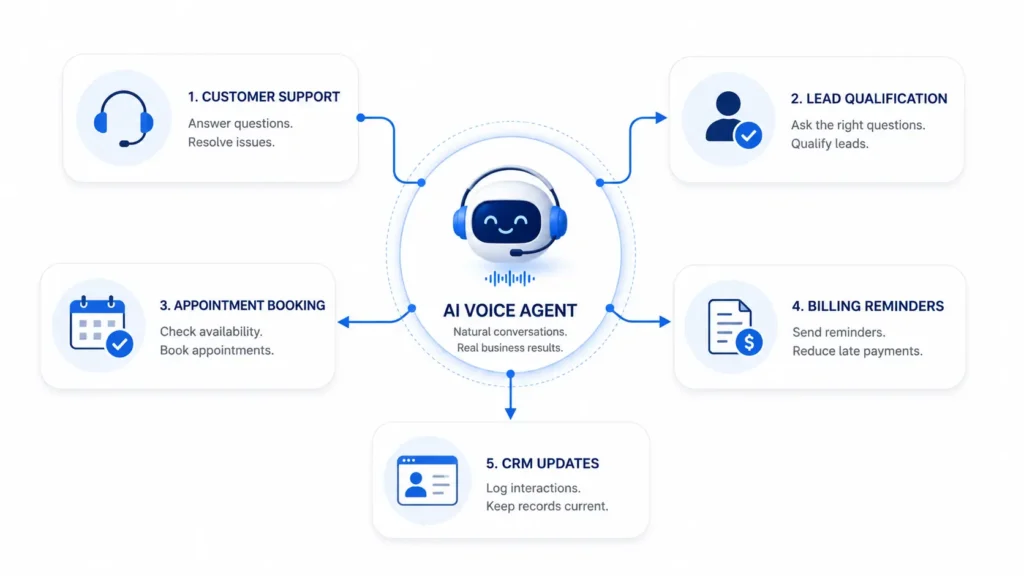
This is where AI voice agents are becoming useful. They help businesses automate voice-based tasks through natural conversations. With tools like ai voice agents, businesses can answer calls, collect information, update systems, trigger workflows, and send follow-ups without depending on manual work for every step.
AI voice agents do not replace human teams. They support people by handling simple, repeated, and time-consuming tasks. This gives teams more time to focus on complex work, customer relationships, and business growth.
What Are AI Voice Agents?
AI voice agents are AI-powered systems that can speak with users through voice. They can listen to a customer, understand the request, reply clearly, and complete a task.
They usually use several technologies together:
Speech recognition
Natural language understanding
Text-to-speech
Workflow automation
API integrations
Business data systems
For example, a customer may call and say, “I want to book a service appointment for next week.” The AI voice agent can understand the request, ask for details, check available slots, book the appointment, and send a confirmation.
This makes voice agents different from old phone menu systems. Customers do not need to press many buttons. They can speak in a natural way.
What Is Business Workflow Automation?
Business workflow automation means using technology to complete repeated business tasks with less manual effort. It helps move work from one step to another automatically.
For example, when a customer submits a form, the system may create a lead in CRM, send an email, assign a sales rep, and schedule a follow-up. No employee needs to do each step by hand.
Common workflow automation tasks include:
Creating support tickets
Updating CRM records
Sending follow-up emails
Booking meetings
Sending reminders
Routing calls
Collecting customer details
Updating order records
Notifying internal teams
AI voice agents add a voice layer to this process. A workflow can now start from a phone call or voice conversation, not only from a form, email, or app action.
Why Businesses Need Voice-Based Automation
Many business workflows still begin with a call. Customers call to ask questions, book services, check orders, request support, or talk to sales.
When all calls are handled manually, teams can become overloaded. This can lead to missed calls, slow replies, wrong data entry, and delayed follow-ups.
Voice-based automation helps solve these problems.
It Reduces Repeated Work
Many calls include the same questions. For example, customers may ask about business hours, order status, pricing, booking slots, or refund steps. AI voice agents can handle these simple calls and free up human agents.
It Improves Response Time
Customers want quick answers. If they wait too long, they may leave or contact another company. AI voice agents can answer instantly and collect details even outside office hours.
It Prevents Missed Follow-Ups
Manual follow-ups are easy to miss. Automation can send confirmations, reminders, updates, and internal alerts on time.
It Helps Small Teams Do More
Small businesses often have limited staff. AI voice agents help them manage more calls and tasks without hiring a large support or sales team.
How AI Voice Agents Support Workflow Automation
AI voice agents can support many stages of a business workflow.
Capturing Information
They can collect names, phone numbers, emails, company details, order numbers, issue details, appointment needs, and lead requirements.
This saves time and reduces manual data entry.
Updating Business Systems
After collecting information, the AI voice agent can send it to the right tool. This may include CRM, helpdesk, calendar, database, spreadsheet, or order management software.
Triggering Actions
A voice conversation can trigger many actions. For example, the system can create a ticket, book a meeting, send a reminder, notify a manager, or schedule a follow-up.
Routing Requests
AI voice agents can understand the reason for a call and route it to the right team. Sales questions can go to sales. Billing issues can go to accounts. Technical problems can go to support.
CRM systems are important for sales teams, but they only work well when data is updated. Many teams forget to add call notes, update lead status, or schedule the next follow-up.
AI voice agents can reduce this problem. They can create new leads, update contact details, record customer interest, add call notes, assign leads to sales reps, and set follow-up reminders.
For example, if a prospect calls to ask about a service, the AI voice agent can ask for their name, email, company, budget, and timeline. Then it can add the lead to the CRM and notify the sales team.
This helps the sales team work with cleaner data and faster follow-ups.
AI Voice Agents in Customer Support Automation
Support teams often handle repeated questions. These may be about login issues, pricing, refunds, delivery, account access, service status, or product use.
AI voice agents can answer simple questions and collect full details before creating a ticket. If the issue needs human help, the support agent receives a clear summary.
This improves ticket quality. It also reduces the time agents spend asking basic questions.
For customers, it means faster support and less waiting.
Appointment and Reminder Automation
Many businesses depend on appointments. This includes healthcare clinics, real estate firms, SaaS companies, salons, education centers, repair services, and consultants.
AI voice agents can help customers book, reschedule, or cancel appointments. They can check available times, confirm details, and send reminders.
This can reduce no-shows and save staff time.
For example, a service business can use an AI voice agent to confirm appointments one day before the visit. If the customer wants to reschedule, the agent can offer new slots and update the calendar.
Connecting AI Voice Agents With Business Tools
AI voice agents become more useful when they connect with existing business tools.
Useful integrations include:
CRM
Helpdesk
Calendar
Email
SMS
Cloud databases
Ecommerce platforms
Accounting or billing tools
Project management tools
Notification systems
Without integrations, a voice agent can only answer basic questions. With integrations, it can complete real business tasks. For teams that need these workflows to connect to existing CRM, finance, and operations systems, agentic AI development services can provide a practical path from a narrow use case to a production workflow.
For example, if a customer asks about an invoice, the voice agent may check billing data, confirm the invoice number, and send a payment reminder. This makes the workflow faster and more useful.
Benefits of AI Voice Agents in Workflow Automation
AI voice agents can help businesses in many ways:
Faster response time
Fewer missed calls
Less manual data entry
Better lead capture
Better CRM updates
Faster support ticket creation
Improved appointment booking
More consistent follow-ups
Lower workload for teams
Better customer experience
They also give managers better visibility. Call summaries and workflow logs can show common issues, lead quality, customer needs, and process gaps.
Challenges to Consider
AI voice agents are useful, but businesses should use them carefully.
Accuracy
AI may misunderstand unclear speech, background noise, strong accents, or complex requests. Businesses should test the system with real conversations.
Data Privacy
Voice conversations may include personal or sensitive data. Businesses should use consent, encryption, limited access, and clear data retention rules.
Integration Quality
If integrations are weak, workflows may fail. For example, a meeting may not appear in the calendar, or a ticket may miss important details.
Human Handoff
Some conversations need human support. Complaints, payment disputes, legal matters, medical questions, and high-value sales calls should be handled by people.
Best Practices for Businesses
Start with one clear workflow. Do not try to automate everything at once.
Good first use cases include:
FAQ calls
Lead capture
Appointment booking
Support ticket creation
Reminder calls
Call routing
Keep voice responses short and simple. Ask one question at a time. Confirm important details before taking action.
Review call summaries, failed conversations, and workflow logs. This helps improve the system over time.
Most importantly, use AI voice agents to support human teams. The goal is better workflow efficiency, not removing the human touch.
Key Metrics to Track
Businesses should measure performance after launch. Useful metrics include:
Call completion rate
Task success rate
Missed call reduction
Lead capture rate
Appointment booking rate
Ticket creation accuracy
Human handoff rate
Customer satisfaction
Time saved by automation
These metrics help teams understand whether AI voice automation is improving the business process.
Conclusion
AI voice agents are becoming an important part of business workflow automation. They help companies answer calls, collect information, update systems, create tickets, book appointments, send reminders, and route requests.
For small teams and growing businesses, this can save time and improve customer experience. It can also help sales, support, billing, and operations teams work with cleaner data and faster processes.
The best results come when businesses start with simple workflows, connect the right tools, protect customer data, and keep humans involved for important decisions. Used wisely, AI voice agents can make daily business operations faster, clearer, and easier to manage.
FAQs
What is an AI voice agent in workflow automation?
An AI voice agent is a system that uses voice conversations to collect information, answer questions, and trigger business actions.
What workflows can AI voice agents automate?
They can automate customer support calls, lead qualification, CRM updates, appointment booking, reminders, call routing, and ticket creation.
Can AI voice agents help small businesses?
Yes. They can help small teams respond faster, save time, reduce missed calls, and manage simple workflows with less manual work.
Do AI voice agents replace human employees?
No. They should handle simple and repeated tasks while human teams manage complex and sensitive conversations.
What tools can AI voice agents connect with?
They can connect with CRM, helpdesk, calendars, email, SMS, ecommerce platforms, billing tools, databases, and notification systems.
AI-generated videos have opened new possibilities for filmmakers, brands, and creators by making visual storytelling faster and more accessible. From cinematic scenes and digital characters to product commercials and short films, AI tools can help transform creative ideas into detailed video content.
However, one of the biggest challenges in AI filmmaking is consistency.
A video may look impressive in individual shots but lose continuity when multiple scenes are combined. A character may appear slightly different from one frame to another, a product may change shape, or the visual style may shift unexpectedly between scenes.
For filmmakers, this creates a major challenge. A successful film or commercial is not made from isolated clips. Every shot needs to feel like part of the same world.
Maintaining consistency in AI-generated videos requires careful planning, strong references, and workflows that connect different stages of production. By understanding why inconsistencies happen and how to solve them, filmmakers can create AI-assisted videos that feel more professional and cohesive.
Why AI-Generated Videos Lose Consistency
AI video generation works by interpreting prompts, references, and creative instructions to produce visual outputs. While modern AI models have become highly capable, maintaining exact continuity across multiple scenes remains difficult.
Unlike traditional filmmaking, where the same physical actor, location, and product are captured throughout production, AI-generated videos recreate visuals based on available information. If the system does not have enough context about a character, object, or environment, variations can appear.
These inconsistencies can affect different parts of a video, including characters, products, camera style, lighting, and overall visual direction.
For filmmakers creating longer videos, advertisements, or episodic content, these small differences can become noticeable and impact the audience’s experience.
Character Appearance Changes Between Scenes
Character inconsistency is one of the most common challenges in AI-generated videos.
A character created in one scene may have slightly different facial features, hairstyle, clothing, or body proportions in another. Even subtle changes can make the character feel like a different person.
This becomes especially challenging for:
Short films
Series
Virtual actors
AI-generated commercials
Character-driven storytelling
Filmmakers solve this by creating detailed character references before production. Character sheets, reference images, and defined visual traits help establish a clear identity that can be maintained throughout the project.
Important details such as facial structure, clothing, hairstyle, age, personality, and movement style should be documented before generating multiple scenes.
Product Details Change in AI Commercials
Product consistency is another major challenge, especially for brands creating AI-generated advertisements.
A product shown in one shot may appear slightly different in another. Packaging, logos, colors, materials, or dimensions can change when AI generates new scenes.
For ecommerce and commercial videos, this can create trust issues because customers expect advertisements to accurately represent the real product.
Filmmakers and marketers address this by using strong product references and maintaining a consistent visual guide throughout production.
For example, a skincare bottle appearing in a studio shot, lifestyle scene, and close-up product shot should maintain the same shape, label, and design details across every frame.
Visual Style and Lighting Can Shift Unexpectedly
Consistency is not only about characters and products. The overall look of a video also needs to remain connected.
A scene generated with warm cinematic lighting may suddenly shift to a cooler tone in the next shot. Camera styles, color grading, environments, and visual moods can change if the creative direction is not clearly maintained.
These changes can make a film feel like a collection of unrelated clips instead of one complete story.
Filmmakers often solve this by defining a visual style guide before production. This includes references for:
Lighting style
Color palette
Camera movement
Composition
Environment design
Overall mood
This gives AI systems a clearer creative direction to follow.
Lack of Context Between Individual Generations
One reason AI videos lose consistency is that individual generations often lack connection.
When every scene is created separately, the AI model may not understand that the character, product, or environment from one scene needs to continue into another.
This is similar to asking different teams to create separate scenes without sharing production notes. Each result may look good individually but fail to connect as a complete project.
Modern AI filmmaking workflows are addressing this by keeping more context connected across production stages.
Invideo Agent helps filmmakers approach AI video creation as a connected workflow instead of separate generations. Working with ideas, references, scenes, and creative direction together, it helps creators maintain continuity while developing multi-scene videos.
For larger productions, invideo Agent Two supports more complex workflows by helping teams coordinate different creative areas such as visual planning, cinematography, story development, and effects. This helps filmmakers maintain a shared understanding of the project when managing longer videos or campaigns with multiple scenes.
Using Reference Images to Improve Consistency
References are one of the most important tools filmmakers use to maintain AI video consistency.
Instead of relying only on text prompts, creators can provide visual examples that define how a character, product, or environment should appear.
Reference images help AI systems understand:
Character appearance
Product details
Clothing and accessories
Environment style
Camera perspective
For example, a filmmaker creating a sci-fi short film can establish a character reference, spaceship design, and world style before generating different scenes. This creates a stronger foundation for maintaining continuity.
Creating Detailed Prompts for Better Results
Prompts play an important role in AI video creation. Generic prompts often produce inconsistent results because they leave too much room for interpretation.
A strong prompt provides more details about the subject, environment, style, and movement.
Instead of describing a character as simply “a woman walking through a city,” filmmakers may define details about appearance, clothing, lighting, camera angle, and emotional expression.
However, consistency does not come from repeating longer prompts alone. The strongest results usually come from combining detailed prompts with references and connected workflows.
Maintaining Camera and Cinematic Continuity
Camera style is another element that affects whether AI-generated videos feel connected.
A filmmaker may want a project to have a specific visual language, such as slow cinematic movements, handheld realism, or dramatic wide shots.
If each scene uses a different camera approach, the final video can feel inconsistent.
To solve this, filmmakers define camera rules early in production. They establish preferred shot types, movement styles, framing approaches, and visual references before creating multiple scenes.
This helps every shot contribute to the same cinematic experience.
How Filmmakers Build Better AI Video Workflows
Consistency improves when filmmakers treat AI video creation like traditional production.
Instead of generating scenes randomly, professional workflows usually include:
Planning the story
Creating references
Defining visual direction
Establishing characters and products
Reviewing outputs
Refining scenes
This process allows creators to identify inconsistencies early and make adjustments before the final edit.
AI works best when it supports a clear creative process rather than replacing production planning.
The Role of AI Models in Maintaining Consistency
Different AI models have different strengths. Some may produce stronger realism, while others may perform better with specific styles, movements, or creative directions.
Filmmakers increasingly use multiple AI models depending on the requirements of a project. For example, Google Veo 3.1 can help creators develop cinematic scenes with realistic motion, camera control, and detailed visual outputs, making it useful for projects where maintaining a consistent visual style across shots is important.
Kling 3.0 omni is another strong option in this category, offering multi-shot storyboarding specifically designed to keep characters and products visually consistent across a sequence of generated scenes.
One model may be better suited for cinematic environments, another for character movement, and another for image references or visual refinement.
Using the right model for each stage allows creators to achieve better results while maintaining the overall creative direction of the project.
Human Creative Direction Still Matters
Although AI tools are improving rapidly, human decision-making remains essential for maintaining consistency.
Filmmakers still need to define:
How characters should look
What emotions scenes should communicate
How products should be presented
What visual style fits the story
AI can help generate and refine content, but creative direction ensures that every scene supports the same vision.
The strongest AI-generated videos come from combining technology with traditional filmmaking principles.
Final Thoughts
AI-generated videos often lose consistency because individual scenes can be created without enough shared context. Characters may change, products may shift, and visual styles may become disconnected.
Filmmakers solve these challenges by using stronger references, detailed planning, consistent prompts, and connected AI workflows.
As AI filmmaking continues to evolve, the focus will move beyond generating impressive individual clips. The future will be about creating complete visual stories where every character, product, scene, and shot feels like part of the same world.
Creating a memorable character has always been one of the most important parts of filmmaking. Whether it is a lead character in a short film, an animated personality, or a recurring digital actor in a series, audiences build connections through familiarity and consistency.
With the growth of AI-assisted filmmaking, creators can now design and develop digital characters faster than ever. However, creating a character once is not the biggest challenge. The real challenge is maintaining that character’s identity across multiple scenes, episodes, and storytelling moments.
A character appearing in one scene should look the same in the next. Their face, hairstyle, clothing, personality, expressions, and movement style need to remain consistent throughout the project.
Traditional filmmaking manages this through costume references, character design documents, continuity teams, and detailed production notes. AI filmmaking workflows are now bringing similar ideas into digital production through character sheets, reference images, and connected creative processes.
For creators making short films and series, consistent AI characters are becoming essential for building stories that feel professional, immersive, and emotionally engaging.
Why Character Consistency Matters in AI Filmmaking
A strong character is more than just a visual design. Their appearance, behavior, and personality work together to create a recognizable identity.
In traditional productions, viewers naturally expect the same actor to appear consistent from one scene to another. The same expectation applies to AI-generated characters.
If a digital character changes between scenes, audiences may notice differences in:
Facial structure
Hair and clothing
Age and appearance
Body proportions
Expressions and emotions
Overall visual style
These inconsistencies can interrupt storytelling and make the character feel less believable.
For short films and episodic content, this becomes even more important because characters often appear repeatedly across different locations, timelines, and emotional moments.
Building a Strong Character Sheet Before Generation
One of the most effective ways to maintain AI character consistency is by creating a detailed character sheet before production begins.
A character sheet acts as a visual and creative reference that defines who the character is. Instead of relying on a simple text prompt every time, creators can establish a complete identity that can guide future scenes.
A useful character sheet may include details about:
Facial features
Hairstyle and color
Clothing style
Body type
Age appearance
Personality traits
Emotional expressions
Movement style
For example, a science fiction character may require specific clothing details, futuristic accessories, and a consistent visual style throughout an entire series. A character sheet helps ensure these elements remain stable.
Using Reference Images to Maintain Visual Identity
Reference images play an important role in AI character creation. They provide visual guidance that helps AI systems understand what the character should look like.
Instead of generating every scene from a completely new prompt, creators can use references to maintain continuity.
This is especially useful when creating:
Multiple episodes
Different camera angles
Emotional scenes
Action sequences
New environments
A character should remain recognizable whether they appear in a close-up shot, a wide cinematic scene, or a completely different location.
Strong references help bridge the gap between creative ideas and consistent visual output.
Creating Recurring Digital Actors for Stories
AI characters are increasingly being used as recurring digital actors in short films, series, and branded storytelling.
Unlike one-time generated characters, recurring digital actors need a stronger identity. They need to feel like the same individual across every appearance.
This requires consistency in both appearance and performance.
A recurring AI character should maintain:
The same visual identity
Similar voice characteristics
Consistent personality traits
Stable emotional behavior
Recognizable movement patterns
When these elements remain consistent, audiences can develop a connection with digital characters in the same way they connect with traditional actors.
How AI Workflows Help Maintain Character Identity
Creating a consistent character involves managing many creative elements at the same time. Filmmakers need to think about character appearance, scene design, camera choices, lighting, and storytelling direction together.
AI workflows are helping creators manage these elements in a more connected way.
Invideo Agent supports this type of AI-assisted filmmaking workflow by helping creators move from ideas and references to complete video projects. For character-driven stories, it can help maintain creative direction across scenes by connecting visual development, scene creation, editing, and refinement.
This approach is useful for short films and series where the same character needs to appear repeatedly while maintaining a consistent identity throughout the story.
With invideo Agent Two, creators working on larger narrative projects can manage more complex workflows by coordinating different creative areas such as visual planning, cinematography, story development, and effects. This helps teams maintain alignment when building multi-scene stories with recurring characters and detailed worlds.
Maintaining Character Consistency Across Different Scenes
A character may appear in many different situations throughout a story. They may move between locations, experience different emotions, or interact with different characters.
The challenge is ensuring that changes in the scene do not change the character itself.
For example, a character shown in a quiet indoor conversation should still feel like the same person during an outdoor action sequence. Their appearance, personality, and visual style should remain recognizable even when the environment changes.
AI-assisted workflows can help creators track these details and maintain a stronger connection between different scenes.
The Role of Style References in AI Character Creation
Character consistency is not only about the character itself. The surrounding visual style also affects how audiences perceive them.
A character created with a cinematic, realistic style may feel completely different if placed into a cartoon-like environment in the next scene.
Style references help maintain consistency in areas such as:
Lighting
Color palette
Camera style
Environment design
Overall visual tone
For short films and series, a consistent visual language helps create a more immersive world.
Creating Emotional Consistency in AI Characters
Visual consistency alone is not enough. Characters also need emotional continuity.
A character who behaves differently in every scene may feel artificial, even if their appearance remains unchanged.
Creators need to define how the character reacts, communicates, and expresses emotions.
For example, a serious character should maintain similar personality traits throughout the story, while a humorous character should have a recognizable style of interaction.
AI tools can support character creation, but human storytelling decisions remain essential for developing believable personalities.
Challenges of Creating Consistent AI Characters
Although AI character creation has improved significantly, challenges still remain.
Long-form storytelling requires stronger control over character identity because small inconsistencies can become more noticeable over time.
Some common challenges include:
Maintaining the same face across scenes
Keeping clothing details accurate
Preserving personality traits
Matching expressions with emotions
Creating natural movement
Successful AI filmmaking requires a combination of strong references, creative planning, and consistent workflows.
The Future of AI Characters in Film and Series
AI characters are moving beyond simple generated visuals. Future workflows will focus on creating complete digital performers with consistent appearances, personalities, and storytelling abilities.
Filmmakers will be able to develop characters that exist across multiple episodes, campaigns, and creative projects while maintaining the same identity.
As AI filmmaking tools become more advanced, creators will have more freedom to build larger worlds and tell stories with digital actors that feel connected and believable.
Final Thoughts
Creating consistent AI characters requires more than generating a good-looking image. It requires careful planning, strong references, character sheets, and workflows that maintain identity throughout production.
For short films and series, character continuity is what transforms a digital creation into a believable performer.
AI tools are making this process more accessible by helping creators manage visual consistency, develop recurring digital actors, and build richer stories. The combination of AI-assisted workflows and human storytelling will continue to shape how characters are created and experienced in the future of filmmaking.
Filling out a receipt book means recording the date, receipt number, payer’s name, a description of the product or service, the amount paid, the payment method, and the recipient’s signature. Each field confirms that a specific payment happened, for a specific amount, on a specific date.
This guide walks through every field on a standard receipt book, then breaks the process down into simple steps with a real filled-out example. Layouts vary between receipt books, so we’ll also cover how to read unfamiliar fields like “Sum Of” or “M” that show up on older or pre-printed formats.
What Is a Receipt Book?
A receipt book is a pad of pre-numbered payment slips, usually in duplicate or triplicate, used to record that a customer or tenant paid a specific amount. Each page typically includes a carbon or carbonless copy underneath, so writing on the top sheet automatically creates a duplicate.
What Is the Purpose of a Receipt Book?
A receipt book serves several functions at once:
Proof of payment — gives the payer written evidence that money changed hands.
Customer record — helps the payer track their own spending or rent history.
Business record — gives the business owner a physical log of income.
Bookkeeping — feeds directly into daily or weekly sales totals.
Tax documentation — supports income reporting if records are ever reviewed.
Dispute resolution — settles disagreements about whether or how much someone paid.
What Does a Typical Receipt Book Look Like?
Most receipt books share a similar structure: a receipt number in the top corner, a date line, a “Received From” line, a description area, a total, a payment method section, and a signature line at the bottom.
Common fields you’ll see across most formats include the receipt number, date, payer name, description of goods or services, subtotal, tax, total, payment method, and the “received by” signature. Some books add a business letterhead area at the top; others leave that blank for a stamp.
Layouts differ mainly in how much detail they leave room for. A simple rent receipt book might have five or six lines. A retail-style receipt book may include a small itemized table with columns for quantity, description, and price.
What Information Goes on a Receipt?
Every complete receipt should include the fields below.
Field
What It Captures
Receipt Number
Unique identifier for tracking and sequencing
Date
The date the payment was made
Business Information
Name, address, and contact details of the business
Customer/Payer Information
Name and, when relevant, contact details
Product or Service Description
What was purchased, including quantity
Subtotal, Tax, Discounts, Fees
The math behind the final amount
Total Amount Paid
The final amount, in numbers and sometimes in words
Payment Method
Cash, check, card, transfer, or digital payment
Received By
Signature or initials of the person accepting payment
Receipt Number
Each receipt needs a unique, sequential number. Most receipt books come pre-numbered, so you simply use the number that’s already printed on the page.
If your book isn’t pre-numbered, assign numbers yourself and keep them in strict sequential order. Skipping or reusing numbers makes it harder to prove your records are complete, which matters if you’re ever asked to justify your income.
Date
Write the date the payment was actually made, not the date you’re filling out paperwork related to it. This distinction matters most when there’s a separate invoice: the invoice date reflects when payment was requested, while the receipt date reflects when it was received.
Business Information
Include your business name, address, and phone number or email. If you operate under a registered business name, use it consistently across every receipt so your records match your bank deposits and tax filings.
Some receipt books have a pre-printed letterhead area for this. If yours doesn’t, a rubber stamp works well and saves time on repetitive writing.
Customer or Payer Information
Write the payer’s full name, and their contact details when it’s relevant, such as for a large purchase, a rental payment, or a transaction that might need follow-up. For simple retail sales, a name alone is often enough.
Product or Service Description
Describe what was purchased. Include the item or service name, the quantity, and a SKU or model number if that helps identify it later. “Website maintenance, monthly plan” is more useful than just “services.”
Subtotal, Tax, Discounts and Fees
Show your math. List the subtotal first, then any discount, then tax, then additional fees, so the total is easy to verify at a glance.
Total Amount Paid
Write the total as a number. Some receipt formats also ask for the amount written out in words, which reduces the chance of a number being misread or altered later.
Payment Method
Note how the customer paid:
Cash
Check
Card
Bank transfer
Digital payment (Venmo, PayPal, Zelle, etc.)
This detail matters for reconciling your records against your bank statements at the end of the month.
Received By / Signature
The person accepting the payment signs or initials this line. It confirms who on your team handled the transaction, which is useful if a question comes up later.
How to Fill Out a Receipt Book Step by Step
Step 1: Prepare the Receipt Book
Slide the protective cardboard flap behind the page you’re about to write on. This keeps your writing from bleeding through to pages further back in the book. Confirm you’re on the correct, next-in-sequence receipt, and use a dark pen so both the original and the carbon copy stay legible.
Step 2: Write the Receipt Number
If your book is pre-numbered, use the number already printed on the page. If you’re numbering manually, continue the sequence from your last receipt without skipping or repeating a number.
Step 3: Enter the Date
Write the date the payment is being made, right now, in the transaction.
Step 4: Fill In the “Received From” Section
“Received From” simply means whose payment you’re recording. Write the payer’s full name here, exactly as they’d expect to see it.
Example: Received from: John Smith
Step 5: Describe the Product or Service
Write enough detail that anyone reading the receipt later, including you in six months, understands what was paid for. A single clear line is usually enough. Avoid vague entries like “services rendered” when a specific description takes the same amount of space.
Step 6: Enter Quantity and Price
List the quantity, the unit price, and the line total. For a single service or flat-fee item, quantity is simply 1.
Step 7: Calculate the Subtotal
Add up all line totals before tax or discounts. For a single $500 service line, the subtotal is $500.
Step 8: Add Tax, Discounts and Other Charges
Apply the formula:
Subtotal − Discount + Tax + Fees = Total
For example, a $500 subtotal with no discount and $40 in tax comes to $540.
Step 9: Write the Total Amount
Write the numerical total clearly. If the form has a line for the amount in words, spell it out too. This second step prevents disputes over whether a number was written or altered incorrectly.
Step 10: Mark the Payment Method
Circle, check, or write in how the customer paid. If your receipt book has boxes for cash, check, card, and transfer, mark the one that applies. If it doesn’t, just write the method next to the total.
Step 11: Complete “Received By”
The person who physically accepted the payment signs or initials this line. In a small business, this is often the owner, but any authorized staff member can sign.
Step 12: Separate and Distribute the Copies
Once every field is filled in, separate the copies:
White/original copy usually goes to the customer.
Yellow/carbon duplicate stays in the book as your business record.
Pink/third copy, if your book has one, often goes to a manager, accountant, or separate filing system.
The receipt number, 1048, follows directly from the previous receipt in the book. The date reflects the actual day the cash changed hands. “Received From” identifies John Smith as the payer, and the description specifies exactly what he paid for rather than a generic label.
The math flows top to bottom: a $500 subtotal, no discount, $40 in tax, and a final total of $540, written both numerically and in words. The cash box is marked, and the business owner signs off as the person who received the payment.
How to Fill Out Different Types of Receipt Books
How to Fill Out a Cash Receipt
Follow the standard 12-step process above and mark “Cash” as the payment method. Cash receipts carry extra weight for recordkeeping since there’s no bank trail backing them up, so accuracy here matters more than with other payment types in accounts management.
How to Fill Out a Receipt for a Check Payment
Fill in the same fields, then mark “Check” as the payment method. Many businesses also note the check number on the receipt, which makes it easier to match the receipt to a bank deposit later.
How to Fill Out a Receipt for a Card Payment
Complete the same fields and mark “Card.” If your receipt book has space for it, noting the last four digits of the card can help with reconciliation, though many businesses simply rely on their card processor’s statement for that detail.
How to Fill Out a Receipt for a Service
Service receipts follow the same structure as product receipts, but the description line carries more weight since there’s no physical item to reference later. Be specific: “2 hours, plumbing repair, kitchen sink” is far more useful than “labor.”
How to Fill Out a Rent Receipt
Rent receipts need a few extra details beyond a standard sales receipt:
Tenant name
Payment date
Rental period covered (for example, “September 2026 rent”)
Amount paid
Late fee, if applicable
Payment method
Received by (landlord or property manager)
The rental period is the detail most people forget, and it’s the one tenants and landlords rely on most when reviewing payment history.
What Do the Fields on a Traditional Receipt Book Mean?
Older or pre-printed receipt books sometimes use shorthand that isn’t obvious if you haven’t seen the format before.
What Does “Received From” Mean?
It identifies the payer, the person or business handing over the money.
What Does “Received By” Mean?
It identifies the person accepting the payment on behalf of the business, confirmed with a signature or initials.
What Does “Sum Of” Mean?
“Sum Of” introduces the amount in words, as in “Sum of Five hundred forty dollars.” It’s a written-out restatement of the numerical total.
What Does “No.” Mean?
“No.” is short for the receipt number, the sequential identifier printed or written in the corner.
What Does “M” Mean?
On some older forms, a small “M” or checkbox next to the total stands for “Money,” distinguishing a cash line from a check line on the same receipt.
What Do Cash and Cheque Columns Mean?
Some traditional books split the total into two columns, one for cash and one for cheque (check), so the bookkeeper can see at a glance how the payment was split without reading the full description line.
What Does “Discount/Allowance” Mean?
This line captures any reduction applied to the subtotal, whether it’s a promotional discount or an allowance for a returned or damaged item.
What Does “Balance Due” Mean?
“Balance Due” shows any amount still owed after this payment. It’s common on rent receipts and installment payments where the full amount isn’t paid in a single transaction.
Receipt Book Copies: Which One Goes to the Customer?
White Copy
The white, top copy is almost always the original, and it goes to the customer as their proof of payment.
Yellow/Carbon Copy
The yellow duplicate stays in the receipt book and becomes part of the business’s own records.
Pink or Third Copy
If the book includes a third, pink copy, it’s often routed to an accountant, a manager, or a separate filing system for cross-checking against the business’s main copy.
What If My Receipt Book Has Different Colored Copies?
Color conventions aren’t universal. Some books reverse the order, or use blue instead of yellow. Check the first page or cover of your specific receipt book, which usually explains which copy is which.
How to Correct a Mistake in a Receipt Book
What to Do With a Minor Writing Error
Draw a single line through the error, write the correction next to it, and initial the change. Never scribble it out completely, since a legible correction is more trustworthy than one that looks hidden.
What to Do If the Amount Is Wrong
If the total amount is incorrect, it’s safer to void the entire receipt and issue a new one rather than correcting the number in place, since amount errors carry more weight in a dispute or audit.
When to Void a Receipt
Void a receipt when the error affects the amount, the payer’s identity, or the date, or if the customer needs a completely fresh copy for their own reasons.
Should You Tear Out a Mistake?
No. Write “VOID” clearly across the receipt and its carbon copy, then keep both in the book. Removing pages breaks the sequential numbering and makes your records look incomplete.
How to Keep the Receipt Number Sequence Intact
Even a voided receipt keeps its number. Skipping a number without a matching voided page in the book is one of the fastest ways to raise questions about missing income.
Common Receipt Book Mistakes to Avoid
Forgetting the receipt number — breaks the sequence and makes reconciliation harder.
Using the wrong date — confuses the payment date with an unrelated invoice or order date.
Leaving the payer blank — removes the ability to confirm who actually paid.
Writing vague product descriptions — makes the receipt nearly useless months later.
Incorrect tax or total calculations — creates mismatches with bank deposits.
Forgetting the payment method — makes it harder to reconcile cash versus card totals.
Forgetting to sign — leaves the receipt without accountability for who handled it.
Giving the wrong copy to the customer — hands over the business’s own record by mistake.
Losing or damaging the business copy — removes proof of the transaction from your own files.
How to Organize and Store Your Receipt Book
Keep Receipts in Numerical Order
Store completed books in the order they were used. This makes it fast to locate a specific transaction later.
Reconcile Receipts With Sales Records
Compare your receipt totals against your bank deposits or point-of-sale summaries on a regular basis, ideally weekly, so discrepancies get caught early.
Store Completed Receipt Books Securely
Keep finished books in a locked drawer or filing cabinet. They often contain customer names and payment details worth protecting.
Scan or Photograph Important Receipts
Take a photo or scan of higher-value receipts as a backup in case the physical book is lost or damaged.
Maintain a Digital Backup
Log totals into a spreadsheet or accounting software regularly, so your digital records stay current even if something happens to the paper copies.
Receipt Book vs. Invoice: What’s the Difference?
Feature
Receipt
Invoice
Main purpose
Confirms payment
Requests payment
Timing
Usually after payment
Usually before payment
Amount shown
Amount paid
Amount due
Payment status
Paid
Unpaid/due
Payment method
Usually included
May be included
The short version: an invoice asks for money, and a receipt confirms it was received.
Receipt Book vs. Digital Receipt
When a Paper Receipt Book Makes Sense
Paper works well for cash-heavy businesses, mobile services, landlords collecting rent in person, or anywhere reliable internet or power isn’t guaranteed.
When Digital Receipts Make More Sense
Digital receipts fit businesses with steady point-of-sale volume, teams that need shared access to records, or owners who want automatic totals and backups without manual entry.
How to Digitize a Paper Receipt Book
Photograph or scan completed receipts and store them in a labeled folder by month, or enter totals into a spreadsheet on a set schedule. Some accounting apps also let you photograph a receipt directly into a digital ledger, which keeps a paper trail and a digital backup in sync. You can also use templates available across the web with adequate fields.
Are Handwritten Receipts Valid?
Handwritten receipts are generally valid as proof of payment, though requirements can vary by jurisdiction and by the type of transaction. Check your local tax authority’s guidance if you’re unsure whether a handwritten receipt meets requirements for a specific situation.
What Makes a Handwritten Receipt Useful?
A handwritten receipt is useful when it’s legible, dated, includes both parties’ names, and states a clear amount and payment method. Missing details are the main reason a handwritten receipt gets questioned later.
When Additional Documentation May Be Needed
Larger transactions, business tax deductions, or formal disputes may call for additional documentation beyond a handwritten receipt, such as a bank statement or a signed contract.
How Long Should You Keep Receipt Records?
Why Receipt Retention Matters
Retained receipts support your tax filings, help resolve disputes, and give you a clear history if you’re ever asked to justify your reported income.
Paper vs. Digital Recordkeeping
Paper books take up physical space but need no backups beyond a fireproof storage box. Digital records take up no physical space but need a reliable backup system to avoid losing everything to a single device failure.
Check Your Local Tax and Accounting Requirements
Retention periods vary by country, state, and transaction type, so confirm the specific requirement that applies to your business rather than relying on a single universal rule. The IRS recordkeeping guidance is a solid starting point for U.S. businesses.
Frequently Asked Questions About Receipt Books
What do you write in a receipt book? You write the receipt number, date, payer’s name, a description of the product or service, the amount, the payment method, and a signature confirming who received the payment.
How do you fill out a receipt book for cash? Follow the same 12-step process as any other receipt, then mark “Cash” in the payment method section.
What does “Received From” mean on a receipt? It identifies the payer, the person or business the money came from.
Who gets the white copy of a receipt? The customer typically keeps the white, top copy as their proof of payment.
Who keeps the yellow copy? The business keeps the yellow duplicate as its own internal record.
Do receipt books need sequential numbers? Yes. Sequential numbering keeps your records complete and makes it easy to spot a missing or voided receipt.
What should I do if I make a mistake? Correct small errors with a single line-through and initials. For amount errors, void the receipt and write a new one instead.
Can I use a receipt book for rent payments? Yes. Just include the rental period covered, since that’s the detail standard sales receipts leave out.
What is the difference between a receipt and an invoice? An invoice requests payment before it’s made. A receipt confirms payment after it’s received.
Can I use handwritten receipts for my business? Generally yes, as long as the receipt is legible and complete, though it’s worth checking local requirements for larger transactions or formal tax purposes.
User-generated content (UGC) ads have become one of the most effective formats for brands looking to connect with audiences on platforms like TikTok, Instagram, and YouTube. The reason behind their success is simple: UGC-style videos feel personal, authentic, and closer to real customer experiences compared to traditional advertisements.
However, producing UGC ads at scale can be challenging. Brands often need multiple creators, different scripts, product variations, and frequent content testing. Maintaining consistency across dozens of videos while keeping production costs manageable can become difficult.
AI actors are changing this process by allowing brands to create digital presenters and recurring characters that can appear across multiple ads. Instead of hiring new creators for every campaign, brands can develop consistent AI actors with specific appearances, voices, styles, and personalities.
The challenge is not only creating an AI actor once. The real challenge is keeping that actor consistent across different videos, scenes, products, and campaigns.
Modern AI video tools help solve this by offering features such as:
Consistent character creation
AI-generated presenters
Voice and expression control
Multiple video variations
Localization and adaptation
UGC-style storytelling
Here are some of the best AI tools that help brands create consistent AI actors for UGC advertisements.
1. Invideo Agent
Invideo Agent helps brands create AI-powered video content by turning product ideas, briefs, and creative concepts into complete video campaigns. For UGC ads, its biggest advantage is helping creators maintain consistency when building multiple videos around the same AI actor, product, or campaign idea.
Instead of generating disconnected clips, creators can develop a repeatable content style where the same character, tone, visual direction, and brand messaging remain aligned across different ad variations. With invideo Agent Two, project memory and specialized creative agents can help carry these decisions across more complex campaigns, making it easier to maintain the same AI actor and creative direction while testing different hooks, product angles, and storytelling formats.
Key Features:
Supports creation of AI-powered UGC video ads from concepts or briefs
Helps maintain character and visual consistency across scenes
Supports different video formats for social platforms
Helps create product-focused storytelling and UGC-style content
Connects planning, generation, and editing workflows
Best For:
Brands creating UGC ad campaigns at scale
Performance marketers testing multiple creatives
Creators building AI-powered content series
Teams producing product videos quickly
Invideo Agent helps creators maintain creative context across projects, making it easier to keep elements such as character appearance, visual style, and storytelling direction aligned.
2. HeyGen
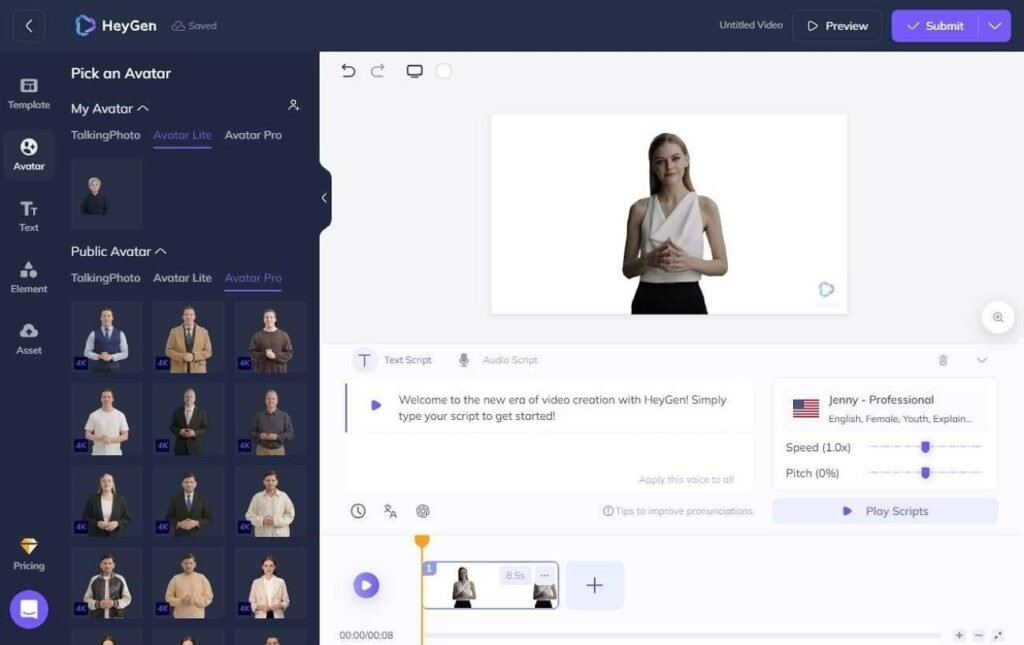
HeyGen is an AI video creation platform focused on generating videos with digital avatars and AI presenters. It is widely used by businesses for marketing videos, training content, product explainers, and social media content where a consistent presenter is needed.
For UGC ads, HeyGen can help brands create recurring AI spokespersons that deliver different scripts without recording new videos every time. Brands can use AI avatars to explain products, share promotional messages, create localized versions of ads, and test different messaging approaches while maintaining the same presenter identity.
This makes it useful for campaigns where consistency matters, especially when brands need multiple variations of similar creatives for different audiences or platforms.
HeyGen works especially well for brands that want a consistent digital spokesperson delivering multiple variations of marketing messages.
3. Synthesia
Synthesia is an AI avatar video platform designed to create professional videos using digital presenters. It is commonly used for corporate communication, training, education, and marketing content where brands need a consistent on-screen spokesperson.
For UGC advertising, Synthesia can help brands create repeatable presenter-based videos without relying on traditional filming setups. A company can use the same AI actor to deliver different scripts, introduce products, explain features, or create localized versions for different markets.
While its style is generally more polished and professional compared to casual creator-style UGC, it can be useful for brands that want a controlled and consistent digital spokesperson.
Key Features:
AI-generated presenters
Script-to-video creation
Multiple languages and voices
Professional avatar styles
Custom branding options
Best For:
Corporate-style UGC content
Educational product videos
Brand announcements
Presenter-led campaigns
Synthesia is most suitable when brands need polished digital presenters rather than highly casual creator-style UGC.
4. Runway
Runway is an AI video generation and creative editing platform focused on helping creators produce visually advanced videos. Unlike avatar-focused platforms, Runway is primarily designed around generative video, visual effects, and cinematic content creation.
For UGC ads, Runway can help brands create unique AI-generated characters, product environments, and creative scenes that support advertising campaigns. It is particularly useful when brands want UGC-inspired content with stronger visual storytelling rather than a traditional talking-head format.
Creators can experiment with different characters, locations, and visual styles to develop more engaging ad concepts.
Key Features:
AI video generation
Character and scene creation
Generative editing tools
Visual effects capabilities
Creative video workflows
Best For:
Brands creating visually unique ads
Creative teams developing campaign concepts
AI-powered storytelling
Cinematic product content
Runway is useful when brands want UGC-inspired ads with more creative visuals rather than simple talking-head formats.
5. Creatify
Creatify is an AI video advertising platform focused on helping businesses quickly create marketing videos from product information. It is designed around performance marketing workflows where brands need multiple ad creatives to test different messages and audiences.
For UGC ads, Creatify helps brands transform product details into advertisement formats using AI-generated presenters and structured video templates. This makes it useful for ecommerce companies that want to create several versions of product-focused videos without managing traditional production.
The platform focuses heavily on speed and creative testing, allowing marketers to experiment with different hooks, scripts, and product angles.
Key Features:
Product-to-video workflows
AI-generated ad variations
UGC-style creative formats
Marketing-focused templates
Fast content production
Best For:
Ecommerce brands
Performance marketing teams
Product testing campaigns
Social media advertising
Creatify is useful for teams that need to create multiple ad versions quickly for testing different hooks and messaging.
6. Arcads
Arcads is an AI video advertising platform focused specifically on creating UGC-style ads using AI actors. It is built for performance marketers who want to produce creator-style advertisements without depending entirely on traditional influencer production.
The platform helps brands create multiple versions of ads by using AI-generated actors who can deliver different scripts, product messages, and marketing angles. This makes it useful for testing creative variations while maintaining a consistent UGC format.
Arcads is particularly focused on direct-response advertising, where brands need to quickly experiment with different hooks and approaches.
Key Features:
AI actors for UGC ads
Multiple creator-style formats
Script-based ad generation
Performance marketing workflows
Creative variation testing
Best For:
Direct-response advertising
Ecommerce campaigns
Paid social teams
Brands testing multiple creative concepts
Arcads is particularly focused on replicating the structure and feel of creator-led ads used in performance marketing.
What Makes a Good AI Actor Tool for UGC Ads?
Not every AI video tool is designed for creating consistent AI actors. Brands should look for features that support long-term creative workflows.
Character Consistency
The same AI actor should maintain recognizable features across multiple videos, including appearance, voice, and personality.
Flexible Content Creation
Brands often need different hooks, scripts, and product variations. The tool should allow quick adaptation without recreating the entire character.
Realistic Performance
Good UGC ads depend on authenticity. Facial expressions, gestures, voice delivery, and natural movement all influence how believable an AI actor feels.
Campaign Scalability
A useful AI actor workflow should help brands create dozens of variations while maintaining quality and consistency.
How AI Actors Are Changing UGC Advertising
AI actors are not replacing the creative thinking behind UGC ads. Instead, they are changing how brands approach production.
Traditional UGC campaigns often require finding creators, recording content, managing revisions, and producing multiple versions. AI-powered workflows allow brands to experiment faster by creating consistent digital actors that can appear across different campaigns.
This is especially valuable for performance marketers who need to test different:
Hooks
Product messages
Audiences
Languages
Creative formats
Final Thoughts
Creating successful UGC ads requires more than simply generating a digital face. Brands need AI actors that can remain consistent, communicate naturally, and adapt across multiple campaigns.
Tools like invideo Agent help bring together planning, generation, and editing into a connected workflow, while platforms like HeyGen, Synthesia, Runway, Creatify, and Arcads serve different needs across avatar creation, cinematic generation, and advertising production.
As AI video technology continues to improve, consistent AI actors will become an increasingly useful option for brands looking to produce more personalized, scalable, and creative advertising content.
Managing one business location is complicated enough. Managing dozens or hundreds creates a different set of challenges, especially when security, employee safety, operational consistency, incident investigations, and physical assets must all be monitored across locations that may be hundreds of miles apart.
The broader shift toward cloud infrastructure is accelerating this change. Flexera’s 2026 State of the Cloud Report found that enterprises now run about 54% of workloads in the public cloud, while SMB public-cloud workloads reached 63%. At the same time, physical security pressures remain significant. The National Retail Federation’s 2025 research found a 19% increase in combined external shoplifting and merchandise theft incidents from 2023 to 2024. More than half of the retailers surveyed operated at least 500 stores, highlighting the scale at which these problems must increasingly be managed.
Traditional surveillance systems were rarely designed for that environment. Separate recorders, passwords, storage systems, maintenance schedules, and monitoring procedures can leave regional and corporate teams with fragmented visibility.
Cloud-connected video is changing that model. Instead of treating cameras as isolated security equipment, multi-site organizations can increasingly use video as a centralized management resource for security, operations, investigations, compliance, and everyday decision-making.
Centralized Visibility Is Changing Multi-Site Management
For years, video surveillance was primarily managed at the individual location level. A store manager, warehouse supervisor, or facility security team would review footage through equipment installed inside the building. Corporate teams often became involved only after an important incident occurred.
Cloud management changes the structure. Authorized employees can access cameras from multiple locations through a centralized interface rather than physically visiting each site or connecting to separate local recording systems. This is particularly useful for businesses operating retail stores, warehouses, offices, healthcare facilities, restaurants, automotive locations, and other distributed properties.
The operational difference becomes significant as the business expands. Adding ten more facilities to an organization should not require ten completely separate surveillance management processes. Centralized administration allows security leaders to create more consistent practices while still giving local managers appropriate access to their own sites.
The same visibility can also support management beyond security. Regional leaders can investigate incidents, verify whether facilities opened on time, review loading areas, examine customer traffic patterns, or understand what occurred during an operational disruption without waiting for somebody at the site to export footage.
Faster Investigations Reduce the Burden on Local Teams
Recorded video has little operational value if retrieving the correct footage takes several hours. Traditional systems frequently require employees to know approximately when an event happened, locate the appropriate camera, manually move through the timeline, export a clip, and then send a large video file to another department.
Across many locations, this process becomes difficult to scale. A corporate loss-prevention team investigating repeated incidents across 40 stores may have to contact multiple store managers and collect footage from separate systems. Similar problems occur when HR investigates a workplace incident or when a warehouse manager needs video connected to damaged merchandise.
Modern cloud video platforms increasingly make recorded footage searchable and remotely accessible. This means an authorized manager can begin an investigation from another office rather than asking employees at the affected facility to become temporary video investigators.
The need for more efficient investigation tools is becoming especially visible in retail. NRF’s 2025 report found that retailers tracking incidents experienced an 18% increase in shoplifting incidents and a 12% increase in merchandise theft incidents between 2023 and 2024. Shoplifting apprehensions increased 28% during the same period. When incident volumes rise across hundreds of sites, reducing the time required to locate and review evidence becomes an operational issue as much as a security issue.
Connecting Video Across Locations Creates a Broader Management System
The real value of cloud surveillance appears when organizations stop thinking about each camera as a separate device. Cameras across entrances, parking areas, warehouses, production floors, loading docks, offices, and customer spaces can become part of a larger stream of operational information.
Centralized video makes it easier to standardize who can view footage, how incidents are investigated, how clips are shared, and how new locations are added. It also reduces the problem of individual sites developing completely different surveillance procedures simply because they use different hardware or local configurations.
Platforms such as Coram illustrate how cloud based security cameras can fit into this multi-site model. According to its cloud camera overview, Coram can work with an organization’s existing camera infrastructure rather than requiring every camera to be replaced. Its system supports scaling from one location to multiple sites and allows users to search, rewind, and share footage. The page also describes its Discover and Journey tools for locating relevant footage and following people or assets across cameras.
The larger management principle extends beyond any single platform. When video can be accessed and managed consistently across locations, organizations can establish common investigation processes, reduce dependence on individual sites, and give regional or corporate teams a more complete picture of what is happening across the business.
Real-World Deployments Show Why Centralization Matters
The benefits become clearer when looking at businesses that already operate across multiple facilities. Autoco Group, for example, has deployed cloud-managed video security across 13 automotive sites covering mechanical, tyre, and suspension workshops. According to its published customer case study, managers and HR teams can retrieve recorded footage from different locations while after-hours checks can be performed remotely.
Sook Retail provides another example. The company operates flexible retail spaces in the UK and consolidated previously separate systems so that multiple sites could be accessed through a centralized platform. In that case, video was also used to provide operational information about how retail spaces were being used, showing how surveillance infrastructure can serve purposes beyond investigating theft.
This wider use of video is important for multi-site businesses. A camera positioned at a loading dock might help investigate theft, but the same footage could also explain delivery delays, unsafe working practices, damaged goods, or congestion during a busy period.
Over time, these small operational improvements can accumulate across locations. When managers can identify recurring problems across several stores or facilities rather than treating every incident individually, video becomes useful for identifying patterns and improving procedures throughout the organization.
Cloud Video Can Improve Consistency Across Growing Businesses
Expansion often exposes weaknesses in physical security management. An organization may acquire another company, open new branches, or inherit buildings with different cameras, recorders, policies, and maintenance arrangements.
Managing each location independently creates duplication. IT teams may maintain different software versions, regional managers may follow different incident processes, and permissions may become difficult to track as employees change roles.
A centralized approach provides an opportunity to standardize these processes. Corporate teams can establish clearer access policies, define which employees should see particular locations, and create more consistent procedures for reviewing and sharing footage.
This is particularly valuable when business risk varies by location. One retail store may experience frequent theft while another has greater parking-lot concerns. A manufacturing facility may focus on workplace safety, while a distribution center may prioritize loading docks and inventory movement. Centralization does not require every site to be treated identically. Instead, it gives management a common framework within which individual locations can be managed according to their risks.
The NRF’s 2025 research shows why flexibility matters. 61% of surveyed retailers had already increased perimeter or exterior security measures, including cameras and license plate readers, while 53% had increased interior security measures. Another 57% planned to increase exterior measures during the following 18 months.
Cloud Adoption Still Requires Careful Governance
Moving video management into the cloud does not automatically solve every surveillance problem. Organizations still need appropriate camera placement, clear policies, trained staff, secure user accounts, sufficient network capacity, and well-defined procedures for accessing sensitive footage.
Connectivity is particularly important. A business should understand what happens to recording when a location temporarily loses internet access and how footage is synchronized once connectivity returns. Some modern architectures combine local recording with cloud management specifically to maintain recording continuity during network interruptions.
Privacy also becomes more important as centralized systems give employees access to footage from multiple locations. Access should follow job responsibilities rather than convenience. A local store manager may need access to one site, while a loss-prevention director may legitimately require visibility across an entire region.
Retention policies deserve similar attention. Organizations should determine how long footage needs to be stored, what information should be preserved following an incident, and how local privacy or employment regulations affect surveillance practices.
Finally, businesses should assess migration realistically. Replacing every camera across dozens of sites simultaneously can create unnecessary expense and disruption. A phased strategy often makes more sense, beginning with locations where existing surveillance creates the greatest operational problems and expanding after the organization has established standards for permissions, investigations, training, and maintenance.
The Future of Cameras Is Closely Connected to Business Operations
Cloud management is likely to make video increasingly useful outside traditional security departments. Operations teams can use visual information to investigate workflow problems, safety teams can review workplace incidents, regional managers can verify conditions remotely, and loss-prevention teams can examine patterns across multiple sites.
Retail provides an early indication of this direction. Modern video analytics can already help organizations evaluate customer movement, queue formation, staffing requirements, and other activity without requiring cameras to serve only as passive recording devices. This allows existing visual infrastructure to contribute to operational metrics as well as physical security.
For distributed organizations, the next step is likely to involve connecting video with a wider set of business workflows. Instead of an incident generating hours of manual investigation, relevant information can increasingly be surfaced more quickly for the person responsible for responding.
That does not mean cameras should replace human judgment. Their value comes from giving managers better information at the moment decisions need to be made. The strongest multi-site strategies will combine centralized technology with clearly defined responsibilities at both local and corporate levels.
FAQs
What are cloud-based security cameras?
Cloud-based security cameras connect surveillance infrastructure with cloud software or storage so authorized users can remotely manage live and recorded video. Depending on the architecture, some or all footage may also be stored locally while the cloud provides centralized management and remote access.
Why are cloud cameras useful for businesses with multiple locations?
They reduce the need to manage every site’s surveillance system independently. Corporate, regional, and local teams can access appropriate locations through a more consistent management environment, making investigations, administration, and expansion easier.
Can businesses use existing cameras with a cloud platform?
In some deployments, yes. Compatibility depends on the platform, existing cameras, network architecture, and recording equipment. Businesses should conduct an inventory of their current infrastructure before deciding whether cameras can be retained, upgraded, or replaced.
What should multi-site businesses consider before moving video management to the cloud?
Important factors include cybersecurity, internet connectivity, permissions, video retention, privacy requirements, camera compatibility, storage costs, and staff training. Organizations should also decide how recording will continue during network interruptions.
Are cloud-managed cameras only useful for security?
No. Depending on the system and deployment, video can also support workplace safety investigations, facility management, operational reviews, customer-flow analysis, logistics, training, and other management functions. The key is using video for clearly defined business purposes rather than collecting footage without an operational objective.
Conclusion
Cloud-connected video is becoming increasingly relevant to multi-site businesses because the management problem has changed. Organizations no longer need cameras simply to document what happened at one building. They increasingly need visibility that can be accessed, investigated, and managed across an entire network of locations.
The organizations that gain the most value will be those that treat video as part of a broader management strategy. Centralized access, faster investigations, consistent policies, responsible data governance, and thoughtful integration can turn surveillance from isolated site equipment into a practical source of operational awareness across the business.
AI UGC tools are platforms that help brands create creator-style videos for social advertising using artificial intelligence instead of relying only on traditional influencer production. These tools can generate videos with AI actors, avatars, scripts, voiceovers, product visuals, and editing workflows to help marketers produce more ad variations faster.
The demand for AI UGC has grown as brands need more creative testing, personalized messaging, and short-form videos across platforms like TikTok, Instagram, YouTube Shorts, and paid social channels.
This article compares the leading AI UGC tools for social ads in 2026 based on video quality, creative flexibility, speed, ease of use, and how well each platform supports scalable ad production.
How were these AI UGC tools evaluated?
The best AI UGC tools are not judged only by how quickly they generate videos. A useful platform needs to support the complete creative workflow behind successful social ads.
The comparison considers these factors:
Video quality: How realistic and engaging the final videos look.
Creative control: Ability to customize scripts, characters, visuals, and brand messaging.
Speed and scalability: How quickly marketers can create multiple ad variations.
Ease of use: Whether creators and marketing teams can produce content without advanced editing skills.
Use cases: Whether the tool supports product ads, creator-style videos, and campaign workflows.
Best AI UGC tools for social ads in 2026 compared
Tool
Best for
Key output or feature
Starting price
invideo Agent
AI-powered video workflows
Complete videos with scripts, visuals, voiceovers, music, and editing
Available on invideo plans
HeyGen
AI avatar videos
AI presenters, localization, personalized videos
Free plan available
Arcads AI
AI actor UGC ads
Creator-style advertising videos with AI actors
Paid plans available
Creatify AI
Product ads
URL-to-video ads and creative variations
Free trial available
Synthesia
Business avatar videos
AI presenters and multilingual videos
Paid plans available
JoggAI
Ecommerce UGC videos
AI avatars and product-focused ads
Paid plans available
Pipio
AI-generated actors
Synthetic actors and marketing videos
Paid plans available
Vidnoz AI
Template-based AI videos
AI avatars, templates, and promotional videos
Free plan available
Invideo Agent: AI video workflows for scalable social content
invideo Agent helps creators and marketers turn ideas into complete videos by handling multiple parts of production, including scripts, scenes, visuals, voiceovers, music, and editing.
For teams creating AI UGC content at scale, the advantage is having a workflow that supports different types of videos instead of only generating individual clips. Brands can create social ads, product videos, marketing campaigns, and short-form content from a single creative direction.
Invideo agent supports an agentic video creation workflow where creators can move from an idea to a finished video while reducing the need to manually manage every production step.
Building further on this workflow, invideo Agent Two adds deeper creative intelligence with project memory, specialized expert agents, and the ability to understand inputs like scripts, documents, and videos. It can also work with invideo’s range of AI models and select the right model for different creative tasks, helping teams create more consistent AI UGC ad campaigns while focusing more on creative direction.
The platform is useful for marketers who need multiple creative variations for testing. Instead of creating every version from scratch, teams can focus more on refining messaging, hooks, and campaign strategy.
HeyGen: AI avatar videos with realistic presenters
HeyGen creates videos using AI avatars that can deliver scripts in different languages and styles. The platform focuses on presenter-led content, making it useful for brands that need spokesperson videos without recording traditional footage.
For social ads, HeyGen can help create product explainers, promotional videos, and localized campaigns where the same message needs to reach different audiences.
The platform is especially useful when brands want a consistent digital presenter across multiple videos. It reduces the need for repeated filming while maintaining a recognizable style.
Arcads AI: AI actors for performance marketing ads
Arcads AI focuses on creating UGC-style advertising videos using AI-generated actors. The platform is designed around performance marketing workflows where brands need multiple ad creatives for testing.
Instead of relying on one creator recording multiple variations, marketers can generate different versions with different actors, scripts, and messaging approaches.
Arcads AI is useful for direct-response advertising because it focuses on producing social-native videos designed around hooks, product benefits, and conversion-focused messaging.
Creatify AI: Product-focused AI UGC ad generation
Creatify AI helps brands turn product pages and links into short-form advertising videos. The platform focuses on quickly generating product-focused ads by combining AI-written scripts, visuals, voiceovers, and video creation workflows.
For ecommerce brands, Creatify AI is useful when teams need multiple ad concepts without producing every variation manually. Marketers can test different hooks, messaging angles, and creative approaches to find what performs best across social platforms.
The platform fits well into AI UGC workflows where product demonstrations, testimonials, and promotional videos need to be created at scale.
Synthesia: AI avatar videos for business content
Synthesia creates videos using AI avatars and generated voiceovers. The platform is widely used for business communication, training, marketing, and educational videos where organizations need consistent presenter-style content.
For social campaigns, Synthesia can help brands create professional videos without organizing traditional filming sessions. Teams can adapt scripts, choose presenters, and produce content in multiple languages.
The platform is designed more around structured communication than casual creator-style videos, making it a stronger fit for brands that prefer polished presentations.
JoggAI: AI avatars for ecommerce video ads
JoggAI focuses on creating product videos using AI avatars and ecommerce-focused workflows. The platform helps brands generate videos that showcase products without requiring creators to record every variation.
For ecommerce teams, JoggAI can be useful for producing product introductions, promotional clips, and social advertising content quickly.
The platform is designed around speed and volume, which makes it suitable for businesses that need frequent creative updates across campaigns.
Pipio: AI-generated actors for marketing videos
Pipio creates videos using AI-generated actors and synthetic presenters. The platform helps brands produce marketing content without arranging traditional shoots with human talent.
Pipio can support campaigns where brands need different characters, presenters, or video versions for testing. This makes it useful for experimenting with different audience segments and creative directions.
The platform focuses mainly on AI actors rather than complete campaign workflows, so teams may combine it with other marketing tools.
Vidnoz AI: Accessible AI avatar video creation
Vidnoz AI helps users create videos using AI avatars, templates, and automated video generation features. The platform focuses on making AI video creation accessible for individuals and small teams.
For social media campaigns, Vidnoz AI can help create promotional videos, announcements, and short marketing content using ready-made templates.
The platform works well for teams that need simple video creation workflows without advanced production requirements.
Which AI UGC tool should you use for social ads in 2026?
Need complete AI video workflows with scripts, visuals, editing, and campaign content → invideo Agent
Need AI avatar presenters for professional videos → HeyGen
Need AI actors for direct-response UGC ads → Arcads AI
Need product page-to-video ad creation → Creatify AI
Need multilingual business presenter videos → Synthesia
Need ecommerce product videos with AI avatars → JoggAI
Need AI-generated actors for marketing experiments → Pipio
Need simple template-based AI videos → Vidnoz AI
How does invideo agent fit into AI UGC workflows?
AI UGC has moved beyond replacing a camera setup with an AI presenter. Modern campaigns often require multiple hooks, formats, edits, and variations for different audiences.
invideo Agent helps support this shift by giving creators a workflow where they can develop complete videos instead of managing separate steps across different tools. For AI UGC campaigns, this can help teams move faster from an idea to social-ready content.
The same workflow can also support AI filmmaking projects where creators need more structured storytelling, scene development, and visual consistency.
As brands continue increasing their video output, tools that combine creative direction with production automation can become increasingly valuable.
Frequently asked questions about AI UGC tools for social ads
Which AI UGC tool is best for creating social media ads?
The best AI UGC tool depends on the type of content being created. Brands focused on AI actors may prefer Arcads AI, while teams needing complete video creation workflows may benefit from invideo Agent. The right choice depends on whether the priority is avatars, product ads, or end-to-end production.
Which AI UGC tool creates videos from product pages?
Creatify AI is designed around converting product information into advertising videos. It helps ecommerce brands create product-focused videos by generating scripts, visuals, and ad variations.
Can AI UGC tools create creator-style ads without real influencers?
Yes, several AI UGC platforms can create videos using AI actors, avatars, or synthetic presenters. These tools allow brands to test different creative approaches without arranging traditional influencer shoots.
Which tool is better for scalable AI UGC campaigns?
Tools that support multiple creative variations and faster production workflows are better suited for scalable campaigns. invideo Agent helps creators build complete videos through an agentic workflow, while specialized platforms like Arcads AI focus more specifically on AI actor-based ad variations.
Are AI UGC tools replacing human creators?
AI UGC tools are not replacing every role of human creators. They help brands produce more content variations, test ideas faster, and reduce production barriers, while creative strategy, storytelling, and brand understanding remain important parts of successful campaigns.
What are AI UGC tools for social ads?
AI UGC tools are platforms that help brands create creator-style videos for social advertising using artificial intelligence instead of relying only on traditional influencer production. These tools can generate videos with AI actors, avatars, scripts, voiceovers, product visuals, and editing workflows to help marketers produce more ad variations faster.
The demand for AI UGC has grown as brands need more creative testing, personalized messaging, and short-form videos across platforms like TikTok, Instagram, YouTube Shorts, and paid social channels.
This article compares the leading AI UGC tools for social ads in 2026 based on video quality, creative flexibility, speed, ease of use, and how well each platform supports scalable ad production.
How were these AI UGC tools evaluated?
The best AI UGC tools are not judged only by how quickly they generate videos. A useful platform needs to support the complete creative workflow behind successful social ads.
The comparison considers these factors:
Video quality: How realistic and engaging the final videos look.
Creative control: Ability to customize scripts, characters, visuals, and brand messaging.
Speed and scalability: How quickly marketers can create multiple ad variations.
Ease of use: Whether creators and marketing teams can produce content without advanced editing skills.
Use cases: Whether the tool supports product ads, creator-style videos, and campaign workflows.
SEO and GEO influence different parts of B2B SaaS discovery. SEO aims to earn visibility in ranked search results, while Generative Engine Optimisation focuses on whether a SaaS brand is mentioned, cited or represented accurately inside an AI-generated answer.
SaaS companies need both because buyers now move between search engines, AI assistants, review platforms and vendor websites when evaluating software.
Key Takeaways
SEO supports discovery through crawling, indexing, rankings and organic traffic.
GEO supports answer visibility through mentions, citations and accurate brand representation.
AI is changing software research, but it has not made technical SEO obsolete.
GEO needs broader measurement, including prompt coverage, cited pages and answer accuracy.
The right investment split depends on a company’s current search foundations and buyer behaviour.
Why Does AI Search Matter for B2B SaaS Buyers?
AI search can influence which software providers enter a buyer’s shortlist before they visit a vendor website.
B2B software research often begins with a problem rather than a product name. Buyers may ask how to automate a workflow, which tools integrate with their existing platform or which vendors suit their company size.
AI-generated answers can combine category education, product recommendations and comparison criteria in one response, compressing several traditional research steps.
G2’s 2026 Buyer Behavior Report found that eight in ten buyers use AI search to make software research more efficient. But, buyers still rely on search engines, review platforms and vendor websites to validate recommendations.
A SaaS company may rank well for a category keyword but remain absent from AI-generated comparisons. Another may appear because trusted third-party sources describe it clearly, even if its organic rankings are less established.
The challenge is therefore not choosing one discovery channel, but making the company understandable and credible across the entire research journey.
SEO vs GEO: What Does Each Optimise?
SEO improves a website’s ability to be crawled, indexed, understood and surfaced in search results. It covers areas such as technical SEO, site architecture, search-intent research, content creation, internal linking, digital PR and performance analysis.
GEO focuses on how a brand or source appears inside generated answers. That can involve being cited as a source, included in a comparison, mentioned as a relevant provider or represented accurately within an explanation.
Search engines usually present several results and allow the user to choose which pages to visit. A generative system can retrieve information from multiple sources and combine it into one response.
Area
SEO
GEO
Primary outcome
Visibility in search results
Visibility inside generated answers
Main interface
Ranked links and search features
Synthesised answers and citations
Unit of analysis
Query, keyword and landing page
Prompt cluster, answer and cited source
Technical focus
Crawling, indexing and architecture
Retrieval access and entity clarity
Content focus
Search intent and relevance
Direct answers, evidence and context
Authority focus
Backlinks and topical authority
Credibility and third-party corroboration
Core metrics
Rankings, traffic and conversions
Mentions, citations, accuracy and AI referrals
Main risk
Ranking without commercial impact
Being omitted or represented inaccurately
SEO helps a SaaS company become discoverable while GEO helps its information become retrievable, attributable and accurately represented inside AI-generated answers.
A clear, technically accessible and well-supported product page can perform in search while also giving generative systems useful information to retrieve.
GEO does not remove the need for SEO but it adds new questions about how information is selected, combined and presented.
Why Does SEO Still Matter in AI Search?
GEO cannot compensate for content that search and retrieval systems cannot reliably access or understand.
Google official guidance states that its generative AI features are rooted in its core Search ranking and quality systems. Pages still need to be indexed, eligible to appear with a snippet and accessible to Google’s crawlers.
The following established SEO practices stay relevant to both traditional and AI-supported discovery:
Clear architecture: Product, use-case, integration and comparison pages should be connected through logical navigation and internal links.
Reliable indexing: Canonicals, sitemaps and robots directives should point search engines towards the correct pages.
Descriptive structure: Titles and headings should state what the page covers instead of relying on vague marketing language.
Original information: Product evidence, practical examples and expert analysis are harder to replace than generic summaries.
Consistent details: Product names, capabilities, pricing models and company information should agree across the website.
Accessible content: Important information should appear in the rendered page rather than depend on broken scripts or inaccessible interactions.
These fundamentals reflect the broader relationship between SEO and business visibility: even a strong product can remain difficult to find when its website structure, content and technical performance are weak. Strong SEO does not guarantee an AI citation but it does create the conditions in which content can be discovered and assessed.
What Does GEO Add for B2B SaaS Companies?
GEO adds prompt-level research, citation monitoring and brand-representation checks to an existing organic growth programme.
Map Prompt Clusters, Not Isolated Keywords
Buyers can express the same software need in several ways: one might search for “subscription billing software” or “ask an AI assistant which billing platforms support usage-based pricing”. A useful GEO programme groups these questions by underlying intent rather than treating every wording variation as a separate content target.
Common SaaS prompt clusters include:
Best software for a specific workflow
Alternatives to an established product
Product A versus Product B
Tools for a company size or sector
Platforms that integrate with an existing technology
Products that meet a security or compliance requirement
The team can then review which brands are mentioned, which sources are cited and what evidence appears to influence the answer.
Make Product Information Easy to Interpret
Clear product information helps both buyers and retrieval systems. A product page should explain what the software does, who it serves and where it fits within a workflow. It should also make important limitations visible rather than burying them beneath broad claims.
Useful details include:
Supported use cases
Integrations and technical requirements
Pricing context
Implementation expectations
Security and compliance information
Customer examples
Clear comparison criteria
Build Third-Party Corroboration
A SaaS company cannot establish its market position entirely through claims on its own website. AI-generated answers may draw on reviews, partner directories, trade publications, customer case studies and expert discussions. Consistent external evidence can help confirm what the product does and which customers it suits.
Useful corroboration might include a detailed customer review, an integration listing from a recognised partner or an editorial comparison that evaluates products against clear criteria.
The objective is not to manufacture mentions but to give independent sources accurate, defensible information worth including.
Monitor Accuracy, Not Only Inclusion
A brand mention is not automatically valuable. An AI answer may repeat outdated pricing, confuse two similarly named tools or suggest that a product supports an integration that does not exist. SaaS teams should therefore track accuracy alongside visibility.
This is especially important after a rebrand, acquisition, pricing change or significant product release.
How Does AI Search Change the SaaS Buyer Journey?
AI search can compress discovery, comparison and validation into one conversation, so SaaS content must support more than initial awareness.
Buyer stage
Typical question
SEO priority
GEO priority
Problem discovery
“How can we automate recurring billing?”
Educational guides
Clear, citable explanations
Category research
“Which tools support usage-based billing?”
Category and use-case pages
Accurate category association
Comparison
“Platform A vs Platform B”
Comparison pages
Inclusion in generated comparisons
Validation
“Will this work for a 50-person SaaS?”
Case studies and industry pages
Evidence of customer fit
Purchase
“Which tools should we shortlist?”
Product and pricing pages
Accurate recommendations and citations
This journey shows why broad category content is not enough. A company also needs pages that answer implementation, integration, pricing and suitability questions. Those details reduce uncertainty for the buyer and they also provide clearer evidence when an AI system attempts to distinguish between similar tools.
How Can B2B SaaS Teams Optimise for SEO and GEO Together?
The most efficient approach is one combined workflow; SEO creates the discovery foundation, while GEO expands the research, evidence and measurement around it.
1. Map Search and Prompt Demand
Combine conventional keyword research with the questions buyers ask in natural language.
Include educational queries, product comparisons, alternatives, integration questions and purchase-focused prompts. Do not assume search volume alone reflects commercial importance.
2. Group Demand by Buying Stage
Organise questions according to the decision they support.
A problem-solving query belongs near the start of the journey. A request for alternatives or implementation requirements indicates a buyer who may be closer to creating a shortlist.
3. Audit Existing Visibility
Review:
Search rankings
AI mentions
Cited sources
Competitor inclusion
Brand accuracy
Pages receiving organic and AI referral traffic
This establishes whether the problem is technical access, weak content, limited authority or poor representation. For teams that need support with this, AI SEO agencies can help align SEO and GEO efforts.
4. Identify the Information Gap
Find something useful that existing results do not explain well.
That might be a product limitation, implementation checklist, original benchmark, integration diagram or detailed customer example.
Repeating the same high-level advice as every competitor gives buyers little reason to trust or remember the page.
5. Create Answer-First Content
Answer the central question early, then expand with evidence, context, limitations and practical steps.
For example, a page targeting recurring billing software could begin by defining which billing model suits which SaaS business. It could then compare fixed subscriptions, tiered pricing and usage-based billing against implementation complexity, reporting needs and revenue predictability.
6. Strengthen External Evidence
Support owned content with credible reviews, partner references, expert commentary and customer proof.
The external evidence should agree with the product’s current positioning. Conflicting descriptions make it harder for buyers and AI systems to determine which claims are reliable.
7. Measure and Refresh
Track rankings and traffic alongside prompt coverage, citations, brand accuracy and commercial outcomes.
Update content when the product, market or cited-source landscape changes. SaaS pages become less useful when integrations, pricing and feature information are allowed to drift out of date.
How Should B2B SaaS Companies Measure GEO?
GEO should be measured through a stable set of prompts and business outcomes, not a screenshot of one favourable answer.
A practical scorecard includes:
Mention rate: The percentage of tracked prompts that mention the company.
Citation frequency: How often the company’s website appears as a source.
Cited-page distribution: Which product, comparison, case-study or research pages receive citations.
Prompt coverage: Visibility across educational, category, comparison and purchase questions.
Answer accuracy: Whether product details and positioning are correct.
Competitor share: How often competitors appear for the same prompt set.
Citation context: Whether a citation supports the main recommendation or a minor detail.
AI referral traffic: Visits from identifiable AI platforms.
Commercial impact: Sign-ups, demos, enquiries and assisted conversions.
What those metrics look like in practice: a B2B management software and technology solutions provider running a structured GEO programme recorded a Citation Rate of 46.1% across 2,959 prompt runs in a 31-day window, with a Mention Rate of 34.2% and a Weighted Share of Voice of 26.5%.
These results show that a structured GEO programme can deliver measurable gains in citations, brand mentions and AI share of voice.
What Are the Most Common SEO and GEO Mistakes?
Mistake
Why it causes problems
Treating SEO as obsolete
GEO cannot repair blocked pages, poor indexing or weak architecture.
Writing only for AI
Mechanical summaries and repetitive headings reduce value for human readers.
Testing one prompt
One generated answer does not establish a reliable trend.
Counting every citation as a win
A citation may be inaccurate, peripheral or commercially irrelevant.
Ignoring third-party sources
SaaS buyers and AI systems both use external evidence to validate claims.
Separating SEO and GEO completely
Isolated workflows duplicate research and create inconsistent messaging.
Publishing generic content
Material without original evidence or insight is easy to replace.
Conclusion
AI search changes where B2B SaaS visibility is earned and how it should be measured, but it does not remove the need for SEO.
SEO provides the technical, content and authority foundations that make a company discoverable. GEO adds prompt research, citation monitoring, external corroboration and checks on how the product is represented inside generated answers.
The most practical starting point is a combined visibility audit. Review technical SEO, organic rankings, AI mentions, citations, answer accuracy and commercial outcomes. The results will show whether the next priority is fixing the foundation or expanding visibility across AI-supported buying journeys.
FAQs
Is GEO replacing SEO for B2B SaaS?
No. GEO extends visibility into AI-generated answers, while SEO continues to support crawling, indexing, relevance and search discovery. SaaS companies need both disciplines, although the balance of investment may change.
Can a SaaS page rank well but receive no AI citations?
Yes. Search rankings and AI citations are different outcomes. A page may rank strongly while other sources are chosen to support a generated answer.
Which SaaS pages are most useful for GEO?
Useful formats include detailed product pages, comparisons, integration guides, original research, case studies and use-case pages. The strongest pages provide clear information and credible supporting evidence.
How often should GEO visibility be measured?
Track a stable prompt set regularly, such as monthly, and conduct deeper quarterly reviews. Testing the same questions over time makes patterns easier to distinguish from normal answer variation.
Does structured data guarantee AI citations?
No. Structured data can support search understanding and eligibility for certain search features, but it does not guarantee retrieval, inclusion or citation in an AI-generated answer.