
Let me be straight with you, most SaaS founders overthink the build. They spend six months designing a full-featured platform, burn through the runway, and launch to crickets. I’ve seen it happen more times than I’d like to count.
The smarter path? Build a lean, focused MVP, a minimum viable product that solves one real pain point exceptionally well. When it comes to inventory or billing SaaS, this is especially true. Businesses switching from spreadsheets or legacy software don’t need bells and whistles on day one. They need reliability, speed, and clarity.
This guide walks you through exactly how to build that MVP from understanding what features actually matter, to choosing the right tech stack, to launching something businesses will pay for. Whether you’re working with an mvp development company or building in-house, these steps apply.
What Are the Core Benefits of Using Cloud-Based Inventory?
Before you build anything, it helps to understand why businesses are actively moving away from on-premise systems. This shapes what your MVP needs to deliver.
Cloud-based inventory gives businesses real-time visibility across multiple locations without requiring an IT department to maintain servers. A warehouse manager in Surat and a procurement lead in Mumbai can look at the same stock data at the same moment that kind of synchronization used to cost six figures to implement. Now it’s a monthly subscription.
Other benefits that your target customers will immediately recognize:
- Automatic updates without downtime or manual patches
- Scalability- pay for what you use, grow without migrating data
- Accessible from any device – desktop, tablet, phone
- Built-in redundancy – no more losing data when a local drive fails
- Integration-ready APIs for connecting to accounting, e-commerce, and logistics tools
What Key Functionalities Should a Business Look for in Cloud Inventory Software?
Here’s something most SaaS founders get wrong; they build what they think users want rather than what users actually shop for. When a small business evaluates cloud inventory software, here’s what they’re ticking off their checklist:
- Real-time stock tracking with low-stock alerts
- Multi-location support
- Barcode scanning compatibility
- Purchase order and supplier management
- Reporting dashboards — movement history, dead stock, turnover rates
- Integration with billing or accounting tools
Your MVP doesn’t need all of these at launch. But it needs to do two or three of them so well that users don’t want to go back to their old system. That’s your entry point.
What Are the Essential Features for an Inventory Management MVP?
When you’re working with SaaS software developers or an internal team, scope creep is your biggest enemy during the MVP phase. Here’s the honest list of what belongs in version one and what doesn’t.
Must-have for MVP launch:
- User authentication with role-based access (admin, staff, read-only)
- Product catalog with SKU management
- Inbound and outbound stock recording
- Current stock level dashboard
- Basic reporting (stock summary, movement log)
- CSV import for existing product data
Leave for version two:
- Predictive reorder suggestions
- Advanced analytics and forecasting
- Native mobile app
Top Features to Include in an Inventory Management MVP
If you’re partnering with an mvp development company having a clear feature specification saves weeks of back-and-forth. Here’s how I’d prioritize the build:
1. Smart Dashboard — A single-screen overview showing total SKUs, low-stock items, recent activity, and pending orders. This is the first thing users see every day — make it count.
2. Inventory Movements Log — Every stock in and out, timestamped and attributed to a user. This builds trust fast because businesses can audit what happened without calling anyone.
3. Low-Stock Alerts — Automated notifications (email or in-app) when stock drops below a threshold the user sets. Simple, but this feature alone gets people to switch from spreadsheets.
4. Supplier & Purchase Order Module — Let users raise POs directly from the platform, track expected delivery dates, and auto-update stock on receipt confirmation.
5. AI-Powered Suggestions (lightweight) — Even at MVP stage, integrating a basic AI-powered MVP solution for reorder suggestions based on historical sales velocity is a strong differentiator. It doesn’t need to be complex — a simple algorithm trained on the user’s own data works well enough to impress in demos.
What Are the Benefits of Using a SaaS Accounting Platform?
If your MVP includes billing functionality or you’re building a standalone billing SaaS — this is worth understanding from your customers’ point of view.
A SaaS accounting or billing platform removes the friction that kills small business cash flow. Late invoices, manual reconciliation errors, chasing payments across WhatsApp threads — these are real, daily frustrations. When your SaaS platform development solves even one of these consistently, retention numbers hold up.
Core advantages that make the sale:
- Automated invoice generation and delivery
- Tax calculation and GST compliance (critical for the Indian market)
- Payment gateway integration (Razorpay, Stripe, PayU)
- Recurring billing support for subscription businesses
- Financial reports that actually make sense to a non-accountant
How Do I Migrate My Existing Billing System to a Cloud-Based SaaS Platform?
This question comes up in every sales call, and how your MVP handles it determines whether deals close or stall. Migration fear is real — businesses worry about losing historical data, confusing their accountants mid-year, or breaking workflows that have worked (messily) for years.
Your MVP needs to reduce that fear. Here’s the migration process your platform should support:
Step 1 — Data audit and export. Help users export their existing data from Tally, Excel, or legacy software in CSV or JSON format.
Step 2 — Mapping and cleaning. Provide a simple mapping tool or template that lets users align their old data fields to your platform’s structure. Errors here are costly — build in validation logic.
Step 3 — Parallel running period. Let users run both systems side by side for 30 days. This sounds counterintuitive but dramatically improves confidence and conversion to paid plans.
Step 4 — Cutover and training. Provide a short onboarding checklist, not a 40-page manual. Video walkthroughs work far better for SMB customers.
For founders building mvp development for startups in this space, including even a basic data import wizard in your MVP puts you miles ahead of competitors who treat migration as an afterthought.
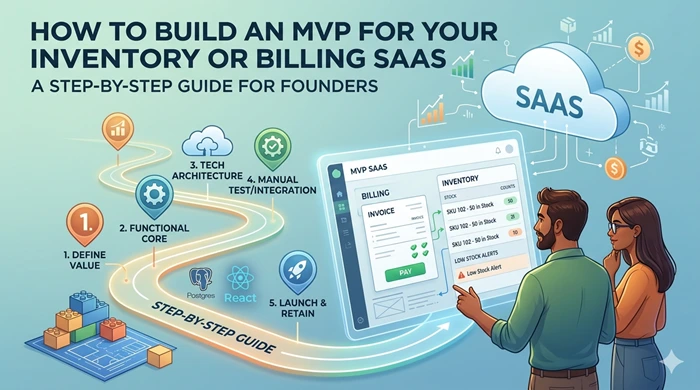
The Step-by-Step Build Plan
Alright, here’s how to actually put it all together — from idea to first paying customer.
Week 1-2: Customer Discovery. Talk to 20 potential customers. Understand their current workflow, where it breaks, and what they’d pay to fix it. Don’t skip this. Everything else depends on it.
Week 3-4: Define MVP Scope. Write a one-page feature list. Prioritize ruthlessly. If a feature doesn’t solve a problem you heard in customer interviews, it doesn’t make version one.
Week 5-10: Build. Whether you engage SaaS development services externally or build internally, keep sprint cycles short (one week). Ship something testable every sprint. For founders considering external partnership, partnering with an MVP Development Company like Acquaint Softtech ensures fast iteration without compromising quality. Good tech choices for this stack: React or Next.js frontend, Node.js or Django backend, PostgreSQL, hosted on AWS or GCP.
Week 11-12: Beta Testing. Get five to ten real users using the product daily. Sit in on their sessions if you can. The bugs you’ll find in 48 hours of real usage outstrip anything QA catches in testing.
Week 13+: Launch and Iterate. Launch publicly, charge from day one (even a small amount separates serious users from casual tire-kickers), and iterate based on what your paying customers ask for.
Where AI Fits Into Your MVP Strategy
This is where things get interesting for founders in 2025. SaaS AI Development services have come down dramatically in cost, and what used to require a data science team can now be plugged in via API.
For an inventory MVP, consider these practical AI additions:
- Demand forecasting — predict stock requirements based on historical patterns and seasonality
- Anomaly detection — flag unusual stock movements that could indicate theft or data entry errors
- Natural language querying — let users ask “how much did we sell last month in Mumbai” in plain text
These aren’t gimmicks. Businesses that have tried AI-powered MVP solutions report faster user adoption because the product feels intuitive rather than transactional.
Final Thought
The founders who win in the inventory and billing SaaS space aren’t the ones who built the most features. They’re the ones who understood a specific customer’s pain so deeply that their MVP — even a rough one — felt like it was built just for them.
Start narrow. Solve one thing well. Then expand. That’s the whole game.
Whether you’re working with a full SaaS platform development team or bootstrapping solo, the framework stays the same: validate the problem, define the minimum scope, build fast, and charge real money. Everything else is commentary.
