


Managing school money is very different from managing a store or a law office. Schools have to deal with money that’s only for certain things: government money, tuition payments and budgets for many campuses. They also have to follow a lot of rules. Regular accounting tools are often not good enough. That is why schools, colleges and universities are investing in accounting software just for education.
This guide will tell you everything you need to know about education accounting software. You will learn what it is, why schools need it, which software is good, how much it costs and how to pick the one for your school.
Education accounting software is a system that helps schools manage their money. It is made for schools, colleges and universities. It can handle the way that schools deal with money including separate accounts for different things tracking government money, sending tuition bills and following government rules.
This software is different from accounting tools that are made for other businesses. Education accounting software keeps track of money by accounts, programs, departments or government money not just by how much money is coming in and going out. Education accounting software is made to help schools, colleges and universities manage their money in a way that works for them.
How It Works
The software brings all activity across an institution into one system. When a grant is received it is tracked separately from operating funds. For example a department gets a grant. The software keeps track of it separately.
The system checks if a department has a budget before approving a spend. Every dollar has a purpose. The software can generate reports by fund, department, campus or time period. Most modern platforms are on the cloud. This means administrators can access data from anywhere.
The systems update automatically. No manual IT work is needed to keep the systems updated.
Who Uses It

1. K-12 Schools
Public school districts use education accounting software to manage the money they get from the state and federal government. They use this software to keep track of how much they spend on each student. The software also helps them pay the teachers and other staff members. Public school districts have to report to the school boards and government agencies and the education accounting software makes it easier for them to do that. They have to give these reports to the school boards and government agencies to show how the public school districts are using the education accounting software to manage the state and federal funding.
2. Private Schools
Private K-12 schools manage tuition revenue, endowments, scholarship funds, and donor contributions. They need software that separates restricted donations from general operating funds.
3. Charter Schools
Charter schools get money from the government. Work on their own.They have to follow the rules as regular public schools when it comes to reporting to the government.
This can be tough for them because they have complicated systems to manage.It’s extra important for them to keep their finances separate and be ready for audits.
4. Colleges
Community colleges and two-year institutions deal with a mix of state appropriations, federal financial aid, tuition revenue, and workforce development grants. Budget management across multiple departments and programs is a primary challenge.
5. Universities
Big universities have to deal with a lot of money, billions of dollars that is spread out across departments, research grants, endowments, sports programs and other services. These universities need computer systems that can handle all the accounting and also work with the human resources, procurement and student information systems. They need these systems to work together so that the universities can manage their money and people in a way. Universities like these have different parts, like research grants, endowments and athletic programs and they all need to be managed properly.
Best Accounting Software for Educational Institutions in 2026
1. MIP Fund Accounting
Best For: Small to mid-sized K-12 districts, nonprofits, and government entities
MIP Fund Accounting (now part of Community Brands) has been built specifically for fund accounting environments for decades. It supports unlimited funds, grant tracking, encumbrance accounting, and government reporting standards. It is one of the most widely used platforms among public school districts.
Key Features: Multi-fund general ledger, grant management, fixed assets, payroll integration, customizable reporting, audit trails
Pros: Purpose-built for fund accounting; strong compliance reporting; widely understood by school finance staff; affordable for smaller institutions
Cons: Older interface compared to newer cloud platforms; limited ERP capabilities; may require additional modules for full functionality
2. Sage Intacct
Best For: Growing school districts and colleges that need cloud-based fund accounting with strong reporting
Sage Intacct is a cloud-native accounting platform with a strong nonprofit and education focus. It offers multi-dimensional reporting, meaning you can report by fund, department, program, location, and grant simultaneously without running separate reports.
Key Features: Multi-dimensional general ledger, automated AP processing, real-time dashboards, grant management, strong API for integrations
Pros: Modern cloud interface; excellent reporting flexibility; strong integration ecosystem; scales well as institutions grow
Cons: Higher price point than some competitors; implementation requires experienced consultants; not purpose-built for education (requires configuration)
3. QuickBooks
Best For: Very small private schools or charter schools with simple financial structures
QuickBooks can be used by schools but requires significant configuration to approximate fund accounting. It works for small institutions with limited grants and a simple fund structure but becomes difficult to manage as complexity grows.
Key Features: Standard accounting, invoicing, payroll (add-on), basic reporting, bank reconciliation
Pros: Low cost; widely known; easy to find bookkeepers familiar with it
Cons: Not built for fund accounting; limited grant management; does not meet government reporting requirements without manual workarounds; not scalable for growing institutions
4. Blackbaud Financial Edge NXT
Best For: Private schools, independent schools, and nonprofits with fundraising and development programs
Blackbaud Financial Edge NXT is built specifically for nonprofits and educational institutions. It integrates directly with Blackbaud’s fundraising and donor management tools, making it an excellent choice for private schools that rely on development programs.
Key Features: Fund accounting, grant management, accounts payable, fixed assets, integration with Raiser’s Edge NXT for donor management
Pros: Purpose-built for education and nonprofits; strong fund accounting; excellent for donor-funded institutions; cloud-based
Cons: Higher cost; best value when combined with other Blackbaud products; less suitable for public schools
5. Oracle NetSuite
Best For: Universities and large multi-campus institutions needing a full ERP
Oracle NetSuite is a comprehensive cloud ERP used by large organizations including universities. It covers accounting, HR, procurement, and financial planning in a single system. It requires significant implementation investment but delivers deep functionality.
Key Features: Full ERP suite, multi-entity management, advanced reporting, grant management, procurement, HR integration
Pros: Highly scalable; extensive integration capabilities; strong analytics; single platform for all financial operations
Cons: High cost; long implementation timeline; requires dedicated IT and consulting resources; complex for smaller institutions
6. Microsoft Dynamics 365
Best For: Universities and institutions already invested in the Microsoft ecosystem
Microsoft Dynamics 365 Finance integrates with the broader Microsoft stack including Teams, SharePoint, and Power BI. It offers strong financial management capabilities and is a natural fit for institutions that rely on Microsoft tools.
Key Features: Fund accounting (with configuration), advanced financial reporting, Power BI integration, procurement, HR integration, AI-driven insights
Pros: Deep Microsoft integration; strong analytics through Power BI; flexible and customizable; familiar interface for Microsoft users
Cons: Requires significant implementation and configuration; not purpose, built for education; expensive; needs specialist consultants
7. Workday
Best For: Large universities needing fully integrated finance and HR in a single cloud platform
Workday is a cloud-native ERP platform that combines financial management with human capital management. It is widely used by large universities because it eliminates the integration challenges between HR and finance systems.
Key Features: Fund accounting, grant management, procurement, HR and payroll, student financial aid integration, real-time analytics
Pros: Unified platform for finance and HR; strong reporting; modern cloud interface; widely adopted by higher education
Cons: Very high cost; multi-year implementation; not suitable for small or mid-sized institutions
8. Ellucian Banner
Best For: Community colleges and universities that need deep student information system integration
Ellucian Banner is one of the most widely used ERP platforms in higher education. It connects financial management with student information, financial aid, HR, and advancement in a single system. It is especially common among community colleges and regional universities.
Key Features: Student information system, fund accounting, financial aid management, HR and payroll, advancement, procurement
Pros: Deep integration between student and financial data; widely understood by higher education staff; strong implementation support network
Cons: Legacy interface; high cost; long implementation timelines; upgrade cycles can be disruptive
9. Tipalti
Best For: Institutions with high-volume accounts payable and payment processing needs
Tipalti is an accounts payable automation platform rather than a full accounting system. It excels at automating invoice processing, supplier payments, and payment compliance. Schools with large vendor bases or grant-funded programs with many subrecipients may find it valuable as a complement to their primary accounting system.
Key Features: Automated invoice processing, global payment processing, supplier management, payment compliance, integration with major accounting systems
Pros: Excellent AP automation; reduces manual invoice processing; strong compliance for international payments
Cons: Not a standalone accounting system; requires integration with a primary platform; best for specific use cases rather than full financial management
Why Educational Institutions Need Specialized Accounting Software
1. Financial Complexity in Education
Schools do not get money in a way like other businesses do. They get money from a lot of places and each place has its own set of rules about how the money can be used like that of Accounting software used for Travel agencies, and when it needs to be reported. For example a single school district has to deal with money from the state, money from property taxes, money from the federal government for Title I, money for special education, money for the cafeteria and money for sports teams all, at the same time.
Using a spreadsheet or a regular accounting tool to keep track of education finance is not an idea. It can lead to mistakes, waste a lot of time and cause problems with following the rules. Education finance is a thing and it needs a better way to be managed.
2. Fund Accounting Requirements
Fund accounting is the practice of tracking each pool of money separately based on its source and intended use. It is the core financial model used by schools, nonprofits, and government agencies.
In fund accounting, you cannot simply mix all incoming money together and report a single profit or loss. Each fund must be balanced individually. If a school receives a grant restricted to technology purchases, that money cannot be used for staff salaries, even if the general budget is running short. Software must enforce these restrictions automatically.
Standard business accounting software is not built for this. QuickBooks, for example, can be configured to approximate fund accounting, but it requires workarounds that are difficult to maintain and prone to error as the institution grows.
3. Grant Management Challenges
Schools and universities rely heavily on grants, but managing grant funds is one of the most administratively demanding tasks in education finance. Each grant has its own budget, expense categories, reporting deadlines, and allowable costs.
Without specialized software, grant managers rely on spreadsheets and manual tracking, which increases the risk of spending errors, missed reporting deadlines, and failed audits. Federal grants like Title I, IDEA, and Perkins each come with their own compliance requirements.
Education accounting software automates grant budget tracking, flags when spending approaches limits, and generates the reports required by funding agencies.
4. Compliance and Audit Demands
Public schools are subject to annual audits. Universities that receive federal funding must comply with the Uniform Guidance (2 CFR Part 200), which sets strict requirements for how grant money is tracked, documented, and reported. FERPA governs how student data is handled, including financial data tied to student records.
These requirements demand a complete and reliable audit trail. Every transaction must be documented, approvals must be recorded, and reports must match the underlying data exactly. Specialized software builds this audit trail automatically.
5. Multi-Campus Financial Management
School districts usually handle buildings. Big universities have lots of campuses, in parts of a state or area. Each place might have its money plan, cost center and reporting needs.. The finance team wants to see everything together for the whole organization.
Specialized software helps with accounting for places and campuses right away. This lets each campus manage its money. At the time it gives leaders a full view of everything at any time.
Key Features of Education Accounting Software
1. Fund Accounting
The ability to set up and manage multiple funds, enforce spending restrictions by fund, and report on each fund separately. This is the foundational feature that distinguishes education accounting software from general business tools.
2. Budget Planning
Budgeting tools that allow administrators to set annual budgets by department, program, fund, or grant. Advanced platforms support multi-year budgeting and allow staff to submit budget requests that flow through an approval process before being finalized.
3. Accounts Payable and Receivable
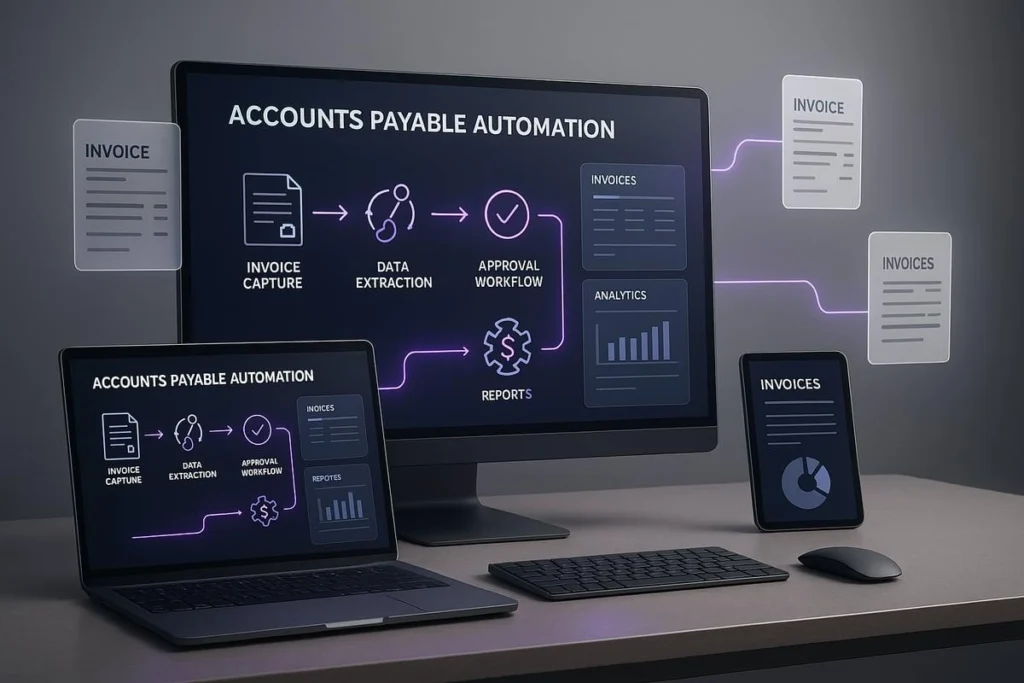
Automated invoice processing, vendor payment management, and tuition billing. For schools, the receivable side includes tuition, fees, and student account management. The payable side covers vendor invoices, purchase orders, and reimbursements.
4. General Ledger Management
The central record of all financial transactions, organized by chart of accounts that reflects the institution’s fund structure. A strong general ledger module supports multi-dimensional reporting, meaning you can slice financial data by fund, department, location, grant, or program simultaneously.
5. Payroll Processing
Staff payroll is typically the largest expense for any school. Education accounting software either includes payroll processing or integrates directly with dedicated payroll systems. Payroll must be allocated correctly across funds when employees work across multiple programs or grants.
6. Grant Accounting
Dedicated tools for managing grant budgets separately from operating funds, tracking allowable costs, generating grant-specific financial reports, and managing grant closeout procedures. This feature is essential for any institution that receives federal or state grant funding.
7. Fixed Asset Tracking
Schools own significant physical assets including buildings, equipment, vehicles, and technology. Fixed asset tracking records the value, depreciation, and location of each asset and supports the reporting required for government financial statements.
8. Procurement Management
Purchase order creation, approval workflows, and vendor management. Encumbrance accounting, which reserves funds when a purchase order is created rather than when the invoice is paid, is a standard requirement in government and education finance.
9. Financial Reporting
Pre-built and custom reports including balance sheets, income statements, budget vs. actual comparisons, and government-required financial statements. Education-specific reports should meet state and federal reporting formats without manual rework.
10. Audit Trails
A complete, tamper-proof record of every transaction, approval, and change in the system. This feature is not optional for any institution subject to external audit.
11. Multi-Entity Management
The ability to manage finances for multiple schools, departments, or campuses within a single system while maintaining appropriate separation between entities.
12. Mobile Access
Cloud-based platforms allow administrators, department heads, and approvers to access financial data and approve transactions from any device. This is increasingly important for institutions with distributed teams.
13. AI-Powered Automation
Newer platforms include automation features such as intelligent invoice matching, anomaly detection that flags unusual transactions, predictive budget variance alerts, and automated report generation. These tools reduce manual work and improve financial oversight.
Education Accounting Software vs. Generic Accounting Software vs. ERP
Major Differences
A. Accounting Software
General accounting tools like QuickBooks or Xero are made for mid-sized businesses. These businesses use QuickBooks or Xero to track the money that comes in and the money that goes out. They also track what the business owns and what it owes to others. QuickBooks or Xero can make financial reports.
They are good for organizations that do not have complicated setups. However QuickBooks or Xero do not have built-in support for types of accounting like fund accounting, managing grants or making reports that the government needs.
B. Education Accounting Software
Some platforms, like MIP Fund Accounting or Blackbaud Financial Edge NXT are made for schools and nonprofits and government entities. MIP Fund Accounting and Blackbaud Financial Edge NXT have a feature which is fund accounting. They also help with managing grants. Have special templates for government reports. The good thing about MIP Fund Accounting and Blackbaud Financial Edge NXT is that they are usually cheaper than systems that do everything. MIP Fund Accounting and Blackbaud Financial Edge NXT are also quicker to set up.
C. ERP Systems
Enterprise Resource Planning systems, such as Oracle NetSuite, Microsoft Dynamics 365 Workday or Ellucian Banner are really good at bringing lots of different things like accounting and human resources and payroll and buying supplies and student records all in one place.
These Enterprise Resource Planning systems have a lot of features. They work well together. However it takes a long time to get them set up and it costs a lot of money and you need people who know about computers to help you.
So Enterprise Resource Planning systems are probably best, for universities that have many campuses.
Comparison Table
| Feature | Generic Accounting | Education Accounting | ERP System |
| Fund Accounting | No | Yes | Yes |
| Grant Management | Limited | Yes | Yes |
| Government Reporting | No | Yes | Yes |
| Student Integration | No | Varies | Yes |
| Payroll | Add-on | Varies | Yes |
| Implementation Complexity | Low | Medium | High |
| Cost | Low | Medium | High |
| Best For | Very small schools | K-12, colleges | Universities |
Benefits of Accounting Software for Educational Institutions
1. Improved Financial Visibility
Administrators can see the financial position of every fund, department, and program in real time without waiting for month-end reports. This visibility supports faster and better decisions.
2. Better Budget Control
Encumbrance accounting and real-time budget tracking prevent overspending. Department heads can see available balances before submitting purchase requests. Finance teams get alerts before budgets are exhausted.
3. Faster Reporting
Month-end and year-end financial reports that used to take days of manual work can be generated in hours. Government-required reports are produced directly from the system without reformatting.
4. Simplified Grant Tracking
Each grant lives in its own fund with its own budget and expense categories. The system tracks spending against grant limits automatically and generates the reports required by funding agencies.
5. Stronger Compliance
Built-in controls enforce spending restrictions, approval requirements, and documentation standards. This makes compliance with FERPA, Uniform Guidance, and state requirements part of the normal workflow rather than an after-the-fact burden.
6. Reduced Administrative Work
Automation handles routine tasks like invoice matching, recurring payments, and report generation. Staff spend less time on data entry and more time on analysis and planning.
7. Improved Audit Readiness
A complete audit trail means auditors can trace any transaction from beginning to end. Audit preparation time drops significantly, and the risk of findings decreases.
Accounting Software Pricing for Educational Institutions
Education accounting software pricing varies significantly based on institution size, features required, and deployment model. Here are realistic ranges.
1. Small Schools
Small private schools, charter schools, and small school districts typically spend between $3,000 and $15,000 per year on accounting software. Platforms like MIP Fund Accounting and QuickBooks (with configuration) fall in this range for basic functionality.
2. Mid-Sized Institutions
Mid-sized school districts, community colleges, and private schools with more complex needs typically spend between $15,000 and $75,000 per year. Sage Intacct and Blackbaud Financial Edge NXT are commonly used at this level.
3. Universities
Large universities that use ERP systems need to plan for a big budget. They should expect to pay between $100,000 and $500,000 or more each year for licensing fees. The total cost of owning such a system is even higher.
When you add up the costs of implementation, customization, training and ongoing support it can be million dollars for big projects like Workday or Oracle NetSuite. These costs are in addition to the licensing fees. Large universities should be prepared for these expenses when implementing an ERP system, like Workday or Oracle NetSuite.
4. Hidden Costs
Implementation
Most enterprise platforms require professional services for implementation. Expect to pay 50% to 150% of annual license fees for initial setup, data migration, and configuration.
Migration
Moving financial data from an old system requires careful planning and data cleansing. This is often underestimated in initial budgets.
Training
Staff training is essential for adoption. Budget for both initial training and ongoing training as new staff join or features are updated.
Integrations
Connecting accounting software to payroll systems, student information systems, or HR platforms often requires additional development work or third-party connectors.
How to Choose the Right Education Accounting Software
1. Define Financial Goals
Start by identifying the specific problems you are trying to solve. Are you struggling with grant tracking? Is your month-end close taking too long? Do you lack visibility into department budgets? Your top pain points should drive your software evaluation.
2. Assess Fund Accounting Needs
How many funds do you manage? How complex is your chart of accounts? How many grants are active at any given time? Institutions with many restricted funds and active federal grants need purpose-built fund accounting, not a generic tool.
3. Evaluate Integrations
Identify the systems your accounting software will need to connect with. This typically includes your payroll system, student information system, HR platform, and any learning management or procurement tools. Ask vendors specifically about integration with the systems you use.
4. Consider Security
Educational institutions hold sensitive financial and student data. Evaluate each vendor’s security certifications (SOC 2, ISO 27001), data encryption practices, access control options, and data backup procedures. FERPA compliance should be confirmed in writing.
5. Request a Demo
Never select accounting software based on marketing materials alone. Request a live demo using scenarios specific to your institution. Ask vendors to show you how their platform handles a grant budget transfer, a multi-fund budget report, or an audit trail review.
6. Run a Pilot Program
For larger implementations, negotiate a pilot period with a subset of departments or funds before full deployment. This reveals integration gaps, training needs, and workflow issues before they affect the entire institution.
Essential Integrations for Educational Institutions
1. Student Information Systems
The connection between student data and financial data is critical, especially for tuition billing, financial aid management, and per-pupil expenditure reporting. Common student information systems include PowerSchool, Infinite Campus, and Skyward for K-12, and Ellucian Banner or PeopleSoft for higher education.
2. Learning Management Systems
While LMS platforms like Canvas or Blackboard are primarily academic tools, they increasingly connect to financial systems for billing, program cost tracking, and reporting on grant-funded instructional programs. Many institutions also integrate digital assessment platforms such as AssessPrep to streamline testing, measure learning outcomes, and centralize assessment data.
3. Payroll Systems
Payroll is typically the largest budget item for schools. Your accounting software must either handle payroll directly or integrate cleanly with your payroll provider. Payroll entries must post to the correct funds and cost centers automatically.
4. Platforms
Position control, where the accounting system tracks budgeted positions and flags when hiring decisions exceed budgeted headcount, requires tight integration between HR and finance. Workday’s unified approach is one reason it is popular among large universities.
5. ERP Platforms
For institutions using a broader ERP, accounting is typically a module within the larger system. The integration between financial management and procurement, HR, and student services is a core feature of platforms like Ellucian Banner, Oracle NetSuite, and Microsoft Dynamics 365.
Industry-Specific Recommendations
1. Public Schools
Public school districts need to think about using platforms that’re good at helping with government reports, keeping track of money that is already promised to be spent, paying people who work for the school and managing many different funds. MIP Fund Accounting and Infinite Visions are two platforms that a lot of schools use. When a school is looking to buy a platform they should make sure to ask the company about the specific reporting rules for their state.
2. Private Schools
Private schools that teach kids from kindergarten to grade can really use platforms that help them manage their money and also handle donations and other things. A lot of these schools use Blackbaud Financial Edge NXT along with Raisers Edge NXT. Some schools also like to use Sage Intacct because it’s good for schools that are getting bigger and more complicated.
3. Charter Schools
Charter schools face dual reporting requirements, submitting both to their authorizing agency and to state education departments. They need platforms with strong fund separation, audit trail capabilities, and flexible reporting. MIP Fund Accounting and Sage Intacct both serve this market well.
4. Community Colleges
Community colleges typically need a platform that connects financial management with student financial aid, HR, and state reporting. Ellucian Banner and Colleague are widely used. Sage Intacct is increasingly popular as a modern, cloud-based alternative for mid-sized colleges.
5. Universities
Big universities need a system to manage everything. Workday is now the choice for cloud based systems in universities. Some universities still use Oracle PeopleSoft and Ellucian Banner. Many are trying to update and move away from old systems. Workday is the system that many universities are turning to because it is an ERP platform. Universities like to use Workday for their ERP needs.
Implementation Best Practices
1. Migration
Data migration is one of the most time-consuming and risk-prone parts of any accounting software implementation. Before migrating data from your old system, audit it for completeness and accuracy. Clean up duplicate vendors, correct account coding errors, and document your chart of accounts in detail. Work with your vendor’s implementation team to map old data structures to the new system.
2. Staff Training
Training is not a one-time event. Plan for role-based training that teaches each staff member only what they need to know for their specific responsibilities. After go, live, budget for refresher training, training for new hires, and training when new features are released. Untrained users create data quality problems that undermine the value of the software.
3. Change Management
Finance staff often have deep institutional knowledge embedded in their current processes. Changing those processes requires communication, involvement, and support from leadership. Identify internal champions in each department who can support their colleagues through the transition.
4. Workflow Optimization
Do not simply recreate your old processes in the new system. Use the implementation as an opportunity to redesign workflows. Ask where approvals add delays without adding value, where data is entered more than once, and where reports require manual assembly. Modern platforms can automate many of these steps.
AI and the Future of Education Accounting

1. Predictive Budgeting
AI-powered budgeting tools analyze historical spending patterns to project future expenditures with greater accuracy. For schools with cyclical budget processes, predictive tools can identify likely budget variances months in advance, giving administrators time to make adjustments.
2. AI Reporting
Natural language interfaces allow finance staff to generate reports by describing what they need in plain language rather than navigating complex report builders. Some platforms now allow users to ask questions like “show me grant spending by department for the current fiscal year” and receive an immediate report.
3. Automated AP Processing
Optical character recognition and machine learning can extract data from paper or PDF invoices, match them to purchase orders, route them for approval, and post them to the correct funds automatically. This dramatically reduces the manual workload in accounts payable.
4. Fraud Detection
AI systems can monitor transaction patterns and flag anomalies that may indicate errors or fraud. For educational institutions handling public funds, early detection of irregularities is essential for both financial integrity and audit compliance.
5. Financial Forecasting
Beyond annual budgets, AI forecasting tools model scenarios across multiple time horizons. A university finance team can model the impact of enrollment changes, state funding cuts, or grant losses on long-term financial sustainability.
Education Accounting Software ROI Calculator Framework
Before investing in accounting software, estimate the return on that investment across four categories.
1. Cost Savings
Estimate current costs of manual processes. This includes staff hours spent on data entry, report preparation, and reconciliation. A school that spends 40 hours per month on manual reporting and moves to automated reporting at 4 hours per month saves 36 hours multiplied by the average hourly cost of finance staff.
2. Productivity Gains
Identify processes that currently take multiple days and estimate how much time the new system would save. Faster month-end close, automated grant reporting, and real-time budget dashboards all have measurable productivity value.
3. Audit Reduction
Audit preparation is expensive in staff time and external audit fees. Institutions that reduce audit prep time by 50% and reduce findings that require remediation generate measurable savings. Ask vendors for specific case studies from comparable institutions.
4. Reporting Efficiency
Government reporting requirements take significant staff time when reports must be manually assembled from multiple sources. Quantify the hours currently spent on state and federal reports and estimate how much of that time automated reporting would eliminate.
Frequently Asked Questions
What is accounting software for educational institutions?
It is a financial management system designed specifically for schools, colleges, and universities. It handles fund accounting, grant tracking, government compliance reporting, and the specific financial workflows found in education, unlike general business accounting software.
What is fund accounting?
Fund accounting is a method of tracking money based on the source and intended purpose of each dollar rather than simply tracking total revenue and expenses. Each fund is managed separately, and spending restrictions are enforced by the fund. It is the standard financial model for schools, governments, and nonprofits.
Which software is best for schools?
There is no single best option for all schools. Small public schools and districts often use MIP Fund Accounting. Private schools frequently use Blackbaud Financial Edge NXT. Growing institutions often choose Sage Intacct. Universities use full ERP platforms like Workday or Ellucian Banner. The right choice depends on institution size, complexity, budget, and integration requirements.
Can QuickBooks work for schools?
QuickBooks can work for very small private schools with simple financial structures. However, it is not designed for fund accounting and requires significant manual configuration to meet government reporting requirements. As institutions grow in complexity, QuickBooks becomes increasingly difficult to maintain for education finance purposes.
How much does education accounting software cost?
Costs range from around $3,000 per year for small institutions using entry-level platforms to more than $500,000 per year for large universities using full ERP systems. Total cost of ownership, including implementation, training, and integrations, is typically two to three times the annual license fee in the first year.
What integrations are essential?
The most critical integrations are with your payroll system, student information system, and HR platform. For higher education, financial aid system integration is also essential. The specific systems in your technology environment should be confirmed as compatible with any accounting platform before purchase.
How long does implementation take?
Implementation timelines range from 3 to 6 months for smaller platforms like MIP Fund Accounting or Sage Intacct to 18 to 36 months for full ERP implementations at large universities. Data migration complexity, staff availability, and customization requirements are the primary factors that extend timelines.
What compliance requirements apply?
Public schools must comply with government accounting standards set by the Governmental Accounting Standards Board (GASB). Institutions receiving federal funding must comply with the Uniform Guidance (2 CFR Part 200). All institutions handling student financial data must comply with FERPA. State-specific reporting requirements vary and should be verified for your location.
Final Verdict: Which Accounting Software Is Best?
Best for Small Schools
MIP Fund Accounting is the strongest choice for small to mid-sized public schools, school districts, and charter schools. It is purpose-built for fund accounting, widely understood by school finance professionals, and more affordable than enterprise platforms. Its government reporting capabilities and encumbrance accounting make it a practical fit for institutions managing public funds.
Best for Growing Institutions
Sage Intacct is the best choice for private schools, community colleges, and mid-sized districts that have outgrown simpler tools. Its modern cloud interface, flexible multi-dimensional reporting, and strong integration ecosystem make it well-suited for institutions that need more than basic fund accounting but are not yet ready for a full ERP.
Best for Universities
Workday has become the leading cloud ERP for higher education. Its unified approach to finance and HR, modern interface, and strong analytics capabilities make it the top choice for large universities undertaking platform modernization. For institutions deeply embedded in legacy systems, Ellucian Banner remains a widely supported option during transition planning.
Best Overall
For educational institutions that need a platform balancing purpose-built fund accounting capabilities, modern cloud access, and a reasonable implementation timeline, Sage Intacct offers the best combination of capability, usability, and scalability. It serves a wide range of institution types and grows with the organization’s needs.
This article reflects research completed in 2026. Software features, pricing, and market positions change regularly. Request current pricing and feature details directly from vendors before making a purchasing decision.
