User-generated content (UGC) ads have become one of the most effective formats for brands looking to connect with audiences on platforms like TikTok, Instagram, and YouTube. The reason behind their success is simple: UGC-style videos feel personal, authentic, and closer to real customer experiences compared to traditional advertisements.
However, producing UGC ads at scale can be challenging. Brands often need multiple creators, different scripts, product variations, and frequent content testing. Maintaining consistency across dozens of videos while keeping production costs manageable can become difficult.
AI actors are changing this process by allowing brands to create digital presenters and recurring characters that can appear across multiple ads. Instead of hiring new creators for every campaign, brands can develop consistent AI actors with specific appearances, voices, styles, and personalities.
The challenge is not only creating an AI actor once. The real challenge is keeping that actor consistent across different videos, scenes, products, and campaigns.
Modern AI video tools help solve this by offering features such as:
Consistent character creation
AI-generated presenters
Voice and expression control
Multiple video variations
Localization and adaptation
UGC-style storytelling
Here are some of the best AI tools that help brands create consistent AI actors for UGC advertisements.
1. Invideo Agent
Invideo Agent helps brands create AI-powered video content by turning product ideas, briefs, and creative concepts into complete video campaigns. For UGC ads, its biggest advantage is helping creators maintain consistency when building multiple videos around the same AI actor, product, or campaign idea.
Instead of generating disconnected clips, creators can develop a repeatable content style where the same character, tone, visual direction, and brand messaging remain aligned across different ad variations. With invideo Agent Two, project memory and specialized creative agents can help carry these decisions across more complex campaigns, making it easier to maintain the same AI actor and creative direction while testing different hooks, product angles, and storytelling formats.
Key Features:
Supports creation of AI-powered UGC video ads from concepts or briefs
Helps maintain character and visual consistency across scenes
Supports different video formats for social platforms
Helps create product-focused storytelling and UGC-style content
Connects planning, generation, and editing workflows
Best For:
Brands creating UGC ad campaigns at scale
Performance marketers testing multiple creatives
Creators building AI-powered content series
Teams producing product videos quickly
Invideo Agent helps creators maintain creative context across projects, making it easier to keep elements such as character appearance, visual style, and storytelling direction aligned.
2. HeyGen
HeyGen is an AI video creation platform focused on generating videos with digital avatars and AI presenters. It is widely used by businesses for marketing videos, training content, product explainers, and social media content where a consistent presenter is needed.
For UGC ads, HeyGen can help brands create recurring AI spokespersons that deliver different scripts without recording new videos every time. Brands can use AI avatars to explain products, share promotional messages, create localized versions of ads, and test different messaging approaches while maintaining the same presenter identity.
This makes it useful for campaigns where consistency matters, especially when brands need multiple variations of similar creatives for different audiences or platforms.
HeyGen works especially well for brands that want a consistent digital spokesperson delivering multiple variations of marketing messages.
3. Synthesia
Synthesia is an AI avatar video platform designed to create professional videos using digital presenters. It is commonly used for corporate communication, training, education, and marketing content where brands need a consistent on-screen spokesperson.
For UGC advertising, Synthesia can help brands create repeatable presenter-based videos without relying on traditional filming setups. A company can use the same AI actor to deliver different scripts, introduce products, explain features, or create localized versions for different markets.
While its style is generally more polished and professional compared to casual creator-style UGC, it can be useful for brands that want a controlled and consistent digital spokesperson.
Key Features:
AI-generated presenters
Script-to-video creation
Multiple languages and voices
Professional avatar styles
Custom branding options
Best For:
Corporate-style UGC content
Educational product videos
Brand announcements
Presenter-led campaigns
Synthesia is most suitable when brands need polished digital presenters rather than highly casual creator-style UGC.
4. Runway
Runway is an AI video generation and creative editing platform focused on helping creators produce visually advanced videos. Unlike avatar-focused platforms, Runway is primarily designed around generative video, visual effects, and cinematic content creation.
For UGC ads, Runway can help brands create unique AI-generated characters, product environments, and creative scenes that support advertising campaigns. It is particularly useful when brands want UGC-inspired content with stronger visual storytelling rather than a traditional talking-head format.
Creators can experiment with different characters, locations, and visual styles to develop more engaging ad concepts.
Key Features:
AI video generation
Character and scene creation
Generative editing tools
Visual effects capabilities
Creative video workflows
Best For:
Brands creating visually unique ads
Creative teams developing campaign concepts
AI-powered storytelling
Cinematic product content
Runway is useful when brands want UGC-inspired ads with more creative visuals rather than simple talking-head formats.
5. Creatify
Creatify is an AI video advertising platform focused on helping businesses quickly create marketing videos from product information. It is designed around performance marketing workflows where brands need multiple ad creatives to test different messages and audiences.
For UGC ads, Creatify helps brands transform product details into advertisement formats using AI-generated presenters and structured video templates. This makes it useful for ecommerce companies that want to create several versions of product-focused videos without managing traditional production.
The platform focuses heavily on speed and creative testing, allowing marketers to experiment with different hooks, scripts, and product angles.
Key Features:
Product-to-video workflows
AI-generated ad variations
UGC-style creative formats
Marketing-focused templates
Fast content production
Best For:
Ecommerce brands
Performance marketing teams
Product testing campaigns
Social media advertising
Creatify is useful for teams that need to create multiple ad versions quickly for testing different hooks and messaging.
6. Arcads
Arcads is an AI video advertising platform focused specifically on creating UGC-style ads using AI actors. It is built for performance marketers who want to produce creator-style advertisements without depending entirely on traditional influencer production.
The platform helps brands create multiple versions of ads by using AI-generated actors who can deliver different scripts, product messages, and marketing angles. This makes it useful for testing creative variations while maintaining a consistent UGC format.
Arcads is particularly focused on direct-response advertising, where brands need to quickly experiment with different hooks and approaches.
Key Features:
AI actors for UGC ads
Multiple creator-style formats
Script-based ad generation
Performance marketing workflows
Creative variation testing
Best For:
Direct-response advertising
Ecommerce campaigns
Paid social teams
Brands testing multiple creative concepts
Arcads is particularly focused on replicating the structure and feel of creator-led ads used in performance marketing.
What Makes a Good AI Actor Tool for UGC Ads?
Not every AI video tool is designed for creating consistent AI actors. Brands should look for features that support long-term creative workflows.
Character Consistency
The same AI actor should maintain recognizable features across multiple videos, including appearance, voice, and personality.
Flexible Content Creation
Brands often need different hooks, scripts, and product variations. The tool should allow quick adaptation without recreating the entire character.
Realistic Performance
Good UGC ads depend on authenticity. Facial expressions, gestures, voice delivery, and natural movement all influence how believable an AI actor feels.
Campaign Scalability
A useful AI actor workflow should help brands create dozens of variations while maintaining quality and consistency.
How AI Actors Are Changing UGC Advertising
AI actors are not replacing the creative thinking behind UGC ads. Instead, they are changing how brands approach production.
Traditional UGC campaigns often require finding creators, recording content, managing revisions, and producing multiple versions. AI-powered workflows allow brands to experiment faster by creating consistent digital actors that can appear across different campaigns.
This is especially valuable for performance marketers who need to test different:
Hooks
Product messages
Audiences
Languages
Creative formats
Final Thoughts
Creating successful UGC ads requires more than simply generating a digital face. Brands need AI actors that can remain consistent, communicate naturally, and adapt across multiple campaigns.
Tools like invideo Agent help bring together planning, generation, and editing into a connected workflow, while platforms like HeyGen, Synthesia, Runway, Creatify, and Arcads serve different needs across avatar creation, cinematic generation, and advertising production.
As AI video technology continues to improve, consistent AI actors will become an increasingly useful option for brands looking to produce more personalized, scalable, and creative advertising content.
Finding accountant jobs is really tough. It takes a lot of time. You have to look at a lot of websites like Indeed, LinkedIn, and ZipRecruiter.
You open a lot of tabs and still may not know which job is the right fit for you. If you’re comparing roles, it can also help to understand the top accounting software employers commonly use, so you can match your software skills to job requirements.
This guide has everything you need to know. It tells you how to search for jobs, what companies want, how much you can make, and what skills you need to get an interview.
You might be looking for a job in Wichita, KS, or you might want to work from home. Either way, we want to help you spend less time looking at listings and more time applying for jobs that are a good fit.
We looked at job listings in August 2026. Remember that job listings change quickly, so always check the details with the company before you apply.
Senior Accountant Jobs Available Now
Most senior accountant openings fall into a few buckets: on-site roles tied to a specific office, hybrid roles that mix office and home days, and fully remote positions that don’t care where you live. Knowing which bucket you want narrows your search fast. It’s also worth reviewing account audit software requirements, as some senior accountant roles involve auditing, reconciliations, and financial controls.
1. Senior Accountant Jobs by Location
Location still has an impact when it comes to hiring in accounting even though more people are working from home these days. A lot of companies prefer someone who’s nearby for tasks like month-end closing, audits or face-to-face meetings with the finance team.
Being helped with those important accounting responsibilities. Some companies still feel it’s better to have someone in the place for these kinds of work. Location is still important for accounting jobs.
2. Wichita, KS
Wichita has a steady stream of senior accountant openings, largely driven by the city’s manufacturing and aviation base. Employers here range from mid-size manufacturers to healthcare systems and regional financial services firms.
3. Other Major Locations
Outside Wichita, senior accountant demand tends to cluster around cities with strong manufacturing, healthcare, or corporate headquarters presence. If you’re open to relocating, larger metro areas usually post more openings but also draw more applicants per role.
4. Remote Senior Accountant Jobs
Remote senior accountant positions are available. They are harder to get than local ones because companies can hire people from anywhere. Employers looking for accountants usually want someone who knows how to work on their own and talk through Slack, Zoom or email without needing a lot of help.
Remote senior accountant positions are available. They are harder to get than local ones because companies can hire people from anywhere. Employers looking for accountants usually want someone who knows how to work on their own and talk through Slack, Zoom or email without needing a lot of help.
5. Hybrid Senior Accountant Jobs
Hybrid setups are popular these days, two or three days in the office and the rest from home. This way works for companies that still need people in the office during month-end close but don’t need a full-time office setup otherwise.
6. On-Site Senior Accountant Jobs
Some jobs are still done completely at the office. This is true for jobs in factories and hospitals. The people who handle money work closely with the people who do the hands on work.
If you like doing the things every day and you like seeing your coworkers every day then you should look for these kinds of jobs. Jobs like these are good if you want a schedule and you want to see the people you work with every day.
Job Title
Company Type
Location
Salary Range
Work Type
Experience
Senior Accountant
Manufacturing
Wichita, KS
$70,000–$85,000
On-site
3–5 years
Senior Accountant, Financial Reporting
Financial Services
Remote
$75,000–$95,000
Remote
4–6 years
Senior Accountant
Healthcare
Wichita, KS
$68,000–$82,000
Hybrid
3–5 years
Use this table as a starting template when you compare real listings side by side, location, salary, work type, and years of experience are the four filters that usually matter most.
Senior Accountant Job Opportunities in Wichita, KS
Wichita’s job market for accounting professionals is strongly influenced by the aviation and manufacturing companies that are based in or operate out of the city. This means many senior accountant positions require experience in cost accounting or manufacturing accounting, rather than regular general ledger tasks. Experience with specialized tools, such as accounting software for travel agencies, can also be valuable for candidates targeting accounting roles in travel and hospitality-related businesses.
1. Current Senior Accountant Openings
Jobs in Wichita are usually with companies that make things fly planes or take care of people. There are not many jobs with banks or the government.
If you want to find a job it is an idea to look at the company’s website, not just websites that list a lot of jobs. Sometimes you can find a job on a company’s website before it is listed on websites, like Indeed or LinkedIn.
2. Accounting Jobs in the Wichita Metropolitan Area
If you don’t mind traveling a bit, looking in the bigger Wichita area gives you more options. There are places to choose from. You can find offices in the suburbs. You can also find places that are part of bigger companies.
These places are spread out more. They are not all in the center of the city. This way you have choices. You can see places. You can find something that fits better.
The more you look the more you might find. It’s worth trying. You might be surprised. There are opportunities. You can find what you need. You can find a place that works for you. You can find a job that’s right for you.
You can find a location that’s convenient. You can find a place that feels good. You can find a company that’s right for you. You can find something that’s perfect.
3. Companies Hiring Senior Accountants
The city of Wichita has a lot of manufacturing and aviation companies. These companies are always looking for people to do accounting work. Some hospitals and banks in the area also need accountants.
You can look at the company pages on LinkedIn for these companies in Wichita, such as the hospitals and the banks and the manufacturing and aviation companies to see if they are hiring people for their finance teams like accounting jobs, at the manufacturing and aviation companies.
4. Remote Opportunities Available to Wichita Candidates
Even if you live in Wichita you don’t have to stick to jobs. There are remote senior accountant positions with companies in other states. These jobs are available to people across the U.S. It’s worth looking into if there aren’t local options.
What Does a Senior Accountant Do?
A senior accountant does the parts of a company’s accounting work. They close the books every month. Get the financial statements ready. They also make sure all the accounts are correct and that the company is following all the accounting rules.
A senior accountant is different from a staff accountant. They usually do not need someone to watch over them much. They also work on the complicated parts of the accounting like the really complex transactions.
The senior accountant has to make sure the company’s accounting work is done correctly. They have to be very careful, with the financial statements and the accounts.
1. Core Responsibilities
Day to day, a senior accountant typically manages the general ledger, leads or supports month-end close, and reconciles accounts to catch discrepancies before they become bigger problems.
They also prepare financial reports for management, record journal entries, and often help with budgeting, forecasting, and variance analysis, comparing what actually happened against what was planned.
Internal controls fall under this role too. That means checking that the company’s financial processes are accurate and following proper procedures, which matters a lot during audits.
2. Senior Accountant vs. Staff Accountant
A staff accountant usually deals with tasks and works with more direct supervision. A senior accountant handles complicated account reviews, checks the work of the staff accountant and has more influence over how financial reports are created. Money and duties both increase at the level. Along, with that comes the idea that you can solve problems on your own without needing help.
3. Senior Accountant vs. Accounting Manager
An accounting manager typically oversees the accounting team itself reviewing work, managing deadlines, and reporting up to a controller or finance director. A senior accountant, by contrast, is still doing hands-on accounting work but with more independence and complexity than a staff-level role. Moving from senior accountant to accounting manager usually means taking on people management for the first time.
Senior Accountant Job Requirements
Most senior accountant postings ask for a fairly consistent set of qualifications, though the exact mix varies by employer and industry.
1. Education
A bachelor’s degree in accounting or finance is a basic requirement for this job. Some companies might look at a business degree that has a lot of accounting classes. Most people who are hired have a specific accounting degree.
2. Work Experience
Most job listings will want you to have three to five years of accounting experience. This is what you can expect. Sometimes it is even more for companies or companies that do lots of complicated things.
What employers usually look for is that you started as a staff accountant and then took on more responsibility as time went on. They want to see that you have been a staff accountant and have gotten better and better at your job over time. Accounting experience is very important to them.
3. Technical Accounting Skills
Strong knowledge of GAAP is expected. GAAP stands for Accepted Accounting Principles. The person should have hands-on experience closing the books each month. They should know how to account.
They should also prepare statements. Being comfortable with budgeting is important. Forecasting is another task. Variance analysis is also part of the job. This is common in companies. The work is often done in companies.
The role is usually found in companies. The responsibilities are typical in companies. The company is usually a company. The person works in a company. The work is done in a company. The job is in a company. The environment is usually a company.
4. Software Skills
People really need to know how to use Excel. Things like pivot tables and VLOOKUP or XLOOKUP come up all the time when companies are looking for someone to hire. They also want people who can do financial modeling in Excel.
Beyond knowing Excel it is also good to have experience with something called an ERP system. This can be something like NetSuite, SAP, Oracle or Microsoft Dynamics. A lot of companies use these systems. At companies they often use QuickBooks so it is good to know how to use that too.
5. Communication and Leadership Skills
Senior accountants often work across departments, explaining financial results to non-finance managers or coordinating with auditors. Clear written and verbal communication matters as much as technical accuracy, especially once you’re the one presenting numbers to leadership.
6. Is a CPA Required?
A CPA (Certified Public Accountant) license isn’t always required for senior accountant roles, but it’s frequently preferred and can make you a stronger candidate. Some employers, particularly larger companies or those handling public financial reporting, do require it. If you’re weighing whether to pursue one, the American Institute of CPAs is a useful place to check current licensing requirements by state.
Skills to Include on a Senior Accountant Resume
Your resume should make it easy for a hiring manager to match your background against their job posting in under a minute. That means leading with the skills and results that map directly to what senior accountant roles actually ask for.
1. Technical Accounting Skills
List specific tasks you’ve owned, not just accounting in general, month-end close, account reconciliation, journal entries, financial statement preparation, and GAAP compliance are all worth naming directly.
2. Software and ERP Skills
Name the actual systems you’ve used, not just “accounting software.” If you’ve worked in NetSuite, SAP, Oracle, or QuickBooks, say so, recruiters often scan resumes specifically for these terms.
3. Analytical Skills
Budgeting, forecasting, and variance analysis show that you can do more than record transactions, you can help a company understand its numbers. If you’ve built or maintained financial models, mention it.
4. Leadership Skills
Even without formal management experience, note anywhere you’ve reviewed a colleague’s work, trained a junior accountant, or led part of a close process. It signals you’re ready for more responsibility.
5. Communication Skills
If you’ve presented financial results to non-accounting stakeholders or worked directly with auditors, include it. This is one of the more overlooked skills on accounting resumes, and it’s one employers specifically ask about in interviews.
A short skills checklist near the top of your resume, GAAP, month-end close, reconciliations, Excel, your specific ERP system, makes it easy for both a human reviewer and an applicant tracking system to see the match quickly.
Senior Accountant Salary and Compensation
Salary for senior accountant roles varies quite a bit based on location, industry, and company size, so treat any single number as a rough guide rather than a guarantee.
1. Average Senior Accountant Salary
As of mid-2026, senior accountant salaries in the U.S. generally fall in the $70,000 to $95,000 range, with higher figures more common in larger metro areas and specialized industries like financial services. For a fuller, regularly updated national breakdown, the Bureau of Labor Statistics tracks accountant and auditor wage data by state and metro area.
2. Salary by Experience
Candidates closer to three years of experience tend to land toward the lower end of the range, while those with six or more years, especially with a CPA, often push into the upper end or beyond.
3. Salary by Location
Smaller metro areas like Wichita generally pay less than major coastal cities, but the cost of living difference often makes the real-world value comparable or better. Always weigh salary against local cost of living rather than comparing raw numbers across cities.
4. Remote Senior Accountant Compensation
Some companies give money to people who work from home depending on where those people live. Other companies use one pay level for everyone, in the country no matter where they are. It makes sense to ask during the job interview what method a company uses. This can change how much money you expect to get a lot.
5. Bonuses and Benefits
When you are looking at a job do not just look at the salary. You should also think about the bonus that you might get. Some companies also have retirement matching and health benefits. These things can add a lot of value to the salary.
Some employers will also pay for you to take the CPA exam or help you with continuing education. The CPA exam reimbursement and continuing education support are really important if you want to get certified as a Certified Public Accountant. You should ask about these things when you talk to the employer about the job.
Industries Hiring Senior Accountants
Senior accountants are needed across nearly every industry, but a few sectors consistently post more openings than others.
1. Manufacturing
Manufacturing companies need senior accountants who understand cost accounting, tracking production costs, inventory valuation, and margins on physical goods.
2. Healthcare
Hospital systems and healthcare networks hire senior accountants for both general accounting and healthcare-specific reporting requirements tied to insurance and regulatory compliance.
3. Aviation
In cities like Wichita, aviation manufacturers are a major source of accounting jobs, often looking for candidates with cost accounting or government contract accounting experience.
4. Technology
Tech companies, particularly ones that are venture-backed or preparing for acquisition, often want senior accountants comfortable with fast-changing processes and detailed investor reporting.
5. Financial Services
Banks, credit unions, and investment firms tend to pay toward the higher end of the salary range but often expect deeper regulatory knowledge.
6. Government and Nonprofit Organizations
Government agencies and nonprofits hire senior accountants familiar with fund accounting and grant reporting, which works differently from standard corporate accounting.
7. Professional Services
Accounting and consulting firms hire senior accountants both for client-facing work and internal finance functions, often with a faster pace than in-house roles.
How to Find the Best Senior Accountant Jobs
Finding the right listing is less about searching harder and more about searching smarter with a clear set of filters in mind.
1. Search by Location
Start by deciding your realistic commute radius, or confirm you’re open to relocating, before you start filtering listings, it saves time later.
2. Search for Remote Opportunities
If remote work matters to you, filter for it explicitly on each platform rather than assuming a listing without a location is remote-friendly. Some postings labeled “remote” are actually hybrid once you read the full description.
3. Compare Salary and Benefits
Where salary isn’t listed, check sites like Glassdoor or ask directly during a first-round call rather than guessing based on the job title alone.
4. Check Required Qualifications
Match the listed requirements against your actual experience honestly. Applying to roles where you meet most but not all requirements is normal, applying to roles where you meet almost none usually wastes your time and theirs.
5. Research the Employer
A quick look at a company’s LinkedIn page can tell you a lot, how big the finance team is, whether they’re actively hiring for multiple roles, and what current employees say about the culture.
6. Apply Through a Trusted Source
Where possible, apply directly through the employer’s own careers page rather than only through an aggregator. It reduces the chance of applying to an outdated or duplicate listing.
Best Websites for Senior Accountant Jobs
Different job platforms have different strengths, so using a combination of sites can help you find more opportunities and avoid relying on a single source.
1. Indeed
Indeed offers one of the largest volumes of accounting job listings, making it a good starting point for senior accountant positions. You can narrow your search by salary, location, experience level, remote or hybrid work, and other factors. However, because listings come from many different employers and sources, the quality and relevance of postings can vary. It is worth checking the posting date and employer details before applying.
2. LinkedIn
LinkedIn is especially useful for senior-level accounting roles because it combines job searching with professional networking. You can see whether you have connections at a company who may be able to provide a referral or introduce you to a hiring manager. LinkedIn may also show applicant activity, giving you an idea of how competitive a position is. Keeping your profile updated can also help recruiters discover you directly.
3. ZipRecruiter
ZipRecruiter is useful for finding recently posted accounting jobs and applying quickly. Its streamlined application process can save time when you’re applying to multiple positions. Because some applications may give you limited space to explain your experience, your resume should clearly highlight senior accounting skills, financial reporting experience, software knowledge, certifications, and leadership responsibilities.
4. SimplyHired
SimplyHired aggregates job listings from different sources, giving you another place to discover senior accountant opportunities. It can be helpful for finding positions you may have missed elsewhere, although there can be significant overlap with listings on larger job boards such as Indeed. Use it as a supplementary search rather than your only source.
5. Employer Career Pages
Don’t overlook the careers pages of companies you would actually like to work for. Many employers post openings on their own websites, sometimes before those positions appear on major job boards. Applying directly can also help you avoid outdated or duplicate listings. Make a list of target companies and check their career pages regularly for senior accountant, accounting manager, financial reporting, and related positions.
How to Apply for Senior Accountant Jobs
A strong application takes more time per role but usually performs better than mass-applying to dozens of listings with a generic resume.
1. Tailor Your Resume
Adjust your resume’s skills and summary section for each application so the language matches the specific job posting, especially around software and industry experience. If you are starting with an existing resume or need to restructure your experience, a resume builder can help organize your skills and accomplishments before you tailor the final version to a specific accounting role.
2. Highlight Measurable Achievements
Instead of listing duties, note results, for example, reducing month-end close time by two days, or catching a reconciliation error that saved the company money. Numbers stand out.
3. Match the Job Description
Read the posting closely and mirror its key terms where they genuinely apply to your background. Many companies use applicant tracking systems that scan for specific keywords before a human ever sees your resume.
4. Prepare Your Cover Letter
A short, specific cover letter that references the actual company and role beats a generic template every time. Two to three paragraphs is usually plenty.
5. Track Your Applications
Keep a simple spreadsheet of where you’ve applied, when, and what stage each application is at. It’s easy to lose track once you’re applying to more than a handful of roles.
Senior Accountant Resume Tips
What to Put in Your Professional Summary
Keep your summary to two or three sentences that state your years of experience, your core specialty, and one standout achievement or credential.
Accounting Skills to Highlight
Prioritize the skills most relevant to the specific job, if a posting emphasizes reconciliations, lead with that experience rather than burying it lower on the page.
How to Show Financial Reporting Experience
Be specific about what kind of reports you’ve prepared, monthly financial statements, board reporting packages, or audit-ready documentation, rather than just saying “financial reporting.”
How to Highlight ERP Experience
Name the specific system and, if possible, what you did with it, implementing a new module, running month-end processes, or building reports, for instance.
Resume Mistakes to Avoid
Common mistakes include listing duties instead of results, using a generic objective statement, and submitting the same resume for every application without adjusting it for the role.
Senior Accountant Interview Questions
1. Accounting Knowledge Questions
Expect questions about GAAP principles, how you’d handle a specific reconciliation scenario, or how you approach identifying errors in financial statements.
2. Behavioral Questions
Interviewers often ask about a time you caught a mistake, handled a tight deadline, or disagreed with a colleague about how to record a transaction.
3. Financial Reporting Questions
You may be asked to walk through how you’d prepare a specific report or explain a variance between budgeted and actual results.
4. Month-End Close Questions
Expect questions about your role in the close process, how you prioritize tasks under a deadline, and how you handle discrepancies discovered late in the cycle.
5. Leadership Questions
Even without formal management experience, be ready to discuss times you’ve reviewed someone else’s work or guided a less experienced colleague.
6. Questions to Ask the Employer
Good questions to ask include how the finance team is structured, what the company’s month-end close timeline looks like, and what success looks like in the role after six months. A useful r/Accounting Reddit thread on interview prep is worth a browse for real candidate experiences and questions employers actually ask.
Senior Accountant Career Path
A typical accounting career moves from staff accountant to senior accountant, then often to accounting manager, controller, and eventually finance director or CFO. Not everyone follows this exact sequence, some accountants move laterally into specialized roles like FP&A (financial planning and analysis) or internal audit instead of continuing straight up the management track.
Staff Accountant → Senior Accountant → Accounting Manager → Controller → Finance Director or CFO
How fast you move through these stages depends on company size, your own goals, and whether you pursue a CPA or other credentials along the way. Wikipedia’s overview of the accountant profession is a decent starting point if you want more background on how the role has developed over time.
Senior Accountant Job Search Checklist
Define your preferred location or confirm you’re open to relocating
Set a minimum acceptable salary
Decide on remote, hybrid, or on-site preference
Update your resume for the specific role
Check whether the employer requires a CPA
Review the ERP and software systems the job requires
Research the employer on LinkedIn or Glassdoor
Verify the posting date before applying
Apply through the employer’s own careers page when possible
Track every application you submit
Frequently Asked Questions About Senior Accountant Jobs
What does a senior accountant do?
A senior accountant manages advanced accounting tasks like month-end close, account reconciliation, and financial statement preparation, usually with less supervision than a staff accountant.
How much does a senior accountant make?
Most senior accountants in the U.S. earn between $70,000 and $95,000 a year as of 2026, though this varies by location, industry, and experience level.
What qualifications do you need to become a senior accountant?
A bachelor’s degree in accounting or finance and three to five years of accounting experience are typical requirements, with a CPA often preferred but not always required.
Do senior accountants need a CPA?
Not always. Many senior accountant roles don’t strictly require a CPA, though having one can improve your chances and your earning potential.
How many years of experience does a senior accountant need?
Most job postings ask for three to five years of relevant accounting experience.
Conclusion
Finding the senior accountant job is not just about sending your application to a lot of different jobs. You should look for jobs that’re a good match for what you have done before, how much money you want to make, what kind of work setup you like and what you want to do with your career.
If you want to work in Wichita or some other big city in the United States or if you want to work from home you should carefully look at what each job requires so you do not waste your time on jobs that’re not a good fit for you.
Before you send in your application make sure your resume shows that you have the accounting skills that the job needs, that you have experience with ERP systems, that you have done things that can be measured and that you have been a leader.
Check when the job was posted, learn about the company, make your application fit the job description and send it in through the company’s website if you can.
If you look for jobs in a way and get your application ready you will not have to spend as much time looking at job listings and you can focus on finding senior accountant jobs that are really a good match, for what you can do and what you want to do with your career.
Managing one business location is complicated enough. Managing dozens or hundreds creates a different set of challenges, especially when security, employee safety, operational consistency, incident investigations, and physical assets must all be monitored across locations that may be hundreds of miles apart.
The broader shift toward cloud infrastructure is accelerating this change. Flexera’s 2026 State of the Cloud Report found that enterprises now run about 54% of workloads in the public cloud, while SMB public-cloud workloads reached 63%. At the same time, physical security pressures remain significant. The National Retail Federation’s 2025 research found a 19% increase in combined external shoplifting and merchandise theft incidents from 2023 to 2024. More than half of the retailers surveyed operated at least 500 stores, highlighting the scale at which these problems must increasingly be managed.
Traditional surveillance systems were rarely designed for that environment. Separate recorders, passwords, storage systems, maintenance schedules, and monitoring procedures can leave regional and corporate teams with fragmented visibility.
Cloud-connected video is changing that model. Instead of treating cameras as isolated security equipment, multi-site organizations can increasingly use video as a centralized management resource for security, operations, investigations, compliance, and everyday decision-making.
Centralized Visibility Is Changing Multi-Site Management
For years, video surveillance was primarily managed at the individual location level. A store manager, warehouse supervisor, or facility security team would review footage through equipment installed inside the building. Corporate teams often became involved only after an important incident occurred.
Cloud management changes the structure. Authorized employees can access cameras from multiple locations through a centralized interface rather than physically visiting each site or connecting to separate local recording systems. This is particularly useful for businesses operating retail stores, warehouses, offices, healthcare facilities, restaurants, automotive locations, and other distributed properties.
The operational difference becomes significant as the business expands. Adding ten more facilities to an organization should not require ten completely separate surveillance management processes. Centralized administration allows security leaders to create more consistent practices while still giving local managers appropriate access to their own sites.
The same visibility can also support management beyond security. Regional leaders can investigate incidents, verify whether facilities opened on time, review loading areas, examine customer traffic patterns, or understand what occurred during an operational disruption without waiting for somebody at the site to export footage.
Faster Investigations Reduce the Burden on Local Teams
Recorded video has little operational value if retrieving the correct footage takes several hours. Traditional systems frequently require employees to know approximately when an event happened, locate the appropriate camera, manually move through the timeline, export a clip, and then send a large video file to another department.
Across many locations, this process becomes difficult to scale. A corporate loss-prevention team investigating repeated incidents across 40 stores may have to contact multiple store managers and collect footage from separate systems. Similar problems occur when HR investigates a workplace incident or when a warehouse manager needs video connected to damaged merchandise.
Modern cloud video platforms increasingly make recorded footage searchable and remotely accessible. This means an authorized manager can begin an investigation from another office rather than asking employees at the affected facility to become temporary video investigators.
The need for more efficient investigation tools is becoming especially visible in retail. NRF’s 2025 report found that retailers tracking incidents experienced an 18% increase in shoplifting incidents and a 12% increase in merchandise theft incidents between 2023 and 2024. Shoplifting apprehensions increased 28% during the same period. When incident volumes rise across hundreds of sites, reducing the time required to locate and review evidence becomes an operational issue as much as a security issue.
Connecting Video Across Locations Creates a Broader Management System
The real value of cloud surveillance appears when organizations stop thinking about each camera as a separate device. Cameras across entrances, parking areas, warehouses, production floors, loading docks, offices, and customer spaces can become part of a larger stream of operational information.
Centralized video makes it easier to standardize who can view footage, how incidents are investigated, how clips are shared, and how new locations are added. It also reduces the problem of individual sites developing completely different surveillance procedures simply because they use different hardware or local configurations.
Platforms such as Coram illustrate how cloud based security cameras can fit into this multi-site model. According to its cloud camera overview, Coram can work with an organization’s existing camera infrastructure rather than requiring every camera to be replaced. Its system supports scaling from one location to multiple sites and allows users to search, rewind, and share footage. The page also describes its Discover and Journey tools for locating relevant footage and following people or assets across cameras.
The larger management principle extends beyond any single platform. When video can be accessed and managed consistently across locations, organizations can establish common investigation processes, reduce dependence on individual sites, and give regional or corporate teams a more complete picture of what is happening across the business.
Real-World Deployments Show Why Centralization Matters
The benefits become clearer when looking at businesses that already operate across multiple facilities. Autoco Group, for example, has deployed cloud-managed video security across 13 automotive sites covering mechanical, tyre, and suspension workshops. According to its published customer case study, managers and HR teams can retrieve recorded footage from different locations while after-hours checks can be performed remotely.
Sook Retail provides another example. The company operates flexible retail spaces in the UK and consolidated previously separate systems so that multiple sites could be accessed through a centralized platform. In that case, video was also used to provide operational information about how retail spaces were being used, showing how surveillance infrastructure can serve purposes beyond investigating theft.
This wider use of video is important for multi-site businesses. A camera positioned at a loading dock might help investigate theft, but the same footage could also explain delivery delays, unsafe working practices, damaged goods, or congestion during a busy period.
Over time, these small operational improvements can accumulate across locations. When managers can identify recurring problems across several stores or facilities rather than treating every incident individually, video becomes useful for identifying patterns and improving procedures throughout the organization.
Cloud Video Can Improve Consistency Across Growing Businesses
Expansion often exposes weaknesses in physical security management. An organization may acquire another company, open new branches, or inherit buildings with different cameras, recorders, policies, and maintenance arrangements.
Managing each location independently creates duplication. IT teams may maintain different software versions, regional managers may follow different incident processes, and permissions may become difficult to track as employees change roles.
A centralized approach provides an opportunity to standardize these processes. Corporate teams can establish clearer access policies, define which employees should see particular locations, and create more consistent procedures for reviewing and sharing footage.
This is particularly valuable when business risk varies by location. One retail store may experience frequent theft while another has greater parking-lot concerns. A manufacturing facility may focus on workplace safety, while a distribution center may prioritize loading docks and inventory movement. Centralization does not require every site to be treated identically. Instead, it gives management a common framework within which individual locations can be managed according to their risks.
The NRF’s 2025 research shows why flexibility matters. 61% of surveyed retailers had already increased perimeter or exterior security measures, including cameras and license plate readers, while 53% had increased interior security measures. Another 57% planned to increase exterior measures during the following 18 months.
Cloud Adoption Still Requires Careful Governance
Moving video management into the cloud does not automatically solve every surveillance problem. Organizations still need appropriate camera placement, clear policies, trained staff, secure user accounts, sufficient network capacity, and well-defined procedures for accessing sensitive footage.
Connectivity is particularly important. A business should understand what happens to recording when a location temporarily loses internet access and how footage is synchronized once connectivity returns. Some modern architectures combine local recording with cloud management specifically to maintain recording continuity during network interruptions.
Privacy also becomes more important as centralized systems give employees access to footage from multiple locations. Access should follow job responsibilities rather than convenience. A local store manager may need access to one site, while a loss-prevention director may legitimately require visibility across an entire region.
Retention policies deserve similar attention. Organizations should determine how long footage needs to be stored, what information should be preserved following an incident, and how local privacy or employment regulations affect surveillance practices.
Finally, businesses should assess migration realistically. Replacing every camera across dozens of sites simultaneously can create unnecessary expense and disruption. A phased strategy often makes more sense, beginning with locations where existing surveillance creates the greatest operational problems and expanding after the organization has established standards for permissions, investigations, training, and maintenance.
The Future of Cameras Is Closely Connected to Business Operations
Cloud management is likely to make video increasingly useful outside traditional security departments. Operations teams can use visual information to investigate workflow problems, safety teams can review workplace incidents, regional managers can verify conditions remotely, and loss-prevention teams can examine patterns across multiple sites.
Retail provides an early indication of this direction. Modern video analytics can already help organizations evaluate customer movement, queue formation, staffing requirements, and other activity without requiring cameras to serve only as passive recording devices. This allows existing visual infrastructure to contribute to operational metrics as well as physical security.
For distributed organizations, the next step is likely to involve connecting video with a wider set of business workflows. Instead of an incident generating hours of manual investigation, relevant information can increasingly be surfaced more quickly for the person responsible for responding.
That does not mean cameras should replace human judgment. Their value comes from giving managers better information at the moment decisions need to be made. The strongest multi-site strategies will combine centralized technology with clearly defined responsibilities at both local and corporate levels.
FAQs
What are cloud-based security cameras?
Cloud-based security cameras connect surveillance infrastructure with cloud software or storage so authorized users can remotely manage live and recorded video. Depending on the architecture, some or all footage may also be stored locally while the cloud provides centralized management and remote access.
Why are cloud cameras useful for businesses with multiple locations?
They reduce the need to manage every site’s surveillance system independently. Corporate, regional, and local teams can access appropriate locations through a more consistent management environment, making investigations, administration, and expansion easier.
Can businesses use existing cameras with a cloud platform?
In some deployments, yes. Compatibility depends on the platform, existing cameras, network architecture, and recording equipment. Businesses should conduct an inventory of their current infrastructure before deciding whether cameras can be retained, upgraded, or replaced.
What should multi-site businesses consider before moving video management to the cloud?
Important factors include cybersecurity, internet connectivity, permissions, video retention, privacy requirements, camera compatibility, storage costs, and staff training. Organizations should also decide how recording will continue during network interruptions.
Are cloud-managed cameras only useful for security?
No. Depending on the system and deployment, video can also support workplace safety investigations, facility management, operational reviews, customer-flow analysis, logistics, training, and other management functions. The key is using video for clearly defined business purposes rather than collecting footage without an operational objective.
Conclusion
Cloud-connected video is becoming increasingly relevant to multi-site businesses because the management problem has changed. Organizations no longer need cameras simply to document what happened at one building. They increasingly need visibility that can be accessed, investigated, and managed across an entire network of locations.
The organizations that gain the most value will be those that treat video as part of a broader management strategy. Centralized access, faster investigations, consistent policies, responsible data governance, and thoughtful integration can turn surveillance from isolated site equipment into a practical source of operational awareness across the business.
AI UGC tools are platforms that help brands create creator-style videos for social advertising using artificial intelligence instead of relying only on traditional influencer production. These tools can generate videos with AI actors, avatars, scripts, voiceovers, product visuals, and editing workflows to help marketers produce more ad variations faster.
The demand for AI UGC has grown as brands need more creative testing, personalized messaging, and short-form videos across platforms like TikTok, Instagram, YouTube Shorts, and paid social channels.
This article compares the leading AI UGC tools for social ads in 2026 based on video quality, creative flexibility, speed, ease of use, and how well each platform supports scalable ad production.
How were these AI UGC tools evaluated?
The best AI UGC tools are not judged only by how quickly they generate videos. A useful platform needs to support the complete creative workflow behind successful social ads.
The comparison considers these factors:
Video quality: How realistic and engaging the final videos look.
Creative control: Ability to customize scripts, characters, visuals, and brand messaging.
Speed and scalability: How quickly marketers can create multiple ad variations.
Ease of use: Whether creators and marketing teams can produce content without advanced editing skills.
Use cases: Whether the tool supports product ads, creator-style videos, and campaign workflows.
Best AI UGC tools for social ads in 2026 compared
Tool
Best for
Key output or feature
Starting price
invideo Agent
AI-powered video workflows
Complete videos with scripts, visuals, voiceovers, music, and editing
Available on invideo plans
HeyGen
AI avatar videos
AI presenters, localization, personalized videos
Free plan available
Arcads AI
AI actor UGC ads
Creator-style advertising videos with AI actors
Paid plans available
Creatify AI
Product ads
URL-to-video ads and creative variations
Free trial available
Synthesia
Business avatar videos
AI presenters and multilingual videos
Paid plans available
JoggAI
Ecommerce UGC videos
AI avatars and product-focused ads
Paid plans available
Pipio
AI-generated actors
Synthetic actors and marketing videos
Paid plans available
Vidnoz AI
Template-based AI videos
AI avatars, templates, and promotional videos
Free plan available
Invideo Agent: AI video workflows for scalable social content
invideo Agent helps creators and marketers turn ideas into complete videos by handling multiple parts of production, including scripts, scenes, visuals, voiceovers, music, and editing.
For teams creating AI UGC content at scale, the advantage is having a workflow that supports different types of videos instead of only generating individual clips. Brands can create social ads, product videos, marketing campaigns, and short-form content from a single creative direction.
Invideo agent supports an agentic video creation workflow where creators can move from an idea to a finished video while reducing the need to manually manage every production step.
Building further on this workflow, invideo Agent Two adds deeper creative intelligence with project memory, specialized expert agents, and the ability to understand inputs like scripts, documents, and videos. It can also work with invideo’s range of AI models and select the right model for different creative tasks, helping teams create more consistent AI UGC ad campaigns while focusing more on creative direction.
The platform is useful for marketers who need multiple creative variations for testing. Instead of creating every version from scratch, teams can focus more on refining messaging, hooks, and campaign strategy.
HeyGen: AI avatar videos with realistic presenters
HeyGen creates videos using AI avatars that can deliver scripts in different languages and styles. The platform focuses on presenter-led content, making it useful for brands that need spokesperson videos without recording traditional footage.
For social ads, HeyGen can help create product explainers, promotional videos, and localized campaigns where the same message needs to reach different audiences.
The platform is especially useful when brands want a consistent digital presenter across multiple videos. It reduces the need for repeated filming while maintaining a recognizable style.
Arcads AI: AI actors for performance marketing ads
Arcads AI focuses on creating UGC-style advertising videos using AI-generated actors. The platform is designed around performance marketing workflows where brands need multiple ad creatives for testing.
Instead of relying on one creator recording multiple variations, marketers can generate different versions with different actors, scripts, and messaging approaches.
Arcads AI is useful for direct-response advertising because it focuses on producing social-native videos designed around hooks, product benefits, and conversion-focused messaging.
Creatify AI: Product-focused AI UGC ad generation
Creatify AI helps brands turn product pages and links into short-form advertising videos. The platform focuses on quickly generating product-focused ads by combining AI-written scripts, visuals, voiceovers, and video creation workflows.
For ecommerce brands, Creatify AI is useful when teams need multiple ad concepts without producing every variation manually. Marketers can test different hooks, messaging angles, and creative approaches to find what performs best across social platforms.
The platform fits well into AI UGC workflows where product demonstrations, testimonials, and promotional videos need to be created at scale.
Synthesia: AI avatar videos for business content
Synthesia creates videos using AI avatars and generated voiceovers. The platform is widely used for business communication, training, marketing, and educational videos where organizations need consistent presenter-style content.
For social campaigns, Synthesia can help brands create professional videos without organizing traditional filming sessions. Teams can adapt scripts, choose presenters, and produce content in multiple languages.
The platform is designed more around structured communication than casual creator-style videos, making it a stronger fit for brands that prefer polished presentations.
JoggAI: AI avatars for ecommerce video ads
JoggAI focuses on creating product videos using AI avatars and ecommerce-focused workflows. The platform helps brands generate videos that showcase products without requiring creators to record every variation.
For ecommerce teams, JoggAI can be useful for producing product introductions, promotional clips, and social advertising content quickly.
The platform is designed around speed and volume, which makes it suitable for businesses that need frequent creative updates across campaigns.
Pipio: AI-generated actors for marketing videos
Pipio creates videos using AI-generated actors and synthetic presenters. The platform helps brands produce marketing content without arranging traditional shoots with human talent.
Pipio can support campaigns where brands need different characters, presenters, or video versions for testing. This makes it useful for experimenting with different audience segments and creative directions.
The platform focuses mainly on AI actors rather than complete campaign workflows, so teams may combine it with other marketing tools.
Vidnoz AI: Accessible AI avatar video creation
Vidnoz AI helps users create videos using AI avatars, templates, and automated video generation features. The platform focuses on making AI video creation accessible for individuals and small teams.
For social media campaigns, Vidnoz AI can help create promotional videos, announcements, and short marketing content using ready-made templates.
The platform works well for teams that need simple video creation workflows without advanced production requirements.
Which AI UGC tool should you use for social ads in 2026?
Need complete AI video workflows with scripts, visuals, editing, and campaign content → invideo Agent
Need AI avatar presenters for professional videos → HeyGen
Need AI actors for direct-response UGC ads → Arcads AI
Need product page-to-video ad creation → Creatify AI
Need multilingual business presenter videos → Synthesia
Need ecommerce product videos with AI avatars → JoggAI
Need AI-generated actors for marketing experiments → Pipio
Need simple template-based AI videos → Vidnoz AI
How does invideo agent fit into AI UGC workflows?
AI UGC has moved beyond replacing a camera setup with an AI presenter. Modern campaigns often require multiple hooks, formats, edits, and variations for different audiences.
invideo Agent helps support this shift by giving creators a workflow where they can develop complete videos instead of managing separate steps across different tools. For AI UGC campaigns, this can help teams move faster from an idea to social-ready content.
The same workflow can also support AI filmmaking projects where creators need more structured storytelling, scene development, and visual consistency.
As brands continue increasing their video output, tools that combine creative direction with production automation can become increasingly valuable.
Frequently asked questions about AI UGC tools for social ads
Which AI UGC tool is best for creating social media ads?
The best AI UGC tool depends on the type of content being created. Brands focused on AI actors may prefer Arcads AI, while teams needing complete video creation workflows may benefit from invideo Agent. The right choice depends on whether the priority is avatars, product ads, or end-to-end production.
Which AI UGC tool creates videos from product pages?
Creatify AI is designed around converting product information into advertising videos. It helps ecommerce brands create product-focused videos by generating scripts, visuals, and ad variations.
Can AI UGC tools create creator-style ads without real influencers?
Yes, several AI UGC platforms can create videos using AI actors, avatars, or synthetic presenters. These tools allow brands to test different creative approaches without arranging traditional influencer shoots.
Which tool is better for scalable AI UGC campaigns?
Tools that support multiple creative variations and faster production workflows are better suited for scalable campaigns. invideo Agent helps creators build complete videos through an agentic workflow, while specialized platforms like Arcads AI focus more specifically on AI actor-based ad variations.
Are AI UGC tools replacing human creators?
AI UGC tools are not replacing every role of human creators. They help brands produce more content variations, test ideas faster, and reduce production barriers, while creative strategy, storytelling, and brand understanding remain important parts of successful campaigns.
What are AI UGC tools for social ads?
AI UGC tools are platforms that help brands create creator-style videos for social advertising using artificial intelligence instead of relying only on traditional influencer production. These tools can generate videos with AI actors, avatars, scripts, voiceovers, product visuals, and editing workflows to help marketers produce more ad variations faster.
The demand for AI UGC has grown as brands need more creative testing, personalized messaging, and short-form videos across platforms like TikTok, Instagram, YouTube Shorts, and paid social channels.
This article compares the leading AI UGC tools for social ads in 2026 based on video quality, creative flexibility, speed, ease of use, and how well each platform supports scalable ad production.
How were these AI UGC tools evaluated?
The best AI UGC tools are not judged only by how quickly they generate videos. A useful platform needs to support the complete creative workflow behind successful social ads.
The comparison considers these factors:
Video quality: How realistic and engaging the final videos look.
Creative control: Ability to customize scripts, characters, visuals, and brand messaging.
Speed and scalability: How quickly marketers can create multiple ad variations.
Ease of use: Whether creators and marketing teams can produce content without advanced editing skills.
Use cases: Whether the tool supports product ads, creator-style videos, and campaign workflows.
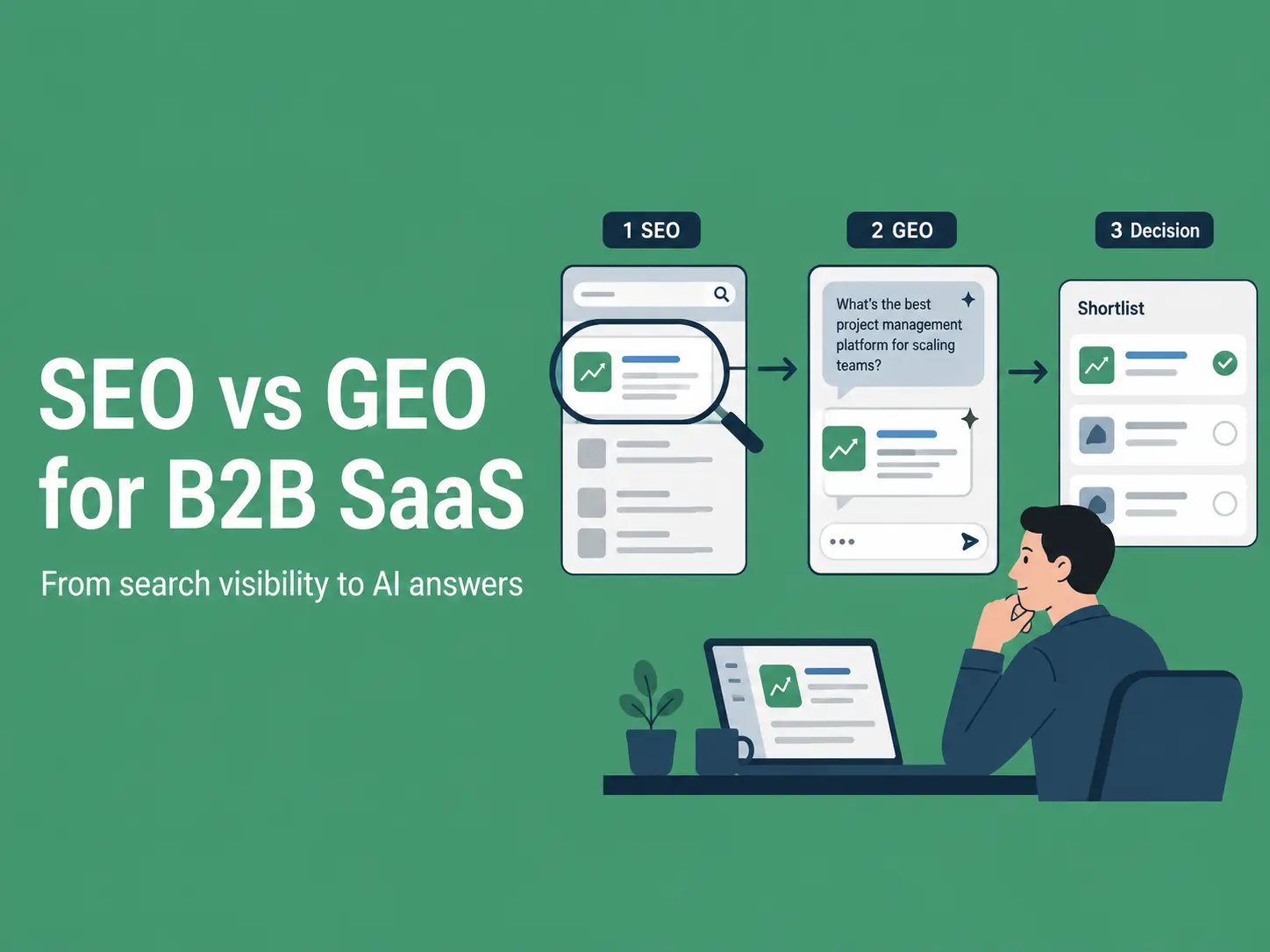
SEO and GEO influence different parts of B2B SaaS discovery. SEO aims to earn visibility in ranked search results, while Generative Engine Optimisation focuses on whether a SaaS brand is mentioned, cited or represented accurately inside an AI-generated answer.
SaaS companies need both because buyers now move between search engines, AI assistants, review platforms and vendor websites when evaluating software.
Key Takeaways
SEO supports discovery through crawling, indexing, rankings and organic traffic.
GEO supports answer visibility through mentions, citations and accurate brand representation.
AI is changing software research, but it has not made technical SEO obsolete.
GEO needs broader measurement, including prompt coverage, cited pages and answer accuracy.
The right investment split depends on a company’s current search foundations and buyer behaviour.
Why Does AI Search Matter for B2B SaaS Buyers?
AI search can influence which software providers enter a buyer’s shortlist before they visit a vendor website.
B2B software research often begins with a problem rather than a product name. Buyers may ask how to automate a workflow, which tools integrate with their existing platform or which vendors suit their company size.
AI-generated answers can combine category education, product recommendations and comparison criteria in one response, compressing several traditional research steps.
G2’s 2026 Buyer Behavior Report found that eight in ten buyers use AI search to make software research more efficient. But, buyers still rely on search engines, review platforms and vendor websites to validate recommendations.
A SaaS company may rank well for a category keyword but remain absent from AI-generated comparisons. Another may appear because trusted third-party sources describe it clearly, even if its organic rankings are less established.
The challenge is therefore not choosing one discovery channel, but making the company understandable and credible across the entire research journey.
SEO vs GEO: What Does Each Optimise?
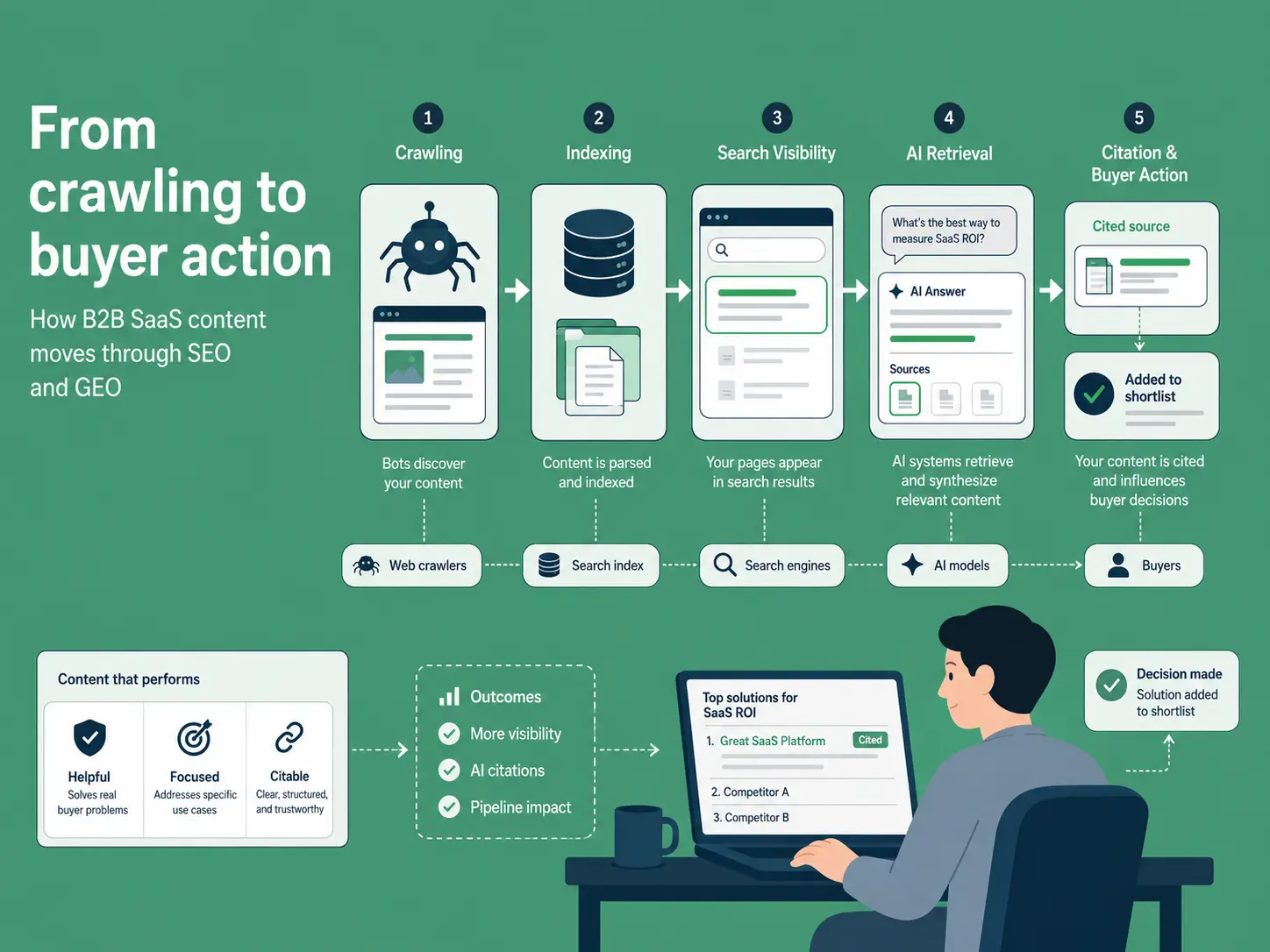
SEO improves a website’s ability to be crawled, indexed, understood and surfaced in search results. It covers areas such as technical SEO, site architecture, search-intent research, content creation, internal linking, digital PR and performance analysis.
GEO focuses on how a brand or source appears inside generated answers. That can involve being cited as a source, included in a comparison, mentioned as a relevant provider or represented accurately within an explanation.
Search engines usually present several results and allow the user to choose which pages to visit. A generative system can retrieve information from multiple sources and combine it into one response.
Area
SEO
GEO
Primary outcome
Visibility in search results
Visibility inside generated answers
Main interface
Ranked links and search features
Synthesised answers and citations
Unit of analysis
Query, keyword and landing page
Prompt cluster, answer and cited source
Technical focus
Crawling, indexing and architecture
Retrieval access and entity clarity
Content focus
Search intent and relevance
Direct answers, evidence and context
Authority focus
Backlinks and topical authority
Credibility and third-party corroboration
Core metrics
Rankings, traffic and conversions
Mentions, citations, accuracy and AI referrals
Main risk
Ranking without commercial impact
Being omitted or represented inaccurately
SEO helps a SaaS company become discoverable while GEO helps its information become retrievable, attributable and accurately represented inside AI-generated answers.
A clear, technically accessible and well-supported product page can perform in search while also giving generative systems useful information to retrieve.
GEO does not remove the need for SEO but it adds new questions about how information is selected, combined and presented.
Why Does SEO Still Matter in AI Search?
GEO cannot compensate for content that search and retrieval systems cannot reliably access or understand.
Google official guidance states that its generative AI features are rooted in its core Search ranking and quality systems. Pages still need to be indexed, eligible to appear with a snippet and accessible to Google’s crawlers.
The following established SEO practices stay relevant to both traditional and AI-supported discovery:
Clear architecture: Product, use-case, integration and comparison pages should be connected through logical navigation and internal links.
Reliable indexing: Canonicals, sitemaps and robots directives should point search engines towards the correct pages.
Descriptive structure: Titles and headings should state what the page covers instead of relying on vague marketing language.
Original information: Product evidence, practical examples and expert analysis are harder to replace than generic summaries.
Consistent details: Product names, capabilities, pricing models and company information should agree across the website.
Accessible content: Important information should appear in the rendered page rather than depend on broken scripts or inaccessible interactions.
These fundamentals reflect the broader relationship between SEO and business visibility: even a strong product can remain difficult to find when its website structure, content and technical performance are weak. Strong SEO does not guarantee an AI citation but it does create the conditions in which content can be discovered and assessed.
What Does GEO Add for B2B SaaS Companies?
GEO adds prompt-level research, citation monitoring and brand-representation checks to an existing organic growth programme.
Map Prompt Clusters, Not Isolated Keywords
Buyers can express the same software need in several ways: one might search for “subscription billing software” or “ask an AI assistant which billing platforms support usage-based pricing”. A useful GEO programme groups these questions by underlying intent rather than treating every wording variation as a separate content target.
Common SaaS prompt clusters include:
Best software for a specific workflow
Alternatives to an established product
Product A versus Product B
Tools for a company size or sector
Platforms that integrate with an existing technology
Products that meet a security or compliance requirement
The team can then review which brands are mentioned, which sources are cited and what evidence appears to influence the answer.
Make Product Information Easy to Interpret
Clear product information helps both buyers and retrieval systems. A product page should explain what the software does, who it serves and where it fits within a workflow. It should also make important limitations visible rather than burying them beneath broad claims.
Useful details include:
Supported use cases
Integrations and technical requirements
Pricing context
Implementation expectations
Security and compliance information
Customer examples
Clear comparison criteria
Build Third-Party Corroboration
A SaaS company cannot establish its market position entirely through claims on its own website. AI-generated answers may draw on reviews, partner directories, trade publications, customer case studies and expert discussions. Consistent external evidence can help confirm what the product does and which customers it suits.
Useful corroboration might include a detailed customer review, an integration listing from a recognised partner or an editorial comparison that evaluates products against clear criteria.
The objective is not to manufacture mentions but to give independent sources accurate, defensible information worth including.
Monitor Accuracy, Not Only Inclusion
A brand mention is not automatically valuable. An AI answer may repeat outdated pricing, confuse two similarly named tools or suggest that a product supports an integration that does not exist. SaaS teams should therefore track accuracy alongside visibility.
This is especially important after a rebrand, acquisition, pricing change or significant product release.
How Does AI Search Change the SaaS Buyer Journey?
AI search can compress discovery, comparison and validation into one conversation, so SaaS content must support more than initial awareness.
Buyer stage
Typical question
SEO priority
GEO priority
Problem discovery
“How can we automate recurring billing?”
Educational guides
Clear, citable explanations
Category research
“Which tools support usage-based billing?”
Category and use-case pages
Accurate category association
Comparison
“Platform A vs Platform B”
Comparison pages
Inclusion in generated comparisons
Validation
“Will this work for a 50-person SaaS?”
Case studies and industry pages
Evidence of customer fit
Purchase
“Which tools should we shortlist?”
Product and pricing pages
Accurate recommendations and citations
This journey shows why broad category content is not enough. A company also needs pages that answer implementation, integration, pricing and suitability questions. Those details reduce uncertainty for the buyer and they also provide clearer evidence when an AI system attempts to distinguish between similar tools.
How Can B2B SaaS Teams Optimise for SEO and GEO Together?
The most efficient approach is one combined workflow; SEO creates the discovery foundation, while GEO expands the research, evidence and measurement around it.
1. Map Search and Prompt Demand
Combine conventional keyword research with the questions buyers ask in natural language.
Include educational queries, product comparisons, alternatives, integration questions and purchase-focused prompts. Do not assume search volume alone reflects commercial importance.
2. Group Demand by Buying Stage
Organise questions according to the decision they support.
A problem-solving query belongs near the start of the journey. A request for alternatives or implementation requirements indicates a buyer who may be closer to creating a shortlist.
3. Audit Existing Visibility
Review:
Search rankings
AI mentions
Cited sources
Competitor inclusion
Brand accuracy
Pages receiving organic and AI referral traffic
This establishes whether the problem is technical access, weak content, limited authority or poor representation. For teams that need support with this, AI SEO agencies can help align SEO and GEO efforts.
4. Identify the Information Gap
Find something useful that existing results do not explain well.
That might be a product limitation, implementation checklist, original benchmark, integration diagram or detailed customer example.
Repeating the same high-level advice as every competitor gives buyers little reason to trust or remember the page.
5. Create Answer-First Content
Answer the central question early, then expand with evidence, context, limitations and practical steps.
For example, a page targeting recurring billing software could begin by defining which billing model suits which SaaS business. It could then compare fixed subscriptions, tiered pricing and usage-based billing against implementation complexity, reporting needs and revenue predictability.
6. Strengthen External Evidence
Support owned content with credible reviews, partner references, expert commentary and customer proof.
The external evidence should agree with the product’s current positioning. Conflicting descriptions make it harder for buyers and AI systems to determine which claims are reliable.
7. Measure and Refresh
Track rankings and traffic alongside prompt coverage, citations, brand accuracy and commercial outcomes.
Update content when the product, market or cited-source landscape changes. SaaS pages become less useful when integrations, pricing and feature information are allowed to drift out of date.
How Should B2B SaaS Companies Measure GEO?
GEO should be measured through a stable set of prompts and business outcomes, not a screenshot of one favourable answer.
A practical scorecard includes:
Mention rate: The percentage of tracked prompts that mention the company.
Citation frequency: How often the company’s website appears as a source.
Cited-page distribution: Which product, comparison, case-study or research pages receive citations.
Prompt coverage: Visibility across educational, category, comparison and purchase questions.
Answer accuracy: Whether product details and positioning are correct.
Competitor share: How often competitors appear for the same prompt set.
Citation context: Whether a citation supports the main recommendation or a minor detail.
AI referral traffic: Visits from identifiable AI platforms.
Commercial impact: Sign-ups, demos, enquiries and assisted conversions.
What those metrics look like in practice: a B2B management software and technology solutions provider running a structured GEO programme recorded a Citation Rate of 46.1% across 2,959 prompt runs in a 31-day window, with a Mention Rate of 34.2% and a Weighted Share of Voice of 26.5%.
These results show that a structured GEO programme can deliver measurable gains in citations, brand mentions and AI share of voice.
What Are the Most Common SEO and GEO Mistakes?
Mistake
Why it causes problems
Treating SEO as obsolete
GEO cannot repair blocked pages, poor indexing or weak architecture.
Writing only for AI
Mechanical summaries and repetitive headings reduce value for human readers.
Testing one prompt
One generated answer does not establish a reliable trend.
Counting every citation as a win
A citation may be inaccurate, peripheral or commercially irrelevant.
Ignoring third-party sources
SaaS buyers and AI systems both use external evidence to validate claims.
Separating SEO and GEO completely
Isolated workflows duplicate research and create inconsistent messaging.
Publishing generic content
Material without original evidence or insight is easy to replace.
Conclusion
AI search changes where B2B SaaS visibility is earned and how it should be measured, but it does not remove the need for SEO.
SEO provides the technical, content and authority foundations that make a company discoverable. GEO adds prompt research, citation monitoring, external corroboration and checks on how the product is represented inside generated answers.
The most practical starting point is a combined visibility audit. Review technical SEO, organic rankings, AI mentions, citations, answer accuracy and commercial outcomes. The results will show whether the next priority is fixing the foundation or expanding visibility across AI-supported buying journeys.
FAQs
Is GEO replacing SEO for B2B SaaS?
No. GEO extends visibility into AI-generated answers, while SEO continues to support crawling, indexing, relevance and search discovery. SaaS companies need both disciplines, although the balance of investment may change.
Can a SaaS page rank well but receive no AI citations?
Yes. Search rankings and AI citations are different outcomes. A page may rank strongly while other sources are chosen to support a generated answer.
Which SaaS pages are most useful for GEO?
Useful formats include detailed product pages, comparisons, integration guides, original research, case studies and use-case pages. The strongest pages provide clear information and credible supporting evidence.
How often should GEO visibility be measured?
Track a stable prompt set regularly, such as monthly, and conduct deeper quarterly reviews. Testing the same questions over time makes patterns easier to distinguish from normal answer variation.
Does structured data guarantee AI citations?
No. Structured data can support search understanding and eligibility for certain search features, but it does not guarantee retrieval, inclusion or citation in an AI-generated answer.
Running a business is already demanding enough without worrying about server maintenance, security patches, website migrations, or troubleshooting technical issues. Yet many business owners end up spending valuable time dealing with hosting problems that should never have been their responsibility.
Managed hosting was designed to solve exactly that problem.
Instead of requiring customers to manage servers, install software, monitor security, optimize performance, or recover from failures, managed hosting providers handle these tasks behind the scenes so business owners can focus on growing their companies.
The best managed hosting providers don’t just offer reliable infrastructure, they simplify every aspect of website management through intuitive control panels, proactive support, automatic security, free migrations, backups, and expert assistance whenever it’s needed.
In this guide, we ranked the best managed hosting providers for non-technical business owners based on ease of use, customer support, managed services, security, scalability, and overall value.
How We Evaluated Managed Hosting for Business Owners
Choosing hosting as a non-technical user isn’t about comparing CPU benchmarks or Linux distributions. It’s about finding a provider that removes complexity while delivering dependable performance.
We evaluated every provider using the following criteria.
Factor
Why It Matters
Ease of Setup
Get online quickly without technical knowledge
Free Website Migration
Move your website without hiring a developer
User-Friendly Control Panel
Manage your hosting with minimal learning
Security
Automatic protection against malware and attacks
Backups
Easy recovery if something goes wrong
Managed Maintenance
Server updates handled for you
Customer Support
Real experts available when needed
Scalability
Upgrade resources without rebuilding your website
Transparent Pricing
No unexpected fees or expensive add-ons
Best Managed Hosting for Non-Technical Business Owners
Rank
Hosting Provider
Best For
1
ScalaHosting
Best Overall
2
SiteGround
Best for WordPress
3
Hostinger
Best Budget Option
4
Cloudways
Best for Growing Businesses
5
Kinsta
Best Premium WordPress Hosting
6
WP Engine
Best Enterprise WordPress
7
Bluehost
Best for Beginners
8
Kamatera
Best Cloud Flexibility
9
GoDaddy
Best Existing Ecosystem
10
HostGator
Best Entry-Level VPS
#1 ScalaHosting – Best Overall Managed Hosting for Non-Technical Business Owners
Overall Rating: 9.9/10
Best for
Small businesses
Ecommerce stores
Agencies
Service businesses
Entrepreneurs
Growing companies
Running a successful business requires focusing on customers, sales, and operations—not learning how to manage servers.
That’s why ScalaHosting ranks first.
Its Managed Cloud VPS platform removes nearly all of the technical responsibilities that usually come with hosting a website. Instead of configuring servers, worrying about software updates, installing security tools, or troubleshooting performance issues, business owners receive a fully managed environment where experienced engineers handle the technical work.
Whether you’re launching your first website or migrating an established business, ScalaHosting makes the entire process straightforward.
Why It’s Perfect for Non-Technical Users
One of the biggest advantages is that nearly everything comes included.
This means business owners spend less time managing hosting and more time growing their companies.
SPanel Makes Website Management Simple
Traditional control panels often overwhelm beginners with dozens of technical settings.
ScalaHosting developed SPanel specifically to simplify server management without sacrificing functionality.
Business owners can easily:
Manage websites
Create email accounts
Restore backups
Install WordPress
Monitor resources
Manage domains
Enable Redis
View security alerts
All from a clean, intuitive interface.
Because SPanel is included free with every managed Cloud VPS, customers also avoid expensive control panel licensing fees.
Free Website Migration
Migrating a website is one of the biggest concerns for non-technical users.
ScalaHosting removes that barrier completely.
Its migration team performs professional migrations at no additional cost regardless of:
Website size
Number of websites
Control panel
Previous hosting provider
CMS platform
Even email accounts can be migrated by the support team, eliminating one of the most stressful parts of changing hosts.
Support That Solves Problems
Many hosting companies advertise 24/7 support.
ScalaHosting’s engineers go much further.
Instead of simply pointing customers toward documentation, they actively:
Configure servers
Troubleshoot website issues
Optimize performance
Handle migrations
Improve security
Fine-tune hosting environments
Real customer experiences reinforce this approach.
ParcelUp, a custom ecommerce platform operating internationally, described ScalaHosting’s support as the best they had experienced in more than fifteen years of working with hosting providers after engineers customized Apache, tuned PHP-FPM, configured remote backups, and optimized the server specifically for their application.
For business owners without an internal IT department, having access to experienced engineers can be invaluable.
Security Without Extra Work
Cybersecurity can quickly become overwhelming for small businesses.
ScalaHosting handles much of that complexity automatically.
Features such as:
SShield AI malware protection
Daily backups
IP blacklist monitoring
Free SSL certificates
Managed server updates
are included rather than sold as optional add-ons.
This significantly reduces both maintenance work and security risks.
Why ScalaHosting Ranks First
ScalaHosting removes nearly every technical obstacle that business owners typically face.
Its managed infrastructure, expert support, intuitive control panel, built-in security, free migrations, and transparent pricing create one of the easiest hosting experiences available today.
For businesses that want reliable hosting without becoming server administrators, ScalaHosting is our top recommendation.
#2 SiteGround – Best Managed WordPress Hosting for Small Businesses
Overall Rating: 9.4/10
Best for
WordPress websites
Local businesses
Bloggers
Small ecommerce stores
SiteGround has earned a strong reputation for making WordPress hosting approachable.
Its custom Site Tools control panel is considerably easier to navigate than traditional cPanel installations, and many common tasks can be completed with just a few clicks.
The company also manages software updates, caching, security, and backups, helping business owners avoid many routine maintenance tasks.
For businesses running standard WordPress websites, SiteGround offers an excellent balance between simplicity and performance.
What Makes SiteGround Easy to Use
Business owners benefit from:
Guided WordPress setup
Automatic updates
Built-in caching
Daily backups
Free SSL certificates
User-friendly dashboard
Helpful documentation
These features reduce the amount of technical knowledge required to keep a website online.
Areas Where It Falls Behind
While SiteGround is beginner-friendly, several useful services require additional cost or involve limitations.
Professional website migrations are limited, additional migrations incur fees, and several advanced security tools are available only as paid add-ons.
The platform also offers less flexibility as businesses grow beyond standard WordPress hosting.
Why ScalaHosting Ranks Higher
SiteGround provides an excellent managed WordPress experience.
ScalaHosting builds upon that foundation by including unlimited professional migrations, free email migration, integrated malware protection, Redis Manager, OpenLiteSpeed support, guaranteed cloud resources, and a more flexible managed Cloud VPS platform that can grow alongside the business.
#3 Hostinger – Best Budget-Friendly Managed Hosting
Overall Rating: 9.2/10
Best for
Startups
Small businesses
Freelancers
First-time website owners
Hostinger has become one of the most popular hosting providers by combining affordable pricing with an easy-to-use interface.
Its custom hPanel simplifies many hosting tasks that previously required technical knowledge, making it attractive for entrepreneurs launching their first website.
Customers can install WordPress quickly, manage domains, configure email, and monitor their hosting account through an intuitive dashboard.
Automatic updates, built-in security features, and helpful tutorials make the learning curve relatively small.
What Makes Hostinger Beginner-Friendly
Clean custom dashboard
Easy WordPress installation
Automatic updates
AI website tools
Affordable pricing
Helpful knowledge base
Responsive support
For businesses on a tight budget, these features provide excellent value.
Areas Where It Falls Behind
As websites become more demanding, businesses may require stronger managed services, more advanced server optimization, and greater scalability than entry-level hosting environments typically provide.
Some advanced performance features also require additional manual configuration.
Why ScalaHosting Ranks Higher
Hostinger is an excellent choice for new website owners.
ScalaHosting offers a more complete managed experience through Cloud VPS hosting, unlimited migrations, managed optimization, integrated Redis management, proactive security, and infrastructure capable of supporting businesses as they continue growing.
#4 Cloudways – Best Managed Hosting for Growing Businesses
Overall Rating: 9.0/10
Best for
Growing businesses
Agencies
Developers working with clients
Businesses expecting rapid growth
Cloudways offers a managed cloud platform built on top of providers like DigitalOcean, AWS, Google Cloud, Vultr, and Linode.
Rather than managing physical servers yourself, Cloudways simplifies deployment while still giving businesses access to enterprise cloud infrastructure.
For companies that expect to grow quickly, this flexibility can be attractive.
Its dashboard is modern, backups are automated, and many server management tasks are handled automatically.
What Makes Cloudways Easy to Use
Business owners benefit from:
One-click application deployment
Automatic backups
Managed server maintenance
Cloud scaling
Built-in monitoring
Multiple cloud providers
Simple dashboard
These features remove much of the complexity normally associated with cloud hosting.
Areas Where It Falls Behind
Cloudways still assumes a higher level of technical knowledge than many traditional managed hosting providers.
Choosing cloud providers, server sizes, caching options, and infrastructure settings can become confusing for business owners who simply want their website to work.
Support also focuses more on infrastructure than complete hands-on management.
Why ScalaHosting Ranks Higher
Cloudways simplifies cloud hosting, but ScalaHosting simplifies the entire hosting experience.
Business owners don’t need to choose between infrastructure providers or learn cloud terminology. Everything from migrations and security to optimization and server maintenance is handled by ScalaHosting’s engineering team.
#5 Kinsta – Best Premium Managed WordPress Hosting
Overall Rating: 8.9/10
Best for
Professional WordPress websites
Agencies
Online publishers
Established businesses
Kinsta has built its reputation around premium managed WordPress hosting.
Its MyKinsta dashboard is polished, intuitive, and easy to navigate even for users without technical backgrounds.
Routine maintenance, security monitoring, backups, and performance optimization are handled automatically, allowing business owners to concentrate on content and customers instead of server administration.
What Makes Kinsta Easy to Use
Extremely clean dashboard
Automatic backups
Managed WordPress updates
Built-in caching
Excellent support
Strong security
Google Cloud infrastructure
For WordPress-only businesses, the platform delivers an excellent user experience.
Areas Where It Falls Behind
Kinsta focuses exclusively on WordPress.
Businesses that later need custom applications, ecommerce platforms beyond WordPress, or more advanced server flexibility may eventually need to migrate again.
Why ScalaHosting Ranks Higher
ScalaHosting offers the same beginner-friendly managed experience while supporting virtually any PHP application, custom website, or ecommerce platform—not just WordPress.
That flexibility makes it a better long-term solution for growing businesses.
#6 WP Engine – Best Enterprise WordPress Hosting
Overall Rating: 8.8/10
Best for
Corporate websites
Marketing teams
Enterprise WordPress
Large publishers
WP Engine specializes in managed WordPress hosting for businesses that require reliability and premium support.
Its platform removes much of the technical complexity through automatic updates, daily backups, security monitoring, and optimized hosting environments.
Business owners who rely entirely on WordPress can confidently operate their websites without worrying about server management.
What Makes WP Engine Easy to Use
Automatic WordPress updates
Daily backups
Staging environments
Performance optimization
Strong security
Excellent documentation
Managed maintenance
These features allow non-technical teams to focus on publishing content instead of maintaining infrastructure.
Areas Where It Falls Behind
WP Engine is intentionally designed around WordPress.
Businesses that expand into custom software or require complete server flexibility may eventually find the platform limiting.
Why ScalaHosting Ranks Higher
ScalaHosting provides the same managed convenience while supporting a much wider range of applications, giving business owners room to grow without changing hosting providers.
#7 Bluehost – Best Managed Hosting for First-Time Website Owners
Overall Rating: 8.6/10
Best for
New businesses
Personal brands
Small business websites
First-time entrepreneurs
Bluehost has helped millions of users launch their first websites, making it one of the most recognizable names in the hosting industry.
Its platform is designed to minimize complexity through guided setup, WordPress integration, and beginner-friendly tools.
For business owners creating their first online presence, Bluehost offers a gentle learning curve without requiring previous hosting experience.
What Makes Bluehost Easy to Use
Business owners benefit from:
Guided website setup
WordPress pre-installation
User-friendly dashboard
One-click application installs
Automatic updates
Knowledge base and tutorials
24/7 customer support
These features make it possible to launch a website with very little technical knowledge.
Areas Where It Falls Behind
As businesses grow, Bluehost becomes less comprehensive than fully managed cloud hosting providers.
Several advanced management features require additional services, while server optimization and performance tuning are more limited than on managed Cloud VPS platforms.
Why ScalaHosting Ranks Higher
Bluehost makes website creation simple.
ScalaHosting goes further by handling server optimization, security, migrations, backups, and infrastructure management while providing a hosting environment capable of supporting long-term business growth.
#8 Kamatera – Best for Businesses That Need Maximum Flexibility
Overall Rating: 8.4/10
Best for
Businesses with IT consultants
Custom applications
SaaS companies
Rapidly growing organizations
Kamatera offers one of the most flexible cloud infrastructures available.
Customers can customize nearly every aspect of their virtual servers, including CPU, RAM, storage, operating systems, networking, and cloud resources.
For businesses working with developers or IT professionals, this flexibility is a significant advantage.
What Makes Kamatera Attractive
Highly customizable servers
Global cloud infrastructure
Flexible resource allocation
Enterprise scalability
Wide operating system support
These capabilities allow businesses to build infrastructure that precisely matches their requirements.
Areas Where It Falls Behind
For non-technical business owners, all of this flexibility can quickly become overwhelming.
Choosing server configurations, managing infrastructure, and understanding cloud architecture often requires technical expertise or external assistance.
Many managed services are also optional rather than included.
Why ScalaHosting Ranks Higher
ScalaHosting delivers cloud scalability without requiring customers to become infrastructure experts.
Business owners receive the benefits of managed cloud hosting while experienced engineers handle the technical work behind the scenes.
#9 GoDaddy – Best for Businesses Already Using GoDaddy Services
Overall Rating: 8.2/10
Best for
Existing GoDaddy customers
Small businesses
Local service companies
Many businesses already use GoDaddy for domain registration, email, or website builders.
Keeping hosting within the same ecosystem can simplify account management, billing, and support.
The platform offers guided setup and familiar interfaces that many first-time users appreciate.
What Makes GoDaddy Easy to Use
Simple onboarding
Unified account management
Website builder integration
Domain management
Large knowledge base
Multiple support channels
For businesses already invested in GoDaddy’s ecosystem, managing services from a single account can be convenient.
Areas Where It Falls Behind
Essential features such as migrations, backup restores, advanced security, SSL renewals, and certain control panel options may involve additional costs depending on the hosting plan. The platform also relies heavily on upsells for features that many managed hosting providers include by default.
Why ScalaHosting Ranks Higher
ScalaHosting includes professional migrations, backups, security tools, SSL certificates, SPanel, and managed services without requiring customers to purchase multiple add-ons.
Its transparent pricing also makes long-term budgeting significantly easier for small businesses.
#10 HostGator – Best Entry-Level Managed VPS Hosting
Overall Rating: 8.1/10
Best for
Small businesses
Personal websites
Growing blogs
Entry-level VPS users
HostGator offers dependable hosting with a familiar interface and helpful customer support.
Its managed hosting products simplify many administrative tasks while allowing businesses to move beyond shared hosting when additional resources are needed.
The platform is suitable for businesses looking for an affordable introduction to VPS hosting.
What Makes HostGator Easy to Use
Simple account dashboard
One-click installations
Website management tools
Automatic updates
Helpful support
Easy domain management
These features allow new users to become comfortable managing their websites without extensive technical knowledge.
Areas Where It Falls Behind
Compared to modern managed Cloud VPS platforms, HostGator offers fewer built-in optimization tools and less proactive infrastructure management.
Advanced security, performance tuning, and scalability often require additional configuration or higher-tier services.
Why ScalaHosting Ranks Higher
HostGator provides a solid entry point into managed hosting.
ScalaHosting delivers a significantly more complete experience by combining managed Cloud VPS infrastructure, proactive optimization, integrated security, free migrations, intuitive management tools, and expert engineers who handle the technical work for customers.
What Non-Technical Business Owners Should Look for in Managed Hosting
Not every managed hosting provider offers the same level of service. While many advertise “managed hosting,” the actual experience can vary significantly.
Before choosing a hosting provider, consider these essential features.
Free Professional Website Migration
Moving a website shouldn’t require hiring a developer.
The best managed hosts include professional migration services that transfer your website, databases, emails, and configurations with little to no downtime.
Proactive Security
Security should work in the background.
Look for providers that include:
Malware protection
Firewall management
Free SSL certificates
Daily backups
Security monitoring
Automatic updates
These features reduce the risk of attacks without requiring constant attention.
Easy-to-Use Control Panel
A good control panel should simplify website management.
Tasks like creating email accounts, restoring backups, managing domains, and installing WordPress should take only a few clicks.
If basic tasks require technical documentation, the platform probably isn’t designed for business owners.
Real Human Support
Even the best hosting occasionally requires assistance.
Choose a provider where experienced technicians can solve problems instead of simply directing you to knowledge base articles or automated chatbots.
Fast, knowledgeable support often makes the biggest difference during emergencies.
Room to Grow
Your hosting should grow with your business.
Whether traffic doubles next month or your online store expands significantly over the next few years, your hosting provider should allow you to scale resources without requiring a complete migration.
Signs You’re Using the Wrong Hosting Provider
Many business owners don’t realize their hosting is holding them back until problems become frequent.
Here are some common warning signs.
You have to hire a developer for basic hosting tasks.
Website migrations cost extra.
Security features require paid add-ons.
Backup restores involve additional fees.
Support sends generic responses instead of solving problems.
Your website slows down as traffic increases.
Upgrading resources requires moving to an entirely new server.
You spend more time maintaining your hosting than running your business.
If several of these sound familiar, switching to a fully managed hosting provider can save both time and money.
Frequently Asked Questions
What is managed hosting?
Managed hosting is a service where the hosting provider handles server maintenance, security updates, backups, monitoring, and technical administration on your behalf.
Is managed hosting worth it for small businesses?
Yes. For most small businesses, the time saved by not managing servers easily outweighs the additional cost of managed hosting.
Do I need technical knowledge to use managed hosting?
No. Managed hosting is specifically designed for users without system administration experience.
Can I migrate my existing website?
Most managed hosting providers offer migration services. Some perform the migration for you, while others provide migration tools.
Does managed hosting include security?
Most reputable providers include SSL certificates, firewall protection, malware scanning, and automatic security updates as part of their managed service.
Will managed hosting improve website performance?
In many cases, yes. Managed providers optimize server configurations, caching, databases, and infrastructure to improve loading speeds and overall reliability.
Is managed hosting only for WordPress?
No. While many providers specialize in WordPress, others support WooCommerce, Magento, Laravel, Joomla, Drupal, custom PHP applications, and many other platforms.
Can managed hosting scale as my business grows?
Yes. Most managed cloud hosting providers allow businesses to increase CPU, RAM, storage, and other resources without rebuilding their websites.
What makes ScalaHosting the best choice for non-technical business owners?
ScalaHosting combines fully managed Cloud VPS hosting, an intuitive control panel, unlimited free website migrations, built-in security, daily backups, expert 24/7 support, and transparent pricing into a platform designed to eliminate technical complexity. Business owners can focus on running their companies while experienced engineers manage the infrastructure.
Final Verdict
Choosing the right hosting provider isn’t about finding the cheapest plan, it’s about choosing one that lets you focus on your business instead of your server.
For non-technical business owners, managed hosting provides peace of mind by handling updates, security, maintenance, backups, and performance optimization automatically.
While providers like SiteGround, Hostinger, Cloudways, and Kinsta all offer strong managed hosting solutions, ScalaHosting delivers the most complete package for businesses that want simplicity without sacrificing performance.
Its fully managed Cloud VPS platform, intuitive SPanel control panel, unlimited free migrations, built-in security tools, expert human support, and scalable infrastructure remove nearly every technical barrier that business owners typically encounter.
If your goal is to spend less time managing hosting and more time growing your business, ScalaHosting is our top recommendation for 2026.
If you’ve searched for “business FTAsiaStock,” you’ve probably landed on a mix of confusing results. Some pages call it a business news outlet. Others describe it as a crypto trading platform. A few treat it like a general finance blog.
That confusion is understandable because FTAsiaStock isn’t just one thing. It’s a name attached to at least two different projects: a finance and business content site (FTAsiaStock Technology, published at ftasiastock.com) and a separately marketed crypto trading platform known as FTAsiaStock Crypto. This guide untangles both, explains what each one actually offers, and gives you a clear overview of whether either is worth your time.
If you’re interested in exploring more business and finance resources, you can also read our guide on RobTheCoins Business, which covers business insights, market trends, and practical financial information to help you make more informed decisions.
What Is Business FTAsiaStock?
Definition
FTAsiaStock is the finance-focused part of the FTAsia network and operates through the website ftasiastock.com. The platform publishes business news, stock market updates, investing guides, and technology-related content, with a particular focus on Asian markets. According to the website, its goal is to help readers make more informed investment decisions by providing educational articles and market insights.
Rather than acting as a brokerage or a provider of real-time financial data, FTAsiaStock positions itself as an informational resource for investors, business owners, and anyone interested in understanding financial markets. If you’re also looking for practical advice on growing and managing a company, explore our Local Business guide for insights into business operations, marketing strategies, and long-term growth.
Purpose
The stated goal, according to the site’s own about page, is to explain investing and financial markets in plain language for readers who find traditional financial media too technical. It publishes articles on stocks, banking, business management, and fintech, written from the perspective of a self-described financial analyst with an MBA in finance and around nine years of market research experience.
Who Uses It
The people who will like this are investors who are just starting out and want to learn the basics. This also includes business owners who want to know what is happening in the market. Students who are studying finance will also find this helpful. Then there are people who just want to read about business in general and do not need all the details that a professional trader would need.
This is for people who’re at the beginning of learning about money and business, not for the experts who work with big companies. The main goal is to help investors and other people, like small business owners and students who are studying finance.
Company Background
Public information about FTAsiaStocks ownership and the way the company is structured is not available. The website calls itself part of the “FTAsia network,” which’s a group of websites that each focus on a different area of finance. There is no proof of the company’s registration, no public list of the people in charge and no record of where the money comes from outside of what the website says.
This lack of information is important. Known websites like Bloomberg and Reuters have many years of public history clear leaders and are watched over by rules that apply to their work. FTAsiaStock is a brand that has only one person listed as the writer and no outside proof that what it says is true. This does not mean it is not trustworthy. It does mean that people who read it should think of it as a place for opinions and learning, not as a source that has been checked and approved.
How Does FTAsiaStock Business News Analyze Market Trends?
FTAsiaStock Business News provides simple articles about how the markets are changing. It looks at business news, economic changes, what’s happening in industries and how companies are doing. By giving instant trading advice or special research the website explains what is affecting the financial markets. It also shows how these changes might impact businesses and people who invest money.
1. Business and Economic News
The website tracks business events, company news and economic changes that can affect how people feel about the market. Issues, like rising prices, loan costs rules made by the government and trade between countries are usually talked about to help people see the things shaping the money world.
2. Industry and Sector Analysis
FTAsiaStock looks at what’s happening in different industries, like technology and healthcare. The platform also looks at finance and manufacturing and energy. It helps people see which industries are doing well, which ones are having problems and which ones have people wanting things. FTAsiaStock does this by looking at what’s happening in each industry. This way readers can see what is going on in the technology industry, the healthcare industry, the finance industry, the manufacturing industry and the energy industry.
3. Company Performance
Articles may review company earnings, revenue growth, mergers and acquisitions, product launches, and leadership changes to explain how business performance can impact stock prices and investor confidence. These insights are presented in a simplified format that is accessible to readers without a strong financial background.
4. Financial and Market Indicators
FTAsiaStock talks about things that affect money like inflation, interest rates, how fast a country’s economy is growing, how many people do not have jobs and how well companies are doing with their money.
When you know about these things you can see how the economy affects what happens in the market and what people decide to do with their investments. FTAsiaStock is helpful because it explains things, like inflation and interest rates and GDP growth and unemployment data and corporate earnings in a way that’s easy to understand.
5. Technology and Innovation Trends
The website often talks about technologies, like artificial intelligence, fintech, blockchain and digital payments. Because technology changes and affects how businesses grow and how people invest these subjects are looked at along with business and financial news. The topics of intelligence, fintech, blockchain and digital payments are covered in detail. Technology. Affects how businesses grow and how people invest. The website often talks about technologies. Business and financial news are also discussed.
6. Educational Market Commentary
FTAsiaStock does not tell people what to buy or sell. Instead FTAsiaStock talks about what’s happening in the market and why it is important. They explain how certain events can affect parts of the market. This way people can learn more about how the market works. FTAsiaStock wants people to understand what is going on and then do their research using trusted financial websites before they make any decisions about their money. FTAsiaStock is about helping people learn about the market and make good choices about their investments.
How Business FTAsiaStock Works
1. Business News
FTAsiaStock is a place where people can find out what is going on in the world of business. They write about things like what’s happening with companies and what is new in different industries. They also talk about events that can affect the economy.
FTAsiaStock likes to focus on what’s happening in Asian markets.. They also like to tell people about big business stories from around the world that can affect investors and companies.
The main goal of FTAsiaStock is to keep people up to date on what’s changing in the markets and what new things are happening in business. They want to help people understand FTAsiaStock and business news without needing to know a lot about finance and FTAsiaStock.
2. Stock Market Coverage
The platform gives us information about what’s happening in the stock market. We can find out about how the market’s doing, how different sectors are performing and what is going on with specific companies. The platform talks about things like technology, healthcare, finance and manufacturing. It also discusses things that affect how people feel about the market.
The platform helps people learn about the market. It is not a place where people can trade stocks in real time. The stock market platform does not give us prices or help us buy and sell stocks. It also does not have tools to help us look at charts and graphs. The platform is for learning about the stock market. It helps us understand the stock market.
3. Investment Research
Business FTAsiaStock has a lot of information that teaches people about the basics of investing. It talks about things like spreading your money around which is called portfolio diversification and investing for a time. It also talks about managing risk and looking at the market to see what is happening. The people who write for FTAsiaStock do not tell you what to invest in.
They do try to help you understand how to make good investment decisions. They want to help you learn about the market and how things that happen in the world can affect the stocks and other things you invest in. This makes FTAsiaStock a great place to learn about money and investing if you are just starting out.
4. Financial Analysis
Some articles explain concepts with simple words making things, like company earnings, revenue growth, profit margins, balance sheets and economic indicators easier to grasp. Of showing complicated analyst reports the platform works on turning hard financial information into easy to understand explanations. This helps people see how businesses are doing and learn what affects the markets.
5. Technology Coverage
Beyond business and investing FTAsiaStock also shares information about technology, which is called fintech. It also covers intelligence, digital payments, blockchain and other new technologies that are changing today’s markets. This technology reporting looks at how new ideas are changing businesses, making financial services better and opening up new chances to invest. The website’s attention to blockchain and digital money also connects with its content about crypto. This includes topics about FTAsiaStock Crypto and what is happening in the world of cryptocurrency.
Key Features of Business FTAsiaStock
Regularly published business and finance articles
Beginner-friendly explanations of investing terms and concepts
Coverage of Asian market trends alongside global business news
Fintech and technology reporting, including blockchain topics
Educational framing rather than real-time trading tools
Unlike a stock screener or a trading terminal, there’s no interactive dashboard, no live price feed, and no account-based portfolio tracker built into the core FTAsiaStock Technology site. It functions as a media and education property.
Types of Information Available
Readers can expect to find information in different areas. There will be updates about the stock market. There will be news about the economy. There will be advice about how to manage a business. There will be analysis about parts of the market. There will be information about technology and financial technology.
There will also be some coverage of cryptocurrency. The cryptocurrency part is important enough to mention on its own. A related brand called FTAsiaStock Crypto has been looked at by websites that focus on cryptocurrency. This product is a mix of types of trading. It combines assets with something similar to stocks.
Reviews of this product including ones from websites that teach about cryptocurrency say that it is not clear what the ownership is. It is also not clear if the product follows the rules. Anyone thinking about using this product should be just as careful as they would be, with any cryptocurrency project.
Benefits for Investors
Business FTAsiaStock is best viewed as a supplementary educational resource rather than a primary investment research platform. It can help readers understand market developments and financial concepts, but investment decisions should always be supported by additional research from established financial data providers. Here are some of the ways it may benefit investors:
1. Better Market Awareness
Regular business and market news can help investors stay informed about economic developments, industry trends, and company updates that may influence financial markets. FTAsiaStock places a strong emphasis on Asian markets while also covering notable global events, giving readers broader exposure to regions that may receive less attention from Western financial media. Keeping up with these developments can help investors better understand the factors driving market sentiment.
2. Investment Research Starting Point
For beginners, the platform offers easy-to-understand explanations of common investing concepts such as diversification, asset allocation, earnings reports, and market cycles. Rather than overwhelming readers with technical analysis, the articles explain financial topics in plain language, making it easier to build a solid knowledge base before exploring more advanced research tools or professional investment resources.
3. Risk Management Understanding
Successful investing isn’t just about finding opportunities, it’s also about managing risk. Some FTAsiaStock articles introduce readers to fundamental risk management concepts, including portfolio diversification, market volatility, and long-term investing strategies. While these discussions are educational rather than comprehensive, they can help new investors develop a more disciplined approach before learning more advanced risk assessment techniques.
4. Portfolio Monitoring Context
Although FTAsiaStock doesn’t provide portfolio tracking, real-time stock monitoring, or brokerage services, its market commentary can offer useful context for understanding changes in your investments. Reading about economic events, industry performance, and company news may help investors better interpret movements in their portfolios and understand how broader market conditions can affect individual stocks and sectors.
Benefits for Businesses
Small business owners and managers might use the site for a few practical reasons. Competitive intelligence articles can flag industry shifts worth watching. Sector-specific pieces help with monitoring trends in a given market. Coverage of cross-border business and finance topics can inform early-stage market expansion research. And general business management content offers strategic planning ideas, though again, these should be treated as a starting point rather than a substitute for professional consulting.
How to Use Business FTAsiaStock Effectively
A workable daily routine looks like this: skim FTAsiaStock alongside two or three other outlets for a broader picture, rather than relying on it alone. For long-term investing, use it to spot themes worth researching further on a platform with verified data, like TradingView or a brokerage’s own research tools. For business strategy work, treat its articles as one input among several, and validate any specific claim against a primary source like a company’s own filings or an industry report before acting on it.
Combining sources is the real skill here. No single site, however good, should be your only research input for money decisions.
Business FTAsiaStock vs Other Financial Platforms
Platform
Best For
Strengths
Weaknesses
FTAsiaStock
Beginner-friendly business and finance reading
Plain-language explanations, Asian market focus
No live data, limited ownership transparency
Bloomberg
Professional-grade market data and news
Deep data coverage, global newsroom, regulatory credibility
Expensive terminal access, steep learning curve
Reuters
Breaking business and financial news
Wire-service speed and accuracy, global sourcing
Less educational content for beginners
Yahoo Finance
Free stock quotes and portfolio tracking
Free access, simple interface, wide coverage
Ads, occasional data delays on free tier
Investing.com
Retail investor research and economic calendars
Broad asset coverage, real-time alerts
Interface can feel cluttered
TradingView
Charting and technical analysis
Powerful charting tools, active trader community
Less focus on written business news
1. Bloomberg
Bloomberg remains the industry benchmark for institutional-grade market data, built on decades of newsroom credibility. See Bloomberg L.P. on Wikipedia for background on the company’s scale and history.
2. Reuters
Reuters is a wire service known for speed and neutrality in breaking financial and business news, widely cited by other outlets.
3. Yahoo Finance
A free, widely used option for stock quotes, basic portfolio tracking, and news aggregation, popular with everyday retail investors.
4. Investing.com
Known for its economic calendar and broad coverage of stocks, commodities, and currencies, useful for tracking scheduled market-moving events.
5. TradingView
A charting platform with a large community of traders sharing technical analysis, often discussed in forums like r/stocks and r/investing on Reddit.
Is Business FTAsiaStock Legitimate?
1. Available Public Information
FTAsiaStock Technology publishes an about page identifying a single author with stated finance credentials, but there’s no independent registry listing or press coverage confirming corporate details beyond the site itself.
2. Transparency
The site is upfront about its editorial mission, which is a positive sign, but it doesn’t publish an editorial team roster, contact address, or clear ownership disclosure that would meet the transparency bar set by established financial media.
3. Editorial Quality
Articles read as accessible and beginner-oriented, generally free of the jargon-heavy style common in professional analyst notes. Whether the underlying analysis holds up to expert scrutiny is harder to verify without named sources or citations within the articles themselves.
4. Strengths
Plain-language writing, consistent publishing schedule, and a focus on markets that get less Western media attention are real positives for a casual reader.
5. Limitations
No live market data, no regulatory disclosures, and limited third-party verification mean it shouldn’t be treated as an authoritative data source for actual trading decisions.
6. Important Considerations
If you’re evaluating the separately branded FTAsiaStock Crypto product, apply extra scrutiny. Crypto review sites covering it have flagged that ownership and regulatory status aren’t fully disclosed, which is a common red flag pattern worth researching thoroughly, including checking community discussion on forums like Reddit, before committing any money.
Advantages and Disadvantages
Pros
Plain-language explanations make it approachable for beginners. It covers Asian markets that get less attention from major Western outlets. Publishing appears consistent, with a steady stream of new articles.
Cons
There’s limited public verification of ownership and credentials. No live trading data or portfolio tools exist on the core site. The overlap with a separately marketed crypto product adds confusion about what “FTAsiaStock” actually refers to.
Common Use Cases
Beginner investors can use it as an entry point before moving to more data-heavy platforms. Active traders will likely find it too general for actual trade decisions and should rely on tools like TradingView or a brokerage terminal instead.
Business owners might scan it for competitive and industry trend awareness. Financial students could use the plain-language explanations as a study aid alongside textbooks. Market researchers may find occasional value in its Asian market focus, though they’ll still need primary data sources to back up any real analysis.
Best Practices
Verify any specific claim, especially numbers or company-specific facts, against a primary source before relying on it. Compare what you read here against at least one established outlet like Reuters or Yahoo Finance. Remember that markets carry real risk, and no article, including this one, should replace your own research or a licensed financial advisor’s guidance. Check publication dates, since fast-moving fintech and crypto coverage can go stale within weeks.
Frequently Asked Questions
1. What is Business FTAsiaStock?
It’s a finance and business content platform, part of the FTAsia network, publishing articles on markets, investing basics, and business trends.
2. Is FTAsiaStock a legitimate platform?
It’s a real, actively publishing content site, but it lacks the third-party verification and regulatory transparency of major financial platforms, so treat it as an educational read rather than a verified data source.
3. Is FTAsiaStock free?
Yes, the articles are publicly accessible without a paywall.
4. Does FTAsiaStock provide stock recommendations?
It publishes general market commentary and educational content rather than personalized buy or sell recommendations.
5. How does FTAsiaStock work?
It operates as an editorial site, publishing regular articles rather than offering live trading tools or account-based portfolio tracking.
6. What markets does FTAsiaStock cover?
Primarily Asian business and stock markets, alongside general global finance and technology topics.
7. Is FTAsiaStock good for beginners?
Yes, its plain-language style is aimed squarely at readers new to investing and business topics.
Conclusion
Business FTAsiaStock can be a useful starting point for readers who want to improve their understanding of business, investing, and Asian market trends without diving into overly technical financial analysis. Its content is generally accessible, making it suitable for beginners, students, and business owners looking for market updates and educational insights. However, it should not be treated as a standalone source for investment research or financial decision-making. Because publicly available information about the platform’s ownership, editorial standards, and regulatory oversight is limited, it’s wise to verify important information through well-established financial resources before acting on it. If you’re exploring FTAsiaStock Crypto or any investment-related offering associated with the platform, conduct additional due diligence and confirm its legitimacy through independent sources. Used alongside trusted platforms and official market data, FTAsiaStock can serve as a helpful supplementary resource for building financial knowledge and staying informed. To further strengthen your business operations, you may also find our guide on Cloud Accounting Helps Businesses useful, as it explains how cloud-based accounting solutions can improve financial management, streamline bookkeeping, and support better business decision-making.
If you have searched for “what’s Robthecoins business” then you are likely one of two kinds of people. You might be someone who found the name Robthecoins in a forum about cryptocurrency. You want to know if Robthecoins is worth your time.. You might be someone who has already looked at the Robthecoins site and you want to get a second opinion before you do anything else with Robthecoins.
This guide will tell you what Robthecoins says it can do, how the Robthecoins business seems to work and what we can and cannot verify about Robthecoins.
We want to say this because it is important: being transparent is the most important thing when we are looking at any platform that is related to cryptocurrency and this is what we will focus on in this guide to Robthecoins.
The Robthecoins business is a platform that teaches people about cryptocurrency and helps them with tools for their investments. Robthecoins says it can help people learn about crypto manage their investments and build their wealth for people who are new to investing in cryptocurrency or who do not have a lot of money to invest.
Robthecoins is not a bank. It does not seem to have the same kind of licenses that big exchanges like Coinbase or Kraken have. So you should think of Robthecoins as a place to get information not as a bank until we can find out more about Robthecoins.
Robthecoins Business Explained
Definition
Robthecoins is basically a place where people go to learn about crypto, talk about trading and get business tips. Some people say it is a blog. Others think it is more, like a platform that has some tools. This is something that’s worth paying attention to because it is not really clear what Robthecoins is. When you are reading about Robthecoins this is one of the things you should notice. Robthecoins seems to be a bit of everything, which can be confusing.
Purpose
The main idea is to help regular people understand cryptocurrency. They should not need to know a lot about finance to do this. This is a good goal. The truth is, a lot of people do not know much about cryptocurrency. Many people buy their Bitcoin without knowing what a wallet is or what private keys are or what gas fees are. People buy cryptocurrency like Bitcoin without reading any information about these things. The cryptocurrency education gap is real. It affects everyday people who want to buy cryptocurrency.
Target Audience
The content is clearly aimed at three groups:
Crypto beginners who want plain-English explanations
Small business owners exploring digital payments or Web3 tools
Everyday people chasing “extra income” ideas online
Company Overview
1. History
This is where we hit the transparency gap. There is no information about when Robthecoins was started, no record of it being set up as a company and no true story about how Robthecoins began. That is weird for a platform that deals with trading staking or giving advice. Usually good platforms share the year they were started and where their main office is located. Robthecoins does not do this, which’s strange for a company like Robthecoins that handles important things. Robthecoins should be more open about its history.
2. Ownership
We could not find a named founder, executive team or parent company connected to Robthecoins through any official source. There are no LinkedIn profiles, for executives no press releases and no SEC or similar regulatory filings came up during the research. If you are looking at this platform on your own this is the important issue to fix before giving it any money.
3. Mission
Based on the content it shares, the hidden goal seems to be “helping new people understand crypto and online money.” This is a mission that people can guess from the way it talks and what it writes about.. The website never says this mission, in a clear and official way.
4. Business Focus
The business focus, as far as public content indicates, sits somewhere between crypto media and light-touch financial tooling, closer to a content business monetizing attention than a full-service exchange.
How Does Robthecoins Business Work?
1. Platform Structure
From what we can see the website looks like a place where people can learn things. It has lots of guides and articles that teach you about stuff. There are also pages that explain how certain things work and talk about trading and staking. The trading and staking concepts website has are used to help people understand these things.
We do not know if the website actually has a system that lets people trade or if they are just using these terms to help people learn. The website has a lot of information about trading and staking concepts. We cannot say for sure what is really going on behind the scenes with the trading engine. The trading and staking concepts are important to understand so the website is trying to help people learn about them.
2. Revenue Model
Most content-driven platforms in this space earn money through a mix of:
Display advertising
Affiliate commissions (referring users to actual licensed exchanges or wallets)
Sponsored educational content
Possible premium subscriptions, where offered
We’re presenting this as the typical model for platforms shaped like this one — not as a confirmed breakdown specific to Robthecoins, since no revenue disclosure is publicly available.
3. Trading
If trading features exist, treat any platform that lets you buy or sell crypto directly the same way you would treat a bank: check for licensing, a real support line, and a track record before funding an account. Absent that, be cautious.
4. Staking
Staking usually means putting crypto into a wallet to get returns like how a savings account gives interest. This is done to help keep a blockchain network safe or running. Real staking always has rules about how long the money will be locked up the chances of losing some of it and who is, in charge of the funds. If a website offers staking. Doesn’t explain these details that is a warning sign, not just a small thing to ignore.
5. Educational Resources
This appears to be the strongest and most verifiable part of the offering, articles, guides, and explainers aimed at beginners. Educational content is low-risk to consume, which is a reasonable place to start if you’re curious about the platform.
6. Community Features
Some coverage references forum-style or community engagement. We’d recommend checking any community claims against actual, independently viewable activity (a real subreddit, a real Discord with visible history) rather than taking the claim at face value.
Key Features
1. Crypto Learning
Beginner-oriented explainers covering wallets, exchanges, and market basics, the kind of material that’s genuinely useful if it’s accurate, and easy to verify by cross-checking against neutral sources like Wikipedia’s overview of cryptocurrency exchanges.
2. Portfolio Tools
References to tracking or organizing holdings. Standard portfolio tools (price tracking, allocation breakdowns) are low-risk as long as they don’t require you to connect a wallet with withdrawal permissions or share private keys, never do that on any platform.
3. Security
Content references two-factor authentication, encryption, and cold storage, all standard industry terms. Standard terminology being mentioned isn’t the same as an independently audited security posture. Established exchanges typically publish third-party security audits; look for that before assuming any platform’s security claims.
4. Analytics
Market analysis and trend commentary appear to be part of the content mix, similar to what you’d find on many crypto media sites.
5. Trading Resources
General guides on trading concepts, terminology, and strategy framing, aimed at people newer to the space.
How Robthecoins Makes Money
1. Advertising
Display ads are the most common and lowest-risk revenue stream for a content-heavy site like this.
2. Affiliate Partnerships
Many crypto education sites earn commissions by directing readers to real exchanges, wallets, or trading tools. This is a completely normal and disclosed practice across the industry when done transparently, the key word being disclosed.
3. Educational Content
Paid guides, courses, or premium articles are a common monetization path in this niche.
4. Premium Services (if applicable)
If subscription or premium tiers exist, we’d expect a clear pricing page. We didn’t find one that we could independently confirm as current and accurate, so treat any pricing claims you encounter directly on the site as something to verify at the point of purchase, not something to take on faith from a third-party summary.
Benefits of Robthecoins Business
To be fair to the platform, a few things work in its favor if the educational framing is accurate:
Low barrier to entry for crypto beginners
Plain-English explanations instead of jargon-heavy content
A single destination for learning, rather than hunting across dozens of sites
No apparent requirement to trade real money just to read the educational material
Potential Risks
1. Market Risk
Cryptocurrency is volatile by nature. Prices can swing 10-20% in a single day, and that risk exists regardless of which platform or app you use to hold or trade it.
2. Security Risk
Any platform touching your crypto, wallet connections, deposits, or account credentials, is a target for phishing and account takeover. Never share seed phrases or private keys with any platform, no matter how legitimate it looks.
3. Platform Risk
Unverified ownership and an unclear operating history mean there’s limited recourse if something goes wrong. Established exchanges have compliance teams and dispute processes; unclear entities may not.
4. Regulatory Risk
We found no evidence of registration with financial regulators (such as FinCEN in the U.S., the FCA in the U.K., or equivalent bodies elsewhere). That doesn’t automatically mean wrongdoing, but it does mean you’d have far less legal protection than you would with a regulated exchange.
5. Scam Awareness
The crypto space is heavily targeted by fake platforms that mimic legitimate education and trading language. The U.S. Federal Trade Commission publishes ongoing guidance on cryptocurrency scams that’s worth reading regardless of which platform you’re evaluating. Common red flags include guaranteed returns, pressure to deposit quickly, and unclear company ownership, several of which overlap with the gaps we found here.
Is Robthecoins Legitimate?
1. What We Could Verify
The domain is active and publishes ongoing content
The subject matter (crypto education, trading concepts, staking) is consistent across its pages
Coverage of the platform exists across multiple third-party blog posts
2. What We Could Not Verify
Company registration or incorporation details
Named ownership or leadership
Regulatory licensing in any jurisdiction
Independent security audits
A transparent, dated fee or pricing schedule
3. Trust Signals
Genuine trust signals for any crypto platform include named leadership, regulatory registration, third-party audits, and a visible, long-standing community (an active subreddit with real discussion history, not just mentions). Robthecoins currently shows few of these in a way we could independently confirm.
4. Independent Assessment
Our honest read: this looks more like a content and affiliate-driven media property than a licensed financial platform. That’s not necessarily a scam, a huge share of crypto media works exactly this way, but it does mean you should treat any “trading” or “staking” claims with real caution until you can verify them directly, ideally by contacting the platform and asking for documentation a legitimate business would readily provide.
How to Evaluate Any Crypto Platform
Whether you’re looking at Robthecoins or any other platform, run it through the same checklist.
1. Licensing
Search for the company in your country’s financial regulator database. In the U.S., that’s FinCEN registration for money services businesses; in the U.K., it’s FCA registration.
2. Transparency
Look for a named team, a physical business address, and a company registration number, not just a contact form.
3. Security
Confirm two-factor authentication is real and testable, and look for a published, dated third-party security audit, not just the phrase “bank-level security.”
4. Reviews
Cross-check reviews across independent platforms like Trustpilot and genuine community discussion — for example, browsing a real, active subreddit such as CryptoCurrency to see how a platform is actually discussed by users, rather than relying on the platform’s own claims.
5. Community Reputation
A real community has years of visible history, disagreement, and organic discussion — not just a handful of promotional posts.
Robthecoins vs Other Crypto Platforms
Feature
Robthecoins
Coinbase
Binance
Kraken
Regulatory registration
Not publicly disclosed
Registered in multiple jurisdictions, publicly listed (NASDAQ: COIN)
Registered/licensed in select jurisdictions, varies by region
Registered as a money services business in the U.S.
Named leadership
Not publicly disclosed
Public leadership team
Public leadership team
Public leadership team
Independent security audits
Not publicly disclosed
Regularly published
Regularly published
Regularly published
Core focus
Crypto education/content
Full exchange + custody
Full exchange + wide asset range
Full exchange + staking
Educational content
Primary focus
Secondary offering
Secondary offering
Secondary offering
The comparison isn’t meant to declare a winner — it’s meant to show exactly where the transparency gaps sit.
Who Should Use Robthecoins?
1. Beginners
If your goal is purely to read educational content and cross-check it against neutral sources before applying anything with real money, the risk is low.
2. Experienced Traders
Experienced traders will likely want more transparency (audits, licensing, order-execution data) than currently appears to be publicly available, and may prefer established exchanges for actual trading.
3. Long-term Investors
Anyone planning to hold meaningful sums long-term should prioritize regulated custodians with insurance or compensation schemes over platforms with unclear ownership.
Best Practices Before Investing
1. Risk Management
Never invest more than you can afford to lose, and never let a single platform hold funds you haven’t stress-tested with a small amount first.
2. Portfolio Diversification
Don’t concentrate savings in one coin, one platform, or one strategy. Diversification is a basic risk-management principle in personal finance generally, not just crypto.
3. Security Checklist
Use hardware wallets for large holdings, enable 2FA everywhere, and never reuse passwords across financial accounts.
4. Avoiding Common Mistakes
Avoid FOMO-driven deposits, avoid “guaranteed return” language entirely, and always verify a platform’s licensing before funding an account, not after.
Frequently Asked Questions
1. Is Robthecoins legitimate?
There’s no strong public evidence confirming it’s a scam, but there’s also no verified proof of licensing, ownership, or regulatory registration. Treat it as unverified until documentation says otherwise.
2. Who owns Robthecoins?
Ownership isn’t publicly disclosed in any source we could independently confirm.
3. Does Robthecoins charge fees?
No independently verifiable, dated pricing page was found. Confirm any fee claims directly and in writing before depositing funds.
4. What are the biggest risks of using Robthecoins?
The combination of unclear ownership, no confirmed regulatory registration, and general crypto market volatility are the three biggest risk factors.
5. Does Robthecoins offer real trading and staking?
Some content references these features, but we couldn’t independently confirm a functioning trading or staking engine behind the educational content.
6. Is Robthecoins good for beginners?
The educational content is reasonably approachable for beginners, provided you treat it as a learning resource rather than a place to deposit significant funds without further verification.
Conclusion
Robthecoins is more like a place to learn about crypto than a real trading platform. It has easy to understand information and explanations that can help you learn the basics of cryptocurrency. This is good if you are new to crypto and want to learn.. There are some problems with Robthecoins. We do not know who owns it. It does not seem to be registered with the right people. We also do not know if it is secure. These are things to know before you put money into it or use it to trade.
If you just want to learn about crypto the information on Robthecoins might be helpful.. Before you do anything with money you need to make sure it is safe and real. You need to check if it is following the rules and if the people in charge are honest. If not it is better to use a known and regulated crypto exchange. They are safer for your money. Robthecoins may be okay for learning. Not for investing a lot of money. You should be careful with your money. Use a platform that you can trust.
Moving from entry-level accounting software to a full enterprise resource planning platform can transform how a business operates. Financial reporting, inventory, purchasing, order management, customer data, and operational workflows can all be managed within one connected cloud system.
Budgeting for that system, however, is rarely straightforward.
NetSuite does not have one standard price that applies to every organization. A professional services firm using it primarily for accounting will have a very different cost profile from a manufacturer managing several subsidiaries, warehouses, production lines, currencies, and third-party applications.
Understanding what determines the total cost of NetSuite starts with separating the recurring software subscription from the work required to implement, connect, operate, and improve the platform.
Published market estimates often place first-year NetSuite investments anywhere from approximately $25,000 to $300,000 or more. Highly customized, multinational, or enterprise-level projects can exceed that range. These figures are directional rather than fixed because every implementation is shaped by a different combination of users, modules, processes, data, integrations, and support requirements.
Instead of asking only, “How much does NetSuite cost?” decision-makers should ask a more useful question:
Quick Answer: What Is Included in the Cost of NetSuite?
A complete NetSuite budget usually contains two broad categories.
Initial costs
Implementation and configuration
Data preparation and migration
Third-party integrations
Custom workflows and development
Testing
Employee training
Change management
Go-live assistance
Ongoing costs
Annual software subscription
User licenses
Additional modules
Support and administration
Integration maintenance
Sandbox environments
New training requirements
System improvements
Contract renewals
In practice, what determines the total cost of NetSuite is the combined effect of these initial and recurring expenses. The software quote is important, but it does not represent the entire financial commitment.
Which parts of our proposed NetSuite environment are responsible for the cost?
The following ten factors provide a practical framework for answering that question.
1. The Scope of the NetSuite Deployment
The first major cost driver is the functional scope of the project.
A finance-focused implementation might include:
General ledger
Accounts payable
Accounts receivable
Cash management
Budgeting
Standard financial reporting
A more extensive ERP deployment could also cover:
Inventory management
Procurement
Warehouse operations
Demand planning
Manufacturing
Customer relationship management
Project accounting
Revenue recognition
Ecommerce
Multi-entity consolidation
Each additional business function can affect both the subscription cost and the implementation cost. It may require another module, more configuration, additional user roles, new workflows, extra testing, or another integration.
Consider two businesses with 50 employees.
The first company needs accounting, basic reporting, and customer invoicing. The second company operates three warehouses, sells through several ecommerce channels, assembles products, and reports across multiple subsidiaries.
Their employee counts are similar, but their NetSuite requirements are not. The second organization has more processes, transactions, exceptions, and system dependencies to manage.
Practical takeaway
Separate requirements into two categories:
Essential for launch
Suitable for a later phase
A clearly defined first phase is easier to estimate and less likely to suffer from uncontrolled scope expansion.
2. The Number and Type of User Licenses
NetSuite generally follows a named-user licensing model. Employees who need access are assigned individual licenses rather than drawing from a shared pool of concurrent access.
However, not every employee needs the same level of functionality.
A controller may require full access to financial reporting and transaction management. A warehouse employee may only need to receive inventory or update fulfillment records. A department manager might need to review dashboards and approve purchases without entering complex transactions.
Assigning full-access licenses to employees who only perform limited tasks can unnecessarily increase annual costs.
Before requesting a quote, map employees according to their actual responsibilities.
User group
Typical access requirement
Finance team
Full accounting and reporting access
NetSuite administrators
Broad system and configuration access
Sales representatives
Customer, opportunity, and order access
Warehouse employees
Inventory and fulfillment functions
Department managers
Dashboards, reports, and approvals
Occasional users
Limited or self-service functions
Do not simply count the number of employees in the business. Identify which employees need NetSuite, what they need to accomplish, and the least expensive license type that still supports their work.
Question to ask
Does this person need to create and edit transactions, or do they only need to view information, submit a request, approve an item, or enter an expense?
That distinction can have a meaningful effect on the recurring subscription.
3. The Modules the Business Requires
NetSuite is modular. Companies can add functionality based on their industry, processes, and growth plans.
Common modules include:
Advanced Financials
OneWorld and multi-subsidiary management
Warehouse Management System
Advanced Inventory
Manufacturing
Demand Planning
Fixed Assets
Revenue Management
Project Management
SuitePeople
SuiteCommerce
A module affects more than the subscription price.
For example, adding warehouse management may require barcode configuration, warehouse process design, mobile-device testing, employee training, and integration with shipping systems. A manufacturing module may require work-center setup, bills of materials, production-routing design, and detailed operational testing.
Buying modules simply because they might be useful later can create unnecessary recurring costs.
A better framework is to place modules into three groups:
Required now: The business cannot operate successfully without them.
Needed soon: They support an approved project planned for the next 6 to 18 months.
Potentially useful: They may provide value in the future, but no implementation plan currently exists.
Only the first category automatically belongs in the initial deployment. The second should be evaluated against the company’s roadmap. The third usually deserves further validation before purchase.
4. Implementation Complexity
Implementation is the process of turning licensed software into a working business system.
It normally includes:
Requirements discovery
Business-process review
Solution design
System configuration
User-role setup
Forms and approval workflows
Data migration
Integration setup
Testing
Training
Go-live preparation
Post-launch support
This is often where companies begin to see what determines the total cost of NetSuite beyond the subscription itself.
Implementation expenses increase when the organization has:
Unclear requirements
Inconsistent processes
Numerous exceptions
Multiple legal entities
Complex approval structures
Poorly documented workflows
Large transaction volumes
Conflicting stakeholder expectations
For example, a purchasing approval process may initially appear simple. During discovery, the implementation team may learn that approval limits vary by department, location, vendor type, currency, project, and purchase category.
What looked like one workflow may become several interconnected workflows with different routing rules and exception paths.
Practical takeaway
Document critical processes before requesting a final proposal. Implementation partners can estimate more accurately when they understand transaction volumes, approval paths, reporting expectations, system dependencies, and unusual exceptions.
5. Data Migration and Data Quality
Data migration is frequently underestimated because the task sounds simple: move information from the old system into NetSuite.
In reality, migration may involve:
Locating data across several systems
Removing duplicate records
Correcting incomplete information
Standardizing naming conventions
Mapping legacy fields
Resolving conflicting values
Deciding how much history to transfer
Validating opening balances
Reconciling transactions
Archiving information that will not be migrated
Clean, organized data is less expensive to migrate than inconsistent data.
Suppose the finance, sales, and ecommerce teams maintain separate customer databases. The same customer may appear under different company names, addresses, payment terms, tax settings, and contact details.
Those records cannot simply be imported without creating duplicates and reporting problems. The organization must identify the correct record and decide how conflicts will be resolved.
Businesses can control migration costs by answering three questions early:
Which records are required for daily operations?
How much transaction history must be available inside NetSuite?
Which older information can remain in a secure archive?
Migrating every historical transaction is not always necessary. In some cases, moving master records, open transactions, and summarized balances is more efficient.
6. Integrations With Other Applications
Most companies do not operate NetSuite as a completely isolated system.
The ERP may need to exchange information with:
Ecommerce platforms
Customer relationship management software
Payroll providers
Banking systems
Payment processors
Tax applications
Shipping carriers
Electronic data interchange networks
Business intelligence tools
Industry-specific platforms
Integration cost depends on more than the applications being connected. It is influenced by the volume, frequency, direction, and complexity of the data being exchanged.
A standard connector that transfers customers and sales orders may be relatively straightforward. A custom integration that manages several transaction types, regional tax rules, inventory allocations, error handling, and near-real-time updates will require significantly more development and testing.
For each proposed connection, document:
Which system creates the original record
Which information must be transferred
How frequently synchronization should occur
Whether data moves in one or both directions
How errors will be identified
Who will correct failed transactions
Who will maintain the integration after launch
“Connect our ecommerce platform” is too vague to estimate accurately.
“Send confirmed orders into NetSuite every five minutes, then return fulfillment status and tracking numbers” is much more useful.
Expert insight
Integration cost is driven less by the names of the applications and more by the number of data flows, transformation rules, exceptions, and possible failure scenarios.
7. Customizations, Scripts, and Specialized Workflows
NetSuite can be configured with standard fields, forms, roles, reports, dashboards, saved searches, and approval workflows.
When standard configuration cannot satisfy a requirement, a business may consider custom scripts or specialized development.
Customization can create significant value. It may automate a unique process, improve data accuracy, or eliminate repetitive manual work.
It also introduces additional expenses for:
Requirements analysis
Development
Testing
Documentation
Deployment
Troubleshooting
Release testing
Ongoing maintenance
The most problematic customization is not always the largest one. It may be a small, poorly documented script that becomes difficult to support after the original developer leaves.
Before approving custom development, ask:
Can standard NetSuite functionality meet the requirement?
Could the business adopt a more conventional workflow?
What measurable benefit will the customization provide?
Who will maintain it?
How will it be tested during future platform updates?
Customization should solve a clear business problem. It should not automatically reproduce every habit or limitation of the legacy system.
8. Employee Training and Internal Project Time
Software does not improve operations on its own. Employees must understand the new processes and use the system correctly.
Training costs may include:
Administrator education
Role-based user training
Process documentation
Recorded tutorials
Practice environments
Refresher sessions
New-hire onboarding
There is also an internal labor cost.
Finance leaders, operations managers, IT employees, warehouse supervisors, and other subject-matter experts may spend substantial time:
Attending discovery sessions
Reviewing requirements
Cleaning data
Testing transactions
Validating reports
Training employees
Supporting the launch
This time may not appear on the implementation partner’s invoice, but it still contributes to the project’s economic cost.
Underinvesting in training can become expensive after go-live. Employees may create workarounds, enter inconsistent data, avoid new workflows, or continue maintaining unofficial spreadsheets outside the ERP.
Practical takeaway
Assign process owners before implementation begins. Give them enough time and authority to make decisions, test realistic scenarios, and help their teams adapt to the new system.
9. Support, Administration, and Post-Launch Improvements
Go-live is not the end of the NetSuite investment. It marks the beginning of the operating phase.
Once the platform is in use, the business may need ongoing assistance with:
User provisioning
Roles and permissions
Reports and dashboards
Saved searches
Workflow adjustments
Data-quality issues
Integration monitoring
Release testing
Employee training
Additional modules
Process improvements
A growing company may eventually need an internal NetSuite administrator, an outside support partner, or a combination of both.
Organizations with integrations and custom development may also need sandbox or testing environments. These environments allow changes to be evaluated before they are introduced into the live system.
The support model should be established before launch.
Determine:
Who answers everyday user questions
Who maintains integrations
Who can change configurations
Who tests platform updates
When an issue should be escalated
How enhancement requests will be prioritized
Without clear ownership, small system problems tend to accumulate. Over time, the ERP becomes harder to manage and employees become less confident using it.
10. Contract Terms, Renewals, and Future Growth
The initial subscription discount is only one part of a NetSuite agreement.
A complete commercial review should examine:
Contract length
Renewal conditions
Annual increase protections
User commitments
Module commitments
Rules for reducing licenses
Support inclusions
Sandbox access
Payment schedules
Expansion pricing
Termination provisions
Companies should also consider how their needs may change.
What happens when the business:
Opens another subsidiary
Adds a warehouse
Hires more employees
Expands internationally
Introduces manufacturing
Launches a new ecommerce channel
Acquires another company
A business should avoid buying excessive capacity before it is needed. At the same time, it should understand how future users, modules, entities, and environments will be priced.
A multi-year agreement may provide better predictability and stronger renewal protection. A shorter agreement may preserve flexibility. The right decision depends on the organization’s growth plans, confidence in the proposed solution, and negotiated commercial terms.
A Practical Framework for Estimating NetSuite Costs
Rather than relying on a single headline number, divide the budget into first-year costs and ongoing annual costs.
First-year cost
Annual software subscription
plus
Implementation services
plus
Data migration
plus
Integrations
plus
Custom development
plus
Training and change management
plus
Internal project labor
plus
Contingency
Ongoing annual cost
Subscription renewal
plus
Additional users and modules
plus
Support and administration
plus
Integration maintenance
plus
Script maintenance
plus
Testing environments
plus
Training
plus
Future improvement projects
This framework makes proposals easier to compare.
One quote may appear cheaper because migration, testing, training, or post-launch support has been excluded. That does not necessarily mean the overall project will cost less.
Three Examples of How Business Requirements Affect Cost
Example 1: A Finance-Only Implementation
A professional services company needs accounting, accounts payable, accounts receivable, reporting, and approximately ten users.
Its cost profile may be relatively contained because it has:
One legal entity
Few integrations
Limited historical data
Standard financial workflows
No inventory or manufacturing
Example 2: A Distributor With Ecommerce Operations
A distributor needs financial management, purchasing, inventory, warehouse operations, order processing, and ecommerce integration.
Its cost will likely be higher because the implementation must account for:
Several inventory locations
Item and pricing records
Fulfillment processes
Shipping applications
Ecommerce synchronization
Replenishment rules
Warehouse employee training
Example 3: A Multi-Entity Manufacturer
A manufacturer operates several subsidiaries and requires consolidated reporting, production management,inventory planning, procurement, and connections to specialized applications.
Its cost profile will be substantially higher due to:
Multi-entity configuration
Intercompany transactions
Multiple currencies
Manufacturing workflows
More complex data migration
Custom reporting
Broader testing requirements
Extensive change management
These examples demonstrate why employee count alone is not a reliable pricing indicator. Operational complexity, deployment scope, and technical requirements are usually more informative.
Frequently Asked Questions
What determines the total cost of NetSuite?
The total cost is determined by the selected platform edition, number and type of users, required modules, implementation complexity, data migration, integrations, customization, training, support, contract terms, and future expansion needs.
Is NetSuite priced per user?
User licenses are an important part of the subscription, but they are only one cost component. Modules, implementation, integrations, migration, support, and ongoing administration also affect the total investment.
Is implementation included in the subscription?
Implementation is generally treated as a separate professional-services expense. Businesses should confirm which discovery, configuration, migration, integration, testing, training, and post-launch activities are included in the proposal.
Why do two similar companies receive different NetSuite quotes?
Even similar companies may require different modules, user roles, subsidiaries, integrations, workflows, reports, migration volumes, support arrangements, and implementation services.
How can a business control NetSuite costs?
Start with essential modules, match licenses to actual job duties, clean data before migration, define integrations clearly, limit unnecessary customization, phase lower-priority functions, and negotiate renewal terms before signing.
Build the Budget Around Business Requirements, Not a Headline Price
The clearest way to understand what determines the total cost of NetSuite is to examine the complete system the organization needs—not just the initial software quote.
User licenses and modules establish the subscription baseline. Implementation, migration, integrations, customization, and training shape the first-year investment. Administration, support, maintenance, expansion, and renewals influence the long-term cost of ownership.
A reliable budget begins with clear requirements.
Document what employees need to accomplish, which processes must be included at launch, which applications need to connect, what information must be migrated, and who will manage the environment after go-live.
With that groundwork in place, businesses can compare proposals based on complete solutions rather than incomplete headline prices. They can also avoid unnecessary complexity while investing in the capabilities that deliver the greatest operational value.
A year ago, the coffee shop on my corner was about to close. Costs were rising, fewer people were coming in, and large chain cafés were attracting many of its regular customers. One day, the owner posted an honest message on Instagram explaining the situation and asking the local community for support.
The owner didn’t have a big marketing budget or a detailed recovery plan. A few loyal customers shared the post, recommended the café to friends, and encouraged others to stop by. Within a week, the shop was noticeably busier. New customers visited because someone they trusted recommended it, while existing customers made a conscious effort to return more often. Those small actions helped the business generate enough revenue to cover its rent for the month.
Stories like this happen more often than you might think. Buying one product, leaving a positive review, or sharing a social media post may not seem like much on its own, but when many people do the same, the impact can be significant.
For many small businesses operating on tight margins, just a few additional customers each day or a handful of positive online reviews can mean the difference between surviving, expanding, or shutting down. As these businesses grow, they also face operational responsibilities such as managing payroll, taxes, and compliance. If you’re interested in understanding one of those obligations, you can also read our guide on Tax Deducted at Source (TDS) and how it affects businesses.
That is what supporting local businesses is really about: taking small actions that create meaningful results. Whether you shop locally, recommend a business to friends, leave a positive review, or engage with a company on social media, every action helps increase visibility, build trust, and strengthen the local economy.
The best part is that many of the most effective ways to help don’t cost anything. In this guide, you’ll discover 20 practical ways to support local businesses, including several free methods that can make a real difference, just like the community support that helped the coffee shop on my corner stay open.
20 Best Ways to Support Local Businesses
1. Shop locally whenever possible
Not everything, not always, but when the option exists at a fair price, choose it. Even one or two purchases a month redirected toward a local shop adds up over a year.
2. Leave honest online reviews
I think reviews on Google Business Profile or Yelp are really important. They are one of the things you can do for your business and they do not cost you anything. When you get a lot of reviews that say something specific like what people liked about your business it helps your business show up higher in search results. This also helps people who have never been to your business before feel trust. Reviews on Google Business Profile or Yelp are very helpful for your business. Reviews are just one piece of the puzzle — many small businesses also work with agencies like to build a broader local SEO strategy that helps them get found beyond review platforms alone.
3. Recommend businesses to friends and family
Word of mouth is really good for businesses that do not have a lot of money to spend on advertising. If someone has a problem with a faucet you can tell them about your favorite plumber. This does not cost you anything. Your favorite plumber will get customers because people are talking about them. Word of mouth is very helpful for businesses, like your favorite plumber.
4. Share businesses on social media
A quick story or post tagging a local shop puts it in front of your entire network. This is basic advocacy marketing, and it’s one of the few channels a small business without a marketing department can actually use for free.
5. Buy gift cards
Gift cards give business cash today for a purchase that happens later. During slow seasons, this is one of the most direct ways to help with cash flow, and it’s a natural gift idea anyway.
6. Attend local events
Farmers markets, craft fairs, pop-up shops, and small business open houses exist because owners are trying to reach new customers face to face. Showing up is support, even before you buy anything.
7. Subscribe to newsletters
Email is one of the few marketing channels a small business fully owns (unlike social media, where algorithms decide who sees what). Subscribing, and actually opening the emails, keeps that channel useful for the owner.
8. Tag businesses in your posts
Tagging does more than sharing without a tag. It puts the business directly on people’s radar when they view your profile or the business’s tagged photos, and it can surface in Instagram or TikTok search.
9. Purchase directly from their website
Buying through a business’s own site instead of a third-party marketplace usually means the owner keeps more of the sale, since marketplaces and delivery apps typically take a cut of anywhere from 15% to 30%.
10. Join loyalty or rewards programs
Signing up costs nothing and gives you a reason to return. For the business, repeat customers cost far less to keep than new customers cost to win in the first place.
11. Hire local service providers
When people say shop local they usually miss one thing. Supporting people in our area is not about buying things from stores. If we hire someone from our town to do our accounting or build our website, that’s just as good as buying something from a local store. It also helps when we hire an electrician or someone to cater our food instead of going with a big company from somewhere else. This way we are helping the people who have businesses in our town like when we buy a sweater from a store near us.
12. Support local restaurants
Order takeout directly through the restaurant’s phone line or website instead of a delivery app when you can. It’s a small habit, but delivery-app commissions can meaningfully cut into a restaurant’s already thin margins.
13. Buy seasonal and holiday gifts locally
Small Business Saturday (the Saturday after Thanksgiving in the U.S., started by American Express in 2010) is the obvious moment for this, but any holiday shopping list is a chance to swap in a local option.
14. Volunteer your professional skills
If you’re a photographer, offer to shoot product photos for a local shop. If you’re a writer, help with website copy. Skills-based volunteering is a real form of community wealth building, and it costs you time rather than money.
15. Collaborate if you’re another business owner
Cross-promotions between complementary businesses, like a bakery and a coffee roaster running a joint discount, expose each business to the other’s customer base at no extra ad spend.
16. Participate in crowdfunding campaigns
For nonprofits and community organizations running similar campaigns, dedicated giving platforms like Donorbox go further by enabling recurring donations, branded fundraising pages, and donor management tools that help sustain community-driven causes well beyond a single campaign.
17. Engage with Google Business Profiles
Beyond leaving a review, you can answer questions other customers post, upload your own photos, and mark listings as accurate. This activity signals to Google that the listing is active, which helps it show up in local search and in AI-generated search summaries.
18. Visit farmers markets and craft fairs
These markets exist specifically to connect small producers with buyers, and showing up regularly (not just once a season) helps vendors plan inventory and stay viable.
19. Choose local delivery options
Some towns have their own local delivery co-ops or apps that charge lower commissions than the national delivery giants. Using one, when available, keeps more money with the business.
20. Become a long-term brand advocate
The businesses that survive tend to have a core group of repeat customers who talk about them unprompted. Being that person for a few businesses you genuinely like is worth more over years than any single purchase.
Why Supporting Local Businesses Matters
1. Economic benefits
Money spent at a local business tends to stay local longer. When you buy from a national chain, a large share of that revenue gets sent to a corporate office elsewhere. When you buy from an independent shop, the owner is more likely to bank locally, hire locally, and spend their profit at other businesses in town.
Researchers call this the local multiplier effect, and it’s been studied by groups like the American Independent Business Alliance (AMIBA) and the Institute for Local Self-Reliance. The general finding across these studies is that independent businesses recirculate a noticeably larger share of revenue within the community than chains do.
2. Community impact
Local businesses are really good to the youth soccer team. They gave us a raffle basket for the school fundraiser. The people who work at these businesses know your name. They remember what you like to order. You will not see any of this on a balance sheet. It is a big part of what makes a neighborhood feel like a real neighborhood and not just a strip mall, with a lot of stores. Local businesses are what make this happen. They are the ones who make our neighborhood feel like home.
3. Environmental benefits
Shorter supply chains generally mean less shipping and packaging. A farmer selling produce at a Saturday market isn’t trucking it across three states first. This isn’t a reason to boycott every online order, but it’s a real, measurable difference on the margins.
4. Innovation and entrepreneurship
Small business owners take on real financial risk to open their doors. According to the U.S. Small Business Administration, small businesses make up the large majority of U.S. businesses and are responsible for a substantial share of net new job creation. Every dollar spent locally helps keep that pipeline of entrepreneurship alive.
What Counts as a Local Business?
A local business is one that is owned and operated by people who live in your community. It is not run by a company from somewhere else. A local business can be very small like a person who takes care of lawns or it can be a little bigger, like a grocery store with locations. What matters is that the people who make decisions about the business are from your community and make decisions locally. They decide what to do with the business.
Examples of local businesses
We should think about restaurants and hair salons and hardware stores and bookshops and dog groomers and accountants and plumbers and farmers and freelance designers. These service businesses are just as important as the ones. Most of the time when people talk about supporting businesses they only talk about stores like bookshops and hardware stores.. Service businesses like restaurants and hair salons and freelance designers are also a big part of the local community. Service businesses like plumbers and accountants and farmers and dog groomers are just as important as businesses, like bookshops and restaurants.
Small business vs. local business
The two terms overlap but aren’t identical. A small business is defined by size (usually employee count or revenue, per SBA guidelines). A local business is defined by ownership and location. A regional franchise owner might run a “small business” that isn’t fully independent, while a mid-sized locally owned manufacturer is very much a local business even if it employs 200 people.
How to Support Local Businesses Without Spending Money
You do not have to spend money to help businesses. Buying something from them is one way to support them, but there are many other actions that are completely free. Local businesses often have limited advertising budgets, so word-of-mouth recommendations, positive online reviews, and social media shares can make a real difference. If you want to help local businesses without opening your wallet, there are plenty of simple ways to do it. Local businesses rely on people sharing their experiences and recommending them to others, helping them reach new customers and build trust. Supporting businesses means creating opportunities for them to grow, and when that growth isn’t enough, many startups and small companies also look for a fundraising strategy to secure the capital they need to expand. Whether through community support or the right funding approach, every effort helps businesses succeed. Supporting your favorite local businesses by talking about them is one of the easiest and most effective ways to make an impact.
1. Write Honest Online Reviews
When you leave a review on Google, Facebook or Yelp it is an idea to say what you really liked about the product, the service or the experience you had. This will take you a minute.. It can help a lot of people who are thinking about using the product, the service or the experience you had. If you just give a star rating it does not say much. So when you write a review try to include some details about the product, the service or the experience you had. This makes your review more believable and useful to people. Writing a review about a business is also good for the business. It helps the business get a reputation online and makes it easier for people to find the business when they search online for something in their area. This is good for the business because it helps them get customers.
2. Share Their Posts on Social Media
When you like something a business is doing you should share it with the people who follow you. If a restaurant comes out with a menu you can post about it. If a boutique has clothes you can tell people about that too. You can also share information about things that are happening in your town. This helps the business because it gets their name out to people who might not know about it yet. Even if you do not have a lot of people looking at what you post it is still helpful to the business. This is because people are more likely to try something when someone they know tells them about it. They trust that person so they are more likely to listen to what they have to say about a business.
3. Recommend Businesses to Friends and Family
Word of mouth is a great way to help out businesses. When people ask you for suggestions you should tell them about the businesses you like. This could be the coffee shop near your house, the mechanic you trust, the person who cuts your hair or the bakery where you buy bread. If you say something about these places it can help them get new customers. You can just say something like “I had a time at this local business. You should really check out the local business. They are very good.” This can make a difference, for the local business.
4. Engage With Their Social Media Content
You don’t have to create content to help a business gain visibility. Simply liking posts, leaving meaningful comments, answering questions, or sharing updates sends positive engagement signals to social media platforms. Higher engagement often increases the chances that the business’s posts will appear in more people’s feeds, helping them reach a wider audience without paying for advertising.
5. Create User-Generated Content
If you’ve purchased a product or enjoyed a service, consider posting a photo or short video and tagging the business. Authentic customer content is often seen as more trustworthy than branded advertising because it reflects real experiences. Whether it’s sharing your meal at a local restaurant, showing off a handmade product, or posting before-and-after photos from a local salon, user-generated content builds credibility and encourages others to support the business as well.
Supporting Different Types of Local Businesses
1. Retail stores
Buy in person when you can, and if not, buy through their own website rather than a marketplace.
2. Restaurants
Order direct, tip well, and leave reviews that mention specific dishes, since specificity helps other diners decide.
3. Home-based businesses
Many home-based businesses (bakers, tutors, seamstresses) rely entirely on referrals. A single introduction to a friend can matter more than any ad.
4. Freelancers
If you’ve worked with a local freelancer and were happy with the result, a LinkedIn recommendation or public endorsement carries real weight for their next client search.
5. Artists
Commission work directly, attend gallery openings, and share their work with proper credit rather than reposting without attribution.
6. Farmers
Buy a CSA share if one’s available. It gives farmers upfront cash for the season and guarantees you fresh produce in return.
7. Tradespeople
Plumbers, electricians, and contractors depend heavily on reputation. A specific, honest review (what the job was, how it went) helps them far more than a generic one. Recommendations and positive reviews can also help these businesses generate leads for home improvement services by improving trust and making it easier for potential customers to choose a local contractor.
How Local Businesses Benefit the Economy
1. The local multiplier effect
Every dollar spent at a local business circulates through the community multiple times as it gets spent again on local wages, rent, inventory, and other business expenses. Studies comparing local versus chain spending, including work referenced by AMIBA, generally find that a meaningfully larger share of each dollar spent at an independent business stays within the local economy compared to spending at national chains. Covering essential business expenses such as payroll, utilities, rent, insurance, and supplier payments is one of the biggest challenges for small businesses, making consistent customer support even more valuable.
2. Job creation
Small businesses account for a large share of net new jobs created in the U.S. economy, according to SBA data. That means the health of local businesses is directly tied to local employment.
3. Community development
Foot traffic from thriving small businesses supports nearby businesses too. A busy bookstore brings people who then grab coffee next door.
4. Tax revenue
Local sales and property taxes from businesses fund schools, roads, and public services in the same town where the business operates.
Common Mistakes People Make When Trying to Support Local Businesses
Most people genuinely want to support local businesses, but good intentions don’t always translate into meaningful impact. In many cases, it’s the small habits, not occasional grand gestures, that help businesses thrive. Avoiding a few common mistakes can make your support more valuable and sustainable.
1. Treating “Shop Local” as a Once-a-Year Event
Many people make an effort to shop locally during events like Small Business Saturday or the holiday season, then return to larger retailers for the rest of the year. While seasonal campaigns provide an important sales boost, local businesses rely on consistent customers throughout the year to cover rent, payroll, inventory, and operating expenses. Making even one or two local purchases each month can have a greater long-term impact than spending heavily on a single day.
2. Only Leaving Reviews After a Bad Experience
Customers are often more motivated to leave reviews when they’re unhappy, but positive reviews are just as important, if not more so, for small businesses. A steady stream of honest, positive feedback builds trust with potential customers and improves a business’s visibility in local search results. If you’ve had a great experience at a restaurant, salon, bookstore, or repair shop, take a few minutes to share it online. Your review could be the reason someone else decides to visit.
3. Assuming Supporting Local Only Means Buying Products
Supporting local businesses goes far beyond shopping at neighborhood stores. Hiring local service providers such as accountants, electricians, plumbers, photographers, designers, landscapers, tutors, or fitness trainers also keeps money circulating within the community. Likewise, dining at independent restaurants, booking local accommodations, and using locally owned repair services all contribute to a stronger local economy.
4. Choosing Convenience Every Time
Large online retailers often offer lower prices and faster shipping, making them an easy choice. However, when possible, consider whether a local business can provide the same product or service. Even shifting a portion of your purchases to local businesses can make a noticeable difference to their success while helping create jobs and strengthen the local economy.
5. Thinking Small Actions Don’t Matter
Some people believe that one purchase, one social media share, or one online review won’t have much impact. In reality, these small actions add up. A recommendation to a friend, a five-star review, or sharing a business’s post can introduce them to new customers and improve their online visibility. For many small businesses, consistent community support is what drives long-term growth.
By avoiding these common mistakes and making supporting local businesses part of your everyday routine, you can help create stronger neighborhoods, encourage entrepreneurship, and contribute to a more resilient local economy.
How Businesses Can Support Other Local Businesses
People who own businesses can help each other out. They can do this by buying things they need from local businesses instead of from big companies. They can also tell people about each other’s businesses. For example if someone asks a business owner if they know a good place to get something they can say go to the business down the street.
Local groups like the chamber of commerce and groups like SCORE often help make these connections happen. Main Street America also has programs that’re just for making local businesses work together better.
Building a Shop Local Habit
Consistency beats intensity here. A rough framework:
1. Weekly checklist
Leave one review. Share one local business on social media. Choose one local option over a chain for a routine purchase.
2. Monthly checklist
Try one new local business you haven’t visited before. Buy one gift card for an upcoming occasion. Attend one local event or market.
3. Annual community support plan
Do your holiday shopping locally where possible. Volunteer a skill to one business or nonprofit. Write a year-end thank-you note or review for the business you relied on most.
Frequently Asked Questions
Why is supporting local businesses important?
It keeps more money circulating in the community, supports local jobs, and helps fund local tax revenue that pays for schools and public services.
How can I support local businesses without spending money?
Leave reviews, share their posts, recommend them by word of mouth, and engage with their social media content.
What happens when you buy local?
More of your money stays in the local economy, since local owners tend to spend and bank locally rather than sending revenue to a distant headquarters.
How does buying local help the economy?
Through the local multiplier effect: local spending recirculates through local wages, rents, and supplier purchases multiple times before leaving the area.
What is the local multiplier effect?
It’s the idea that money spent locally gets re-spent locally several times over, generating more total economic activity than the same dollar spent at a business headquartered elsewhere.
How do online reviews help local businesses?
They improve visibility in local search results and build trust with potential customers who’ve never visited before.
How can social media support local businesses?
Sharing posts, tagging locations, and engaging with content extends a business’s reach without costing anything, and it works especially well because algorithms tend to favor content with active engagement.
Conclusion
None of the 20 ideas above requires a big gesture. A review here, a shared post there, choosing the local plumber over the national chain when the quote is close. Do a handful of these regularly and the businesses in your community stay open longer, hire more people, and keep the neighborhood feeling like one.
If you want more detail on any of these approaches, there are active discussions on small business on Reddit where business owners describe exactly which kinds of support made the biggest difference for them.