


Businesses today want to save time, reduce manual work, and improve customer experience. But many teams still spend hours on repeated calls, follow-ups, data entry, appointment booking, customer questions, and internal updates.
These tasks are important, but they can slow down employees. A sales team may spend too much time collecting basic lead details. A support team may answer the same questions every day. An operations team may need to update records manually after every customer call.
This is where AI voice agents are becoming useful. They help businesses automate voice-based tasks through natural conversations. With tools like ai voice agents, businesses can answer calls, collect information, update systems, trigger workflows, and send follow-ups without depending on manual work for every step.
AI voice agents do not replace human teams. They support people by handling simple, repeated, and time-consuming tasks. This gives teams more time to focus on complex work, customer relationships, and business growth.
What Are AI Voice Agents?
AI voice agents are AI-powered systems that can speak with users through voice. They can listen to a customer, understand the request, reply clearly, and complete a task.
They usually use several technologies together:
- Speech recognition
- Natural language understanding
- Text-to-speech
- Workflow automation
- API integrations
- Business data systems
For example, a customer may call and say, “I want to book a service appointment for next week.” The AI voice agent can understand the request, ask for details, check available slots, book the appointment, and send a confirmation.
This makes voice agents different from old phone menu systems. Customers do not need to press many buttons. They can speak in a natural way.
What Is Business Workflow Automation?
Business workflow automation means using technology to complete repeated business tasks with less manual effort. It helps move work from one step to another automatically.
For example, when a customer submits a form, the system may create a lead in CRM, send an email, assign a sales rep, and schedule a follow-up. No employee needs to do each step by hand.
Common workflow automation tasks include:
- Creating support tickets
- Updating CRM records
- Sending follow-up emails
- Booking meetings
- Sending reminders
- Routing calls
- Collecting customer details
- Updating order records
- Notifying internal teams
AI voice agents add a voice layer to this process. A workflow can now start from a phone call or voice conversation, not only from a form, email, or app action.
Why Businesses Need Voice-Based Automation
Many business workflows still begin with a call. Customers call to ask questions, book services, check orders, request support, or talk to sales.
When all calls are handled manually, teams can become overloaded. This can lead to missed calls, slow replies, wrong data entry, and delayed follow-ups.
Voice-based automation helps solve these problems.
It Reduces Repeated Work
Many calls include the same questions. For example, customers may ask about business hours, order status, pricing, booking slots, or refund steps. AI voice agents can handle these simple calls and free up human agents.
It Improves Response Time
Customers want quick answers. If they wait too long, they may leave or contact another company. AI voice agents can answer instantly and collect details even outside office hours.
It Prevents Missed Follow-Ups
Manual follow-ups are easy to miss. Automation can send confirmations, reminders, updates, and internal alerts on time.
It Helps Small Teams Do More
Small businesses often have limited staff. AI voice agents help them manage more calls and tasks without hiring a large support or sales team.
How AI Voice Agents Support Workflow Automation
AI voice agents can support many stages of a business workflow.
Capturing Information
They can collect names, phone numbers, emails, company details, order numbers, issue details, appointment needs, and lead requirements.
This saves time and reduces manual data entry.
Updating Business Systems
After collecting information, the AI voice agent can send it to the right tool. This may include CRM, helpdesk, calendar, database, spreadsheet, or order management software.
Triggering Actions
A voice conversation can trigger many actions. For example, the system can create a ticket, book a meeting, send a reminder, notify a manager, or schedule a follow-up.
Routing Requests
AI voice agents can understand the reason for a call and route it to the right team. Sales questions can go to sales. Billing issues can go to accounts. Technical problems can go to support.
Common Workflows AI Voice Agents Can Automate
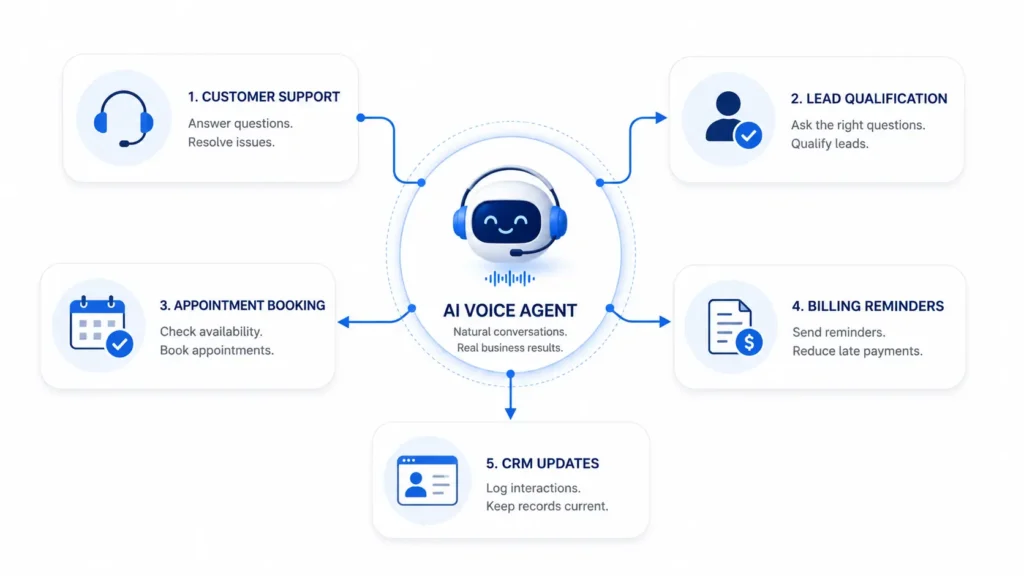
| Workflow | What AI Voice Agents Can Do | Business Benefit |
| Customer support | Answer FAQs, collect issue details, create tickets | Reduces support workload |
| Lead qualification | Ask questions, capture details, update CRM | Helps sales focus on serious leads |
| Appointment booking | Check slots, book meetings, send confirmations | Reduces manual scheduling |
| Order support | Share delivery status and return steps | Improves customer experience |
| Billing reminders | Call customers and send payment reminders | Improves payment follow-up |
| Internal updates | Collect team updates and trigger alerts | Keeps operations organized |
AI Voice Agents and CRM Automation
CRM systems are important for sales teams, but they only work well when data is updated. Many teams forget to add call notes, update lead status, or schedule the next follow-up.
AI voice agents can reduce this problem. They can create new leads, update contact details, record customer interest, add call notes, assign leads to sales reps, and set follow-up reminders.
For example, if a prospect calls to ask about a service, the AI voice agent can ask for their name, email, company, budget, and timeline. Then it can add the lead to the CRM and notify the sales team.
This helps the sales team work with cleaner data and faster follow-ups.
AI Voice Agents in Customer Support Automation
Support teams often handle repeated questions. These may be about login issues, pricing, refunds, delivery, account access, service status, or product use.
AI voice agents can answer simple questions and collect full details before creating a ticket. If the issue needs human help, the support agent receives a clear summary.
This improves ticket quality. It also reduces the time agents spend asking basic questions.
For customers, it means faster support and less waiting.
Appointment and Reminder Automation
Many businesses depend on appointments. This includes healthcare clinics, real estate firms, SaaS companies, salons, education centers, repair services, and consultants.
AI voice agents can help customers book, reschedule, or cancel appointments. They can check available times, confirm details, and send reminders.
This can reduce no-shows and save staff time.
For example, a service business can use an AI voice agent to confirm appointments one day before the visit. If the customer wants to reschedule, the agent can offer new slots and update the calendar.
Connecting AI Voice Agents With Business Tools
AI voice agents become more useful when they connect with existing business tools.
Useful integrations include:
- CRM
- Helpdesk
- Calendar
- SMS
- Cloud databases
- Ecommerce platforms
- Accounting or billing tools
- Project management tools
- Notification systems
Without integrations, a voice agent can only answer basic questions. With integrations, it can complete real business tasks. For teams that need these workflows to connect to existing CRM, finance, and operations systems, agentic AI development services can provide a practical path from a narrow use case to a production workflow.
For example, if a customer asks about an invoice, the voice agent may check billing data, confirm the invoice number, and send a payment reminder. This makes the workflow faster and more useful.
Benefits of AI Voice Agents in Workflow Automation
AI voice agents can help businesses in many ways:
- Faster response time
- Fewer missed calls
- Less manual data entry
- Better lead capture
- Better CRM updates
- Faster support ticket creation
- Improved appointment booking
- More consistent follow-ups
- Lower workload for teams
- Better customer experience
They also give managers better visibility. Call summaries and workflow logs can show common issues, lead quality, customer needs, and process gaps.
Challenges to Consider
AI voice agents are useful, but businesses should use them carefully.
Accuracy
AI may misunderstand unclear speech, background noise, strong accents, or complex requests. Businesses should test the system with real conversations.
Data Privacy
Voice conversations may include personal or sensitive data. Businesses should use consent, encryption, limited access, and clear data retention rules.
Integration Quality
If integrations are weak, workflows may fail. For example, a meeting may not appear in the calendar, or a ticket may miss important details.
Human Handoff
Some conversations need human support. Complaints, payment disputes, legal matters, medical questions, and high-value sales calls should be handled by people.
Best Practices for Businesses
Start with one clear workflow. Do not try to automate everything at once.
Good first use cases include:
- FAQ calls
- Lead capture
- Appointment booking
- Support ticket creation
- Reminder calls
- Call routing
Keep voice responses short and simple. Ask one question at a time. Confirm important details before taking action.
Review call summaries, failed conversations, and workflow logs. This helps improve the system over time.
Most importantly, use AI voice agents to support human teams. The goal is better workflow efficiency, not removing the human touch.
Key Metrics to Track
Businesses should measure performance after launch. Useful metrics include:
- Call completion rate
- Task success rate
- Missed call reduction
- Lead capture rate
- Appointment booking rate
- Ticket creation accuracy
- Human handoff rate
- Customer satisfaction
- Time saved by automation
These metrics help teams understand whether AI voice automation is improving the business process.
Conclusion
AI voice agents are becoming an important part of business workflow automation. They help companies answer calls, collect information, update systems, create tickets, book appointments, send reminders, and route requests.
For small teams and growing businesses, this can save time and improve customer experience. It can also help sales, support, billing, and operations teams work with cleaner data and faster processes.
The best results come when businesses start with simple workflows, connect the right tools, protect customer data, and keep humans involved for important decisions. Used wisely, AI voice agents can make daily business operations faster, clearer, and easier to manage.
FAQs
What is an AI voice agent in workflow automation?
An AI voice agent is a system that uses voice conversations to collect information, answer questions, and trigger business actions.
What workflows can AI voice agents automate?
They can automate customer support calls, lead qualification, CRM updates, appointment booking, reminders, call routing, and ticket creation.
Can AI voice agents help small businesses?
Yes. They can help small teams respond faster, save time, reduce missed calls, and manage simple workflows with less manual work.
Do AI voice agents replace human employees?
No. They should handle simple and repeated tasks while human teams manage complex and sensitive conversations.
What tools can AI voice agents connect with?
They can connect with CRM, helpdesk, calendars, email, SMS, ecommerce platforms, billing tools, databases, and notification systems.
