Author: Shabir Ahmad

  • Why Profitability Ratios Matter for Business Growth

    Why Profitability Ratios Matter for Business Growth

    In competitive business environment, running a successful company is no longer just about increasing sales. Many businesses generate impressive revenue but still struggle to survive because they fail to manage their profits effectively. Real success comes from understanding how much money your business actually keeps after covering all expenses.

    This is where profitability ratios become extremely important.

    Profitability ratios help you measure how efficiently your business turns revenue into profit. They reveal whether your company is financially healthy, operationally strong, and prepared for long-term growth. For entrepreneurs, managers, investors, and students alike, these financial tools provide valuable insights that guide smarter decisions.

    In this article, we will explore why profitability ratios matter for business growth, how they work, and how you can use them to strengthen your business performance.

    Understanding Profitability Ratios

    Profitability ratios are financial indicators that evaluate a company’s ability to earn profit compared to its sales, assets, equity, and operating costs. In simple terms, they show how well your business converts income into actual earnings.

    These ratios are widely used in financial analysis because they give a clear picture of business efficiency. Business owners rely on them to monitor performance. Investors use them to judge risk and returns. Banks analyze them before approving loans. Managers study them to improve operations.

    Unlike basic revenue figures, profitability ratios reflect the true quality of business growth. They tell you whether your company is expanding in a healthy and sustainable way.

    Why Profitability Is More Important Than Revenue

    Many entrepreneurs focus heavily on increasing sales figures. While revenue growth is important, it does not guarantee success. A business can earn millions in sales and still fail if its costs are too high.

    Profitability shows whether your business model actually works. It reveals how much money remains after paying suppliers, employees, taxes, rent, and other expenses. Without sufficient profit, a company cannot reinvest, innovate, or survive unexpected challenges.

    When profitability is strong, businesses can build reserves, reduce debt, and plan for future expansion. When it is weak, even high sales volumes cannot prevent financial trouble.

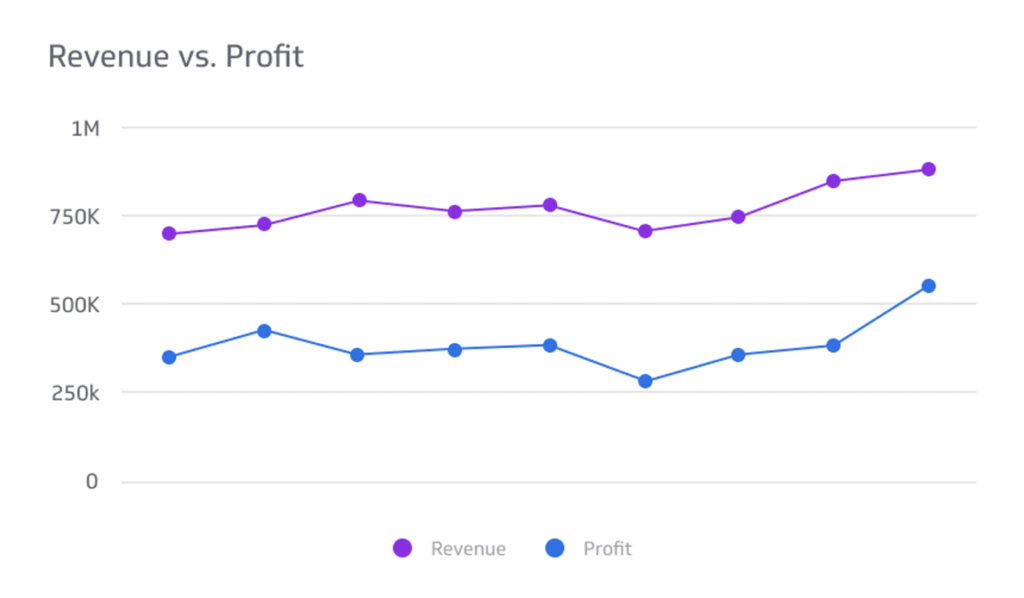
    revenue vs profit graph
    kpi dashboard

    How Profitability Ratios Support Business Growth

    Profitability ratios play a direct role in shaping business success. They help companies understand where they stand financially and where they need to improve.

    One of their most important roles is measuring true financial health. These ratios reveal whether profits are improving, declining, or remaining stable. A falling profit margin may indicate rising costs, inefficient operations, or pricing problems. By identifying such issues early, businesses can take corrective action before major losses occur.

    Another major benefit is better decision-making. Business owners make choices every day about hiring, expansion, investments, and pricing. Profitability ratios provide reliable data to support these decisions. Instead of relying on assumptions or emotions, managers can base their strategies on real financial evidence.

    Profitability ratios also improve cost control. When margins decrease, it signals that expenses are increasing faster than income. This encourages businesses to review production methods, supplier contracts, marketing budgets, and operational processes. Reducing unnecessary costs directly improves profitability and strengthens growth potential.

    Building Trust with Investors and Lenders

    For businesses seeking external funding, profitability ratios are especially important. Investors and lenders carefully examine these figures before committing their money.

    Strong profitability ratios show that a company is well-managed and financially stable. They demonstrate that the business can generate returns and repay loans. High net margins, healthy return on equity, and consistent returns on investment increase credibility.

    When investors trust a company’s financial performance, they are more likely to support expansion plans. This access to capital allows businesses to grow faster and compete more effectively.

    growth bar graph

    Ensuring Long-Term Business Sustainability

    Many businesses fail within their first few years due to poor financial planning and weak profitability. Low profits limit a company’s ability to adapt to market changes, invest in innovation, or survive economic downturns.

    Profitability ratios help ensure long-term sustainability by promoting financial discipline. They encourage companies to maintain healthy reserves, reinvest wisely, and manage risks effectively.

    A profitable business can handle unexpected expenses, respond to competition, and explore new opportunities with confidence. In contrast, companies with weak margins often struggle to survive even minor setbacks.

    Important Profitability Ratios Explained

    Several key profitability ratios are commonly used in financial analysis. Each one provides unique insights into business performance.

    Gross profit margin measures how efficiently a company produces goods or delivers services. It shows how much profit remains after covering direct production costs. A strong gross margin indicates effective pricing and cost control.

    Net profit margin reflects overall profitability after all expenses are deducted. It represents the true earning capacity of a business. A high net margin suggests strong management and operational efficiency.

    Operating profit margin focuses on income generated from core business activities. It excludes taxes and interest, making it useful for comparing companies within the same industry.

    Return on assets evaluates how effectively a company uses its resources to generate profit. It shows whether assets are being used productively.

    Return on equity measures returns generated for shareholders. It indicates how well management uses invested capital.

    Return on investment assesses the profitability of specific projects or investments. It helps businesses decide where to allocate funds for maximum returns.

    Together, these ratios provide a complete picture of financial performance.

    Gaining Competitive Advantage Through Profitability

    In competitive markets, companies that manage profitability well gain a significant advantage. Strong margins allow businesses to offer competitive prices while still earning healthy profits.

    Profitable companies can invest more in research, marketing, technology, and customer service. They can improve product quality and expand into new markets. This creates a positive cycle where efficiency leads to growth, and growth supports further efficiency.

    Businesses with weak profitability often struggle to compete because they lack financial flexibility. Over time, they may lose market share to stronger rivals.

    Using Profitability Ratios in Strategic Planning

    Strategic planning becomes more effective when guided by profitability analysis. These ratios help businesses evaluate past performance and forecast future results.

    By analyzing trends over time, managers can identify patterns and anticipate challenges. For example, consistent improvement in ROI may justify further investment in a particular department. A declining ROA may suggest underutilized assets that should be sold or restructured.

    Profitability ratios also support budgeting, performance evaluation, and expansion decisions. They ensure that growth strategies are realistic and financially sound.

    Common Mistakes in Profitability Analysis

    Despite their importance, many businesses misuse profitability ratios. One common mistake is ignoring industry benchmarks. Comparing your ratios only with past performance is not enough. Understanding how competitors perform provides better context.

    Another mistake is relying on a single ratio. No single measure can capture overall performance. A balanced approach using multiple ratios gives more accurate insights.

    Some businesses also fail to track trends over time. One year’s data does not show long-term performance. Continuous monitoring is essential.

    Finally, focusing only on financial numbers while ignoring customer satisfaction, employee morale, and brand reputation can lead to incomplete analysis.

    Practical Ways to Improve Profitability Ratios

    Improving profitability requires consistent effort and smart management. Reviewing pricing strategies helps ensure that products and services reflect their true value. Reducing operational inefficiencies lowers unnecessary expenses. Better inventory management prevents waste and shortages.

    Focusing on high-margin products increases overall earnings. Strengthening customer relationships reduces marketing costs and improves retention. Investing in modern technology improves productivity and financial monitoring.

    Small improvements in these areas can produce significant long-term results.

    Profitability Ratios in the Digital Era

    Modern technology has transformed financial management. Cloud accounting systems, ERP software, and analytics tools now allow businesses to track profitability in real time.

    These systems provide instant access to key performance indicators, making it easier to identify trends and respond quickly. Digital tools also improve transparency and reduce human error.

    As businesses adopt digital solutions, managing profitability becomes more efficient and data-driven.

    Why Startups Must Focus on Profitability Early

    Many startups prioritize rapid growth over profits. While expansion is important, ignoring profitability can be dangerous.

    Early attention to profitability ratios helps startups control spending, avoid excessive debt, and build investor confidence. It encourages disciplined financial management from the beginning.

    Startups that balance growth with profitability are more likely to achieve long-term success.

    A Simple Real-Life Example

    Consider a small online retail business. In its first year, the company had a low net profit margin and poor asset utilization. By analyzing its profitability ratios, management identified high logistics costs and inefficient pricing.

    Over the next two years, the business negotiated better supplier deals, optimized delivery routes, and adjusted prices. As a result, profit margins and returns improved significantly.

    This example shows how profitability analysis can guide practical improvements and support growth.

    Final Thoughts: Why Profitability Ratios Matter for Business Growth

    Profitability ratios are not just accounting tools. They are powerful indicators of business strength and sustainability.

    They help companies understand financial health, manage costs, attract investors, improve efficiency, and plan strategically. Businesses that regularly analyze and improve their profitability are better prepared to face challenges and seize opportunities.

    In today’s fast-changing economy, relying on intuition is no longer enough. Data-driven financial management is essential for survival and success.

    Frequently Asked Questions (FAQs)

    1. What are profitability ratios in simple words?

    Profitability ratios are financial measurements that show how much profit a business makes compared to its sales, assets, or investments. They help determine how efficient and successful a company is.


    2. Why are profitability ratios important for business growth?

    Profitability ratios are important because they show whether a business can sustain itself, attract investors, manage costs, and reinvest for future expansion.


    3. Which profitability ratio is the most important?

    There is no single “most important” ratio. However, net profit margin, return on equity, and return on assets are commonly used together to evaluate overall performance.


    4. How often should businesses calculate profitability ratios?

    Businesses should calculate profitability ratios monthly, quarterly, and annually to track performance trends and make timely financial decisions.


    5. Can small businesses benefit from profitability ratios?

    Yes, small businesses benefit greatly from profitability ratios. They help owners control expenses, set better prices, and improve financial planning.


    6. What is a good profitability ratio?

    A good profitability ratio depends on the industry. Comparing your ratios with competitors and industry benchmarks gives a more accurate understanding of performance.


    7. How do profitability ratios help investors?

    Investors use profitability ratios to assess a company’s earning potential, financial stability, and risk level before investing their money.


    8. What is the difference between profit and profitability?

    Profit is the total amount earned after expenses, while profitability measures how efficiently a business generates that profit.


    9. How can a company improve its profitability ratios?

    A company can improve profitability by reducing costs, improving productivity, increasing prices wisely, focusing on high-margin products, and strengthening customer retention.


    10. Are profitability ratios useful for startups?

    Yes, startups should monitor profitability ratios early to manage cash flow, attract investors, and build a strong financial foundation for growth.

  • How Many Pay Periods in a Year? Everything Employers Should Know

    How Many Pay Periods in a Year? Everything Employers Should Know

    Managing payroll is one of the most important responsibilities for any employer. No matter the size of your business, paying employees accurately and on time builds trust, improves workplace morale, and ensures legal compliance. One of the most common questions business owners and HR professionals ask is: How many pay periods are there in a year?

    The answer depends on your payroll system. Most businesses follow one of seven common payroll schedules: weekly (52–53), biweekly (26–27), semi-monthly (24), monthly (12), daily (260+), on-demand (flexible), and fortnightly (26) pay periods per year. Each option affects how often employees are paid, how payroll is processed, and how businesses manage cash flow.

    Choosing the right payroll schedule is about more than counting paydays. Different pay frequencies impact budgeting, taxes, employee satisfaction, and administrative workload. Understanding how pay periods work helps employers avoid mistakes and improve payroll efficiency.

    What Is a Pay Period?

    payroll and person holding pencil

    A pay period is the recurring time frame during which an employee works and earns wages. At the end of each pay period, employees receive their salary or wages for the work they have completed.

    For example, if you pay employees every two weeks, your pay period is biweekly. If you pay once a month, your pay period is monthly. This schedule determines when salaries are calculated, when taxes are deducted, and when employees receive their paychecks.

    Choosing the right pay period affects your company’s cash flow, payroll costs, compliance obligations, and employee satisfaction. That is why employers must understand how different pay periods function before selecting one.

    Seven Types of Payroll Schedules in a Year

    Businesses today use several payroll schedules depending on their industry, workforce, and financial structure. Below are the seven most common types of payroll systems used worldwide.

    1. Weekly Payroll (52–53 Pay Periods Per Year)

    With weekly payroll, employees are paid once every week, usually on the same day. This system results in 52 pay periods in most years and occasionally 53 in some calendar years.

    Weekly payroll is popular in industries where employees are paid hourly, such as retail, construction, and hospitality. Workers appreciate frequent payments because it helps them manage expenses more easily. However, for employers, weekly payroll requires more administrative work and higher processing costs.

    2. Biweekly Payroll (26–27 Pay Periods Per Year)

    Biweekly payroll means employees are paid every two weeks. Most years have 26 pay periods, while some have 27.

    This is one of the most widely used payroll schedules because it balances convenience and efficiency. Employers benefit from fewer payroll runs than weekly systems, while employees still receive regular income. Biweekly payroll also simplifies overtime calculations for many businesses.

    3. Semi-Monthly Payroll (24 Pay Periods Per Year)

    Semi-monthly payroll involves paying employees twice a month, usually on fixed dates such as the 1st and 15th or the 15th and 30th.

    This system results in exactly 24 pay periods per year. It is commonly used for salaried employees and corporate roles. While it makes budgeting easier for employers, overtime calculations can become more complex because pay periods do not align with standard workweeks.

    4. Monthly Payroll (12 Pay Periods Per Year)

    With monthly payroll, employees are paid once per month, resulting in 12 pay periods per year.

    This schedule is often used in government jobs, international organizations, and senior management positions. It reduces payroll processing costs and administrative workload. However, employees may find it difficult to manage finances with long gaps between paychecks.

    5. Daily Payroll (260+ Pay Periods Per Year)

    Daily payroll allows employees to receive payment every working day or shortly after completing work. This system can result in more than 260 pay periods per year.

    It is commonly used in gig economy platforms, freelancing, and short-term contract work. Daily payroll improves employee satisfaction and helps workers handle financial emergencies. However, it requires advanced payroll systems and higher operational costs.

    6. On-Demand Payroll (Flexible Pay Periods)

    On-demand payroll allows employees to access earned wages before their official payday. Instead of waiting for a scheduled pay period, workers can withdraw part of their salary whenever needed.

    This system does not follow fixed pay periods and depends on employee usage. Many modern companies are adopting on-demand pay to improve employee retention and financial wellness. However, it requires specialized software and careful compliance management.

    7. Fortnightly Payroll (Every 14 Days – 26 Pay Periods)

    Fortnightly payroll is similar to biweekly payroll and is commonly used in countries such as the UK, Australia, and New Zealand. Employees are paid every 14 days, resulting in 26 pay periods per year.

    This system is easy to manage and provides consistent income for employees. It works well for both salaried and hourly workers and simplifies payroll planning.

    Seven Payroll Types and Pay Periods

    Payroll TypePay Periods Per Year
    Weekly52–53
    Biweekly26–27
    Semi-Monthly24
    Monthly12
    Daily260+
    On-DemandFlexible
    Fortnightly26

    Why Pay Periods Matter for Employers

    person working on payroll

    Pay periods are not just about when employees get paid. They affect many areas of business operations, including financial planning, legal compliance, and workplace culture.

    From a financial perspective, payroll frequency determines how often money leaves your business. Weekly payroll requires frequent cash outflow, which means you must maintain strong reserves. Monthly payroll allows you to hold funds longer but may create dissatisfaction among workers.

    From an employee standpoint, regular and predictable payments build trust. When employees know exactly when they will be paid, they feel more secure and valued. Late or inconsistent payments can damage morale and lead to higher turnover.

    Payroll frequency also impacts administrative costs. Each payroll run requires processing time, accounting work, tax filings, and banking transactions. More pay periods mean more work and higher expenses.

    Finally, compliance is a major concern. Many countries and states regulate how often employees must be paid. Choosing the wrong pay schedule can expose your business to fines and legal disputes.

    How to Calculate Salary Based on Pay Periods

    Employers must understand how to convert annual salaries into per-paycheck amounts. This ensures accurate budgeting and transparent compensation.

    To calculate pay for weekly payroll, divide the annual salary by 52. For biweekly payroll, divide by 26. For semi-monthly payroll, divide by 24. For monthly payroll, divide by 12.

    For example, if an employee earns ₹6,00,000 per year, their weekly salary would be approximately ₹11,538. With biweekly payroll, they would receive around ₹23,077 per paycheck. Under semi-monthly payroll, they would earn ₹25,000 twice per month. With monthly payroll, they would receive ₹50,000 each month.

    These calculations help employers forecast expenses and help employees understand their earnings.

    Understanding Extra Pay Periods

    Some years contain extra pay periods. Weekly payroll may occasionally have 53 paychecks, while biweekly payroll may have 27. This happens because a calendar year does not divide evenly into weeks.

    If employers do not plan for these extra pay periods, they may face budgeting problems. Salaries that were divided by 52 or 26 may suddenly need to be stretched over more payments.

    To manage this, businesses should review payroll calendars at the beginning of each year. Some companies divide annual salaries by the actual number of pay periods, while others build a financial buffer. Using payroll software also helps manage these variations automatically.

    Overtime and Pay Periods

    Overtime calculations are closely linked to pay periods, especially for hourly workers. In many regions, overtime is calculated based on weekly work hours, regardless of how often employees are paid.

    With weekly payroll, overtime calculations are straightforward because pay periods align with workweeks. With biweekly payroll, employers must still calculate overtime on a weekly basis within the two-week period.

    Semi-monthly and monthly payroll systems make overtime more complicated because pay periods do not match standard workweeks. Employers must carefully track hours to ensure compliance with labor laws.

    For businesses that rely heavily on hourly labor, weekly or biweekly payroll often provides better control and reduces compliance risks.

    Legal and Compliance Considerations

    Every employer must follow local labor laws when setting payroll schedules. These laws regulate how frequently employees must be paid, how wages must be documented, and how deductions are handled.

    In some countries, employers are required to pay workers at least twice per month. In others, monthly payroll is allowed. Many regions also require employers to provide detailed payslips showing earnings, deductions, and net pay.

    Failure to follow these regulations can lead to fines, legal disputes, and reputational damage. Before choosing a pay period, employers should consult labor authorities or legal professionals to ensure compliance.

    Impact on Taxes and Deductions

    Pay periods affect how taxes and deductions are applied. Income tax, social security contributions, insurance premiums, and retirement savings are usually deducted from each paycheck.

    With more frequent pay periods, these deductions are spread across many smaller payments. With fewer pay periods, deductions become larger per paycheck. This can affect how employees perceive their take-home pay.

    Using automated payroll systems helps ensure that tax calculations remain accurate regardless of payroll frequency.

    How to Choose the Right Pay Period

    Choosing the best payroll schedule depends on your business model, workforce, and financial capacity. There is no universal solution.

    Employers should consider whether their workforce is primarily hourly or salaried. Hourly workers often prefer frequent payments, while salaried employees may be comfortable with semi-monthly or monthly schedules.

    Cash flow is another major factor. Businesses with stable revenue can manage frequent payroll, while startups may prefer biweekly or monthly schedules.

    Administrative resources also matter. If your HR team is small, fewer pay periods may reduce workload. Employee preferences should also be considered, as satisfaction often improves when workers feel financially secure.

    Role of Payroll Software

    Modern payroll software has transformed how businesses manage pay periods. These systems automate salary calculations, tax deductions, payslip generation, and bank transfers.

    With payroll software, employers can manage different pay frequencies, track attendance, calculate overtime, and generate compliance reports. This reduces human error and saves time.

    Investing in reliable payroll technology is one of the best ways to ensure accurate and efficient payroll management.

    Common Payroll Mistakes Employers Should Avoid

    Many payroll problems arise from avoidable mistakes. Some employers choose pay periods that do not suit their business needs, leading to cash flow stress. Others fail to plan for extra pay periods, which disrupts budgeting.

    Late payments are another major issue. They damage trust and can lead to employee dissatisfaction. Incorrect overtime calculations and excessive reliance on manual processes also increase the risk of errors.

    By adopting proper systems and procedures, employers can avoid these common pitfalls.

    How Pay Periods Affect Employee Financial Planning

    Payroll frequency plays a significant role in how employees manage their finances. Workers who are paid weekly or biweekly often find it easier to cover daily expenses, pay bills, and avoid debt.

    Monthly payroll requires strong budgeting skills. Employees may struggle to manage money over long gaps, especially during emergencies. This can create financial stress and reduce workplace productivity.

    Employers who consider employee financial well-being often see better engagement and loyalty.

    Global Payroll Challenges

    For companies operating internationally, managing pay periods becomes more complex. Different countries have different labor laws, tax systems, and payment practices.

    International employers must deal with currency conversion, compliance reporting, and cross-border banking. Many businesses use global payroll providers or outsourcing services to handle these challenges efficiently.

    Future Trends in Payroll

    Payroll systems continue to evolve with technology. Many companies are adopting cloud-based platforms, mobile payslips, and AI-powered processing.

    On-demand pay is becoming more popular, allowing employees to access wages before payday. Real-time tax reporting and automated compliance tools are also shaping the future of payroll management.

    These trends aim to make payroll faster, more transparent, and more employee-friendly.

    Final Thoughts

    Understanding the seven types of payroll schedules and how many pay periods occur in a year helps employers manage finances, stay compliant, and keep employees satisfied.

    Whether you choose weekly, biweekly, semi-monthly, monthly, daily, on-demand, or fortnightly payroll, your decision should align with your business goals, cash flow, and workforce needs.

    With proper planning and modern payroll tools, payroll management can become a seamless and efficient part of your organization.

    Frequently Asked Questions (FAQs)

    1. How many pay periods are in a year for biweekly payroll?

    Most years have 26 pay periods, but some have 27 due to calendar alignment.

    2. Which payroll schedule is best for small businesses?

    Biweekly payroll is often ideal because it balances cost, efficiency, and employee satisfaction.

    3. Is monthly payroll legal everywhere?

    No. Some countries and states require employers to pay employees more frequently. Always check local labor laws.

    4. Can an employer change payroll frequency?

    Yes, but employees must be informed in advance, and legal guidelines must be followed.

    5. How do extra pay periods affect salaries?

    Extra pay periods may slightly reduce individual paycheck amounts if annual salaries are spread over more payments.

    6. What is the difference between biweekly and semi-monthly payroll?

    Biweekly pays every two weeks (26 times a year), while semi-monthly pays twice a month (24 times a year).

    7. Is on-demand payroll safe for businesses?

    Yes, when supported by reliable software and proper compliance systems.

  • The Complete Ecommerce SEO Checklist for Long-Term Growth

    The Complete Ecommerce SEO Checklist for Long-Term Growth

    What you need is an SEO Checklist:
    A clear, actionable plan of steps and strategies that brings structure and focus to the time you dedicate to improving your site’s SEO. Ecommerce SEO is not a one-time task, it’s a long-term strategy that helps your online store attract consistent organic traffic, achieve higher search rankings, and drive sustainable sales.

    Showing up in the right place at the right time requires more than just ranking well. A structured SEO checklist ensures your store stays visible, optimized, and profitable over time.

    This complete ecommerce SEO checklist will guide you through every step of the process. From identifying the right buyer-intent and long-tail keywords to optimizing product and category pages, improving technical SEO, with tools like Rankller helping automate audits and uncover actionable SEO insights along with it creating high-quality content, implementing effective link building strategies, building authoritative backlinks, and tracking performance with analytics you’ll find actionable strategies to grow your online store.

    By following this guide, you’ll have a clear roadmap to strengthen your SEO foundation through advanced ai seo techniques, enhance user experience, and drive long-term ecommerce growth.

    5 Key Checks to Complete for Sustainable Ecommerce SEO Growth

    Before scaling your ecommerce SEO efforts, it’s essential to evaluate whether your website is truly prepared for long-term organic success. Ask yourself these five critical questions to ensure your store is built on a strong SEO foundation.

    1. Is your ecommerce website accessible to search engines?

    Your online store must be easily discoverable by search engines. Proper configuration of Google Search Console, a clean XML sitemap, and correctly set robots.txt files ensure that search engines can access your site without restrictions. This step forms the backbone of any long-term ecommerce SEO strategy.

    2. Is your site structure optimized for efficient crawling?

    Search engines rely on clear navigation and internal linking to understand your store. A well-organized category structure, logical URLs, and strong internal links allow crawlers to move smoothly across your ecommerce site, improving content discovery and crawl efficiency.

    3. Are your pages eligible for indexing?

    Being crawled isn’t enough; your pages must also be index-ready. Avoid duplicate content, apply canonical tags correctly, and use structured data to help search engines interpret your product and category pages accurately. Proper indexation ensures your pages can appear in search results.

    4. Does your content match search intent and user expectations?

    Long-term growth depends on relevance. Product descriptions, category content, and blog posts should align with what users are actively searching for. High-quality, intent-focused content improves engagement, builds trust, and strengthens your ecommerce SEO performance over time.

    5. Is your store optimized to compete and rank consistently?

    Ranking requires more than keywords. Fast loading speeds, mobile-friendly design, positive user experience, and authoritative backlinks all contribute to sustained rankings. An ecommerce website optimized for performance and trust has a stronger chance of maintaining visibility in competitive search results.

    1. Ecommerce Keyword Research Checklist

    Keyword research is the foundation of successful ecommerce SEO. Choosing the right keywords helps your products reach users who are actively searching to buy, not just browse. A strong keyword strategy improves visibility, drives qualified traffic, and increases conversions over the long term.

    Identify Buyer-Intent Keywords:

    Buyer-intent keywords indicate that users are close to making a purchase. These keywords should be your top priority because they attract high-converting traffic.

    Focus on terms such as:

    • “buy”, “best”, “price”, “discount”, “deal”
    • Product-specific keywords (brand, model, size, color)
    • Category-level keywords (e.g., “men’s running shoes”, “wireless earbuds online”)

    These keywords should be used primarily on product pages and category pages, where users expect to take action.

    Target Long-Tail Keywords:

    Long-tail keywords are longer, more specific search phrases. While they may have lower search volume, they usually come with less competition and higher conversion rates.

    Benefits of long-tail keywords:

    • Easier to rank for new or growing ecommerce sites
    • Better match user intent
    • Higher likelihood of conversions

    Examples include:

    Long-tail keywords are ideal for product descriptions, category content, and blog posts.

    Analyze Competitor Keywords:

    Competitor analysis helps uncover keyword opportunities you may be missing. By studying top-ranking ecommerce competitors, you can identify which keywords are driving their traffic and sales. Businesses can also use techniques to scrape real estate data and analyze market trends, pricing information, and competitor activity to gain additional insights for data-driven strategies.

    Key actions to take:

    • Analyze competitor product and category pages
    • Find keywords they rank for but you don’t (keyword gaps)
    • Identify high-performing keywords with manageable competition
    • Avoid targeting keywords dominated by major brands unless you have strong authority

    This approach allows you to build a smarter keyword strategy without guessing.

    2. Category Page SEO Optimization Checklist

    Category pages are some of the most powerful pages on an ecommerce website. They usually target high-volume, commercial keywords and often generate more organic traffic than individual product pages. Properly optimized category pages improve rankings, user engagement, and conversions.

    Optimize Category Page Titles & Meta Descriptions

    Title tags and meta descriptions play a crucial role in search engine rankings and click-through rate (CTR). They are often the first elements users see in search results, making them essential for attracting qualified traffic to your ecommerce category pages.

    Best practices:

    • Use the primary category keyword naturally in the title
    • Keep title tags under 60 characters to avoid truncation
    • Add modifiers such as buy, best, online, price when relevant
    • Write clear, compelling meta descriptions that encourage clicks
    • Highlight benefits like free shipping, offers, or wide product selection

    Well-optimized titles and descriptions help search engines understand the page and attract more qualified traffic from search results.

    Add SEO-Friendly Category Content

    Title tags and meta descriptions are essential for improving search visibility and increasing click-through rate (CTR). They help search engines understand your category pages and influence whether users choose to click your listing in search results.

    Best practices:

    • Use the primary category keyword naturally in the title
    • Keep title tags under 60 characters to prevent truncation
    • Add relevant modifiers such as buy, best, online, price
    • Write clear, persuasive meta descriptions to boost CTR
    • Highlight key benefits like free shipping, discounts, or product variety

    Well-optimized titles and meta descriptions improve search relevance, attract high-intent users, and drive more qualified traffic to ecommerce category pages.

    Optimize Headings (H1, H2, H3)

    Proper heading structure helps search engines understand your category page hierarchy and improves readability for users. Well-optimized headings make content easier to scan, enhance user experience, and support stronger SEO performance.

    Best practices:

    • Use one clear H1 that includes the main category keyword naturally
    • Structure content with H2 and H3 headings for subcategories, filters, features, or FAQs
    • Keep headings descriptive, meaningful, and user-focused
    • Avoid repeating the same keyword in every heading to prevent over-optimization
    • Maintain a logical heading order without skipping levels

    Optimized H1, H2, and H3 tags improve content clarity, strengthen keyword relevance, and help both users and search engines navigate category pages more effectively.

    Improve Internal Linking Structure

    Internal linking plays a vital role in ecommerce SEO by helping search engines understand page relationships while guiding users through your store. A strong internal linking structure distributes page authority, improves crawlability, and increases the visibility of important category and product pages.

    Best practices:

    • Link category pages to relevant subcategories to create a clear hierarchy
    • Add internal links to top-selling, popular, or featured products to boost their visibility
    • Use breadcrumb navigation to improve user experience and help search engines understand page structure
    • Link from blog posts, buying guides, and informational content to related category pages
    • Use descriptive, keyword-relevant anchor text naturally without over-optimization

    Well-planned internal linking helps search engines discover and index pages faster, strengthens overall site architecture, and improves user navigation leading to better rankings and higher conversions over time.

    Optimize URLs & Canonical Tags

    Technical consistency is critical for category page SEO because search engines rely on clean URLs and correct canonical signals to index pages properly. Poor URL structure or incorrect canonical tags can lead to duplicate content issues and lost rankings. Fixing canonical issues helps ensure the correct pages are indexed, preventing duplicate content and preserving overall search visibility and rankings.

    Best practices:

    • Keep category URLs short, clean, and keyword-focused to improve readability and search visibility
    • Avoid unnecessary URL parameters created by filters, sorting options, or session IDs
    • Use canonical tags to signal the preferred version of a category page and prevent duplicate content issues
    • Ensure only indexable versions of category pages are accessible to search engines
    • Regularly audit category URLs using Search Console to identify crawl or indexing problems

    Well-optimized URLs and correctly implemented canonical tags help search engines understand your category structure, consolidate ranking signals, and improve long-term ecommerce SEO performance.

    Enhance User Experience & Conversion Signals

    aUser experience (UX) and conversion signals play a major role in ecommerce SEO. Search engines closely analyze how users interact with category pages, including page speed, engagement, and conversion behavior. A smooth user experience not only improves rankings but also increases sales.

    Best practices:

    • Ensure fast page load speed to reduce bounce rates and improve Core Web Vitals
    • Make filters and sorting options mobile-friendly for seamless navigation across devices
    • Use clear and visible CTAs such as Shop Now, View Products, or Explore Collection to guide users
    • Add trust signals like customer reviews, ratings, secure payment badges, and return policies
    • Improve page layout to allow easy product comparison, including pricing, features, and images

    A user-focused category page encourages longer visits, higher engagement, and better conversions, sending positive signals to search engines and supporting long-term ecommerce SEO growth.

    3. Product Page SEO Checklist

    Product pages are the core revenue drivers of any ecommerce website. Optimizing them correctly ensures your products rank for high-intent searches, attract qualified traffic, and convert visitors into customers.

    Well-structured product pages also improve user experience, reduce bounce rates, and increase trust among potential buyers. When combined with strong technical SEO and content optimization, they play a key role in long-term organic growth and revenue stability.

    Optimize Product Titles & Descriptions

    Product titles and descriptions play a critical role in ecommerce SEO because they help search engines understand the product while directly influencing customer purchasing decisions. Well-optimized content ensures your products appear for high-intent searches and clearly communicates value to potential buyers.

    Best practices:

    • Use primary and secondary keywords naturally in product titles and descriptions without forcing them
    • Keep product titles clear, specific, and user-focused, including key details such as brand, type, size, or model
    • Avoid duplicate manufacturer descriptions, as they offer no unique value and can negatively impact rankings
    • Highlight important features, benefits, and real-world use cases to answer buyer questions and reduce hesitation
    • Write scannable descriptions using bullet points, short paragraphs, and subheadings for easy reading
    • Include technical specifications where relevant to support informed purchase decisions

    Well-written product content improves keyword relevance, increases user engagement, builds trust, and ultimately boosts conversion rates making it a key factor in long-term ecommerce SEO success.

    Optimize Product Images

    Product images are essential for both user experience and ecommerce SEO. High-quality, well-optimized images help users understand the product better while enabling search engines to index and rank visual content effectively and before uploading, preparing each image in a photo editor to sharpen, crop, and adjust brightness ensures every product photo meets that quality standard from the start.

    Best practices:

    • Use descriptive, keyword-based file names instead of generic names (e.g., black-leather-wallet.jpg)
    • Add keyword-rich ALT text to improve accessibility and increase visibility in image search results
    • Compress images to ensure faster load speeds without compromising visual quality
    • Maintain consistent image dimensions to create a clean layout and avoid page shifts
    • Include multiple images from different angles to help users evaluate the product confidently

    Optimized product images enhance page speed, accessibility, and visibility in Google Image Search while improving engagement and conversion rates on product pages.

    Add Structured Data (Schema Markup)

    Structured data, also known as schema markup, helps search engines better understand your product information and display it more effectively in search results. It provides additional context about your products, improving both visibility and click-through rates.

    Implement product schema for:

    • Price to show accurate product cost directly in search results
    • Ratings and reviews to build trust and increase credibility
    • Availability (in stock / out of stock) to set clear user expectations

    Using schema markup can generate rich results, such as star ratings and price details, which make your product listings more noticeable and clickable in search results. Proper implementation also helps search engines deliver more relevant results, supporting long-term ecommerce SEO performance.

    4. Technical SEO Checklist for Ecommerce Websites

    Technical SEO forms the backbone of ecommerce performance. It ensures search engines can crawl, index, and rank your online store efficiently while providing a fast, secure, and user-friendly experience. Without strong technical foundations, even the best content and keywords may fail to rank.

    A technically optimized website also reduces errors, improves site stability, and enhances overall user satisfaction. Over time, this leads to stronger search visibility, better engagement, and sustainable ecommerce growth. As search continues to evolve beyond traditional rankings, understanding what is AEO can also help ecommerce businesses optimize their content for AI-driven search experiences.

    Improve Website Speed

    Website speed is a critical factor in ecommerce SEO, user experience, and conversion rates. Search engines prioritize fast-loading websites, and users are more likely to abandon slow pages, leading to higher bounce rates and lost sales.

    Best practices:

    • Use server-side and browser caching to reduce server response time and speed up repeat visits
    • Compress images and use next-gen formats such as WebP or AVIF to maintain quality while reducing file size
    • Minimize, combine, and defer JavaScript and CSS files to prevent render-blocking resources For websites that support dynamic media or user-generated content, optimized JavaScript file upload functionality can also help improve file handling without adding unnecessary performance strain.
    • Enable browser caching and GZIP compression to reduce data transfer size and loading time
    • Choose fast, reliable hosting optimized for ecommerce platforms to handle high traffic and peak loads

    Faster-loading pages improve Core Web Vitals, enhance user satisfaction, and create a smoother shopping experience leading to higher engagement, better rankings, and increased conversions over time.

    Ensure Mobile-Friendliness

    With Google’s mobile-first indexing, the mobile version of your ecommerce store is considered the primary version for ranking and indexing. If your site performs poorly on mobile, it can negatively impact both visibility and conversions.

    Best practices:

    • Use a fully responsive design that adapts smoothly across smartphones, tablets, and different screen sizes
    • Ensure buttons, menus, filters, and CTAs are easy to tap and navigate on smaller screens
    • Optimize mobile page speed and reduce layout shifts to improve stability and user experience
    • Avoid intrusive pop-ups or interstitials that block content and frustrate mobile users

    A mobile-friendly ecommerce store enhances usability, increases engagement, and supports stronger search performance, leading to better rankings and higher mobile conversions.

    Fix Crawl Errors & Indexing Issues

    For ecommerce SEO to succeed, search engines must be able to crawl and index the correct pages without encountering errors or restrictions. Crawl and indexing issues can prevent important product and category pages from appearing in search results.

    Best practices:

    • Submit XML sitemaps through Google Search Console to help search engines discover new and updated pages
    • Use robots.txt correctly to control crawl access while ensuring important pages remain accessible
    • Remove or properly redirect broken links and 404 errors to preserve crawl budget and user experience
    • Eliminate duplicate URLs caused by filters or parameters using canonical tags
    • Ensure key product and category pages are indexable and not blocked by noindex tags or crawl rules

    Fixing crawl and indexing issues allows search engines to discover, understand, and rank your pages more efficiently, leading to improved visibility and long-term ecommerce SEO growth. Regular audits using a Free SEO Tool help identify crawl errors, indexation problems, and technical gaps before they impact rankings.

    Optimize Site Architecture & URL Structure

    A clean and well-organized site architecture helps search engines crawl your ecommerce website efficiently and understand the relationship between pages. It also improves user navigation, making it easier for visitors to find products quickly.

    Best practices:

    • Keep important category and product pages within three clicks from the homepage to improve crawl efficiency
    • Use short, descriptive, and keyword-focused URLs that clearly reflect page content
    • Avoid unnecessary URL parameters created by filters, sorting, or tracking IDs
    • Maintain consistent internal linking to strengthen page hierarchy and distribute authority evenly

    An optimized site architecture and URL structure improve crawlability, enhance user experience, and support stronger search engine rankings across your ecommerce store.

    Implement HTTPS & Security Measures

    Security is a ranking factor and trust signal for ecommerce websites. Protecting your site not only safeguards customer data but also improves SEO and builds trust.

    Best practices:

    • Use HTTPS across the entire site to encrypt data and display the secure padlock in browsers
    • Secure checkout and payment pages with trusted payment gateways and PCI DSS compliance
    • Regularly update plugins, themes, and platform software to fix vulnerabilities
    • Protect against malware and attacks using firewalls, malware scanners, strong passwords, 2FA, and regular backups

    Implementing HTTPS and robust security measures ensures your ecommerce website is safe for customers, builds trust, prevents data breaches, and supports better search engine rankings.

    5. Ecommerce Content Marketing Checklist

    Content is a critical factor in long-term SEO success for ecommerce websites. It attracts both informational traffic (users researching products) and transactional traffic (users ready to buy). A solid content marketing strategy helps improve rankings, drives traffic, and increases conversions.

     High-quality content also builds brand authority and trust with potential customers. Consistently publishing and updating content ensures your store stays relevant in search results and meets evolving user needs.

    Create SEO-Optimized Blog Content

    Publishing high-quality, SEO-friendly blog content positions your ecommerce store as an authority and drives organic traffic. Focus on content that aligns with your target audience’s search intent.

    Types of blog content to create:

    • Buying Guides: Help users make informed purchase decisions by providing detailed insights on features, benefits, and comparisons. Example: “The Ultimate Guide to Choosing the Best Noise-Canceling Headphones.”
    • Product Comparisons: Compare your products or competitors’ products to help buyers choose the right option. Example: “iPhone vs. Samsung Galaxy: Which Should You Buy in 2026?”
    • How-To Articles: Offer actionable instructions or tips that relate to your products. Example: “How to Style Your Summer Wardrobe With Our Latest Collection.”

    Best Practices:

    • Focus on User Intent: Always create content that answers your audience’s questions or solves their problems.
    • Maintain Consistency: Publish content regularly to keep your audience engaged and signal freshness to search engines.
    • Optimize Meta Tags: Use clear, descriptive titles and meta descriptions to improve click-through rates.
    • Encourage Engagement: Include call-to-actions (CTAs), comment sections, and social sharing buttons.
    • Analyze Performance: Use analytics tools to track which content drives traffic, conversions, and rankings, then refine your strategy accordingly.

    Benefits:

    • Drives Organic Traffic: Well-optimized content attracts visitors actively searching for relevant products.
    • Builds Brand Authority: High-quality, informative content positions your store as an expert in your niche.
    • Improves SEO Rankings: Targeting relevant keywords and user intent helps pages rank higher in search results.
    • Increases Conversions: Engaging content with internal links and CTAs guides users through the buyer journey.
    • Enhances Customer Trust: Informative content reassures customers and improves their buying confidence.

    Optimize for Featured Snippets

    Featured snippets appear at the top of Google search results and can dramatically increase visibility, traffic, and brand authority. Optimizing your content for snippets ensures that your ecommerce store is more likely to be seen by users searching for specific answers.

    Best practices:

    • Use Clear Headings: Use H2 and H3 headings that directly answer common user questions. Example: “What is the Best Laptop for Gaming?”
    • Structure Content for Scannability: Organize content with bullet points, numbered lists, and tables to make it easy for Google and users to read.
    • Provide Concise Answers: Write short, clear answers (around 40–60 words) at the beginning of each section to target snippet formats.
    • Add FAQ Sections: Include frequently asked questions at the bottom of your pages or blogs to address common queries and improve the chance of appearing in rich results.
    • Use Schema Markup: Implement structured data (FAQ or HowTo schema) to help search engines understand your content and enhance your chances of being featured.
    • Optimize Visuals: Include relevant images, diagrams, or infographics to complement answers and increase engagement.

    Benefits:

    • Increases click-through rates from search results.
    • Positions your brand as an authority in your niche.
    • Attracts both informational (researching products) and transactional (ready-to-buy) traffic.
    • Improves overall SEO performance by targeting high-visibility search features.

    Update Old Content Regularly

    SEO is not a “set and forget” process. Refreshing old content ensures it remains relevant, accurate, and competitive in search rankings. Regular updates also improve user experience, maintain traffic, and strengthen your ecommerce store’s authority.

    Strategies for Updating Content:

    Add New Information: Incorporate updated statistics, product details, trends, or industry insights to keep the content relevant. Example: Updating a “Top 10 Gadgets in 2024” blog to include 2026 models.

    • Optimize for New Keywords: Check which new search terms your audience is using and naturally integrate them into the content.
    • Improve Readability: Break up long paragraphs, add subheadings (H2/H3), bullet points, and visuals like images or infographics to make content easier to scan.
    • Update Internal Links: Ensure older posts link to new products, categories, or related blog content to improve crawlability and boost SEO.
    • Fix Broken Links & Errors: Identify and remove outdated links, 404 errors, or outdated information that may harm user experience or SEO.

    Best Practices:

    • Set a Content Audit Schedule: Review older posts periodically (e.g., every 6–12 months) to identify pages that need updates.
    • Prioritize High-Traffic or High-Value Pages: Focus on pages that bring in the most traffic, conversions, or revenue.
    • Maintain Brand Voice & Consistency: Ensure updates match the tone, style, and messaging of your website.
    • Use Analytics Insights: Monitor metrics like page views, bounce rate, and dwell time to identify content that needs improvement.
    • Republish Updated Content: Once refreshed, consider republishing with a new date to signal freshness to search engines.

    Benefits:

    • Maintains or Improves Search Rankings: Fresh content is favored by search engines, keeping your pages competitive.
    • Signals Content Freshness to Search Engines: Regular updates show Google that your website is active and trustworthy.
    • Boosts User Engagement: Updated, easy-to-read content keeps visitors on your site longer.
    • Increases Conversions: Current and accurate information helps users make purchasing decisions more confidently.
    • Maximizes ROI on Existing Content: Instead of creating entirely new content, updating old posts leverages existing traffic and authority.

    6. On-Page SEO Checklist

    On-page SEO focuses on optimizing individual pages on your ecommerce site to improve relevance, user experience (UX), and search engine rankings. Proper on-page SEO ensures that both search engines and visitors understand the content, leading to higher visibility, better engagement, and increased conversions.

     It also helps highlight your products and services effectively, making it easier for users to find what they’re looking for. Consistently optimized pages contribute to long-term SEO growth and stronger brand credibility.

    Optimize URLs

    URLs are one of the first things both users and search engines notice when navigating your ecommerce site. Clean, descriptive, and keyword-rich URLs not only improve SEO but also enhance user experience and trust. 

    A well-structured URL gives visitors a clear idea of what the page is about and makes it easier for search engines to crawl and index your content effectively.

    Best Practices:

    • Keep URLs Short and Keyword-Rich: Include main keywords relevant to the page content. Example: www.example.com/blue-running-shoes instead of www.example.com/product?id=12345.
    • Avoid Unnecessary Parameters: Remove session IDs, tracking codes, or extra symbols that make URLs confusing.
    • Use Hyphens Instead of Underscores: Example: blue-running-shoes instead of blue_running_shoes.
    • Maintain Consistency: Follow a logical URL structure for categories, subcategories, and products. Example: www.example.com/shoes/running/blue-running-shoes.

    Benefits of Optimized URLs

    • Improves Search Engine Crawlability: Clean, structured URLs help search engines index pages more efficiently.
    • Enhances Click-Through Rates (CTR): Clear and descriptive URLs appear more trustworthy in search results, encouraging users to click.
    • Builds User Trust and Improves UX: Users can easily understand what a page is about before clicking.
    • Reduces Duplicate Content Issues: Proper URL structure with canonical tags prevents search engines from indexing multiple versions of the same page.
    • Supports Better Internal Linking: Consistent URLs make it easier to link to pages internally, passing SEO value and authority.

    Use Proper Heading Structure

    Headings are essential for organizing content on your ecommerce pages. They help users scan and understand information quickly while allowing search engines to determine the hierarchy and relevance of your content. Properly structured headings improve both user experience (UX) and SEO performance.

    Best Practices:

    • Use H1 for Main Titles: Each page should have a single H1 describing the main topic. Example: H1: Blue Running Shoes.
    • Use H2/H3 for Subtopics: Organize sections and subsections with H2/H3 tags for clarity. Example: H2: Features of Blue Running Shoes, H3: Cushioning and Support.
    • Include Keywords Naturally: Incorporate primary or related keywords in headings without keyword stuffing.
    • Maintain Hierarchy: Don’t skip heading levels (e.g., H1 → H3) to avoid confusing search engines and users.

    Benefits of Proper Heading Structure

    • Improves Content Readability: Makes it easy for users to scan and understand your content quickly.
    • Enhances SEO: Search engines use headings to understand content hierarchy and relevance.
    • Supports Featured Snippets: Well-structured headings increase the chances of your content being selected for featured snippets.
    • Boosts User Engagement: Clear headings help visitors find information faster, reducing bounce rates.
    • Improves Accessibility: Structured headings assist screen readers, enhancing usability for all users.

    Improve User Experience (UX)

    Good UX keeps visitors engaged, reduces bounce rates, and increases conversions. It also helps users navigate your ecommerce site easily, finding products and information quickly. A seamless and enjoyable experience builds trust and encourages repeat purchases.

    Best Practices:

    • Clear Navigation: Use intuitive menus, breadcrumbs, and category filters to help users find products quickly.
    • Easy Checkout Process: Minimize steps, offer guest checkout, and clearly display shipping/payment options.
    • Strong Call-to-Actions (CTAs): Use visible and action-oriented buttons like “Buy Now,” “Add to Cart,” or “Check Availability.”
    • Mobile Optimization: Ensure pages load fast and display correctly on all devices.
    • Fast Page Speed: Compress images, leverage caching, and optimize code to reduce load times.

    Benefits 

    • Enhances User Engagement and Satisfaction: Visitors can easily find products and information.
    • Reduces Bounce Rates and Increases Time on Site: Users are more likely to explore multiple pages.
    • Boosts Conversions and Revenue: Smooth navigation and checkout improve purchase completion rates.
    • Signals Search Engines of a Quality Site: A positive UX can indirectly improve SEO rankings.
    • Builds Customer Trust and Loyalty: A seamless experience encourages repeat visits and purchases.

    7. Ecommerce Link Building Checklist

    Backlinks remain one of the most important ranking factors in SEO. For ecommerce websites, a strong backlink profile improves domain authority, increases organic visibility, and drives referral traffic over time. 

    However, quality matters more than quantity; high-authority, relevant links outperform numerous low-quality links.

    Build High-Quality Backlinks

    Acquiring backlinks from trusted, authoritative websites signals to search engines that your ecommerce store is credible and relevant. High-quality backlinks also drive referral traffic from other sites, bringing in potential customers who are already interested in your niche. To build long-term credibility and avoid penalties, natural backlinks earned through valuable content help maintain a strong and trustworthy link profile.

    Over time, consistent backlink acquisition strengthens your domain authority and improves your site’s ability to rank for competitive keywords.

    Strategies:

    1. Guest Posting
      • Write valuable content for authoritative blogs or publications in your niche. You can also explore curated lists of marketing sites for guest posting to identify platforms that accept high-quality contributions.
      • Include links naturally back to your ecommerce store or relevant product pages.
      • Example: A fashion brand contributing a post on “2026 Summer Wardrobe Trends” with links to your product pages.
    2. Digital PR
      • Launch campaigns or create newsworthy content that attracts media attention.
      • Examples: Product launches, charity initiatives, unique surveys, or innovative industry studies.
      • Benefits: Earns high-authority mentions and backlinks from reputable news sites and blogs.
    3. Influencer Collaborations
      • Partner with niche influencers to create content featuring your products.
      • Influencers can link to your store through blog posts, reviews, or social media articles.
      • Example: A tech influencer reviewing your headphones and linking back to the product page.

    Earn Links Through Content

    Creating link-worthy content naturally attracts backlinks, even without outreach. Focus on content that provides value, unique insights, or data that others want to reference. This not only boosts your SEO but also establishes your ecommerce store as an authority in your industry.

    Types of Link-Worthy Content:

    • Industry Reports
      • Publish research or insights relevant to your niche.
      • Example: “2026 Ecommerce Trends in Electronics” websites and blogs in the niche are likely to link to it.
    • Statistics Pages
      • Original data or statistics are highly linkable.
      • Example: “Average Running Shoe Prices by Region in 2026.”
    • In-Depth Guides & Tutorials
      • Comprehensive, actionable guides attract links from blogs, forums, and educational sites.
      • Example: “The Ultimate Guide to Choosing the Best Noise-Cancelling Headphones.”
    • Infographics & Visual Content
      • Shareable visuals are highly linkable and can drive social shares.

    Best Practices for Ecommerce Link Building

    • Focus on Relevance: Links should come from websites in your niche or related industries.
    • Prioritize Authority Over Quantity: A few high-authority backlinks are more valuable than dozens of low-quality links.
    • Diversify Link Sources: Combine guest posts, PR mentions, influencer links, and organic content links.
    • Use Natural Anchor Text: Avoid exact-match keyword anchors excessively; keep links contextually relevant.
    • Monitor Backlinks: Use tools like Ahrefs or SEMrush to track backlinks, detect toxic links, and maintain a healthy link profile.

    8. Analytics & Performance Tracking Checklist

    Tracking and analyzing your ecommerce website’s performance is essential for refining your SEO strategy, identifying opportunities, and ensuring long-term growth. Without data, even the best optimization efforts may not yield results, and you won’t know which pages or tactics are driving revenue. 

    Regular performance monitoring also helps you spot trends, seasonal shifts, and changes in user behavior early. Acting on these insights allows you to make informed, strategic decisions that improve traffic, conversions, and overall ROI.

    Monitor SEO Metrics

    Regularly tracking SEO metrics allows you to understand how your store is performing and where to focus optimization efforts. It helps identify high-performing pages, uncover underperforming content, and spot opportunities to improve rankings.

    Consistent monitoring also ensures you can quickly respond to traffic drops, technical issues, or shifts in user behavior.

    Key Metrics to Track:

    1. Organic Traffic
      • Measure the number of visitors coming from search engines.
      • Segment traffic by landing page, category, or product page to see which pages attract the most visitors.
      • Identify trends, seasonal spikes, or drops to adjust your content and marketing strategies.
    2. Keyword Rankings
      • Track the positions of your primary and long-tail keywords in search results.
      • Monitor fluctuations to identify pages that need optimization or content refresh.
      • Example: If a high-converting product page drops in rankings, updating content, meta tags, or internal links may help regain position.
    3. Conversion Rates
      • Measure the percentage of visitors completing desired actions, such as product purchases, newsletter signups, or downloads.
      • Compare conversion rates for different landing pages, campaigns, or traffic sources to determine what drives sales most effectively.
      • Use insights to improve product pages, CTAs, and checkout experience.
    4. Bounce Rate and Dwell Time
      • Monitor how long users stay on your pages and whether they leave quickly.
      • High bounce rates may indicate irrelevant content, poor UX, or slow page speed, which need optimization
    5. Referral and Backlink Traffic
      • Track visitors coming from backlinks or third-party sites.
      • Helps evaluate the effectiveness of your link-building campaigns.

    Use Google Search Console (GSC)

    Google Search Console is a free, powerful tool for monitoring SEO performance, indexing, and technical health. It provides detailed insights into how Google views your website, including search queries, click-through rates, and coverage issues.

     Using GSC effectively helps you identify and fix errors, optimize underperforming pages, and improve overall search visibility.

    Key Actions in GSC:

    • Index Coverage: Identify pages that are not being indexed or have errors
    • Search Queries & CTR: See which queries bring traffic to your site and which pages have low click-through rates.
    • Core Web Vitals & Page Experience: Monitor page speed, mobile-friendliness, and user experience issues.
    • Sitemaps & Crawl Stats: Ensure search engines can efficiently crawl and index your pages.
    • Backlink Insights: Analyze which websites are linking to your store.

    Optimize Based on Data

    Analyzing data is only useful if you take action based on insights. Use the information to update content, improve page performance, and refine your SEO strategy. Making data-driven adjustments ensures your ecommerce site continually improves in rankings, user experience, and conversion rates.

    Optimization Steps:

    1. Improve Underperforming Pages
      • Update content, add internal links, refresh meta tags, and optimize images on pages with low rankings or engagement.
    2. Prioritize High-Value Keywords
      • Focus on pages targeting keywords with high traffic potential and conversion value.
    3. Adjust Content Strategy
      • Identify topics or formats that perform best (blogs, guides, product videos) and produce more of them.
    4. Monitor Competitor Performance
      • Use tools like SEMrush or Ahrefs to compare rankings, backlinks, and content strategies.
    5. Run A/B Tests
      • Test CTAs, product descriptions, page layouts, or checkout flows to improve conversions.

    Benefits of Analytics & Performance Tracking

    • Data-Driven Decisions: Helps you prioritize optimizations that truly impact traffic and revenue.
    • Continuous Improvement: Identifies opportunities to update content, improve UX, and boost rankings.
    • Maximizes ROI: Focus resources on high-performing pages, keywords, and campaigns.
    • Early Detection of Issues: Crawl errors, indexing problems, or traffic drops are caught before they affect performance.
    • Supports Long-Term Growth: Monitoring and acting on performance metrics ensures sustainable ecommerce SEO success.

    9. Essential Tools for Ecommerce SEO

    To execute your ecommerce SEO checklist effectively, using the right tools is key. These tools help with keyword research, site optimization, content performance, and link building. They save time, provide actionable insights, and ensure your strategies are data-driven. By leveraging the right tools, you can monitor progress, identify opportunities, and make informed decisions to grow your online store consistently.

    Google Search Console (GSC)

    Google Search Console is a free and essential tool provided by Google that allows website owners to monitor and maintain their site’s presence in Google Search results. For ecommerce stores, it’s crucial to ensure that product and category pages are discoverable, crawlable, and free from technical issues that can hurt rankings.

    Key Features:

    • Index Coverage: See which pages are indexed and identify errors or duplicate content.
    • URL Inspection: Check how Google views individual pages and troubleshoot indexing issues.
    • Search Performance: Track clicks, impressions, CTR, and keyword rankings by page, device, and location.
    • Core Web Vitals: Monitor page speed, interactivity, and visual stability for better UX and rankings.
    • Sitemaps & Indexing Control: Submit and manage XML sitemaps to guide Google’s crawling.
    • Security & Manual Actions: Receive alerts for penalties, spam, or security issues affecting your site.

    Best Practices:

    • Regularly check Index Coverage and fix errors immediately.
    • Submit updated XML sitemaps after adding or removing products.
    • Monitor Search Performance weekly to identify high-performing and underperforming pages.
    • Use URL Inspection Tool to troubleshoot indexing issues.
    • Track Core Web Vitals and fix slow-loading or unstable pages, especially product and category pages.

    Benefits:

    • Ensures all products and categories are visible in Google search results.
    • Helps identify and fix technical issues before they impact SEO performance.
    • Provides data on which keywords and pages drive traffic and sales.
    • Improves user experience by tracking page speed and mobile usability.
    • Protects your store from penalties and ensures compliance with Google’s guidelines.

    Ahrefs

    Ahrefs is a powerful SEO tool that helps ecommerce businesses monitor their backlink profile, analyze competitor strategies, and track keyword rankings to build a strong SEO presence.

    Key Features:

    • Site Explorer: Analyze competitor websites to discover keywords, top pages, and traffic sources.
    • Keyword Explorer: Research high-converting keywords and long-tail opportunities.
    • Backlink Analysis: Monitor incoming links, domain authority, and anchor text distribution.
    • Content Explorer: Find high-performing content in your niche for inspiration and link-building.
    • Rank Tracker: Track keyword rankings and changes over time across search engines.

    Best Practices:

    • Regularly monitor backlinks to remove toxic links or spam.
    • Use Keyword Explorer to target buyer-intent and long-tail keywords.
    • Analyze competitor strategies to identify gaps and opportunities.
    • Track top-performing pages to replicate SEO success.

    Benefits:

    • Helps build a strong backlink profile for higher domain authority.
    • Identifies profitable keywords and content opportunities.
    • Provides competitor insights to outperform rivals.
    • Improves organic search visibility and targeted traffic.

    SEMrush

    SEMrush is an all-in-one SEO platform that allows ecommerce stores to perform keyword research, audit site health, and track SEO performance across multiple metrics. It also helps identify competitor strategies, uncover content opportunities, and optimize paid advertising campaigns. With its comprehensive tools, ecommerce businesses can make data-driven decisions to improve visibility, traffic, and conversions.

    Key Features:

    • Keyword Research: Find high-volume and low-competition keywords.
    • Site Audit: Identify technical SEO issues like broken links, duplicate content, and crawl errors.
    • Position Tracking: Monitor keyword rankings and SERP performance.
    • Backlink Audit: Analyze link quality and opportunities for link-building.
    • Content Analyzer: Evaluate SEO performance of blog posts, category pages, and product descriptions.

    Best Practices:

    • Conduct regular site audits to fix technical issues.
    • Use Position Tracking to monitor keyword performance weekly.
    • Optimize content based on the Content Analyzer’s recommendations.
    • Audit backlinks and disavow harmful links.

    Benefits:

    • Provides a complete view of your ecommerce SEO health.
    • Helps identify growth opportunities through keywords and content.
    • Tracks competitors’ SEO strategies to gain a competitive edge.
    • Improves website performance, visibility, and conversions.

    Google Analytics

    Google Analytics tracks website traffic, user behavior, and ecommerce conversions, helping store owners make data-driven decisions. It also provides insights into which marketing channels drive the most sales and how users navigate through your site. By analyzing this data, you can optimize your store layout, improve user experience, and boost overall revenue.

    Key Features:

    • Traffic Analysis: Monitor where visitors come from, including organic search, paid ads, and referrals.
    • User Behavior: Track pages viewed, session duration, and bounce rates.
    • Conversion Tracking: Measure product purchases, add-to-cart events, and revenue.
    • Audience Insights: Understand demographics, device usage, and customer preferences.
    • Goal Setting: Create custom goals to track sales funnels and marketing effectiveness.

    Best Practices:

    • Set up ecommerce tracking to monitor sales and product performance.
    • Segment traffic by source, device, and geography to optimize marketing.
    • Track high-value pages to improve user engagement and conversions.
    • Use insights to optimize CTAs, product pages, and checkout flow.

    Benefits:

    • Provides a clear understanding of traffic and customer behavior.
    • Helps measure the effectiveness of SEO and marketing campaigns.
    • Supports data-driven decision-making for site improvements.
    • Maximizes conversions and ROI through informed optimization.

    Screaming Frog SEO Spider

    Screaming Frog is a website crawler that performs in-depth technical SEO audits, identifying issues that may affect search rankings and user experience. It helps detect broken links, duplicate content, and missing meta tags while providing a complete overview of your site’s structure. By using Screaming Frog, ecommerce store owners can ensure their website is crawlable, optimized, and free of technical errors that could impact SEO performance..

    Key Features:

    • Site Crawling: Analyze all pages for broken links, redirects, and response codes.
    • Meta Data Audit: Check titles, meta descriptions, headings, and duplicate content.
    • URL & Canonical Analysis: Detect URL issues and canonical tag problems.
    • Internal Linking Analysis: Evaluate site structure and link equity distribution.
    • Integration with GSC & Analytics: Pull data to combine technical and performance insights.

    Best Practices:

    • Perform monthly crawls to identify and fix broken links and errors.
    • Audit meta titles and descriptions to avoid duplicates.
    • Analyze internal linking to ensure proper page authority distribution.
    • Use crawl data to prioritize technical fixes affecting SEO performance.

    Benefits:

    • Ensures all pages are crawlable and error-free.
    • Detects duplicate content and metadata issues for better rankings.
    • Improves internal linking and site architecture.
    • Supports long-term technical SEO health and website stability.

    Conclusion

    Implementing a comprehensive ecommerce SEO strategy is essential for long-term online store growth. By optimizing your website for search engines, creating high-quality content, building authoritative backlinks, and monitoring performance with analytics, you can increase organic traffic, improve rankings, and drive consistent sales.

    SEO is not a one-time task, it requires continuous effort, analysis, and refinement. Following this checklist ensures your ecommerce store remains competitive, delivers an excellent user experience, and achieves sustainable growth over time.

    Frequently Asked Questions (FAQs)

    1. What is ecommerce SEO, and why is it important?

    Ecommerce SEO is the process of optimizing an online store to improve visibility in search engines. It drives organic traffic, helps products rank for relevant keywords, and increases conversions and sales.

    2. How long does it take to see results from ecommerce SEO?


    SEO results usually take 3–6 months to become noticeable, depending on competition, website authority, and the quality of optimizations. Continuous monitoring and updates are key to long-term growth.

    3. Should I focus on product pages or category pages first?


    Both are important. Category pages often target high-volume keywords and attract broad traffic, while product pages focus on buyer-intent keywords that drive conversions. A balanced approach is recommended.

    4. How can I find the best keywords for my ecommerce store?


    Use a mix of buyer-intent keywords, long-tail keywords, and competitor analysis. Tools like Google Keyword Planner, SEMrush, and Ahrefs can help identify high-converting, low-competition keywords.

    5. What are link-worthy content ideas for ecommerce websites?


    Examples include industry reports, statistics pages, in-depth guides, tutorials, and shareable infographics. Valuable content naturally attracts backlinks from authoritative sources.

    6. How do I monitor the performance of my ecommerce SEO efforts?


    Track key metrics such as organic traffic, keyword rankings, conversion rates, bounce rates, and backlink profiles. Google Search Console and analytics tools help identify areas for improvement.

    7. Can SEO alone guarantee sales for my ecommerce store?


    SEO drives traffic, but sales also depend on factors like website UX, product quality, pricing, and trust signals. Combining SEO with conversion optimization ensures better results.

    8. How often should I update my content?


    Regularly audit and update content every 6–12 months or when industry trends, products, or data change. Fresh content helps maintain rankings and improves user engagement.

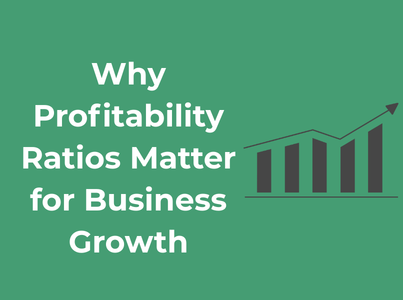
  • Types of Planning in Management: A Complete Guide for Businesses.

    Types of Planning in Management: A Complete Guide for Businesses.

    Planning helps businesses decide what to do, how to do it, when to do it, and who will do it. It reduces uncertainty, improves coordination, saves resources, and prepares organizations for future challenges. Without proper planning, even the best ideas can fail due to poor execution.

    In this complete guide, we will explore the types of planning in management, their importance, features, examples, and how businesses can use them to grow and stay competitive.

    What Is Planning in Management?

    Planning is the process of setting goals and deciding in advance the actions required to achieve them. It is the first and most fundamental function of management, followed by organizing, staffing, directing, and controlling.

    In simple words, planning answers these questions:

    • What do we want to achieve?
    • How will we achieve it?
    • When should we start?
    • What resources are required?
    • Who will be responsible?

    Good planning gives direction to employees, minimizes risks, avoids confusion, and ensures that everyone works toward the same objectives.

    Why Planning Is Important for Businesses

    Before diving into the types, let’s understand why planning is so important in management.

    Planning provides clarity and focus. It helps businesses define their goals clearly and align daily activities with long-term objectives. When employees know what they are working toward, productivity increases.

    It also reduces uncertainty. Market conditions, customer behavior, technology, and competition change constantly. Planning allows businesses to anticipate changes and prepare backup strategies.

    Planning improves decision-making. Managers can compare alternatives, evaluate risks, and choose the best course of action instead of making random decisions.

    It helps in the efficient use of resources. Time, money, manpower, and materials are limited. Planning ensures they are used wisely and not wasted.

    Most importantly, planning creates a roadmap for growth. Whether a company wants to expand, launch new products, or enter new markets, planning makes these goals achievable.

    Types of Planning in Management

    Planning is not a single activity. It exists in different forms, depending on the time period, objectives, level of management, and business needs. Below are the major types of planning in management explained in detail.

    1. Strategic Planning

    Strategic planning is long-term planning done by top-level management. It focuses on the overall direction of the organization and usually covers a period of three to five years or more.

    It answers big questions such as:

    • Where is the company heading?
    • What should be our long-term goals?
    • How can we gain a competitive advantage?

    Strategic planning involves analyzing the business environment, competitors, market trends, strengths, weaknesses, opportunities, and threats (SWOT analysis).

    Example

    A technology company plans to become a leader in AI software in the next five years by investing in research, hiring experts, and expanding globally.

    Benefits

    • Provides clear vision and mission
    • Helps in long-term growth
    • Improves competitive positioning
    • Aligns the entire organization

    2. Tactical Planning

    Tactical planning is medium-term planning done by middle-level management. It focuses on how things should be done to achieve strategic goals.

    If strategic planning decides what to achieve, tactical planning decides how to achieve it.

    It usually covers a period of one to three years and is more detailed than strategic planning.

    Example

    If the company’s strategy is to increase market share, the marketing manager may create a tactical plan for advertising campaigns, discounts, and partnerships.

    Benefits

    • Converts strategy into action
    • Improves coordination between departments
    • Helps managers track progress
    • Makes goals more realistic and achievable

    3. Operational Planning

    Operational planning is short-term planning done by lower-level management. It focuses on daily activities and routine operations.

    It includes specific tasks, schedules, budgets, and procedures required to run the organization smoothly.

    Example

    A factory manager prepares a weekly production schedule, assigns workers, and ensures raw materials are available.

    Benefits

    • Ensures smooth day-to-day operations
    • Improves efficiency
    • Reduces delays and confusion
    • Helps employees understand their responsibilities

    4. Contingency Planning

    Contingency planning is also known as backup planning. It prepares businesses for unexpected situations such as economic downturns, natural disasters, system failures, or sudden market changes.

    Strategic planning helps organizations define long-term goals and allocate resources effectively. In marketing departments, working with an influencer marketing agency can also become part of broader planning efforts when brands aim to expand their digital outreach strategies.

    Instead of reacting in panic, companies with contingency plans can respond quickly and effectively.

    Example

    A company prepares an alternative supply chain plan in case its main supplier fails.

    Benefits

    • Reduces business risks
    • Improves crisis management
    • Protects company reputation
    • Ensures continuity of operations

    5. Financial Planning

    Financial planning ensures that a business has the funds necessary to pursue its strategic and operational goals. This type of planning analyzes budgets, cash flow, investment needs, risks, and financial forecasts.

    Key Features

    • Focuses on money management
    • Includes budgeting, forecasting, and risk analysis
    • Guides investment and expense decisions

    Example: A startup outlines a three-year financial plan to attract investors, manage cash flow, and reach break-even.

    6. Marketing Planning

    Marketing planning focuses on connecting the business to its customers. It outlines how products or services will be positioned, promoted, and sold in the market.

     Key Features

    • Defines marketing objectives
    • Maps promotional activities
    • Allocates marketing budgets

    Example: An e-commerce brand plans a six-month campaign that includes influencer collaborations, email marketing, and social ads to boost awareness and sales.

    7. Human Resource Planning

    People are a business’s most valuable resource. Human resource planning ensures the organization has the right talent at the right time.

     Key Features

    • Workforce forecasting
    • Recruitment and training strategies often supported by AI recruiting software
    • Succession planning

    Example: A growing tech company predicts skill shortages and starts a training program to build future leaders internally.

    8. Long-Term Planning

    Long-term planning focuses on goals that take several years to achieve. It is closely related to strategic planning but specifically emphasizes future growth and sustainability.

    It includes expansion plans, new product development, mergers, acquisitions, and brand building.

    Example

    A retail company plans to open 100 new stores across the country over the next 10 years.

    Benefits

    • Prepares the company for future challenges
    • Encourages innovation
    • Builds financial stability
    • Supports sustainable growth

    9. Short-Term Planning

    Short-term planning covers a period of less than one year. It focuses on immediate goals and current business needs.

    This type of planning is common in budgeting, sales targets, production goals, and marketing campaigns.

    Example

    A business sets a quarterly sales target of ₹50 lakh and plans promotions to achieve it.

    Benefits

    • Helps achieve quick results
    • Improves cash flow management
    • Keeps teams motivated with short goals
    • Allows quick adjustments

    10. Standing Plans

    Standing plans are permanent plans used repeatedly for similar situations. They include policies, procedures, rules, and methods.

    These plans save time because managers do not have to make the same decisions again and again.

    Example

    Company policies on employee leave, attendance, and code of conduct.

    Benefits

    • Ensures consistency
    • Saves managerial time
    • Improves discipline
    • Reduces confusion

    11. Single-Use Plans

    Single-use plans are created for specific situations and are used only once. They include programs, projects, and budgets.

    Example

    Planning a product launch campaign or organizing a corporate event.

    Benefits

    • Helps manage special tasks
    • Improves control over costs
    • Ensures timely completion
    • Focuses on specific objectives

    Difference Between Strategic, Tactical, and Operational Planning

    BasisStrategic PlanningTactical PlanningOperational Planning
    LevelTop managementMiddle managementLower management
    Time periodLong termMedium termShort term
    FocusOverall goalsDepartment goalsDaily tasks
    NatureBroadDetailedVery specific

    How Businesses Can Choose the Right Type of Planning

    Not every business needs all types of planning at the same time. The right choice depends on:

    • Business size
    • Industry type
    • Market conditions
    • Financial resources
    • Company goals

    Small businesses may focus more on short-term and operational planning, while large organizations rely heavily on strategic and corporate planning.

    A balanced approach using multiple types of planning usually delivers the best results.

    Common Mistakes in Business Planning

    Even good plans can fail if certain mistakes are made:

    • Setting unrealistic goals
    • Ignoring market trends
    • Poor communication with employees
    • Lack of flexibility
    • Not reviewing plans regularly

    Successful businesses treat planning as a continuous process, not a one-time activity.

    Future of Planning in Management

    With the rise of artificial intelligence, data analytics, and automation, business planning is becoming more accurate and data-driven.

    Modern companies now use:

    • Business intelligence tools
    • Predictive analytics
    • Cloud-based planning software
    • Real-time dashboards

    These technologies help managers make faster and smarter decisions.

    Final Thoughts

    Planning is the backbone of effective management. Without it, businesses operate blindly and react to problems instead of preventing them.

    Understanding the types of planning in management allows organizations to set clear goals, allocate resources wisely, reduce risks, and achieve sustainable growth.

    Whether it is strategic planning for long-term vision or operational planning for daily efficiency, every type plays a vital role in business success.

    Frequently Asked Questions (FAQs)

    1. What is planning in management?

    Planning in management is the process of setting goals and deciding in advance the actions, resources, and timelines needed to achieve them. It helps businesses work in an organized and goal-oriented way.

    2. What are the main types of planning in management?

    The main types of planning include strategic planning, tactical planning, operational planning, contingency planning, financial planning, marketing planning, human resource planning, project planning, and corporate planning.

    3. Why is planning important for business success?

    Planning helps businesses reduce risks, use resources efficiently, improve decision-making, and prepare for future challenges. It provides clear direction and increases the chances of long-term success.

    4. What is the difference between strategic and operational planning?

    Strategic planning focuses on long-term goals and overall direction, while operational planning deals with daily activities and short-term tasks needed to achieve those goals.

    5. What is the 7S Framework in planning and management?

    The 7S Framework is a management model developed by McKinsey that helps organizations align their internal elements for better performance.

    The seven elements are:

    • Strategy – The plan to achieve competitive advantage
    • Structure – How the organization is arranged
    • Systems – Daily processes and procedures
    • Shared Values – Core beliefs and culture
    • Style – Leadership and management approach
    • Staff – Employees and talent management
    • Skills – Capabilities and competencies

    In planning, the 7S model helps ensure that business plans are balanced and aligned across all areas.

    6. How does the 7S model help in business planning?

    The 7S model helps managers check whether their strategy, people, processes, and culture are working together. If one area is weak, planning can be adjusted to improve overall performance.

    7. What is contingency planning and why is it necessary?

    Contingency planning prepares businesses for unexpected events such as economic downturns, supply chain issues, or system failures. It helps companies respond quickly and minimize losses.

    8. How often should business plans be reviewed?

    Business plans should be reviewed regularly, usually every quarter or year. In fast-changing industries, reviews may be done more frequently to stay competitive.

    9. Can small businesses benefit from formal planning?

    Yes, small businesses benefit greatly from planning. Even simple plans help owners manage finances, set clear goals, and prepare for growth and risks.

    10. What are the common mistakes in business planning?

    Common mistakes include setting unrealistic goals, ignoring market trends, poor communication, lack of flexibility, and failing to monitor performance.

  • How Does a Barcode Work in Retail and Inventory Management?

    How Does a Barcode Work in Retail and Inventory Management?

    In today’s fast-paced retail world, speed and accuracy are everything. Customers expect quick checkouts, businesses want real-time stock updates, and managers need clear insights into what is selling and what is not. Behind all of this efficiency is a small but powerful technology: the barcode.

    From supermarkets and clothing stores to warehouses and online fulfillment centers, barcodes play a vital role in keeping operations smooth and organized. But how does a barcode actually work in retail and inventory management? And why has it become such an essential tool for modern businesses?

    What Is a Barcode?

    barcode print machine

    A barcode is a visual representation of data in the form of black lines, spaces, or patterns that can be read by a scanner or camera. Each barcode contains information about a product, such as its identification number, manufacturer, or category.

    When a barcode is scanned, the system instantly recognizes the product and retrieves its details from a database. This allows businesses to process sales, update inventory, and generate reports within seconds.

    There are two main types of barcodes used in retail:

    • 1D barcodes (linear barcodes) – These are the traditional vertical lines you see on most product packaging, such as UPC and EAN codes.
    • 2D barcodes – These include QR codes and Data Matrix codes, which can store more information in a smaller space.

    Both types are widely used in inventory tracking and point-of-sale (POS) systems.

    How Does a Barcode Work? A Simple Explanation

    At its core, a barcode system works through three basic components:

    1. The barcode label on the product
    2. A barcode scanner to read the code
    3. Software or a database system to process the information

    Here’s what happens step by step:

    First, a product is assigned a unique barcode number. This number is stored in the business’s inventory or POS software along with details such as product name, price, stock quantity, and supplier information.

    When a cashier or warehouse worker scans the barcode, the scanner emits a light that reflects off the barcode. The black bars absorb the light, while the white spaces reflect it back. The scanner converts this pattern into digital data.

    That data is sent to the software system, which identifies the product and displays its information instantly on the screen.

    In retail and inventory management, this process happens thousands of times a day, making operations faster and more accurate.

    Role of Barcodes in Retail Operations

    Barcodes are deeply integrated into almost every part of a retail business. Let’s look at where they are used and why they matter.

    A. Faster Checkout Process

    One of the most visible uses of barcodes is at the checkout counter.

    Instead of manually entering product prices, cashiers simply scan the barcode. The POS system automatically displays the product name and price, calculates the total bill, and applies any discounts or taxes.

    This reduces long queues, improves customer satisfaction, and minimizes human errors.

    B. Accurate Pricing

    Manual price entry can lead to mistakes, such as charging the wrong amount or applying incorrect discounts. With barcode scanning, prices are pulled directly from the system, ensuring consistency across all stores and counters.

    This builds trust with customers and prevents revenue loss due to undercharging.

    C. Easy Product Identification

    In large retail stores with thousands of SKUs (stock keeping units), identifying products manually can be difficult. Barcodes make it easy to recognize products instantly, even if they look similar.

    This is especially useful for clothing stores, electronics retailers, and supermarkets with multiple variants of the same product.

    How Barcodes Work in Inventory Management

    Inventory management is where barcodes truly shine. Keeping track of stock manually is time-consuming and error-prone. Barcode systems automate most of this work.

    1. Real-Time Stock Updates

    Every time a product is sold, returned, or moved, its barcode is scanned. The inventory software updates the stock level automatically.

    This means business owners always know:

    • How many items are in stock
    • Which products are running low
    • Which items are overstocked

    Real-time inventory tracking helps prevent stockouts and reduces unnecessary storage costs.

    2. Receiving and Stocking Products

    When new products arrive from suppliers, warehouse staff scan the barcodes to record them into the system. This process confirms that the correct items and quantities have been received.

    During shelving or storage, barcodes are scanned again to track the location of each item. This makes it easy to find products later, especially in large warehouses.

    3. Inventory Audits and Cycle Counts

    Traditional stock audits involve counting items manually, which can take days. With barcode scanners, staff can quickly scan products on shelves to verify quantities against the system.

    This improves accuracy and reduces the time required for inventory audits.

    Components of a Barcode System in Retail

    To understand how barcode technology supports retail and inventory management, it helps to look at the main components involved.

    a. Barcode Labels

    These are printed stickers or packaging codes that contain the barcode and sometimes the product name or price. High-quality labels are important because damaged or faded barcodes can cause scanning issues.

    b. Barcode Scanners

    Scanners can be handheld, fixed at checkout counters, or integrated into mobile devices. Modern scanners are fast and can read barcodes even if they are slightly damaged or poorly printed.

    c. POS and Inventory Software

    This software stores all product information and handles sales transactions, stock updates, and reporting. Many retailers today use cloud-based POS systems that sync inventory data across multiple locations in real time.

    d. Database

    The database is where all product details are stored. Each barcode number is linked to specific product information, making it easy to retrieve data instantly.

    Benefits of Using Barcodes in Retail and Inventory Management

    Barcode systems offer several advantages that directly impact business performance.

    a. Improved Accuracy

    Manual data entry often leads to mistakes. Barcodes reduce errors by automating product identification and pricing.

    b. Time Savings

    Scanning a barcode takes less than a second. This speeds up checkout lines, inventory checks, and stock receiving processes.

    c. Better Inventory Control

    With real-time data, retailers can make informed decisions about reordering, promotions, and discontinuing slow-moving products.

    d. Cost Reduction

    By avoiding overstocking and stockouts, businesses save money on storage, lost sales, and emergency restocking.

    e. Enhanced Customer Experience

    Fast billing, accurate pricing, and product availability all contribute to better customer satisfaction.

    Types of Barcodes Used in Retail and Inventory Management

    Not all barcodes are the same. Different barcode types are designed for different purposes, industries, and product sizes. In retail and inventory management, choosing the right barcode format helps improve scanning accuracy, data storage, and system compatibility.

    Below are the most commonly used barcode types in modern retail environments.

    1. UPC (Universal Product Code)

    UPC is one of the most widely used barcode types in retail, especially in the United States and Canada.

    You’ll find UPC barcodes on almost every consumer product, including groceries, electronics, and household items. It usually contains 12 digits that identify the manufacturer and the specific product.

    Retailers prefer UPC because it works seamlessly with POS systems and allows fast checkout and accurate pricing.

    2. EAN (European Article Number)

    EAN barcodes are similar to UPC but are used internationally, including in India, Europe, and Asia.

    The most popular format is EAN-13, which contains 13 digits. It is commonly printed on packaged goods, cosmetics, food items, and clothing labels.

    For businesses operating globally or selling imported products, EAN is essential for compatibility with international suppliers and retailers.

    3. Code 128

    Code 128 is a high-density barcode that can store both numbers and letters.

    It is widely used in:

    • Warehouses
    • Logistics companies
    • Shipping labels
    • Internal inventory tracking

    Retailers often use Code 128 for cartons, pallets, and back-end inventory operations where more detailed product or batch information is needed.

    4. Code 39

    Code 39 is one of the oldest barcode types still in use today.

    It supports letters, numbers, and special characters and is commonly used for:

    • Asset tracking
    • Employee ID cards
    • Industrial inventory systems

    While it is not as compact as newer barcode types, it is easy to print and reliable for internal business use.

    5. QR Codes (Quick Response Codes)

    QR codes are 2D barcodes that can store much more information than traditional linear barcodes.

    In retail and inventory management, QR codes are often used for:

    • Product authentication
    • Batch tracking
    • Expiry date tracking
    • Linking to product manuals or warranty pages
    • Mobile payments

    They are especially useful for businesses that want to combine inventory tracking with customer engagement.
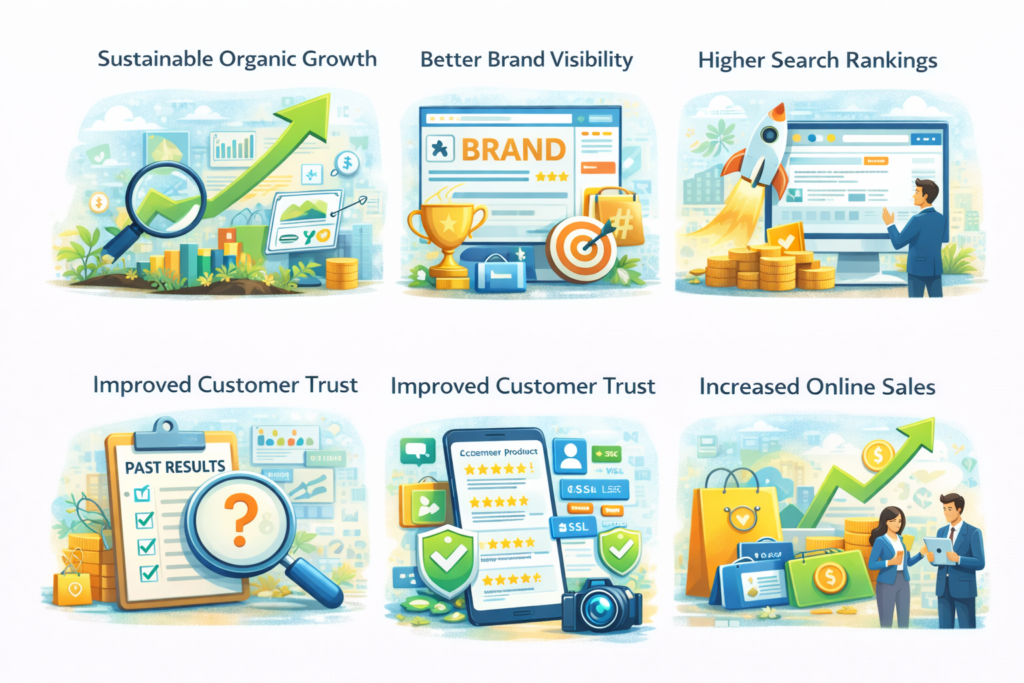
    6. Data Matrix Codes

    Data Matrix is another type of 2D barcode commonly used for small products where space is limited.

    They are popular in:

    • Electronics
    • Pharmaceuticals
    • Jewelry
    • Small retail packaging

    Even if partially damaged, Data Matrix codes remain readable, making them reliable for long-term inventory tracking.

    7. ITF (Interleaved 2 of 5)

    ITF barcodes are mainly used for bulk packaging such as cartons and boxes in warehouses.

    Retailers use this barcode type to manage:

    It is ideal for scanning at high speed during logistics operations.

    Barcode vs Manual Inventory Management

    FeatureBarcode Inventory ManagementManual Inventory Management
    Data EntryAutomatic through barcode scanningHandwritten or typed manually
    AccuracyVery high, minimal human errorsLow, prone to frequent mistakes
    SpeedFast and efficientSlow and time-consuming
    Stock UpdatesReal-time updatesDelayed and often outdated
    ScalabilityEasy to scale as business growsDifficult to manage at large scale
    Cost EfficiencyReduces long-term operational costsHigher costs due to errors and labor
    Reporting & AnalyticsDetailed reports available instantlyLimited or requires manual calculation
    Inventory AuditsQuick barcode scanningTime-consuming physical counting
    Business Growth SupportIdeal for expanding retail operationsBecomes inefficient as inventory grows

    Challenges of Barcode Systems

    While barcode technology is highly effective, it is not perfect.

    Damaged or dirty labels can cause scanning problems. Poor lighting or low-quality printers may also affect barcode readability.

    Additionally, setting up a barcode system requires initial investment in scanners, printers, and software.

    However, these challenges are minor compared to the long-term benefits.

    Barcodes and the Future of Retail Technology

    As retail becomes more digital, barcode systems are evolving too.

    Today, barcodes are integrated with:

    • Cloud-based POS systems
    • Industrial AI powered inventory forecasting tools
    • Mobile checkout solutions
    • Warehouse automation and robotics

    Some businesses are even combining barcodes with RFID technology for faster and more advanced tracking.

    Despite new innovations, barcodes remain one of the most reliable and cost-effective technologies in retail and inventory management.

    Best Practices for Using Barcodes in Retail

    To get the most out of barcode systems, retailers should follow a few best practices.

    Use high-quality barcode printers and labels to avoid scanning errors.

    Keep your product database updated so that every barcode matches the correct product information.

    Train staff to handle scanners properly and recognize common barcode issues.

    Integrate your barcode system with your POS and inventory management software for real-time synchronization.

    Perform regular inventory audits to ensure data accuracy.

    Final Thoughts

    So, how does a barcode work in retail and inventory management? It works as a bridge between physical products and digital systems.

    By converting simple printed patterns into valuable data, barcodes help retailers sell faster, manage stock better, and make smarter business decisions.

    Whether you run a small shop or a multi-store retail chain, barcode technology can transform your operations by improving accuracy, reducing costs, and enhancing customer experience.

    In today’s competitive retail landscape, adopting a reliable barcode system is not just a convenience—it’s a strategic advantage.

    Frequently Asked Questions (FAQs)

    1. How does a barcode work in retail stores?

    A barcode works by storing a product’s identification number in a visual pattern. When scanned at checkout, the POS system reads the code, fetches the product details from the database, displays the price, and updates inventory automatically.

    2. What information is stored in a barcode?

    Most retail barcodes store a unique product number that links to details such as product name, price, stock quantity, brand, and supplier information in the inventory system.

    3. Are barcodes better than manual inventory management?

    Yes. Barcode systems are faster, more accurate, and reduce human errors. They also provide real-time stock updates, making inventory planning and reordering much easier.

    4. What is the difference between 1D and 2D barcodes?

    1D barcodes store data horizontally using lines and spaces, such as UPC and EAN codes.
    2D barcodes, like QR codes, store data both horizontally and vertically and can hold much more information.

    5. Can small retail businesses use barcode systems?

    Absolutely. Barcode systems are affordable and scalable, making them suitable for small shops as well as large retail chains. Even basic POS systems support barcode scanning.

  • Best Ecommerce SEO Companies: A Complete Guide to Scaling Your Online Store

    Best Ecommerce SEO Companies: A Complete Guide to Scaling Your Online Store

    Why do even established ecommerce brands struggle to sustain growth without a well-planned SEO strategy? Without an effective SEO approach, even well-known ecommerce businesses can lose momentum in an increasingly competitive market.

    Today, success isn’t just about ranking on search engines, it’s about reaching the right customers at the exact moment they’re ready to buy.

    As search engines evolve and AI-powered search continues to influence user behavior, choosing the right ecommerce SEO partner becomes critical. The right agency can improve visibility, drive qualified traffic, and support long-term sales growth.

    This blog serves as a complete guide to finding the best ecommerce SEO company for your business. It explains what ecommerce SEO is, why it’s essential for long-term growth, and how professional SEO agencies help increase traffic and sales.

    You’ll find a curated list of top ecommerce SEO companies, a breakdown of their services, pricing models, and ideal use cases, along with practical tips on how to choose the right SEO partner and avoid common hiring mistakes. By the end, you’ll clearly understand how the right ecommerce SEO company can help you scale your online store confidently and sustainably.

    Understanding Ecommerce SEO

    Ecommerce SEO is the process of optimizing an online store to improve its visibility on search engines like Google. It helps product and category pages rank higher when users search for specific products online. The main goal of ecommerce SEO is to attract people who are ready to buy. It focuses on using the right keywords, improving page content, and optimizing website structure. An SEO checklist helps ensure all essential optimization steps are covered consistently.

     Ecommerce SEO also makes the website fast, mobile-friendly, and easy to navigate. This improves the overall user experience for customers. Unlike paid ads, ecommerce SEO brings long-term traffic without ongoing costs. It helps build trust and credibility for your brand.

    Better rankings lead to more visitors to your store. More visitors increase the chances of higher sales and revenue. Using SEO Reporting Tools allows you to track performance metrics, keyword movements, and conversion data to continuously refine your strategy and maximize results.

     Top Ecommerce SEO Companies

    Here are the top  Ecommerce SEO Companies you can get in touch with for the utmost performance and growth of your e-commerce business:

    Company NameOverviewScope HighlightsBest ForPricing Range / Engagement Type
    First Page SageTop-rated San Francisco agency focused on long-term ecommerce SEO. Works with brands like NBC & Logitech.SEO strategy, keyword research, technical SEO, product & category page optimization, content, link-building, reporting & CRO.Medium to large ecommerce brands wanting long-term growth.Custom / Enterprise-level pricing (Long-term retainers)
    WYTLABSData-driven agency using AI-powered SEO, analytics & GEO optimization.AI-based keyword research, technical SEO, product & category optimization, content & GEO optimization, CRO, link-building, reporting.Ecommerce brands looking for future-ready, AI-driven SEO.Mid to high-range pricing (Monthly retainers)
    WebFXLarge full-service USA agency trusted for traffic and conversions.Ecommerce SEO, PPC integration, content marketing, technical SEO, product & category page optimization, CRO, link-building, reporting.Large ecommerce brands needing full-service marketing + SEO.Mid to high-range pricing (Monthly retainers & packages)
    Coalition TechnologiesWell-established agency focusing on site speed, technical SEO & conversions. Works with Shopify, Magento, WooCommerce.Technical SEO, keyword research, site speed optimization, product & category optimization, mobile SEO, CRO, content, link-building, reporting.Ecommerce stores needing fast, technically optimized websites..Mid-range pricing (Flexible monthly retainers)
    OneLittleWebEcommerce SEO expert combining technical SEO, link-building & content strategies.Technical SEO, keyword research, product & category optimization, content marketing, CRO, internal linking, mobile SEO, reporting.Small to medium ecommerce stores seeking tailored SEO.Affordable to mid-range pricing (Custom monthly plans)

    1. First Page Sage

    First Page Sage is a top-rated ecommerce SEO agency based in San Francisco, widely known for its strategic and data-driven approach to SEO. The company specializes in helping ecommerce brands achieve long-term organic growth by focusing on quality traffic, strong content, and technical excellence.

     They have worked with well-known brands like NBC, Logitech, and Salesforce, which shows their credibility and expertise in handling competitive markets.

    Instead of quick fixes, First Page Sage focuses on sustainable SEO strategies that improve brand authority and search visibility over time. Their team combines SEO, content marketing, and thought leadership to help ecommerce businesses stand out in crowded industries.

    Scope of Work:

    First Page Sage offers a comprehensive and strategic scope of work designed specifically for ecommerce businesses. Their approach focuses on building a strong SEO foundation, improving search visibility, and driving long-term organic growth. Every strategy is customized according to business goals, industry competition, and target audience.

    The scope of work typically includes:

    • Ecommerce SEO strategy development aligned with business objectives and revenue goals
    • In-depth keyword research focused on high-intent, buyer, and product-based keywords
    • Technical SEO optimization, including site structure, crawlability, indexing, and page speed improvements
    • Product page optimization, including titles, descriptions, images, schema markup, and internal linking
    • Category page optimization to rank for high-volume and competitive keywords
    • Content creation, such as SEO blogs, buying guides, and comparison content
    • Thought leadership content to strengthen brand authority and industry trust
    • On-page SEO improvements, including meta tags, headings, and URL optimization
    • Internal linking strategy to improve navigation and SEO performance
    • Link-building and digital PR support using white-hat SEO techniques
    • Conversion-focused optimization to improve user experience and sales
    • Performance tracking and reporting with clear KPIs, insights, and growth metrics

    Overall, First Page Sage follows a highly customized and scalable SEO approach. Their scope of work is designed not only to improve rankings but also to build long-term brand authority, increase qualified traffic, and deliver sustainable ecommerce growth.

    Why They Stand Out

     First Page Sage is their strong focus on long-term and sustainable SEO growth. They prioritize high-quality content, technical excellence, and brand authority instead of quick ranking tricks. Their strategic approach helps ecommerce brands build trust and visibility over time. Overall, First Page Sage stands out for delivering reliable, well-planned SEO results that last.

    2. WYTLABS

    WYTLABS is a data-driven ecommerce SEO company known for its advanced use of AI-powered optimization, analytics, and performance-focused strategies. The company specializes in helping ecommerce brands scale their organic growth by combining technical SEO expertise with intelligent data analysis.

    They work with growing and enterprise-level ecommerce businesses that want measurable results rather than vanity metrics. WYTLABS focuses on improving search visibility, user engagement, and revenue by targeting high-intent keywords and optimizing websites for both search engines and users.

    Instead of relying on traditional SEO methods alone, WYTLABS integrates AI tools, automation, and generative engine optimization (GEO) strategies often implemented by a geo agency to stay ahead of evolving search algorithms. Their approach is highly strategic, making them a strong choice for ecommerce brands looking for scalable and future-ready SEO solutions.

    Scope of Work

    WYTLABS offers a comprehensive and performance-driven scope of work designed for ecommerce businesses that want data-backed growth. Their strategies are built around analytics, AI insights, and continuous optimization to ensure long-term success.

    The scope of work typically includes:

    • Custom ecommerce SEO strategy development based on business goals and market data
    • Advanced keyword research using AI and analytics to target high-intent and buyer-focused keywords
    • Technical SEO optimization, including site architecture, indexing, crawlability, and page speed
    • Product and category page optimization to improve rankings and conversion rates
    • AI-driven content optimization for better relevance and engagement
    • Generative Engine Optimization (GEO) to improve visibility in AI-powered search results
    • On-page SEO enhancements, including meta tags, headings, and structured data
    • Internal linking and site flow optimization to improve crawl efficiency
    • Conversion rate optimization (CRO) to turn organic traffic into sales
    • White-hat link-building strategies to strengthen domain authority
    • Data analytics and performance tracking with actionable insights
    • Transparent reporting with clear KPIs, traffic trends, and revenue impact

    Overall, WYTLABS follows a highly analytical and scalable SEO approach. Their scope of work is designed to help ecommerce businesses adapt to changing search landscapes, improve organic performance, and achieve consistent, data-backed growth.

    Why They Stand Out

     WYTLABS is their strong data-driven and AI-powered approach to ecommerce SEO. They focus on real performance metrics rather than guesswork, which leads to measurable growth. Their use of advanced analytics and Generative Engine Optimization makes their strategies future-ready. Overall, WYTLABS stands out for delivering scalable SEO solutions that drive both traffic and sales.

    3. WebFX

    WebFX is a large, full-service digital marketing agency based in the USA, well known for delivering measurable results for ecommerce businesses. The company offers a wide range of services, including ecommerce SEO, PPC advertising, content marketing, and website optimization. WebFX is trusted by large and growing ecommerce brands for its ability to drive traffic, improve conversions, and increase online revenue.

    With years of experience and a strong team of SEO specialists, WebFX focuses on data-backed strategies and performance tracking. They use advanced tools and in-house technology to analyze user behavior, keyword trends, and conversion data. This allows them to create effective SEO campaigns that align with business goals and scale with growth.

    Instead of focusing only on rankings, WebFX emphasizes ROI-driven SEO. Their approach combines organic search optimization with conversion-focused improvements, helping ecommerce brands turn traffic into real sales.

    Scope of Work

    WebFX offers a comprehensive and results-oriented scope of work for ecommerce businesses. Their strategies are designed to improve visibility, traffic quality, and overall revenue performance.

    The scope of work typically includes:

    • Custom ecommerce SEO strategy aligned with business goals and market competition
    • Keyword research and mapping focused on high-intent and transactional keywords
    • Technical SEO optimization, including site speed, mobile usability, and crawlability
    • Product and category page optimization for better rankings and conversions
    • On-page SEO improvements, including meta tags, headings, and URL structure
    • Content marketing, such as blogs, product guides, and SEO landing pages
    • Link-building and authority development using ethical SEO practices
    • Conversion rate optimization (CRO) to improve user experience and sales
    • Integration of SEO with PPC campaigns for better overall performance
    • Advanced analytics and tracking using proprietary tools
    • Detailed reporting with clear KPIs, traffic data, and ROI insights

    Overall, WebFX follows a scalable and performance-focused SEO approach. Their scope of work is designed to help ecommerce brands grow consistently, improve conversions, and achieve measurable results across multiple digital marketing channels.

    Why They Stand Out

    WebFX is their strong focus on measurable results and ROI. They combine SEO with data analytics and conversion optimization to drive real business growth. Their transparency in reporting and use of advanced tools make their strategies easy to trust. Overall, WebFX stands out as a reliable choice for large and fast-growing ecommerce brands.

    4. Coalition Technologies

    Coalition Technologies is a well-established SEO and digital marketing company with a strong focus on ecommerce SEO and performance optimization. Based in the USA, the company is known for helping online stores improve keyword rankings, site performance, and organic sales through data-driven strategies.

    They work with ecommerce businesses of all sizes and have deep experience in platforms like Shopify, Magento, WooCommerce, and BigCommerce. Coalition Technologies places a strong emphasis on technical SEO, site speed optimization, and conversion rate improvements, making them an excellent choice for ecommerce brands looking to scale efficiently.

    Rather than focusing only on traffic growth, Coalition Technologies aims to improve the overall shopping experience. Their SEO strategies are designed to attract high-intent users and guide them smoothly toward conversions.

    Scope of Work

    Coalition Technologies offers a structured and results-focused scope of work tailored specifically for ecommerce websites. Their approach balances technical excellence with conversion-driven optimization.

    The scope of work typically includes:

    • Custom ecommerce SEO strategy aligned with business goals and competition
    • Comprehensive keyword research targeting buyer and transactional keywords
    • Technical SEO optimization, including site structure, crawlability, and indexing
    • Site speed optimization to improve performance and user experience
    • Product page optimization, including titles, descriptions, images, and schema
    • Category page optimization for high-volume and competitive keywords
    • On-page SEO improvements, such as meta tags, headings, and internal linking
    • Mobile SEO optimization for better rankings and usability
    • Conversion rate optimization (CRO) to increase sales and reduce bounce rates
    • Content optimization and SEO copywriting for ecommerce pages
    • White-hat link-building strategies to improve domain authority
    • SEO performance tracking and reporting with clear KPIs and insights

    Overall, Coalition Technologies follows a practical and scalable SEO approach. Their scope of work is designed to help ecommerce stores improve rankings, enhance user experience, and generate consistent organic revenue.

    Why They Stand Out

    What I loved the most about Coalition Technologies is their strong focus on technical SEO and site performance. They pay close attention to speed, structure, and usability, which directly impacts conversions. Their ecommerce-specific expertise makes their strategies highly practical and effective. Overall, they stand out for delivering SEO solutions that improve both rankings and sales.

    5. OneLittleWeb

    OneLittleWeb is a highly regarded ecommerce SEO agency recognized for its deep expertise in technical SEO, content marketing, and link-building strategies. The company specializes in helping online stores improve search visibility, increase traffic, and boost sales with tailored SEO campaigns. OneLittleWeb works closely with ecommerce brands of all sizes, providing customized solutions that align with their business goals.

    Instead of offering generic SEO services, OneLittleWeb focuses on strategic, data-driven approaches that target high-intent buyers and optimize the user journey. Their team combines technical know-how with creative content strategies to ensure online stores rank higher in search results and convert more visitors into customers.

    Scope of Work 

    OneLittleWeb provides a detailed and ecommerce-focused scope of work designed to deliver measurable results and long-term growth. Their approach balances technical optimization with content and authority-building strategies.

    The scope of work typically includes:

    • Custom ecommerce SEO strategy tailored to business objectives and competition
    • Comprehensive keyword research focused on transactional and product-specific keywords
    • Technical SEO optimization, including site structure, indexing, crawlability, and schema markup
    • Product and category page optimization for better rankings and conversions
    • Content marketing, including blogs, product guides, and informational pages
    • On-page SEO improvements, including meta tags, headings, and URL optimization
    • Internal linking strategies to improve navigation and search engine crawlability
    • White-hat link-building campaigns to boost domain authority
    • Conversion rate optimization (CRO) to enhance user experience and sales
    • Mobile SEO optimization for responsive and fast-loading pages
    • Analytics, tracking, and reporting with clear KPIs and actionable insights

    Overall, OneLittleWeb follows a highly specialized and scalable SEO approach. Their scope of work is designed not only to increase search rankings but also to enhance user experience, drive qualified traffic, and generate consistent ecommerce revenue.

    Why They Stand Out

    What I loved the most about OneLittleWeb is their focus on combining technical SEO with smart content and link-building strategies. They don’t just improve rankings—they create campaigns that help ecommerce stores dominate search results and convert traffic into real sales. Their tailored approach makes them an excellent choice for brands looking for strategic and sustainable SEO growth.

    Why Hiring the Best Ecommerce SEO Company Is Important

    The right agency helps your website rank higher, attract relevant traffic, and convert visitors into loyal customers. This becomes even more effective when ecommerce SEO is aligned with broader digital marketing services that support brand visibility, customer acquisition, and long-term growth. Here’s why it’s so important:

    1. Increased Organic Traffic:

    A top ecommerce SEO company focuses on high-intent keywords that attract people actively searching for your products. By optimizing product pages, category pages, and content, they help your store appear on the first page of Google search results.

    This leads to consistent, free traffic from search engines without the ongoing costs of paid ads. More organic visitors mean more potential customers discovering your products naturally.

    2. Higher Conversion Rates:

    It’s not just about getting visitors it’s about getting the right visitors. Ecommerce SEO experts optimize your pages to match user intent, which helps turn visitors into buyers. Key optimizations include:

    • Clear, engaging product descriptions
    • Optimized images and page layout
    • Easy navigation and internal linking
    • Strong calls-to-action (CTAs)

    When visitors can quickly find what they want, whether through standard navigation or a search by image feature, they are more likely to make a purchase. This improves engagement, reduces bounce rates, and increases conversion rates.

    3. Long-Term Business Growth:

    Unlike paid ads that stop working when the budget ends, SEO builds a strong foundation for long-term success. Agencies work on:

    • Technical SEO improvements
    • High-quality content creation
    • Backlink building
    • Optimized product and category pages

    These efforts continue to generate sustainable traffic and sales, helping your store grow steadily over time.

    4. Build Brand Authority:

    Professional SEO helps your ecommerce store gain credibility in your niche. When your website consistently ranks high for relevant keywords, customers begin to trust your brand. High authority leads to:

    • Increased brand recognition
    • More repeat customers
    • Better engagement on content and products

    This not only improves sales but also strengthens your reputation in a competitive market.

    5. Competitive Advantage:

    An experienced ecommerce SEO company studies your competitors to help you stay ahead in search rankings. They identify gaps in competitor strategies and implement solutions like:

    • Targeting untapped keywords
    • Optimizing underperforming pages
    • Creating superior content

    This gives your business a clear advantage, helping you capture more market share and outperform competitors online.

    6. Cost Efficiency:

    SEO is one of the most cost-effective marketing strategies for ecommerce. Unlike paid ads, which require continuous investment, SEO provides long-term benefits at a fraction of the cost. Investing in a professional SEO agency:

    • Reduces wasted ad spend
    • Generates organic traffic that keeps growing
    • Offers higher ROI over time

    Core Services Provided by the Best Ecommerce SEO Company

    A top ecommerce SEO company helps increase your store’s visibility, attract ready-to-buy customers, and boost sales through specialized, ecommerce-focused SEO strategies.

    1. Ecommerce Website SEO Audit:

    An SEO audit is the first and most important step in building a successful ecommerce SEO strategy. It identifies issues that may prevent your store from ranking higher in search engines. This process can vary depending on the types of ecommerce businesses involved, since different store models often face unique technical and content-related challenges.

    Key checks performed during an audit include:

    • Broken links: Links that lead to missing pages can hurt your rankings.
    • Duplicate product pages: Duplicate content confuses search engines and reduces SEO value.
    • Poor site structure: A confusing website structure makes it hard for users and search engines to navigate.
    • Slow loading speed: Pages that load slowly reduce user experience and negatively impact rankings.

    The audit provides a clear roadmap for fixing these issues and optimizing your site for search engines. It forms the foundation for all other SEO efforts.

    2. Keyword Research for Ecommerce Stores:  

    Keyword research is the process of finding the best keywords that potential buyers use when searching for products online. The goal is to target commercial and transactional keywords that attract high-intent shoppers.

    Examples of keywords include:

    • “Best [product name] online”
    • “Buy [product] near me”
    • “Affordable [product] price”

    A professional ecommerce SEO company focuses on keywords that drive real buyers, not just traffic, ensuring your store gets qualified leads that are more likely to convert. A clean way to keep every page focused is to choose one main keyword for each product or category, then let every on-page signal reinforce that single intent rather than splitting attention across overlapping variations.

    3. Category Page Optimization:

    Category pages are essential for ecommerce SEO because they target high-volume keywords and guide users to the products they want. Optimizing these pages helps your site rank higher and improve navigation.

    Key optimizations include:

    • Category titles and descriptions with targeted keywords
    • Meta tags to improve search engine visibility
    • Internal linking to connect category pages with products and other categories
    • Filters and navigation to make it easy for users to browse products

    Properly optimized category pages drive more organic traffic and improve the overall shopping experience.

    4. Product Page SEO Optimization:

    Product pages are where most conversions happen, so they need to be fully optimized for both search engines and shoppers.

    Optimization tasks include:

    • Writing unique product descriptions that highlight features and benefits
    • Adding keyword-rich titles to improve search rankings
    • Optimizing images with alt text to boost visibility in image searches
    • Improving product schema markup for rich snippets, which increases click-through rates

    Well-optimized product pages attract more buyers, improve rankings, and increase conversions, making them a critical part of ecommerce SEO.

    Conversion Rate Optimization (CRO) and SEO

    While SEO brings traffic to your ecommerce store, Conversion Rate Optimization (CRO) ensures that this traffic turns into paying customers. Simply attracting visitors isn’t enough your website needs to guide users smoothly through the purchase process and make it easy for them to buy.

    Optimizing for Sales, Not Just Traffic

    A professional ecommerce SEO agency doesn’t just focus on rankings, they also implement strategies to increase conversions. This means the visitors who come to your site are more likely to complete a purchase.

    Key CRO strategies include:

    • Clear Call-to-Action (CTA) Buttons: Buttons like “Buy Now,” “Add to Cart,” or “Get Yours Today” should be visible, compelling, and easy to click. This helps guide users toward making a purchase without confusion.
    • User-Friendly Navigation: A well-structured website with easy menus, filters, and search options allows visitors to find the products they want quickly. This reduces bounce rates and keeps potential buyers engaged.
    • Trust Signals: Adding reviews, ratings, testimonials, and secure payment badges builds trust with shoppers. Customers are more likely to buy from a store that appears credible and reliable.
    • Optimized Product Pages: Product descriptions, images, pricing, and availability must be clear and appealing. Well-optimized pages increase both engagement and the likelihood of conversion.
    • Mobile Optimization: Since many shoppers use mobile devices, having fast-loading, mobile-friendly pages is essential to maximize conversions.

    Why CRO and SEO Together Matter

    When SEO and CRO work hand in hand:

    • SEO attracts high-intent visitors actively searching for your products.
    • CRO ensures these visitors complete purchases, increasing sales and revenue.
    • Combining both improves ROI because you’re not just driving traffic—you’re generating qualified buyers.

    SEO brings visitors to your store, and CRO turns those visitors into customers, making it a crucial strategy for ecommerce success.

    How to Choose the Best Ecommerce SEO Company

    Selecting the right ecommerce SEO company is critical for your online store’s growth. The wrong choice can waste time, money, and even harm your search rankings. Here are the key factors to consider when making your decision:

    1. Industry Experience:

    Look for an SEO agency that has proven experience in ecommerce SEO. Ecommerce websites have unique challenges compared to other sites, such as product pages, category pages, schema markup, and shopping cart integration.

    • Check if the company has worked with ecommerce clients similar to your niche or business size.
    • Ask for case studies or success stories showing measurable results like increased traffic, improved rankings, and higher sales.
    • Experienced agencies know what works for ecommerce, from product page optimization to CRO (conversion rate optimization).

    Hiring an agency with real ecommerce expertise reduces trial-and-error and speeds up your SEO success.

    2. Transparent SEO Process:

    A trustworthy SEO company will have a clear, well-documented process and keep you informed at every stage. Transparency ensures you know what strategies are being implemented and how results are measured.

    • They should provide regular reports with key metrics such as traffic, keyword rankings, and conversion data.
    • Expect a company that explains their on-page, off-page, and technical SEO strategies in simple terms.
    • Transparency helps you understand ROI, make informed decisions, and avoid hidden costs or “black-box” approaches.

    3. Customized Ecommerce SEO Strategy:

    Every ecommerce business is different. The best SEO companies don’t use a one-size-fits-all approach; instead, they create strategies tailored to your products, target audience, and competition.

    • Keyword research should focus on high-intent, buyer keywords specific to your niche.
    • Content strategy should match your brand voice and address customer needs.
    • Technical SEO improvements should fit your website platform, whether it’s Shopify, WooCommerce, Magento, or BigCommerce.

    A customized strategy ensures your SEO efforts are aligned with your business goals, rather than following generic methods that may not deliver results.

    4. Ethical SEO Practices:

    Always choose an agency that follows white-hat SEO methods. Unethical or “black-hat” tactics may provide short-term gains but can lead to Google penalties or even deindexing of your site.

    • White-hat SEO includes quality content, ethical link-building, and technical optimization.
    • Avoid agencies promising instant #1 rankings or spammy backlinks.
      Ethical practices help your ecommerce store grow sustainably and safely over time.

    Common Mistakes to Avoid When Hiring an Ecommerce SEO Agency

    Hiring the wrong SEO agency can waste your ecommerce store’s time, money, and potential customers. Avoiding common mistakes ensures better results and protects your site from penalties.

    1. Choosing Low-Cost SEO Services with Unrealistic Promises:

    Some agencies may offer very cheap SEO services or promise instant #1 rankings. While this might sound tempting, these are usually red flags.

    • SEO is a long-term investment that requires ongoing work.
    • Agencies promising quick results often use black-hat techniques like spammy backlinks, which can lead to Google penalties.
    • Low-cost services may cut corners, providing minimal optimization that doesn’t drive real results.

    2. Ignoring Technical SEO Expertise:

    Many ecommerce sites fail because technical SEO issues are overlooked. Even with great content and keywords, your website may not rank if it has:

    • Slow page loading speed
    • Poor mobile responsiveness
    • Broken links or crawl errors
    • Improper URL structure or duplicate pages

    Always choose an agency that understands technical SEO and can fix these issues, ensuring search engines can crawl and index your website properly.

    3. Not Checking Past Ecommerce Results:

    A common mistake is hiring an agency without verifying their track record with ecommerce businesses.

    • Ask for case studies, client testimonials, or references.
    • Check if they’ve handled stores similar in size or industry to yours.
    • Agencies with relevant experience understand ecommerce platforms like Shopify, WooCommerce, or Magento, and know the strategies that drive sales.

    Without checking past results, you risk hiring an agency that lacks the specific expertise your online store needs.

    4. Expecting Instant SEO Results:

    SEO is not instant. It takes time to see significant results because it involves:

    • Building authority and trust with search engines
    • Optimizing multiple pages and content over time
    • Gaining high-quality backlinks and improving user experience

    Expecting immediate rankings or traffic can lead to frustration. The right agency sets realistic expectations and focuses on sustainable growth.

    Benefits of Working with the Best Ecommerce SEO Company

    Partnering with a professional ecommerce SEO company can significantly impact your online store’s success. A top agency doesn’t just improve rankings—they help your business grow sustainably, attract qualified traffic, and convert visitors into loyal customers. Here’s a detailed look at the benefits:

    1. Sustainable Organic Growth:

    A professional ecommerce SEO company and good marketing company for small business focuses on long-term strategies rather than quick fixes. They optimize your website, product pages, and content to consistently attract organic traffic from search engines.

    • Continuous keyword optimization and content updates keep your store visible.
    • Technical SEO improvements ensure search engines can crawl and index your site efficiently.
    • Sustainable growth reduces reliance on paid ads and lowers marketing costs over time.

    2. Better Brand Visibility: SEO helps your ecommerce store appear on the first page of search results, making your brand more visible to potential customers.

    • Appearing for high-intent keywords increases recognition and recall.
    • Consistently ranking for relevant searches positions your brand as an industry leader.
    • Enhanced visibility helps your store stand out in a competitive market.

    3. Higher Search Rankings:

    A top SEO agency implements strategies that improve your rankings for both product and category pages.

    • Optimized titles, meta descriptions, and content ensure your pages rank for relevant searches.
    • Technical SEO fixes, link-building, and schema markup boost rankings further.
    • Higher search rankings result in more qualified traffic to your store.

    4. Improved Customer Trust:

    SEO isn’t just about visibility it also builds credibility and trust with your audience.

    • High rankings signal to customers that your store is reliable and authoritative.
    • Optimized product pages, reviews, and trust signals increase confidence in your brand.
    • Customers are more likely to purchase from a store they trust.

    5. Increased Online Sales:

    Ultimately, the goal of ecommerce SEO is to drive revenue.

    • Targeted traffic ensures visitors are ready to buy, not just browsing.
    • Conversion-focused strategies like CRO, optimized product pages, and strong CTAs help turn traffic into sales.
    • Over time, organic traffic growth leads to higher ROI and more consistent online revenue.

    Conclusion

    Choosing the best ecommerce SEO company can significantly impact your online store’s performance in a competitive market. A strong SEO strategy helps improve search rankings, attract qualified buyers, and drive consistent organic traffic. The right SEO partner focuses on ethical, data-driven methods that deliver long-term growth rather than quick wins. By investing in a trusted ecommerce SEO agency, businesses can build stronger brand visibility, increase conversions, and achieve sustainable revenue growth over time.

    Frequently Asked Questions (FAQs)

    1. What does an ecommerce SEO company do?

    An ecommerce SEO company optimizes your online store to rank higher on search engines. This includes keyword research, technical SEO, product and category page optimization, content creation, and conversion improvements to increase traffic and sales.

    2. How is ecommerce SEO different from regular SEO?

    Ecommerce SEO focuses on product and category pages, buyer-intent keywords, schema markup, and conversion optimization, while regular SEO usually targets blogs or service pages.

    3. How long does ecommerce SEO take to show results?

    Most ecommerce SEO campaigns start showing improvements within 3 to 6 months, but strong and stable results typically take 6 to 12 months, depending on competition and website condition.

    4. Is ecommerce SEO better than paid ads?

    Ecommerce SEO provides long-term, cost-effective traffic, while paid ads offer instant results but stop when the budget ends. The best strategy often combines both, but SEO delivers higher ROI over time.

    5. How much does ecommerce SEO cost?

    The cost of ecommerce SEO varies based on business size, competition, and scope of work. Prices typically range from $500 to $5,000+ per month, depending on the agency and services included.

    6. Which ecommerce platforms are best for SEO?

    Popular platforms like Shopify, WooCommerce, Magento, and BigCommerce are SEO-friendly when optimized correctly. A good SEO agency knows how to work with all major platforms.

    7. Can small ecommerce businesses benefit from SEO?

    Yes, ecommerce SEO is especially valuable for small businesses because it brings free, targeted traffic and helps compete with larger brands without relying heavily on paid ads.

    8. What should I look for in the best ecommerce SEO company?

    Look for ecommerce experience, transparent reporting, customized strategies, ethical SEO practices, and proven results through case studies or client testimonials.

    9. Does ecommerce SEO include content creation?

    Yes, most ecommerce SEO companies provide content services such as product descriptions, category content, blogs, buying guides, and SEO landing pages to attract and convert users.

    10. Can SEO really increase ecommerce sales?

    Absolutely. SEO targets users who are actively searching to buy products. When combined with conversion optimization, it leads to higher traffic, better engagement, and increased sales.

  • What Is EPOS? Meaning, Features, Benefits, and How It Works in Retail

    What Is EPOS? Meaning, Features, Benefits, and How It Works in Retail

    EPOS (Electronic Point of Sale) is a computerized system used by businesses to process sales transactions and accept payments. It also helps manage inventory, customers, and sales data in real time.

    In today’s fast‑moving retail world, speed, accuracy, and customer experience can make or break a business. Shoppers expect quick billing, multiple payment options, and smooth returns, while store owners need real‑time inventory tracking and clear sales reports. This is where EPOS systems come into play. EPOS, or Electronic Point of Sale, has become the backbone of modern retail operations, replacing traditional cash registers with smart, software‑driven solutions.

    This guide explains what EPOS means, how it works in retail, its main features, key benefits, and why it has become essential for small and large retailers alike.

    What Is EPOS, describe in detail?

    person working at epos

    EPOS (Electronic Point of Sale) is a computerized system used to process sales transactions and manage different parts of a retail business, such as inventory, customers, staff, and reporting. Instead of only recording sales like a cash register, an EPOS system connects hardware and software to create a complete retail management platform.

    An EPOS setup usually includes a touchscreen terminal, barcode scanner, receipt printer, card payment machine, and cloud‑based or local software. Together, these components allow retailers to sell products, accept payments, update stock levels automatically, and store transaction data in one place.

    In simple terms, EPOS in different sectors is the digital heart of a retail store. Every sale, return, discount, or stock update passes through this system .

    Why EPOS Is Important in Modern Retail

    Retail is no longer just about selling products over a counter. Businesses now operate across physical stores, online platforms, and mobile channels. Managing all this manually is slow and error‑prone.

    EPOS systems bring everything together. They help retailers understand what is selling, what is not, who their best customers are, and which products generate the highest profit. With real‑time data and automation, store owners can make better decisions instead of relying on guesswork.

    For small retailers, EPOS reduces daily workload. For large chains, it ensures consistency across multiple locations.

    How an EPOS System Works in Retail

    An EPOS system works by combining hardware and software to handle every step of a sale.

    When a customer brings items to the checkout counter, the cashier scans each product using a barcode scanner or selects it from the touchscreen. The EPOS software instantly retrieves the product name, price, tax rate, and stock level from the database.

    The system calculates the total bill, including discounts or promotions, and displays it on the screen. The customer then pays using cash, card, UPI, wallet, or other digital payment methods supported by the system.

    Once the payment is completed, the EPOS system does several things automatically:

    It records the transaction in the sales database. It updates inventory levels in real time. It generates a receipt for the customer. It stores customer details if loyalty programs are enabled. It updates financial and sales reports.

    All of this happens within seconds, making checkout faster and more accurate.

    Key Components of an EPOS System

    POS machine

    To understand EPOS better, it helps to know what it is made of.

    1. Hardware

    Most EPOS systems include:

    Touchscreen monitor or tablet Barcode scanner Receipt printer Cash drawer Card payment terminal Weighing scale (for grocery or fresh produce stores)

    These devices work together to handle physical transactions smoothly.

    2. Software

    The EPOS software is the brain of the system. It manages:

    Product database Pricing and taxes Inventory tracking Customer data Staff accounts Sales reports

    Many modern EPOS solutions are cloud‑based, allowing store owners to access data from anywhere.

    Main Features of an EPOS System

    A good EPOS system offers much more than basic billing. Below are the most important features retailers look for.

    1. Sales and Billing Management

    EPOS software processes transactions quickly and accurately. It applies discounts, calculates taxes automatically, and supports multiple currencies and payment methods. This reduces billing errors and speeds up checkout lines.

    2. Inventory Management

    Inventory tracking is one of the biggest advantages of EPOS. Every sale updates stock levels automatically. Retailers can see which items are running low, which are overstocked, and which sell the fastest.

    This helps avoid both out‑of‑stock situations and excess inventory.

    3. Barcode and Product Management

    Products can be added with unique barcodes, descriptions, prices, and categories. This makes scanning faster and reduces manual entry mistakes.

    4. Customer Relationship Management (CRM)

    Many EPOS systems store customer information such as names, phone numbers, and purchase history. This helps retailers offer loyalty points, personalized discounts, and targeted promotions.

    5. Staff Management

    Store owners can create separate logins for employees, track working hours, and monitor individual sales performance. This improves accountability and reduces internal theft.

    6. Reporting and Analytics

    EPOS systems generate detailed reports on daily sales, profits, taxes, best‑selling products, and slow‑moving stock. These insights help in planning marketing strategies and improving store performance.

    7. Multi‑Store and Omnichannel Support

    Advanced EPOS software allows retailers to manage multiple stores from one dashboard. It can also sync with eCommerce websites, keeping online and offline inventory aligned.

    8. Cloud Access and Data Backup

    Cloud‑based EPOS systems store data securely online. This protects information from hardware failure and allows owners to check sales reports remotely.

    Benefits of Using EPOS in Retail

    Switching to an EPOS system offers long‑term advantages that go far beyond faster billing.

    a. Faster Checkout Experience

    Customers hate waiting in long queues. EPOS speeds up transactions, which improves customer satisfaction and increases the chances of repeat visits.

    b. Improved Accuracy

    Manual billing often leads to pricing and calculation errors. EPOS reduces mistakes by automating calculations and product selection.

    c. Better Inventory Control

    Retailers can track stock levels in real time, set low‑stock alerts, and avoid losing sales due to unavailable products.

    d. Data‑Driven Decisions

    Instead of guessing which products to reorder or promote, retailers can rely on actual sales data. This leads to smarter purchasing and higher profits.

    e. Enhanced Customer Loyalty

    By storing customer data and purchase history, EPOS systems make loyalty programs easy to manage. Personalized offers help build long‑term relationships.

    f. Reduced Operational Costs

    Automation cuts down the need for manual record‑keeping and reduces staff workload. Over time, this lowers operating expenses.

    g. Business Scalability

    As a business grows, an EPOS system grows with it. New stores, products, or employees can be added without changing the entire setup.

    FeatureEPOS SystemTraditional Cash Register
    MeaningElectronic Point of Sale system with software and hardwareBasic machine for recording sales and storing cash
    Sales ProcessingFast, automated, supports barcodes and digital paymentsManual or semi-automatic billing
    Inventory ManagementReal-time stock tracking and low-stock alertsNot available
    Reporting & AnalyticsDetailed sales, profit, tax, and performance reportsVery limited or none
    Customer ManagementStores customer data and supports loyalty programsNot supported
    Staff ManagementTracks employee sales and work hoursNot supported
    Cloud AccessAvailable in modern EPOS systemsNot available
    Multi-store SupportCan manage multiple branches from one systemSingle store only
    Error ReductionHigh accuracy due to automationHigher chance of manual errors
    Setup CostHigher initial or subscription costLower upfront cost
    Long-term ValueHigh – improves efficiency and reduces lossesLow – limited functionality
    Best ForGrowing and modern retail businessesVery small shops with basic needs

    Types of EPOS Systems

    Different retailers choose different EPOS setups depending on their needs.

    1. Retail EPOS

    Designed for clothing stores, supermarkets, electronics shops, and pharmacies. It focuses on inventory control and fast checkout.

    2. Restaurant EPOS

    Includes table management, kitchen order tickets, and menu customization.

    3. Mobile EPOS

    Runs on tablets or smartphones, ideal for pop‑up shops and small businesses.

    4. Cloud‑Based EPOS

    Stores data online and allows remote access. This is the most popular option today.

    How to Choose the Right EPOS System for Your Store

    Before investing in an EPOS solution, retailers should consider a few factors.

    Business size and type play a major role. A grocery store needs strong inventory tools, while a boutique may focus more on customer management.

    Budget is another key factor. Cloud‑based EPOS systems usually have monthly fees, while traditional systems require higher upfront costs.

    Ease of use matters as well. Staff should be able to learn the system quickly.

    Integration with payment gateways, accounting software, and eCommerce platforms is also important for smooth operations.

    Finally, good customer support from the EPOS provider can save time and frustration in the long run.

    Common Challenges of EPOS Systems

    Although EPOS offers many benefits, it is not without challenges.

    Initial setup costs can be high for small businesses.

    Staff training is required to use the system efficiently.

    Internet dependency can be an issue for cloud‑based systems during outages.

    Data security must be taken seriously to protect customer information.

    Choosing a reliable provider and implementing proper security measures can reduce most of these risks.

    Future of EPOS in Retail

    EPOS technology continues to evolve. Artificial intelligence, machine learning, and advanced analytics are being added to modern systems.

    In the future, EPOS systems will predict customer behavior, automate reordering, and offer deeper insights into buying patterns. Integration with AI assistants and smart devices will further improve efficiency.

    Retailers who adopt modern EPOS solutions early will have a competitive advantage in an increasingly digital marketplace.

    Frequently Asked Questions (FAQs)

    A. What does EPOS stand for?

    EPOS stands for Electronic Point of Sale.

    Is EPOS suitable for small businesses?

    Yes, many affordable cloud‑based EPOS systems are designed specifically for small retailers.

    B. Can EPOS work without the internet?

    Some systems offer offline modes, but full functionality usually requires an internet connection.

    C. Is EPOS better than POS?

    EPOS is a type of POS system. EPOS usually refers to more advanced, computerized setups with inventory and reporting features.

    D. How much does an EPOS system cost?

    Costs vary depending on hardware, software, and features. Prices can range from low monthly subscriptions to higher one‑time investments.

    Final Thoughts

    An EPOS system is no longer a luxury for retail businesses. It is a necessity in a world where customers expect fast service and business owners need accurate data to stay competitive.

    By automating sales, tracking inventory in real time, and providing valuable insights, EPOS systems help retailers save time, reduce errors, and grow their businesses with confidence.

    Whether you run a small neighborhood store or a multi‑location retail chain, investing in the right EPOS solution can transform the way you operate and serve your customers.

  • What Does Q1 Mean? Quarter 1 Explained for Business & Finance

    What Does Q1 Mean? Quarter 1 Explained for Business & Finance

    Q1 stands for Quarter 1, the first three-month period of a calendar year or fiscal year, commonly used in business and financial reporting. For companies following the calendar year, Q1 runs from January 1 to March 31, while businesses using a fiscal year may have a different Q1 timeframe depending on when their financial year begins.

    What Is Q1?

    Q1, short for Quarter 1, refers to the first three months of a year used for business and financial tracking. Instead of reviewing performance once a year, companies break the year into four equal parts, called quarters, to better monitor progress. Q1 is simply the starting quarter, marking the beginning of a new financial cycle.

    Quarters exist because they make it easier for businesses, investors, and analysts to track results regularly, spot trends early, and make timely decisions. By reviewing data every three months, companies can adjust budgets, improve strategies, and respond to changes without waiting until the end of the year.

    Q1 in a Calendar Year

    When a company follows the calendar year, Q1 refers to the period from January 1 to March 31. This is the most common structure used by businesses worldwide because it aligns with the standard January to December calendar. Under this system, the financial year is divided into four equal quarters, and Q1 represents the very beginning of that cycle.

    For many organizations, Q1 is a foundational period. It is often when annual goals are set, budgets are finalized, and performance expectations are defined. Since it is the first quarter of the year, results from Q1 are closely watched to understand how well a company is starting the year and whether its strategies are on track.

    Example of a Calendar Year Company

    Consider a company that operates on a calendar year ending on December 31. For this company, Q1 includes all business activity that occurs between January 1 and March 31. Any revenue earned, expenses recorded, or performance metrics measured during this time are reported as part of the company’s Q1 results.

    This means that sales made in February, operating costs in January, and marketing performance in March are all grouped together when the company prepares its Q1 financial reports.

    Key Characteristics of Q1 in a Calendar Year

    • Q1 begins on January 1 and ends on March 31
    • It marks the start of a new financial and reporting year
    • Companies use Q1 data to evaluate early performance
    • Budget planning and forecasting often begin in this quarter
    • Q1 results help guide decisions for the remaining quarters

    Because Q1 sets the tone for the rest of the year, businesses often analyze this period carefully. Strong Q1 performance can signal healthy growth, while weaker results may prompt companies to adjust strategies early rather than waiting until later quarters.

    Q1 in a Fiscal Year

    Not all companies follow the calendar year when reporting their finances. Many businesses use a fiscal year, which starts and ends on dates that better align with their operations, industry cycles, or government regulations.
    When a company uses a fiscal year, the timing of Q1 changes, even though it still represents the first three months of that financial year.

    In a fiscal calendar, Q1 always begins on the first day of the fiscal year and ends three months later. The key difference is that this period may not fall between January and March. Instead, Q1 shifts based on when the company’s fiscal year officially starts.

    Example of a Fiscal Year Ending June 30

    If a company’s fiscal year ends on June 30, its new fiscal year begins on July 1. In this case, Q1 covers the period from July 1 to September 30. All financial activity during these months is reported as Q1 results, even though it occurs in the middle of the calendar year.

    For such companies, Q1 is still a planning and evaluation phase. Budgets are implemented, performance goals are reviewed, and early results are measured just as they would be in a calendar year structure.

    Common Fiscal Year Structures and Their Q1 Periods

    • Fiscal year starting January 1
    Q1 runs from January 1 to March 31

    • Fiscal year starting April 1
    Q1 runs from April 1 to June 30

    • Fiscal year starting July 1
    Q1 runs from July 1 to September 30

    • Fiscal year starting October 1
    Q1 runs from October 1 to December 31

    Understanding these variations is important when reviewing financial reports, comparing company performance, or analyzing earnings announcements. Two companies may both report Q1 results, but their reporting periods can be entirely different if they follow different fiscal calendars.

    This is why businesses, investors, and analysts always check whether Q1 refers to a calendar year or a fiscal year before making comparisons or decisions.

    Why Is Q1 Important in Business and Finance?

    Q1 plays a critical role in how businesses plan, measure, and communicate their financial performance. The first quarter of the year, it sets the foundation for decision-making throughout the remaining months. Many strategic and financial activities begin in Q1, making it one of the most closely analyzed periods in both business and finance.

    Financial Reporting

    Companies are required to report their financial performance on a quarterly basis, and Q1 is the first official checkpoint of the year. Q1 financial reports include revenue, expenses, profits, and other key metrics collected during the first three months.
    These reports help stakeholders understand how the company has started the year and whether it is moving in the right direction.

    Because Q1 data is the first set of results for the year, it often establishes expectations for future quarters. Analysts and decision makers use this information to identify early trends and potential challenges.

    Budgeting and Forecasting

    Q1 is closely tied to budgeting and forecasting activities. Many organizations finalize annual budgets at the start of the year and begin executing them during Q1. Actual performance in this quarter is compared against planned budgets to see whether spending and revenue targets are realistic.

    Forecasts for upcoming quarters are often adjusted based on Q1 results. If performance exceeds expectations, companies may revise growth targets upward. If results fall short, they may reassess spending, pricing, or operational strategies early in the year.

    Performance Tracking

    Tracking performance in Q1 helps businesses measure progress against their annual goals. Key performance indicators such as sales growth, customer acquisition, and operating efficiency are closely monitored during this period.

    Since Q1 marks the beginning of the year, it provides a clean baseline for comparison. Businesses can use Q1 data to track improvement or decline as the year progresses and make timely corrections rather than waiting until year-end.

    Investor Analysis

    Investors and financial analysts pay close attention to Q1 results because they offer early insight into a company’s financial health. Earnings reports released after Q1 often influence stock prices, investor confidence, and market expectations.

    Strong Q1 performance can signal effective planning and positive momentum, while weak results may raise concerns about execution or market conditions. Investors also compare Q1 performance year over year to evaluate long-term growth trends and stability.

    Q1 vs Other Quarters

    While Q1 is the first quarter of the year, it is only one part of a broader quarterly system used to track business and financial performance. Each quarter serves a different purpose, and understanding how Q1 compares with later quarters helps put results into proper context.

    Q1 vs Q2

    Q1 focuses on starting the year, setting goals, and measuring early progress, whereas Q2 builds on that foundation. After Q1 results are reviewed, many businesses refine their strategies and expectations for the rest of the year. This makes Q2 a period of execution and adjustment rather than initial planning.

    Q1 performance often answers the question of how the year has begun, while Q2 performance helps determine whether the company is maintaining momentum. To understand how the second quarter fits into this cycle, you can read our detailed guide on what does Q2 means, which explains how businesses evaluate growth after the first quarter.

    Q1 vs Q3

    By the time companies reach Q3, they already have data from both Q1 and Q2 to analyze trends. Q1 provides a baseline, while Q3 is typically used to assess whether annual targets are still achievable. Many organizations treat Q3 as a checkpoint before finalizing end of year strategies.

    Q1 is about direction and setup, whereas Q3 is about validation and preparation for closing the year strong. Businesses often compare Q3 results against Q1 to measure how much progress has been made over time. For a deeper explanation of the third quarter’s role, explore our article on what does Q3 mean, where we break down its importance in performance analysis.

    Why These Comparisons Matter

    Comparing Q1 with other quarters helps businesses, investors, and analysts avoid making decisions based on a single data point. A weak Q1 does not always indicate a poor year, just as a strong Q1 does not guarantee long-term success. Understanding how each quarter functions allows for more accurate planning, forecasting, and evaluation.

    Examples of Q1 Usage

    The term Q1 is commonly used in business, finance, and economic discussions to describe performance during the first quarter of the year. Below are some common ways Q1 appears in real-world contexts and what it typically means in each case.

    Q1 Financial Results

    When companies release their Q1 financial results, they are sharing a summary of how the business performed during the first three months of the year. These results usually include information about revenue, expenses, profits, and overall financial health.

    Q1 financial results help businesses and stakeholders understand whether the company is starting the year strong or facing early challenges. Since this is the first report of the year, it often sets expectations for future performance and guides planning for upcoming quarters.

    Q1 Earnings Report

    A Q1 earnings report is a detailed financial statement released by publicly traded companies after the first quarter ends. It typically includes income statements, balance sheets, and commentary from management about performance and outlook.

    Investors and analysts closely review Q1 earnings reports to evaluate how well a company is executing its strategy. These reports can influence investor confidence and market perception, especially when results differ from expectations.

    Q1 Sales Performance

    Q1 sales performance refers to the revenue generated from sales during the first quarter. Businesses analyze this data to understand customer demand, seasonal patterns, and the effectiveness of marketing and sales strategies.

    For many companies, Q1 sales performance is used as a benchmark for the rest of the year. Strong sales in Q1 may indicate healthy demand, while weaker results can prompt adjustments in pricing, promotions, or sales targets early in the year.

    Industries Where Q1 Matters Most

    Q1 does not affect every industry in the same way. While all businesses track quarterly performance, some industries place extra importance on Q1 because it strongly influences planning, revenue expectations, and decision-making for the rest of the year.

    Retail

    In the retail industry, Q1 is often used to evaluate performance after the holiday season. Sales data from January through March helps retailers understand post holiday demand, inventory movement, and customer buying patterns.

    Retailers also use Q1 to plan promotions, manage stock levels, and prepare for upcoming seasonal trends. Q1 results can reveal whether holiday strategies were effective and how consumer behavior is changing.

    Finance

    For banks, investment firms, and financial institutions, Q1 is critical for assessing market conditions and setting financial strategies. Q1 financial reports help determine profitability, risk exposure, and liquidity at the start of the year.

    Financial institutions also use Q1 data to adjust lending strategies, investment allocations, and growth forecasts based on early-year performance and economic indicators.

    SaaS

    Software as a Service companies rely heavily on Q1 data to measure subscription growth, customer retention, and recurring revenue. Because many SaaS businesses operate on annual contracts, Q1 often reflects renewals and new customer onboarding.

    Q1 performance helps SaaS companies evaluate product demand, pricing strategies, and customer engagement early in the year, allowing them to make data-driven improvements before scaling further and investing in marketing efforts such as SaaS link building.

    Manufacturing

    In manufacturing, Q1 is important for production planning and supply chain management. Manufacturers analyze Q1 demand to determine production volumes, staffing needs, and material sourcing.

    Q1 also helps identify potential bottlenecks or inefficiencies early in the year. This allows manufacturers to make adjustments before peak production periods later in the year.

    Tax and Accounting

    For tax professionals and accounting firms, Q1 is one of the busiest and most important periods of the year. It often involves preparing financial statements, managing compliance requirements, and assisting clients with planning and reporting.

    Q1 is also closely tied to quarterly tax obligations for businesses and self-employed individuals. Accurate Q1 records are essential for proper tax planning and avoiding financial surprises later in the year. Therefore, integrating wealth succession planning into your overall financial strategy can help ensure that your assets are aligned with your long-term goals and reduce potential legal complications.

    Frequently Asked Questions About Q1

    1. What does Q1 stand for?

    Q1 stands for Quarter 1, which is the first three months of a company’s financial or calendar year. It is commonly used in business, finance, and accounting to track performance, report results, and make strategic decisions.

    2. Is Q1 always January to March?

    Q1 is January to March only for companies that follow a calendar year. For businesses using a fiscal year, Q1 refers to the first three months of that fiscal year, which may start on a different date, such as July 1 or April 1. The concept of Q1 remains the same, even if the months differ.

    3. What is the difference between fiscal Q1 and calendar Q1?

    Calendar Q1 always runs from January 1 to March 31. Fiscal Q1 begins on the first day of a company’s fiscal year and ends three months later. The difference lies in the start and end dates, which depend on the organization’s financial calendar. Both are used to monitor performance, plan budgets, and report results.

    4. How long is Q1?

    Q1 is three months long in every case, whether it is part of a calendar year or a fiscal year. Each quarter in a year is equal in length, allowing companies to divide their financial year into four predictable periods for reporting and analysis.

    Conclusion

    Q1, or Quarter 1, is the first quarter of the year and serves as a key period for financial reporting, budgeting, performance tracking, and strategic planning. Whether a company follows a calendar year or a fiscal year, Q1 sets the foundation for the rest of the year. Understanding how Q1 works helps businesses, investors, and analysts make informed decisions and track progress accurately.

    For a complete picture of annual performance, it is also important to understand Q2 and Q3, which continue the financial cycle and allow businesses to adjust strategies based on earlier results. By learning how each quarter functions, you can better interpret business reports, track growth, and plan effectively throughout the year.

  • When Does Q2 End? Calendar Year vs Fiscal Year Explained Simply

    When Does Q2 End? Calendar Year vs Fiscal Year Explained Simply

    Q2 ends on June 30 for businesses and organizations that follow the standard calendar year. The second quarter runs from April 1 to June 30, making June 30 the official Q2 end date.

    People often search “when does Q2 end” because quarter timelines are crucial for financial reporting, budgeting, tax planning, payroll reviews, and performance analysis. Whether you’re a business owner, employee, investor, or student, knowing the exact Q2 end date helps you stay aligned with reporting deadlines and planning cycles.

    In this blog, we’ll clearly explain what Q2 means, when Q2 ends for both calendar and fiscal years, and why the Q2 end date matters for businesses and financial planning. We’ll also break down the differences between calendar and fiscal quarters, answer common questions about Q2 timelines, and provide a simple summary so you can quickly understand how Q2 applies to your situation.

    What Is Q2?

    Q2 stands for the Second Quarter of a year, which is a three-month period used in business, finance, and accounting to track performance and report results. A year is divided into four equal quarters, Q1, Q2, Q3, and Q4, each lasting three months.

    Meaning of Q2 (Second Quarter)

    Q2 represents the second three-month segment of a calendar or fiscal year.
    For companies that follow the calendar year, Q2 covers:

    • April
    • May
    • June

    The quarter officially ends on June 30 in a calendar year. Businesses use Q2 data to evaluate mid-year performance, adjust strategies, and prepare financial reports for stakeholders.

    Difference Between Quarters and Months

    While months divide a year into 12 individual time periods, quarters group three months together to make financial tracking and reporting more structured.

    • Months are commonly used for payroll, billing, and short-term planning
    • Quarters are used for earnings reports, tax planning, forecasting, and business reviews

    Using quarters like Q2 allows companies and analysts to compare performance consistently across different years, making trends and growth patterns easier to identify.

    When Does Q2 End in a Calendar Year?

    In a calendar year, Q2 follows the standard January–December timeline used by most businesses and organizations. Q2 ends on June 30, marking the completion of the second quarter of the year.

    Q2 Start and End Dates (Calendar Year)

    For companies that operate on a calendar year:

    • Q2 Start: April 1
    • Q2 End: June 30

    These dates are widely used for quarterly financial reporting, budget reviews, performance evaluations, and tax planning. Once Q2 ends on June 30, businesses transition into Q3 starting July 1.

    When Does Q2 End in a Fiscal Year?

    Unlike the calendar year, a fiscal year does not always run from January to December. Many companies and organizations choose a fiscal year that aligns better with their business cycle, revenue patterns, or tax planning needs. Because of this, the Q2 end date can vary.

    Fiscal Year vs Calendar Year

    • A calendar year runs from January 1 to December 31, with Q2 ending on June 30.
    • A fiscal year is a 12-month period chosen by a company or government body, which may start in any month of the year.

    Since quarters are based on the fiscal year start date, Q2 in a fiscal year always ends three months after it begins, but not necessarily in June.

    Example of Non-January Fiscal Years

    For example, if a company’s fiscal year:

    • Starts on July 1 and ends on June 30, then:
      • Q2 runs from October 1 to December 31
      • Q2 ends on December 31

    Many governments, educational institutions, and large corporations use non-January fiscal years to better align reporting with operational cycles.

    Calendar Year vs Fiscal Year Q2 

    While Q2 always represents the second quarter of a year, its start and end dates change depending on whether a business follows a calendar year or a fiscal year. The table below highlights the key differences.

    BasisCalendar Year Q2Fiscal Year Q2
    Start DateApril 1Varies based on fiscal year start
    End DateJune 30Varies (three months after Q2 begins)
    Common UsersMost businesses, small companies, individualsGovernments, large corporations, educational institutions

    This distinction is important because financial reporting, budgeting, and tax deadlines are all tied to the type of year a business follows.

    Why Knowing When Q2 Ends Is Important

    Knowing when Q2 ends is essential for businesses, professionals, and even individuals because many critical financial and strategic decisions depend on quarter-end timelines. The Q2 end date acts as a checkpoint for reviewing progress, meeting obligations, and planning ahead.

    Financial Reporting

    The end of Q2 signals the close of the first half of the year, making it one of the most important reporting periods. Companies use Q2 data to prepare income statements, balance sheets, and cash flow reports that reflect mid-year performance. Investors and stakeholders closely review these reports to assess profitability, financial stability, and growth potential. Accurate Q2 reporting also ensures consistency in year-over-year comparisons, which is crucial for long-term analysis.

    Business Planning and Budgeting

    Q2 ending provides businesses with a clear opportunity to reassess budgets and forecasts. By this stage, companies have enough data to determine whether they are meeting annual targets or falling behind. If expenses are higher than expected or revenues are lower, corrective actions, such as reallocating budgets, adjusting pricing, or revising sales strategies, can be implemented before the second half of the year begins.

    Tax Deadlines and Compliance

    Many tax obligations are structured around quarterly timelines. For freelancers, small business owners, and corporations, the end of Q2 often aligns with quarterly estimated tax payments and regulatory filings. Knowing the exact Q2 end date helps ensure taxes are calculated correctly for the quarter and submitted on time, reducing the risk of penalties, interest charges, or compliance issues.

    Performance Analysis

    Q2 results are widely used for performance evaluation because they offer a broader view than a single quarter while still allowing timely adjustments. Businesses compare Q2 data with Q1 and previous years’ Q2 performance to identify trends, seasonal impacts, and operational strengths or weaknesses. This analysis supports smarter decision-making and helps leadership teams set realistic goals for Q3 and Q4.

    Common Questions About Q2 End Date 

    Q1. When does Q2 end for most companies?

    For most companies that follow the calendar year, Q2 ends on June 30. These businesses operate on a January–December timeline, making Q2 run from April 1 to June 30. This structure is commonly used for financial reporting, budgeting, and performance tracking.

    Q2. Can Q2 end on a different date?

    Yes, Q2 can end on a different date if a company follows a fiscal year instead of a calendar year. Since fiscal years can start in any month, the Q2 end date depends on when the fiscal year begins. In these cases, Q2 still lasts three months but may end in months other than June.

    Q3. Is Q2 always April to June?

    No, Q2 is not always April to June. While this applies to calendar-year businesses, companies with non-January fiscal years may have Q2 fall in entirely different months. The key rule is that Q2 is always the second three-month period of a company’s year, regardless of the actual months involved.

    Final Summary: When Does Q2 End?

    To summarize, when does Q2 end depends on the type of year a business follows. For most companies using the calendar year, Q2 ends on June 30, covering the period from April 1 to June 30. However, for organizations that operate on a fiscal year, the Q2 end date can vary based on when their fiscal year begins.

    Understanding when Q2 ends is important for accurate financial reporting, effective business planning, timely tax compliance, and meaningful performance analysis. Knowing the correct Q2 end date helps ensure decisions and deadlines stay aligned throughout the year.

  • What is MOQ: Meaning, Definition & Impacts Explained

    What is MOQ: Meaning, Definition & Impacts Explained

    When dealing with suppliers, manufacturers, or wholesalers, one term comes up again and again: MOQ. If you have ever been told that you must order a certain number of units before a supplier will accept your order, you have already encountered it in action. MOQ plays a major role in pricing, inventory planning, cash flow, and even supplier relationships.

    In simple terms, MOQ determines the smallest quantity of a product you can order at one time. But its impact goes far beyond that single definition. It affects how businesses buy, sell, store, and scale.

    In this guide, we will explain the meaning of MOQ, its definition, how it works, why suppliers use it, and the real business impacts you should understand before placing your next order.

    What is MOQ?

    MOQ stands for Minimum Order Quantity. It is the minimum number of units or the minimum order value a supplier is willing to sell in a single order.

    For example, if a supplier sets an MOQ of 500 units, you must order at least 500 pieces of that product. Some suppliers define MOQ by quantity, while others define it by order value, such as $1,000 per order.

    MOQ is widely used in manufacturing, wholesale, ecommerce, dropshipping, and international trade. It helps suppliers cover production costs and helps buyers plan inventory more efficiently.

    MOQ Meaning in Simple Words

    MOQ

    The meaning of MOQ is straightforward: the smallest amount you are allowed to buy from a supplier at one time.

    Think of it like a store rule. Just as some stores only sell products in packs, suppliers use MOQ to ensure their business operations remain profitable and efficient.

    For small businesses, startups, and online sellers, MOQ often becomes one of the first challenges when sourcing products.

    MOQ Definition

    From a business perspective, MOQ can be defined as:

    The minimum quantity of goods or minimum order value that a supplier requires a buyer to purchase in a single transaction.

    This definition applies whether you are working with local wholesalers, overseas manufacturers, or B2B ecommerce platforms like Alibaba.

    Why Do Suppliers Set MOQ?

    Suppliers do not choose MOQ randomly. There are several practical reasons behind it.

    First, manufacturing products has fixed costs. Machines must be set up, raw materials must be prepared, and workers must be paid. Producing very small quantities often costs nearly the same as producing larger batches.

    Second, packaging, labeling, and shipping also involve expenses. Handling small orders repeatedly can be inefficient and time-consuming for suppliers.

    Third, suppliers want to ensure profitability. Selling low quantities at wholesale prices may not cover their operational costs.

    Finally, MOQ helps suppliers manage their workflow and inventory. It allows them to plan production schedules more accurately and avoid frequent small interruptions.

    Types of MOQ

    MOQ can appear in different forms depending on the supplier and industry.

    1. Quantity-Based MOQ

    This is the most common type. The supplier specifies the number of units you must order, such as 100 pieces or 1,000 units.

    2. Value-Based MOQ

    Instead of units, the supplier sets a minimum order value, such as $500 or $2,000 per order.

    3. SKU-Based MOQ

    Some suppliers require a minimum quantity for each product variant, such as each color or size.

    4. Production MOQ

    Manufacturers may require a minimum batch size to start production, especially for customized products.

    How MOQ Works in Real Business Scenarios

    Imagine you run an online store selling phone accessories. You find a supplier offering phone cases at a great price, but the MOQ is 1,000 units.

    If you only sell 100 cases per month, ordering 1,000 units means you will hold inventory for 10 months. This affects your cash flow, storage costs, and risk of unsold stock.

    On the other hand, if you are a wholesaler or a fast-growing ecommerce brand, a large MOQ might help you secure better pricing and increase profit margins.

    This is why understanding MOQ is critical before choosing a supplier.

    Impacts of MOQ on Businesses

    MOQ has both positive and negative effects depending on your business size and strategy.

    A. Impact on Cash Flow

    High MOQ often requires a large upfront investment. For small businesses, this can strain cash flow and limit the ability to invest in marketing, staff, or new products.

    Low MOQ, on the other hand, allows businesses to test products with minimal financial risk.

    B. Impact on Inventory Management

    Large MOQs can result in overstocking. Excess inventory takes up warehouse space and increases storage costs. It also increases the risk of damage, obsolescence, or changes in customer demand.

    Smaller MOQs make inventory management more flexible and reduce waste.

    C. Impact on Pricing and Profit Margins

    Suppliers usually offer lower prices for higher order quantities. This means higher MOQs often lead to better unit costs and improved profit margins.

    Lower MOQs may come with higher per-unit prices, reducing short-term profitability.

    D. Impact on Supplier Relationships

    Meeting or exceeding MOQ can strengthen relationships with suppliers. It signals commitment and reliability, which may lead to better payment terms, priority production, and exclusive deals.

    Failing to meet MOQ can limit your supplier options.

    5. Impact on Product Testing and Market Entry

    Startups and new ecommerce sellers often struggle with MOQ when launching new products. High MOQs increase the risk of product failure.

    Low MOQ suppliers allow businesses to test market demand before scaling production.

    MOQ in Different Industries

    MOQ is used across many industries, but its importance varies.

    1. Manufacturing

    In manufacturing, MOQ is often strict because production setup costs are high. Customized products usually have higher MOQs.

    2. Wholesale and Distribution

    Wholesalers use MOQ to ensure bulk purchases and efficient logistics.

    3. Ecommerce and Dropshipping

    Many ecommerce sellers prefer low MOQ suppliers to reduce risk and storage needs. Dropshipping businesses often look for suppliers with no MOQ.

    4. Retail

    Retailers use MOQ when ordering stock from distributors or manufacturers to maintain consistent inventory levels.

    How to Calculate the Right MOQ for Your Business

    Understanding your ideal MOQ is just as important as understanding your supplier’s MOQ.

    Start by analyzing your average monthly sales. Then calculate how long it will take to sell a bulk order. Next, consider your storage capacity and holding costs. Factor in your cash flow and available working capital.

    Finally, compare supplier pricing at different quantity levels. Sometimes ordering slightly more can significantly reduce per-unit cost and increase profit.

    How to Negotiate MOQ with Suppliers

    MOQ is not always fixed. Many suppliers are open to negotiation, especially if you approach them professionally.

    You can start by explaining that you are a new buyer and want to test product quality and demand.

    Offering to pay a higher price per unit for a lower MOQ is another common strategy. You can also ask for a trial order or sample batch before committing to a large purchase.

    Building a long-term relationship often leads to more flexible MOQs in the future.

    MOQ and Inventory Management

    MOQ has a direct and long-term impact on how businesses manage their inventory. The minimum quantity you are required to order often determines how much stock you keep on hand, how often you reorder, and how much capital is locked in unsold products.

    When MOQ is high, businesses are forced to purchase large quantities at once. This usually increases inventory levels, warehouse space requirements, and storage costs. It can also lead to slow-moving stock, especially if demand changes or sales are lower than expected. In such cases, businesses may need to offer discounts or run promotions just to clear excess inventory.

    On the other hand, a low MOQ gives businesses greater flexibility. It allows more frequent reordering, smaller stock levels, and better alignment between supply and actual customer demand. This is especially helpful for ecommerce stores, seasonal businesses, and startups testing new products.

    Advantages of MOQ

    MOQ is not only beneficial for suppliers. Buyers also gain advantages.

    -It encourages bulk purchasing, which reduces per-unit cost.

    -It improves supply chain efficiency and consistency.

    -It helps businesses plan inventory more systematically.

    -It strengthens long-term supplier partnerships.

    Disadvantages of MOQ

    However, MOQ also has downsides.

    • It can create high entry barriers for startups.
    • It increases inventory risk.
    • It ties up working capital.
    • It limits flexibility when testing new products.

    MOQ vs EOQ: Key Differences Explained

    Below is a clear comparison table you can add to your article.

    FeatureMOQ (Minimum Order Quantity)EOQ (Economic Order Quantity)
    MeaningThe minimum quantity a supplier requires per orderThe ideal quantity a business should order to minimize total inventory cost
    Set bySupplier or manufacturerBuyer or business
    Main purposeEnsure supplier profitability and efficient productionReduce storage, ordering, and holding costs
    FocusSupplier constraintsBusiness optimization
    FlexibilityUsually fixed, but sometimes negotiableCalculated based on demand, costs, and storage capacity
    Impact on pricingHigher MOQ often lowers unit priceOptimizes total cost rather than unit price
    Impact on inventoryCan increase inventory levels if set highAims to maintain balanced inventory levels
    Used inManufacturing, wholesale, procurementInventory planning and supply chain management
    Risk factorMay cause overstocking or cash flow issuesHelps avoid overstocking and stockouts

    How to Reduce the Risks of High MOQ

    If you must work with high MOQ suppliers, there are ways to reduce risk.

    -You can bundle products to increase sales volume.

    -You can run promotions to move inventory faster.

    -You can share orders with other businesses.

    -You can negotiate staggered deliveries.

    -You can improve demand forecasting using sales data.

    Future Trends in MOQ

    As ecommerce grows and supply chains become more digital, many suppliers are offering more flexible MOQs.

    Print-on-demand, dropshipping, and small-batch manufacturing are reducing barriers for startups. However, traditional manufacturing industries still rely heavily on MOQ to maintain efficiency.

    In the coming years, technology and automation are likely to lower production costs, making smaller MOQs more common.

    Final Thoughts

    MOQ, or Minimum Order Quantity, is a fundamental concept in supply chain and business operations. It influences how much you spend, how much you store, how you price your products, and how you scale your business.

    Understanding the meaning, definition, and impacts of MOQ allows you to make smarter purchasing decisions and avoid costly mistakes. Whether you are a startup founder, ecommerce seller, wholesaler, or procurement manager, learning how to manage MOQ effectively can significantly improve your profitability and operational efficiency.

    By choosing the right suppliers, negotiating wisely, and planning inventory carefully, MOQ can become a strategic advantage instead of a limitation.

    FAQs 

    1. What is a good MOQ for small businesses?

    A good MOQ for small businesses is usually between 50 and 300 units, depending on the product price and demand. Lower MOQs help reduce financial risk and make inventory easier to manage, especially for startups and ecommerce sellers.

    2. Can MOQ be negotiated with suppliers?

    Yes, MOQ is often negotiable. Many suppliers are willing to reduce it for first-time buyers, trial orders, or long-term partnerships. You can also offer to pay a slightly higher unit price in exchange for a lower MOQ.

    3. Is MOQ the same as minimum order value?

    Not always. MOQ usually refers to the minimum number of units, while minimum order value refers to the minimum total cost of an order. Some suppliers use one, and others use both.

    4. How does MOQ affect product pricing?

    Higher MOQs usually result in lower per-unit costs because suppliers benefit from bulk production. Lower MOQs often come with higher prices per unit since production and handling costs are spread across fewer items.

    5. What happens if I don’t meet the MOQ?

    If you don’t meet the MOQ, the supplier may refuse to process your order, charge a higher price, or ask you to increase your order quantity. In some cases, they may offer alternatives such as mixed SKUs or trial orders.