


Filling out a receipt book means recording the date, receipt number, payer’s name, a description of the product or service, the amount paid, the payment method, and the recipient’s signature. Each field confirms that a specific payment happened, for a specific amount, on a specific date.
This guide walks through every field on a standard receipt book, then breaks the process down into simple steps with a real filled-out example. Layouts vary between receipt books, so we’ll also cover how to read unfamiliar fields like “Sum Of” or “M” that show up on older or pre-printed formats.
What Is a Receipt Book?
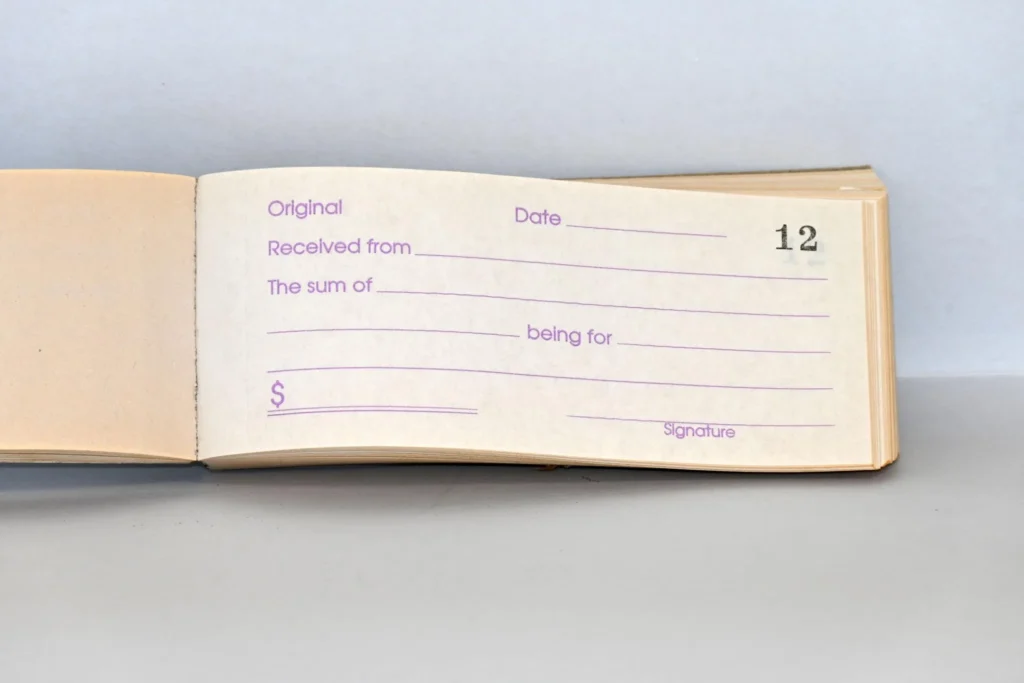
A receipt book is a pad of pre-numbered payment slips, usually in duplicate or triplicate, used to record that a customer or tenant paid a specific amount. Each page typically includes a carbon or carbonless copy underneath, so writing on the top sheet automatically creates a duplicate.
What Is the Purpose of a Receipt Book?
A receipt book serves several functions at once:
- Proof of payment — gives the payer written evidence that money changed hands.
- Customer record — helps the payer track their own spending or rent history.
- Business record — gives the business owner a physical log of income.
- Bookkeeping — feeds directly into daily or weekly sales totals.
- Tax documentation — supports income reporting if records are ever reviewed.
- Dispute resolution — settles disagreements about whether or how much someone paid.
What Does a Typical Receipt Book Look Like?
Most receipt books share a similar structure: a receipt number in the top corner, a date line, a “Received From” line, a description area, a total, a payment method section, and a signature line at the bottom.
Common fields you’ll see across most formats include the receipt number, date, payer name, description of goods or services, subtotal, tax, total, payment method, and the “received by” signature. Some books add a business letterhead area at the top; others leave that blank for a stamp.
Layouts differ mainly in how much detail they leave room for. A simple rent receipt book might have five or six lines. A retail-style receipt book may include a small itemized table with columns for quantity, description, and price.
What Information Goes on a Receipt?
Every complete receipt should include the fields below.
| Field | What It Captures |
| Receipt Number | Unique identifier for tracking and sequencing |
| Date | The date the payment was made |
| Business Information | Name, address, and contact details of the business |
| Customer/Payer Information | Name and, when relevant, contact details |
| Product or Service Description | What was purchased, including quantity |
| Subtotal, Tax, Discounts, Fees | The math behind the final amount |
| Total Amount Paid | The final amount, in numbers and sometimes in words |
| Payment Method | Cash, check, card, transfer, or digital payment |
| Received By | Signature or initials of the person accepting payment |
Receipt Number
Each receipt needs a unique, sequential number. Most receipt books come pre-numbered, so you simply use the number that’s already printed on the page.
If your book isn’t pre-numbered, assign numbers yourself and keep them in strict sequential order. Skipping or reusing numbers makes it harder to prove your records are complete, which matters if you’re ever asked to justify your income.
Date
Write the date the payment was actually made, not the date you’re filling out paperwork related to it. This distinction matters most when there’s a separate invoice: the invoice date reflects when payment was requested, while the receipt date reflects when it was received.
Business Information
Include your business name, address, and phone number or email. If you operate under a registered business name, use it consistently across every receipt so your records match your bank deposits and tax filings.
Some receipt books have a pre-printed letterhead area for this. If yours doesn’t, a rubber stamp works well and saves time on repetitive writing.
Customer or Payer Information
Write the payer’s full name, and their contact details when it’s relevant, such as for a large purchase, a rental payment, or a transaction that might need follow-up. For simple retail sales, a name alone is often enough.
Product or Service Description
Describe what was purchased. Include the item or service name, the quantity, and a SKU or model number if that helps identify it later. “Website maintenance, monthly plan” is more useful than just “services.”
Subtotal, Tax, Discounts and Fees
Show your math. List the subtotal first, then any discount, then tax, then additional fees, so the total is easy to verify at a glance.
Total Amount Paid
Write the total as a number. Some receipt formats also ask for the amount written out in words, which reduces the chance of a number being misread or altered later.
Payment Method
Note how the customer paid:
- Cash
- Check
- Card
- Bank transfer
- Digital payment (Venmo, PayPal, Zelle, etc.)
This detail matters for reconciling your records against your bank statements at the end of the month.
Received By / Signature
The person accepting the payment signs or initials this line. It confirms who on your team handled the transaction, which is useful if a question comes up later.
How to Fill Out a Receipt Book Step by Step
Step 1: Prepare the Receipt Book
Slide the protective cardboard flap behind the page you’re about to write on. This keeps your writing from bleeding through to pages further back in the book. Confirm you’re on the correct, next-in-sequence receipt, and use a dark pen so both the original and the carbon copy stay legible.
Step 2: Write the Receipt Number
If your book is pre-numbered, use the number already printed on the page. If you’re numbering manually, continue the sequence from your last receipt without skipping or repeating a number.
Step 3: Enter the Date
Write the date the payment is being made, right now, in the transaction.
Step 4: Fill In the “Received From” Section
“Received From” simply means whose payment you’re recording. Write the payer’s full name here, exactly as they’d expect to see it.
Example: Received from: John Smith
Step 5: Describe the Product or Service
Write enough detail that anyone reading the receipt later, including you in six months, understands what was paid for. A single clear line is usually enough. Avoid vague entries like “services rendered” when a specific description takes the same amount of space.
Step 6: Enter Quantity and Price
List the quantity, the unit price, and the line total. For a single service or flat-fee item, quantity is simply 1.
Step 7: Calculate the Subtotal
Add up all line totals before tax or discounts. For a single $500 service line, the subtotal is $500.
Step 8: Add Tax, Discounts and Other Charges
Apply the formula:
Subtotal − Discount + Tax + Fees = Total
For example, a $500 subtotal with no discount and $40 in tax comes to $540.
Step 9: Write the Total Amount
Write the numerical total clearly. If the form has a line for the amount in words, spell it out too. This second step prevents disputes over whether a number was written or altered incorrectly.
Step 10: Mark the Payment Method
Circle, check, or write in how the customer paid. If your receipt book has boxes for cash, check, card, and transfer, mark the one that applies. If it doesn’t, just write the method next to the total.
Step 11: Complete “Received By”
The person who physically accepted the payment signs or initials this line. In a small business, this is often the owner, but any authorized staff member can sign.
Step 12: Separate and Distribute the Copies
Once every field is filled in, separate the copies:
- White/original copy usually goes to the customer.
- Yellow/carbon duplicate stays in the book as your business record.
- Pink/third copy, if your book has one, often goes to a manager, accountant, or separate filing system.
Example of a Completed Receipt Book
Example Transaction
- Customer: John Smith
- Service: Website maintenance
- Subtotal: $500
- Tax: $40
- Total: $540
- Payment: Cash
- Receipt No.: 1048
Completed Receipt Example
RECEIPT No. 1048
Date: August 19, 2026
Received From: John Smith
Description: Website maintenance (monthly plan)
Qty: 1 Unit Price: $500.00 Line Total: $500.00
Subtotal: $500.00
Discount: $0.00
Tax (8%): $40.00
—————————–
Total: $540.00
Amount in Words: Five hundred forty dollars
Payment Method: [x] Cash [ ] Check [ ] Card [ ] Transfer
Received By: R. Torres
How Each Field Was Completed
The receipt number, 1048, follows directly from the previous receipt in the book. The date reflects the actual day the cash changed hands. “Received From” identifies John Smith as the payer, and the description specifies exactly what he paid for rather than a generic label.
The math flows top to bottom: a $500 subtotal, no discount, $40 in tax, and a final total of $540, written both numerically and in words. The cash box is marked, and the business owner signs off as the person who received the payment.
How to Fill Out Different Types of Receipt Books
How to Fill Out a Cash Receipt
Follow the standard 12-step process above and mark “Cash” as the payment method. Cash receipts carry extra weight for recordkeeping since there’s no bank trail backing them up, so accuracy here matters more than with other payment types in accounts management.
How to Fill Out a Receipt for a Check Payment
Fill in the same fields, then mark “Check” as the payment method. Many businesses also note the check number on the receipt, which makes it easier to match the receipt to a bank deposit later.
How to Fill Out a Receipt for a Card Payment
Complete the same fields and mark “Card.” If your receipt book has space for it, noting the last four digits of the card can help with reconciliation, though many businesses simply rely on their card processor’s statement for that detail.
How to Fill Out a Receipt for a Service
Service receipts follow the same structure as product receipts, but the description line carries more weight since there’s no physical item to reference later. Be specific: “2 hours, plumbing repair, kitchen sink” is far more useful than “labor.”
How to Fill Out a Rent Receipt
Rent receipts need a few extra details beyond a standard sales receipt:
- Tenant name
- Payment date
- Rental period covered (for example, “September 2026 rent”)
- Amount paid
- Late fee, if applicable
- Payment method
- Received by (landlord or property manager)
The rental period is the detail most people forget, and it’s the one tenants and landlords rely on most when reviewing payment history.
What Do the Fields on a Traditional Receipt Book Mean?
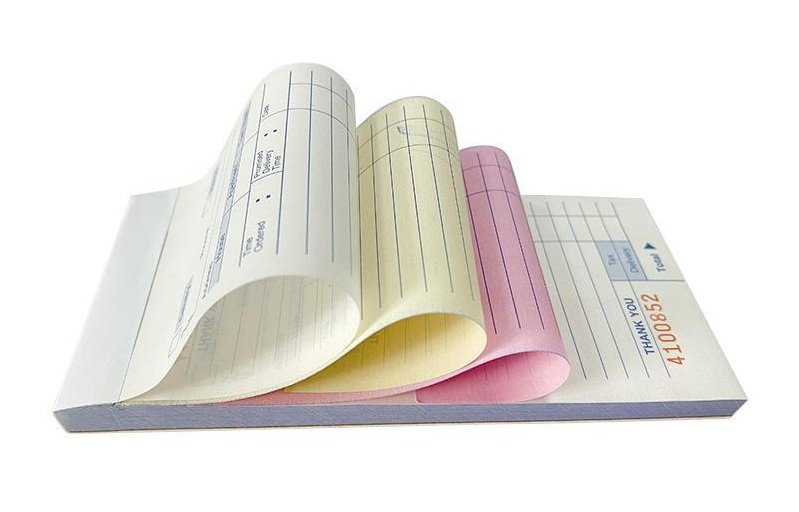
Older or pre-printed receipt books sometimes use shorthand that isn’t obvious if you haven’t seen the format before.
What Does “Received From” Mean?
It identifies the payer, the person or business handing over the money.
What Does “Received By” Mean?
It identifies the person accepting the payment on behalf of the business, confirmed with a signature or initials.
What Does “Sum Of” Mean?
“Sum Of” introduces the amount in words, as in “Sum of Five hundred forty dollars.” It’s a written-out restatement of the numerical total.
What Does “No.” Mean?
“No.” is short for the receipt number, the sequential identifier printed or written in the corner.
What Does “M” Mean?
On some older forms, a small “M” or checkbox next to the total stands for “Money,” distinguishing a cash line from a check line on the same receipt.
What Do Cash and Cheque Columns Mean?
Some traditional books split the total into two columns, one for cash and one for cheque (check), so the bookkeeper can see at a glance how the payment was split without reading the full description line.
What Does “Discount/Allowance” Mean?
This line captures any reduction applied to the subtotal, whether it’s a promotional discount or an allowance for a returned or damaged item.
What Does “Balance Due” Mean?
“Balance Due” shows any amount still owed after this payment. It’s common on rent receipts and installment payments where the full amount isn’t paid in a single transaction.
Receipt Book Copies: Which One Goes to the Customer?
White Copy
The white, top copy is almost always the original, and it goes to the customer as their proof of payment.
Yellow/Carbon Copy
The yellow duplicate stays in the receipt book and becomes part of the business’s own records.
Pink or Third Copy
If the book includes a third, pink copy, it’s often routed to an accountant, a manager, or a separate filing system for cross-checking against the business’s main copy.
What If My Receipt Book Has Different Colored Copies?
Color conventions aren’t universal. Some books reverse the order, or use blue instead of yellow. Check the first page or cover of your specific receipt book, which usually explains which copy is which.
How to Correct a Mistake in a Receipt Book
What to Do With a Minor Writing Error
Draw a single line through the error, write the correction next to it, and initial the change. Never scribble it out completely, since a legible correction is more trustworthy than one that looks hidden.
What to Do If the Amount Is Wrong
If the total amount is incorrect, it’s safer to void the entire receipt and issue a new one rather than correcting the number in place, since amount errors carry more weight in a dispute or audit.
When to Void a Receipt
Void a receipt when the error affects the amount, the payer’s identity, or the date, or if the customer needs a completely fresh copy for their own reasons.
Should You Tear Out a Mistake?
No. Write “VOID” clearly across the receipt and its carbon copy, then keep both in the book. Removing pages breaks the sequential numbering and makes your records look incomplete.
How to Keep the Receipt Number Sequence Intact
Even a voided receipt keeps its number. Skipping a number without a matching voided page in the book is one of the fastest ways to raise questions about missing income.
Common Receipt Book Mistakes to Avoid
- Forgetting the receipt number — breaks the sequence and makes reconciliation harder.
- Using the wrong date — confuses the payment date with an unrelated invoice or order date.
- Leaving the payer blank — removes the ability to confirm who actually paid.
- Writing vague product descriptions — makes the receipt nearly useless months later.
- Incorrect tax or total calculations — creates mismatches with bank deposits.
- Forgetting the payment method — makes it harder to reconcile cash versus card totals.
- Forgetting to sign — leaves the receipt without accountability for who handled it.
- Giving the wrong copy to the customer — hands over the business’s own record by mistake.
- Losing or damaging the business copy — removes proof of the transaction from your own files.
How to Organize and Store Your Receipt Book
Keep Receipts in Numerical Order
Store completed books in the order they were used. This makes it fast to locate a specific transaction later.
Reconcile Receipts With Sales Records
Compare your receipt totals against your bank deposits or point-of-sale summaries on a regular basis, ideally weekly, so discrepancies get caught early.
Store Completed Receipt Books Securely
Keep finished books in a locked drawer or filing cabinet. They often contain customer names and payment details worth protecting.
Scan or Photograph Important Receipts
Take a photo or scan of higher-value receipts as a backup in case the physical book is lost or damaged.
Maintain a Digital Backup
Log totals into a spreadsheet or accounting software regularly, so your digital records stay current even if something happens to the paper copies.
Receipt Book vs. Invoice: What’s the Difference?
| Feature | Receipt | Invoice |
| Main purpose | Confirms payment | Requests payment |
| Timing | Usually after payment | Usually before payment |
| Amount shown | Amount paid | Amount due |
| Payment status | Paid | Unpaid/due |
| Payment method | Usually included | May be included |
The short version: an invoice asks for money, and a receipt confirms it was received.
Receipt Book vs. Digital Receipt
When a Paper Receipt Book Makes Sense
Paper works well for cash-heavy businesses, mobile services, landlords collecting rent in person, or anywhere reliable internet or power isn’t guaranteed.
When Digital Receipts Make More Sense
Digital receipts fit businesses with steady point-of-sale volume, teams that need shared access to records, or owners who want automatic totals and backups without manual entry.
How to Digitize a Paper Receipt Book
Photograph or scan completed receipts and store them in a labeled folder by month, or enter totals into a spreadsheet on a set schedule. Some accounting apps also let you photograph a receipt directly into a digital ledger, which keeps a paper trail and a digital backup in sync.
You can also use templates available across the web with adequate fields.
Are Handwritten Receipts Valid?
Handwritten receipts are generally valid as proof of payment, though requirements can vary by jurisdiction and by the type of transaction. Check your local tax authority’s guidance if you’re unsure whether a handwritten receipt meets requirements for a specific situation.
What Makes a Handwritten Receipt Useful?
A handwritten receipt is useful when it’s legible, dated, includes both parties’ names, and states a clear amount and payment method. Missing details are the main reason a handwritten receipt gets questioned later.
When Additional Documentation May Be Needed
Larger transactions, business tax deductions, or formal disputes may call for additional documentation beyond a handwritten receipt, such as a bank statement or a signed contract.
How Long Should You Keep Receipt Records?
Why Receipt Retention Matters
Retained receipts support your tax filings, help resolve disputes, and give you a clear history if you’re ever asked to justify your reported income.
Paper vs. Digital Recordkeeping
Paper books take up physical space but need no backups beyond a fireproof storage box. Digital records take up no physical space but need a reliable backup system to avoid losing everything to a single device failure.
Check Your Local Tax and Accounting Requirements
Retention periods vary by country, state, and transaction type, so confirm the specific requirement that applies to your business rather than relying on a single universal rule. The IRS recordkeeping guidance is a solid starting point for U.S. businesses.
Frequently Asked Questions About Receipt Books
What do you write in a receipt book?
You write the receipt number, date, payer’s name, a description of the product or service, the amount, the payment method, and a signature confirming who received the payment.
How do you fill out a receipt book for cash?
Follow the same 12-step process as any other receipt, then mark “Cash” in the payment method section.
What does “Received From” mean on a receipt?
It identifies the payer, the person or business the money came from.
Who gets the white copy of a receipt?
The customer typically keeps the white, top copy as their proof of payment.
Who keeps the yellow copy?
The business keeps the yellow duplicate as its own internal record.
Do receipt books need sequential numbers?
Yes. Sequential numbering keeps your records complete and makes it easy to spot a missing or voided receipt.
What should I do if I make a mistake?
Correct small errors with a single line-through and initials. For amount errors, void the receipt and write a new one instead.
Can I use a receipt book for rent payments?
Yes. Just include the rental period covered, since that’s the detail standard sales receipts leave out.
What is the difference between a receipt and an invoice?
An invoice requests payment before it’s made. A receipt confirms payment after it’s received.
Can I use handwritten receipts for my business?
Generally yes, as long as the receipt is legible and complete, though it’s worth checking local requirements for larger transactions or formal tax purposes.
