

Construction payroll is the everyday process of paying your crews: tracking hours, calculating wages and taxes, issuing paychecks and keeping records. Certified payroll is a signed weekly report that proves you paid workers on a covered public project at least the required prevailing wage and fringe benefits.
Here is the key point. Certified payroll is a specialized reporting obligation, not necessarily a separate payroll system. You still run payroll the normal way. You then report the covered project’s hours and pay in a set format and sign a statement that the report is accurate.
This guide is for contractors, subcontractors, payroll managers and construction business owners. If you just won a school, road or housing job and the contract mentions “Davis-Bacon” or “prevailing wage,” you are in the right place.
We will walk through construction payroll vs. certified payroll, when reporting is required, what goes into the report, how to prepare it step by step, and how to stay compliant.
What Is Construction Payroll?
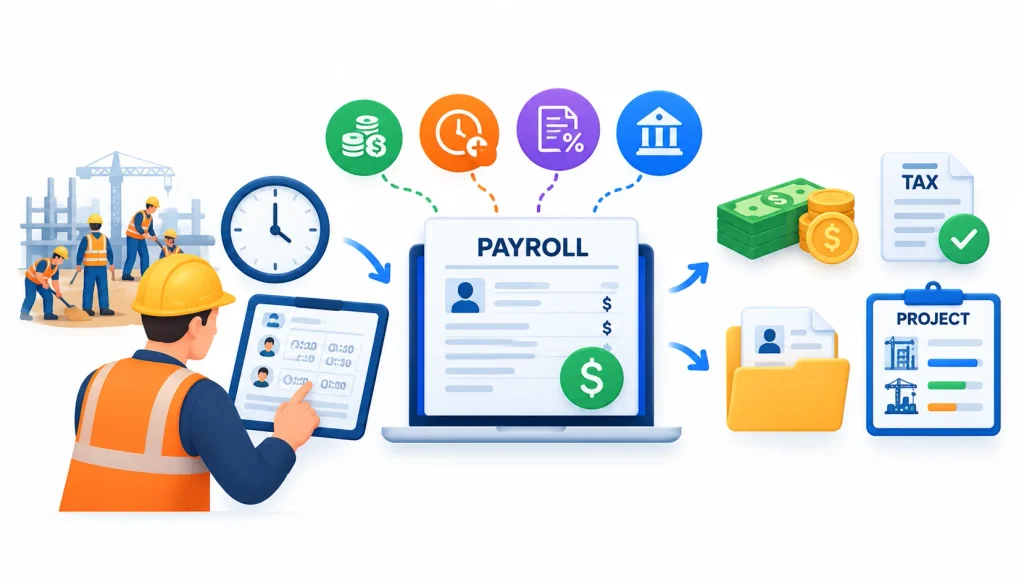
Construction payroll is the process of collecting hours, calculating wages, overtime, deductions and taxes, paying workers, and keeping payroll records for a construction company’s employees. It is organized around jobs and crews, so labor costs can be tracked project by project.
Every contractor runs it, whether the work is a kitchen remodel or a bridge deck.
How construction payroll works
Most construction payroll follows three stages. Each one feeds the next.
Collecting employee hours and timecards
Crews move between sites, trades and shifts. So hours need to be captured by worker, by day and by job.
Paper timecards still exist, but many firms now use mobile time-tracking apps. Good systems record the job and cost code with every entry. That detail matters later, because certified payroll needs hours by project and by classification.
Calculating wages, overtime, deductions, and taxes
Next, payroll turns hours into pay. Workers may earn hourly wages, union scale, piece rates or per diem.
Non-exempt employees generally earn overtime at one and a half times their regular rate after 40 hours in a workweek under the Fair Labor Standards Act. Payroll then subtracts income tax withholding, Social Security and Medicare, garnishments and benefit contributions. The employer side adds payroll taxes and workers’ compensation premiums, which vary by trade classification code.
Processing paychecks and maintaining payroll records
After calculation, you pay workers by direct deposit or check and file your payroll tax returns. Then you keep the records.
Federal law generally requires employers to keep core payroll records for several years. The FLSA sets a three-year rule, and the IRS asks for four years of employment tax records. Construction firms often keep payroll records longer, especially for public jobs.
Construction payroll’s role in job costing and labor tracking
Labor is usually the biggest cost on a construction job. Payroll data tells you where that money went.
When hours are tagged to jobs and cost codes, you can:
- Compare actual labor cost against the bid
- Add labor burden (taxes, insurance and benefits) to each job’s cost
- Spot crews or phases running over budget
- Bid future work with real numbers instead of guesses
This job-costing link is a big reason construction payroll is project-based, not just employee-based.
How construction payroll differs from payroll in other industries
An office payroll is simple by comparison. Employees sit in one location, work set hours and have one pay rate.
Construction payroll adds layers:
- Shifting work sites: one employee may work on three jobs in a week
- Multi-state work: different states mean different tax and wage rules
- Trade-based insurance: workers’ compensation rates depend on the work performed
- Union and benefit remittances: many crews have fund contributions on top of wages
- Public-works rules: prevailing wages and certified reporting on covered projects
That last item is where certified payroll enters the picture.
What Is Certified Payroll in Construction?
Certified payroll is a weekly report, signed by the contractor, that shows each worker’s classification, hours, wages, fringe benefits and deductions on a covered project. It proves workers were paid at least the required prevailing wage. It is a reporting obligation layered on regular payroll, not a separate payroll system.
Government agencies use it to check that public money is not funding underpaid labor.
What a certified payroll report documents
A certified payroll report is a snapshot of one workweek on one covered project. For each laborer and mechanic, it records:
- Who the worker is and what classification they worked in
- Hours worked each day, split into straight time and overtime
- The hourly rate paid and how fringe benefits were satisfied
- Gross pay, deductions and net pay
- A signed statement that everything is correct and complete
The contractor submits one report per week of work, and each report is numbered in sequence.
Why prevailing-wage laws require specialized reporting
The Davis-Bacon Act became law in 1931. It requires contractors on covered public construction to pay local prevailing wages. The goal is to keep outside firms from winning work by undercutting local pay. You can read the background on Wikipedia’s Davis–Bacon Act page.
A rule is only useful if someone can check it. The Copeland “Anti-Kickback” Act added weekly statements of wages paid and rules on deductions. Agencies cannot visit every site every week. So they rely on weekly signed payrolls as proof.
The U.S. Department of Labor (DOL) explains this system in its Davis-Bacon and Related Acts fact sheet.
What Form WH-347 is and when it is used
Form WH-347 is DOL’s weekly certified payroll form for Davis-Bacon and Related Acts (DBRA) work. Page one lists workers, hours, rates and pay. Page two holds the Statement of Compliance.
Here is the part many people miss. Using the WH-347 itself is optional, but submitting the payroll information every week is required. You can use your own format if it has the same information and the same compliance statement wording. Some agencies and states also have their own portals or forms.
DOL publishes the current form, an annotated guide and an online fillable version on its WH-347 page. The version I reviewed was marked Rev. January 2025. Always download the latest copy from DOL instead of reusing an old file.
What the Statement of Compliance certifies
The Statement of Compliance is the legal heart of the report. By signing it, the contractor certifies that:
- The payroll information is correct and complete for that week
- Each laborer and mechanic was paid at least the required prevailing rate, including fringe benefits
- Required payroll records are being kept
- Any apprentices are properly registered, if the contractor used them
It does not need to be notarized. But it carries real weight: DOL’s instructions say it is subject to federal false-statement penalties under 18 U.S.C. § 1001. So the person who signs should know the facts behind it.
Legally valid electronic signatures are accepted. Photocopied or scanned images of signatures are not.
Who prepares and submits certified payroll reports
Every contractor and subcontractor at every tier prepares its own certified payroll for its own employees. A subcontractor does not report the prime’s workers, and the prime does not report the sub’s.
The prime contractor usually collects the subs’ reports, reviews them for errors and submits everything to the contracting agency. On federally assisted work, reports may go to the owner or grantee instead, who passes them on. The contract tells you the route.
Construction Payroll vs. Certified Payroll: Key Differences
The table below gives the quick comparison. The sections after it explain the differences that cause the most trouble.
| Factor | Construction payroll | Certified payroll |
| Purpose | Pay employees and meet tax and labor rules | Prove covered workers got at least prevailing wages and fringe benefits |
| Scope | Every employee on every job | Laborers and mechanics on covered projects only |
| When it applies | Always | Only when a law or contract requires it |
| Legal basis | Wage-hour law, tax law, state wage laws | Davis-Bacon and Related Acts, Copeland Act, state prevailing-wage laws |
| Wage rates | Agreed pay, minimum wage, union or market rates | Rates set in a wage determination: basic hourly rate plus fringe |
| Frequency | Your normal pay cycle (weekly on DBRA work) | Weekly, for each week of covered work |
| Classifications | Your own job titles and pay grades | Classifications named in the wage determination |
| Certification | Not sent to an agency | Signed Statement of Compliance |
| Audit exposure | Tax and wage-hour audits | Agency review, back-wage claims, possible debarment |
Purpose and scope
Construction payroll answers one question: “Did we pay our people correctly?” Certified payroll answers a harder one: “Can we prove to the government that we paid the legally required wage on this project?”
Scope also differs. Regular payroll covers everyone you employ. Certified payroll covers only laborers and mechanics working on the covered project, though the report also shows total pay and deductions across all work that week.
Project eligibility and legal requirements
You run regular payroll on every job. You prepare certified payroll only when the contract or law requires it, such as a federal construction contract above $2,000 or a state public-works project. We cover the triggers in the next section.
Wage rates and fringe benefits
In regular payroll, you and the worker agree on pay, subject to minimum wage and overtime rules. On a covered project, a government-set wage determination fixes the minimum.
That minimum has two parts: a basic hourly rate and a fringe benefit amount. You can meet the fringe part through contributions to bona fide benefit plans, by paying cash in lieu, or by a mix of both.
Reporting frequency and deadlines
Regular payroll runs on your pay cycle. On DBRA work, workers must be paid weekly, and a certified payroll is due for every week with covered work.
Federal clauses generally call for submission within seven days after the regular payment date for that payroll period. Your contract or agency may set its own deadline, so confirm it before the first week of work.
Required records and worker classifications
Regular payroll records follow tax and wage-hour rules. Certified payroll adds project-level records: the wage determination, classification decisions, fringe plan details, apprentice registrations and the signed weekly statements.
Classifications matter more here. A “foreman” on your payroll may be a “carpenter” on the wage determination. The certified report must use the wage determination’s terms.
Certification and submission requirements
Regular payroll is internal. Nobody signs a certification to an agency. Certified payroll must be signed, submitted on time and kept available for review.
Audits, compliance risks, and recordkeeping
A regular payroll mistake usually means a tax notice or a wage claim. A certified payroll mistake can also mean back wages, withheld contract payments and, in serious cases, debarment from federal work. We cover consequences in detail later.
On the Davis-Bacon side, contractors must generally keep payroll records for three years after the work is complete. Keep them longer if your contract or state requires it.
When Is Certified Payroll Required?

Certified payroll depends on the project, not the company. The same contractor can run regular payroll on a private job and certified payroll on a public one in the same week.
| Project type | Certified payroll typical? | What triggers it |
| Federal construction contract | Yes, if over $2,000 and the contract has Davis-Bacon clauses | Davis-Bacon Act |
| Federally assisted construction (highways, housing, water) | Usually, depending on the program | Davis-Bacon Related Act |
| State or local public works | Often, depending on state law and thresholds | State prevailing-wage law |
| Private project, no public money | Generally no | Only if the contract requires it |
| Private project with public assistance | Sometimes | Program rules or local law |
Federal construction projects under the Davis-Bacon Act
The Davis-Bacon Act applies to federal and D.C. contracts above $2,000 for the construction, alteration or repair, including painting and decorating, of public buildings and public works.
That $2,000 threshold applies to the prime contract, not to individual subcontracts. If the prime contract exceeds $2,000, the covered work under its subcontracts is covered too, even if a subcontract is small. DOL’s coverage guidance spells this out.
The threshold is low, so even small federal jobs can trigger it.
Federally assisted projects under the Davis-Bacon Related Acts
Congress added Davis-Bacon wage rules to dozens of laws that fund construction through grants, loans, loan guarantees and insurance. These are the “Related Acts.” Examples named by DOL include the Federal-Aid Highway Acts, the Housing and Community Development Act of 1974 and the Federal Water Pollution Control Act.
Coverage here depends on the wording of each Related Act. Some have their own funding or size triggers, so the $2,000 figure does not automatically fit. Do not assume. Read the contract clauses and ask the funding agency.
State and local prevailing-wage projects
Many states have their own prevailing-wage laws, often called “little Davis-Bacon” acts. Their dollar thresholds vary widely, from a few thousand dollars to hundreds of thousands, and some states have no such law at all.
State rules also differ on forms, wage rates and filing systems. California, for example, runs its own electronic certified payroll process for public works. Check your state labor agency’s guidance before bidding.
How to check whether a contract triggers certified payroll
Look for these signs in the bid documents and contract:
- Davis-Bacon or labor standards clauses (29 CFR 5.5 clauses, or the FAR labor standards clauses on federal contracts)
- A wage determination attached to the contract
- The words “prevailing wage,” “certified payroll” or “labor compliance”
- Federal or state funding sources in the project description
- A required wage-rate poster at the job site
The contracting agency has the first responsibility to decide whether a contract is covered and to include the right clauses. The prime contractor must then pass those clauses and the wage determination down to subcontractors. If the paperwork is unclear, ask in writing before work starts.
Do private construction projects require certified payroll?
Usually not. A purely private job with no public money normally runs on regular payroll alone.
There are exceptions:
- The project receives federal or state assistance that carries prevailing-wage rules
- A local law attaches prevailing wages to publicly subsidized private projects
- Your contract requires certified-style reporting
- A tax-credit or incentive program requires prevailing-wage compliance and payroll documentation (some clean-energy credits do)
When money from a government program touches the project, ask what labor rules came with it.
Which workers and subcontractors must be included?
Davis-Bacon covers laborers and mechanics working on the site of the work. That includes journeyworkers, registered apprentices and working foremen who do manual work.
Bona fide executives, office staff and professionals who do not perform laborer or mechanic duties are generally outside the report. Delivery truck drivers are a gray area, and DOL has issued enforcement guidance on them while parts of the 2023 rule are enjoined.
Subcontractors at every tier must follow the same rules. The prime is responsible for making sure the clauses flow down and for reviewing the subs’ payrolls.
What Information Goes Into a Certified Payroll Report?
Every item on the report traces back to a record you already keep. The table shows where each piece usually comes from.
| Report section | What it contains | Where it comes from |
| Project and contractor details | Project name, contract number, location, wage determination number, week-ending date, payroll number | Contract documents |
| Worker identity | Name and a unique ID | Employee records |
| Classification | Labor classification and journeyworker or apprentice status | Wage determination plus daily work records |
| Hours | Daily hours, straight time and overtime | Timecards, daily reports |
| Rates and fringes | Rate paid, fringe credit, cash in lieu | Payroll register, benefit plan records |
| Pay | Gross earnings, deductions, net pay | Payroll register |
| Certification | Statement of Compliance and signature | Authorized signer |
Contractor and project details
The top of the report identifies who you are and what you are reporting. You enter your business name, project name, contract or project number, project location, week-ending date and whether you are the prime or a subcontractor.
You also list the wage determination number and revision that apply. If several determinations apply, list them all. Number each weekly report in order, starting with one, and mark the final report for the project.
Worker names and identifying information
List each worker’s name and an individual identifying number. DOL’s instructions say to use something like the last four digits of the Social Security number or another worker-specific number. Do not put full Social Security numbers on the report.
Reports may also be released in response to public records requests, so keep personal data to the minimum the form asks for.
Trade or labor classifications
Use the classification from the wage determination that matches the work the person actually did. Mark each worker as a journeyworker or a registered apprentice, and list the apprentice’s program level.
If the wage determination has no classification for a task, contact the contracting officer right away. A missing classification can be added through a formal process, but you cannot invent one.
Hours worked by day and classification
Record hours for each day of your workweek, with straight time and overtime shown separately. If a worker did two kinds of work in a week, use separate rows, one per classification, under the same worker entry number.
If you cannot show an accurate split, the worker must be paid the highest applicable rate for all hours. That rule alone justifies good time tracking.
Base wages, overtime, and fringe benefits
Report the actual hourly rate paid for straight time and overtime. If you paid more than the wage determination requires, show what you actually paid.
Fringes go in separate fields: one for credit toward bona fide plan contributions and one for cash paid in lieu of fringes. Do not mix cash in lieu into the hourly rate column. On contracts subject to the Contract Work Hours and Safety Standards Act (generally prime contracts above $100,000), overtime is figured against total weekly hours. See DOL’s page on overtime on government contracts.
Gross wages, deductions, and net pay
The report asks for gross pay on the covered project and gross pay for all work that week, including non-covered jobs. It then lists deductions and net pay for all work.
Do not pro-rate deductions between projects. Show what was actually withheld from the worker’s total pay. Deductions must follow the Copeland Act rules (29 CFR Part 3). Beyond the permitted categories, they generally need DOL approval.
Statement of Compliance and authorized signature
Page two holds the certification. The signer enters their name, title, contact details and date, then checks the required boxes.
The signer must be the contractor, the subcontractor or an agent who paid or supervised the payment of the workers. Sign every week. A missing or defective signature can get the whole report rejected.
Supporting records to retain
Keep the backup behind each weekly report:
- Timecards and daily reports
- The wage determination and any classification approvals
- Payroll registers and proof of payment
- Fringe plan documents and contribution records
- Apprentice registrations and ratio records
- Signed statements and agency correspondence
Keep them at least three years after the work is complete, and longer if your contract says so.
How to Prepare Certified Payroll: A Step-by-Step Process
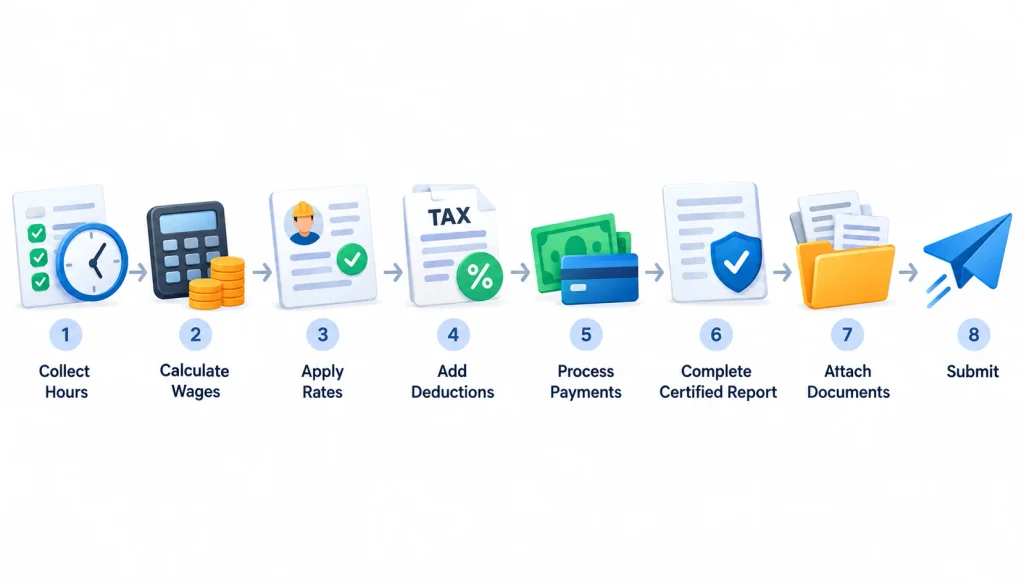
Follow these eight steps every week. After the first few cycles, it becomes routine.
Step 1: Review the contract and identify applicable labor standards
Before work starts, read the labor standards clauses. Confirm which laws apply (Davis-Bacon, a Related Act, state law or all three), who receives the reports and when they are due.
Also confirm any extra requirements, such as electronic filing portals, apprentice rules or on-site posters.
Step 2: Find the correct wage determination on SAM.gov
Wage determinations are published on SAM.gov. Davis-Bacon determinations are organized by county and by construction type: building, residential, heavy or highway.
Use the determination and revision your contract incorporates. Do not simply grab the newest version online. If the contract has none, ask the contracting officer.
Step 3: Assign workers to the correct classifications
Classify each worker by the work actually performed, not by their company title. Build a simple classification guide for supervisors, matching common tasks to the wage determination’s trades.
If someone does mixed work, plan how you will track hours by classification each day.
Step 4: Record and verify hours worked on the covered project
Capture daily hours by worker, by project and by classification. Compare timecards against daily reports, sign-in sheets and the superintendent’s logs.
Watch for crews that split time between covered and private jobs. Those hours must not blur together.
Step 5: Calculate wages, overtime, and fringe benefits correctly
For each worker, check that pay meets the basic hourly rate plus the fringe amount for the classification. Calculate overtime using the correct rules. Then document how fringes were met: plan contributions, cash in lieu or both.
Some fringe credits, such as unfunded plans, need DOL approval before you can claim them.
Step 6: Reconcile the report against actual payroll records
Match the certified report to the payroll register. Gross pay, hours, deductions and net pay should agree, and the checks should have cleared for those amounts.
If the register and the report disagree, find out why before you sign.
Step 7: Review, certify, and submit the report by the applicable deadline
Have the authorized signer review the report and the backup. Then sign it and submit it by the deadline in your contract. Many agencies use online portals, and some require e-signatures that identify the signer.
Prime contractors should also review each subcontractor’s report before passing it on.
Step 8: Store records and correct discrepancies promptly
File the report, statement, timecards and proof of payment together. If you find an error later, correct it right away. Pay any underpayment owed to the worker, then submit a corrected payroll the way your agency asks.
Many agencies have specific numbering or labeling rules for corrected reports, so ask.
Weekly certified payroll checklist
- [ ] Contract labor clauses and wage determination on file
- [ ] Wage determination number and revision match the contract
- [ ] Every covered worker classified by work performed
- [ ] Daily hours verified against timecards and daily reports
- [ ] Hours split by classification where needed
- [ ] Basic rate, fringe and overtime meet or beat the requirement
- [ ] Fringe credit or cash in lieu documented
- [ ] Deductions are permitted and shown for all work
- [ ] Report agrees with the payroll register
- [ ] Statement of Compliance signed by an authorized person
- [ ] Submitted on time; backup stored
- [ ] Subcontractor reports collected and reviewed
Construction Payroll and Certified Payroll Example
Important: every name and number below is invented for illustration. The wage rates are assumptions, not official prevailing-wage data. Use the wage determination in your own contract.
Example: A contractor working on a covered public project
Ridgeline Carpentry (a fictional subcontractor) is framing a county community center renovation that includes federal assistance covered by the DBRA. The prime contractor is the fictional Summit Builders.
| Assumption | Value |
| Worker | Jordan E. (fictional), ID ending 4821 |
| Wage determination classification | Carpenter |
| Assumed required basic rate | $30.00/hour |
| Assumed required fringe | $12.00/hour |
| Hours on covered project | 30 (Mon–Thu) |
| Hours on a private job | 10 (Fri–Sat), paid $28.00/hour |
| Rate Ridgeline pays on covered work | $32.00/hour basic |
| Fringe method | $12.00/hour paid into a bona fide benefit plan |
How ordinary payroll records feed into certified reporting
Ridgeline’s normal payroll register already has most of what the report needs. Here is how the numbers flow:
| Item | Calculation | Result |
| Covered gross pay | 30 hrs × $32.00 | $960.00 |
| Fringe credit claimed | 30 hrs × $12.00 | $360.00 |
| Private job gross pay | 10 hrs × $28.00 | $280.00 |
| Gross pay, all work | $960.00 + $280.00 | $1,240.00 |
| Assumed income tax withholding | $150.00 | |
| FICA at 7.65% | $1,240.00 × 0.0765 | $94.86 |
| Total deductions | $244.86 | |
| Net pay, all work | $1,240.00 − $244.86 | $995.14 |
The payroll clerk copies hours and rates from the register, adds the project-level details and sends it to the signer for review.
How the worker’s classification and wage determination affect the report
Jordan’s classification drives everything. At the assumed carpenter rate, the required minimum is 42.00/hour(30.00 basic plus $12.00 fringe). Ridgeline paid $32.00 in cash wages plus $12.00 in plan contributions, which clears the bar.
Now suppose Jordan spent 8 of the 30 hours doing laborer tasks. The report would need two rows with the same worker entry number: one for carpenter hours and one for laborer hours, each paid at least its own rate. If Ridgeline could not show that split, DOL’s instructions require paying all hours at the highest applicable rate.
How fringe benefits and deductions are documented
Because Ridgeline met the fringe obligation through a plan, the $360.00 appears as a fringe credit, and page two lists the plan name, type and number and the hourly credit. The plan contribution is not cash in Jordan’s paycheck.
If Ridgeline paid the $12.00 as cash instead, it would go in the cash-in-lieu column and into Jordan’s gross pay. A mix of plan contributions and cash is also allowed. Deductions are listed for all work, not just the covered project. For exactly how your agency wants fringes shown, follow DOL’s annotated WH-347 guide.
What happens when the employee works on multiple projects
Jordan’s private-job hours do not go on the certified report as covered hours. But they still appear in two places: total gross pay for all work, and the deduction and net pay figures.
The deductions in the example ($244.86) come from the full $1,240.00, not just the $960.00 earned on the covered job. And on contracts subject to the Contract Work Hours and Safety Standards Act, overtime is measured against total weekly hours, including work off the covered project. Jordan worked exactly 40 hours here, so no overtime applied.
Common Certified Payroll Mistakes and How to Avoid Them
DOL lists frequent problems such as misclassification, incomplete records and late or missing weekly payrolls. Here is how each one happens and how to prevent it.
Using the wrong wage determination
Contractors sometimes pull a current determination from SAM.gov instead of the one in their contract. Or they use a building rate on a heavy-construction job.
Fix: copy the determination number and revision from the contract into your project setup, and have a second person verify it.
Misclassifying workers
This is the most expensive mistake. In one DOL case, a New York contractor underpaid workers by classifying skilled work at lower-paid levels and failing to pay for all hours worked. The result was $792,396 in back wages for 79 workers and a three-year debarment. See DOL’s release on the Pythagoras case.
Fix: classify by the work performed, train foremen, and review daily reports for task descriptions.
Reporting inaccurate hours or overtime
Rounded timecards, missing hours and unpaid pre-shift time all show up on audits. Overtime errors are common when workers split time across projects.
Fix: use daily time entries by project and classification, and check weekly totals before certifying.
Miscalculating or incorrectly documenting fringe benefits
Paying the right basic rate is not enough. Fringes must be paid as plan contributions, cash or both. Common errors include claiming credit for non-bona fide benefits or listing plan details incorrectly.
Fix: keep plan documents on file, calculate credits per hour, and get approval before claiming unfunded plan credits.
Missing submissions or omitting required information
Late reports, missing signatures, blank fields and absent wage determination numbers all cause rejections or payment holds.
Fix: set weekly calendar reminders, use a pre-submission checklist and confirm what your agency expects for weeks with no work.
Failing to reconcile payroll with certified reports
When the certified report is built separately from the payroll register, the two drift apart. Auditors compare them.
Fix: generate the report from payroll data, and reconcile gross pay, hours and deductions every week.
Overlooking subcontractor compliance
Primes carry responsibility for the whole project. In a 2024 Massachusetts case, DOL found a subcontractor submitted falsified payroll records and another failed to pay prevailing wages, and the prime contractor paid the $77,206 in back wages.
Fix: flow down the clauses, collect subs’ reports on time, spot-check them against daily logs and ask for corrections early.
Failing to retain supporting documentation
When records are missing, you cannot prove your report. Investigators may then rely on worker statements.
Fix: store every weekly package in one place, in one format, for at least three years after completion.
What Are the Consequences of Certified Payroll Noncompliance?
Not every error triggers every penalty. The outcome depends on the law involved, the facts and whether the violation was willful. Here is how the typical consequences line up.
| Situation | Typical consequence |
| Honest error found and fixed promptly | Corrected payroll, back wages to the worker |
| Chronic late or incomplete reports | Agency follow-up, payment holds |
| Underpayment found on review | Back wages, possible withholding |
| Falsified records or kickbacks | Possible criminal exposure and debarment |
| Willful or repeated violations | Up to three years’ debarment |
Correcting underpayments and paying back wages
The first remedy is simple. Pay the worker what they were owed. In many cases, the agency or DOL finds the shortfall and requires restitution.
In several recent DOL cases, the prime contractor ended up paying the back wages after a subcontractor’s violation.
Withholding of contract funds where authorized
The contracting agency can withhold money from the contract to cover back wages. Under the Davis-Bacon contract clauses, withholding can in some cases extend to other covered contracts held by the same prime contractor.
Agencies may also hold payments until required certified payrolls are current.
Potential civil or criminal consequences for applicable violations
The Statement of Compliance carries federal false-statement penalties, which DOL’s WH-347 instructions say can include a fine, up to five years in prison or both. These penalties are for knowingly false statements, not honest mistakes.
DOL says violations of the Davis-Bacon clauses may also be grounds for contract termination and for making the contractor liable for resulting costs to the government.
Debarment risks for qualifying violations
Debarment means being barred from federal and federally assisted contracts, generally for up to three years. It is aimed at willful violations or disregard of the contract obligations, and in DOL cases it has reached owners and officers as well as the company.
In a recent case reported by HR Dive, DOL recovered more than $596,000 and debarred a subcontractor for three years after finding a kickback scheme. For a firm that depends on public work, that outcome can be fatal.
How documentation and timely corrections reduce risk
Good records do two things. They let you prove compliance, and they let you spot problems early.
To reduce risk:
- Reconcile every week before signing
- Self-correct errors and pay any shortfall quickly
- Keep complete backup files
- Review subcontractor reports
- Train supervisors on classifications
Prompt, documented fixes also help show an error was not willful.
Can Construction Payroll Software Handle Certified Payroll?
Sometimes. It depends on the software, so test it before you rely on it.
Standard payroll processing versus certified reporting functionality
Standard payroll software calculates pay, withholds taxes and files returns. Certified reporting needs extra functions: project-level tracking, classification-level hours, wage determination rates, fringe credit calculations and a formatted report with a signature step.
Many construction-specific payroll systems include these. General small-business payroll tools often do not, or they export data you must reformat by hand.
When a separate reporting tool may be useful
A separate tool can make sense if:
- Your payroll provider cannot produce certified reports
- You work under several states’ formats and portals
- You need an audit trail across many projects and subs
- You collect subcontractor payrolls and want one review process
Check integration first. Re-keying data between systems is where errors creep in.
Features to evaluate in certified payroll software
Use this list when comparing options:
- Project-level and classification-level tracking: hours and pay split by project, classification and day
- Wage determination and fringe-benefit management: stored rates, fringe credit and cash in lieu
- Federal and state reporting formats: WH-347 or equivalent, plus state forms and portals
- Time-tracking and payroll integrations: mobile time capture that carries job and classification data straight into payroll
- Submission status, audit trails and document retention: who signed, when it was submitted, what changed and where backup is stored
Questions to ask before selecting a payroll solution
- Does it produce the current WH-347 and the state forms I need?
- Can one employee have multiple classifications in one week?
- How does it handle fringe credits, cash in lieu and overtime across projects?
- Does it support legally valid electronic signatures?
- Can I see an audit trail of edits and submissions?
- How are corrected payrolls handled?
- How long does it retain records, and can I export them?
- Who supports me when an agency rejects a report?
Frequently Asked Questions
What is the difference between construction payroll and certified payroll?
Construction payroll is how you pay your workers and keep records. Certified payroll is a signed weekly report on a covered public project that proves you paid the required prevailing wage and fringes. Certified payroll sits on top of your regular payroll process and applies only to certain jobs.
Is certified payroll the same as regular payroll?
No. Regular payroll pays employees. Certified payroll reports specific project data to an agency and includes a signed certification. You usually run regular payroll for all workers and prepare certified reports only for covered projects.
Is certified payroll the same as prevailing wage?
No. Prevailing wage is the minimum rate: the basic hourly rate plus fringes in a wage determination. Certified payroll is the weekly report proving you paid it. One is the standard, and the other is the proof.
When is certified payroll required?
It is required on federal construction contracts above $2,000, on many federally assisted projects under Related Acts and on state or local public works covered by prevailing-wage laws. Your contract’s labor standards clauses and wage determination tell you whether it applies.
Is certified payroll required for private construction?
Generally no. Private jobs without public funding usually need only regular payroll. Exceptions include projects with federal or state assistance, local subsidy rules or contract and incentive terms that require prevailing-wage documentation.
Do subcontractors have to submit certified payroll?
Yes. Subcontractors at every tier must prepare certified payroll for their own employees on covered work. They typically submit through the prime contractor, who reviews and forwards the reports.
What is Form WH-347?
It is DOL’s optional weekly certified payroll form for DBRA work. Page one lists workers, hours, rates and pay, and page two has the Statement of Compliance. You can use another format if it includes the same information and statement wording. Get the current version from DOL’s WH-347 page.
How often must certified payroll be submitted?
Every week that covered work is performed. Federal clauses generally set the deadline at seven days after the regular payment date for the payroll period, but your contract may differ. Confirm the deadline and the “no work” reporting rules with your agency.
Who signs the Statement of Compliance?
The contractor or subcontractor, or an agent who paid or supervised the payment of the workers during that week. The signer should know the facts, because false statements carry federal penalties. Legally valid electronic signatures are accepted; scanned copies of signatures are not.
Can existing payroll software generate certified payroll reports?
Maybe. Some payroll platforms do, especially construction-focused ones. Many general tools do not. Test whether yours can track hours by classification and project, calculate fringe credits and output the WH-347 or your state’s format before you bid.
Sources and further reading
- U.S. DOL, Form WH-347 and instructions
- U.S. DOL, Fact Sheet #66: The Davis-Bacon and Related Acts
- U.S. DOL, Prevailing Wage Resource Book: DBRA coverage
- U.S. DOL, Overtime pay on government contracts
- U.S. DOL, Final rule: Updating the Davis-Bacon and Related Acts regulations
- SAM.gov, Wage Determinations
- Wikipedia, Davis–Bacon Act of 1931
- Wikipedia, Copeland “Anti-Kickback” Act
- U.S. DOL news releases: Pythagoras (2011), Ecostructive (2024), Brookline Housing Authority project (2024)
- HR Dive, Subcontractor debarred over alleged kickback scheme
- LinkedIn, U.S. Department of Labor company page for ongoing agency updates
