
Your POS system sits at the center of your business. Every sale, refund, discount, and stock change passes through it. So when it runs on one aging computer in the back office, problems add up fast.
Reports only show up when someone is at the counter. Stock counts drift between branches. A hardware failure can put your records at risk. Updates wait until someone has time to install them.
These are the reasons many owners start looking at the benefits of switching to cloud-based POS software. A cloud POS keeps your sales, inventory, and customer data in one connected place that you can reach from any approved device. Below are nine practical benefits, plus the caveats you should weigh before you switch.
What Is Cloud-Based POS Software?
Cloud-based POS software is a point-of-sale system that stores your business data on remote servers instead of only on a local computer. Staff ring up sales on a terminal, tablet, or phone. Authorized users can view sales, stock, and reports from any internet-connected device.
If you want background on the underlying ideas, Wikipedia has useful overviews of point of sale, cloud computing, and software as a service.
How a Cloud POS Works
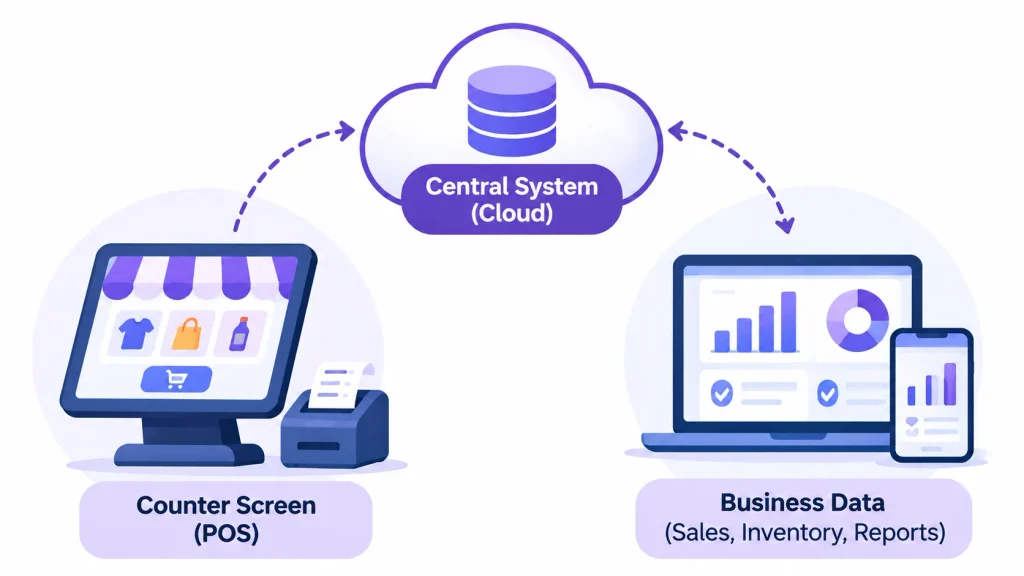
Think of it as two parts. The first is the screen your staff use at the counter. The second is the central system that holds everything.
When a cashier completes a sale, the terminal sends the details to the cloud. The central system records the sale and reduces the stock count. It also updates your reports. Anyone with permission can then see the change.
Most modern systems also keep a small local copy of key data. That is what allows some of them to keep working when the internet drops. We will cover that later.
Cloud POS vs. Traditional POS
| Feature | Cloud-based POS | Traditional (on-premises) POS |
| Data storage | Remote cloud servers | Local server or computer |
| Access | Any approved internet-connected device | Usually at the store |
| Updates | Usually handled by the provider | Often installed manually |
| Maintenance | Provider manages the infrastructure | You manage servers and backups |
| Scaling to new branches | Often simple to add | May need new installations |
| Reporting | Can be centralized across locations | Often limited to each install |
| Internet dependency | Depends on the product’s offline mode | Can often run locally |
| Pricing | Usually subscription-based | Often upfront license plus upkeep |
Neither option wins every time. The right choice depends on how you operate, which we cover in the conclusion.
Who Should Consider Switching?
Cloud POS tends to suit businesses with these needs:
- Retail stores that need accurate stock across shelves and branches
- Restaurants and cafés that want remote visibility into sales
- Supermarkets that rely on barcode billing
- Pharmacies that track batches and expiry dates
- Wholesalers that manage purchasing and warehouses
- Growing businesses planning a second or third outlet
9 Benefits of Switching to Cloud-Based POS Software
1. Access Your Business Data From Anywhere
With a traditional setup, you often need to be at the store to see how the day is going. A cloud POS removes that limit.
You can check sales, stock, and staff activity from a laptop or phone. Picture a café owner who is sick at home on a busy Saturday. They can still see whether sales are on track and whether the morning shift opened correctly.
This also helps when you travel or run more than one outlet. You see the numbers as they happen, not at the end of the week.
2. Keep Inventory Accurate With Real-Time Sync
Stock errors are expensive. Overstock ties up cash. Understock loses sales.
In a cloud POS, each sale updates the central stock record. That means every connected location works from the same numbers. (Illustrative example:) if a shirt sells at Branch A, Branch B can see the lower availability right away.
Many systems also offer low-stock alerts and stock transfers between branches. These cut down on manual counting and spreadsheet fixes.
For retailers managing multiple stores, a dedicated cloud POS for retail can also help coordinate product availability, stock transfers, and inventory operations across locations.
One caution: sync only helps if your product data is clean. Duplicate SKUs and mismatched names will still cause confusion.
3. Lower Infrastructure and Maintenance Costs
A cloud POS can reduce what you spend on local servers, backup hardware, and IT support. The provider hosts the software and usually handles updates.
That does not mean it is always cheaper. You will pay subscription fees, and possibly per-device or per-location charges. Payment processing fees apply too. Compare the total cost of ownership, not just the monthly price. Before choosing a provider, compare different cloud POS systems based on their subscription plans, payment processing fees, hardware requirements, and available features. We break that down in the cost section below.
4. Manage Multiple Locations From One Place
Running several outlets on separate systems means separate reports, prices, and product lists. Someone has to stitch it together by hand.
A cloud POS lets you manage products, prices, and reports centrally. You can also compare branch performance side by side.
(Illustrative example:) a retailer opening a second shop can copy the existing product catalog instead of rebuilding it. They can then set branch-specific stock levels and view both shops in one dashboard.
5. Speed Up Checkout and Improve the Customer Experience
Customers notice slow lines. A good POS shortens them with barcode scanning, quick product search, and flexible payment options.
Mobile POS devices help too. Staff can bill customers on the shop floor or at the table, which cuts walking back and forth. Digital receipts save paper and time.
Speed depends on your hardware, your network, and how well the product catalog is set up. The software helps, but it is not magic.
6. Make Better Decisions With Real-Time Reports
Sales data is only useful if you can read it quickly. Cloud POS tools typically offer daily and monthly reports, and often product-level and branch-level views.
You can spot best-sellers, slow-moving items, and your busiest hours. Say you notice that a snack line sells out every Friday evening. You can reorder earlier and staff the rush better.
Good reports turn gut feeling into evidence. They won’t make decisions for you, but they help you make them with facts.
7. Build Stronger Customer Relationships
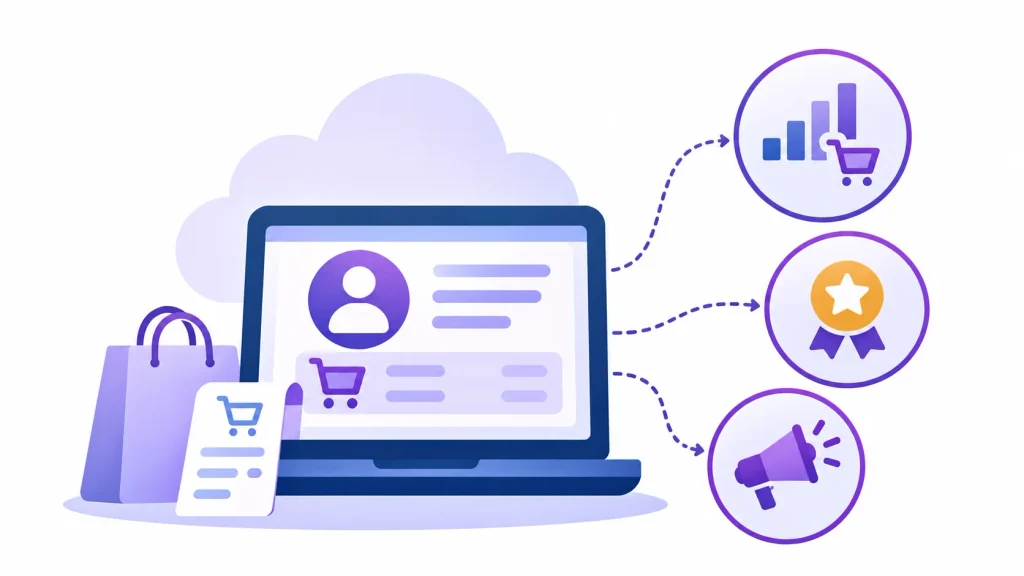
Many cloud POS platforms store customer purchase history and support loyalty programs. Some also help with targeted offers.
This matters because repeat customers are often your most reliable revenue. If you know what someone buys regularly, you can reward them or remind them when it is time to restock.
Check what the platform actually includes. Some offer full CRM and loyalty tools, while others rely on add-ons or integrations.
8. Protect Your Data With Backup and Recovery
If a local computer dies, a business that only stored data there can lose a lot. With a cloud POS, your records are held on provider servers, so a broken terminal does not have to mean lost data.
Good providers also offer encryption, role-based access, multi-factor authentication, and audit logs. These help you control who can do what, such as who can issue refunds or apply discounts.
Cloud hosting does not make you automatically secure, though. Security depends on the provider’s controls and your own habits, such as strong passwords and limited staff permissions.
9. Connect Your Tools With Flexible Integrations
A POS rarely works alone. You may also use accounting software, an online store, a payment gateway, or an ERP.
Cloud POS systems often connect to these tools through APIs or built-in integrations. This reduces double entry. For example, daily sales can flow into your accounting software instead of being retyped.
Connecting POS transactions with cloud-based accounting can further simplify financial reporting, reduce manual data entry, and make it easier to keep business records updated.
Integrations vary a lot between vendors. Before you commit, confirm that the specific tools you use are supported.
What Happens When the Internet Goes Down?
This is the most common worry, and it is a fair one. A cloud system relies on connectivity, so you should understand how it behaves without it.
1. Can a Cloud POS Work Offline?
Some can, and some cannot. Offline support varies by provider and by how payments are set up.
In a typical offline mode, the terminal stores transactions locally. When the connection returns, it syncs them to the cloud. Cash sales are usually the easiest to handle offline. Card payments are often more restricted, because authorization normally needs a live connection.
2. What to Check Before You Choose
Ask the vendor these questions:
- Can the system record cash sales offline?
- What are the limits on offline card payments?
- How long can it operate offline?
- How does it sync and prevent duplicate transactions?
- How does it handle conflicting stock updates?
Run a test during your trial: unplug the internet and ring up a few sales.
Cloud POS Security: Is Your Data Safe?
Cloud POS software stores business information on remote servers, making it accessible from authorized devices. However, storing data in the cloud does not automatically make it secure. Before choosing a provider, check how it protects your sales records, customer information, payment data, and employee accounts.
Look for essential security features such as data encryption, multi-factor authentication (MFA), role-based permissions, and automatic backups. Encryption helps protect information from unauthorized access, while MFA adds another verification step when employees sign in. Role-based permissions allow you to control what different employees can access or change. For example, a cashier may be allowed to process sales but not modify product prices or issue refunds without approval.
Automatic backups are equally important. They help preserve business records if hardware fails, data is accidentally deleted, or another technical issue affects the system. Ask the provider how frequently backups are created, how long they are retained, and how quickly data can be restored.
If your business accepts card payments, ask how the provider handles PCI DSS (Payment Card Industry Data Security Standard) requirements. PCI DSS establishes security requirements for protecting payment card information. Check which responsibilities belong to the POS provider and which remain with your business. You can consult the official PCI Security Standards Council website for information about the standard.
You should also understand who owns your business data and how you can access it. Before signing up, confirm whether you can export your product catalog, customer records, inventory information, and sales history in a usable format. Ask about any export restrictions, additional charges, or data retrieval procedures if you decide to leave the provider. A vendor that makes data exports difficult can create unnecessary problems when switching systems.
Finally, review the provider’s security documentation, incident response procedures, and customer support availability. A reliable provider should clearly explain how it protects business information and what steps it takes if a security incident occurs. Taking time to verify these details can help you choose a cloud POS system that supports your daily operations without overlooking data protection.
How Much Does It Cost to Switch?
Costs fall into three groups.
Setup and hardware. This can include terminals or tablets, barcode scanners, receipt printers, cash drawers, and payment terminals. Some existing hardware may work, so check compatibility first.
Ongoing fees. These include the software subscription and payment processing fees. Some vendors also charge per user, per location, or for premium features.
Hidden costs. Training, data migration, and onboarding take time, and sometimes money.
To calculate total cost of ownership, add up everything you would pay over three years under each option. Include maintenance, upgrades, IT support, and extra branches. (Illustrative only, not an industry average:) A low monthly fee can still cost more overall if it adds per-location charges and paid integrations.
How to Switch From Traditional POS to Cloud POS
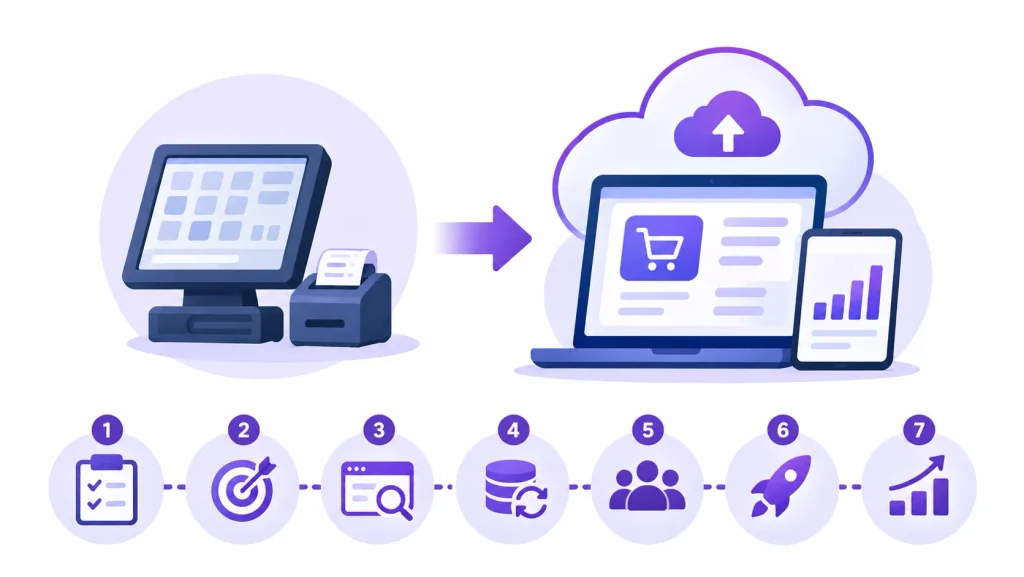
Switching from a traditional POS system to a cloud-based solution requires some planning. A careful rollout helps prevent data loss, reduces disruption to daily operations, and gives employees time to adjust to the new system.
- Review your current system. Start by identifying what works well and what causes problems in your existing POS setup. Look at billing speed, inventory accuracy, reporting, hardware limitations, and maintenance requirements. Make a list of the features and records you need to retain during the transition.
- List your must-have features. Decide what your business needs from the new system. Consider inventory management, billing, sales reports, payment processing, customer records, employee permissions, and multi-location support. Separate essential features from optional ones so you can compare providers more effectively.
- Compare providers. Shortlist a few cloud POS providers and evaluate their pricing, features, security practices, offline capabilities, hardware compatibility, integrations, and customer support. Check whether the software works with your existing devices and business tools. A free trial or product demonstration can help you understand how it handles everyday tasks.
- Prepare your data. Before migration, export important information such as product details, SKU numbers, stock levels, customer records, and pricing. Review the data for duplicate entries, outdated products, and incorrect information. Clean records make importing easier and help prevent inventory or billing errors after the switch.
- Train your team and test the system. Give employees time to learn the new interface and understand their responsibilities. Before going live, test common activities such as sales, refunds, discounts, stock updates, payment processing, and end-of-day closing. Also check whether reports and integrations are working correctly.
- Roll out in stages. Instead of moving every location or checkout counter at once, start with one counter or branch if possible. This gives you an opportunity to identify technical issues, collect employee feedback, and make adjustments before expanding the system across the business.
- Monitor the first few weeks. After implementation, regularly check transaction accuracy, inventory synchronization, payment records, system performance, and employee feedback. Address any issues early and contact the provider’s support team when necessary. Keep your old system and exported records available until you are confident the new setup is working reliably.
Avoid switching during your busiest season. A quieter period gives your team enough time to learn the software, test daily workflows, and resolve unexpected problems without disrupting customers.
What to Look for in Cloud POS Software
| Feature | Why it matters |
| Remote access | Lets you monitor the business from anywhere |
| Inventory management | Keeps stock records accurate |
| Offline mode | Helps during connectivity problems |
| Sales analytics | Supports better buying and staffing decisions |
| Employee permissions | Protects sensitive actions like refunds |
| CRM and loyalty | Helps with retention |
| Payment integrations | Makes checkout smoother |
| Accounting integrations | Cuts manual entry |
| Backup and export | Protects your data and avoids lock-in |
| Multi-location tools | Supports growth |
| Support quality | Helps when something breaks |
Is Switching to Cloud-Based POS Software Worth It?
For many businesses, yes. The benefits of switching to cloud-based POS software are strongest if you need remote visibility, connected inventory, easier updates, or room to add locations.
It is not automatically right for everyone. If your internet is unreliable, if you have strict local infrastructure needs, or if you run a single simple counter, a traditional system may still fit. Weigh connectivity, security, total cost, integrations, and provider reliability before you decide.
If you are ready to explore, shortlist two or three providers and start with a trial. Test offline mode, data export, and the reports you will use every day.
Frequently Asked Questions
What are the main benefits of cloud-based POS software?
The main benefits are remote access, real-time inventory sync, lower infrastructure costs, easier multi-location management, faster checkout, better reporting, customer management tools, data backup, and flexible integrations.
Is cloud POS better than traditional POS?
It depends on your needs. Cloud POS usually works better for remote access, centralized inventory, and multi-location growth. Traditional POS may suit businesses that prioritize fully local operation.
Can cloud POS software work without the internet?
Some products can, usually by storing transactions locally and syncing later. Offline abilities differ by provider, and card payments are often more limited than cash.
Is cloud-based POS suitable for small businesses?
Often, yes. Subscription pricing and little local infrastructure can suit small shops. Just compare total cost, not only the starting price.
How much does cloud POS software cost?
Pricing varies widely by vendor, features, devices, and locations. Expect a software subscription, hardware, and payment processing fees.
Is cloud POS software secure?
It can be, if the provider uses encryption, access controls, backups, and sound security practices, and you manage staff access well. Ask for the provider’s security documentation.
Can cloud POS manage multiple store locations?
Yes, this is one of its strongest use cases. Most platforms support central product management and branch-level reporting.
What hardware is needed?
Usually a terminal, tablet, or computer, plus a barcode scanner, receipt printer, cash drawer, and payment device. Check whether your current hardware is compatible.
How long does it take to switch?
It depends on your data, number of locations, and training needs. A single small shop may move quickly, while multi-branch businesses should plan a staged rollout.
Can cloud POS integrate with accounting and inventory software?
Many can, through built-in connectors or APIs. Confirm support for your exact tools before buying.
Conclusion
Switching to cloud-based POS software can make everyday business operations easier to manage. From accessing sales data remotely and keeping inventory synchronized to managing multiple locations, improving checkout experiences, and connecting business tools, the benefits go beyond simply replacing traditional POS hardware.
However, cloud POS is not automatically the right choice for every business. Before making the switch, consider your internet reliability, security requirements, hardware compatibility, integration needs, and total cost of ownership. Pay particular attention to offline functionality and data export options so you know what to expect if connectivity drops or you decide to change providers later.
The best approach is to compare a few providers based on your actual business requirements. Use a free trial or product demonstration to test everyday tasks, check reporting features, and understand how the system handles offline transactions. With the right solution, cloud-based POS software can give your business better visibility, more connected operations, and the flexibility to grow.
