

Most ERP projects don’t fail because the software was bad. They fail because the company bought the wrong kind of system for how it actually works.
That’s why this guide to the types of ERP software, and to choosing the right solution, starts with a simple idea. “Type” means several different things in the ERP world. One vendor will say cloud, another will say manufacturing, a third will say open source. They’re all describing different things, and a single product can be all three.
Below, I’ll sort the categories out, compare the trade-offs, and walk you through a selection process you can run with your own team.
What Are the Types of ERP Software?
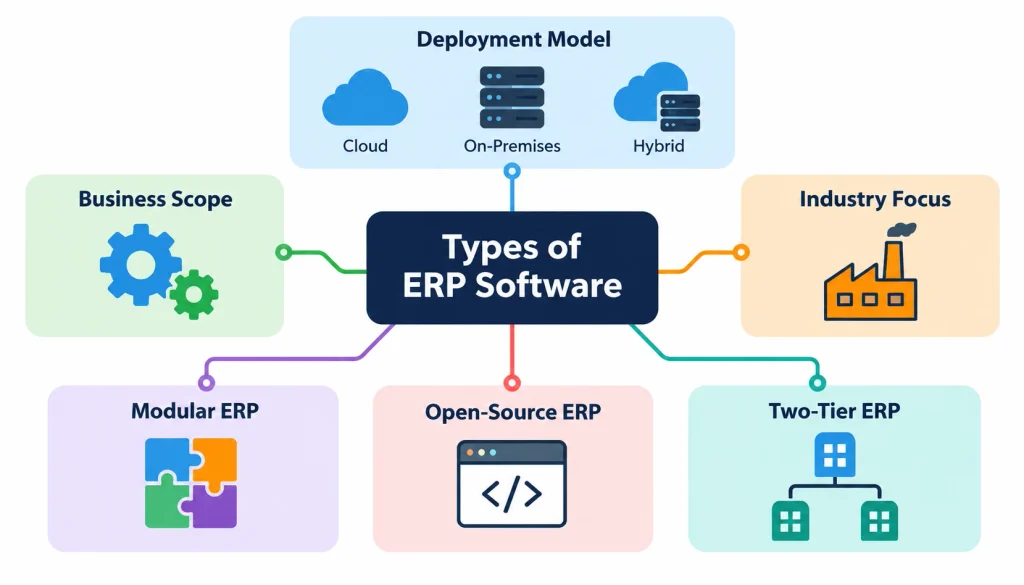
ERP software can be grouped by deployment model, business scope, industry focus and architecture or licensing. The main deployment models are cloud, on-premises and hybrid ERP. Other common categories are modular ERP, industry-specific ERP, open-source ERP and two-tier ERP. These categories overlap, so one system can fit several at once.
A NetSuite-style system, for example, is cloud-delivered, modular and sold as a subscription. A manufacturing ERP can be industry-specific and also run in the cloud.
Keep that in mind as you read. You’re not picking one box. You’re making a choice on each of four questions:
- Where does the software run? (deployment)
- How much of the business does it cover? (scope)
- Is it built for your industry? (specialization)
- How is it built and licensed? (architecture)
What Are the Main Types of ERP Software?
1. Cloud-based ERP
Cloud ERP runs on servers you don’t own. Your team logs in through a browser or app, and the provider handles most of the infrastructure. For a related perspective on cloud-based financial management, explore how cloud accounting helps businesses track assets, revenue and risk.
Pros: You skip most hardware purchases, updates are usually handled by the vendor, and remote teams and extra locations are easy to add.
Cons: You pay recurring fees, you rely on internet access for many tasks, and some products limit how far you can customize. You also depend on the vendor’s roadmap.
Good fit for: growing companies, distributed teams and businesses without a large IT department. Examples include Oracle NetSuite, Acumatica and Microsoft Dynamics 365. Check each product’s current deployment options in its own documentation.
2. On-premises ERP
On-premises ERP runs on servers your company controls, in your own data center or a facility you manage. You or a service partner install it, maintain it and apply upgrades.
Pros: You control the infrastructure, the upgrade schedule and where data is stored. Deep customization is often possible.
Cons: You need hardware, IT staff and a plan for backups, security patches and capacity. Upgrades can be slow and expensive.
Good fit for: organizations with legacy systems they must connect to, specific infrastructure rules, or a strong in-house IT team.
One caution. Strict compliance rules don’t automatically mean on-premises. Many regulated companies run cloud ERP with the right controls. Ask your compliance team what the rules actually require before you decide.
3. Hybrid ERP
Hybrid ERP mixes on-premises and cloud pieces. A common example: a company keeps its core finance system in its own data center and adds cloud tools for a new warehouse or a recently acquired business.
Pros: You can modernize in stages and keep systems that still work.
Cons: Integration gets harder, data can end up split across systems, and you manage two environments instead of one.
Good fit for: companies that can’t move everything at once. For the general idea behind mixed environments, see Wikipedia’s page on hybrid cloud.
4. SaaS ERP
SaaS describes how software is delivered: you subscribe, and the vendor runs and updates it. Most people use “cloud ERP” and “SaaS ERP” as if they mean the same thing, and in daily use they nearly do. Technically, cloud is about where it runs, and software as a service is about how you buy and receive it.
A private-cloud ERP is different. It runs in a cloud environment set aside for one customer, and who manages what depends on the contract.
SaaS ERP suits companies happy to use a fairly standard product and let the vendor do the upkeep. If your processes are unusual, test carefully how much the product can be configured.
5. Open-source ERP
Open-source ERP gives you access to the source code under a license. That’s a licensing choice, not a hosting choice. You can run open-source ERP in the cloud or on your own servers.
Pros: No license fee for the open-source edition, flexibility to change the code, and an active community around some products.
Cons: You usually need technical skill or a paid partner. Implementation, hosting and support still cost money. Heavy customizations can make upgrades painful.
Common examples are ERPNext, Dolibarr and the community edition of Odoo. Be precise here. Odoo also sells a separate paid edition that isn’t open source, so check which edition you’re evaluating. The Wikipedia page on open-source software explains the licensing basics.
6. Modular ERP
Modular ERP lets you start with the functions you need and add more later. Typical modules include:
- Finance and accounting
- Inventory management
- Procurement
- Order management
- Human resources
- Manufacturing
- Project management
- Reporting and analytics
The upside is phased adoption. You can fix your biggest problem first, usually finance or inventory, and expand once the team is comfortable.
The risk is a pile of modules that don’t fit together. Ask the vendor how modules share data, how licensing grows as you add them, and whether you’ll need extra integration work.
7. Industry-specific ERP
Industry-specific ERP is built around the workflows of one sector. It saves configuration time when your industry has unusual requirements. Here’s what to look for in a few of them.
- Manufacturing: production planning, bills of materials, work orders, quality control and material requirements planning.
- Retail and eCommerce: stock sync across stores and online channels, order management and storefront connections.
- Distribution: warehouse operations, demand planning, supplier management and order fulfillment.
- Construction: job costing, subcontractor management, project budgets and progress billing.
- Professional services: time tracking, resource planning, project accounting and billing.
- Healthcare: finance, procurement, supplies and workforce administration. Clinical records usually sit in separate specialized systems, not in the ERP itself.
A general-purpose ERP can often handle these needs too, but you may spend more on configuration or add-ons. The trade-off is breadth against fit.
8. Two-tier ERP
Two-tier ERP means a company runs one large system at headquarters and a lighter, separate system at subsidiaries or business units. A global manufacturer, for instance, might run a big enterprise platform at corporate and a simpler cloud product in each small foreign plant.
The benefits are lower cost and faster rollout at the local level. The challenges are consolidated reporting, consistent data and governance. It’s a strategy for how to combine systems, not a separate product category.
What Is ERP Software?
ERP stands for enterprise resource planning. It’s a set of connected applications that share one database, so finance, inventory, purchasing, sales, HR and production all work from the same numbers. Learn more about what an ERP system in accounting can do to connect financial data with other business operations. Wikipedia’s overview of ERP is a good neutral starting point if you want the background.
1. How does an ERP system work?
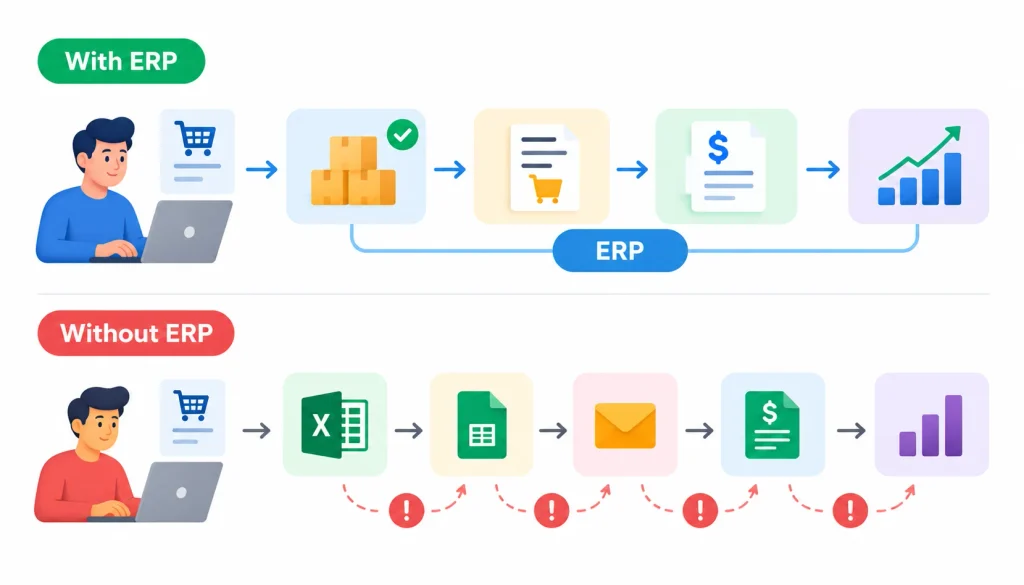
Imagine a sales rep enters an order. In a connected ERP, that one entry checks stock, reserves the items, triggers a purchase request if stock is low, creates an invoice and updates the sales report. Nobody retypes anything.
Without ERP, each of those steps often lives in a separate spreadsheet or tool. Someone has to copy data between them, and mistakes creep in.
2. Why do businesses use ERP software?
Most buyers want one or more of these results: a single source of truth for data, less manual entry, faster month-end reporting, and better visibility across departments. Those goals should drive your choice, not the vendor’s feature list.
3. ERP software vs. ERP modules
ERP is the whole integrated system. Modules are the pieces inside it, such as accounting, inventory or procurement. When someone says “this ERP has a CRM module,” they’re talking about functions, not about a type of ERP. We’ll cover modules below because they affect how you buy.
ERP Software Types Compared
Here’s how the three main deployment models stack up.
| Factor | Cloud ERP | On-premises ERP | Hybrid ERP |
| Where it runs | Provider’s cloud infrastructure | Your own infrastructure | A mix of both |
| Upfront cost | Often lower | Often higher (hardware, licenses) | Varies |
| Ongoing cost | Subscription and services | Maintenance, staff, infrastructure | Costs in both places |
| IT workload | Shared or handled by the provider | Mostly yours or your partner’s | Shared across systems |
| Customization | Depends on the product | Often extensive | Varies by component |
| Scalability | Often easier, within product limits | May need new hardware | Depends on design |
| Best for | Teams that want managed infrastructure | Teams that need infrastructure control | Companies moving in stages |
Treat “often lower” and “often easier” as starting points, not rules. Pricing and limits vary a lot by vendor.
1. Open-source vs. proprietary ERP
Proprietary ERP comes with a vendor who owns the code, provides support and sets the upgrade path. Open-source ERP gives you more freedom and shifts more responsibility to you or your partner. Over the long run, the cheaper option depends on how much customization and support you need.
2. General-purpose vs. industry-specific ERP
General-purpose systems cover common needs like accounting, inventory and sales for many industries. Industry-specific systems bring workflows you’d otherwise configure yourself. If your industry has unusual processes, such as lot tracking or project billing, start with a specialized option.
3. Is cloud ERP better than on-premises ERP?
Neither is better in every case. Cloud ERP tends to suit companies that want less infrastructure to manage. On-premises can suit companies with specific control, integration or regulatory needs. Security depends on how the system is configured and managed, not only on where it runs.
Types of ERP Software: Choosing the Right Solution by Business Size
Company size is a useful starting point, but it’s only one input.
1. Small businesses
Small companies usually need solid accounting, inventory and order handling without a long implementation. Ease of use, cost and vendor support matter most. Cloud and open-source options are common choices. Check the real implementation cost, since setup help is often a bigger expense than the software.
2. Mid-sized businesses
As transaction volume and locations grow, you need workflows that connect departments, approvals that run automatically and reports that cover several entities. Cloud ERP built for growing companies, such as Acumatica or NetSuite, is a typical shortlist item.
3. Large enterprises
Large organizations tend to need multi-country finance, tight governance, many integrations and support for several business units. Platforms such as SAP and Oracle are built for that scale, and some firms pair them with a two-tier setup.
4. Why size alone isn’t enough
A 40-person manufacturer with complex production routing may need a more specialized system than a 400-person consulting firm. Look at process complexity, transaction volume, regulation and geographic reach as well as headcount.
Quick scenario guide
| Your situation | ERP approach to investigate | What to watch |
| Small team, little IT staff | Cloud or SaaS ERP | Subscription cost, ease of use |
| Complex production workflows | Manufacturing-focused ERP | Planning, scheduling, quality |
| Strict infrastructure rules | On-premises or private cloud | What compliance really requires |
| Replacing legacy gradually | Hybrid ERP | Integration and migration plan |
| Headquarters plus subsidiaries | Two-tier ERP | Consolidated reporting, data consistency |
| Need heavy customization | Configurable or open-source ERP | Upgrade and support burden |
ERP Software Examples and Where They Fit
This is a starting shortlist, not a ranking. Product lines change, so confirm editions and deployment options on each vendor’s site.
- SAP: Aimed at large organizations with complex processes and industry-specific needs.
- Oracle NetSuite: Cloud ERP that combines financials and operations, often used by growing companies.
- Microsoft Dynamics 365: ERP applications that connect with the wider Microsoft toolset.
- Sage: Accounting and business management software. ERP depth varies by product.
- Infor: Industry-focused enterprise applications.
- Acumatica: Cloud ERP for growing and midmarket businesses.
- SYSPRO: Often associated with manufacturing and distribution.
- ERPNext, Odoo and Dolibarr: Modular options with open-source editions. Check the license and edition.
When you compare vendors, use the same yardstick for each: functional fit, deployment options, industry features, integrations, implementation effort, scalability, total cost, support and the ability to export your data if you leave.
Want real-world opinions? Practitioners discuss ERP projects openly on communities such as ERP on Reddit. Treat those threads as anecdotes, and cross-check them with vendor references.
How to Choose the Right ERP Software for Your Business
Here’s a process you can run in a few weeks with a small team.
- Write down your requirements. List the problems you want to solve and the capabilities you can’t do without.
- Map your current workflows. to identify manual steps, duplicate data, approval delays and reporting gaps. Explore how integrated accounting software can help reduce repetitive financial tasks and improve coordination between accounting and inventory operations.
- Pick the modules you need. Rank them by business impact.
- Choose a deployment model. Weigh cost, infrastructure, security, integration needs and your internal skills.
- Check industry requirements. Note any regulatory, reporting or operational rules a generic system might miss.
- Set a full budget. Include implementation, data migration, training, integrations, support and future growth.
- Shortlist vendors. Look at support quality, implementation partners and update policies.
- Test with real scenarios. Ask for demos built on your own workflows, such as creating a purchase order, receiving stock, processing an order and running a month-end report.
- Review security and integration. Check access controls, backup and recovery, data location, API support and compatibility with your current tools.
- Plan adoption. Name a project owner, set migration duties, schedule training and agree on success measures.
Understand the real cost
The software price is often only part of the bill. Total cost of ownership, which Wikipedia explains here, also includes consulting, data migration, customization, integrations, training, internal IT time, upgrades and support. Costs vary widely by vendor, modules, users and region, so get written quotes instead of relying on averages.
Use a weighted scorecard
A scorecard keeps the decision from turning into a popularity contest. These weights are only an example. Change them to match your priorities.
| Criterion | Example weight |
| Functional fit | 25% |
| Integration capabilities | 15% |
| Total cost of ownership | 15% |
| Security and compliance | 15% |
| Scalability | 10% |
| Implementation support | 10% |
| Usability and training | 5% |
| Data portability and exit options | 5% |
| Total | 100% |
Score each vendor from 1 to 5 on every row, multiply by the weight and add it up. Then discuss the result with your team, since the numbers should inform the decision, not replace it.
ERP Software Selection Checklist
Functional
- Does it support our critical processes and industry workflows?
- Are all required modules available?
- Can it produce the reports we need?
Technical
- Does it connect to our CRM, warehouse, eCommerce, payroll and banking tools?
- Does the deployment model match our infrastructure and security needs?
- Will it handle more users, entities and locations later?
Financial
- What are the implementation, license or subscription, and support costs?
- What do integrations and customization cost?
- How do costs change as we grow?
Vendor and implementation
- Does the partner have experience in our industry?
- What training and support response times are included?
- Can we export our data if we switch vendors?
ERP Implementation Challenges to Plan For
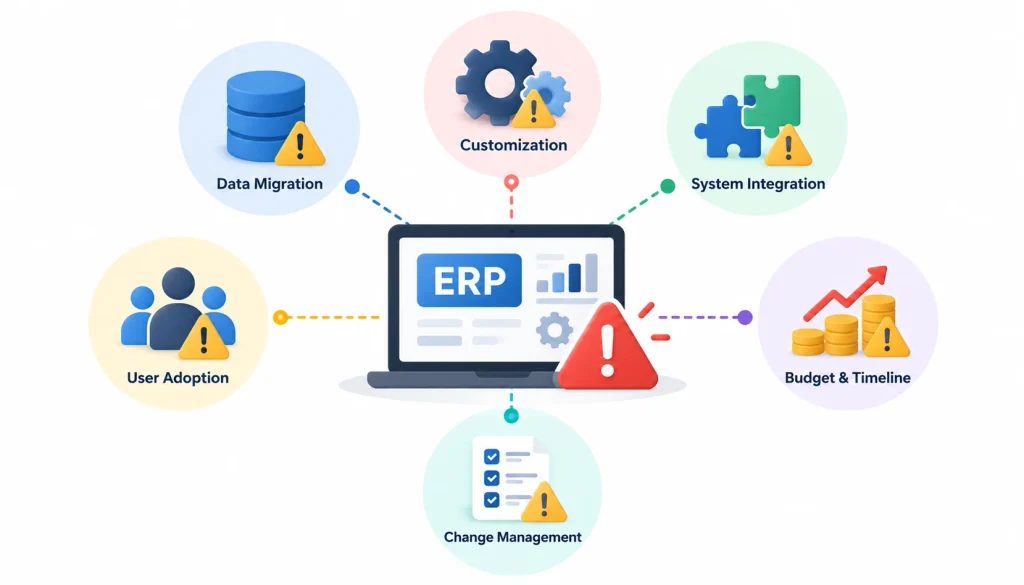
Picking the right category helps, but projects still go wrong in predictable places.
- Poor data. Duplicate or incomplete records in the old system will show up in the new reports. Clean data before migration.
- Too much customization. Every custom change adds cost and can make upgrades harder. Use standard features where you can.
- Integration gaps. Test every data flow between ERP and connected tools before go-live.
- Thin training. People who don’t understand the system will build workarounds in spreadsheets.
- Unrealistic schedules. Build in time for testing and a contingency budget.
- Unclear ownership. Someone senior must make decisions and settle disputes.
Track results against a baseline you measure before launch. Useful metrics include order processing time, inventory accuracy, month-end close time, procurement cycle time and user adoption. Pick the ones tied to your goals.
Common ERP Selection Mistakes
- Choosing a vendor because it’s famous, not because it fits.
- Ignoring total cost of ownership.
- Overlooking industry-specific requirements.
- Underestimating integration work.
- Buying modules you won’t use.
- Not planning for growth in users, locations or products.
Frequently Asked Questions About ERP Software Types
What are the three main types of ERP deployment?
Cloud, on-premises and hybrid. Cloud ERP runs on a provider’s infrastructure, on-premises runs on your own, and hybrid combines the two.
What is the difference between cloud ERP and on-premises ERP?
The main differences are hosting, who maintains the infrastructure, and how costs are structured. Cloud ERP usually means subscription fees and provider-managed infrastructure. On-premises usually means upfront hardware and license costs plus your own maintenance.
Which ERP software is best for small businesses?
There’s no single best option. Your budget, processes, technical skills and growth plans decide it. Many small businesses shortlist cloud or open-source ERP, then test it on real workflows.
What is the difference between ERP modules and ERP types?
Modules describe what the software does, like accounting or inventory. Types describe how it’s deployed, who it’s built for or how it’s licensed.
What is the difference between ERP and CRM?
ERP connects core operations such as finance, inventory and purchasing. CRM focuses on customer relationships, sales and service. Some ERP products include CRM features, and others integrate with a separate CRM.
How much does ERP software cost?
It depends on the vendor, modules, user count, implementation scope and region. Beyond the license or subscription, budget for implementation, migration, training, integrations and support.
How long does ERP implementation take?
There’s no standard timeline. Scope, data migration, integrations, customization and how ready your team is all change the answer. Ask vendors and partners for a plan based on your scope.
Final Thoughts
The best way to approach the types of ERP software, and choosing the right solution, is to stop asking which type is best. Ask which combination of deployment, scope, industry fit and licensing matches your business.
Start with your requirements, not a vendor’s reputation. Judge deployment, functionality, integration and total cost together. Choose a system that handles today’s work without adding complexity you don’t need.
Your next step is small. Write down your top five problems, shortlist three or four products, and ask each to demo your real workflows.
