

You can convert YouTube to MP3 legally when you own the content, the creator has given you permission, or a license clearly allows it. You can’t assume it’s fine just because the video is public or you only want to listen at home. Three things decide the answer: copyright, YouTube’s Terms of Service, and the method you use.
This guide walks through each one in plain English. You’ll also get a decision tree, a step-by-step method for converting files you’re allowed to use, and safe alternatives when an MP3 isn’t an option.
Is it legal to convert YouTube videos to MP3?
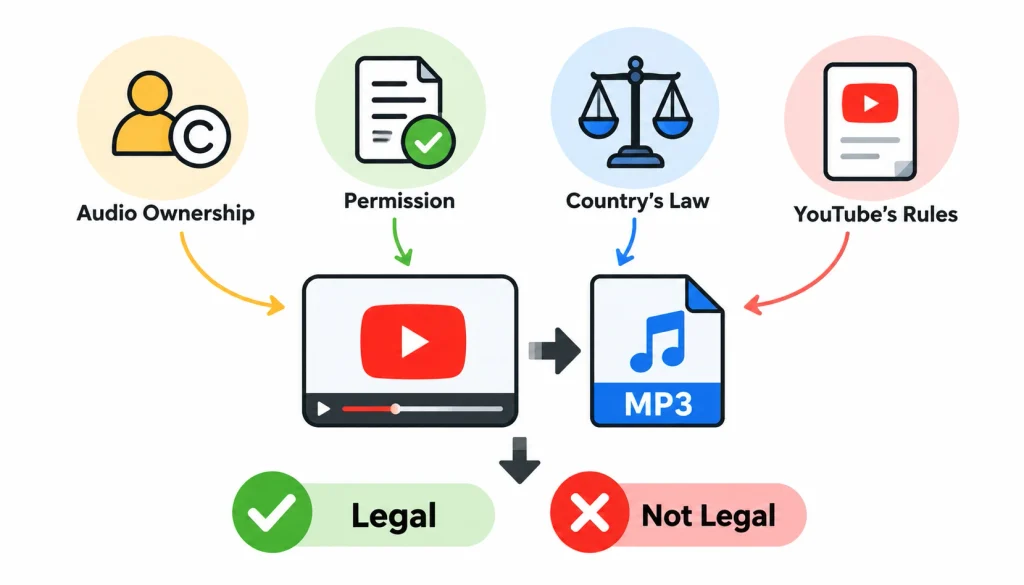
Sometimes yes, sometimes no. It depends on who owns the audio, what permission you have, which country’s law applies, and what YouTube’s rules say about the way you get the file.
People often treat this as one question. It’s really three, and mixing them up is where most bad advice comes from.
The short answer
Converting a YouTube video to MP3 is legal when you own the content, have the owner’s permission, or a license or legal exception covers your use. It is not automatically legal for copyrighted songs, even for private listening. YouTube’s Terms of Service add a separate limit on how you may download content.
Copyright law and YouTube’s rules are two different things
Copyright law decides whether you may make a copy of a work. If someone owns the song or recording, you generally need their permission or a legal exception to copy it.
YouTube’s Terms of Service are a contract between you and the platform. They say you shouldn’t download content unless YouTube provides a download feature or the rights holder has given written permission. So a video can be licensed for reuse and still have a platform rule attached to how you collect it.
Then there’s the tool itself. A converter, an app or a command line program is just software. Its ability to do something tells you nothing about whether you’re allowed to.
Does personal use make it legal?
Not on its own. Many people assume that copying a song for private listening is harmless, but “personal use” isn’t a blanket permission in most legal systems.
Some countries have narrow exceptions for private copying, research or study. They come with conditions, and they vary a lot. Whether one applies to you depends on the facts, so treat any claim that personal use is always fine with suspicion.
Why the answer changes by country
In the United States, the main exception is fair use. Courts look at the purpose of the use, the nature of the work, how much you copy, and the effect on the market for the original. YouTube also notes that giving credit or adding a disclaimer doesn’t make a use fair, as explained in its fair use guidance.
Many other countries, including India and the UK, use a model called fair dealing. Instead of a flexible test, the law lists specific purposes, such as research, criticism, or reporting. India’s Copyright Act, 1957 sets out these exceptions in Section 52. Whether your situation fits one of them is a legal question, so check your local law or ask a qualified lawyer if the stakes are high.
When can you legally get MP3 audio from YouTube content?
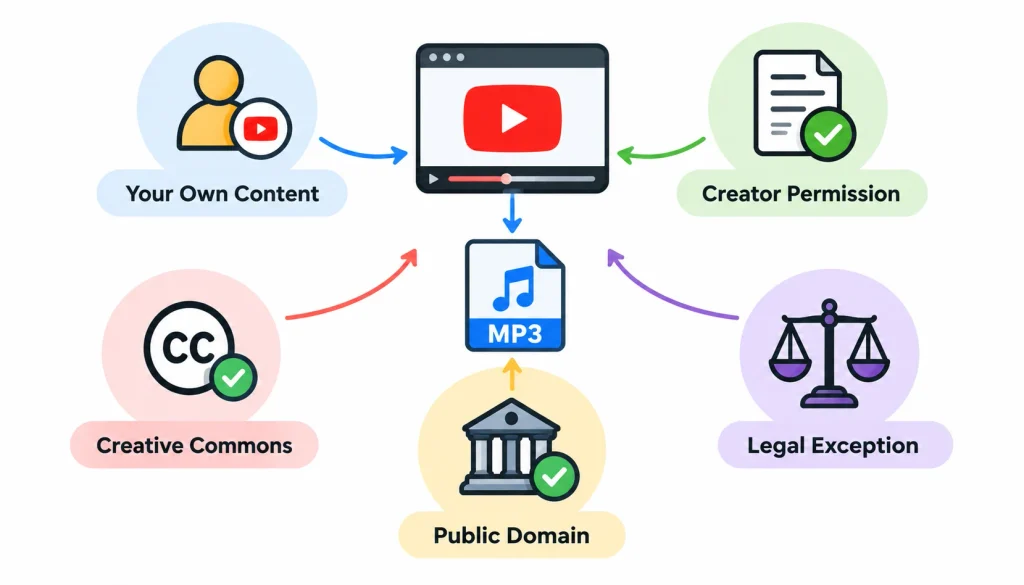
There are a handful of situations where you have a clear route. Start with the one that matches your case.
1. You own the original video or audio
If you recorded it, you probably still have the original file on a phone, camera or computer. Use that file instead of going back to YouTube. It’s higher quality and there’s no rights question to untangle.
One caution: owning the recording doesn’t always mean owning everything in it. If your video has a popular song playing in the background, that song still belongs to someone else.
2. The creator gives you a download or permission
Many musicians, podcasters and educators link a free MP3 in the video description or on their own site. If one exists, use it. It’s the cleanest option, and the audio quality is usually better.
If there isn’t one, you can ask. A good permission message covers a few points:
- Which recording you want.
- That you’d like to download it or extract the audio.
- How you plan to use it (private listening, a class, a video, a commercial project).
- Whether you need to credit them.
Keep the reply. If the creator says yes in writing, you have something you can point to later.
3. The video has a Creative Commons license
A Creative Commons license lets a creator grant public permission to reuse their work under stated terms. On YouTube, you’ll see it in the video description under the license section, where the uploader has chosen it. Businesses managing licensing expenses and other operational costs can also benefit from integrated accounting software to organize financial records and simplify expense tracking.
To check one:
- Open the video and expand the description.
- Find the license line and note which one it is.
- Read what that license allows. The Creative Commons chooser explains each type.
- Make sure the uploader actually owns the content. Someone can mislabel a song they don’t control.
- Check YouTube’s rules before picking a download method.
The common types behave differently:
| License | What it allows | What to watch for |
| CC BY | Reuse and adaptation with credit | You must attribute the creator |
| CC BY-SA | Same as CC BY | Adaptations must use the same license |
| CC BY-NC | Reuse with credit for non-commercial purposes | Business or monetized use is out |
Here’s a realistic example. A teacher finds a lecture recording marked CC BY and wants to build a podcast from it. She can reuse it if she credits the speaker and states any edits she made, and she should confirm the speaker really did own the recording.
4. The recording is in the public domain
Public domain works are no longer covered by copyright, so anyone can copy them. The catch is that the rules depend on the country and the type of work.
A classical piece written 200 years ago is in the public domain almost everywhere. A modern performance of that piece is a new recording with its own copyright. That’s why a song can involve two sets of rights: one for the composition and one for the recording.
5. A copyright exception may apply
Fair use and fair dealing can cover things like criticism, commentary, teaching and research. They’re decided case by case, and they don’t automatically cover a full download of a whole song.
If you plan to rely on an exception, write down why. Note the purpose, how much you used, and whether you’re affecting the creator’s ability to earn money.
When you shouldn’t assume it’s allowed
Be careful with commercial music, movie soundtracks, audiobooks, third-party podcasts, and anything from a label or studio. Being able to stream a video for free doesn’t give you the right to keep a separate audio copy.
How to choose a legal way to convert YouTube to MP3
Here’s a quick decision tree. Work through it in order.
- Do you own the recording or have permission to use it? If yes, go to step 2. If no, check the license, ask the owner, or pick a licensed alternative.
- Do you have a local file or an authorized download? If yes, convert it with software on your own computer. If not, see whether YouTube offers a download option for that video, or ask the rights holder for the file.
- Do you need a real MP3, or just offline listening? For an MP3 file, use the authorized file and convert it locally. For offline listening, use YouTube’s own offline feature.
- Does the license or permission cover your use? If yes, go ahead. If you’re not sure, get clarification before you convert anything.
Businesses can also improve financial visibility by using cloud accounting to track assets, revenue, and risk, helping them maintain more organized financial records.
Comparing your options
| Method | Gives you a standalone MP3? | Main thing to check |
| Your original file | Yes, after converting | You hold the rights to everything in it |
| Creator-provided MP3 | Yes | The license or terms they attach |
| Your own YouTube upload, downloaded from YouTube Studio | Yes, after converting the video file | Third-party music inside the video |
| YouTube offline feature | No | Plays only inside the YouTube app |
| Licensed music service | Depends on the service | Its terms for offline use |
| Third-party YouTube extractor | Technically often | Copyright permission and YouTube’s rules, plus security risk |
Why YouTube Premium doesn’t give you an MP3
This trips up a lot of people. A Premium subscription lets you save videos for offline viewing, but the saved file stays inside the YouTube app. YouTube’s offline FAQ says plainly that you can’t download MP3 files from the app.
So if all you want is to listen on a flight or a commute, Premium or YouTube Music may do the job. If you need an actual file to put in an editor or move to another device, you’ll need an authorized source file instead.
Which route fits you
- Students: Ask your instructor for the original recording or use the course’s own downloads.
- Podcasters and video creators: Work from your original project files, and use licensed or royalty-free music.
- Music listeners: Use a streaming service’s offline mode or buy the track.
- Researchers: Check the license, record your source, and look for a copy provided by the creator or institution.
- Businesses: Get written permission or a commercial license. A private-use argument won’t cover marketing or client work.
How to convert an authorized video file to MP3
Once you have a file you’re allowed to use, the conversion itself is simple. This works on files you own, files a creator gave you, and properly licensed downloads.
Step 1: Get an authorized file
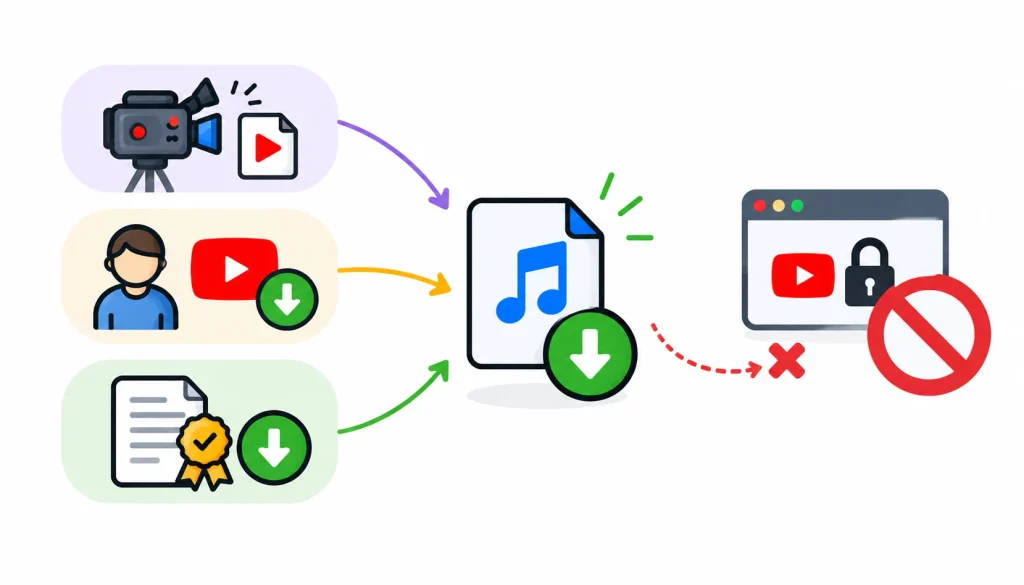
Use your original recording, a creator’s download, or a file from a licensed source. Don’t try to work around any restriction a platform has put in place.
Step 2: Pick software that runs on your computer
Good free options include VLC media player, FFmpeg and Audacity. Download them from their official sites only. These tools process files you already have, and they don’t give you permission to download anything.
Step 3: Import the file and choose MP3
In VLC, go to Media, then Convert/Save, add your file, and choose an audio profile for MP3. In Audacity, open the file and use File, then Export, then Export as MP3.
If you’re comfortable with a terminal, FFmpeg does it in one line:
ffmpeg -i input.mp4 -vn -codec:a libmp3lame -b:a 192k output.mp3
That command drops the video, keeps the audio, and saves it as a 192 kbps MP3.
Step 4: Choose a bitrate
Bitrate is how much data the file uses per second of audio. MP3 is a lossy format, which means it throws away some detail to keep files small.
For speech, 128 kbps is usually fine. For music, 192 kbps is a sensible middle ground, and 320 kbps gives the best quality MP3 can offer. Picking 320 kbps for a low-quality source won’t bring back detail that was never there.
Step 5: Convert and check the result
Play the finished file from start to finish. Make sure the sound is clear, the full recording is there, and the file opens on your phone or player. Save any license or credit details next to the file so you don’t have to hunt for them later.
How to convert your own YouTube video to MP3
This is one of the easiest legal routes. If you uploaded the video, you can download it from YouTube Studio: open Content, find the video, select the three-dot menu, and choose Download. Then convert that file locally using the steps above.
Before you share or publish the MP3, think about what’s inside it. If the video includes a licensed track, a clip from someone else, or a voice you don’t have permission to use, those rights don’t pass to you just because you made the upload.
Keep your original project file too. It usually sounds better than a copy that has been through YouTube’s compression.
How to verify Creative Commons and public domain audio
1. Check the license, not just the label
A CC tag on YouTube is set by the uploader. Look at the channel, find the original source of the music or recording, and make sure the uploader has the right to license it. If the source is unclear, treat it as unlicensed.
2. Check public domain status carefully
Look up the work, its publication date, and the country whose law applies. Remember that a composition and a recording have separate status. A recording from 1920 might be free to use while a 1985 remaster of it isn’t.
3. Credit Creative Commons work properly
A simple credit includes the title, creator, source link, license, and a note of any changes. For example: “Morning Lecture” by Jane Doe, source link, licensed CC BY 4.0, trimmed to remove the intro.
4. What to do if the license is unclear
Don’t guess. Contact the rights holder or choose a source with plain licensing terms. If you’re curious how other people handle gray areas, communities like r/copyright on Reddit discuss real cases, though forum replies are opinions and not legal advice.
Are YouTube to MP3 converter websites safe?
Often not, and that’s a separate issue from the legal one. Many free converter sites make money from aggressive ads, and some push unwanted software.
Common risks
- Fake download buttons that lead to something else.
- Pop-ups and redirects to unrelated or scam pages.
- Browser extension prompts you didn’t ask for.
- Installers or executable files disguised as audio.
- Requests for your Google login or other personal details.
- Vague privacy policies that don’t say what happens to your data.
How to size up a tool before using it
Look for a real developer name and an official website. Read the privacy policy. Download only from the official source, and be wary of anything that asks you to install extra programs or extensions.
A padlock icon and HTTPS only mean your connection to the site is encrypted. They don’t tell you whether the site is trustworthy.
If you already downloaded something suspicious
Don’t open it. Delete it, run a scan with your security software, and change your passwords if you entered any credentials. If you’re unsure whether it’s harmful, ask your IT team or a trusted technical friend.
The same careful approach applies when choosing business tools. This guide to inventory management software explains the features and considerations businesses should evaluate before selecting a solution.
Legal alternatives to YouTube to MP3 conversion
If you can’t get an authorized MP3, these routes still get you listening offline.
- YouTube’s offline feature. Available to eligible Premium users on supported devices. Content stays in the app.
- YouTube Music. Offers offline listening with a subscription, in the same app-only way.
- Creator downloads. Many artists share free or paid tracks on their own sites or on platforms like Bandcamp.
- YouTube Audio Library. Creators can find free music and sound effects there, each with its own usage terms.
- Licensed music libraries. Services that state clearly what you can do with each track, including commercial use.
- Direct permission. Email the creator and ask, using the short message outline earlier in this guide.
Common problems and fixes
The MP3 has no sound. The source file may have no audio track, or you picked the wrong track in the converter. Play the original first to confirm it has sound.
The quality is poor. The source was probably low quality to begin with. A higher bitrate won’t fix it, so look for a better original.
The file won’t play. Check that you exported as MP3 and that the file name ends in .mp3. Renaming a file’s extension doesn’t change its real format.
The file cuts off early. The source download may be incomplete. Get the original again from the authorized source and convert it again.
The website keeps opening strange pages. Close the tab. Don’t click anything, grant permissions, or enter login details.
Frequently asked questions
Is it legal to convert YouTube videos to MP3?
It depends on the content, your permission, the law where you live, and YouTube’s rules. It’s fine for your own content, creator-approved downloads, and properly licensed or public domain material. It isn’t automatically fine for copyrighted music.
Is it illegal to download music from YouTube for personal use?
Personal use doesn’t settle it. Some countries have narrow private-copy exceptions, but many don’t, and YouTube’s Terms of Service apply either way. Streaming or buying the track is the safer route.
Can I convert Creative Commons YouTube videos to MP3?
Often yes, if the license allows reuse, you follow its conditions, and the uploader had the right to license the work. Check the license type and YouTube’s rules before you pick a method.
Does YouTube Premium let me download MP3 files?
No. Premium offline downloads play only inside the YouTube app. They aren’t standalone MP3 files.
Can I convert my own YouTube videos to MP3?
Yes. Download your upload from YouTube Studio, then convert it on your computer. Check that it doesn’t contain music or clips owned by someone else before you share it.
Is royalty-free music the same as copyright-free music?
No. Royalty-free usually means you pay once or nothing and can use the track under set terms. The music is still copyrighted, and the license still applies.
Can I use a converter without installing software?
Browser-based converters exist, but not needing to install anything doesn’t make a download authorized. They also tend to carry more ad and security risk.
What’s the safest way to get an MP3 from YouTube content?
Start with permission. Use a file the creator gave you or one you own, convert it with trusted software on your own computer, and skip sketchy sites.
Final Verdict
Before converting YouTube audio to MP3, check who owns the recording and any music it contains, and make sure you have the necessary license or written permission.
Review the license conditions, including commercial-use restrictions, and read YouTube’s Terms of Service and copyright guidelines. If you plan to rely on a legal exception, check the copyright laws in your country.
Always download software from official sources, provide credit when required, and avoid sharing or selling audio files without proper authorization. Ultimately, learning how to convert YouTube to MP3 legally starts with checking permission before choosing a tool.
If you’re unsure whether a recording can be downloaded or converted, contact the rights holder directly to request permission or an authorized audio file.
