

ERP (enterprise resource planning) software runs the internal side of a business: accounting, inventory, purchasing, and order fulfillment. CRM (customer relationship management) software runs the customer side: leads, sales, marketing, and support. ERP keeps operations organized. CRM keeps customer relationships organized. Many companies connect the two so sales and operations work from the same facts.
That short answer covers most of it. The rest of this guide shows where the two systems overlap, how to tell which one your business needs first, and what goes wrong when they don’t talk to each other.
ERP vs. CRM at a glance
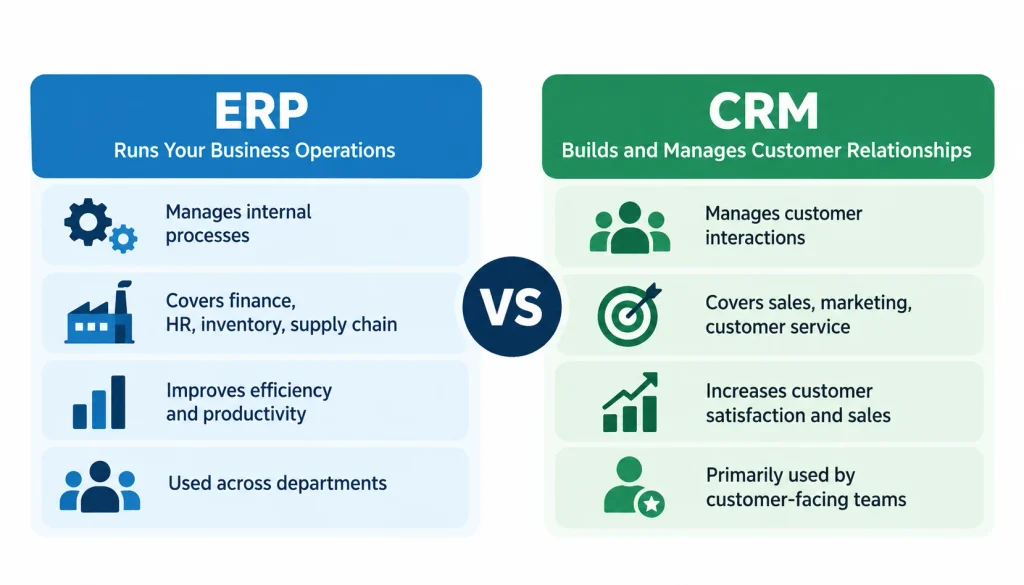
Here is the quick comparison before we go deeper.
| Factor | ERP | CRM |
| Main purpose | Run internal operations | Manage customer relationships |
| Typical users | Finance, operations, procurement, leadership | Sales, marketing, customer service |
| Core data | Transactions, inventory, purchase orders, invoices | Leads, contacts, deals, customer conversations |
| Common functions | Accounting, inventory, purchasing, planning | Pipeline tracking, campaigns, support cases |
| Goal | Control and visibility across operations | Better sales and customer engagement |
| What goes wrong without it | Stock errors, slow closes, messy reporting | Lost leads, missed follow-ups, scattered notes |
Treat this table as a rule of thumb. Modern products blur the lines, and some ERP suites include CRM modules. The table describes what each system was built to do first.
What is ERP software?
ERP software is a shared system that connects the back-office work of a company. Instead of finance using one tool, the warehouse another, and purchasing a third, everyone works from one set of records. For a closer look at its financial applications, explore our guide to an ERP system in accounting, including how ERP connects accounting, inventory, and sales data. Wikipedia’s overview of enterprise resource planning gives a good history if you want background.
Here is a simple example. A buyer raises a purchase order for raw materials. When the goods arrive, the warehouse records them. Accounting sees the receipt and matches it against the supplier’s invoice. Nobody retypes anything.
1. What ERP typically handles
The exact modules depend on the product, but most ERP systems cover some mix of these:
- Financial management and accounting
- Inventory and warehouse management
- Procurement and supplier management
- Production planning (for manufacturers)
- Order processing and fulfillment
- Operational and financial reporting
Businesses that need better stock visibility can also explore our guide to inventory management software to understand essential features, stock tracking, and inventory control.
2. Who uses ERP
Finance teams are the heaviest users. Warehouse staff, buyers, plant managers, and executives who need a reliable view of costs and stock also work in it daily. A small distributor and a global manufacturer will configure the same category of software very differently.
3. What ERP gives you
A good ERP cuts duplicate data entry and gives departments one version of the numbers. Month-end reporting usually gets less painful, because transactions already live in one place. It also forces process discipline, which some teams find annoying at first and useful later.
Be wary of vendor promises like “cut costs by 30%.” Results depend on your starting point, your data, and how well the rollout goes.
What is CRM software?
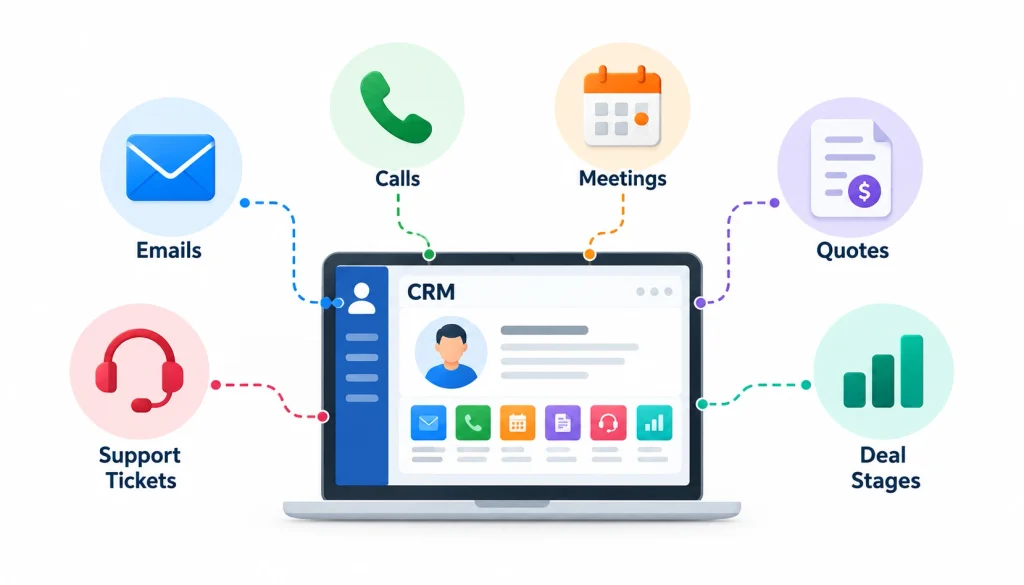
CRM software keeps a record of every interaction with a prospect or customer. Emails, calls, meetings, quotes, support tickets, and deal stages all attach to the same contact or account. Wikipedia’s page on customer relationship management covers the concept and how it developed.
Picture a sales rep who leaves the company. Without a CRM, her pipeline lives in her inbox and her notebook. With one, her replacement opens the account and sees every conversation, the last quote, and the next planned step.
1. What CRM typically handles
- Contact and account records
- Lead and opportunity tracking through a sales pipeline
- Sales forecasting and activity reminders
- Email and marketing campaigns, in products that include them
- Support cases and service history
- Reports on sales performance and customer activity
2. Who uses CRM
Sales reps and sales managers live in it. Marketers use it to segment audiences and track which campaigns bring in real leads. Account managers and support agents use it to see what a customer has already been told.
3. What CRM gives you
Most teams notice the same thing first: follow-ups stop slipping. Managers can see where deals stall. Marketing and sales stop arguing about which leads are any good, because both can look at the same data.
CRM only works if people actually enter data. Adoption is the most common reason a CRM disappoints.
What is the difference between ERP and CRM? A closer look
The table gave you the summary. These are the differences that matter when you are making a real decision.
1. Purpose: operations versus relationships
ERP answers questions like “Do we have the stock, and what did it cost us?” CRM answers “Who are we selling to, and what happens next?” One looks inward at resources and money. The other looks outward at people.
2. Data: records of what happened versus records of what might happen
ERP data is mostly transactional and final: an invoice, a stock movement, a journal entry. CRM data is often forward-looking and fuzzy: a lead who might buy, a deal with a 40% chance of closing. That difference affects how each system is audited, who may edit records, and how strict the controls need to be.
3. Users and ownership
Finance and operations usually own the ERP. Sales and marketing usually own the CRM. When a customer record exists in both, the question of who owns it matters more than most buyers expect. We come back to that in the integration section.
4. Implementation effort
ERP projects tend to involve more process redesign, data migration, and cross-department coordination. CRM projects tend to hinge on user adoption and getting the sales process written down clearly. That said, a lightweight cloud ERP can be simpler than a heavily customized CRM. Scope, not category, drives effort.
5.Cost
Neither system is cheap or expensive by default. We cover cost drivers in their own section below.
Real-world examples
These are illustrative scenarios, not customer case studies.
1. Manufacturer
A company that makes industrial pumps uses CRM to track distributor leads, quotes, and long sales cycles. It uses ERP to plan production, buy parts, manage stock, and cost each order. The CRM tells sales who to call. The ERP tells the plant what to build.
2. E-commerce store
The marketing team uses CRM to segment buyers and run win-back campaigns for lapsed customers. The ERP handles inventory, supplier orders, shipping, and accounting. If the two don’t connect, marketing may promote a product that is already out of stock.
3. Professional services firm
CRM tracks prospects, proposals, and client contacts. Billing, time tracking, project costs, and financials sit in an ERP or a professional services automation tool. Many firms in this space start with CRM and spreadsheets and add the back-office system later.
4. Distributor
Sales reps log opportunities and send quotes from the CRM. The ERP holds stock levels, purchasing, order processing, and invoicing. The reps’ biggest frustration is usually that they can’t see what is actually available to promise.
5. What happens when the two are disconnected
Disconnected systems create the same handful of problems again and again:
- Someone retypes orders from one system into the other
- The same customer appears twice with slightly different names
- Sales can’t see stock or delivery dates
- Invoices and orders don’t match what the rep promised
- Finance and sales report different revenue numbers
If that list sounds familiar, you may not need a new system. You may need the two you have to share data properly.
Can ERP and CRM work together?
Yes. You can connect separate products, or you can use a suite that includes both functions. Either route can work.
1. A typical order-to-cash workflow
Here is how data often moves in a connected setup. The exact steps depend on your software.
- A lead enters the CRM from a web form or a sales call.
- The sales team qualifies it and builds a quote.
- When the customer accepts, the order passes to the ERP.
- The ERP checks stock, triggers fulfillment, and issues the invoice.
- Order status and payment information flow back so sales and support can see them.
- The CRM schedules follow-ups, renewals, or service checks.
2. Benefits of connecting them
- Less retyping and fewer entry errors
- One consistent customer record
- Sales can answer “where is my order?” without calling the warehouse
- Reports that cover both pipeline and fulfillment
Businesses looking to reduce manual data entry and connect financial workflows can also learn about the benefits of integrated accounting software.
3. Ways to integrate
There are a few common approaches. Some vendors offer a native connector. Others expose an API that your team or a partner can build against. An integration platform (often called iPaaS) can sit in the middle and move data between systems. A single suite with both modules avoids the problem, but you accept that suite’s strengths and weaknesses in both areas.
The right choice depends on your systems, your budget, and whether you have technical people to maintain it.
4. What tends to go wrong
Most integration trouble is about data, not software. Watch for these:
- Duplicate customers. A rep creates “Acme Ltd.” in the CRM while finance already has “Acme Limited” in the ERP.
- No clear owner. If both systems can edit a customer’s address, they will eventually disagree.
- Silent sync failures. An order fails to transfer and nobody notices until the customer complains.
- Loose permissions. Sales rarely needs full access to financial records.
Practical tips
Map the real workflow on paper first. Decide which system is the source of truth for each type of record: customers, products, prices, orders. Clean your data before you connect anything. Test with a handful of real orders. After launch, set up alerts for failed syncs and review them weekly for the first couple of months.
Should you choose ERP, CRM, or both?
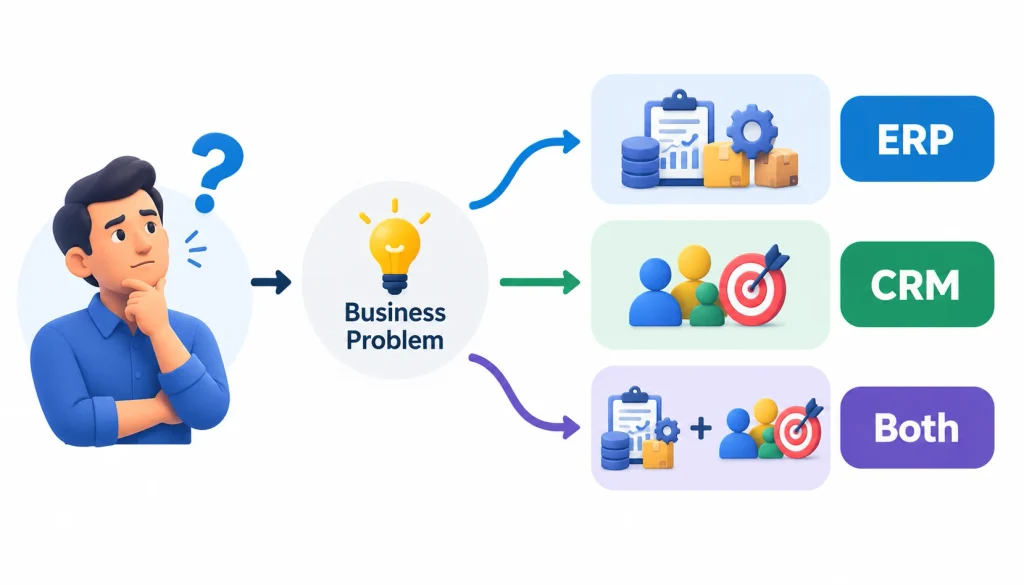
Start with the problem, not the product category. A business that buys both systems by default often ends up with two half-used tools.
| If your biggest problem is… | Look at first |
| Leads scattered across spreadsheets and inboxes | CRM |
| No clear view of the sales pipeline | CRM |
| Inconsistent customer follow-up | CRM |
| Stock counts you can’t trust | ERP |
| Fragmented financial reporting | ERP |
| Purchasing and fulfillment run on separate tools | ERP |
| Sales can’t see order status | Integration between the two |
| Demand and supply planning disconnected | Depends on the root cause |
When CRM comes first
Choose CRM first when the pain shows up in the sales process. If reps lose leads, managers can’t forecast, and service agents don’t know a customer’s history, that’s a CRM problem.
When ERP comes first
Choose ERP first when the pain shows up in operations and money. If month-end close takes weeks, inventory is a guess, and purchasing happens by email, that’s an ERP problem.
When you need both
You probably need both once customer-facing teams depend on operational data to do their jobs: quoting against live stock, confirming delivery dates, or checking payment status before a renewal call.
What about small businesses?
Company size is a weak signal. A ten-person business with complicated inventory may need ERP before CRM. A ten-person consulting firm with a long sales cycle may need CRM and nothing else for years. Look at transaction complexity and where work gets stuck.
Can one replace the other?
Not cleanly. An ERP may include contact management, but that rarely matches the campaign tools, pipeline views, and mobile features a dedicated CRM offers. A CRM may offer quoting or basic forecasting, but it won’t replace a general ledger, purchasing, or inventory control. Having a feature on the list isn’t the same as doing the job well. Ask vendors to demonstrate your actual workflow.
ERP vs. CRM vs. SCM
You may also see a third acronym. SCM stands for supply chain management, and it focuses on coordinating the flow of goods from suppliers to customers.
| System | Main focus | Example activities |
| ERP | Core business operations | Accounting, purchasing, inventory, reporting |
| CRM | Customer relationships | Leads, deals, interactions, support |
| SCM | Supply chain coordination | Demand planning, supplier coordination, logistics |
Some ERP products include SCM features. Others pair with specialist SCM tools. A business with simple logistics probably won’t need a separate SCM system. A business with many suppliers, warehouses, and shipping partners might.
How much do ERP and CRM cost?
I’m not going to quote prices here. They vary by vendor, edition, region, and billing term, and published numbers go stale quickly. Get current quotes from vendors you are considering.
What I can do is list what drives the total. Total cost of ownership is the right way to compare, because the license or subscription is often only part of the bill.
ERP cost drivers: subscription or license fees, the modules you need, implementation services, data migration, customization, integrations, training, and ongoing support.
CRM cost drivers: number of users, plan tier, automation and marketing features, data migration, integrations, training, and the internal time spent administering it.
So is ERP more expensive than CRM? Often, because the scope is wider. Not always. A basic cloud ERP for a small company can cost less than a heavily customized enterprise CRM. Compare costs over three to five years, and include the people-hours your own team will spend.
How to choose the right software
Use this order when you evaluate options:
- Write down your requirements. Separate what you must have from what would be nice.
- List the systems you already use. Note which ones must share data, and check whether native connectors exist.
- Check security and data controls. Look at user permissions, audit trails, data retention, and any compliance rules that apply to you.
- Be honest about implementation. Data migration, testing, training, and change management take real time.
- Test reporting and growth. Make sure the system can handle your expected volume and give you the reports you need.
A short vendor checklist
- Does it cover your must-have requirements?
- Can it connect to your existing software?
- Can people get the information they need without asking IT?
- Are permissions sensible?
- Is the implementation plan realistic?
- Do you understand the full cost?
- Will your team actually use it?
- Can you export your data if you leave?
- Is support available when you need it?
- Will it still fit in three years?
Examples of ERP and CRM software
These are examples of each category, not a ranking. Check each vendor’s current documentation before you shortlist anything, because products and packaging change.
ERP: SAP S/4HANA, Oracle Fusion Cloud ERP, Microsoft Dynamics 365 Business Central, and Acumatica.
CRM: Salesforce, HubSpot CRM, and Microsoft Dynamics 365 Sales.
Suites that combine both: Some vendors offer ERP and CRM functions through one product or a connected family of products. A shared brand name doesn’t guarantee every feature you need is in the edition you’re buying, so confirm it in writing.
If you’d like to see how practitioners talk about these choices, search Reddit communities for ERP and CRM implementation threads and LinkedIn posts from operations and sales-ops leaders. Treat those as opinions from people with their own setups, not as benchmarks.
Frequently asked questions
What is the main difference between ERP and CRM?
ERP manages internal operations such as finance, inventory, and purchasing. CRM manages customer relationships such as leads, sales, and support. They serve different teams, though they often share customer and order data.
Can ERP replace CRM?
Sometimes partly. Many ERP products include basic CRM features. They may not match a dedicated CRM’s sales tools, so check against your actual needs.
Can CRM replace ERP?
Usually no. A CRM doesn’t normally cover accounting, inventory, or procurement at the depth an ERP does.
Do businesses need both?
Not always. Many do fine with one for years. You likely need both when sales and customer service need live operational data, such as stock, order status, or invoices.
Which should you implement first, ERP or CRM?
Fix the bigger bottleneck. If you lose deals through poor follow-up, start with CRM. If you lose money through stock errors and slow reporting, start with ERP.
What are the benefits of integrating ERP and CRM?
You get less duplicate entry, one customer record, better order visibility for sales and support, and reports that span the whole order-to-cash process.
What is the difference between ERP, CRM, and SCM?
ERP runs core operations, CRM manages customers, and SCM coordinates the movement of goods through the supply chain. Features sometimes overlap depending on the product.
Is ERP more expensive than CRM?
Often, because ERP covers more ground and takes longer to implement. But cost depends on vendor, scope, customization, and integrations, so compare total cost over several years.
Conclusion
ERP helps you run the business behind the scenes. CRM helps you manage the people you sell to. The two work best when they share data, but you don’t have to buy both at once.
Start by naming your most painful problem. Map the workflow around it, then look at the system, or the pair, that fixes it. If you already have both and they don’t connect, start with data ownership and a small, well-tested integration before you replace anything.
