
If you run a contracting business you already know that simple bookkeeping is not enough. You must track money for each job. You often have three or four jobs at the same time. Each job has its budget, its own subcontractors and its own payment schedule.
That is why contractor accounting software was created. Contractor accounting software is accounting software designed to match how construction really works. It uses jobs, cost codes, progress billing, retainage and payroll rules that normal small‑business tools never cover.
This guide explains what contractor accounting software really does. It shows how contractor accounting software is different from accounting software such as QuickBooks or Xero.
It also tells you which platforms are best, for which type of contractor and how to choose one without wasting six months on an implementation.
Quick answer: Small contractors with jobs often do fine on QuickBooks or Xero with a few contractor‑focused add‑ons.
Once contractors are managing active jobs, subcontractors, retainage or certified payroll purpose‑built construction accounting software such as Foundation, Sage 100 Contractor or Premier or a project‑accounting layer such, as Adaptive or Knowify usually pays for itself within a year by reducing billing errors and improving job‑cost visibility.
What Is Contractor Accounting Software?
Contractor accounting software is accounting software built around projects instead of just company-wide totals. Every dollar gets tied to a specific job, so you can see whether that job is actually making money, not just whether your bank balance looks healthy.
Regular accounting software answers “how is my business doing this month?” Contractor accounting software answers “how is this job doing right now, and what will it cost me to finish it?” That second question matters more in construction, where a business can look profitable on paper while individual jobs are quietly bleeding money.
Wikipedia’s overview of construction accounting sums up why this field is treated as its own discipline: contractors typically recognize revenue using the percentage-of-completion method, tying earned revenue to the percentage of estimated total cost that’s actually been incurred.
That single accounting rule is the reason generic bookkeeping software struggles here: it usually has no concept of “percent complete” at all.
1. How contractor accounting differs from regular accounting
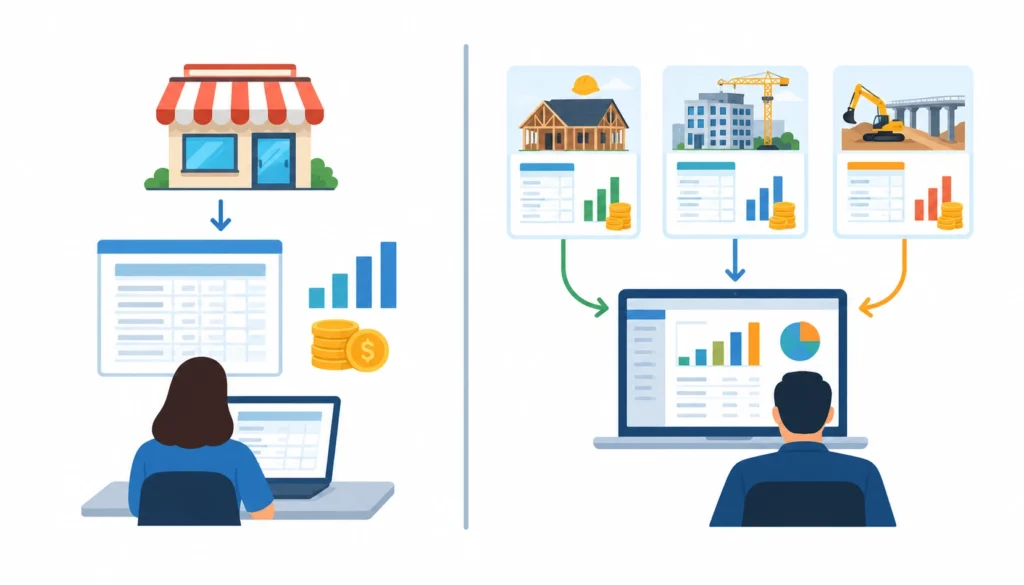
A retail business has one ledger and one set of margins. A contractor effectively runs a separate mini-business inside every job, with its own budget, its own costs, and its own profit or loss.
Contractor accounting software is built to roll all of those mini-businesses up into one clear picture without losing the job-level detail.
2. What contractor accounting software actually manages
At a working level, the software touches:
- Jobs and cost codes
- Labor, materials, and equipment costs
- Subcontractor payments and compliance documents
- Progress billing and retainage
- Work-in-progress (WIP) reporting
- Payroll, including certified and prevailing-wage payroll
- Cash flow and job profitability
Best Contractor Accounting Software in 2026
Before naming names here is the methodology. Each platform below was evaluated on how deep the job costing’s on WIP reporting on payroll capability on billing tools, on how easy it is to set up and on how clear the vendor is about pricing.
Software prices change often so treat the numbers here as a starting point. Confirm current prices directly with each vendor. This comparison reflects listed information as of September 2026.
No single platform is best, for every contractor. The honest answer depends on your size, your trade and how complex your payroll and billing already are.
| Software | Best for | Job costing | WIP | Payroll | Construction billing |
| QuickBooks | Small contractors, existing QuickBooks users | Basic | Limited | Add-on | Limited |
| Xero | Small service contractors, cloud-first teams | Basic-to-moderate | Limited | Via add-on | Moderate |
| Adaptive | Mid-market contractors layering project accounting onto existing systems | Strong | Strong | Depends on integration | Strong |
| Foundation Software | Specialty and mid-size construction firms | Strong | Strong | Strong (certified payroll) | Strong |
| Sage Construction (Sage 100/300) | Established contractors needing broad financial management | Strong | Strong | Strong | Strong |
| Premier Construction Software | Growing contractors ready for an ERP | Advanced | Advanced | Advanced | Advanced |
1. QuickBooks
QuickBooks (Online or Enterprise Contractor Edition) is the first choice for most small contractors. That’s mostly because your bookkeeper or CPA likely already uses it.
It does a job with tracking income and expenses by comparing estimates to actual results and preparing 1099 forms for subcontractors.
It starts to fall short when you need certified payroll, manage multi-tier retainage or generate work-, in-progress reporting that meets bank or surety requirements.
If your annual revenue is moving past a million dollars or if you are bidding on public projects that require prevailing wage records you’ll probably outgrow what QuickBooks can do.
2. Xero
Xero focuses on cloud-based bookkeeping. It includes bank reconciliation, bills, tracking costs at the project level and a good mobile app. It works well for service and remodeling contractors who need simple project profitability without a hard learning curve.
Xero does not have built-in construction payroll or advanced work in progress tools. So contractors who handle certified payroll or complicated progress billing usually need a construction- add-on or a different platform altogether.
3. Adaptive
Adaptive places itself as a project‑accounting layer that sits beside a company’s existing books. Adaptive links job costs, accounts payable, billing, work in progress and forecasts. Adaptive does this without requiring a rip‑and‑replace.
Adaptive makes a choice for mid‑market contractors who already have accounting processes they do not want to abandon but need clearer job‑level visibility.
4. Foundation Software
Foundation is a construction-focused accounting system. It handles job costing, payroll, including payroll, invoicing accounts payable and accounts receivable general ledger and project management all in one place.
This system is a choice for specialty contractors and mid-size companies. They need construction accounting features. Don’t want to go all the way to a full ERP system.
5. Sage Construction
Sage’s construction products include Sage 100 Contractor for companies and Sage 300 Construction and Real Estate for bigger ones. These products handle finance, compliance, job costing, payroll work in progress and field access.
It is an option for companies that have been around for a while and need full financial management. These companies also have the people to manage a more complicated system.
6. Premier Construction Software
Premier is built as a cloud-based construction ERP so its pricing, reporting and feature depth go beyond basic accounting. It includes project management and forecasting tools.
This makes it a good fit for growing contractors who have moved past the stage where simple accounting software can handle their day- to-day operations.
7. Other platforms worth knowing
A handful of other names show up regularly in contractor accounting searches, each suited to a different niche: Procore Financials (financial tools bolted onto Procore’s project management platform), Acumatica Construction Edition (cloud ERP with strong customization), CMiC and Viewpoint Vista (enterprise-grade systems for large general contractors), Knowify (project accounting for small-to-mid trade contractors), Buildertrend (project management with construction-aware accounting features), and ComputerEase (construction accounting aimed at mechanical, electrical, and specialty trades).
None of these need a full profile here. The point is knowing they exist and roughly who they’re for, so you can shortlist correctly before you start demos.
Contractor Accounting Software vs. General Accounting Software
This is the decision most contractors actually need help with, more than “which vendor is best.”
General accounting software such as QuickBooks or Xero manages common bookkeeping tasks effectively, including creating invoices, tracking expenses, reconciling bank accounts and producing simple reports.
For businesses that want to understand these fundamentals, this guide to bookkeeping explains how tasks such as bank reconciliation, payroll processing, and financial reporting fit into everyday financial management.
When you require job costing divided into cost codes WIP schedules that a bank will accept, certified payroll for government contracts or multi-tier retainage tracking, across many active jobs General accounting software falls short.
A rough way to think about it:
- General accounting software: fine for a solo contractor or a small crew running one or two jobs at a time with simple billing.
- Construction accounting software: needed once you’re running several jobs simultaneously, using subcontractors regularly, or billing progressively against a contract.
- Construction ERP: worth it once accounting, estimating, project management, procurement, and field operations all need to share the same data in real time.
If you’re not sure which bucket you’re in, a useful gut check: can you tell right now, without pulling a report or calling your bookkeeper, whether your three biggest active jobs are on budget? If not, you’ve likely outgrown general accounting software regardless of your revenue size.
What Features Should Contractor Accounting Software Have?
1. Job costing

Job costing is about keeping track of every cost that happens during a job. This includes things like labor, materials people you hire to do part of the work and the machines or tools you use. It is all linked to the job that caused the cost. Then you compare those costs to the budget you set for that job.
For example if a home renovation job has a budget of $30,000 for labor, $20,000 for materials, $15,000 for subcontractors and $5,000 for equipment, good job-costing software will show you how much you are actually spending in each of those areas. It doesn’t just show the total of $70,000.
This is important because a job might go over budget in one area but still look okay when you look at the total. By the time you notice that problem, on your bank statement it could be too late to do anything about it.
2. WIP accounting and reporting
Work-in-progress (WIP) reporting compares what you’ve billed against what you’ve actually earned, based on percent complete. If you’ve billed more than you’ve earned, you’re “overbilled,” meaning you’re sitting on cash you haven’t technically earned yet, which can mask a cash-flow problem down the road.
If you’ve billed less than you’ve earned, you’re “underbilled,” meaning you’re financing the job out of pocket. Sureties and lenders look closely at WIP schedules, so software that generates them accurately is worth prioritizing if you do any bonded work.
3. Progress billing and retainage
Progress billing lets you invoice a percentage of the contract as work is completed, rather than waiting until the whole job is done. Retainage is the portion of each invoice, often 5% to 10%, that the client holds back until the project wraps up and passes final inspection. Software needs to track retainage separately from regular receivables, since it sits on your books differently and affects cash flow differently.
4. Change orders
A change order is any modification to the original contract: added scope, removed scope, or a price adjustment. Software should let you track a change order from proposal through client approval to final billing, and flag any work that’s happening on unapproved changes before it becomes a dispute.
5. Accounts payable, accounts receivable, and subcontractor management
Beyond standard AP/AR, contractor software should handle W-9 collection, 1099 preparation, lien waivers, and insurance certificate tracking for every subcontractor on a job. Skipping this is a common way contractors end up with compliance headaches at tax time or during an audit.
6. Construction payroll
Contractor payroll often isn’t simple hourly pay. Certified payroll (required on many public projects) demands weekly reporting in a specific federal format; prevailing wage rules set minimum pay by trade and location; union payroll adds fringe benefit calculations on top. Software that handles these natively saves real hours compared to managing them in spreadsheets.
7. Mobile and field accounting
Field crews need to log time, snap photos of receipts, and submit expenses from a job site, not from an office desk at the end of the week.
Software with a solid mobile app keeps job costs current instead of two weeks behind, which matters a lot when you’re trying to catch a budget problem while there’s still time to fix it.
8. Reporting, dashboards, and integrations
Look for real-time dashboards showing job profitability and cash position. Accounting software with strong analytics can also help you monitor financial trends, create custom reports, and make better decisions, while integrations connect the system with estimating, project management, payroll, and banking tools
How Contractor Accounting Software Works Across a Project
This is where the mechanics come together, and it’s worth walking through end to end because it shows why job-based accounting is genuinely different from company-level bookkeeping.
- Estimate the job and build a budget broken into cost codes (labor, materials, subs, equipment, permits).
- Set up the job in the software with those cost codes attached.
- Track labor and materials as they’re spent, coded to the right job and cost code.
- Issue purchase orders and subcontracts, so committed costs show up before the invoice even arrives.
- Capture vendor invoices and expenses, matched against the right PO or subcontract.
- Bill progressively against the contract as work is completed.
- Track retainage and change orders as they happen, not after the fact.
- Generate WIP reports comparing billed, earned, and costs incurred.
- Compare actual costs to the original budget to catch overruns early.
- Measure final profitability once the job closes, and feed that data into your next estimate.
A residential remodeler with three active jobs and a $50M general contractor with forty follow roughly the same sequence. The scale and the compliance requirements differ, but the workflow itself doesn’t change much.
Choosing Software by Business Size and Contractor Type
Rather than a long list of trade-by-trade recommendations, here’s the pattern that actually holds up across contractor types.
Solo contractors and very small crews usually do fine with general accounting software plus simple invoicing and expense tools. The job complexity doesn’t justify a construction-specific platform yet.
Small contractors running a handful of jobs at once: this is where QuickBooks or Xero with project tracking, or an entry-level construction package like Sage 100 Contractor, tends to fit.
Growing contractors juggling multiple crews, subcontractors, and progress billing usually need a purpose-built construction accounting platform like Foundation, Sage, or a project-accounting layer like Adaptive or Knowify.
Mid-market and enterprise contractors running multiple entities, bonded public work, or complex payroll (certified, prevailing wage, union) tend to need either a full construction ERP like Premier or Acumatica, or an enterprise system like Viewpoint Vista or CMiC.
Contractors managing multiple entities can also benefit from understanding how accounting software for multiple businesses handles separate financial data while keeping reporting and integrations organized.
Trade matters less than most software marketing suggests. An electrical contractor and a roofing contractor with similar revenue and similar payroll complexity will usually shortlist the same tier of software. The differences that matter are job count, subcontractor volume, payroll type, and whether you’re bidding public work, not the trade itself.
How Much Does Contractor Accounting Software Cost?
Sticker price is the smallest part of the real cost. A fuller picture includes:
- Subscription or license fees: ranges widely, from roughly $30–$90/month for QuickBooks or Xero plans up to custom enterprise pricing for Sage, Foundation, or Premier that’s quoted per company.
- Implementation and data migration: moving historical job data and chart of accounts into a new system, which can take weeks for a construction-specific platform.
- Training: construction accounting software has a real learning curve for cost codes, WIP, and job setup.
- Integrations: connecting payroll, estimating, or project management tools sometimes carries its own fees.
- Payroll and payment processing: often billed separately, especially for certified payroll modules.
- Ongoing support: some vendors include it, others charge extra for priority support.
Construction ERP software costs more than general accounting software mainly because you’re paying for the compliance and reporting depth (certified payroll, multi-tier WIP, bonding-ready financials) that generic tools were never built to handle.
A contractor group discussion on r/Construction is a decent gut-check on this: you’ll find plenty of contractors describing the jump from QuickBooks to a construction-specific system as expensive up front but worth it once job costing stopped being guesswork.
How to Choose the Right Contractor Accounting Software
- Define your company size and project complexity. How many active jobs run at once, and how big are they?
- Document your current accounting workflow. Know what’s broken before you shop for a fix.
- List your required construction features. Job costing, WIP, retainage, certified payroll: rank them by how painful the gap is today.
- Review payroll and compliance needs. Public work changes the requirements significantly.
- Check integrations with your estimating, project management, and payroll tools.
- Compare reporting capability, especially WIP reports if you deal with sureties or lenders.
- Calculate total cost of ownership, not just the monthly subscription.
- Test the software with a real project, not a demo sandbox with fake data.
- Evaluate implementation and training support.
- Check data security, backups, and export options before you commit.
Contractor Accounting Software Demo Checklist
Bring these questions into every vendor demo:
- Can you show me a real job-costing example with cost codes, not just totals?
- What does your WIP report actually look like, and can a surety or bank read it?
- How is certified payroll handled, and does it generate the required federal forms?
- Can this integrate with [your estimating/project management/payroll tool]?
- What does implementation actually involve, and how long does it typically take for a company our size?
- Is pricing based on users, modules, revenue, or something else?
- What happens to our data if we cancel? Can we export everything cleanly?
Common Contractor Accounting Mistakes Software Can Help Prevent
- Mixing job costs with overhead, which makes every job look more profitable than it actually is.
- Delayed cost coding, so budget overruns aren’t visible until the job’s nearly done.
- Missed or unapproved change orders, a frequent source of billing disputes.
- Sloppy progress billing, leading to over- or under-billing without anyone noticing.
- Poor retainage tracking, which quietly distorts cash flow.
- Stale WIP data, which undermines credibility with lenders and sureties.
- Payroll compliance errors, especially on certified payroll or prevailing wage jobs.
- No visibility into job-level profitability until the job is already closed and it’s too late to course-correct.
How AI Is Changing Contractor Accounting Software
AI features are showing up across most of the platforms named above, mostly in a few practical spots:
- Automated invoice data extraction: pulling line items off a vendor invoice instead of manual entry.
- AI-assisted cost coding: suggesting the right job and cost code based on invoice content and history.
- Exception detection: flagging a cost or invoice that looks out of pattern for a given job.
- Cash-flow forecasting: projecting cash position based on current WIP and committed costs.
- AI-assisted WIP analysis: surfacing jobs that look over- or under-billed before it becomes a real problem.
None of this replaces a controller’s judgment. AI can speed up repetitive data entry and flag anomalies, but approvals, financial controls, and the final call on a WIP schedule still need a person who understands the job and the client relationship.
Contractor Accounting Software Implementation Guide
Rolling out new software takes longer than most contractors expect, mostly because of data migration and chart-of-accounts setup, not the software itself.
- Migrate historical data: decide how far back you actually need job history, rather than dragging over everything.
- Rebuild your chart of accounts and cost codes to match how the new system organizes things, not just copy the old structure.
- Connect integrations: payroll, estimating, banking.
- Set user permissions so field staff, project managers, and accounting see only what they need.
- Train the team, especially anyone entering costs from the field.
- Run a parallel test on a live job before fully switching over.
- Go live, then review after 30–60 days to catch setup mistakes before they compound.
Frequently Asked Questions
What is contractor accounting software?
It’s accounting software built to track costs, billing, and profitability at the individual job level, rather than just at the company level, with features like job costing, WIP reporting, and construction-specific payroll.
What is the best accounting software for contractors?
There isn’t one universal answer. QuickBooks and Xero suit small contractors with simple jobs, while Foundation, Sage, and Premier fit contractors needing deeper job costing, WIP, and certified payroll.
Is QuickBooks good for contractors?
Yes, for small contractors and businesses already using QuickBooks. It handles job-level tracking and basic reporting well but has real limits on WIP reporting and certified payroll as a company scales.
Is Xero good for construction companies?
Xero works well for smaller, cloud-first service and remodeling contractors who want clean project-cost tracking without the complexity of a full construction ERP.
Do small contractors need construction-specific accounting software?
Not always. A solo contractor or small crew running one or two jobs at a time can usually manage on general accounting software with project tracking turned on.
Conclusion
There’s no one choice here and any article that gives you just one is missing the part that really counts: your job complexity, payroll needs and plans for growing.
As a starting point: a small contractor doing jobs is usually okay with QuickBooks or Xero. A contractor who is growing and handling jobs and subcontractors needs a construction accounting system like Foundation or Sage.
A contractor who works in a specialty area and has a lot of payroll rules needs help with certified payroll more than nice charts and graphs. A mid-market contractor who wants job tracking with the systems they already use is a good match for Adaptive or Knowify.
A big contractor or one that works on projects or has many companies under one roof is better off with a full construction ERP, like Premier, Acumatica or Viewpoint Vista.
No matter which way you go, use the demo checklist above with job data before you make a decision. The right contractor accounting software should show you on any day, where every active job is, not just what your bank account looked like last month.