


If your card just got declined and the error message mentioned “AVS,” you’re probably staring at your screen wondering what you did wrong. Short answer: probably nothing. An AVS mismatch happens when the billing address you entered doesn’t line up with the address your card issuer has on file. It doesn’t automatically mean fraud, and it doesn’t always mean your payment failed for good.
This guide walks through what an AVS mismatch actually is, why it happens even when you’re sure you typed your address correctly, what happens to your money afterward, and what both shoppers and merchants can do about it.
Quick answer: An AVS mismatch occurs when the billing address submitted during a card payment doesn’t match what the card issuer has on record. Depending on the merchant’s fraud settings, this can trigger a decline, a manual review, or in some cases get waved through anyway.
What Is an AVS Mismatch?
1. What does AVS stand for?
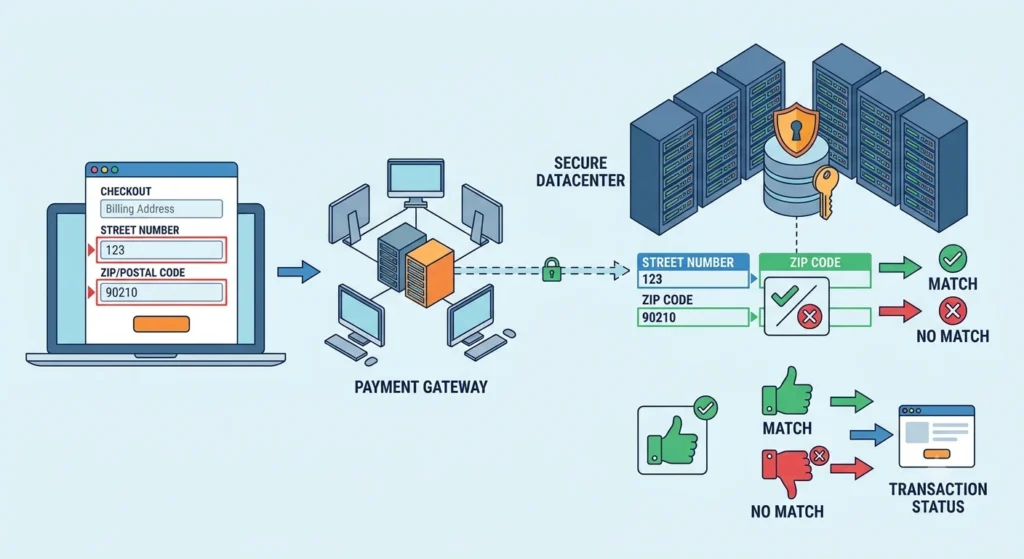
AVS stands for Address Verification Service (sometimes called Address Verification System). It’s a check that compares the numeric parts of the billing address you enter at checkout, usually the street number and ZIP or postal code, against the address the card issuer has on file for that account.
2. How Address Verification Service works
Here’s the path a payment actually takes, which most explanations skip over:
Customer enters card details → Merchant’s checkout page → Payment gateway/processor → Card network (Visa, Mastercard, etc.) → Issuing bank → AVS response comes back → Gateway applies the merchant’s rules → Payment is approved, flagged for review, or declined.
For a broader look at how payment processors work and what businesses should consider when choosing one, see our guide to payment processing options.
The issuing bank is the one that actually runs the address check. It sends back a response code, and it’s the merchant’s payment gateway that decides what to do with that code. Two shoppers with the exact same “mismatch” can get completely different outcomes depending on which store they’re buying from, because each merchant sets its own risk tolerance.
3. What information does AVS check?
AVS typically only looks at:
- The numeric portion of the street address (not the street name)
- The ZIP or postal code
It usually ignores things like apartment numbers, city, and state, which is part of why the system produces so many false mismatches. It’s a blunt tool, not a precise one.
4. What does an AVS mismatch mean?
An AVS mismatch means the numbers you entered didn’t match what the bank has on record. That’s it. It says nothing on its own about whether you’re the legitimate cardholder — it’s one data point that a merchant’s fraud system weighs alongside others.
Does an AVS Mismatch Mean Your Card Was Declined?
Not necessarily. This is where a lot of confusion comes from, because AVS results and payment declines aren’t the same thing.
1. Why an AVS mismatch can cause a declined payment
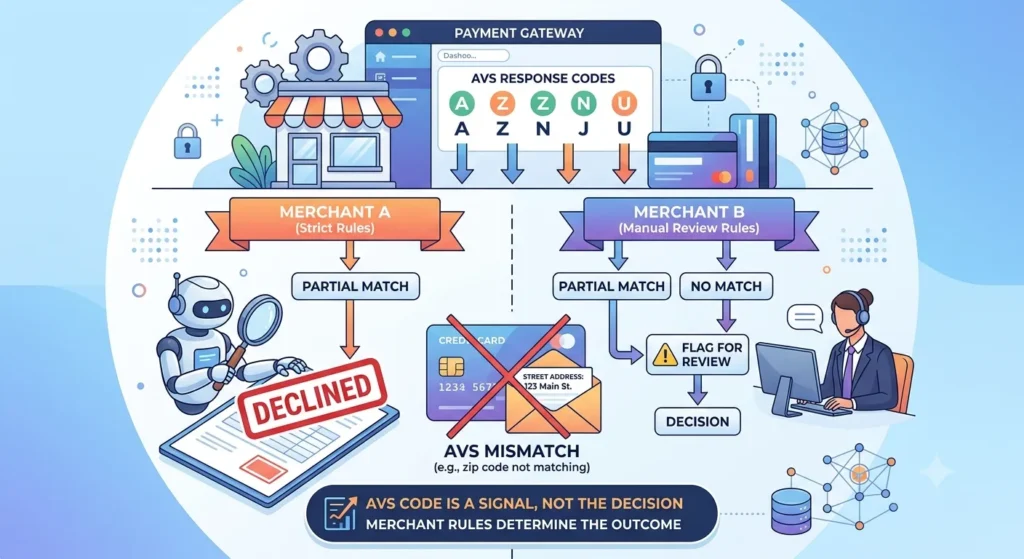
Some merchants set their systems to auto-decline any transaction with even a partial address mismatch. Others only decline a full “no match,” and treat a partial match as something to flag for manual review instead. The AVS code itself doesn’t decide anything — the merchant’s rules do.
2. Can a payment succeed despite an AVS mismatch?
Yes, and this happens more often than people expect. WooCommerce’s own documentation on Stripe payments notes that a charge can go through successfully even when AVS or CVC checks come back as a mismatch, because the issuing bank’s authorization decision and the AVS result are handled as separate signals. A merchant can choose to accept the charge anyway if other risk indicators look fine.
3. Who actually decides whether to approve or decline?
Four parties are involved, and it’s worth keeping them straight:
- The issuing bank generates the AVS response.
- The card network passes that response along.
- The payment gateway applies the merchant’s configured rules to it.
- The merchant ultimately owns the final call on how strict those rules are.
If you’re a customer, this explains why the same billing info can work fine on one site and fail on another.
Why Does an AVS Mismatch Happen?
Most of the time it’s nothing sinister. Here are the usual suspects.
Incorrect billing address. A typo in the street number is the single most common cause. Easy to do on a phone keyboard.
Wrong ZIP or postal code. Even one digit off will trigger a mismatch, since AVS checks numbers exactly.
Recently changed address. If you moved and updated your address with the postal service or your landlord, that doesn’t automatically update your bank’s records. Card issuers usually need you to contact them directly.
Bank records haven’t been updated. Sometimes you did notify your bank, but their system hasn’t synced the change yet. This can take a billing cycle or two depending on the issuer.
Address formatting differences. “123 Main St Apt 4” versus “123 Main Street #4” can occasionally trip up stricter AVS implementations, though this affects the street-name portion less than you’d think since AVS mostly checks numbers.
Apartment, suite, or unit numbers. Ironically, since most AVS checks ignore unit numbers entirely, entering or omitting them usually isn’t the actual problem — but people often assume it is and waste time troubleshooting the wrong field.
Browser autofill entered an old address. This one catches a lot of people. Autofill can silently pull in a saved address from years ago.
International address formats. AVS was built around the US and, to a lesser degree, Canadian and UK address structures. Many other countries don’t have equivalent postal-code granularity, so AVS often can’t return a meaningful result at all.
Prepaid and gift cards. These frequently aren’t linked to a verified billing address in the issuer’s system, so AVS checks on them are unreliable by design.
Corporate and business cards. Company cards are sometimes registered to a corporate office address rather than the employee’s own address, which trips up AVS if the employee enters their personal details.
Recurring or card-on-file payments. If you update your address with the merchant but not with your bank (or vice versa), a subscription renewal can suddenly start failing AVS even though nothing about the card changed.
How to Fix an AVS Mismatch as a Customer
If your payment just got flagged, work through these in order.
- Check your billing address. Compare it character by character against your card statement, not against what you assume it should be.
- Verify your ZIP or postal code. This is the single field most likely to be wrong.
- Match your bank’s records exactly. If you moved recently, your bank’s file may still show the old address, use that one at checkout, not your new one, until you’ve formally updated it with them.
- Turn off outdated browser autofill. Clear the saved address and type it fresh.
- Retry the payment. A simple retry with corrected info resolves most cases.
- Contact your card issuer. If everything you’re entering is genuinely correct, call the number on the back of your card and ask them to confirm what address is on file.
- Try another payment method. PayPal, a different card, or bank transfer can get you unstuck while you sort out the address issue.
When to contact the merchant: if the payment keeps failing after you’ve confirmed the address is correct, or if you were charged despite the decline message.
When to contact your bank: if you suspect your address on file is outdated, or if you don’t recognize why AVS would be failing at all.
What Happens to Your Money After an AVS Decline?
This is usually the most urgent question, so let’s deal with it directly.
1. Authorization hold vs. completed charge
A card payment isn’t one single event, it’s typically an authorization first, then a separate capture. An AVS-related decline usually happens at the authorization stage, before any money actually moves. What you often see is a temporary hold, not a completed charge.
2. Why a declined payment may show as pending
Banks place a hold to check whether funds are available, and that hold can appear on your account or app before the transaction is fully resolved. Even if the transaction is ultimately declined, the hold can take a little while to clear from your visible balance.
3. How long can the hold take to disappear?
There’s no single universal number here, and any article that gives you one is guessing. Support documentation from Authorize.net-based platforms, such as 4aGoodCause’s help center, mentions holds typically clearing within a few business days on their setup — but the actual timeframe depends on your specific bank and the merchant’s processor, so treat any figure you read as a rough guide, not a guarantee.
4. What to do if the money hasn’t been released
If a hold is still sitting on your account well past what your bank considers normal, call your bank directly. They can see the authorization on their end and tell you the expected release date, which the merchant usually can’t do for you.
AVS Response Codes Explained
Card issuers return a short response code alongside the AVS check. Here’s the catch worth flagging up front: these codes aren’t fully standardized. Meanings can shift slightly depending on the card network and processor, so treat the table below as a general guide rather than gospel.
| Code | Match result | What it generally means | Suggested action |
| Y | Full match | Street number and ZIP both match | Approve |
| X | Full match | Exact match including extended ZIP | Approve |
| A | Partial match | Street number matches, ZIP doesn’t | Review |
| Z | Partial match | ZIP matches, street number doesn’t | Review |
| N | No match | Neither street number nor ZIP matches | Decline or review |
| R | Retry | System couldn’t process the check | Retry the request |
| U | Unavailable | Issuer doesn’t support AVS | Rely on other checks |
| G | International issuer | Non-US card, AVS not supported | Use alternative verification |
If you’re a developer working with a specific processor, check that processor’s own documentation for the exact codes they return. Stripe, for example, publishes its own address-verification explanation with its specific code set — worth a direct read if you’re troubleshooting a Stripe integration.
AVS Mismatch vs. Other Payment Verification Checks
AVS is one piece of a bigger fraud-prevention puzzle, not the whole thing. Businesses should also consider broader Data Privacy and Compliance and data-protection practices when handling customer transactions.
| Security check | Primarily verifies |
| AVS | Billing address (street number + ZIP) |
| CVV/CVC | The 3-4 digit code proving you physically hold the card |
| 3D Secure | Cardholder identity, often via a bank app prompt or SMS code |
| IP/geolocation | Whether the transaction location looks consistent with the cardholder |
AVS and CVV get confused constantly because they often fail together, but they check completely different things. AVS looks at where you supposedly live. CVV checks whether you’re holding the physical card. A stolen card number without the physical card can pass AVS (if the thief has your address) but fail CVV.
AVS Mismatch Doesn’t Always Mean Fraud
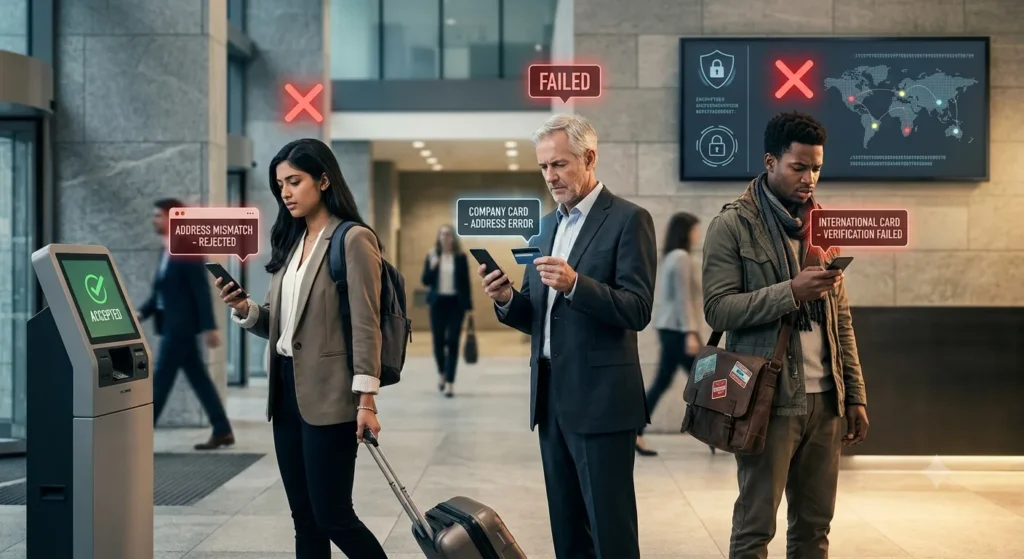
This is worth stating plainly: a failed AVS check is not proof of fraud, and a passed AVS check is not proof of a legitimate transaction.
1. Why legitimate customers fail AVS
Someone who just moved, someone using a company card, someone paying from abroad, none of these people are doing anything wrong, yet all three are likely to trip AVS.
2. Why fraudulent transactions can still pass AVS
If a fraudster has stolen someone’s card details along with their billing address (which happens constantly in data breaches), AVS will return a full match. The check only confirms the address matches records, it says nothing about who’s actually typing it in.
3. Why AVS should be one part of a fraud-prevention strategy
Relying on AVS alone means blocking real customers while letting through fraud committed by anyone with stolen address data. A stronger setup layers AVS with CVV checks, 3D Secure, device fingerprinting, and velocity checks (flagging unusual numbers of attempts in a short window).
Payment security discussions on r/ecommerce and similar communities frequently make this same point from the merchant side, AVS alone is a weak filter, and treating it as a hard gate tends to cost more in lost sales than it saves in blocked fraud.
How Merchants Should Handle AVS Mismatches
If you’re running the checkout rather than clicking through it, here’s the practical framework. For a broader look at improving ecommerce websites, checkout experiences, and search visibility, see our Ecommerce SEO Checklist.
Don’t automatically decline every mismatch. A blanket “decline on any AVS issue” rule is the single biggest cause of false declines, and false declines cost you real revenue from real customers.
Build risk-based rules instead of all-or-nothing ones. Full matches auto-approve. Partial matches go to manual review or get combined with a CVV check before deciding. Full no-matches get declined or heavily scrutinized, especially on high-value orders.
Write customer-friendly decline messages. “Your payment couldn’t be processed, please verify your billing address matches your card statement” is more useful, and generates fewer support tickets, than a generic “transaction declined.”
Offer an alternative payment method at the point of failure. If AVS keeps blocking a genuine customer, letting them switch to PayPal or another method on the spot saves the sale.
How to Reduce False AVS Declines
A few concrete things merchants can do beyond adjusting the AVS threshold itself:
- Validate addresses at the point of entry (before submitting for authorization), using an address-autocomplete service, so typos get caught before they ever reach the payment processor.
- Keep billing and shipping address fields clearly separate in your checkout form, conflating them is a common source of mismatches.
- Build a separate, more lenient rule set for international customers, since AVS coverage outside the US is inconsistent at best.
- Treat prepaid and gift cards differently in your fraud rules, since AVS on these is inherently unreliable.
- Use network tokenization for recurring billing so a customer’s expired or reissued card doesn’t silently break both the charge and the AVS check at once.
- Combine AVS with CVV and 3D Secure rather than leaning on AVS by itself.
- Track your approval rate against your false-decline rate over time, if declines are climbing without a corresponding drop in chargebacks, your AVS rules are probably too strict.
AVS Problems With International Payments
AVS was designed around the US postal system, and it shows.
Canada has a workable but different postal-code format, so match rates there are decent but not identical to the US. The UK’s alphanumeric postcodes work reasonably well with most implementations.
Beyond those three countries, though, AVS support drops off fast, many national card networks and issuing banks simply don’t return a usable AVS response, which is where you’ll see code U (unavailable) or G (international issuer, unsupported) show up.
For merchants selling internationally, this means leaning more heavily on CVV and 3D Secure for non-US, non-Canada, non-UK customers, since AVS isn’t giving you much signal to work with there anyway.
AVS Mismatch by Payment Scenario
The same underlying check plays out differently depending on what you’re buying.
Ecommerce purchases are the classic case, AVS runs once, at checkout, against a billing address the shopper enters fresh.
Subscriptions and recurring billing are trickier, since the address check that passed on day one can start failing months later if the cardholder moves or the card gets reissued, without the subscriber realizing why their renewal suddenly bounced.
Travel and hospitality bookings often involve cards from a different country than where the purchase is being made, which is exactly the scenario where AVS is weakest.
Restaurants and delivery apps sometimes see mismatches simply because the customer is ordering to a work address or a friend’s place rather than their own billing address, a shipping-address mismatch, not a real problem.
B2B and corporate cards frequently fail AVS because the card is registered to a company office rather than the individual making the purchase.
Donations and nonprofit payments tend to be one-off, often from first-time donors on unfamiliar devices, which is part of why organizations like 4aGoodCause see enough AVS-related holds to publish dedicated help documentation on the topic.
What Does “Gateway Rejected: AVS” Mean?
If you’re a merchant and you see this specific message in your payment logs, it means the bank’s AVS response came back fine (or the issuer didn’t even flag it), but your own gateway’s configured filter rejected the transaction anyway based on rules you or your platform set.
This is a configuration issue on your end, not a bank-level decline. Check your gateway’s AVS filter settings (most platforms, including Authorize.net and Stripe, let you adjust exactly which AVS codes trigger a rejection) and loosen them if you’re seeing this too often on transactions that otherwise look legitimate.
Can You Disable or Bypass AVS?
Can customers bypass AVS? No, this isn’t something a shopper controls. If your payment fails AVS, your only real options are the fixes covered earlier in this guide.
Can merchants ignore an AVS mismatch? Yes, technically. Most gateways let merchants turn AVS checking off entirely or set it to advisory-only, where a mismatch is logged but never blocks the sale.
Why disabling strict AVS rules can increase risk. Turning AVS off completely removes one layer of fraud screening, which can increase chargeback exposure, especially for merchants in card-not-present categories that carry higher fraud rates by default.
Better alternatives to completely disabling AVS. Loosen the rules instead of removing them, auto-approve partial matches paired with a passing CVV check, for instance, rather than switching AVS off altogether.
AVS Mismatch Troubleshooting Checklist
Customer checklist
- Billing address matches bank records exactly
- ZIP or postal code is correct
- No outdated autofill data
- Recent address changes have been reported to the bank
- Payment has been retried after corrections
- Card issuer has been contacted if the address is confirmed correct
- Alternative payment method tried if needed
Merchant checklist
- AVS response code reviewed for the failed transaction
- Gateway-level AVS filter settings checked
- Processor-level AVS configuration checked
- Additional fraud signals (CVV, 3DS, velocity) reviewed alongside AVS
- International customer status considered before declining
- False-decline rate monitored over time
- Rule changes tested before rolling out broadly
- Approval rate tracked after any rule adjustment
Frequently Asked Questions About AVS Mismatch
What does AVS mismatch mean?
It means the billing address entered at checkout doesn’t match the address the card issuer has on file, based on the street number and ZIP/postal code.
How do I fix an AVS mismatch?
Double-check your billing address and ZIP code against your card statement, clear outdated autofill data, and retry the payment. If it still fails, contact your card issuer to confirm what address they have on record.
Why does AVS fail when my address is correct?
Usually because your bank’s records haven’t been updated yet, even if you’ve moved and updated your address elsewhere. Use the address your bank has on file, not your new one, until the bank confirms the update.
Does an AVS mismatch mean fraud?
No. It’s one risk signal among several, and plenty of legitimate transactions fail AVS for mundane reasons like a recent move or an international card.
Does an AVS mismatch mean my card was declined?
Not always. Some merchants decline on any mismatch, others only flag partial matches for review and still approve the charge.
Will an AVS decline charge my card?
Usually not a completed charge, more often a temporary authorization hold that clears on its own within a few business days, though the exact timing depends on your bank.
Conclusion
An AVS mismatch means the billing information you submitted doesn’t match the information your card issuer has on file, nothing more, nothing less. It doesn’t automatically mean fraud, and it doesn’t necessarily mean your payment can’t go through.
Sometimes the mismatch is caused by something as simple as an outdated address, a missing apartment number, or entering a ZIP code that differs from the one linked to your card.
If you’re a customer, double-check your billing address and ZIP code against your bank or card statement before assuming something is seriously wrong.
If the information is correct and the payment still fails, contacting your card issuer or trying another payment method may help.
If you’re a merchant, treat an AVS mismatch as one risk signal among several rather than an automatic yes-or-no decision. A mismatch can be worth investigating, especially when combined with other warning signs, but blocking every transaction with an AVS mismatch can also reject legitimate customers.
The goal is to balance fraud prevention with a smooth checkout experience, so your AVS rules should fit your overall risk strategy rather than acting as the only line of defense.
