Author: Shabir Ahmad

  • DeepAI for Business: Unlocking Smarter Workflows with AI

    DeepAI for Business: Unlocking Smarter Workflows with AI

    Every business wants faster output with fewer resources. But not every team has time—or budget—for complex AI setups. DeepAI changes that. It gives access to powerful AI tools like image generation and natural language processing through simple APIs, helping teams automate repetitive tasks, enhance content creation, and speed up delivery.

    Understanding How AI Fits into Your Business Operations

    Artificial Intelligence (AI) is no longer just a futuristic concept—it’s a practical tool that businesses are leveraging to make their operations more efficient and impactful. But you might be wondering, “How exactly can AI fit into my business operations?”. Great question! The key is understanding what AI can do for you and where it can make the most difference.

    At its core, AI is about processing large amounts of data to recognize patterns and make predictions faster and more accurately than a human ever could, especially when paired with chatbot automation, enabling smarter, always-on customer service.. But what makes it truly game-changing for businesses is how it can be tailored to suit your specific needs, no matter the industry. Let’s break it down a bit more:

    The Custom Fit of AI

    Every business has a unique structure and workflow, right? This is where AI really shines. Rather than being a “one-size-fits-all” solution, modern AI platforms like DeepAI can adapt to different industries. With the right AI development services, businesses can customize solutions to fit their unique needs.

    For a retail business, AI might optimize your inventory management by predicting demand trends. For a manufacturer, AI in supply chain can help businesses forecast logistics needs, reduce delays, and maintain smoother end-to-end operations. For a SaaS company, AI could enhance customer service through chatbots or improve visual marketing with image generation tools that create engaging visuals automatically. The secret is identifying where your current processes could use a boost and applying AI specifically in those areas.

    Key Areas Where AI Makes an Impact

    So, which parts of your business are prime candidates for AI integration? Here are some go-to examples:

    • Data Analysis: AI can process enormous datasets at lightning speed and deliver actionable insights. This is a lifesaver for companies dealing with customer behavior, sales trends, or marketing campaign performance.
    • Decision-Making: AI tools can provide predictive insights by using historical data, helping you make smarter choices—like forecasting market fluctuations or detecting risks before they become problems.
    • Customer Engagement: From AI-powered recommendation engines to conversational AI chatbots, engaging with your customers has never been more efficient and personalized. Many companies choose to hire AI developers to build personalized recommendation engines, smarter chatbots, or automated decision-making systems tailored to their goals.

    Understanding the AI Workflow

    It’s also important to think of AI not as a distant “machine overlord” but as a collaborative tool in your team’s arsenal. It doesn’t replace humans—instead, it works alongside them to enhance productivity and free up time for more strategic, creative, or complex tasks. Think of it like having a superpowered assistant that handles the heavy lifting, so your team can zero in on what they do best.

    DeepAI for Business

    Breaking Down Workflow Automation with DeepAI

    Everyone has heard the buzz about workflow automation, but what exactly does it mean when we add – or more accurately, supercharge it – with AI? Workflow automation with DeepAI is all about using advanced technologies to streamline, simplify, and enhance repetitive or complex tasks in your business processes.

    Put simply, it’s like having a tireless assistant working behind the scenes so you and your team can focus on high-impact activities. During this phase, many organizations also rely on process intelligence software such as KYP to uncover how work truly flows across teams and identify where inefficiencies may be slowing down results.

    What Does Workflow Automation Actually Do?

    Think of workflow automation as a tool that helps businesses save time and reduce human error by automating repetitive tasks.

    However, with DeepAI, this isn’t just about following pre-set sequences or rules. It’s smarter than that! DeepAI uses machine learning and predictive analytics to enhance workflows by learning, adapting, and even proactively suggesting solutions in ways traditional automation simply can’t match.

    Whether it’s sorting customer service emails, auto-generating reports, or improving your supply chain logistics, DeepAI helps elevate every aspect of the way your business operates.

    How Can DeepAI Supercharge Your Current Processes?

    You might already have workflows in place – after all, productivity is the backbone of every successful business. But take a moment to imagine this: a system that gets smarter with each task, saving even more time as it learns your processes and identifies bottlenecks. Here’s how DeepAI makes this possible:

    • Real-Time Data Analysis: DeepAI can instantly analyze massive amounts of data flowing into your system to make faster, data-driven decisions. This is perfect for businesses with heavy customer insights needs or finance-related operations.
    • Predictive Actions: Instead of waiting for a problem to arise, DeepAI analyzes trends to help you identify potential issues before they even happen. Think customer complaints flagged before they escalate or supply-chain disruptions anticipated weeks in advance.
    • Smart Task Allocation: With DeepAI, tasks can be intelligently assigned to the right person or even automated completely based on historical performance or availability. No more guesswork or unnecessary meetings to figure out who should do what!

    Benefits for Your Team

    Here’s where the magic happens—workflow automation with AI isn’t just about cutting costs (although that’s undeniably a bonus). It’s about transforming how your team operates. By automating repetitive tasks like data entry or document creation, your people can focus more on creative problem-solving, strategic planning, and initiatives that drive growth.

    DeepAI in Action

    Let’s say your business relies on customer inquiries and support tickets. Using workflow automation powered by DeepAI, incoming tickets can be categorized automatically—urgent matters prioritized, and common queries responded to with AI-driven chatbots that work 24/7. Meanwhile, your team handles high-value, customer-centric issues that require human empathy.

    Or imagine your marketing team: equipped with DeepAI, they can analyze campaign performance in real-time, forecasting success metrics and making adjustments on-the-fly. DeepAI provides the tools to act faster, smarter, and with precision.

    Addressing Common Myths About AI in the Workplace

    When it comes to Artificial Intelligence (AI) in the workplace, you’ve probably heard it all: “AI is going to replace everyone’s job,” “Only big tech companies can afford AI,” or “AI is too ‘sci-fi’ for my industry.”

    While these myths may have gained traction, they can create unnecessary fear or hesitation about adopting AI into your business operations. Let’s tackle these misconceptions head-on and uncover the truth so you can make informed decisions about AI adoption.

    Myth 1: AI Will Replace Human Jobs

    One of the most common fears surrounding AI is that it’s here to make human jobs obsolete. The truth? AI is meant to enhance human efforts, not eliminate them. Think of AI as your reliable teammate that handles repetitive and time-consuming tasks so that your human staff can focus on activities that require creativity, critical thinking, and emotional intelligence.

    For example, AI-powered tools like chatbots might handle frequently asked customer support queries, but complex or high-stakes inquiries still rely on skilled human agents. Similarly, AI can help analyze data faster than ever, but the final strategic decisions still depend on human expertise. Far from replacing jobs, AI often creates opportunities for new roles centered around creativity, decision-making, and AI optimization.

    Myth 2: AI Is Only for Large Companies

    It’s easy to think that AI is only accessible to large corporations with deep pockets and in-house tech teams. In reality, AI development solutions are increasingly affordable and scalable for businesses of all sizes. Whether you’re running a small business or a mid-sized operation, AI can be customized to fit your unique needs and budget.

    • AI-based tools for email marketing, such as generating personalized campaign content, are affordable and easy to integrate.
    • Project management software with AI features, like task prioritization or deadline forecasting, allows even small teams to benefit from smoother workflows.
    • Freelance platforms and SaaS companies often provide AI-powered tools without requiring advanced technical expertise to use.

    The democratization of AI means that with the right partner or platform, you don’t need a Silicon Valley budget to take advantage of smarter workflows and automations. Whether you’re partnering with an ai development company in brazil or other regions, this accessibility is now reality.

    Myth 3: AI Is Too Complicated to Implement

    Many businesses think that integrating AI requires a full overhaul of systems and significant technical expertise, but that’s far from true. In most cases, AI platforms are designed to integrate seamlessly into existing tools, with intuitive dashboards and user-friendly interfaces.

    Practical Examples of AI Enhancing Day-to-Day Tasks

    Artificial intelligence (AI) isn’t just a futuristic concept reserved for tech giants or research labs anymore. It’s here, now, transforming how businesses of all sizes operate—especially when it comes to everyday tasks. Let’s dive into some practical, real-world ways AI can step in and simplify those repetitive, time-consuming workflows, so your team has more time to focus on what truly matters.

    1. AI in Customer Service: Chatbots that Never Sleep

    If your team spends hours answering basic customer queries, AI-powered chatbots could be a game-changer. These bots are designed to handle repetitive but essential tasks, like providing order updates, resolving account issues, or even recommending products. For example:

    • 24/7 Availability: Chatbots stay active around the clock, ensuring customers never have to wait for answers, even at 3:00 am.
    • Personalization: Using customer data, AI can tailor responses, making the experience feel personal and engaging.

    Of course, this frees your human teammates to focus on higher-value problems that a machine can’t solve, like building relationships with VIP clients or developing innovative strategies.

    2. AI Streamlining Administrative Tasks

    We’ve all been there—spending way too much time on scheduling meetings, sifting through emails, or organizing files. AI tools like smart calendars, email assistants, and document classification systems can handle much of this grunt work. Some excellent examples include:

    • Scheduling Optimization: Tools like AI-driven calendar assistants analyze everyone’s availability and propose the best times to meet.
    • Email Triage: AI can sort through email inboxes, flagging important messages while filtering out irrelevant clutter.
    • Document Management: AI workflow solutions can automatically categorize, tag, and store files, making them easy to retrieve later.

    Imagine if just 20% of your team’s admin tasks were handled by an AI assistant—how much more productive could your business be with those hours reclaimed?

    3. Smarter Marketing Campaigns with AI

    Marketing isn’t just about creativity—it’s also about data. AI tools can analyze customer behavior, predict trends, and even help craft personalized campaigns. Here are some ways it’s being used:

    • Content Suggestions: AI tools like Jasper or others generate topic ideas or full blog posts tailored to your audience preferences.
    • Ad Optimization: AI-driven platforms test multiple ad versions, automatically identifying and running the ones that perform best.
    • Audience Insights: Tools like Google Analytics and DeepAI can process huge datasets and extract meaningful patterns, helping you target the right audience with pinpoint precision.
    • Video Creation: Marketing teams can create AI videos from scripts or briefs in minutes — no production team or editing skills needed.

    In short, AI isn’t just a helper—it’s a strategic partner that takes your campaigns to the next level.

    4. Inventory and Supply Chain Management

    Retailers and manufacturers know the pain of managing inventory—too little stock, and customers leave disappointed; too much, and resources go to waste. AI solves this balancing act with predictive analytics. For instance:

    • Demand Forecasting: AI tools can predict which products will be in demand based on sales history, seasonal trends, and more.
    • Efficiency Boost: Some systems optimize warehouse layouts or recommend reorder points, reducing inventory headaches.

    This isn’t just for the big players; even small-to-mid-sized businesses stand to gain huge advantages from these insights.

    DeepAI for Business

    5. AI-Driven Employee Assistance

    AI doesn’t just help customers—your team benefits in big ways, too. For example:

    • Training and Onboarding: AI-powered learning platforms provide tailored training programs that adapt to individual employees’ needs.
    • Workload Management: AI tools can prioritize and delegate tasks effectively, ensuring no one is overwhelmed.

    Your team members will feel empowered when they see technology working to make their lives easier—not replacing them, but amplifying their skills.

    Analyzing Cost and Time Savings with Smarter AI Decisions

    Imagine this: your business is running at peak efficiency, and you’re saving time and cutting costs—all thanks to smarter decisions driven by Artificial Intelligence (AI). Sounds exciting, right? Let’s dive into how AI can help analyze costs, streamline workflows, and liberate your team to focus on creative and impactful work. By the end of this, you’ll see why adopting AI might just be one of the smartest decisions your business makes.

    Why Smarter Decisions Are the Key to Success

    Every business owner and manager knows the importance of making informed decisions. But the reality is, humans are prone to errors. That’s where AI steps in as a powerful ally. **AI doesn’t guess—it calculates, predicts, and recommends based on real-time data.** This makes it a game-changer in reducing inefficiencies and highlighting areas where you can save money without compromising on quality.

    Real Benefits of AI in Cost and Time Analysis

    Let’s break it down into tangible benefits. Here’s what AI can do for your business:

    • Optimize Resource Allocation: AI can assess how resources like money, time, and labor are being used and suggest ways to maximize their potential. For instance, if a project budget is inflated, AI tools can recommend cost adjustments based on market trends and historical data.
    • Reduce Errors: Mistakes can be expensive. Whether it’s a misplaced decimal point in financial analysis or a miscalculated delivery schedule, errors cost both time and money. AI minimizes these risks by taking the guesswork out of the equation.
    • Forecast with Confidence: Through predictive analytics, AI can help you prepare for what’s ahead. Whether it’s changes in supply chain demands or customer behavior, having foresight leads to smarter planning and fewer last-minute crisis situations.
    • Automate Time-Consuming Tasks: AI tools excel at handling repetitive and mundane tasks like expense tracking, report generation, and data entry. This means your team is free to take on innovative, high-impact work instead.

    Is AI Really Cost-Effective?

    One of the biggest hang-ups businesses have is whether investing in AI is worth it initially. Here’s the truth: AI is an investment that pays off over time—and often much faster than you’d think. For example:

    1. Reduced Hiring Costs: Task automation means fewer human resources are needed for certain operational roles.
    2. Energy Efficiency: AI-powered systems often help businesses track and conserve energy use.
    3. Fewer Errors = Fewer Redos: Minimizing mistakes means cutting down on the extra time and money spent on revisions, refunds, or damage control.

    How Do You Measure the Impact?

    The beauty of AI is that it equips you with data to measure its own success. Tools often provide real-time dashboards or reports on cost savings, time reductions, and workforce efficiency. By tracking these metrics, you can identify areas where AI is excelling and areas where adjustments could make it even more effective.

    Choosing the Right AI Features for Optimal Results

    Artificial intelligence (AI) is revolutionizing the way businesses operate, but with so many features and tools available, how do you choose the right ones for your needs? Don’t worry—we’ve got you covered! Let’s break it down so you can make informed, strategic decisions that yield optimal results for your business.

    1. Start with Your Goals – Why Do You Need AI?

    Before diving into AI platforms, take a step back and ask yourself, “What specific problems am I trying to solve?” AI isn’t a one-size-fits-all solution. Are you aiming to improve customer service, streamline internal processes, or optimize inventory management? Determining your business goals allows you to focus on the features and functionalities that will have the most impact on your operations.

    For example, if customer engagement is your top priority, look for AI with robust natural language processing (NLP) capabilities, such as chatbots or sentiment analysis tools. If it’s about forecasting or decision-making, predictive analytics is where you should focus your efforts.

    2. Evaluate the Scalability of the Features

    An important consideration when selecting AI features is scalability. Think about how your business might grow in the future and whether the AI tool can adapt to your evolving needs. A feature that works for a small team today should also support a larger team or handle more complex operations tomorrow. Cloud-based tools, for instance, often offer the flexibility to scale up or down as required.

    Ask vendors or service providers about how their AI solutions handle scaling. Can additional features or functions be added on demand? Does performance remain consistent as data volumes expand? These are key questions to keep in mind.

    3. Leverage User-Friendly Interfaces

    Advanced AI doesn’t mean it has to be overcomplicated. One of the easiest ways to expedite the adoption of AI tools is by choosing solutions that have a user-friendly interface. Your team is more likely to embrace the technology if they can navigate it easily without needing to be data scientists or coders.

    Seek out platforms that emphasize simplicity and offer training or tutorials to help your team get started. Some AI tools even come with drag-and-drop functionality or pre-built templates to make customization painless. Remember, the goal is to empower your team, not overwhelm them.

    4. Beware of Overloading on Features

    When choosing AI tools, it’s easy to get dazzled by platforms loaded with every bell and whistle. While comprehensive systems can be impressive, you don’t want to pay for features you’ll never use. Excessive complexity can also slow down your workflow rather than enhancing it.

    To stay on track, prioritize the features that align with your immediate goals. You can always expand capabilities later as your team gains confidence in using AI and your business needs shift.

    5. Investigate Vendor Support and Integration

    One aspect that’s often overlooked is the level of support provided by the AI vendor. Transitioning to AI-powered systems is a journey, and having reliable support in place makes all the difference. Choose vendors that offer excellent customer service, ongoing technical assistance, and clear documentation.

    Additionally, consider integration with your current tools. The AI solution should complement your existing platforms, not require a complete overhaul. Seamless integration ensures data flows smoothly and eliminates redundancies in your systems.

    6. Test Before You Commit

    Finally, always take advantage of demos or free trials to evaluate if the AI features meet your expectations. A hands-on experience provides clarity on usability, performance, and compatibility with your business, allowing you to make a confident decision.

    Preparing Your Team for an AI-Optimized Workflow

    So, you’ve decided to integrate AI into your business operations—great choice! But before diving into the deep end, let’s talk team preparation. After all, change isn’t just about implementing new tools; it’s about bringing people on the journey with you. In this section, we’ll explore how to properly get your team ready to embrace and thrive in an AI-enhanced workflow.

    1. Begin with Open Communication

    The word “AI” can sound intimidating to many. For some, it might conjure images of futuristic robots or even fears about job displacement. Start by having an open dialogue with your team. Explain what AI means for your company and clarify that it’s not about replacing people but empowering them to work smarter.

    Use accessible language—skip the complex tech jargon—and focus on how AI solves specific challenges. For example, will it automate repetitive tasks so your team can concentrate on more meaningful work? Highlight the benefits they’ll personally experience and how their roles may evolve in exciting ways. When people see what’s in it for them, they’ll be much more receptive to change.

    2. Address Concerns and Build Trust

    Change, even positive change, often comes with fear or resistance. That’s normal! Create a safe environment where your team feels comfortable expressing concerns or asking questions. Some team members may be worried about AI monitoring their productivity, while others may feel unsure about learning new tools.

    Proactively bring up these topics. Offer reassurance that AI is a supportive partner, not a snooping overseer. Provide examples of how it can make their day-to-day lives easier. If you can, pair this step with stories of other companies where AI has boosted morale and results!

    3. Offer Training Opportunities

    Nobody loves being thrown into new systems without support, right? The good news is that training your team on AI tools doesn’t have to be overwhelming. In fact, consider offering bite-sized workshops or on-demand tutorials catered to different roles in your organization.

    • Provide hands-on learning sessions where team members can experiment with the AI tools without fear of making mistakes.
    • Use examples and case studies relevant to your industry, so employees see how these tools apply to their work.
    • Promote a culture of ongoing learning—AI is evolving, and your team can grow with it!

    Most importantly, emphasize that no prior technical knowledge is required. AI platforms like DeepAI are designed to be user-friendly for everyone, not just tech wizards.

    4. Create AI Champions

    There’s a good chance that at least a few team members will be especially enthusiastic about embracing AI. Leverage their energy by turning them into your AI champions. Task them with becoming the go-to resources for others who may need a little extra help navigating the new workflow.

    This not only helps the rest of the team feel supported, but it fosters a sense of teamwork and collaboration. Plus, when employees see their peers thrive with the AI tools, they’re more likely to follow suit.

    5. Monitor Progress and Celebrate Wins

    As your team begins to engage with their AI-enhanced workflow, make it a habit to check in. Ask for feedback—what’s working, and what could be improved? Listening to their experience shows you value their input and are committed to improvement.

    Finally, don’t forget to celebrate the wins, small or big. Whether it’s saving time on a weekly task or completing a major project faster than before, acknowledge those victories. This boosts morale and solidifies the idea that AI isn’t just another tool—it’s a positive force for change.
  • 8 Highly Rated Voice of Customer Software  – Pros and Cons

    8 Highly Rated Voice of Customer Software  – Pros and Cons

    You are gathering feedback, but it is all over the place. Surveys and support tickets in one place, and some messages floating around in DMs. And yet, somehow, you keep missing what the customers feel.

    This is exactly where the voice of customer (VoC) software can help. It helps you gather, collect, and work on those actual customer perceptions. However, there are probably dozens of tools all vying to do the same job, so your hardest challenge is not even finding a tool, but choosing the right one.

    This guide breaks down eight top-rated VoC tools, clearly outlining their pros and real limitations, as well as the best fit for each. It refines your choices so you won’t spend on features you’ll never use or insights you can’t act upon. Let’s dive in.

    Highly Rated Voice of Customer Software to Try in 2025 

    No tools are the same. Everyone is good on their own, but it all depends on your business needs. Here, we have handpicked the top-rated voice of customer software and tools that are worth checking out in 2025: 

    1. Crescendo.ai

    Crescendo.ai has a robust AI-powered Voice of Customer (VoC) platform for customer support tickets received via chat, e-mails, SMS, and voice. Its unique power is its capacity to analyse all the conversations and calculate CSAT, and perform sentiment analysis in real-time using AI without the need for manual surveys. 

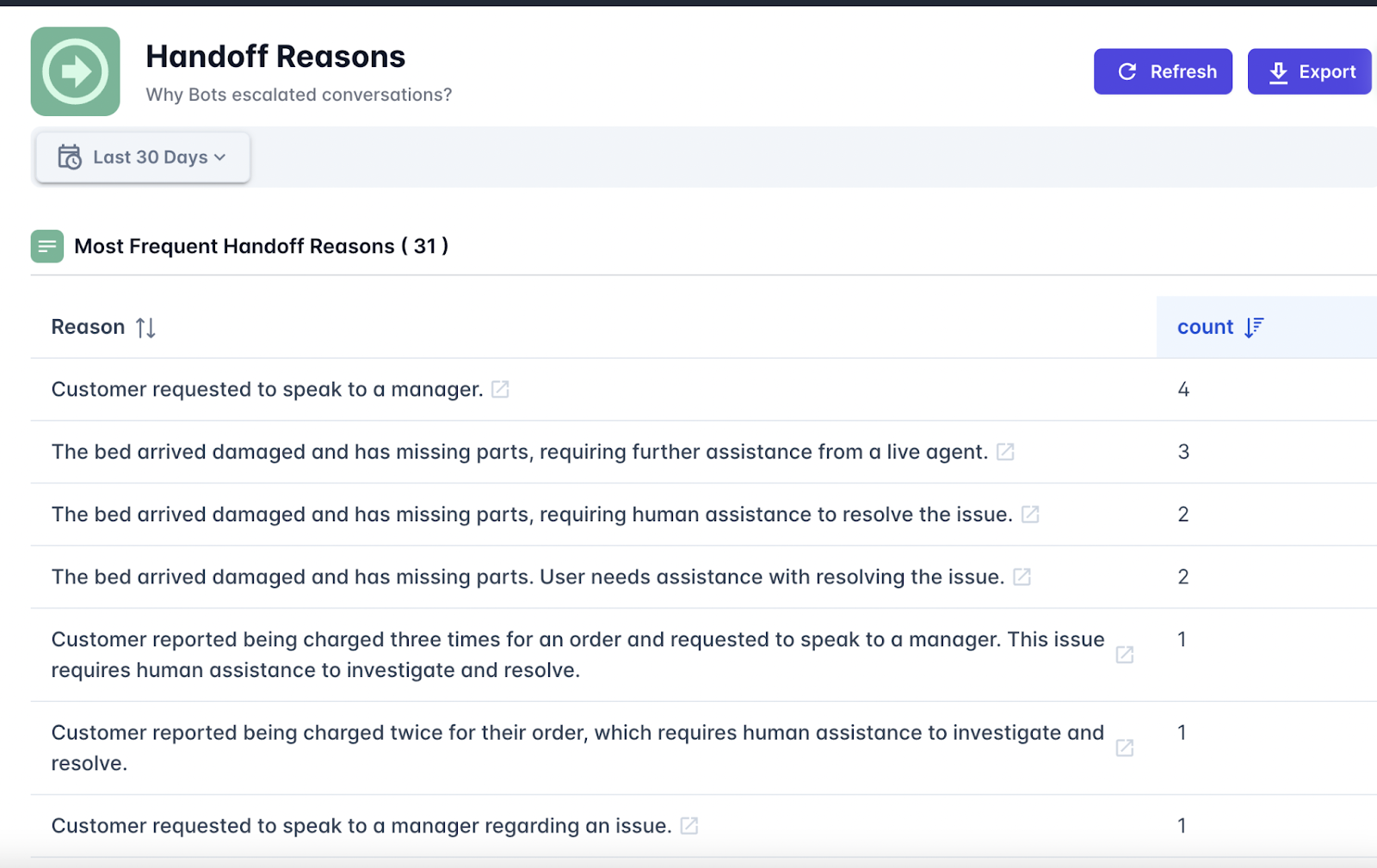
    So, say goodbye to scattered feedback and unreliable surveys with Cresendo.ai. It is an entirely automated and AI-powered Voice of the Customer platform that provides you with deep and instant insights. Whether sorting queries or drilling down into the reasons behind handoffs, it does all the work of converting raw conversations into actionable information, hands down for you, all without ever asking for a bit of physical effort. 

    On the other hand, it is a full-fledged CX support platform in itself, offering helpdesk software, AI-powered support agents, and outsourcing service with real human agents.

    Image source: Crescendo.ai

    Pros 

    • Auto-calculates CSAT and sentiment for 100% of conversations without surveys.
    • Categorizes issues like billing, refunds, or tech errors for actionable insights.
    • Flags reasons for human handoffs to improve workflows and agent training.
    • Detects critical issues like fraud, duplicate accounts, or failed transactions.
    • CX leaders get an opportunity to measure the surges in specific customer issues across categories.
    • Offers multilingual support with seamless integration of translation across 50+ languages.
    • It combines AI and human-backed outsourcing services to provide high empathy and context-aware accuracy.
    • Starts from $2.99, which is a cost-efficient pricing without sacrificing quality.
    • Achieves up to 90% instant resolution rate with 99.8% accuracy, which is the highest in the industry.

    Cons 

    • No social listening and employee review capacity. Its VoC is made just for customer support queries.
    • Though the dashboard is easy to navigate, it might be overwhelming if you are unfamiliar with AI-driven analytics.
    1. Zonka Feedback

    Zonka Feedback is an AI Voice of Customer platform that converts multi-channel unstructured customer feedback into crystal-clear and actionable intelligence. It ingests data from surveys, chats, reviews, tickets, and other sources. It organizes all the information into a single dashboard. Thematic analysis, sentiment scoring, impact mapping, and role-based dashboards are some of the features that help teams go very deep in identifying root causes, align on actions, and close the feedback loop with practically zero manual work. Zonka brings clarity across locations, teams, and touchpoints.

    Pros

    • Auto-tags feedback by location, team, service type, or issue owner so that they can be routed faster.
    • Role-based dashboards show only the most important insights to stakeholders.
    • AI-driven insights highlight performance drivers linked to NPS, CSAT, CES, and churn.
    • Smart workflows automatically assign tasks, escalate issues, and trigger follow-ups.
    • Built-in case management tracks progress on resolution and accountability.

    Cons 

    • Delays in syncing large datasets from third-party platforms.
    • Some of the advanced AI capabilities are locked behind a premium tier, which may be prohibitive for smaller teams.
    1. Medallia

    Being one of the leading Voice of Customer and experience management platforms, Medallia captures feedback signals from a multitude of channels — surveys, social media, contact centers, and web — and turns those inputs into real-time, AI-driven insights. Its built-in AI engine, Athena, allows businesses to deliver experiences akin to personalization at scale, automate workflows, and predict behaviors. Medallia allows front-line and internal teams to close the loop faster, drive retention improvements, and tie feedback into real revenue or cost-savings outcomes across journeys and touchpoints.

    Pros

    • Offers real-time AI-driven coaching to front-line teams based on conversation analysis.
    • Strong role-based reporting ties every stakeholder to actionable CX steps.
    • Gives organizations the power to orchestrate hyper-personalized customer journeys using behavior data.
    • Includes industry-specific modules strong in execution and insight (e.g., healthcare, retail, telecom).
    • ROI-proven with an application to directly link CX improvements to revenue and cost savings. 

    Cons 

    • A long and winding initial setup and onboarding process for large organizations.
    • Some dashboard customizations can only be completed by the vendor rather than being completed through self-service.
    1. Qualtrics

    Qualtrics is an Experience Management (XM) or Voice of Customer (VoC) platform used to collect and analyze feedback from customers, employees, and markets and act thereupon. Format-wise, Qualtrics holds tools for CX, EX, and market research to knit together signals across channels to optimize every single touchpoint. Its AI engine can identify sentiments, pinpoint issues, and empower teams to realize context-specific actions, thus making experiences personal, measurable, and scalable throughout your organization.

    Pros

    • Industry-specific CX, EX, and research modules in one platform.
    • Insight generation uses AI-based and role-specific criteria for managers, agents, and product teams.
    • Integrates voice, text, survey, and behavioral data for 360-degree visibility of feedback.
    • Has excellent dashboarding and reporting capabilities powered by advanced, customizable analytics.
    • Trusted by over 20,000 enterprises across the globe and proven in domains such as retail, airlines, and finance.

    Cons 

    • Learning curve for non-technical users, especially when dealing with complex logic.
    • It feels laggy sometimes to load all the info within dashboards or to navigate among them, and its performance drops when handling big data from multi-country setups.
    1. SentiSum

    SentiSum is a real-time Voice of Customer platform designed for fast-paced teams requiring instant, lucid insights from customer feedback. Employing advanced AI, it scrutinizes every ticket, chat, review, and survey to identify burgeoning concerns, classifies them automatically, and sets up alerts for brands to act before problems escalate. It brings data together from across channels with minimal setup and high adoption due to its intuitive design. SentiSum allows businesses to repair problems today and build customer loyalty for tomorrow, without complicated setups.

    Pros

    • Real-time scanning of support tickets, chats, and reviews
    • Automated alerting to identify unexpected issues (product, service, delivery)
    • Consolidates feedback from every touchpoint into one transparent dashboard
    • Setup is done in anywhere 2 weeks, with adoption from more than 90% of teams
    • Minimal training needed because it’s all very intuitive

    Cons

    • Heavy focus on support channels, limited CX journey tools
    • A limited number of integrations outside of support platforms such as Zendesk or Intercom
    1. UserTesting

    UserTesting is an enterprise-grade, top-rated VoC software enabling organizations to rapidly test digital experiences, marketing campaigns, or product ideas and tune them according to real customer feedback. In the broader landscape of enterprise testing, having access to the most robust global participant network and an AI-powered analytical suite means teams can validate and de-risk decisions and launches, working alongside their users in real time. From product to marketing, and to CX, UserTesting helps make faster and wiser decisions, which improves customer satisfaction, enhances revenue, and builds brand loyalty, all without traditional research that takes months. 

    Pros

    • Feedback from actual customers and target users in real-time
    • Good for validating messages, product designs, and digital flows
    • Increases speed of decision-making by up to 5x
    • 6x ROIs have been recorded according to some customers’ (Microsoft, Walmart) studies
    • Used by multiple teams such as marketing, UX, CX, and production.

    Cons

    • Deep UX-level research capabilities are mostly utilized by enterprises
    • Live testing formats can add friction to high-speed development cycles
    1. AskNicely

    AskNicely is a customer loyalty platform optimized for NPS-powered frontline engagement. It, powered by conversational AI, surveys people over email, SMS, and web, then turns the responses into actionable insights with suggestions for next steps and leaderboards. Real-time feedback is featured, from which frontline teams can set priorities. Designed to fit in the regular flow of work, it connects with Salesforce, Slack, or Microsoft Teams. AskNicely assists customer-facing teams in prioritizing problems, retention, and improving online reviews—all with little effort and great involvement.

    Pros

    • The conversational style of the survey helps in getting more responses.
    • Real-time dashboards and leaderboards keep teams motivated. 
    • Suggested follow-up actions help reps to close the feedback loop.
    • Good CRM and collaboration tools integrations – e.g., Salesforce, Slack.
    • AI-driven insights automatically highlight key themes.

    Cons 

    • Integration issues: Users have reported glitches, or at times, they have had to use workarounds. 
    • Analytics: Reporting does not support strong trend analysis or dashboard customization.
    1. SurveySparrow 

    SurveySparrow is an omnichannel Voice of Customer platform that provides businesses with multiple ways to collect feedback through conversational surveys, WhatsApp, emails, social media, and website spot checks. It has AI-powered smart analytics (CogniVue) that interprets sentiment, key themes, and brand reputation, whereas ticketing, reviews, and reputation management tools close the feedback loop. Its elegant designs and conversational formats promise strong engagement and response rates.

    Pros

    • Integrated ticketing and reputation management tools close the feedback loop.
    • Over 2,000 integrations make the platform flexible to embed into your existing tech stack.
    • Strong white-labeling features to ensure brand consistency.
    • The Wings AI assistant helps managers with survey creation and review responses.
    • Supports multilingual surveys and sentiment tagging in real time.

    Cons 

    • Somewhat limited customization options (especially in lower-tier and free plans) 
    • The learning curve can be a little steep for beginners in conversational and AI-powered survey logic.

    Wrapping Up on VoC Software

    All these great VoC platforms provide an opportunity for brands to tap customer sentiment, close feedback loops, and really effect change. They make listening, learning, and responding easy for businesses, from real-time alerts to insights generated by AI. Choose the platform that not only hears your customers but also truly understands them.

  • How Cloud-Based Solutions Can Make Healthcare Data More Accessible

    How Cloud-Based Solutions Can Make Healthcare Data More Accessible

    cloud based solutions

    Today’s healthcare environment demands access to timely, accurate data, as it can make the difference between good and poor outcomes. Hospitals, clinics, and private practices all rely on information to manage diagnoses, treatment plans, and medications. Yet too often, this data is fragmented, outdated, or simply unavailable when it’s needed most.

    Cloud-based solutions are quietly changing that. A $752.44 billion global industry, cloud computing and solutions can help make healthcare data more readily accessible to the public and healthcare providers.

    Here’s how. 

    Bridging the Information Gap Between Patients and Providers

    For decades, many patients had to request physical copies of their records from various clinics and departments. These files could take days or weeks to transfer, often arriving too late to inform crucial treatment decisions. Cloud systems eliminate those delays.

    The global healthcare cloud computing market alone is a $19.6 billion industry. A cloud-based platform can give patients access to their health history in seconds.

    Whether it’s routine lab results, detailed diagnostics such as an NGS report from genetic testing, vaccination status, or current prescriptions, all patient information is available instantly through the cloud. For any healthcare software development company, integrating advanced data management solutions has become essential to support this. Modern LIMS software platforms play a critical role here by organizing, tracking, and securely sharing laboratory data in real time, ensuring that clinicians can access accurate test results without delays.

    This means a clinician can review a patient’s genomic data alongside other health records in real time, enabling more precise, personalized treatment decisions without waiting days for physical reports.

    It also means fewer errors. When information is centralized, different doctors no longer work in isolation. Allergies, pre-existing conditions, and past treatments are visible to every healthcare provider involved in a patient’s care. This reduces the risk of misdiagnoses and helps avoid harmful drug interactions.

    Medications

    Transparency on Medications is Now Possible

    Too often, patients start a new drug without understanding its full list of side effects. They rely on brief conversations during appointments or hard-to-read labels that don’t tell the whole story.

    With cloud access, healthcare providers can attach detailed medication profiles to each patient record. This includes known side effects, risk categories, studies, and patient-reported outcomes. By partnering with a reputable healthcare software consultancy, providers can implement and optimize cloud-based solutions that integrate seamlessly with electronic health records, enabling informed decision-making and personalized patient care.

    When a new medication is prescribed, patients can view this information immediately. As providers modernize their digital infrastructure, healthcare software development plays a key role in creating secure, interoperable tools that enhance data accessibility and support clinical workflows. Providers, too, can easily compare options and make more informed decisions. This level of visibility is long overdue, particularly in cases where a lack of transparency has caused harm. One such example is Depo-Provera, an injectable form of birth control.

    According to TorHoerman Law, many users were not fully warned about the serious risks linked to long-term Depo-Provera use. In recent years, Depo-Provera lawsuits have surfaced across the country, with former users seeking compensation for bone density loss and other health problems. People were left to suffer without knowing the full scope of what they were taking. 

    Some have now chosen to join the Depo lawsuit in the hope of receiving justice and compensation. The Depo-Provera lawsuit settlements underscore what happens when manufacturers withhold essential safety data from healthcare providers and patients. Cloud-based tools offer a path forward by storing and sharing these warnings with every prescription, making blind trust a thing of the past.

    Improving Continuity of Care for Chronic Conditions

    For patients with long-term illnesses like asthma, arthritis, or cancer, seeing multiple specialists is normal. But those appointments often happen in different locations and at different times. Without cloud integration, test results can fall through the cracks, and treatment plans may conflict.

    Cloud-based healthcare platforms solve this. A rheumatologist in one city can review imaging ordered by a general practitioner elsewhere. An oncologist can adjust chemotherapy based on a scan taken the week before. Everyone involved is working with the same information at the same time.

    This continuity doesn’t just improve care; it saves time and lowers costs. There’s no need to repeat tests or guess about previous procedures. Patients get answers faster and avoid redundant or harmful interventions. Patient reminder software built into cloud platforms helps maintain this continuity by automatically notifying patients about upcoming appointments, medication refills, and follow-up tests across all their providers, reducing missed visits that can disrupt carefully coordinated treatment plans. For clinics, choosing the right appointment reminder software ensures GDPR compliance alongside automated patient notifications. It also relieves families from the burden of managing stacks of paperwork or repeating medical histories at every visit.

    Accessing Care in Rural and Underserved Areas

    Healthcare in rural America is still in a poor state. For people in such remote or underserved regions, traveling for care is not always feasible. Specialist care may require hours of driving, lost wages, or childcare arrangements. In some cases, patients delay appointments or give up entirely.

    Cloud-based solutions can help bridge this divide. Doctors can review charts, lab work, and progress reports without the patient being physically present. 

    Through telemedicine paired with cloud data, a nurse in a rural clinic can connect with a specialist hundreds of miles away. This gives the patient access to expert care close to home.

    This doesn’t just help in emergencies. It allows for long-term monitoring, medication management, and follow-up care for people who otherwise wouldn’t get it. It brings equity to healthcare in a way that wasn’t possible before the rise of digital recordkeeping.

    Protecting Privacy

    Protecting Privacy While Expanding Access

    Of course, access doesn’t mean a compromise on privacy. Cloud systems are built with secure encryption, authentication layers, and constant monitoring. Patients can control who sees their data, for how long, and for what purpose. A provider must request access, and those logs are recorded.

    This level of transparency builds trust. People know their records aren’t being misused or handed off without consent. At the same time, patients benefit from the collaborative, real-time nature of cloud storage. The balance between privacy and access is finally starting to tip in the patient’s favor.

    However, healthcare data breaches in the US have recently been on the rise. Hence, cloud providers must also take extra precautions in protecting patient data. Cloud-based systems allow healthcare providers to securely store and access patient information from multiple locations. When integrated with on-site technologies such as a healthcare kiosk, these systems can further streamline patient check-ins and real-time data retrieval.

    Frequently Asked Questions (FAQs)

    Why does healthcare data need to be accessible?

    Accessible healthcare data through a modern hospital management system ensures that doctors, nurses, and specialists can provide timely, accurate, and coordinated care. With integrated healthcare software, it helps prevent medical errors, supports personalized treatment, and improves patient outcomes.
    When patient records flow efficiently between providers and digital hospital systems, patients benefit from quicker diagnoses, better continuity of care, and reduced duplication of tests or procedures.
    Such medical data management solutions drive safer, smarter, and more connected digital hospital solutions for improved healthcare delivery. When combined with operational tools such as queue management systems like WaitWell or digital self-check-in hospital solutions from Axel Health, these platforms can further improve patient flow, reduce wait times, and enhance the overall care experience.

    How can healthcare data be exploited?

    Healthcare data can be exploited through breaches, unauthorized sharing, or data mining without consent. This approach has proven to convert to high client satisfaction for Registered Dietitians (RD), who benefit from streamlined documentation, easier follow-ups, and more efficient use of digital tools when delivering nutrition care. Hackers may sell personal medical records on the dark web, and some companies might use data for targeted ads or insurance discrimination. Misuse erodes trust in the system and puts patients’ privacy, safety, and financial well-being at risk.

    Do pharmaceutical companies misuse patient data?

    Pharmaceutical companies have faced criticism for using patient data without full transparency or consent, especially when partnering with tech firms or data brokers. While not always illegal, such practices can raise ethical concerns. Responsible data use requires clear privacy policies, patient consent, and strong regulation to prevent exploitation for profit-driven motives.

    Cloud-based healthcare is reshaping how we share, understand, and act on medical information. Whether it’s providing clarity or bringing care to remote communities, these solutions are helping healthcare systems serve people more completely.

    In a world where too many have suffered because of miscommunication and hidden risks, transparent, accessible data is not just a convenience. It’s a necessity. With the right technology and ethical commitment, we can make healthcare more open, more inclusive, more connected, and far more human.

  • Janitor.ai for Business: Is It Worth the Investment?

    Janitor.ai for Business: Is It Worth the Investment?

    Hiring more staff to answer basic queries or handle repetitive tasks? That’s one way to grow—but not the smartest. Janitor.ai offers an alternative: an AI tool that can manage conversations, automate tasks, and work 24/7 without burnout or training costs.

    But does it actually help your business grow? Or is it just another tool that looks good on paper but adds no real value?

    This article breaks down what Janitor.ai does, how businesses are using it, and whether it’s a smart investment based on results, not just features.

    I. Breaking Down Modern Business Operations

    Let’s tackle the big question right away: what exactly does Janitor.ai bring to the table for businesses? At its core, Janitor.ai is an AI-powered solution designed to streamline operations, improve efficiency, and reduce time spent on repetitive tasks.

    But what does this actually mean in plain business terms? Let’s break it down so you can understand the true value proposition it offers you.

    1. Smart Automation of Mundane Tasks

    We all know those mindless tasks that eat up hours of precious productivity—stuff like sorting emails, managing customer queries, or consolidating data entries. Janitor.ai excels here by automating administrative chores and freeing up your team’s time for more strategic efforts.

    Imagine reducing the need for manual data input or having routine emails composed without a second thought. Time-consuming? Not anymore.

    2. Personalized AI-Powered Insights

    Beyond the basics, Janitor.ai doesn’t just do tasks; it learns from your team’s workflows. This learning capability allows the AI to provide insights tailored specifically to your operation.

    Whether it’s making proactive suggestions for improving response times or identifying patterns that might otherwise go unnoticed, Janitor.ai thrives on creating personalized recommendations for better decision-making.

    3. Improving Scalability Without Overwhelming Resources

    As businesses grow, so do their operational complexities. The beauty of Janitor.ai lies in its ability to scale alongside you, taking on more processes as your needs evolve without requiring a significant increase in resources or hiring additional staff. This can be a game-changer for small to medium-sized enterprises looking to grow sustainably.

    4. Multitasking Beyond Human Capabilities

    Let’s face it: no employee, no matter how efficient, can juggle handling customer service, organizing data, AND optimizing workflows simultaneously.

    Janitor.ai, however, effortlessly performs multiple tasks concurrently. It acts as your behind-the-scenes multitasking superhero, keeping everything running smoothly without burning out (unlike human workers).

    5. Integrating Seamlessly

    You don’t need to completely overhaul your existing operations for Janitor.ai to work. One of its standout features is its ability to easily integrate into your current systems. Whether you’re using CRM tools, email services, or data organization platforms, Janitor.ai plugs in with minimal disruption.

    Why This All Matters

    What does all this boil down to for you as a business leader? Simply put, Janitor.ai offers efficiency improvements with a transformative edge. It handles the tedious, scales with you, provides insights, and integrates seamlessly. But, and this is important, all these benefits only hold their weight if they align specifically with your business’s unique challenges and goals.

    So, before proceeding, it’s crucial to evaluate exactly how these strengths might apply to your needs. Are there inefficiencies in your current operations that automated AI could address? Do you have processes that need to scale, but your current team can’t handle the additional workload? If the answer to these questions is yes, Janitor.ai might just be a perfect fit.

    II. How Janitor.ai Fits into Modern Business Operations

    Emerging technologies like Janitor.ai are transforming how organizations function, helping to minimize inefficiencies and maximize output. But how exactly does Janitor.ai slot into the intricate puzzle of modern business operations? Let’s explore.

    Understanding Its Role in Automation

    At its core, Janitor.ai is designed to tackle repetitive, time-consuming tasks, enabling businesses to save time and resources. Whether it’s processing customer tickets, organizing datasets, or managing backend systems, this AI tool automates tedious workflows. As businesses shift towards leveraging automation, tools like Janitor.ai become less of a luxury and more of a necessity.

    Think about it this way: if key members of your team no longer need to handle monotonous processes, they can focus on creativity, strategy, and high-priority business goals. It’s like giving your team a turbo-boost, enhancing both productivity and morale.

    Streamlining Communication and Collaboration

    In many businesses, communication between teams, departments, or even clients can lead to bottlenecks. Janitor.ai steps in here by acting as a bridge. It doesn’t just automate tasks—it can also gather and analyze information, summarizing it in a way that’s easy for humans to act on. This fosters smoother collaboration across teams.

    For example, it can notify your sales team when a lead is ready, or alert your technical department of patterns in customer complaints, saving valuable response time. It’s like having a reliable assistant, ensuring everyone stays on the same page.

    Enhancing Decision-Making Through Data Insights

    Data drives the modern world, and businesses are flooded with it daily. But let’s be honest: raw data alone isn’t much help. This is where Janitor.ai shines. By organizing and interpreting complex datasets quickly, it delivers actionable insights that help leaders make informed decisions.

    For instance, Janitor.ai can analyze customer behavior patterns, suggest optimization strategies, and even project potential outcomes based on historical trends—all without requiring a data scientist on staff. It’s a smart partner for smarter decisions.

    Scalability for Growing Businesses

    One of Janitor.ai’s standout traits is its scalability. As your business grows, this tool evolves with you. Whether you’re handling a hundred clients or a hundred thousand, Janitor.ai adjusts to meet your needs, ensuring you’re not constantly outgrowing your solutions.

    This makes it particularly appealing to startups and SMBs with big ambitions. Why? Because investing in flexible tools now means fewer headaches later when your operations expand.

    Adapting to Industry-Specific Requirements

    Another way in which Janitor.ai integrates seamlessly into business operations is its adaptability to industry-specific demands. From retail to healthcare, Janitor.ai can be fine-tuned to meet unique business parameters. Its architecture is designed to accommodate customization, making it a powerhouse for businesses wanting tailored performance.

    III. Comparing Janitor.ai with Your Current Workflow Solutions

    When it comes to deciding whether to embrace a new tool like Janitor.ai for your business, the first step is seeing how it stacks up against what you’re already using. Is it really a step forward, or just a shiny new toy? Let’s break that down.

    Automation: Streamlining vs. Overcomplicating

    Janitor.ai prides itself on automation, designed to handle repetitive and time-consuming tasks with minimal manual intervention. If your current workflow involves manual data entry, task tracking, or even customer issue resolution, Janitor.ai could lighten your team’s workload significantly. The trick here is to evaluate how much of your team’s day-to-day involves tasks that could be automated.

    Key question: Are you spending valuable hours on processes that could be handled by an intelligent tool?

    If your team already utilizes automation solutions, you’ll want to focus on how Janitor.ai integrates with what’s already in place. Standard tools like CRMs or scheduling apps may have specific workflows, and Janitor.ai’s integration capabilities—like seamlessly connecting with platforms such as Slack or Asana—could make or break its functionality in your environment.

    User Experience: Friend or Foe?

    No matter how advanced the functionality, if a tool is a nightmare to use, no one will want to use it. Here’s a tip: Compare the intuitiveness of Janitor.ai with your current tools. Does your team have to struggle with clunky interfaces day in and day out?

    One of the things Janitor.ai gets right is offering an interface where key tasks are easy to set up, monitor, and adjust. For comparison, if your team currently needs weeks of training to adapt to your existing workflow systems, Janitor.ai’s user-friendly design could be a winning factor in fostering quicker adoption and better utilization.

    Customization and Scalability

    Your current tools might work fine—but do they grow alongside your business? This is where Janitor.ai really shines. Its customization options allow you to mold the tool according to your business’ needs, ensuring processes can evolve without making your workflow feel static or outdated.

    Example: Let’s say you frequently deal with customer inquiries. Janitor.ai allows you to train its AI to handle patterns specific to your business’ frequent pain points instead of relying on rigid, one-size-fits-all processes that some tools impose.

    If scalability is a buzzword in your strategy meetings, Janitor.ai poses an important question: Can your current solutions adapt dynamically when your business grows? Moving to an AI solution often ensures you’re future-proofing your processes without requiring big overhauls down the line.

    Productivity Metrics: Numbers Don’t Lie

    Your current workflow solutions might feel like they’re doing the job, but do they prove it? One of Janitor.ai’s biggest selling points is the data-driven insights it provides into efficiency. Think dynamic reports and performance forecasting that allow you to track real productivity growth in real-time.

    If your present tools don’t have this kind of visibility, you might be working hard but not smart. With Janitor.ai, you’ll have solid productivity benchmarks to measure whether tasks are being completed faster, communication between teams has improved, or customer satisfaction numbers are on the rise.

    Integration with Existing Tools: The Make-or-Break Factor

    Don’t overlook this aspect! Your current workflow tools likely rely on a web of interconnected systems. Janitor.ai is designed to integrate smoothly with a variety of platforms, but it’s still worth verifying if it supports the tools you’re already heavily reliant upon. For instance:

    • Does it sync with your project management tool, like Trello or Jira?
    • How well does it pair with your CRM, such as Salesforce deployments?
    • Does it allow bidirectional communication with communication platforms like Microsoft Teams or Google Workspace?

    Compare how Janitor.ai handles integrating these platforms with how your current tools perform. A seamless ecosystem can save you headaches in the transition phase—and going forward.

    IV. The Costs and What You’re Really Paying For

    Let’s talk about everyone’s favorite topic: money. When it comes to investing in Janitor.ai for your business, understanding the costs—and more importantly, what you’re getting in return—is crucial. After all, every tool you choose needs to bring more to the table than it takes away. So, is Janitor.ai worth it? Let’s break it down together.

    Understanding the Pricing Structure

    To start with, Janitor.ai typically offers pricing tiers based on the size of your business and the number of features you want to leverage. Smaller businesses may have access to basic plans with core functionalities, whereas enterprise-level operations shell out more for customization, integrations, and advanced analytics.

    Generally speaking, you’re looking at a subscription-based model, billed monthly or annually. While we all dread monthly fees, annual plans might save you a significant percentage in the long run if you’re willing to commit upfront.

    Tips: Before you click “subscribe,” make sure you fully understand what’s included in each tier of pricing. There’s no sense in paying for premium features you won’t use—or worse, skimping on a plan that leaves out essentials for your workflow.

    What’s Behind the Price Tag?

    One thing to keep in mind about Janitor.ai—or any AI tool, for that matter—is that you’re not just paying for software. You’re paying for:

    • Efficiency: AI tools like Janitor.ai are designed to reduce time spent on repetitive tasks, like data sorting or answering FAQs. That’s time your team can use for higher-value work.
    • Personalization: With advanced AI capabilities, Janitor.ai can learn about your business over time, offering increasingly customized solutions. Think of it as an evolving assistant, not a static tool.
    • Support and Updates: A portion of your subscription goes toward keeping the system running smoothly, troubleshooting problems, and ensuring you’re always working with cutting-edge technology.

    When you add it all up, the goal is to see a significant return on investment (ROI). Whether that’s through saved hours, increased customer satisfaction, or improved productivity, Janitor.ai should be delivering more value than the dollars you put in.

    Hidden Costs to Watch Out For

    So far, it probably sounds like a no-brainer, right? Not so fast. Even with all its bells and whistles, you have to factor in a few potential hidden costs:

    1. Training Time: While AI tools tend to be user-friendly, your team will still need time to onboard and adjust to using them. Those hours can add up.
    2. Integration Work: If Janitor.ai doesn’t integrate seamlessly with your current tech stack, you may spend time (or money, if you hire outside help) setting up everything to talk to each other.
    3. Scaling Costs: As your business grows, you might need a more advanced subscription plan to keep up with demand, which could increase your monthly costs.

    How to Evaluate the Value

    Finally, let’s chat about how you can estimate whether the price is right. Consider asking yourself:

    • Does the tool replace tasks that currently require manual time, and how much is that time worth?
    • Is it solving a specific pain point that’s costing your business revenue or efficiency?
    • Does the subscription include ongoing updates, customer support, or future features, so the tool doesn’t become obsolete?

    None of these questions have a “one size fits all” answer. What matters is that Janitor.ai addresses your actual business objectives without breaking the bank. If it can save you time, improve operations, and ultimately make your customers happier, then the investment isn’t just worth it—it’s a win for your entire team.

    V. Real-World Scenarios of Janitor.ai in Action

    So, you’ve heard the buzz about Janitor.ai, and maybe you’re wondering: does it have real use cases, or is it just another hyped-up AI tool?

    Let’s dive into some practical, everyday scenarios where businesses are leveraging Janitor.ai to transform the way they operate. Spoiler alert: it’s working wonders in spaces you probably wouldn’t expect!

    Customer Service Excellence

    Imagine this: your customer support team is swamped with inquiries — some as simple as “Where’s my order?” and others requiring detailed troubleshooting. Enter Janitor.ai.

    By integrating Janitor.ai, companies have shifted the burden of routine, repetitive queries to the AI, freeing up their human agents for complex, high-priority tasks. Not only does this reduce response time, but it also improves customer satisfaction scores (goodbye, angry emails!).

    For example, a mid-sized e-commerce company shared how Janitor.ai responded to 80% of FAQs in under a minute, while escalating only the nuanced issues to their team. The result? Happier customers and less burnout for their team.

    Streamlining Internal Communications

    If you’ve ever spent hours searching your inbox or Slack messages for a file or an answer to a question, Janitor.ai has your back. Many businesses use this AI tool internally to streamline operations.

    Employees can ask Janitor.ai things like, “What was the deadline for Project X?” or, “Can you summarize last week’s marketing meeting notes?” The AI swiftly compiles the necessary information, leaving teams to focus on actual work instead of rummaging through digital clutter.

    One tech startup saw a 30% boost in productivity after implementing Janitor.ai for such tasks. Employees reported a lot less time spent on redundant searches, and morale climbed because, let’s be honest, no one likes feeling bogged down by admin work.

    Enhanced Onboarding for New Employees

    Here’s a scenario that’ll resonate with HR professionals: onboarding a new hire often feels overwhelming, with manuals, onboarding sessions, and countless Q&A emails flying back and forth. Well, Janitor.ai has become a digital onboarding buddy for some companies. New hires use it to learn about company policies, find quick answers to procedural questions, or even practice role-specific workflows in a simulated environment.

    Take the case of a logistics company that implemented Janitor.ai to streamline onboarding. Their new hires reported feeling more confident and up to speed in half the time compared to the previous process. Plus, HR finally got their weekends back — win-win!

    Data Handling and Report Generation

    Generating reports can be daunting, especially with multiple data sources. But with Janitor.ai, businesses can automate the grunt work. Just feed the AI the data, ask it to generate digestible insights, and voilà, you’ve got a report ready for your team in minutes.

    A manufacturing company shared how Janitor.ai helped them cut their monthly report prep time from three days to less than an hour. Even better, the AI flagged trends in their data that the team initially missed, enabling them to make quicker, smarter business decisions.

    Scaling Without Sacrificing Quality

    One of Janitor.ai’s biggest strengths? It scales beautifully with your business. Whether you’re working with 10 employees or 1,000, Janitor.ai adapts to handle the increasing load without cracking under pressure. For businesses looking to grow fast, this scalability feels like having a reliable secret weapon on hand.

    • For example, a marketing agency used Janitor.ai to manage communication with freelancers across multiple time zones.
    • Another team implemented it to moderate community forums while ensuring that queries were addressed promptly.

    VI. What to Watch Out For Before Committing

    Investing in a new AI tool like Janitor.ai can be exciting, but let’s press pause for a moment. Diving in headfirst without a bit of caution can lead to headaches later on.

    Before you make the commitment, there are a few potential pitfalls and key considerations you should keep an eye on. The goal here is to ensure you are fully informed and making a decision that truly benefits your business!

    1. Compatibility with Your Existing Systems

    This is a big one. While Janitor.ai boasts plenty of fantastic features, it’s critical to check how well it plays with the software and systems you already use. You don’t want to end up with a tool that requires a massive overhaul of your current infrastructure or forces you into costly upgrades just to make everything work. Take the time to ensure seamless integration before jumping on board.

    2. The Learning Curve for Your Team

    Not every shiny new tech comes with an effortless onboarding process. Depending on how intuitive Janitor.ai is for your team, you might need to allocate extra time and resources for training. Consider whether key employees will need to step away from other priorities to get up to speed and whether the productivity dip during the adoption phase is manageable for your business.

    3. Overpromising and Under-delivering

    We’ve all encountered software that claims to solve every problem under the sun, only to fall short in practice. While Janitor.ai has garnered a lot of attention for its advanced AI capabilities, you need to ensure it delivers on the specific outcomes you’re prioritizing. Be wary of promises that sound too good to be true, and read reviews or testimonials from businesses similar to yours to gauge real-world performance.

    4. Data Security and Privacy

    With an AI that processes potentially sensitive information, security should be at the top of your radar. Ask yourself:

    • Does Janitor.ai comply with the necessary industry standards and regulations for data protection?
    • How is your data stored, used, or shared?
    • Is there an option to customize security settings for your unique needs?

    Don’t leave your business exposed—confirm that Janitor.ai’s privacy features are solid beyond question.

    5. Long-term Costs

    Sure, the upfront cost of implementing Janitor.ai might seem appealing, but what about the long-term? Hidden fees like upgrades, support subscriptions, or overage charges for exceeding usage limits can sneak up on unsuspecting users. Dive into the fine print, calculate projections for at least a year out, and make sure you’re aware of the financial commitment you’re signing up for.

    6. Vendor Support and Responsiveness

    Let’s face it—no tool is perfect 100% of the time, and at some point, you might need to rely on Janitor.ai’s support team. The question is, how reliable and responsive are they? Look for companies that back their software with excellent customer service, clearly defined troubleshooting guides, and timely assistance. Trust me, you don’t want to be stuck with radio silence when things go awry.

    VII. Benchmarks for Evaluating Whether Janitor.ai is Worth It

    Making the decision to invest in Janitor.ai—or any tool for that matter—shouldn’t feel like taking a wild guess. Instead, it’s all about knowing exactly what to look for and measuring the right benchmarks to see if it fits your business needs. Let’s break down how to evaluate Janitor.ai effectively while keeping things simple, actionable, and straightforward!

    1. Performance Metrics: Is It Delivering Real Impact?

    First things first—evaluate how well Janitor.ai performs compared to your expectations. You don’t need to dive into complex algorithms; instead, focus on what matters most to your business:

    • Accuracy: How precise is Janitor.ai when it comes to completing tasks or analyzing information?
    • Speed: Does it save significant time compared to your current processes? Efficiency is key!
    • Reliability: Is it dependable during critical moments, or does it need constant intervention?

    Document these results over a test period and compare them to your baseline workflow stats to see if it’s truly moving the needle in your favor.

    2. Ease of Integration: How Smooth Is the Transition?

    Introducing new software shouldn’t mean bringing massive upheaval to your existing systems. A key benchmark is how easily Janitor.ai integrates with your current tools and workflows. Look for indicators like:

    • Compatibility with your existing platforms (like CRMs, project management tools, or databases).
    • Time and resources needed for implementation—was it quick and painless or a lengthy process?
    • Employee adoption rates. Are your team members finding it intuitive to use?

    The fewer obstacles you encounter during integration, the more seamless the transition and the faster you’ll start reaping the rewards.

    3. Cost-Benefit Ratio: What’s the ROI?

    Let’s get real—every investment should make sense financially. For Janitor.ai, break its value down into measurable benefits (time saved, reduced errors, enhanced decision-making) versus its costs (subscription fees, training expenses, etc.). Ask yourself things like:

    • Is it reducing overhead expenses or minimizing repetitive labor costs?
    • How long will it take for the investment to pay for itself through improved productivity?
    • Are there any other hidden costs, like upgrading existing systems to accommodate it?

    A high return on investment (ROI) signifies that Janitor.ai is pulling its weight and then some.

    4. Scalability: Is It Built for Growth?

    Your business isn’t static, and neither should your tools be. Assess whether Janitor.ai can scale in stride with your company’s growth:

    • Can it handle an increasing volume of data or tasks without breaking a sweat?
    • Does the pricing structure make sense as your team or workload expands?
    • Is there evidence (such as customer reviews or testimonials) showing its adaptability in industries like yours?

    If it can grow alongside your business, it’s a great long-term investment rather than a short-term fix.

    5. Support & Updates: Are You Set for the Long Haul?

    Finally, let’s not forget about the human side. Even the best software needs troubleshooting and updates. Evaluate things like:

    • How accessible and responsive is customer support?
    • Is Janitor.ai regularly releasing updates to improve its features or address any bugs?
    • What kind of user community exists? Can you connect with others to share tips and ideas?

    Having a strong support system ensures you get the most out of your investment without hiccups along the way.

  • Jasper.ai for Business: Save Time, Cut Costs, Stay Ahead

    Jasper.ai for Business: Save Time, Cut Costs, Stay Ahead

    Running a business comes with enough challenges—writing content, reports, emails, and documents shouldn’t slow you down. Jasper.ai is changing the way businesses handle everyday writing tasks by making them faster, easier, and more affordable.

    Whether you’re handling customer communication, preparing proposals, or planning your next campaign, Jasper.ai helps you save time, reduce costs, and stay ahead of the competition.

    This post breaks down how businesses are using Jasper.ai to get more done with fewer resources—without compromising on quality.

    I. Streamlining Content Creation Without Overloading Your Team

    Let’s be honest—content creation is one of the most critical yet time-consuming tasks for companies of all sizes. Blogs, emails, social posts, product descriptions—the sheer volume is enough to overwhelm even the most seasoned marketing team.

    That’s where Jasper.ai comes in to save the day. Think of it as your team’s secret weapon—one that helps you create incredible content while giving your staff time to focus on what they do best.

    Why Does Content Creation Drain So Much Time?

    Creating high-quality, on-brand content consistently is a marathon, not a sprint. Your employees might spend hours researching ideas, refining drafts, and editing for clarity and grammar. All of that adds up to countless hours that could be spent on other key business objectives. And let’s not forget, burnout is real—spending too much energy on repetitive tasks reduces creativity over time.

    Enter Jasper.ai: The Game-Changer You Didn’t Know You Needed

    Here’s the good news: Jasper.ai makes content creation faster, smarter, and less stressful. By leveraging advanced artificial intelligence, Jasper not only writes engaging text but also eliminates that dreaded writer’s block your team may be battling.

    • Speed: Jasper helps your team generate high-quality content in minutes instead of hours. Need to craft an introductory email for an upcoming product launch? Jasper has you covered.
    • Consistency: It’s hard to keep every piece of content aligned with your brand voice, but Jasper ensures every output reflects your style.
    • Customization: Whether it’s playful, professional, or empathetic, you control Jasper’s tone to match what your audience expects.

    The Best Part? It’s Not Replacing Your Team—It’s Enhancing Them

    Jasper isn’t here to steal anyone’s job. It’s not about replacing talent but amplifying it. Think of Jasper as a digital assistant your team can rely on to lighten the load. Your employees can use it to handle repetitive tasks—like drafting initial outlines or brainstorming ideas—while they take care of strategic projects.

    Practical Benefits for Your Business

    If you’re still wondering how Jasper can directly benefit your business, think about these practical advantages:

    1. Free Up Resources: With Jasper taking care of first drafts and repetitive content, your teams have space to focus on high-priority campaigns or refining their creative strategies.
    2. Stay Agile: Need to respond to an industry trend or create time-sensitive updates? With Jasper, you can skip the delays—it delivers polished results, fast.
    3. Boost Employee Morale: Let’s face it—manual drafting can be tedious. By cutting down on monotonous tasks, Jasper helps your team feel more engaged and excited about their work.

    It’s Time to Rethink Content Creation

    No business can afford to fall behind in today’s competitive landscape. With Jasper.ai, streamlining content creation doesn’t mean compromising on quality—it means achieving more in less time. It’s the boost your team needs to stay on top of their game while avoiding burnout.

    Imagine a workplace where your creative minds can shine without the pressure of never-ending content demands. Sounds like a dream, right? It can be your reality with Jasper.ai.

    II. Crafting Personalized Marketing Strategies That Actually Work

    Personalized marketing isn’t just a buzzword; it’s the key to standing out in today’s competitive business landscape. Customers want to feel seen, heard, and understood—and generic strategies simply won’t cut it anymore.

    The good news? With tools like Jasper.ai, tailoring marketing strategies to meet individualized needs can be seamless, impactful, and surprisingly fun. This is a prime example of how AI in business strategy is reshaping how companies approach personalization and customer engagement.

    Why Personalization Matters More Than Ever

    We live in an era where customers are bombarded with content daily. Emails, social posts, ads—it’s endless! What makes someone pause and pay attention is when the message feels like it was made just for them.

    Whether it’s calling someone by their name or referencing their preferences, personalized marketing not only grabs attention but also builds trust and boosts long-term loyalty.

    The Jasper.ai Edge: Turbocharge Your Personalization Efforts

    Creating tailored marketing messages for every customer might sound overwhelming, but here’s where Jasper.ai can take the heavy lifting off your plate.

    This powerful AI platform doesn’t just generate content; it helps businesses create thoughtful, personalized messaging while keeping your voice and goals intact. Let’s break down how Jasper.ai makes this possible:

    • Data-Powered Insights: Jasper.ai can analyze customer data to identify trends, behaviors, and preferences. With this intelligence at your fingertips, crafting personalized messaging for specific audiences becomes faster and smarter.
    • Dynamic Content Creation: Whether it’s emails, ad copy, or landing pages, Jasper.ai quickly generates content that resonates with individual customers. It’s like having a marketing whiz on speed dial!
    • Consistency Across Platforms: Maintaining a personal touch while juggling multiple marketing channels can be tricky. Jasper.ai ensures that your brand voice remains consistent and personalized across email, social media, blogs, and more.

    Practical Tips for Effective Personalized Marketing

    Integrating Jasper.ai into your marketing workflow is one thing, but you also want to ensure you’re applying best practices along the way. Here’s how to get the most out of your personalized marketing tactics:

    1. Start with Solid Segmentation: Break down your customer base into meaningful segments—by demographics, purchase history, or geographic location. Jasper.ai can help you fine-tune your segments to ensure you’re targeting the right audience with the right message.
    2. Be Relatable, Not Robotic: While Jasper.ai excels at creating optimized content, always add a human touch. Adjust the tone as needed to make your message feel genuine and authentic.
    3. Track, Test, Tweak: Personalization isn’t a set-it-and-forget-it strategy. Use analytics to review how audiences are responding. Jasper.ai can even help you A/B test different approaches to find what works best. Remember, adaptability is key!

    The Payoff of Personalization

    When done right, personalized marketing delivers results. Imagine higher email open rates, clicks, and conversions simply because your audience feels connected to your brand. Besides the obvious ROI, you’re also fostering relationships that turn one-time buyers into loyal customers.

    So, the next time you’re brainstorming marketing strategies, remember: personal messages resonate, and the right tools make all the difference. With Jasper.ai by your side, crafting personalized campaigns isn’t just achievable—it’s a game-changer for your business success.

    III. Achieving Seamless Automation in Customer Interactions

    Businesses are constantly looking for ways to better connect with their customers while minimizing operational bottlenecks. That’s where automation steps in, and Jasper.ai takes it to a whole new level.

    When it comes to handling customer interactions, Jasper provides an intuitive, efficient, and reliable solution—helping you save time, deliver better experiences, and focus on what matters most: growing your business.

    Why Automation is Crucial for Modern Businesses

    Customer expectations have dramatically shifted. They expect instantaneous responses, personalized support, and 24/7 availability. For businesses, meeting such demands can often mean incurring high costs or overburdening their teams—but it doesn’t have to.

    Automation bridges this gap by ensuring that no question goes unanswered and no concern goes unnoticed, all while keeping things worry-free for you.

    Think about it: How much could you achieve if the repetitive back-and-forth with customers was handled seamlessly, allowing your team to tackle high-value tasks instead? Automation transforms this dream into reality.

    How Jasper.ai Makes Customer Automation Seamless

    When it comes to automating customer interactions, Jasper.ai has plenty of tricks up its sleeve. Here’s how it can help you achieve that smooth, automated experience your customers will love:

    • Dynamic Chatbots: Jasper-powered chatbots are anything but generic. With AI-informed responses and natural conversational abilities, they mimic human-like interaction while addressing customer queries with speed and accuracy, much like an AI Call Assistant that handles real-time voice conversations and ensures quick, accurate responses.
    • Personalization at Scale: Automation doesn’t have to feel robotic. Jasper personalizes responses based on customer preferences and behavior, making every exchange feel meaningful and tailored.
    • Multichannel Support: Whether your customers reach out via email, social media, or live chat, Jasper integrates seamlessly across multiple platforms, ensuring continuity and consistency in communication.
    • Always-On Availability: Never miss a single customer inquiry again. Jasper works round the clock, ensuring your business stays available to assist customers no matter the time zone or day of the week.

    Benefits of Automated Customer Interaction

    So, why should you fully embrace Jasper’s automation capabilities? Below are a few benefits that stand out:

    1. Consistent Responses: With Jasper, your customers will always receive consistent, professional, and accurate answers to their questions, regardless of who’s (or what’s) behind the response.
    2. Faster Resolution Times: No more waiting in queues! Automated systems resolve customer inquiries in record time, keeping satisfaction levels high.
    3. Empowered Teams: By offloading routine tasks, your customer support team can channel their focus toward proactive problem-solving and enhancing overall service quality.
    4. Cost Efficiency: Hiring a 24/7 support team can be costly. Jasper allows for the same level of customer care without stretching budgets.

    Pro Tips to Maximize Automation Success

    Automating customer interactions doesn’t mean “set it and forget it.” Here are some best practices to make the most of Jasper’s capabilities:

    • Keep it human: Add a personal touch to automated messages by using the customer’s name and providing empathetic responses.
    • Continuously optimize: Collect and analyze feedback from automated interactions to refine and improve the system for even better performance.
    • Use escalation wisely: Set clear limits for what your automation handles. Complex issues should seamlessly escalate to a human team member when needed.

    IV. Reducing Overhead by Optimizing Team Resources

    Let’s face it—running a business can feel like juggling a dozen flaming torches while riding a unicycle. Keeping overhead costs in check while ensuring your team has everything they need to perform at their best is no small feat. That’s where Jasper.ai steps in.

    By leveraging powerful AI solutions, you can optimize your team’s resources, eliminate inefficiencies, and save money—all without sacrificing quality or growth opportunities.

    Why Optimizing Resources Matters

    Wasted time and resources can cost your company dearly—not just financially but also in productivity and morale. Overworked teams and misaligned processes can lead to burnout, high turnover rates, and even a dip in customer satisfaction. Doesn’t sound great, does it?

    Optimizing resources isn’t about trimming the fat to the detriment of your team; it’s about working smarter, not harder. With tools like Jasper.ai, you can free up your workforce to focus on what truly matters while the technology takes care of the repetitive, time-sucking tasks.

    What Does “Optimizing Team Resources” Look Like in Practice?

    Let’s break it down. Here are some practical ways Jasper.ai can help fine-tune how your team works:

    • Content Creation Support: Instead of your team spending hours brainstorming blog posts, crafting marketing emails, or writing product descriptions, Jasper.ai can generate high-quality, on-brand content at lightning speed. Faster work means fewer hours wasted and more focus on strategic initiatives. Win-win!
    • Maximizing Time with Automation: Tasks like generating reports or compiling customer feedback can bog down your team. Jasper.ai simplifies these processes. By automating routine workflows, your staff can dedicate more time to higher-value contributions.
    • Improved Collaboration: AI tools can improve team dynamics by acting as a versatile assistant. Employees can turn to Jasper for quick content drafts or chat summaries, enabling more efficient and focused collaboration across your organization.

    How Jasper.ai Helps Cut Overhead Cost

    Still wondering, “Will this really save money?” The short answer is—absolutely. Let’s look at why:

    1. Fewer Hours Spent on Low-Value Tasks: By automating repetitive processes like drafting standard emails or creating reports, your team won’t have to spend as much time on mundane work. Your payroll stretches further when talent focuses on big-impact initiatives instead of day-to-day busywork.
    2. Enhanced Efficiency: Jasper’s AI reduces bottlenecks. Think quicker turnarounds on campaigns, streamlined workflows, and fewer errors to correct later. Time saved is budget saved.
    3. Scaling Without Over-hiring: Rather than expanding headcount to handle increasing workloads, you can use AI to absorb some of the pressure. Your core team remains lean, operational costs stay low, and you grow sustainably.

    Making the Transition Seamless

    Integrating Jasper.ai into your team’s daily workflow doesn’t mean upending everything. The platform is intuitive, and your employees can learn to use it quickly. Instead of saddling your team with yet another complex tool, Jasper serves as the helpful colleague who’s always ready to lend a hand (and never needs a coffee break!).

    V. Simplifying Complex Ideas into Engaging Content

    Let’s face it—communicating complex ideas can feel like trying to learn a new language while juggling. You’re balancing intricate data, industry jargon, and detailed concepts, trying to distill them into something that resonates with your audience.

    It’s exhausting! Fortunately, this is exactly where Jasper.ai shines. So, grab your coffee (or tea!) and let’s talk about how Jasper can make your life easier while turning dense topics into snappy, engaging content.

    Why Simplifying Complex Ideas Matters

    Whether you’re pitching a groundbreaking concept to potential customers, explaining a sophisticated process to your team, or marketing technical solutions to non-technical audiences, simplicity is the name of the game. People prefer engaging, digestible content—it’s that simple. The clearer and more captivating your content is, the better the chance your audience understands your message and takes action. Remember, your brilliance won’t shine if your audience can’t follow along!

    How Jasper.ai Does the Heavy Lifting for You

    This is where the real magic happens. Jasper.ai isn’t just another AI tool; it’s your new brainstorming partner, simplifier of chaos, and translator of all-things-complex. Here’s how:

    • Digest Complicated Info: Dump your dense reports, technical specs, or long-winded ideas into Jasper’s hands—it’s like feeding a puzzle into a genius machine, and out comes a masterpiece. Jasper processes all that complicated info and gives you clear, digestible summaries that anyone can relate to.
    • Tailored Tone and Style: Need your content to sound casual, professional, or witty? No problem. Jasper adapts its tone to suit your audience. Whether you’re producing a white paper, an email campaign, or social media posts, tools like Jasper help maintain consistency—just as White Label SEO helps agencies deliver optimized content under their own brand.
    • Engagement First: Understandably, complex content can be dry or boring. Jasper spices up your ideas with hooks, actionable tips, and relatable language, making sure your audience is not just informed, but excited too.

    The Proven Benefits of Clear, Friendly Content

    But why put effort into simplification? The results speak for themselves:

    1. Improved Engagement: When your audience understands your message, they stay engaged. They click, share, and interact with your content more frequently.
    2. Building Trust: When you communicate clearly, you come across as an expert who “gets it.” People trust brands (and their creators!) that can explain things simply.
    3. Better Decision-Making: Whether your goal is to win over customers or rally your team, clear content facilitates faster and more confident decision-making.

    Using Jasper to Overcome Common Challenges

    If writing isn’t your forte or your team struggles with time constraints, Jasper becomes your secret weapon. Imagine turning hours of head-scratching into just a few minutes of flawless, audience-appropriate content creation. Plus, you can quickly tweak and iterate—Jasper’s speed and accuracy let you test variations of your message until it’s just right.

    VI. Making Data-Driven Decisions Faster and Easier

    Let’s face it—when it comes to decision-making in today’s fast-paced business world, relying on instinct is just not enough. Businesses thrive on data, and being able to interpret that data quickly and accurately can be the difference between staying ahead and falling behind. That’s where Jasper.ai comes in. With its ability to process and present valuable data insights in record time, it’s like having your own business analyst on standby 24/7. Let’s dive into how it can transform the way your team makes decisions!

    Why Data-Driven Decisions Matter

    Data is a goldmine for businesses—it tells you what’s working, what’s not, and where you need to focus. But a common challenge? The time and effort it takes to turn that raw information into actionable strategies. Here’s why adopting a data-driven approach is crucial:

    • Increased Accuracy: Decisions based on hard facts always outperform gut feelings.
    • Higher Efficiency: Knowing where to allocate resources saves time and money.
    • Better Predictions: Analyzing trends can give you a competitive edge in anticipating market shifts.

    That being said, wrangling data is no easy feat… unless you’ve equipped your team with the right tools. And yes, Jasper.ai can make a huge difference here!

    How Jasper.ai Simplifies Data Interpretation

    The beauty of Jasper.ai lies in how it takes the complexities of data and translates them into something your team can actually use. Imagine this: instead of spending hours poring over Excel sheets or reports, Jasper.ai can provide immediate summaries, isolating the key trends and metrics you need to focus on. Here’s how it works:

    1. Data Consolidation: Jasper.ai collects and organizes information from multiple sources, so you’re not chasing data across platforms.
    2. Actionable Insights: No more vague reports! Jasper.ai highlights exactly what’s important for your business goals.
    3. Real-Time Recommendations: Whether it’s tweaking marketing campaigns or reallocating budgets, it offers suggestions based on live data.

    With Jasper.ai, you’re not just analyzing past data—you’re setting your business up for success moving forward by leveraging immediate, actionable intel.

    Make Confident Decisions—Every Single Time

    There’s something empowering about making decisions backed by data. It removes the guesswork, reduces risks, and builds trust within your team and with stakeholders. For example:

    • Launching a product? Jasper.ai can analyze market data to help you identify your target demographic.
    • Not sure about seasonal trends? Jasper.ai can pull patterns from years of data in minutes.
    • Looking to optimize spending? Let Jasper.ai show you where to cut costs without impacting performance.

    More than just a time-saver, Jasper.ai becomes your reliable partner in decision-making, helping you feel confident in every move you make.

    The Competitive Advantage

    In a world where quick and accurate decision-making powers the most successful companies, tools like Jasper.ai are no longer optional—they’re essential.

    By cutting down the time it takes to sift through data and presenting crystal-clear insights, Jasper.ai ensures your business stays agile, focused, and ahead of the curve.

    So, why waste another day wrestling with complicated analytics tools or risking poor decisions based on incomplete data? With Jasper.ai, embracing a smarter, data-driven future isn’t just possible—it’s easy.

    VII. Affordable Solutions That Scale with Your Needs

    Let’s face it—running a business isn’t cheap, and finding the right tools to support growth without draining your budget can feel like solving a never-ending puzzle. That’s where Jasper.ai steps in with an approach that will have you thinking, “Wait, why didn’t I do this sooner?” Let’s break it down and explore why affordability and scalability aren’t mutually exclusive goals when it comes to this intelligent platform.

    Cost-Effective Without Compromising Quality

    When you’re trying to save costs in business, you might feel tempted to lower your standards or settle for tools that “just get the job done.” But Jasper.ai is here to tell you that affordability and top-notch performance can coexist. By automating tasks like content creation, copywriting, and brainstorming, Jasper helps you reduce the need for extra manpower while still delivering outputs that feel like they were created by a team of experts.

    Think of the costs saved on hiring freelancers, scheduling endless brainstorming meetings, or overburdening your team. Jasper gives you room in your budget to invest in other critical areas of your business. More bang for your buck, less stress on your team. Win-win, right?

    Scales Effortlessly as Your Business Grows

    One of the biggest pains of growing a business is finding tools that actually grow with you. Too often, services work great in the early days but crumble under the pressure of increased demand. Jasper.ai takes a different approach—it’s built with scale in mind.

    • Launching a new product line? Jasper will churn out product descriptions and marketing materials quickly.
    • Expanding to an international audience? Jasper can even accommodate multiple languages to ensure your global campaigns resonate.
    • Facing seasonal spikes? Let Jasper help you handle massive content needs without missing a beat.

    With Jasper.ai, there’s no need to “start over” every time you level up your business. It integrates easily into your workflow from the get-go and grows with you, adapting to your increasing requirements while maintaining the same consistent quality.

    Flexible Plans Built Around Your Needs

    Running a startup on a shoestring budget? Managing a larger operation with more complex demands? Whatever stage you’re at, Jasper has a pricing model that matches your needs. Take advantage of flexible subscription plans that make it simple to only pay for what you use. This way, you can stop overpaying for bloated software with features you never use.

    1. Start small and experiment with minimal risk.
    2. Upgrade or customize as your requirements change.
    3. Enjoy consistent costs without the surprise fees (we all hate those).

    This flexibility means you’ll never feel locked into a tool that outgrows your budget—or, worse, outgrows its own usefulness.

    A Reliable Partner for Sustainable Growth

    At the end of the day, Jasper.ai is more than just an AI tool—it’s a trusted partner that helps you strike a balance between affordability, efficiency, and scalability. No more compromises between quality content and staying on budget. No more scrambling to find new solutions for your growing list of business needs.

    So, whether you’re mapping out your big-picture strategy or simply trying to make today’s workload less overwhelming, Jasper.ai has your back. It’s time to think smarter, not harder, with a solution that doesn’t just meet your needs—it evolves alongside them.

  • Top Plagiarism Tools That Work with Cloud Storage

    Top Plagiarism Tools That Work with Cloud Storage

    You work with documents and send them across cloud drives daily. Did you think of a reliable defense, as one duplicated paragraph could ruin your reputation and credibility?

    Seamless content checks inside your workspace are what you need. Think of a reliable plagiarism checker tool that provides instant alerts, helping you identify and fix issues before anyone else notices them. And sure, this solution should integrate with Drive, Dropbox, or OneDrive with no extra steps from your side.

    Below is the list of the top plagiarism detection tools you can tie to your cloud storage. Let’s discover their core features, price, and ease of use. It’s time to pick the right fit that will guard your every file!

    But first, the basics:

    The Benefits of Cloud‑Integrated Plagiarism Detection

    What is plagiarism in the age of AI content?

    As well as with human-written content, it’s about taking someone’s work or ideas without clear attribution and presenting them as your own. Yes, this definition fits AI content, too:

    While AI-powered writers like ChatGPT and Co can generate texts that look original, they remain copied and rehashed. Such content has nothing to do with genuine creativity and original insights, and it erodes trust in your work. That’s why many professionals choose to humanize AI text free before publishing to ensure it sounds natural, personalized, and credible.

    Why bother if AI detectors and plagiarism checkers don’t see your content as generated or duplicated?

    It’s not only the issue of ethics and copyright infringement; it’s also about your content’s credibility, performance, and rankings in search engines.

    Look:

    Original content fuels audience engagement, search engine performance, and brand authority. Google rewards fresh, relevant content — well, at least they say that in their policies and content guidelines — so it will penalize duplicate or low‑quality content and won’t rank it in SERPs for users to see it.

    So:

    Any hint of plagiarism or AI text patterns in your content threatens your traffic, rankings, and brand (professional) reputation. Integrating plagiarism detection tools and running your content through the Detektify AI humanizer helps you catch and remove risks before publishing. Still, detection alone isn’t always enough, as flagged sections often require careful refinement to maintain clarity and originality. Many creators follow up by using a plagiarism remover tool to rework overlapping content and ensure every piece is fully unique before it goes live.

    The benefits are evident:

    • Real‑time scanning: You can scan each file the moment you save or share it, spotting copied text instantly rather than running checks after upload delays.
    • Centralized reporting: You can view similarity reports in one dashboard inside Google Drive, OneDrive, or Dropbox and skip juggling multiple platforms or inbox alerts.
    • Collaboration safeguards: You can protect team projects with built‑in checks, preventing accidental copying and keeping your co‑authors honest.
    • Automated workflows: You can embed checks into your existing development, publishing, or learning management pipelines by activating scans and notification emails through APIs or webhooks.

    When you connect your storage and detection tool, you save time on manual checking, reduce risk, and ensure every document you publish is original. Integrating an AI detector free alongside plagiarism detection into your cloud storage can help you prevent the threats. Cloud‑native scans let you focus on creating, while the system catches any copy issues before they go live.

    Plagiarism Detection Tools to Integrate With Your Cloud Storage

    And now, to the tools. Below are the seven instruments worth your attention if you’re looking for a reliable plagiarism checking solution:

    1. Unicheck

    Unicheck connects directly to Google Drive, Microsoft Teams, Canvas, and Moodle.

    It offers live scans that highlight matching text in real-time and lets you set similarity thresholds. You assign folders for automatic checks and pull results into your LMS dashboard.

    K–12 schools and small businesses praise its intuitive interface and pay‑as‑you‑go pricing. Unicheck starts at $5 per document, with no annual commitment required. You keep control over costs and only pay when you run checks like when using a school name generator.

    2. Copyleaks

    Copyleaks syncs with Google Drive, Dropbox, and OneDrive and exposes paraphrased passages.

    Source: copyleaks.com

    Its AI‑driven analysis catches subtle rewrites and supports over 100 languages. Content managers set up API hooks to scan every folder and receive JSON reports for custom dashboards. This plagiarism detection tool also fits marketing agencies and global teams who require multi‑language reach and detailed side‑by‑side comparisons.

    Plans begin at $10 per month for up to 10,000 words, and you can scale up with word‑count bundles or enterprise licensing.

    3. PlagScan

    PlagScan integrates “Import from Cloud” with Dropbox, Google Drive, and OneDrive.

    It’s perfect for compliance officers and universities to run checks inside their cloud zone without moving files: You set folder monitors that trigger scans on every upload. PlagScan highlights source origins and offers inline citation suggestions.

    You choose between pay‑per‑use at around $6 per user per month or annual subscriptions. The tool suits GDPR‑focused institutions that handle sensitive student data, and yet, content teams can benefit from its features, too.

    4. Quetext

    Quetext connects to Google Drive via a simple drag‑and‑drop interface or through Zapier workflows.

    showing key feaatures of quetext plagiasm checker

    Source: quetext.com

    You upload documents to a secure workspace and get color‑coded feedback through its ColorGrade™ system. The tool flags citation gaps and offers a citation assistant to patch missing references. Individual users praise the tool for its intuitive dashboard and clear score breakdown.

    You can start with a free plan that covers 500 words per month, and then upgrade to Pro at $9.99 per month for unlimited checks.

    5. Grammarly Premium

    Most content writers know Grammarly as a super tool to polish the grammar, style, and tone of articles, but it’s far more than that. Its built-in plagiarism checker and AI detector do wonders:

    Grammarly Premium adds plagiarism checks inside Google Docs with a native add‑on and watches your Drive folders via its desktop app. You write or import content, and the tool scans it against billions of web pages, catching uncredited quotes and suggesting inline fixes.

    Grammarly charges $30 per user per month, with discounts on annual plans. This solution fits marketing teams and solo content creators who want grammar and plagiarism checks in one place.

    6. iThenticate

    iThenticate syncs with cloud drives through a Folder Watcher app for Google Drive and Dropbox.

    It taps Crossref Metadata Search and publisher databases to verify research manuscripts. You configure watched folders and let the system run scans whenever new files appear, generating professional reports with source lists and similarity scores.

    This tool isn’t as affordable as others in this list: You pay $100 per report, or choose bulk bundles for ongoing needs. However, its scholarly depth and citation matching suit grant offices and journals demanding rigorous checks before peer review and publication.

    7. Copyscape Premium

    Copyscape Premium powers custom pipelines via its API and scans entire websites or folders.

    copyscape homepage screenshot

    Source: copyscape.com

    That’s how it works:

    You send URLs or documents for batch searches and receive instant JSON results Integrating a URL shortener can further simplify link sharing, improve tracking, and enhance user experience. The tool flags duplicate pages and highlights exact matches. Copy scape integrates into content management systems to run routine audits without manual steps.

    Each search will cost you $0.03, or you can purchase credits in bulk. SEO consultants and web admins use it to catch article theft and web scrapers.

    5 Criteria to Select a Great Plagiarism Checker

    With so many worthy options on the market, how do you choose the perfect solution for your content needs?

    A short answer:

    Focus on practical needs, then match features to your workflow.

    A lengthier answer:

    Consider these five criteria when estimating the functionality of a tool.

    1. Volume and budget. Estimate how many pages or words you scan each month. Choose pay‑per‑use plans if you don’t need frequent checks, or consider a subscription for heavy use to cut per‑report costs.
    2. Academic vs. commercial focus of a tool. Verify each tool’s database scope: Academic platforms excel at student papers and scholarly sources, while commercial services target web pages and industry reports.
    3. API and workflow needs. Check available connectors (Zapier, LTI, native add‑ons) and REST APIs to ensure you can scan automatically and fetch results in your CMS or LMS.
    4. Privacy & regulatory compliance. Confirm where the vendor stores data, especially if you need a plagiarism checker with an academic focus: Europeans often need GDPR‑compliant servers, while U.S. institutions look for FERPA‑safe processes.
    5. Support and training resources. Evaluate customer service channels, documentation quality, and onboarding tools. Reliable support will help you understand all the features and options and consult your team on how to interpret the checker’s reports correctly.

    Have You Chosen Yours?

    Real‑time cloud checks will allow you to spot duplicates and keep your content original. All the plagiarism detection tools we covered in this article can help with that: They operate in the background, with stellar encryption and backup features protecting your files against copying and data loss.

    Have you decided on the instrument to entrust your content’s originality? Integrate one with your cloud storage today, and no human or robot will accuse your words of plagiarism.

  • VAT Number Check for Businesses | Ensure Compliance

    VAT Number Check for Businesses | Ensure Compliance

    In the modern world of globalization and maximum regulation of the business sphere, the VAT number check becomes an essential aspect of financial compliance and international trade.

    As a small company or a multinational organization, checking a company VAT number helps to make sure you are engaging in business with genuine organizations and remitting tax.

    The knowledge of the meaning of a VAT number, its operations, and its verification is essential to business integrity and legality.

    What is the VAT Number?

    A VAT number (Value Added Tax number) or VAT identification number is a business identifier used in many countries to identify those businesses that are registered to pay VAT. It is published by tax collecting bodies in nations where VAT is supported.

    The VAT registration number and its format depends on the country in question, but usually includes a country code, followed by numbers and possibly letters.

    The meaning of VAT number is not just another tax ID- it is a vital instrument of determining business entities that are deemed to collect and remit VAT on goods and services.

    In most jurisdictions, particularly in the European Union, businesses with a particular level of revenue are legally obliged to be assigned a VAT number.

    What is the Importance of VAT Number Verification?

    VAT number check is an important procedure in Know Your Business (KYB) procedures. It enables businesses to:

    Tax compliance: Make sure that a partner or supplier is registered to levy VAT legally.

    Avoid fraud: Do not engage in business with unregistered companies or fraud companies.

    Reclaim VAT correctly: Claim correct input tax credit on audits.

    Simplify international trade: In cases especially within the EU, where a validation of VAT is done correctly, it is possible to use a zero-rated VAT using the reverse charge procedure.

    The consequences of not checking VAT numbers may involve rejected VAT refund claims, fines, or tax authority audits.

    What is VAT Number Lookup?

    Companies may also conduct a VAT number check by looking up the status of a VAT number given by a supplier or business partner. The majority of the countries provide the VAT Number Checker online, where the user can check the VAT number in real-time by entering the VAT number and getting the verification results. The VIES (VAT Information Exchange System) is the most popular platform in the EU and allows free VAT number checks on registrations in any of the EU member states.

    Basic VAT number look up steps:

    • Visit the official VAT checking tool by tax authorities.
    • Type the VAT identification number with the country code.
    • Post the query to get verification status.

    When valid, the result will usually display the name of the business and address relating to the VAT number.

    An invalid number is a red flag and additional verification procedures should be conducted before any business transaction is conducted.

    So When Do You Need a VAT Number Checker?

    Onboarding clients or vendors is not the only time to use a VAT Number Checker. VAT numbers should be checked in the following cases:

    • The integration of new clients or suppliers.
    • Large transaction processing
    • Management of B2B across borders
    • Tax audit preparation
    • Vendor master data update

    Periodic reviews can prevent inaccuracies and prove due diligence to the taxman.

    Cross-border trade VAT Number Verification

    In the case of companies that run their business across the borders, particularly in the EU, the verification of VAT numbers is even more important. B2B transactions within the EU are frequently zero-rated where both partners are entitled to VAT registration numbers.

    In this regard, checking company VAT numbers against official databases is the best way to stay sure that your business is not breaking the EU VAT directives. The inability to verify the validity of the VAT number of the partner can result in the standard rate of VAT becoming payable and misreporting penalties.

    VAT Validation and Know Your Business (KYB)

    The corporate version of KYC (Know Your Customer) is Know Your Business (KYB). It is the process of checking the legality and genuineness of a business partner or vendor. VAT Validation is a major part of KYB which provides information on the validity of a business entity.

    KYB compliance is a requirement in most regulatory jurisdictions, particularly among financial institutions, payment processors and e-commerce businesses. By adding a VAT Number Checker to your KYB process, you will:

    Confirm company registration and taxation status.

    Develop trust with confirmed partners.

    Stop business identity theft.

    Challenges of VAT Number Verification

    Although the procedure is usually not difficult, a number of obstacles may appear:

    Formatting: VAT numbers can be entered in wrong format resulting into false negatives.

    Old databases: Not all national databases are updated in real time, so temporary discrepancies may exist.

    Poor coverage: Not every country has open access to its VAT database.

    Language barriers: Interfaces that are not in English can create problems checking in certain areas.

    To eliminate them, companies usually incorporate automated systems or refer to the local tax advisor in complicated situations.

    Best VAT Compliance Practices in Business

    To remain complaint and reduce risk, business ought to embrace the following best practices:

    • Periodic VAT number verification of the new and existing partners.
    • Keep a record of verification attempts and outcomes.
    • Educate procurement and finance personnel on VAT regulations and checking software.
    • Where VAT number lookups are required in bulk, or via an API, automated tools should be used. To avoid costly mistakes, always verify API responses against official VAT databases.
    • Keep abreast of VAT rules in every jurisdiction that you do business.

    Conclusion

    Conducting a VAT number check on businesses is not just a bureaucratic procedure but the essential element of trust-building, legal compliance, and trouble-free international operation.

    And whether you are checking a new supplier, a customer tax status or just making sure that your own business records are accurate, it is important to know what a VAT number is and how to check it.

    Not only will you avoid penalties by using VAT number lookup services and integrating VAT number verification into your regular business routine, but you will also enhance your image of a responsible and conscientious business.

    Whether it is Know Your Business procedures or your daily transactions, VAT validation must become a standard but important practice in your business.

  • Dedicated Servers and Data Privacy: What You Need to Know

    Dedicated Servers and Data Privacy: What You Need to Know

    Customer records, financial reports, personal information, and trade secrets are all stored, transferred, and accessed online. But where that data lives and how well it’s protected can make all the difference.

    When headlines are filled with data breaches and cyberattacks, businesses ask harder questions: Where is my data? Who has access to it? How do I stay in control? One answer that keeps coming up is dedicated servers.

    What Dedicated Servers Are 

    A dedicated server is a physical machine reserved for the use of a single client with exclusive access. One business — and one business only — runs its operations there.

    This setup offers more than just power and performance. It offers control. When your business controls the server, it also controls how data is handled, stored, and protected. This becomes essential in industries where privacy isn’t just a preference — it’s a requirement.

    • Healthcare
      Patient data must be protected under HIPAA and similar regulations. Dedicated servers help healthcare providers store and transmit sensitive data securely.
    • Finance
      Banks, fintech companies, and accounting firms rely on tight controls over financial records. Privacy violations here can have serious legal consequences.
    • E-commerce
      Online stores process customer names, addresses, and payment data. Any breach can destroy customer trust overnight.
    • Legal and Consulting Services
      Law firms deal with confidential client files. A private server ensures this data doesn’t leak or fall into the wrong hands. To operate efficiently while safeguarding privacy, many firms adopt software for law firms like CasePulse, which combine client communication portals, file sharing, and secure data handling mechanisms into one integrated solution.
    • SaaS Providers
      If your software handles sensitive client data, your clients will want to know exactly where that data lives — and how it’s secured.

    The Role of Hosting in Data Control

    Let’s talk about hosting — the service that makes your websites, apps, or services accessible online. When you choose a hosting provider, you’re also choosing where your data will be stored and how it’s managed behind the scenes, just as businesses rely on elite security alarm systems to protect physical assets and control access. Strengthen access control by deploying a pam solution from Syteca to enforce least-privilege policies and streamline session oversight.

    For businesses that rely on large-scale data extraction, evaluating a reliable ScraperAPI alternative can further improve control over how web data is collected and managed within secure environments.

    With shared hosting, your data sits on the same server as dozens or hundreds of other clients. You don’t know who else is there or how they’re using their part of the server. One bad neighbor could open the door to risks for everyone.

    With dedicated hosting, you know exactly what’s happening on your server. You decide what software runs, who gets access, and how security protocols are enforced. That’s a big win for data privacy. Businesses handling sensitive customer information often choose a managed dedicated server environment because it combines dedicated hardware resources with ongoing infrastructure monitoring, security updates, and technical management support. 

    For added protection, pairing dedicated hosting with a secure password manager can further strengthen your overall access control and safeguard sensitive credentials.

    Key Privacy Advantages of Dedicated Servers

    Let’s break down some of the biggest privacy benefits of using a dedicated server:

    • Full Control Over Security Settings
      You decide how firewalls are configured, how backups are managed, and when software is updated. No unexpected changes or vulnerabilities from shared users.
    • Isolated Environment
      Your data is completely separate from others. There’s no chance of cross-contamination from a compromised neighbor — because you don’t have any.
    • Custom Compliance Options
      Need to meet GDPR, HIPAA, or PCI-DSS requirements? With a dedicated server, you can set up everything to match exact legal standards — including data localization, access logs, and encryption levels.
    • Better Access Management
      You know exactly who has login credentials, and can manage permissions tightly using a PAM solution. This makes it easier to implement internal data policies.
    • Consistent Performance and Uptime
      While not directly related to privacy, stable performance means fewer crashes and less chance of data corruption — which supports overall data integrity.

    What to Look for in a Privacy-Focused Hosting Provider

    Not all hosting companies are created equal. If data privacy is your priority, here are a few things to check before signing a contract:

    Data center location: Does the server sit in a country with strong privacy laws? Will you have data sovereignty?

    Server access control: Can you manage physical and digital access? Who else (if anyone) has administrator rights?

    Encryption options: Does the provider support at-rest and in-transit encryption by default?

    Audit logs and monitoring: Can you track who accessed the server and when? Are alerts set up for suspicious activity?

    24/7 support and incident response: If something goes wrong, how fast will they respond? How experienced is their security team? A provider with a reliable On Call Management process ensures that qualified personnel are available around the clock to act swiftly during security incidents.

    Final Thoughts

    Data privacy isn’t optional anymore it’s a core part of doing business in the digital age. For scalable, compliance-ready environments, consider partnering with a SaaS infrastructure hosting provider to align isolation, global locations, and support with your requirements. And while firewalls and encryption are important, your infrastructure is sometimes the best privacy tool. Choosing a low price Dedicated Server from HostNoc ensures that your data stays private, your performance remains consistent, and your business operates with complete control and confidence. 

  • Tools to Help You Transform from Manual Accounts to Digital Accounts

    Tools to Help You Transform from Manual Accounts to Digital Accounts

    Accounting is a common process for tracking financial transactions. Worldwide, businesses use accounting to monitor their performance and make beneficial decisions. If you are a newly established business, then books and registers will be enough to record your transactions.

    However, these manual records will become your nightmare when your business begins to develop. Manual processing is prone to errors and consumes time. Moreover, finding specific information from a bulk of pages can be a hassle.

    To address this issue, transitioning to digital accounts is the solution. Various tools can help you convert your transaction records from paper to digital files.

    In this blog, we will provide you with different tools through which you can transform from manual accounts to digital accounts.

    Tools to Transform Manual Accounts to Digital Accounts

    Various online tools are available that can help you transform from manual accounts to digital accounts. And this is also why people cannot find the right tool for their requirements. 

    If you want to have accurate results in your transition, then randomly selecting a tool is not an option. A minor error from the tool can create big trouble later. 

    So, to help you accurately transform your accounts, we have listed two easy-to-use tools that you can use to transform from manual accounts to digital accounts.

    Although there were many tools, after extensive research and testing, these two tools stood out from the rest. Both these tools were user-friendly and met all requirements necessary to transform accounts from manual to digital. So, let’s get started with the tools below.

    1. jpgtotext.com

    Link: https://www.jpgtotext.com/jpg-to-excel

    Jpgtotext.com is an online tool that converts image-based data into editable Excel files. By the way, for those who may not know, the Excel file is a popular choice for storing all kinds of structured (tabular) data.

    Anyways, let’s get back to the tool. This tool uses advanced OCR (optical character recognition) technology to identify and extract tabular data from images.

    You can take images of your physical records and upload them to the tool. The tool then analyzes the data in the image and converts it into editable Excel file.

    With only a few steps: Open> Upload> Convert> Download, and you can extract data from the images into editable text. From there, you can:

    • Edit/modify the text.
    • Copy the text for direct use.
    • Download the file as an Excel file.

    Although the chances of an error are low, in case it does occur, you can modify the text and correct the data. You can store this data for your digital accounts.

    Given below are some key features and pros and cons that will help you better understand this tool:

    Key Features

    Given below are a few of the key features of this online converter:

    • Uses advanced OCR technology for extraction.
    • Quickly converts data from images to Excel.
    • Accurately preserves format and layout.
    • Simple user interface.
    • Allows batch processing.
    • Accepts images in all formats.
    • Allow quick editing in the converted data.
    • Ensures data privacy.

    These features make a great difference when transitioning from manual to digital accounts. 

    Pros and Cons

    Pros:

    • Accurate in extracting text and numbers.
    • Accurately process multiple languages.
    • Available for multiple browsers.
    • Allows editing, copying, and downloading for free.
    • Secure data handling.

    Cons:

    • Needs internet to use.
    • Limited use in the free option.
    • Processes only tabular data.
    • Only converts data in the form of tables.
    • Batch processing requires premium planning.
    • Maximum image size is 10 MB.

    Premium Plans

    OptionsWeeklyMonthly
    Price4.7$7.9$
    Number of Images1000 Images2000 Images
    Bulk conversion10 Images10 Images
    Validity7 daysMonth
    1. Imagetotext.info

    Link: https://www.imagetotext.info/jpg-to-excel

    The imagetotext.info is a specialized tool built to convert image-based tabular data into editable Excel files. Similar to the tool above, it is an excellent one that uses advanced OCR (optical character recognition) technology to convert data from images.

    To convert your physical records, take images from your digital devices. And then, in just three steps, you can convert your image-based data into an editable Excel file. i.e., Upload > Extract > Download.

    Key features

    Given below are some of the key features that make it one of the best tools used in the transition from manual to digital accounts:

    • Extract data from multiple sources.
    • Powered with powerful OCR technology.
    • Free to use.
    • Multilingual.
    • Data privacy.
    • Supports multiple image formats.
    • Online and fast-working.

    Pros and Cons

    Given below are a few of the pros and cons of 

    Pros:

    • High accuracy through AI-based extraction.
    • Accurately extract text from over 30 languages.
    • Supports all modern image formats, i.e., JPG, PNG, JPEG, PDF, etc.
    • Highly compatible with digital devices, i.e., smartphones, laptops, computers, iPads, etc.

    Con:

    • Requires an internet connection.
    • Only process information that is in tabular form.
    • No option to capture photos right from the tool.
    • Requires premium planning for batch processing.

    Pricing

    OptionsFree PlanBasic PlanStandard PlanBusiness Plan
    Price$0/Ever$4.9/Month$7.9/Month$14.9/month
    Number of Images7 Image/Day1000 Images5000 Images12000 Images
    Bulk ConversionNo10 Images10 Images10 Images
    Image Size5 MB30 MB30 MB30 MB
    ValidityLifetime1 Month1 Month1 Month

    Caution Towards the Tool

    The online tools are a good choice if you want to transform from manual accounts to digital accounts. However, as good as they are, the tools still require some human touch. 

    For example, they cannot scan or take the physical data. You need to upload images to the tools for it to work.

    Similarly, there are times when the results from the conversion are misplaced. For this reason, after you convert your data, manually check it for any errors. If any error does occur, you can use the editing option to correct the mistake and then save the data.

    As long as you properly review your converted text, you can save yourself the headache of revisiting the physical records. 

    Conclusion

    Digitalizing the accounts makes organizing financial records simple. It is an important task that can improve an organization’s decision-making process. Through it, the hassle of manually searching for information from papers disappears.

    With various online tools you can easily transform your manual accounts into digital accounts. However, many of the tools require human supervision. Because many tools cannot recognize some of the signs used in mathematical data, like the “tally marks”.

  • MyFastBroker Insurance Brokers Review: Bridging Technology and Personalized Insurance Solutions

    MyFastBroker Insurance Brokers Review: Bridging Technology and Personalized Insurance Solutions

    These days, finding the right insurance isn’t as easy as it sounds. There are too many options, and most people either end up confused or pick something that doesn’t really fit. That’s where MyFastBroker Insurance Brokers come in. They’ve built a system that uses simple tech to help regular folks compare policies and speak to actual experts when needed.

    In this blog, we’ll go through what MyFastBroker offers, how their platform works, and what the overall experience feels like for someone using their service.

    To put it simply, MyFastBroker mixes smart online tools with real human support — so you’re not stuck figuring things out on your own.

    Company Overview

    MyFastBroker website screenshot

    MyFastBroker started in 2020 and has quickly become known as a solid option for people looking to compare and buy insurance without the usual back-and-forth.

    Their goal is pretty simple: they want to make picking an insurance policy feel as quick and smooth as ordering food or booking a hotel. At the same time, they still make sure you get expert help when you need it. You’re not just left talking to a bot or reading a bunch of confusing terms.

    They cover all the major areas people usually need: car insurance, home coverage, health plans, life insurance, business policies, travel insurance, and even pet insurance. It’s a one-stop platform where you can explore options, ask questions, and get help without wasting time.

    Why People Like Using MyFastBroker

    A. Smart Tools + Real People

    MyFastBroker isn’t just another online form that spits out quotes. They’ve built a solid system that checks rates from more than 50 insurance companies in seconds. But what really helps is that you can still talk to an actual expert if things get tricky or you’re unsure what to pick. It’s the best of both worlds—fast tech and helpful humans.

    B. All Types of Insurance in One Place

    Whether you’re looking to cover your car, your house, your trip, your pet, or your business, you don’t have to go hunting around ten different websites. MyFastBroker lets you handle everything in one spot. It’s set up for both individuals and businesses, so it works no matter what your situation is.

    C. Fast Quotes, Real Coverage

    You can usually get a quote in under 90 seconds. Most people finish the whole thing and lock in their policy in under 10 minutes. Even though it’s quick, they don’t skip important steps. They still check the details properly and follow the rules so everything’s in order.

    D. Clear on Costs

    No hidden stuff. They tell you upfront what they make and what you’ll pay. This kind of honesty builds trust, especially in an industry where people are used to small print and confusing fees.

    What It’s Like Using MyFastBroker

    Using MyFastBroker

    Simple and Easy to Use

    The website is clean and not full of distractions. You don’t need to be a tech expert to use it. You answer a few questions, and in no time, you can compare different policies side by side. Everything’s laid out in a way that just makes sense.

    Real Help When You Need It

    If you get stuck or want to talk to someone, you can chat live or call. Their team doesn’t just give copy-paste answers—they actually help. It’s good to know there’s someone on the other side who gets what you’re asking and knows what to do.

    What Other People Say

    Most folks who’ve used MyFastBroker talk about how quick and smooth the whole process was. A lot of them also mention how nice it was to have real help instead of being pushed through a bot or endless menus. The mix of tech and real advice seems to really work for people.

    How MyFastBroker Compares to Others

    MyFastBroker Compares to Others

    Old-School Brokers vs. MyFastBroker

    Most old-school brokers still do a lot of things by hand. They often work with just a few insurance companies, which means you don’t always get the best range of options. You might also wait days just to get a simple quote.

    MyFastBroker does things quicker. You fill out your details, and in seconds, you can see offers from over 50 different companies. It saves time, and you don’t feel stuck waiting around.

    Other Online Platforms vs. MyFastBroker

    There are other sites out there that also give fast quotes. But many of them are all tech and no people. If you have questions or need advice, you’re often stuck with a chatbot or email form.

    MyFastBroker stands out because it gives you both—the speed of online tools and the chance to talk to someone when it matters. You’re not left guessing or reading fine print on your own.

    Pros and Cons

    What’s Good

    • You can check quotes from a bunch of companies in one place, without filling the same form over and over.
    • They cover almost every type of insurance you might need—car, home, health, life, even pet and travel.
    • No hidden costs. They clearly show how they make money, which builds trust.
    • You get the best of both worlds: smart online tools plus real people to talk to if needed.

    What’s Not So Good

    • They started in 2020, so they’re still new. Some people might prefer a company that’s been around longer.
    • There’s no local office to walk into. If you like face-to-face help, this might not be for you.

    MyFastBroker: A Step-by-Step Guide to Their Claims Process

    MyFastBroker Claims Process

    Filing an insurance claim can be a daunting task, but with MyFastBroker Insurance Brokers, the process is designed to be straightforward and user-friendly. This guide provides a clear walkthrough of the claims process, helping clients navigate each step with confidence.

    1. Immediate Notification

    As soon as an incident occurs, it’s crucial to inform MyFastBroker promptly. Timely reporting ensures that the claims process begins without delay and helps in gathering accurate information about the event.

    2. Documentation Collection

    Gather all necessary documents related to the incident. This may include photographs of damages, police reports, medical records, and any other relevant information. Proper documentation supports the validity of your claim and facilitates a smoother assessment process.

    3. Claim Submission

    Submit your claim through MyFastBroker’s platform, ensuring all required information and documents are included. Accurate and complete submissions help in expediting the review process.

    4. Claim Assessment

    Once the claim is received, MyFastBroker assigns a claims adjuster to evaluate the details. The adjuster reviews the documentation, may conduct interviews, and assesses the extent of the loss or damage to determine coverage eligibility.

    5. Resolution and Payout

    After the assessment, MyFastBroker communicates the decision regarding the claim. If approved, the payout process is initiated promptly. The time frame for resolution can vary based on the complexity of the claim, but MyFastBroker aims to handle claims efficiently and transparently.

    Tips for a Smooth Claims Experience

    • Prompt Reporting: Inform MyFastBroker immediately after an incident to avoid delays.
    • Detailed Documentation: Provide comprehensive and clear evidence to support your claim.
    • Open Communication: Maintain regular contact with your assigned adjuster for updates and guidance.
    • Understand Your Policy: Familiarize yourself with your insurance policy to know what is covered.

    By following this structured approach, clients can navigate the claims process with MyFastBroker Insurance Brokers more effectively, ensuring a timely and fair resolution.

    MyFastBroker vs. Traditional Insurance Brokers

    Choosing the right insurance broker can make all the difference in securing tailored coverage that meets your needs. MyFastBroker, a modern digital insurance brokerage, has emerged as a game-changer, challenging the conventional methods of traditional brokers.

    Why Compare MyFastBroker and Traditional Brokers?

    Insurance brokers act as intermediaries between clients and insurance providers, helping individuals and businesses find the best coverage. Traditional brokers have long dominated the industry with in-person consultations and established relationships, while MyFastBroker leverages cutting-edge technology to streamline the process.

    Understanding the differences between these two approaches is crucial for selecting a broker that aligns with your priorities—whether it’s speed, customization, or exceptional service.

    Key Areas of Comparison

    To provide a clear picture, we’ll compare MyFastBroker and traditional brokers across four critical dimensions:

    1. Service Delivery: How each broker delivers their services, including accessibility and ease of use.
    2. Response Times: The speed of quote generation, policy issuance, and claims processing.
    3. Personalization: The ability to tailor insurance solutions to individual needs.
    4. Customer Satisfaction: Client feedback, retention rates, and overall experience.

    Below is a detailed breakdown of each category, followed by a comparison table for quick reference.


    1. Service Delivery

    MyFastBroker: Technology-Driven Efficiency

    MyFastBroker operates primarily online, offering a user-friendly platform that simplifies the insurance process. Clients can access services through the MyFastBroker website or mobile app, which allows them to compare quotes, purchase policies, and manage claims from anywhere.

    The platform integrates advanced algorithms and AI-driven tools to match clients with policies from a wide network of trusted insurers, reducing the need for lengthy paperwork or in-person meetings. This digital-first approach ensures 24/7 accessibility, making it ideal for tech-savvy individuals and busy professionals.

    Traditional Brokers: In-Person and Relationship-Based

    Traditional brokers rely heavily on face-to-face consultations, phone calls, and manual processes. They often work with a limited number of insurance providers and may require clients to visit their offices for discussions.

    While this hands-on approach fosters personal relationships, it can be less convenient for clients with tight schedules. Additionally, traditional brokers may not offer the same level of digital tools, such as real-time policy comparisons or mobile apps, which can make the process feel dated.

    Key Difference

    MyFastBroker’s digital platform offers unmatched convenience and accessibility, while traditional brokers prioritize personal interactions but may lack the technological edge. For clients seeking a seamless, self-service experience, MyFastBroker is the clear winner.


    2. Response Times

    MyFastBroker: Lightning-Fast Processes

    Speed is at the core of MyFastBroker’s operations. The platform delivers instant quotes within minutes, often in as little as 90 seconds, thanks to its automated comparison tools. Policy issuance is equally swift, with most policies finalized within 10 minutes.

    When it comes to claims, MyFastBroker boasts an average processing time of approximately seven days, significantly faster than the industry standard of 14 days. A 92% first-call resolution rate further ensures that client issues are addressed promptly.

    Traditional Brokers: Slower, Manual Processes

    Traditional brokers often require more time to generate quotes, as they manually contact insurers and compile options. This process can take hours or even days, depending on the complexity of the request.

    Policy issuance may involve additional paperwork and back-and-forth communication, further delaying the process. Claims processing can also be slower, as traditional brokers rely on insurer timelines and may not have the same level of automation to expedite resolutions.

    Key Difference

    MyFastBroker’s technology-driven approach results in significantly faster response times across quotes, policy issuance, and claims, making it ideal for clients who value efficiency. Traditional brokers, while thorough, may struggle to match this speed due to their reliance on manual processes.


    3. Personalization

    MyFastBroker: Tailored Solutions with a Human Touch

    Despite its digital focus, MyFastBroker excels in personalization. Its AI-driven platform analyzes client data to recommend policies that align with specific needs, whether for auto, home, health, or business insurance. Clients can further customize their coverage through side-by-side policy comparisons that highlight premiums, coverage limits, and exclusions.

    For complex queries, MyFastBroker offers access to over 150 licensed brokers who provide expert guidance via phone, email, or live chat, ensuring a personalized experience. This hybrid model combines the efficiency of technology with the expertise of human advisors.

    Traditional Brokers: Deeply Personalized but Limited Scope

    Traditional brokers are known for their tailored advice, often building long-term relationships with clients to understand their unique needs. They assess risks and recommend policies based on in-depth consultations, which can be valuable for complex or niche requirements.

    However, their personalization is constrained by their access to a smaller pool of insurers, limiting the range of options they can offer. Additionally, the lack of advanced comparison tools means clients may not see a comprehensive view of available policies.

    Key Difference

    MyFastBroker offers highly personalized solutions with the added benefit of a broader range of options and transparent comparisons, while traditional brokers provide deep personalization but are limited by their narrower network and manual processes.


    4. Customer Satisfaction

    MyFastBroker: High Ratings and Retention

    MyFastBroker has earned a stellar reputation for customer satisfaction, with a reported 95% satisfaction score among clients. Its 85% retention rate reflects strong client loyalty, driven by transparent pricing, fast service, and responsive support. Testimonials highlight the platform’s ease of use, quick claims processing, and personalized guidance.

    For example, clients like Jane Doe have praised MyFastBroker for its efficient claims process, which allowed her to recover quickly after an accident. The platform’s focus on transparency, with no hidden fees and clear policy details, further boosts trust.

    Traditional Brokers: Trusted but Inconsistent

    Traditional brokers often build trust through long-term relationships and personalized service, which can lead to high satisfaction for clients who value face-to-face interactions. However, customer satisfaction can vary depending on the broker’s efficiency and responsiveness.

    Some clients report frustration with slow response times or limited policy options. While traditional brokers may excel in building rapport, they may not consistently match MyFastBroker’s high satisfaction scores due to their slower processes and lack of digital tools.

    Key Difference

    MyFastBroker’s combination of speed, transparency, and personalized support results in consistently high customer satisfaction and retention rates, surpassing the often variable experiences offered by traditional brokers.


    Side-by-Side Comparison Table

    CriteriaMyFastBrokerTraditional Brokers
    Service DeliveryOnline platform, mobile app, 24/7 access, minimal paperworkIn-person consultations, phone-based, limited digital tools
    Response TimesQuotes in 90 seconds, policies in 10 minutes, claims in ~7 daysQuotes in hours/days, slower policy issuance, claims in ~14 days
    PersonalizationAI-driven recommendations, broad insurer network, expert broker supportTailored advice, limited insurer options, manual recommendations
    Customer Satisfaction95% satisfaction, 85% retention, transparent pricing, fast supportVaries, strong for personal rapport, slower processes may reduce ratings

    What Sets MyFastBroker Apart?

    MyFastBroker stands out as a modern, client-centric alternative to traditional insurance brokers. Here are the key factors that differentiate it:

    1. Technological Innovation: MyFastBroker’s AI-driven platform and mobile app provide instant quotes, transparent comparisons, and seamless policy management, far surpassing the manual processes of traditional brokers.
    2. Speed and Efficiency: From quotes to claims, MyFastBroker’s response times are unmatched, catering to clients who prioritize quick results.
    3. Broad Network: Partnerships with over 50 insurers ensure clients have access to a wide range of policies, unlike the limited options offered by many traditional brokers.
    4. Transparency: MyFastBroker openly shares commission structures and policy details, fostering trust and eliminating surprises.
    5. Hybrid Model: By combining automation with access to licensed brokers, MyFastBroker delivers both efficiency and personalized expertise.

    Who Should Choose MyFastBroker?

    MyFastBroker is ideal for:

    • Tech-savvy individuals who prefer managing insurance online.
    • Busy professionals seeking fast, efficient service.
    • Clients looking for variety with access to a wide range of insurers.
    • Those prioritizing transparency and clear policy details.

    Traditional brokers may be better suited for:

    • Clients who value in-person relationships and face-to-face consultations.
    • Individuals with complex needs requiring extensive, hands-on guidance.
    • Those less comfortable with digital platforms who prefer traditional methods.

    Conclusion

    MyFastBroker is revolutionizing the insurance brokerage industry by blending cutting-edge technology with personalized service. Its digital platform offers unmatched speed, a broad range of options, and transparent pricing, resulting in high customer satisfaction and loyalty. While traditional brokers excel in building personal relationships, their slower processes and limited insurer networks often fall short of MyFastBroker’s efficiency and customization. For those seeking a modern, hassle-free insurance experience, MyFastBroker is the clear choice.

    Ready to explore MyFastBroker’s services? Visit their official website to get instant quotes and discover tailored insurance solutions that meet your needs.