
Logo maker tools give small businesses and entrepreneurs an easier and more accessible way to create a logo, without having to spend big bucks on designers or learning Photoshop from scratch. You just need to select a premade template, customize a few things, and boom a beautiful logo right at your fingertips.
That’s why logo makers have been massively popular over the last few years. You’ve probably even seen slogans such as “Get the logo of your dreams in seconds” all over the internet.
It all sounds great, but which of the hundred logo maker tools is actually worth it?
Design.com is one of the bigger players, offering over 360,000 templates made by professional designers. From tech startups to food brands, its library covers a wide range of styles. So is it the best logo maker tool? We put it to the test, diving into its features, plus see how it works across different industries. See it all below!
What is Design.com’s Logo Maker?

Design.com is an online branding platform that offers customizable templates for branding and marketing assets such as websites, business cards, email signatures, social media graphics, flyers, presentations, and more. However, their main offering is their logo maker tool, which they describe as the best logo maker in the world.
Reviews and rating does indeed back it up. They have a high 4.7 Trustpilot rating across thousands of reviews. This shows strong social proof. They also have the world’s largest template library at 360,000 templates, the biggest among competitors. These templates span across multiple industries, such as construction, hospitality, food, skincare, gaming, and more.
All logos you see on Design.com are also:
- Created by professional designers
- Uses exclusive fonts and icons (rather than stock fonts or graphics) for a more unique and original look
- Rigorously reviewed for originality and commercial safety
- Undergoes a checking and approval process to ensure only the best logos are on the platform
- Can be fully edited and customized to suit your vision and preference
- Uses a beginner-friendly, drag and drop editor for easy tweaking (no need for technical editing knowledge)
- Can be downloaded in multiple hi-res formats such as PNG, JPG, SVG, EPS, PDF, GIF, MP4
- Only available in the platform
- Logo style, color palette, and typography can be automatically applied to websites, social media graphics, and more to form a cohesive look across materials
How the Logo Maker Works
The process is simple. To get started:
- Go to https://www.design.com/logo-maker. Enter your business name. You can also choose from their categories, such as “minimalist”, “tree”, or “fitness”.

- Browse through the results. You can shortlist the ones you like by clicking the heart icon. You can also further refine your search by filtering by logo style or color.

- Choose a design you like best. You can go through the guided editor or just manually do all the changes on your own. And even if you go through the guided one and want to change something, don’t worry as you can still edit it after.
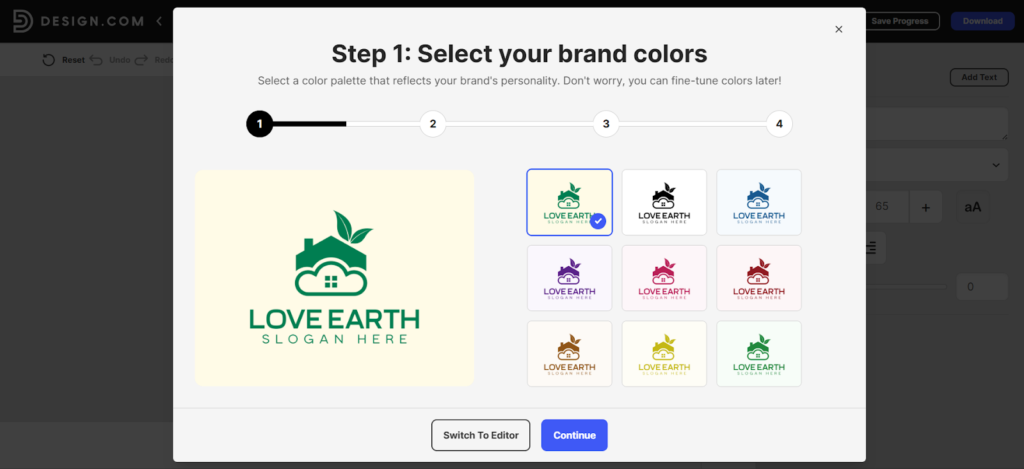
- If you want to manually edit, you can change everything from the icon, color, layout, font, and more. You can also add preset animations if you want a dynamic logo.

- Happy with how it looks? Click Download to get your logo. You can also Save Progress if you want to just get back to it later, or preview how your logo will look across different platforms first before downloading it. After downloading, you can use a link shortener to share your logo quickly and track engagement across social media, emails, or marketing channels.

How the Logos Look Across Different Industries
To get a better sense of range, we investigated how Design.com performs in different categories.
Tech and SaaS logos tend to be clean and restrained, nothing flashy. You can see tons of simple geometrical shapes, abstract style icons, and modern fonts. These work well for businesses that want to look credible without overdesigning.

Food and beverage logos are more expressive. Warmer colors, fun illustrations, and friendlier typography show up more often. They feel appropriate for menus, packaging, and storefronts.

Wellness and skincare logos are more flowy. They also feature leaves, flowers, chakra symbols, and such. Color schemes lean toward cool pastels and muted tones to look more relaxing and serene.

Across all three, the common thread is balance. Logos don’t feel cluttered or awkwardly composed. They also fit “industry standards” – meaning they use color schemes, fonts, and other visual elements that are typically appropriate for the intended industry.
Pros of Using Design.com Logo Maker
There’s multiple reasons why the platform has built a strong reputation in the market.
- The logo library is massive so users have thousands of options to choose from.
- The templates vary in style and type, so you can choose between a minimalist abstract icon to an ornate crest-style badge logo, down to a fun doodle-y style handwriting wordmark.
- Over 575+ fonts and 62,000 custom icons available which helps make the design look unique and distinctive, and not cookie-cutter.
- Logos are created by top designers, so every logo looks professional and high-quality. Nothing looks like placeholders or stock logos.
- Designs are exclusive and not recycled across platforms.
- Editing is easy without being limiting.
- File formats cover pretty much every use case.
- Logos are commercially safe, which is important for business use.
- Option to get exclusive licensing for your logo.
- Reviews say that the customer support is top notch and available 24/7.
- Option to use AI logo generator for an even faster process, as the AI can generate thousands of designs in seconds.
Cons of Design.com Logo Maker
Design.com is great but there are still a few things to keep in mind.
- The tool is web-based and has no app yet. This might be limiting for some users who prefer having a separate app or editing on mobile.
- While there are free logos available, the premium logos can only be downloaded under a subscription. The price is still more affordable compared to hiring a designer, but it’s still worth mentioning it for consideration.
Pricing of Design.com
How much does a logo on Design.com cost? Here is the breakdown:
- Free Plan: $0. Users can browse and edit all logos for free. You can also download a free logo to use, no watermarks or hidden charges.
- Saver Plan: $15/month (Logo Pack only)
- Value Plan: $24/month (Logo + Website)
- Premium Plan: $29/month (Logo + Website + more features)
Here are some further explanations if you need more clarification:
There are free logos and premium logos on Design.com. Free logos are free to download, again with no watermarks or any hidden fees.
Premium logos can be edited for free. But if you want to download it for use you’ll have to subscribe to any of the plans listed above.
You can see which logos are free and premium by looking at the top left corner, as they are marked as such.
If you want to know the inclusions in Design.com’s plan, here is the list of what is included in all plans:
- Your logo is yours forever
- Cancel anytime
- High-res and vector logo files
- Unlimited changes to your logo
- Business cards
- Instagram and Facebook posts
- Email signature templates
- Letterheads
- 50+ other design tools
- 564,000+ templates
Then these are the additional features included in the Premium Plan:
- Website builder
- Link in bio tool
- Digital business card
Final Thoughts:
So is Design.com the best logo maker tool? Our verdict is yes.
Design.com delivers one of the most seamless, convenient, and design-focused logo maker experiences available today. Its strength lies in the sheer depth of professionally designed templates, which allows users from any industry or niche to find a logo that is perfect for them. Users can even be as picky as they want, as there are thousands to choose from!
The tool is also made with beginners and non-designers in mind. It uses a simple interface and straightforward controls, which allow anyone to easily tweak a design and achieve great results.
So if you’re a startup, small business, or entrepreneur who wants a logo that looks credible and ready for launch, then hop on to Design.com now.
