
retailcloud is a cloud-based commerce platform that combines point-of-sale (POS), inventory management, analytics, loyalty, and online ordering tools. It serves retail stores, hospitality businesses, and large venues such as stadiums, arenas, and festivals.
Choosing a POS system is a bit like hiring your most important cashier. It touches every sale, every stock count, and every report you read.
So when a name like retailcloud shows up in your search, you want clear answers. What does it actually do? What does it cost? And is it right for your store?
This review is research-based. I studied the official retail cloud materials, third-party review sites, and press coverage. I have not tested the software hands-on, so I will keep “what the vendor says” separate from “what reviewers say” and from my own analysis.
What Is Retailcloud?
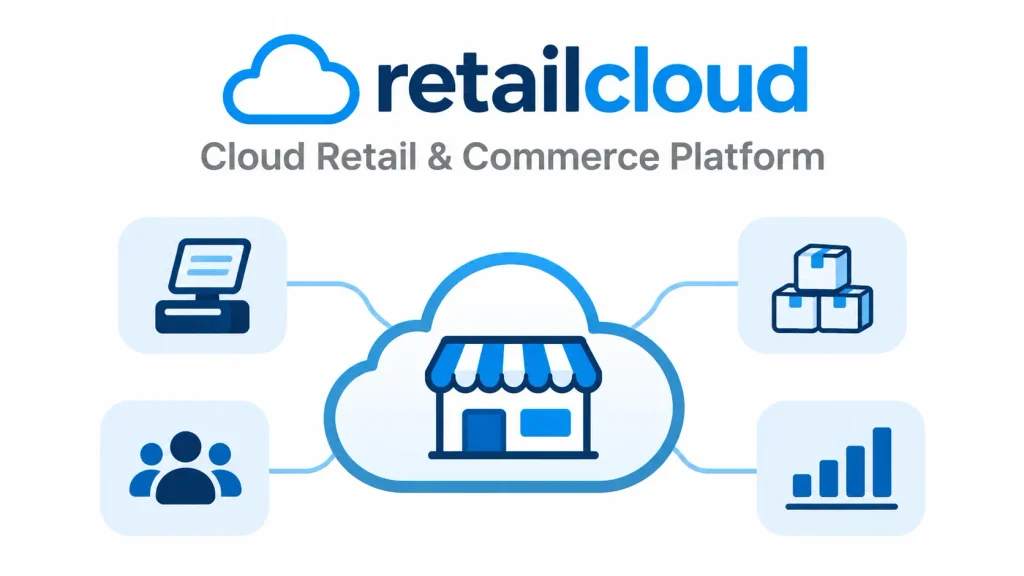
retailcloud is a cloud-based retail and commerce platform. It handles checkout, stock, customer data, and reporting in one connected system.
The company’s own materials describe it as an infrastructure platform for commerce across sports, entertainment, and cultural attractions. Software directories also list it for everyday retail and inventory control. You can see its company profile on LinkedIn.
1. Overview of the retailcloud Platform
A cloud POS stores your data online instead of on one local computer. That means you can check sales or stock from anywhere with a connection. Understanding how a cloud-based POS system works can help retailers evaluate its features, data synchronization, and operational benefits.
If you want a plain-English refresher on the basics, the Wikipedia entry on point of sale explains how modern POS software grew from cash registers into suites with inventory, loyalty, and reporting modules.
retailcloud follows that modern model. It bundles several tools that share one data set.
2. What Is Retailcloud Used For?
Businesses use it for five main jobs:
- Ringing up sales at fixed or mobile checkouts.
- Tracking and counting inventory.
- Reviewing sales reports and dashboards.
- Running loyalty, promotions, and customer programs.
- Connecting in-store and online sales.
3. Which Industries Does Retailcloud Serve?
The company targets four main groups: retail stores, food and beverage operators, sports and entertainment venues, and festivals or touring events.
A November 2025 company announcement said its platform now supports more than seventy professional sports teams across major North American leagues. That tells you where its biggest customers sit. A small boutique may find the product line broader than it needs.
Key Features of Retailcloud
1. Cloud-Based Point-of-Sale System
The core feature is checkout. ZeroPOS is the fixed countertop terminal for traditional stores. It handles sales, refunds, discounts, and coupons.
Third-party coverage describes retailcloud as hardware-flexible. You can reuse some existing peripherals or buy certified bundles. Always check your exact devices with the vendor first.
2. Inventory Management and Stock Tracking
Inventory is where many retailers feel the pain first. retailcloud offers two tiers: mInventory, a free mobile app for basic tasks, and Inventory 360 for full-service management.
With these tools, staff can scan an item, check quantities, change prices, and see where stock sits. Larger operations can manage products and pricing from a central console.
Businesses can also explore automated inventory management practices to improve stock accuracy, reduce manual work, and prevent shortages.
3. Mobile POS and Line Busting
“Line busting” means serving customers away from the counter so queues shrink. 6ixPOS is the mobile app built for this. A team member can ring up a sale on a handheld device on the shop floor.
4. RFID and Barcode Management
Barcodes identify one item at a time. RFID tags can be read faster and in bulk, which speeds up stock counts. The Wikipedia page on RFID is a good primer on how the technology works.
retailcloud lists both barcode and RFID support. The company has also announced RFID checkout for live event commerce.
5. Omnichannel Commerce
Omnichannel means customers can shop in more than one place and get a consistent experience. If that term is new, see the Wikipedia overview of omnichannel retail.
retailcloud offers an online store product and a Shopify integration. Reviewers note two-way inventory syncing between channels. Test this closely in a demo, because sync quality matters more than the feature name.
6. Customer Management and Loyalty Marketing
Customer tools include purchase history, promotions, and loyalty programs. Older feature sheets also mention a Mailchimp connection for email campaigns. For venues, FanVista combines loyalty, ordering, and analytics.
7. Data Analytics and Business Intelligence
The nGauge app shows owners real-time sales totals and key performance numbers on a phone. Its feature descriptions include hourly sales, top-selling items, and customer rating alerts. The Console gives managers a wider view across locations.
8. Employee and Store Management
For multi-store operators, the Console lets managers control products, pricing, and employees across locations. Reviewers say higher-tier plans add more control, such as deciding which products each store can sell.
Understanding the retailcloud Product Ecosystem
Here is a quick guide to the main products. Names and scope can change, so confirm the current lineup with the vendor.
| Product | What it does | Best suited to |
| ZeroPOS | Fixed checkout terminal | Retail stores |
| 6ixPOS | Mobile POS and line busting | Stores and venues needing handheld sales |
| mInventory | Free mobile inventory app | Quick stock checks and basic tasks |
| Inventory 360 | Full-service inventory management | Larger catalogs and multiple stores |
| nGauge | Dashboard and analytics mobile app | Owners and managers on the go |
| OrderUp | Order management | Businesses handling orders for fulfillment |
| retailcloud Online | eCommerce solution | Retailers selling online |
| Console | Centralized management platform | Multi-location operators |
| FanVista | Loyalty, ordering, and fan analytics | Stadiums and live venues |
| OnTour | Mobile-first POS for tours and events | Concerts and festivals |
| ServioPOS | Hospitality POS | Restaurants and food service |
ZeroPOS: The Fixed Checkout
ZeroPOS is the classic countertop system. Think of a clothing store with one or two registers and a back-room stock count.
6ixPOS: Mobile Checkout
6ixPOS turns an Android device into a mobile register. It helps during busy periods, when a long line can cost you sales.
mInventory and Inventory 360
Start with mInventory if you only need quick scans and price checks. Move to Inventory 360 when you need receiving, transfers, and tighter cost control.
nGauge and Console
nGauge is the owner’s pocket dashboard. The console is the back-office control room. Together they cover quick checks and deeper management.
OrderUp and retailcloud Online
These two cover orders and online selling. They matter most if you sell beyond your own front door.
FanVista, OnTour, and ServioPOS
These serve more specialized needs. FanVista focuses on venues, OnTour on touring merchandise and concessions, and ServioPOS on hospitality. A general retailer may never touch them.
How Does Retailcloud Work?
Here is a simple day in the life of a store using a connected cloud POS.
- Set up products and stock. You load items, prices, and quantities into the system.
- Process sales. Staff ring up customers at a fixed or mobile POS.
- Update inventory. Each sale reduces stock, so counts stay current.
- Capture customer data. Purchases can feed loyalty and promotions.
- Review reports. Managers check dashboards and spot trends.
A practical example: Imagine a three-store sports apparel shop. On Saturday, the busiest store runs low on a popular jersey size. The manager sees this in a stock report on Sunday, transfers units from a quieter store, and avoids lost sales the following week.
That is the real value of a connected system. The information moves between steps without anyone retyping it.
Benefits of Using retailcloud for Retail Businesses
1. Centralized Retail Operations
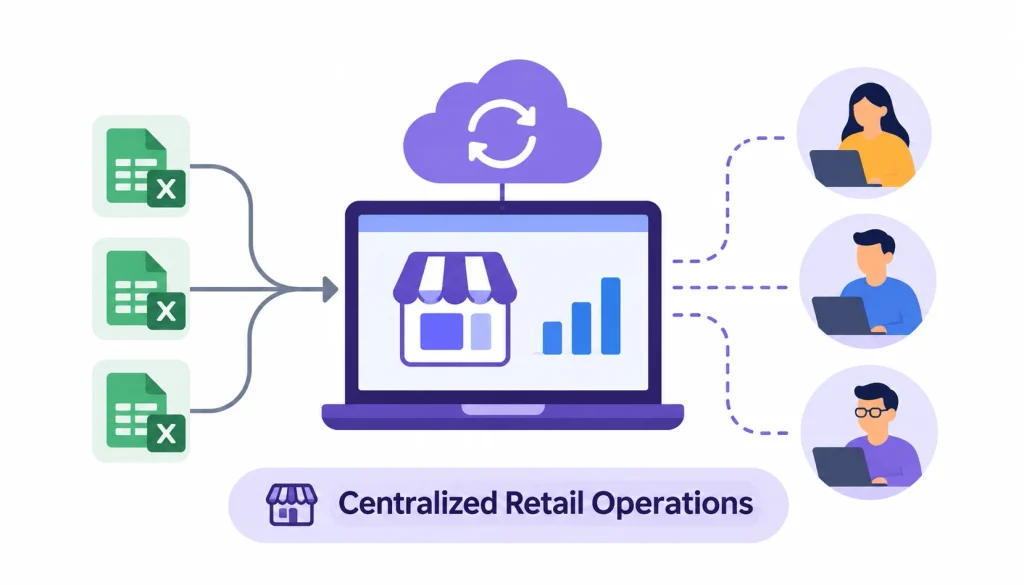
One platform means fewer disconnected spreadsheets. Teams work from the same data.
2. Better Inventory Visibility
Accurate stock numbers help you reorder on time and avoid overselling. Free tools like mInventory lower the barrier to starting.
3. Faster Checkout Experiences
Fixed and mobile POS options let you match checkout to your busiest moments.
4. Improved Customer Engagement
Loyalty and promotion tools help you reward repeat buyers.
5. Better Business Decisions Through Analytics
Reports on top sellers and slow movers show where your money is working or stuck.
6. Hardware and Payment Processor Flexibility
The vendor positions its software as flexible about hardware and payment options. That can protect you from being locked in. Verify exactly which devices and processors are supported before you sign.
Retailcloud Use Cases Across Different Industries
1. Clothing and Apparel Stores
Apparel has many sizes and colors. Look for strong variation handling and fast stock counts.
2. Electronics and Specialty Retail
These stores need accurate item tracking and clear reports on high-value stock.
3. Multi-Location Retail Businesses
Central control of pricing, products, and employees is the main draw here.
4. Stadiums and Sports Venues
This is where the platform appears strongest. The company reports that its system keeps sales and inventory in sync across large venues, including a stadium that connects a frictionless checkout store to its platform.
5. Festivals and Concerts
OnTour is built for tours and multi-day events, with merchandise and concessions in one mobile-first system.
6. Hospitality and Food Businesses
ServioPOS and ordering tools target restaurants and food service. Retailers with a café corner may find this useful.
Retailcloud Pricing and Plans
How Much Does retailcloud Cost?
Here the public information does not agree, so be careful.
| Source | What it reports |
| Capterra and Software Advice | Starting price of $49 per month; free trial and free version listed |
| Software Advice (UK listing) | Also mentions $79 per month per POS and $199 per year per POS |
| Expert Market | $29 to $149 per month per POS, plus custom Enterprise pricing |
Figures as seen in 2026. Prices and plans change often.
My advice: treat these as rough guides and ask retailcloud for a written quote. The vendor’s own sales process scopes pricing by industry, venue size, and product choice, so a single list price may not exist.
What Is Included in Each Plan?
Plan details are not clearly published in the sources I reviewed. Software Advice lists a “Basic” tier but notes that plan information is not available. Ask exactly which products, locations, and users each plan covers.
Additional Costs to Consider
Software fees are only part of the cost. Plan for:
- POS terminals, tablets, scanners, and receipt printers
- Payment processing fees
- Setup and data migration
- Staff training
- Integrations
- Support and maintenance
For example, one reviewer cited a certified hardware bundle at $2,695. Your own cost will depend on your setup.
Is retailcloud Affordable for Small Retail Businesses?
It can be, if the entry price holds and you only need core tools. But smaller shops should compare total cost against simpler options, especially free or low-cost starters.
Retailcloud Integrations and Hardware Compatibility
1. eCommerce Integrations
Shopify is the most clearly documented link. Software Advice also lists connections with website builders such as Wix, WordPress, Squarespace, Weebly, and GoDaddy. Check current compatibility, since integration lists change.
2. Accounting and Business Software Integrations
For larger venues, the company lists links to systems like Salesforce, SAP, Oracle, and NetSuite. Small retailers should ask about their specific accounting tool.
Integrating POS operations with cloud-based accounting can help businesses streamline financial records, monitor transactions, and simplify reporting.
3. Shipping and Fulfillment Integrations
Software Advice lists ShipStation. If you ship orders, confirm how tracking and stock updates flow back into the system.
4. POS Hardware Compatibility
Ask about terminals, tablets, barcode scanners, receipt printers, and payment devices. Bring a list of what you already own.
5. Payment Processor Compatibility
“Flexible” should mean you can shop for rates. Confirm which processors work today and whether switching later is easy.
Retailcloud Advantages and Limitations
Advantages of retailcloud
- A broad product family covering POS, inventory, analytics, and online sales
- A free mobile inventory app for basic tasks
- Mobile POS for line busting
- Support for barcode and RFID workflows
- Central management across locations
- Strong experience in venues and live events
Potential Limitations to Consider
These are questions to investigate, not confirmed flaws:
- Pricing clarity. Sources disagree, and plan details are thin.
- Product complexity. Many named products can confuse a first-time buyer.
- Focus. Much of the current marketing targets large venues, so a small shop may get less attention.
- Hardware needs. Confirm what works with your equipment.
- Implementation effort. Data migration and training take time.
- Security. Ask about user permissions, backups, and data protection.
What Do Customers Say About Retailcloud?
1. Overall Customer Ratings
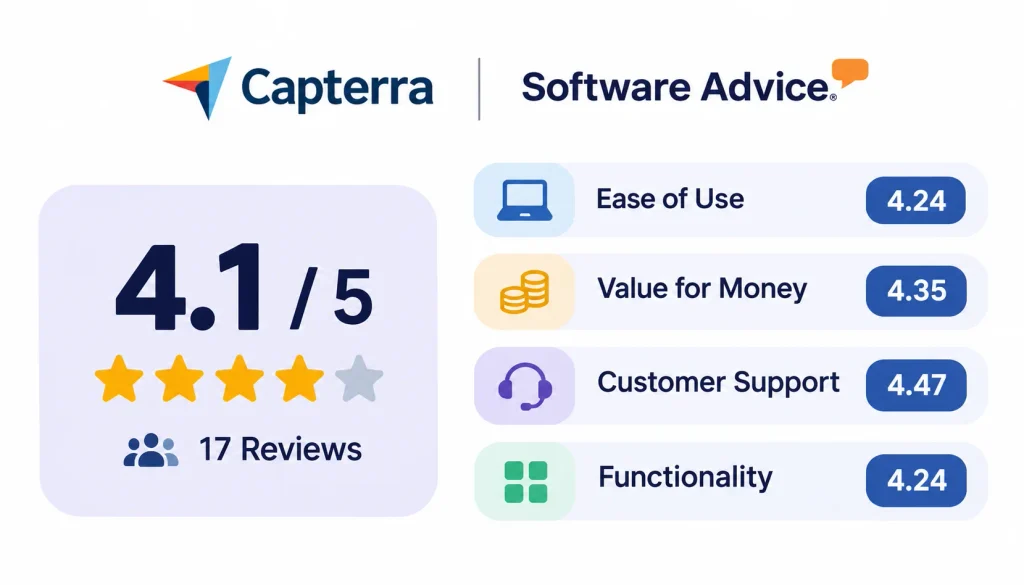
On the Capterra and Software Advice pages I reviewed, retailcloud scores 4.1 out of 5 from 17 reviews. Software Advice breaks it down further: ease of use 4.24, value for money 4.35, customer support 4.47, and functionality 4.24.
For context, Square Point of Sale shows 4.6 from about 3,000 reviews, GoFrugal 4.4 from 198, and Epos Now 3.8 from over 700.
2. What Customers Like About retailcloud
The strongest scores are for support and value. One older Capterra reviewer called the software simple to use but noted that you get more with a paid plan.
3. Common Customer Concerns
With only 17 reviews, I cannot name firm patterns. The paid-plan comment above hints that feature limits on lower tiers are worth checking.
4. Is Retailcloud Well Rated by Its Users?
Yes, but cautiously. The scores are solid. The sample is small, so use them as a starting point, not proof.
For unfiltered opinions from store owners, browse communities like small business and POS. Treat any single comment with care, but look for repeat themes such as hardware reliability, fees, and online-to-store inventory sync.
Retailcloud vs Other Retail POS Systems
There is no single winner. The best choice depends on your store. Here is a high-level view based on the review sites above. Confirm each detail with the vendors.
| Criteria | retailcloud | Square | Shopify POS | GoFrugal | Epos Now |
| Review score (Capterra) | 4.1 (17) | 4.6 (~3,000) | Not checked | 4.4 (198) | 3.8 (700+) |
| Starting price listed | $49/mo | Free plan available | From about $5/mo plus a Shopify plan | $7 per user/mo | $349 one time |
| Strongest fit | Multi-location, venues, retail | Small retail, easy start | Online-first brands with a store | Retail management | Small shops |
Retailcloud vs Square POS
Square is known for an easy start and a free plan. retailcloud looks stronger for central, multi-location and venue needs. Square has far more user reviews.
Retailcloud vs GoFrugal
Both target retail management. Compare inventory depth, local support, and pricing in your region.
Retailcloud vs Epos Now
Epos Now lists a one-time starting price rather than a monthly one, which changes how you compare costs.
Retailcloud vs Shopify POS
If your business lives on Shopify, its POS is a natural fit. retailcloud offers a Shopify integration for those who want its inventory and venue tools alongside it.
Retailcloud vs WooPOS
WooPOS appears on review sites as a retail and inventory alternative, with a 4.6 score from 185 reviews on Capterra. Compare its feature set and your online platform before deciding.
Which POS System Should You Choose?
- Small shop, simple needs: Start with low-cost, easy options.
- Online-first brand: Look closely at Shopify POS.
- Multiple stores or large venues: Put retailcloud on your shortlist.
How to Decide Whether Retailcloud Is Right for Your Business
- Assess your requirements. Count stores, registers, products, and peak-hour transactions.
- Identify your must-haves. List the features you will use weekly.
- Check compatibility. Confirm hardware, integrations, and payment processors.
- Compare total cost. Add software, hardware, processing, and training.
- Request a demo. Test a real sale, a return, a stock transfer, and a report.
How to Implement a Cloud POS System in a Retail Business
- Review current operations. Map how you sell and count stock today.
- Prepare your data. Clean product names, SKUs, prices, and quantities first.
- Set up hardware and payments. Test every device before launch day.
- Connect integrations. Check that online sales and stock sync correctly.
- Train employees. Let staff practice on sample sales.
- Test before launch. Run a few days of trial transactions.
- Monitor after go-live. Review reports weekly and fix issues quickly.
A tip from retail practice: launch on a slow weekday, not before a holiday rush.
Frequently Asked Questions About retailcloud
What Is Retailcloud Software?
It is a cloud-based platform that combines POS, inventory, analytics, loyalty, and online ordering tools for retail, hospitality, and venues.
What Is Retailcloud Used For?
Businesses use it to process sales, track stock, view reports, run loyalty programs, and manage multiple locations.
How Much Does retailcloud Cost?
Directories list a starting price of $49 per month. Other sources report a range of $29 to $149 per month per POS. Ask the vendor for a current quote.
Does retailcloud Offer a Free Trial?
Software Advice and Capterra list a free trial. Confirm current availability with the vendor.
Is retailcloud Suitable for Small Businesses?
It can be. Small shops should compare costs and complexity against simpler tools.
Does retailcloud Support Inventory Management?
Yes. It offers mInventory for basic tasks and Inventory 360 for full management.
Does retailcloud Offer Mobile POS?
Yes. 6ixPOS provides mobile checkout and line busting.
Can retailcloud Manage Multiple Store Locations?
Yes. The company describes centralized management of menus, inventory, procurement, and reporting across locations.
Does retailcloud Support RFID and Barcode Scanning?
Yes. Both are listed in its materials.
What Are the Best Alternatives to Retailcloud?
Common alternatives on review sites include Square Point of Sale, GoFrugal, Epos Now, WooPOS, and Stockagile.
Final Verdict: Is Retailcloud Worth Considering?
retailcloud is a broad, connected platform with real strengths. It covers checkout, inventory, analytics, and online sales, and it has deep experience in stadiums and live events.
It suits multi-location retailers and venue operators best. Small shops may find simpler tools easier to start with.
The main cautions are pricing clarity and a small pool of public reviews. Neither is a dealbreaker, but both are reasons to ask questions.
My advice is simple. If retailcloud fits your shortlist, book a demo, request a written quote, and test your own daily tasks. That will tell you more than any review, including this one.
