Day: August 24, 2026

  • Key Factors to Look for When Choosing a Cloud Storage Solution for Your Business

    Key Factors to Look for When Choosing a Cloud Storage Solution for Your Business

    Every year, millions of people are moving their businesses online, driven by the success they see in the offline world and the desire to expand and reach more customers worldwide.

    The digital world is also going through major shifts and trying to make it easier for new business owners, and one thing that has become more convenient than it was years ago is storing data. Every business creates a lot of data every year, and there’s no option to delete it to make room for new data.

    Earlier, business owners relied on hardware devices to store data, but it was never the safest option because there was constant concern about it being stolen, lost, or damaged. However, things have evolved now, and we have secure cloud storage as the ultimate and safest option to store data that can be accessed anytime, anywhere, and can be expanded based on storage needs.

    After the introduction of cloud storage, many businesses are moving to it, and as per stats, almost 60% of online businesses are using cloud storage as an ultimate solution.

    Key Factors to Look for When Choosing a Cloud Storage Solution

    If your business is experiencing sudden expansion and you too are thinking of moving to cloud storage to store all your business-related data, there are certain key factors you must look for before finalizing one. Here, we are sharing the essential key factors to ease your way:

    1. Security

    Security will always secure the first place on every list when discussing key factors to look for while choosing a cloud storage service, and the reason is obvious, to safeguard your business’s data from possible theft and other compromises. Look for a cloud storage provider that implements multiple methods to ensure the data is not accessible by anyone.

    Security

    Factors such as MFA (Multi-Factor Authentication), secure login mechanism, regular monitoring, and role-based access controls should be provided by the provider. You should also enquire about the ways through which the provider tackles any suspicious activity to get a clear picture of how security concerns are treated.

    2. Scalability

    Even an individual using the internet on a daily basis generates a lot of data; imagine the amount of data generated by a business on a daily basis. You may have initially subscribed for a different storage capability, but the need will increase in the coming time, and that’s something you should decide in advance.

    You should choose a cloud storage provider that offers scalability, and you can choose to increase the storage capacity in a few months or years without the need to migrate to another platform. A cloud storage solution that offers flexibility with this is an ideal choice because it allows the business to grow and adjust to its needs.

    3. Encryption

    In today’s modern world, leaving data readable for everyone who gets into your system is not a wise choice, no matter how confident you are with the security. Encryption is the only solution to ensure that even if someone gets into your database, reading data becomes impossible without a decryption key.

    Considering its importance, you should choose a cloud storage solution that encrypts all data, both at rest and in transit, because the former is information stored in the server hosted by the provider and the latter is moving within the cloud ecosystem. Along with this, also understand how decryption keys are managed under the cloud storage service.

    4. Backup and Data Recovery

    No matter how strong the cloud storage security is, relying on the source of data and keeping a single copy of it is never recommended. Also, people using cloud storage services often think that the data is being backed up on its own. It may be creating a backup but not covering everything, and that is why you should enquire about the backup service from the provider and how many days of intervals they create backups.

    Many cloud storage providers offer to create a backup every month and store it in a different server shared with you in case the primary server is compromised or damaged.

    5. Access Control

    When running a business, you can’t be the sole person to access data, and there will be multiple people to access it for diverse uses. However, keep in mind that not every employee or team member needs to access all data, and their access will depend on the role they are serving.

    To control the access of your employees and keep them from accessing everything stored, look for a cloud storage solution that allows administrators to create different permission levels for different employees. There may be employees whose role should be limited to only viewing a file, while others may need permission to edit and share it further.

    6. Integration

    Every business uses multiple platforms for diverse uses, and all these platforms generate data that needs to be stored safely. As you have opted for a cloud storage solution, you will want to store the data in the same. These platforms and applications can be crucial for the business, such as accounting, management, CRM, communication, and others.

    You should look for a provider that could integrate with all these existing tools and platforms. When the integration is allowed, the transfer of data is done automatically, and it reduces the manual tasks for doing the same, improving efficiency and work productivity. It will also help administrators maintain consistency with security policies and access control on all applications.

    Final Words

    A cloud storage solution is replacing traditional ways of storing data because it is convenient and streamlines the entire workflow by storing all the data generated by the business in one place.

    Since the market has a few options available with cloud storage providers, it is important that you look for the key factors that we have discussed here when choosing one so you save yourself from later issues such as lack of scalability and integration features.

  • The Role of AI Voice Agents in Business Workflow Automation

    The Role of AI Voice Agents in Business Workflow Automation

    Businesses today want to save time, reduce manual work, and improve customer experience. But many teams still spend hours on repeated calls, follow-ups, data entry, appointment booking, customer questions, and internal updates.

    These tasks are important, but they can slow down employees. A sales team may spend too much time collecting basic lead details. A support team may answer the same questions every day. An operations team may need to update records manually after every customer call.

    This is where AI voice agents are becoming useful. They help businesses automate voice-based tasks through natural conversations. With tools like ai voice agents, businesses can answer calls, collect information, update systems, trigger workflows, and send follow-ups without depending on manual work for every step.

    AI voice agents do not replace human teams. They support people by handling simple, repeated, and time-consuming tasks. This gives teams more time to focus on complex work, customer relationships, and business growth.

    What Are AI Voice Agents?

    AI voice agents are AI-powered systems that can speak with users through voice. They can listen to a customer, understand the request, reply clearly, and complete a task.

    They usually use several technologies together:

    • Speech recognition
    • Natural language understanding
    • Text-to-speech
    • Workflow automation
    • API integrations
    • Business data systems

    For example, a customer may call and say, “I want to book a service appointment for next week.” The AI voice agent can understand the request, ask for details, check available slots, book the appointment, and send a confirmation.

    This makes voice agents different from old phone menu systems. Customers do not need to press many buttons. They can speak in a natural way.

    What Is Business Workflow Automation?

    Business workflow automation means using technology to complete repeated business tasks with less manual effort. It helps move work from one step to another automatically.

    For example, when a customer submits a form, the system may create a lead in CRM, send an email, assign a sales rep, and schedule a follow-up. No employee needs to do each step by hand.

    Common workflow automation tasks include:

    • Creating support tickets
    • Updating CRM records
    • Sending follow-up emails
    • Booking meetings
    • Sending reminders
    • Routing calls
    • Collecting customer details
    • Updating order records
    • Notifying internal teams

    AI voice agents add a voice layer to this process. A workflow can now start from a phone call or voice conversation, not only from a form, email, or app action.

    Why Businesses Need Voice-Based Automation

    Many business workflows still begin with a call. Customers call to ask questions, book services, check orders, request support, or talk to sales.

    When all calls are handled manually, teams can become overloaded. This can lead to missed calls, slow replies, wrong data entry, and delayed follow-ups.

    Voice-based automation helps solve these problems.

    It Reduces Repeated Work

    Many calls include the same questions. For example, customers may ask about business hours, order status, pricing, booking slots, or refund steps. AI voice agents can handle these simple calls and free up human agents.

    It Improves Response Time

    Customers want quick answers. If they wait too long, they may leave or contact another company. AI voice agents can answer instantly and collect details even outside office hours.

    It Prevents Missed Follow-Ups

    Manual follow-ups are easy to miss. Automation can send confirmations, reminders, updates, and internal alerts on time.

    It Helps Small Teams Do More

    Small businesses often have limited staff. AI voice agents help them manage more calls and tasks without hiring a large support or sales team.

    How AI Voice Agents Support Workflow Automation

    AI voice agents can support many stages of a business workflow.

    Capturing Information

    They can collect names, phone numbers, emails, company details, order numbers, issue details, appointment needs, and lead requirements.

    This saves time and reduces manual data entry.

    Updating Business Systems

    After collecting information, the AI voice agent can send it to the right tool. This may include CRM, helpdesk, calendar, database, spreadsheet, or order management software.

    Triggering Actions

    A voice conversation can trigger many actions. For example, the system can create a ticket, book a meeting, send a reminder, notify a manager, or schedule a follow-up.

    Routing Requests

    AI voice agents can understand the reason for a call and route it to the right team. Sales questions can go to sales. Billing issues can go to accounts. Technical problems can go to support.

    Common Workflows AI Voice Agents Can Automate

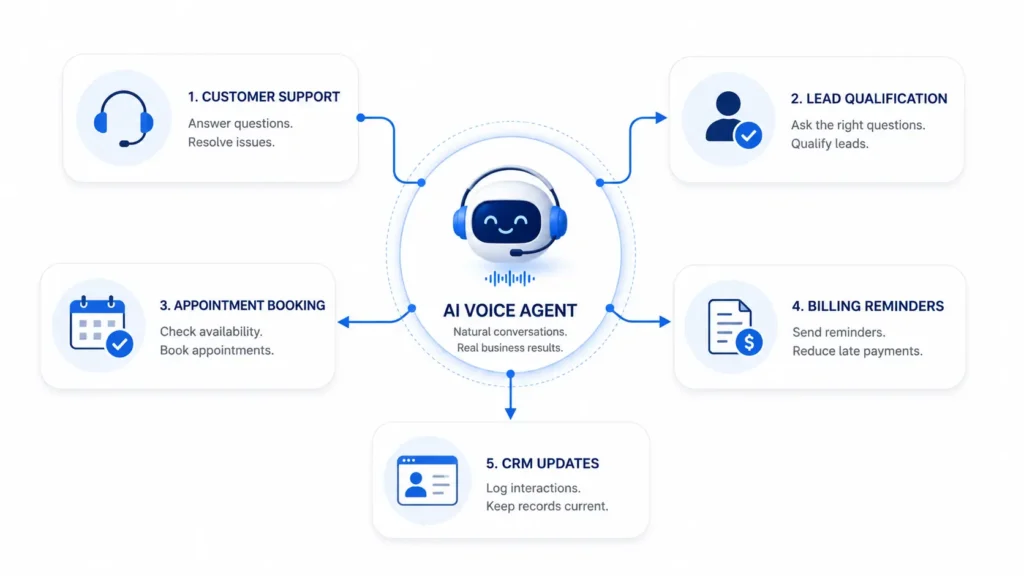
    WorkflowWhat AI Voice Agents Can DoBusiness Benefit
    Customer supportAnswer FAQs, collect issue details, create ticketsReduces support workload
    Lead qualificationAsk questions, capture details, update CRMHelps sales focus on serious leads
    Appointment bookingCheck slots, book meetings, send confirmationsReduces manual scheduling
    Order supportShare delivery status and return stepsImproves customer experience
    Billing remindersCall customers and send payment remindersImproves payment follow-up
    Internal updatesCollect team updates and trigger alertsKeeps operations organized

    AI Voice Agents and CRM Automation

    CRM systems are important for sales teams, but they only work well when data is updated. Many teams forget to add call notes, update lead status, or schedule the next follow-up.

    AI voice agents can reduce this problem. They can create new leads, update contact details, record customer interest, add call notes, assign leads to sales reps, and set follow-up reminders.

    For example, if a prospect calls to ask about a service, the AI voice agent can ask for their name, email, company, budget, and timeline. Then it can add the lead to the CRM and notify the sales team.

    This helps the sales team work with cleaner data and faster follow-ups.

    AI Voice Agents in Customer Support Automation

    Support teams often handle repeated questions. These may be about login issues, pricing, refunds, delivery, account access, service status, or product use.

    AI voice agents can answer simple questions and collect full details before creating a ticket. If the issue needs human help, the support agent receives a clear summary.

    This improves ticket quality. It also reduces the time agents spend asking basic questions.

    For customers, it means faster support and less waiting.

    Appointment and Reminder Automation

    Many businesses depend on appointments. This includes healthcare clinics, real estate firms, SaaS companies, salons, education centers, repair services, and consultants.

    AI voice agents can help customers book, reschedule, or cancel appointments. They can check available times, confirm details, and send reminders.

    This can reduce no-shows and save staff time.

    For example, a service business can use an AI voice agent to confirm appointments one day before the visit. If the customer wants to reschedule, the agent can offer new slots and update the calendar.

    Connecting AI Voice Agents With Business Tools

    AI voice agents become more useful when they connect with existing business tools.

    Useful integrations include:

    • CRM
    • Helpdesk
    • Calendar
    • Email
    • SMS
    • Cloud databases
    • Ecommerce platforms
    • Accounting or billing tools
    • Project management tools
    • Notification systems

    Without integrations, a voice agent can only answer basic questions. With integrations, it can complete real business tasks. For teams that need these workflows to connect to existing CRM, finance, and operations systems, agentic AI development services can provide a practical path from a narrow use case to a production workflow.

    For example, if a customer asks about an invoice, the voice agent may check billing data, confirm the invoice number, and send a payment reminder. This makes the workflow faster and more useful.

    Benefits of AI Voice Agents in Workflow Automation

    AI voice agents can help businesses in many ways:

    • Faster response time
    • Fewer missed calls
    • Less manual data entry
    • Better lead capture
    • Better CRM updates
    • Faster support ticket creation
    • Improved appointment booking
    • More consistent follow-ups
    • Lower workload for teams
    • Better customer experience

    They also give managers better visibility. Call summaries and workflow logs can show common issues, lead quality, customer needs, and process gaps.

    Challenges to Consider

    AI voice agents are useful, but businesses should use them carefully.

    Accuracy

    AI may misunderstand unclear speech, background noise, strong accents, or complex requests. Businesses should test the system with real conversations.

    Data Privacy

    Voice conversations may include personal or sensitive data. Businesses should use consent, encryption, limited access, and clear data retention rules.

    Integration Quality

    If integrations are weak, workflows may fail. For example, a meeting may not appear in the calendar, or a ticket may miss important details.

    Human Handoff

    Some conversations need human support. Complaints, payment disputes, legal matters, medical questions, and high-value sales calls should be handled by people.

    Best Practices for Businesses

    Start with one clear workflow. Do not try to automate everything at once.

    Good first use cases include:

    • FAQ calls
    • Lead capture
    • Appointment booking
    • Support ticket creation
    • Reminder calls
    • Call routing

    Keep voice responses short and simple. Ask one question at a time. Confirm important details before taking action.

    Review call summaries, failed conversations, and workflow logs. This helps improve the system over time.

    Most importantly, use AI voice agents to support human teams. The goal is better workflow efficiency, not removing the human touch.

    Key Metrics to Track

    Businesses should measure performance after launch. Useful metrics include:

    • Call completion rate
    • Task success rate
    • Missed call reduction
    • Lead capture rate
    • Appointment booking rate
    • Ticket creation accuracy
    • Human handoff rate
    • Customer satisfaction
    • Time saved by automation

    These metrics help teams understand whether AI voice automation is improving the business process.

    Conclusion

    AI voice agents are becoming an important part of business workflow automation. They help companies answer calls, collect information, update systems, create tickets, book appointments, send reminders, and route requests.

    For small teams and growing businesses, this can save time and improve customer experience. It can also help sales, support, billing, and operations teams work with cleaner data and faster processes.

    The best results come when businesses start with simple workflows, connect the right tools, protect customer data, and keep humans involved for important decisions. Used wisely, AI voice agents can make daily business operations faster, clearer, and easier to manage.

    FAQs

    What is an AI voice agent in workflow automation?

    An AI voice agent is a system that uses voice conversations to collect information, answer questions, and trigger business actions.

    What workflows can AI voice agents automate?

    They can automate customer support calls, lead qualification, CRM updates, appointment booking, reminders, call routing, and ticket creation.

    Can AI voice agents help small businesses?

    Yes. They can help small teams respond faster, save time, reduce missed calls, and manage simple workflows with less manual work.

    Do AI voice agents replace human employees?

    No. They should handle simple and repeated tasks while human teams manage complex and sensitive conversations.

    What tools can AI voice agents connect with?

    They can connect with CRM, helpdesk, calendars, email, SMS, ecommerce platforms, billing tools, databases, and notification systems.

  • Why AI-Generated Videos Lose Consistency and How Filmmakers Fix It

    Why AI-Generated Videos Lose Consistency and How Filmmakers Fix It

    AI-generated videos have opened new possibilities for filmmakers, brands, and creators by making visual storytelling faster and more accessible. From cinematic scenes and digital characters to product commercials and short films, AI tools can help transform creative ideas into detailed video content.

    However, one of the biggest challenges in AI filmmaking is consistency.

    A video may look impressive in individual shots but lose continuity when multiple scenes are combined. A character may appear slightly different from one frame to another, a product may change shape, or the visual style may shift unexpectedly between scenes.

    For filmmakers, this creates a major challenge. A successful film or commercial is not made from isolated clips. Every shot needs to feel like part of the same world.

    Maintaining consistency in AI-generated videos requires careful planning, strong references, and workflows that connect different stages of production. By understanding why inconsistencies happen and how to solve them, filmmakers can create AI-assisted videos that feel more professional and cohesive.

    Why AI-Generated Videos Lose Consistency

    AI video generation works by interpreting prompts, references, and creative instructions to produce visual outputs. While modern AI models have become highly capable, maintaining exact continuity across multiple scenes remains difficult.

    Unlike traditional filmmaking, where the same physical actor, location, and product are captured throughout production, AI-generated videos recreate visuals based on available information. If the system does not have enough context about a character, object, or environment, variations can appear.

    These inconsistencies can affect different parts of a video, including characters, products, camera style, lighting, and overall visual direction.

    For filmmakers creating longer videos, advertisements, or episodic content, these small differences can become noticeable and impact the audience’s experience.

    Character Appearance Changes Between Scenes

    Character inconsistency is one of the most common challenges in AI-generated videos.

    A character created in one scene may have slightly different facial features, hairstyle, clothing, or body proportions in another. Even subtle changes can make the character feel like a different person.

    This becomes especially challenging for:

    • Short films
    • Series
    • Virtual actors
    • AI-generated commercials
    • Character-driven storytelling

    Filmmakers solve this by creating detailed character references before production. Character sheets, reference images, and defined visual traits help establish a clear identity that can be maintained throughout the project.

    Important details such as facial structure, clothing, hairstyle, age, personality, and movement style should be documented before generating multiple scenes.

    Product Details Change in AI Commercials

    Product consistency is another major challenge, especially for brands creating AI-generated advertisements.

    A product shown in one shot may appear slightly different in another. Packaging, logos, colors, materials, or dimensions can change when AI generates new scenes.

    For ecommerce and commercial videos, this can create trust issues because customers expect advertisements to accurately represent the real product.

    Filmmakers and marketers address this by using strong product references and maintaining a consistent visual guide throughout production.

    For example, a skincare bottle appearing in a studio shot, lifestyle scene, and close-up product shot should maintain the same shape, label, and design details across every frame.

    Visual Style and Lighting Can Shift Unexpectedly

    Consistency is not only about characters and products. The overall look of a video also needs to remain connected.

    A scene generated with warm cinematic lighting may suddenly shift to a cooler tone in the next shot. Camera styles, color grading, environments, and visual moods can change if the creative direction is not clearly maintained.

    These changes can make a film feel like a collection of unrelated clips instead of one complete story.

    Filmmakers often solve this by defining a visual style guide before production. This includes references for:

    • Lighting style
    • Color palette
    • Camera movement
    • Composition
    • Environment design
    • Overall mood

    This gives AI systems a clearer creative direction to follow.

    Lack of Context Between Individual Generations

    One reason AI videos lose consistency is that individual generations often lack connection.

    When every scene is created separately, the AI model may not understand that the character, product, or environment from one scene needs to continue into another.

    This is similar to asking different teams to create separate scenes without sharing production notes. Each result may look good individually but fail to connect as a complete project.

    Modern AI filmmaking workflows are addressing this by keeping more context connected across production stages.

    Invideo Agent helps filmmakers approach AI video creation as a connected workflow instead of separate generations. Working with ideas, references, scenes, and creative direction together, it helps creators maintain continuity while developing multi-scene videos.

    For larger productions, invideo Agent Two supports more complex workflows by helping teams coordinate different creative areas such as visual planning, cinematography, story development, and effects. This helps filmmakers maintain a shared understanding of the project when managing longer videos or campaigns with multiple scenes.

    Using Reference Images to Improve Consistency

    References are one of the most important tools filmmakers use to maintain AI video consistency.

    Instead of relying only on text prompts, creators can provide visual examples that define how a character, product, or environment should appear.

    Reference images help AI systems understand:

    • Character appearance
    • Product details
    • Clothing and accessories
    • Environment style
    • Camera perspective

    For example, a filmmaker creating a sci-fi short film can establish a character reference, spaceship design, and world style before generating different scenes. This creates a stronger foundation for maintaining continuity.

    Creating Detailed Prompts for Better Results

    Prompts play an important role in AI video creation. Generic prompts often produce inconsistent results because they leave too much room for interpretation.

    A strong prompt provides more details about the subject, environment, style, and movement.

    Instead of describing a character as simply “a woman walking through a city,” filmmakers may define details about appearance, clothing, lighting, camera angle, and emotional expression.

    However, consistency does not come from repeating longer prompts alone. The strongest results usually come from combining detailed prompts with references and connected workflows.

    Maintaining Camera and Cinematic Continuity

    Camera style is another element that affects whether AI-generated videos feel connected.

    A filmmaker may want a project to have a specific visual language, such as slow cinematic movements, handheld realism, or dramatic wide shots.

    If each scene uses a different camera approach, the final video can feel inconsistent.

    To solve this, filmmakers define camera rules early in production. They establish preferred shot types, movement styles, framing approaches, and visual references before creating multiple scenes.

    This helps every shot contribute to the same cinematic experience.

    How Filmmakers Build Better AI Video Workflows

    Consistency improves when filmmakers treat AI video creation like traditional production.

    Instead of generating scenes randomly, professional workflows usually include:

    • Planning the story
    • Creating references
    • Defining visual direction
    • Establishing characters and products
    • Reviewing outputs
    • Refining scenes

    This process allows creators to identify inconsistencies early and make adjustments before the final edit.

    AI works best when it supports a clear creative process rather than replacing production planning.

    The Role of AI Models in Maintaining Consistency

    Different AI models have different strengths. Some may produce stronger realism, while others may perform better with specific styles, movements, or creative directions.

    Filmmakers increasingly use multiple AI models depending on the requirements of a project. For example, Google Veo 3.1 can help creators develop cinematic scenes with realistic motion, camera control, and detailed visual outputs, making it useful for projects where maintaining a consistent visual style across shots is important.

    Kling 3.0 omni is another strong option in this category, offering multi-shot storyboarding specifically designed to keep characters and products visually consistent across a sequence of generated scenes.

    One model may be better suited for cinematic environments, another for character movement, and another for image references or visual refinement.

    Using the right model for each stage allows creators to achieve better results while maintaining the overall creative direction of the project.

    Human Creative Direction Still Matters

    Although AI tools are improving rapidly, human decision-making remains essential for maintaining consistency.

    Filmmakers still need to define:

    • How characters should look
    • What emotions scenes should communicate
    • How products should be presented
    • What visual style fits the story

    AI can help generate and refine content, but creative direction ensures that every scene supports the same vision.

    The strongest AI-generated videos come from combining technology with traditional filmmaking principles.

    Final Thoughts

    AI-generated videos often lose consistency because individual scenes can be created without enough shared context. Characters may change, products may shift, and visual styles may become disconnected.

    Filmmakers solve these challenges by using stronger references, detailed planning, consistent prompts, and connected AI workflows.

    As AI filmmaking continues to evolve, the focus will move beyond generating impressive individual clips. The future will be about creating complete visual stories where every character, product, scene, and shot feels like part of the same world.

  • How to Create Consistent AI Characters for Short Films and Series

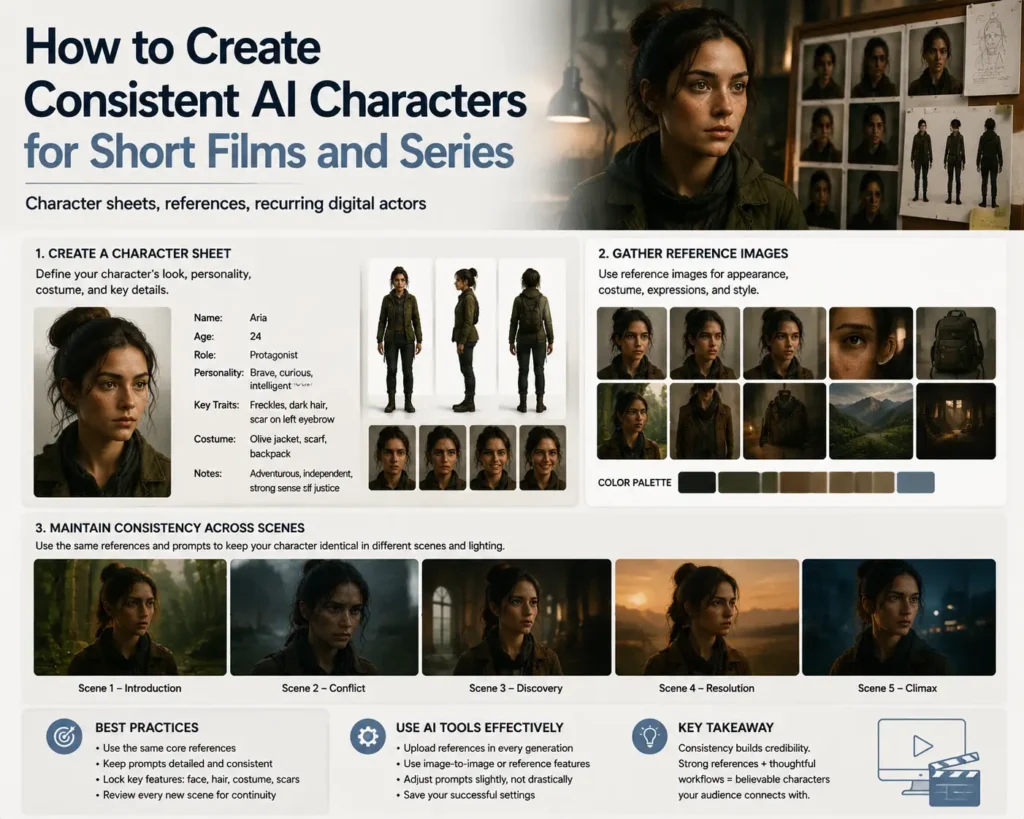
    How to Create Consistent AI Characters for Short Films and Series

    Creating a memorable character has always been one of the most important parts of filmmaking. Whether it is a lead character in a short film, an animated personality, or a recurring digital actor in a series, audiences build connections through familiarity and consistency.

    With the growth of AI-assisted filmmaking, creators can now design and develop digital characters faster than ever. However, creating a character once is not the biggest challenge. The real challenge is maintaining that character’s identity across multiple scenes, episodes, and storytelling moments.

    A character appearing in one scene should look the same in the next. Their face, hairstyle, clothing, personality, expressions, and movement style need to remain consistent throughout the project.

    Traditional filmmaking manages this through costume references, character design documents, continuity teams, and detailed production notes. AI filmmaking workflows are now bringing similar ideas into digital production through character sheets, reference images, and connected creative processes.

    For creators making short films and series, consistent AI characters are becoming essential for building stories that feel professional, immersive, and emotionally engaging.

    Why Character Consistency Matters in AI Filmmaking

    A strong character is more than just a visual design. Their appearance, behavior, and personality work together to create a recognizable identity.

    In traditional productions, viewers naturally expect the same actor to appear consistent from one scene to another. The same expectation applies to AI-generated characters.

    If a digital character changes between scenes, audiences may notice differences in:

    • Facial structure
    • Hair and clothing
    • Age and appearance
    • Body proportions
    • Expressions and emotions
    • Overall visual style

    These inconsistencies can interrupt storytelling and make the character feel less believable.

    For short films and episodic content, this becomes even more important because characters often appear repeatedly across different locations, timelines, and emotional moments.

    Building a Strong Character Sheet Before Generation

    One of the most effective ways to maintain AI character consistency is by creating a detailed character sheet before production begins.

    A character sheet acts as a visual and creative reference that defines who the character is. Instead of relying on a simple text prompt every time, creators can establish a complete identity that can guide future scenes.

    A useful character sheet may include details about:

    • Facial features
    • Hairstyle and color
    • Clothing style
    • Body type
    • Age appearance
    • Personality traits
    • Emotional expressions
    • Movement style

    For example, a science fiction character may require specific clothing details, futuristic accessories, and a consistent visual style throughout an entire series. A character sheet helps ensure these elements remain stable.

    Using Reference Images to Maintain Visual Identity

    Reference images play an important role in AI character creation. They provide visual guidance that helps AI systems understand what the character should look like.

    Instead of generating every scene from a completely new prompt, creators can use references to maintain continuity.

    This is especially useful when creating:

    • Multiple episodes
    • Different camera angles
    • Emotional scenes
    • Action sequences
    • New environments

    A character should remain recognizable whether they appear in a close-up shot, a wide cinematic scene, or a completely different location.

    Strong references help bridge the gap between creative ideas and consistent visual output.

    Creating Recurring Digital Actors for Stories

    AI characters are increasingly being used as recurring digital actors in short films, series, and branded storytelling.

    Unlike one-time generated characters, recurring digital actors need a stronger identity. They need to feel like the same individual across every appearance.

    This requires consistency in both appearance and performance.

    A recurring AI character should maintain:

    • The same visual identity
    • Similar voice characteristics
    • Consistent personality traits
    • Stable emotional behavior
    • Recognizable movement patterns

    When these elements remain consistent, audiences can develop a connection with digital characters in the same way they connect with traditional actors.

    How AI Workflows Help Maintain Character Identity

    Creating a consistent character involves managing many creative elements at the same time. Filmmakers need to think about character appearance, scene design, camera choices, lighting, and storytelling direction together.

    AI workflows are helping creators manage these elements in a more connected way.

    Invideo Agent supports this type of AI-assisted filmmaking workflow by helping creators move from ideas and references to complete video projects. For character-driven stories, it can help maintain creative direction across scenes by connecting visual development, scene creation, editing, and refinement.

    This approach is useful for short films and series where the same character needs to appear repeatedly while maintaining a consistent identity throughout the story.

    With invideo Agent Two, creators working on larger narrative projects can manage more complex workflows by coordinating different creative areas such as visual planning, cinematography, story development, and effects. This helps teams maintain alignment when building multi-scene stories with recurring characters and detailed worlds.

    Maintaining Character Consistency Across Different Scenes

    A character may appear in many different situations throughout a story. They may move between locations, experience different emotions, or interact with different characters.

    The challenge is ensuring that changes in the scene do not change the character itself.

    For example, a character shown in a quiet indoor conversation should still feel like the same person during an outdoor action sequence. Their appearance, personality, and visual style should remain recognizable even when the environment changes.

    AI-assisted workflows can help creators track these details and maintain a stronger connection between different scenes.

    The Role of Style References in AI Character Creation

    Character consistency is not only about the character itself. The surrounding visual style also affects how audiences perceive them.

    A character created with a cinematic, realistic style may feel completely different if placed into a cartoon-like environment in the next scene.

    Style references help maintain consistency in areas such as:

    • Lighting
    • Color palette
    • Camera style
    • Environment design
    • Overall visual tone

    For short films and series, a consistent visual language helps create a more immersive world.

    Creating Emotional Consistency in AI Characters

    Visual consistency alone is not enough. Characters also need emotional continuity.

    A character who behaves differently in every scene may feel artificial, even if their appearance remains unchanged.

    Creators need to define how the character reacts, communicates, and expresses emotions.

    For example, a serious character should maintain similar personality traits throughout the story, while a humorous character should have a recognizable style of interaction.

    AI tools can support character creation, but human storytelling decisions remain essential for developing believable personalities.

    Challenges of Creating Consistent AI Characters

    Although AI character creation has improved significantly, challenges still remain.

    Long-form storytelling requires stronger control over character identity because small inconsistencies can become more noticeable over time.

    Some common challenges include:

    • Maintaining the same face across scenes
    • Keeping clothing details accurate
    • Preserving personality traits
    • Matching expressions with emotions
    • Creating natural movement

    Successful AI filmmaking requires a combination of strong references, creative planning, and consistent workflows.

    The Future of AI Characters in Film and Series

    AI characters are moving beyond simple generated visuals. Future workflows will focus on creating complete digital performers with consistent appearances, personalities, and storytelling abilities.

    Filmmakers will be able to develop characters that exist across multiple episodes, campaigns, and creative projects while maintaining the same identity.

    As AI filmmaking tools become more advanced, creators will have more freedom to build larger worlds and tell stories with digital actors that feel connected and believable.

    Final Thoughts

    Creating consistent AI characters requires more than generating a good-looking image. It requires careful planning, strong references, character sheets, and workflows that maintain identity throughout production.

    For short films and series, character continuity is what transforms a digital creation into a believable performer.

    AI tools are making this process more accessible by helping creators manage visual consistency, develop recurring digital actors, and build richer stories. The combination of AI-assisted workflows and human storytelling will continue to shape how characters are created and experienced in the future of filmmaking.