RFID tags are really important for keeping track of inventory and managing assets and supply chains. They are used in lots of places like stores that scan tons of items really fast and hospitals that need to keep track of equipment. RFID technology is used all over the world and it is one of the most common ways to identify things.
This guide will tell you everything you need to know about RFID tags. You will learn what RFID tags are, how they work, which kind is best for your needs and how to use them without making mistakes.
An RFID tag is a device that stores information and sends it out using radio waves. When an RFID reader sends out a signal the RFID tag gets turned on and sends back the information it has stored. This all happens without anyone touching the RFID tag or even seeing it.
This is really different from barcodes. With barcodes you have to point a scanner at each item one at a time.. With RFID tags one reader can find lots of tagged items all at once even if they are inside boxes or under clothes.
Components of an RFID Tag
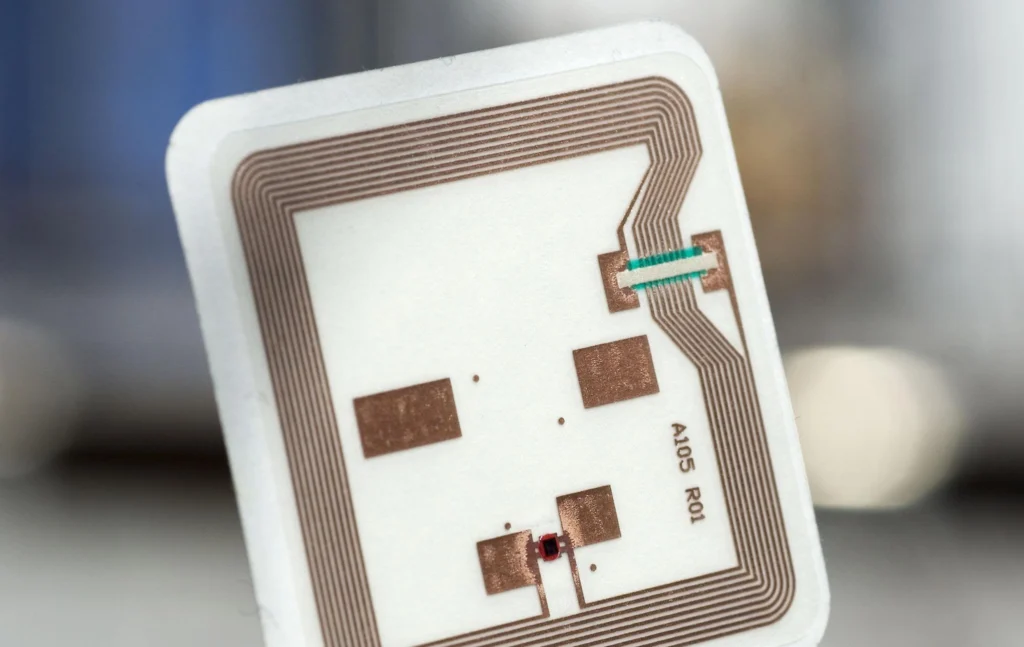
Every RFID tag has three core parts:
Microchip (IC): Stores the tag’s unique identifier and any additional data. Chip capacity ranges from a few bits on simple tags to several kilobytes on advanced ones.
Antenna: The coiled wire or printed circuit that captures energy from the reader’s signal and transmits the tag’s data back. Antenna size directly affects read range.
Substrate: The material the chip and antenna are mounted on. This can be paper, plastic, foam, ceramic, or metal depending on the application.
RFID Tag vs RFID Label
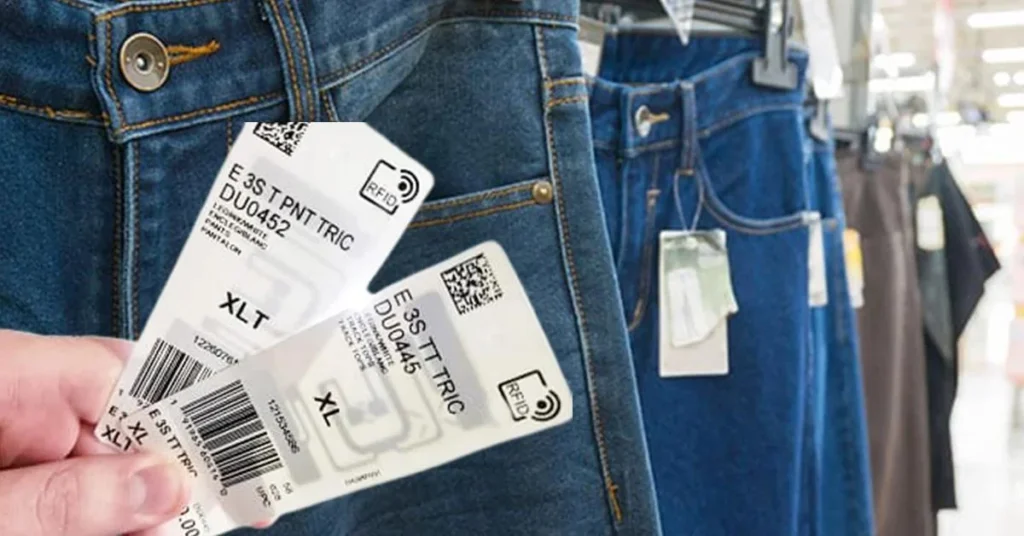
These terms are often used in this way but they are not exactly the same. An RFID tag is the part itself which includes a chip and an antenna. An RFID label is a tag that is put into a label that you can print on and stick somewhere.
This label does two things: it has the part and a surface where you can print barcodes, text or pictures. Most stores and delivery companies use RFID labels because they are useful for two things. They help with the tracking and they have space for labels and other information. RFID labels are really common, in retail and logistics.
How RFID Tags Work
1. RFID System Components
A working RFID system has four parts working together:
- RFID Tags attached to items, assets, or people
- RFID Antennas that emit radio frequency fields
- RFID Readers that send signals and receive tag data
- Backend Software that processes, stores, and acts on the data
2. Data Transmission Process
Here is how a read cycle works:
- The reader powers its antenna and emits a continuous or pulsed radio frequency field.
- When a passive RFID tag enters this field, the antenna harvests enough energy from the radio waves to power the microchip.
- The chip wakes up and modulates the reflected radio signal with its stored data.
- The reader’s antenna picks up this modulated signal and decodes the tag ID and any associated data.
- The reader sends the data to backend software over a network connection.
The entire process happens in milliseconds. Active tags skip the energy harvesting step because they have their own power source.
3. Role of RFID Readers and Antennas
The reader is the brain of the system. It decides when to read something, it handles how things talk to each other, it removes reads and it sends the information to your inventory or the place where you keep track of your things.
There are two kinds of antennas: ones that stay in one place and ones that you can move around. The ones that stay in one place are put up at doors on conveyor belts or at entrances. Then there are readers that have the antenna and the reader all in one thing so you can use it to scan things by hand.
How far the reader can read things depends on things: how strong the antenna is, how powerful the reader is, how the tag antenna is designed and what frequency it uses. The reader and the antennas and the tags all work together to make the system work properly. The reader and the antennas and the tags are all important.
4. Anti-Collision Technology
When there are a lot of tags around a reader at the time they can all start talking at once and cause problems. The reader gets confused because it hears all the tags talking at the time. This is called interference.
To solve this problem we use something called -collision protocols. These protocols make the reader talk to the tags one at a time. It does this by using a system to decide which tag to talk to next.
This system is like a game where the reader says “okay now it is your turn, tag number one” and then “now it is your turn, tag number two”. Modern UHF readers are really good at this game. Can talk to over 1,000 tags in just one second.
This is because they have good anti-collision handling. The tags and the reader work together to make sure everything runs smoothly. UHF readers can do this because of how they handle anti-collision problems.
Types of RFID Tags
1. Passive RFID Tags
Passive tags have no internal battery. They harvest all operating power from the reader’s radio field. Because of this, they only function when within range of a reader.
Advantages: Low cost (often under $0.10 per tag in volume), no maintenance, indefinite lifespan (no battery to replace), very thin and flexible form factors.
Limitations: Shorter read range (typically up to 12 meters for UHF passive), dependent on reader signal strength, can be affected by metal and liquid nearby.
Best for: Retail inventory, supply chain, library books, access cards, product authentication.
2. Active RFID Tags
Active tags carry their own battery and continuously broadcast a signal. They do not wait for a reader to activate them.
Advantages: Much longer read range (up to 100+ meters), can work in areas without dense reader infrastructure, capable of hosting onboard sensors (temperature, humidity, shock, vibration).
Limitations: Higher cost ($15 to $100+ per tag), finite battery life (typically 3 to 7 years), larger form factor, requires battery replacement or disposal.
Best for: Vehicle tracking, shipping container monitoring, high-value asset tracking, cold chain monitoring, construction equipment.
3. Battery-Assisted Passive (BAP) RFID Tags
BAP tags occupy the middle ground. They use a small battery to power the microchip and sensor functions but do not actively transmit. They still rely on a reader’s signal to initiate communication, which extends their battery life considerably compared to fully active tags.
Best for: Temperature-sensitive pharmaceutical shipping, perishable food transport, and any application needing sensor data with moderate read range.
Read-Only vs Read-Write RFID Tags
Read-only tags are programmed at manufacture with a fixed ID that cannot be changed. They are cheaper and simpler.
Read-write tags allow data to be written, updated, or erased by an authorized reader. This is useful when you need to update tag data throughout a product’s lifecycle, such as recording inspection timestamps or updating location data.
WORM (Write Once, Read Many) tags allow a single programming event after manufacture, useful for serialization with tamper-evident requirements.
RFID Frequency Types
Frequency determines read range, data transfer speed, and which environments the tag performs well in.
1. Low Frequency (LF): 125 kHz to 134 kHz
Low Frequency Radio Frequency Identification works at short distances usually one to ten centimeters. Low Frequency Radio Frequency Identification is the slowest when it comes to transferring data. It works well around metal and liquids. This makes Low Frequency Radio Frequency Identification a good choice, for tracking animals and access control fobs, where we want something to work only when it is very close. For example Low Frequency Radio Frequency Identification is used for animal tracking, which follows the standards set by ISO 11784 and ISO 11785.
2. High Frequency (HF): 13.56 MHz
High frequency radio frequency identification or HF RFID for short can read things from far away like up to one meter. HF RFID uses the frequency as Near Field Communication, which is also called NFC and those contactless smart cards you see everywhere. It can handle some interference from liquids. It does not like metal surfaces at all.
You can find HF RFID in a lot of things like library management systems, which use something called ISO 15693 and payment cards and hotel key cards and even event ticketing.
3. Ultra High Frequency (UHF): 860 to 960 MHz
UHF is the workhorse of modern RFID. Passive UHF tags can be read at distances of 1 to 12 meters, and active UHF systems extend this further. Data transfer rates are fast, and readers can process hundreds of tags per second.
The EPC Gen2 standard (also known as ISO 18000-63) governs most UHF deployments globally. UHF is the dominant choice for retail inventory, warehouse logistics, and supply chain applications.
The key challenge with UHF is that it is sensitive to liquids (which absorb the signal) and metals (which reflect it). Specialized on-metal and near-liquid tags address this through modified antenna designs and spacing materials.
4. Microwave RFID: 2.45 GHz and 5.8 GHz
Microwave RFID is used in specific applications like electronic toll collection and some real-time location systems. It offers high data transfer rates but has a narrower read zone and higher sensitivity to environmental interference.
RFID Tag Materials and Form Factors
The physical form of an RFID tag matters as much as its electronic specifications, particularly in industrial environments.
1. Labels
Thin adhesive RFID labels are the most common form factor in retail and logistics. They can be applied to cartons, pallets, and individual products. Most labels are paper-face and can be printed with barcodes or human-readable text using an RFID printer.
2. Hard Tags
Rigid ABS or polycarbonate housing protects the antenna and chip. Hard tags are reusable and suited to environments with physical contact, repeated handling, or exposure to chemicals.
3. On-Metal Tags
Standard RFID antennas detune when placed directly on metal surfaces because the metal reflects and distorts the radio signal. On-metal tags use a ferrite spacer layer or specially designed antenna geometry to isolate the chip from the metal and maintain reliable performance. Applications include IT asset tracking, tooling management, and industrial equipment.
4. Flexible Tags
Thin, bendable tags conform to curved or irregular surfaces. These are common in healthcare (wristbands, IV bags) and apparel (sewn-in garment tags).
5. Printable RFID Labels
RFID printers from manufacturers such as Zebra, SATO, and Honeywell encode the chip and print a label in one pass. This lets operations encode unique EPCs at the point of application rather than ordering pre-encoded labels.
6. Waterproof and Rugged Tags
IP67 and IP68-rated tags are sealed against dust and water immersion. Rugged versions are molded in enclosures that withstand high-pressure washing, extreme temperatures, UV exposure, and mechanical impact. These are standard in outdoor logistics, cold storage, and manufacturing.
RFID Tags vs Other Tracking Technologies
| Feature | RFID | Barcode | QR Code | NFC | BLE Beacon | GPS |
| Line of sight required | No | Yes | Yes | No | No | No |
| Read range | 0.1 m to 100+ m | Up to 10 m | Up to 10 m | Up to 0.1 m | Up to 100 m | Global |
| Bulk reading | Yes (100s/sec) | One at a time | One at a time | One at a time | Multiple | One at a time |
| Tag cost | $0.05 to $100+ | Near zero | Near zero | $0.10 to $5 | $5 to $30 | $20 to $200 |
| Infrastructure needed | Yes | Scanner | Camera/scanner | Smartphone | Gateway | Satellite + device |
| Best use case | Inventory, assets | Point of sale | Consumer info | Payments, access | Indoor location | Vehicle tracking |
RFID vs Barcode
Barcodes require a direct line of sight and one-at-a-time scanning. RFID reads multiple items simultaneously without requiring the item to be visible or oriented correctly. For high-volume environments, RFID dramatically reduces labor costs. The tradeoff is higher infrastructure investment.
RFID vs QR Codes
QR codes store more human-readable data cheaply and can be printed on any surface. They require a camera or dedicated scanner and cannot be read in bulk. RFID is preferable for automated operations; QR codes are better for consumer-facing product information.
RFID vs NFC
NFC is a subset of HF RFID operating at 13.56 MHz, designed for very short-range, secure communication with smartphones. NFC is preferred for contactless payments, access control, and consumer authentication. Standard HF or UHF RFID is better for inventory and logistics at longer ranges.
RFID vs BLE Beacons
BLE beacons broadcast their ID continuously and work with smartphones or dedicated gateways for indoor positioning. They are better suited for real-time location tracking within a building. RFID excels at item-level identification in defined read zones like dock doors or shelving aisles.
RFID vs GPS
GPS provides outdoor location globally but requires significant hardware, battery power, and data connectivity on each tracked asset. RFID does not provide location in the same way; it tells you when a tagged item passes through a read zone. For vehicle or high-value outdoor asset tracking, GPS or combined GPS/RFID systems are appropriate.
RFID Tag Applications by Industry

1. Retail
Retailers use UHF RFID to achieve item-level inventory accuracy. When every garment, shoe, or accessory carries a tag, staff can complete a full store inventory count in minutes instead of hours. Accurate inventory means fewer out-of-stock events and fewer missed sales. Loss prevention is another benefit: tagged items trigger alerts at exit portals if not properly deactivated at purchase.
2. Warehousing
RFID automates receiving, put-away, and outbound shipping. Fixed readers at dock doors read entire pallets in seconds, updating the WMS (Warehouse Management System) automatically. This reduces manual scanning labor and provides a timestamped record of every movement.
3. Manufacturing
On the factory floor, RFID tracks work-in-progress through production stages. Each product carrier or tote carries a tag that reads at each workstation, giving managers real-time visibility into line throughput and bottlenecks. Tool and fixture tracking reduces time lost searching for equipment.
4. Healthcare
Hospitals use RFID to track medical equipment (infusion pumps, wheelchairs, portable monitors) across large facilities, reducing time staff spend searching for assets. Wristband RFID ensures patient identification accuracy during medication administration and surgical procedures. Pharmaceutical authentication uses HF RFID to verify drug authenticity and prevent counterfeiting.
5. Logistics
Shipping companies embed RFID in cartons and pallets to maintain chain-of-custody records across the supply chain. RFID at distribution center portals creates automatic proof-of-departure and proof-of-arrival records without any manual scanning.
6. Construction
Heavy equipment, power tools, and safety gear are tagged and tracked on job sites. This reduces theft, ensures safety inspections are current, and helps project managers allocate equipment across sites efficiently.
7. Libraries
HF RFID tags embedded in books allow self-checkout kiosks and automated return sorting. Staff can inventory entire shelving sections quickly, and anti-theft detection gates catch items that leave without being checked out.
8. Aviation
Airlines use RFID for baggage tracking under IATA Resolution 753. Tags on bags are read automatically at check-in, aircraft loading, and baggage claim, dramatically reducing mishandled baggage rates. Aircraft component tracking also uses RFID to maintain maintenance records for individual parts.
9. Agriculture
Livestock tracking uses LF RFID ear tags and injectable microchips to maintain individual animal records for health management, breeding, and regulatory compliance. In produce supply chains, RFID supports lot-level traceability from field to retailer.
10. Cold Chain Monitoring
Battery-assisted passive RFID tags with temperature sensors record ambient conditions throughout refrigerated shipments. Unlike passive data loggers, RFID-enabled sensors can be read automatically at each handoff point without manually connecting a device.
Advantages of RFID Tags
No line-of-sight scanning: Tagged items can be read through packaging, boxes, or even pallets, removing the need to orient or expose each item.
Bulk reading: A single reader can identify hundreds of tags simultaneously, enabling rapid inventory counts and automated gate reads.
Data capacity: RFID chips store more information than barcodes and can be updated (on read-write tags) throughout a product’s life.
Durability: Hard RFID tags survive harsh environments including heat, chemicals, UV exposure, and mechanical stress that would destroy a printed barcode label.
Automation compatibility: RFID integrates directly with WMS, ERP, and RTLS platforms, enabling automated workflows without human intervention at each read point.
Audit trail: Every read event is timestamped, creating an automatic record of when and where items were detected.
Limitations of RFID Tags
Metal and liquid interference: UHF signals are absorbed by liquids and reflected by metals, causing missed reads. Specialized tags and careful antenna placement are required in these environments.
Tag cost: While passive UHF labels cost as little as $0.05 to $0.15 each at high volumes, active tags can cost tens of dollars per unit, making full deployment expensive at scale.
Reader infrastructure cost: Fixed readers and antennas require capital investment. Entry-level UHF readers start around $500; enterprise systems with multiple antenna ports cost significantly more.
Privacy concerns: Without proper security measures, RFID tags can be read by unauthorized readers, raising data privacy issues in consumer applications.
Frequency interference: Dense deployments with multiple readers require careful frequency coordination to avoid readers interfering with each other.
Read accuracy in challenging environments: Air pockets, dense stacking, and tag orientation all affect read rates. Achieving 99%+ read accuracy requires careful system tuning.
How to Choose the Right RFID Tag
1. Environment
When you are thinking about where to put the tag you need to consider things. If the tag is going to be outside it needs to be in a box that can handle the sun and water. This is because the sun and water can really hurt the tag. If the tag is going to be in a place like a freezer it needs to be able to work well in the cold. Some places, like where food’s made or in hospitals need tags that can get washed a lot and still work. These tags need to be sealed well so water cannot get in. If the tag is going to be on a metal surface you need to use a kind of tag that is made for metal. These tags are called on-metal tags. They work well on metal surfaces.
2. Read Range
You need to decide how away you want to be able to read the tag. If you are talking about access control points you probably only need to read the tag from a few centimeters and that is where LF or HF tags are useful.
For things like dock doors or conveyor belts you need to read the tag from one to twelve meters away so you should use UHF tags. If you need to read the tag from really far away like over twelve meters that is when you should use active or semi-active tags because they are good for things, like yard management or vehicle tracking.
3. Surface Material
The thing that the tag sticks to is really important. If you are talking about metal or things that have liquid in them you need tags.. If you are talking about cardboard or plastic or fabric it is easy to use the regular sticky labels. The substrate, like cardboard or fabric, is simple to work with when you use adhesive labels. The substrate, such as plastic, is also easy to use with these labels.
4. Memory Requirements
Determine what data should be on the tag and what should be in your software database. EPC Gen2 tags usually have 96-bit or 128-bit EPCs.
You need to check if the tag chip has user memory if you want to store extra data, like production dates, batch numbers or inspection records. The data you want to store on the tag is important.
EPC Gen2 tags are commonly used. They have space. So you must choose what data to store on the tag carefully. Check the chip’s user memory to be sure. It will tell you how data the tag can hold.
5. Frequency
Match frequency to your application based on the read range and environment analysis above. If your supply chain partners have existing UHF infrastructure, align with their standards to ensure interoperability.
6. Durability
Estimate the tag’s expected lifespan and the stresses it will face. A tag on a shipping carton may survive one transit cycle. A tag on a returnable container needs to withstand years of use, washing, and mechanical handling.
7. Budget
Calculate the total cost: tags, readers, antennas, mounting hardware, software integration, and ongoing maintenance. Balance tag unit cost against read accuracy and operational savings.
8. Compliance Standards
Some industries mandate specific RFID standards. Retail supply chains typically require GS1 EPC encoding. Defense contractors in the US must meet MIL-STD-129 requirements. Healthcare supply chains may follow GS1 Healthcare guidelines. Confirm requirements before selecting a tag.
RFID Standards and Compliance
EPC Gen2 (ISO 18000-63)
EPC Gen2 is the dominant global standard for UHF RFID in retail and supply chain applications. It defines the air interface protocol between readers and tags, ensuring interoperability across manufacturers. The Gen2 standard supports dense reader environments, fast read rates, and a tiered security model for tag access control.
ISO 18000 Series
The ISO 18000 series covers RFID air interface standards across all frequency bands:
- ISO 18000-2: LF (125/134 kHz)
- ISO 18000-3: HF (13.56 MHz, used in library and ticketing applications)
- ISO 18000-63: UHF (860-960 MHz, the EPC Gen2 standard)
Specifying ISO 18000 compliance ensures your hardware and tags will work across vendor ecosystems.
GS1 EPCglobal
GS1 EPCglobal takes care of the EPC numbering system and EPCIS, which’s a standard for sharing events. This standard helps supply chain partners share data read from RFID tags. GS1 also looks after the SGTIN encoding scheme. This scheme connects an RFID tags EPC to a GTIN barcode.
The EPC numbering system and EPCIS are important for tracking products. GS1 EPCglobal and EPCIS help make supply chains more efficient. The SGTIN encoding scheme is used to link RFID tags to products.
RFID Deployment Best Practices
1. Site Assessment
Before purchasing hardware, map out where tags will be applied, where read zones need to be created, and what the RF environment looks like. Conduct a radio frequency survey to identify existing interference sources such as metal structures, Wi-Fi access points, and other RF equipment.
2. Reader Placement
Position antennas to get the coverage for tag orientation. At dock doors one common way is to use four antennas in a setup. This setup covers all sides of a pallet as it passes through.
When placing antennas do not point them directly at each other. This is unless you are using a controlled configuration. Pointing antennas at each other can cause interference.
3. Pilot Testing
So you want to try out the system before you use it everywhere. Do a test with the system and a few items and only let a few people use it. Also pick an area where the system will be used. See how well the system works when people are actually using it, not just when it is being tested in a lab.
You need to figure out what can go wrong with the system. For example what happens if the tags are not facing the way will the system still work? Are there any places where the system does not work well because of interference? Are there types of items that the system has trouble with? You need to know these things, about the system, about the tags and the read zone.
4. System Integration
You can connect the RFID middleware to your system for managing warehouses or to the system that manages your company’s resources or to the system that keeps track of your assets. The RFID middleware does a few things. It removes reads, which is when it reads the same tag many times in a row. It also makes the data look nice and neat. Then it sends the events to the system in your company. There are platforms that can do this like Impinj Speedway Connect or Zebra FX Series middleware or you can even use custom connections, like MQTT or REST to make it work.
5. Performance Optimization
After the system goes live, keep an eye on how the data is read correctly. If there is a drop in accuracy at one portal it could mean there’s a problem with the hardware like the antenna cable is disconnected or the reader’s software needs to be updated. It could also be because something in the environment has changed, like new metal shelves were put in nearby.
Set up notifications when the read rates go below what you think is acceptable.
Check the read rate metrics often to catch any issues early.
This way you can fix any problems with the hardware. Adjust for environmental changes quickly.
RFID Costs and ROI
Tag Costs
| Tag Type | Typical Cost Range |
| Passive UHF inlay (volume) | $0.05 to $0.15 each |
| Passive UHF label (printed) | $0.10 to $0.50 each |
| On-metal passive UHF | $0.50 to $5.00 each |
| Hard passive UHF tag | $1 to $15 each |
| BAP tag with sensor | $5 to $30 each |
| Active UHF tag | $15 to $100+ each |
Reader Costs
| Reader Type | Typical Cost Range |
| Fixed UHF reader (4-port) | $500 to $3,000 each |
| Handheld UHF reader | $1,500 to $5,000 each |
| Integrated RFID printer-encoder | $1,000 to $5,000 each |
Antennas cost $50 to $500 each depending on gain and housing type.
Software Costs
The cost of RFID software can be very different. You can get some RFID software for free because it is the source. On the other hand you have to pay a lot of money for other RFID software. This can cost tens of thousands of dollars every year.
Then you have to think about how it takes to set it up. Connecting the RFID data to your Warehouse Management System or your Enterprise Resource Planning system usually takes the time and this is a big extra cost.
Infrastructure Costs
Cabling, mounting hardware, network switches, and power-over-Ethernet infrastructure add to total deployment cost. A full dock-door portal (reader, four antennas, cabling, mounting) typically runs $3,000 to $8,000 installed.
ROI Calculation Example
A distribution center processing 5,000 cartons per day currently spends 4 minutes per pallet manually scanning barcodes at receiving. With RFID portals, each pallet reads automatically in under 5 seconds. At a fully-loaded labor cost of $25 per hour:
- Manual scanning: 40 pallets per day x 4 minutes = 160 minutes = 2.67 hours = $66.67 per day
- RFID scanning: near-zero labor at the dock door
- Annual saving: approximately $24,000 per dock door
- Two portal installs: $14,000 investment
Payback period: under 8 months, before accounting for reduced receiving errors and improved inventory accuracy.
Common RFID Challenges and Solutions
1. Metal Interference
Metal reflects UHF signals rather than absorbing them, causing multipath interference where reflected signals cancel each other out. Solutions include on-metal tags with ferrite isolators, antenna placement that angles away from large metal surfaces, and increasing antenna diversity (more antennas at different orientations).
2. Liquid Interference
Liquids absorb UHF radio energy. Products containing significant water content (beverages, fresh produce, pharmaceutical solutions) are challenging. Solutions include placing tags on the top or side of packaging away from liquid content, using HF (13.56 MHz) instead of UHF for these applications, and spacing tags slightly off the surface using foam standoffs.
3. Read Accuracy
Sub-100% read rates in UHF deployments often come from tag orientation (tags perpendicular to antenna polarization read poorly), tag density (too many tags tightly packed), or environmental changes. Solutions include using circular polarization antennas (which read tags regardless of orientation), slowing conveyor speeds, spreading tags spatially, and running read cycles multiple times.
4. Security Risks
RFID signals can be intercepted by unauthorized readers, and passive tags cannot authenticate the reader before responding. Security measures include:
- Kill commands: Permanently disable tags after sale (used in retail EAS applications)
- Password protection: Lock tag memory with read/write passwords
- Encrypted data: Store only encrypted or tokenized identifiers on the tag, keeping sensitive data in a secure backend
- Mutual authentication: HF and UHF Gen2 tags support authentication protocols that verify both tag and reader before data is exchanged
RFID Security and Privacy
Encryption
Tag data itself is not encrypted in basic EPC Gen2 implementations. The EPC number is a reference key that links to data stored in a backend database. Keeping sensitive information in the database rather than on the tag is the simplest security approach. Advanced implementations use crypto-enabled chips that require authentication before any data is accessible.
Authentication
Reader authentication prevents rogue readers from harvesting tag data. This is particularly important in consumer-facing applications where tagged products leave the controlled supply chain environment. GS1’s Digital Link standard is evolving toward authenticated, consumer-safe tag interactions.
Data Protection
RFID data collected in the supply chain constitutes operational data about inventory levels, shipment timing, and product locations. Treat this data with the same security controls as other business-critical data: encrypted transit, access controls, audit logging.
Regulatory Compliance
RFID deployments handling personal data (employee tracking, patient monitoring, consumer product interactions) may fall under GDPR, HIPAA, or equivalent regional regulations. Conduct a privacy impact assessment before deploying RFID in contexts where tag reads could be linked to individuals.
Future Trends in RFID
1. AI-Powered RFID
Machine learning is being used with the data from RFID readers to figure out where things are in stock to find out if something is wrong with the way things are being read like if someone’s stealing or if there is a problem with the process and to make the readers work better. Companies like Impinj and Sensormatic are using machine learning to make their systems smarter so they can tell what is going to happen, not just what has already happened. They are using machine learning to make their RFID readers better, at finding problems and fixing them.
2. IoT Integration
Radio Frequency Identification is becoming a part of the Industrial Internet of Things. When Radio Frequency Identification tags are read the information goes into computer screens along with data, from sensors, cameras and Warehouse Management Systems. Some computers are set up to process Radio Frequency Identification events right where they happen which means it takes time to get the information and uses less internet bandwidth to send it to the cloud.
3. Digital Twins
A digital twin is a copy of a real thing or place that is updated all the time. The digital twin gets the information it needs from RFID tags that tell it where something is. This is really useful in manufacturing because it means that every single part of a product has a digital twin that shows exactly where it is and what it is doing. This digital twin of the product lets people try out changes to the production process before they actually happen to the product.
4. Smart Warehouses
Warehouse automation is really focusing on RFID, robotics and computer vision. Robots that move around on their own called Autonomous Mobile Robots or AMRs are being used with RFID readers. These robots do checks of what’s in stock without needing people to help.
There are also shelving systems that can tell exactly where things are on the shelves right now. All this information then goes into computer programs that use artificial intelligence AI to figure out when to get more stock. These programs are called AI-driven replenishment engines.
They help make sure everything runs smoothly in the warehouse. The robots and smart shelves work together to make the warehouse more efficient.This all helps to make sure that the right products are on the shelves, at the time.
5. Sustainable RFID
Tag manufacturers are making tags that can be recycled. They are using materials that can break down naturally and designing tags that use material. This means that tags are better for the environment.
Industry groups are working on ways to recycle tags that are no longer needed. They want to be able to reuse the parts of the tag.
Tag manufacturers are also making tags that do not need batteries. These tags are better than tags that need batteries because they do not add to the amount of waste. Tag manufacturers are trying to make tags that’re better for the environment and that is why they are making battery-free tags. RFID tag manufacturers are doing a lot of things to reduce waste and make tag recycling easier. Tag recycling is important and tag manufacturers are working hard to make sure that tags can be recycled.
Conclusion
RFID technology is a way to identify things automatically and it is not very expensive. This makes it a good choice for companies that need to keep track of a lot of items. To make it work well you need to choose the kind of tag and make sure it is the right size for what you are using it for. You cannot just use the tag for everything.
First you need to think about where you will be using the tags and what they will be attached to. Then you should try it out on a scale before you spend a lot of money on it. It is also an idea to connect the RFID system to the other systems you are already using like the one that manages your inventory. This will help you to avoid doing things by hand and make your operations more efficient.
RFID is getting better and better. Soon it will be able to do a lot more than just track things. It will be able to work with technologies, like artificial intelligence and the internet of things. If you start using RFID you will be ready to take advantage of these new capabilities when they become available. Companies that start using RFID now will be in a position to use these new technologies when they are ready. RFID will help these companies to be more efficient and effective.
Frequently Asked Questions
What are RFID tags used for?
RFID tags are used for inventory tracking, asset management, access control, supply chain visibility, theft prevention, patient tracking in healthcare, library book management, livestock identification, and baggage tracking in aviation, among many other applications.
How do RFID tags work?
An RFID reader emits a radio frequency field. When a passive tag enters this field, it harvests energy from the signal to power its microchip. The chip transmits its stored ID back to the reader. Active tags use an onboard battery to transmit without needing to harvest energy.
What is the difference between RFID and NFC?
NFC is a subset of HF RFID operating at 13.56 MHz and defined by the NFC Forum standards. NFC is designed for very short-range (under 10 cm), secure, two-way communication, often with consumer smartphones. Standard RFID covers a broader range of frequencies and longer read distances.
Can RFID tags be tracked without the owner’s knowledge?
Passive RFID tags can only be read when within range of an authorized reader, typically a few meters at most for UHF. They do not continuously broadcast. Active RFID devices do broadcast continuously but still require infrastructure to detect them. Tags can be deactivated with kill commands or shielded with RFID-blocking materials.
What is the read range of RFID tags?
It depends on frequency and tag type. LF tags: up to 10 cm. HF tags: up to 1 meter. Passive UHF tags: 1 to 12 meters. Active UHF tags: up to 100+ meters.
Which RFID frequency is best?
There is no single best frequency. UHF (860 to 960 MHz) is best for long-range inventory and supply chain work. HF (13.56 MHz) is best for access control, payments, and library applications. LF (125 to 134 kHz) is best for animal tracking and applications requiring performance through metal or liquids at very short range.