
No software can guarantee perfect security, and a cloud-based POS system is no exception. What it can do is cut your risk sharply. A well-run cloud POS protects data through encryption, automatic backups, multi-factor authentication, role-based access, centralized updates, and constant monitoring. That is the real reason cloud POS security beats most local setups.
Think about what sits inside your point of sale: sales history, customer details, staff accounts, and the link to your payment processor. If a local server dies, gets infected, or is stolen, you can lose all of it in a day.
So why a cloud-based POS system guarantees data security is better read as “why it protects your data so reliably when set up properly.” In this guide, I’ll walk through eight protections that do the heavy lifting, show where cloud POS falls short, and give you a checklist for picking a provider you can trust.
What Is a Cloud-Based POS System?
A cloud-based POS system is point-of-sale software that runs on remote servers instead of a computer in your back office. Understanding how a cloud-based POS system works can help businesses see how sales transactions, inventory records, and customer information are managed through centralized cloud infrastructure. Your tills, tablets, and card terminals connect to it over the internet. Sales, stock, and staff data live in one central, protected place.
1. How does cloud-based POS software work?
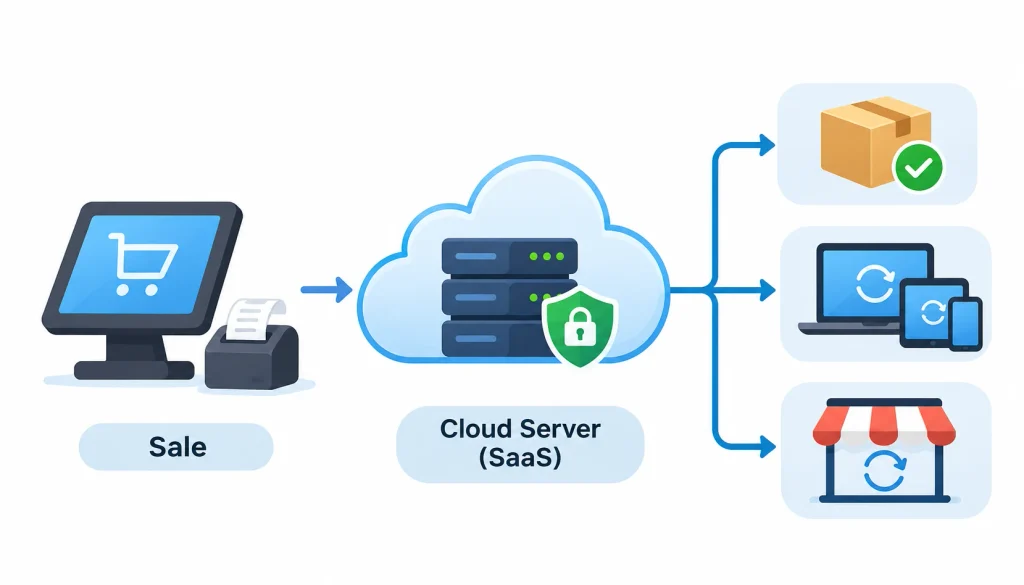
Every sale you ring up is sent to the provider’s servers in seconds. The servers store it, update your inventory, and sync every other device at the same time. This is the software-as-a-service (SaaS) model: the provider runs and patches the platform, and you log in.
2. What data does a POS system store?
Most systems hold customer contact details, sales history, inventory records, staff accounts, and business reports. They also connect to your payment processor.
Here is a point many guides skip: not every POS stores full card numbers. In a well-designed setup, card data goes straight to the payment processor, and your POS only keeps a reference to the payment. Ask your provider exactly what it stores.
3. How is it different from a traditional POS?
A traditional (on-premise) POS keeps the software and database on hardware you own and maintain. That means you handle the updates, the backups, and the physical protection of the machine. I compare the two side by side later in this guide.
Why Is Data Security Important for POS Systems?
Your POS sits at the crossroads of money, customer identity, and daily operations. That makes it an attractive target.
- Customer privacy. Contact details and purchase histories are personal. Exposed data damages trust fast.
- Payment fraud. Attackers go after card data because it is easy to sell. Small shops get hit too, often because they invest less in defenses. Stripe’s overview of POS malware makes the same point.
- Operational losses. A ransomware attack or crashed server can stop sales for days. You lose revenue and the records you need to run the business.
- Compliance and trust. Card brands and acquiring banks can find businesses that were not PCI DSS compliant at the time of a breach, according to Wikipedia’s PCI DSS entry.
8 Ways a Cloud-Based POS System Protects Your Business Data
Here are the eight protections that matter most, in plain English first and detail second.
- Encryption protects data in transit and at rest.
- Automatic backups reduce the risk of data loss.
- Multi-factor authentication blocks stolen passwords.
- Role-based access limits what each employee can see.
- Centralized updates close known vulnerabilities.
- Secure cloud infrastructure protects the servers.
- Tokenization and P2PE shield payment data.
- Monitoring and disaster recovery help you bounce back.
1. Encryption protects sensitive information
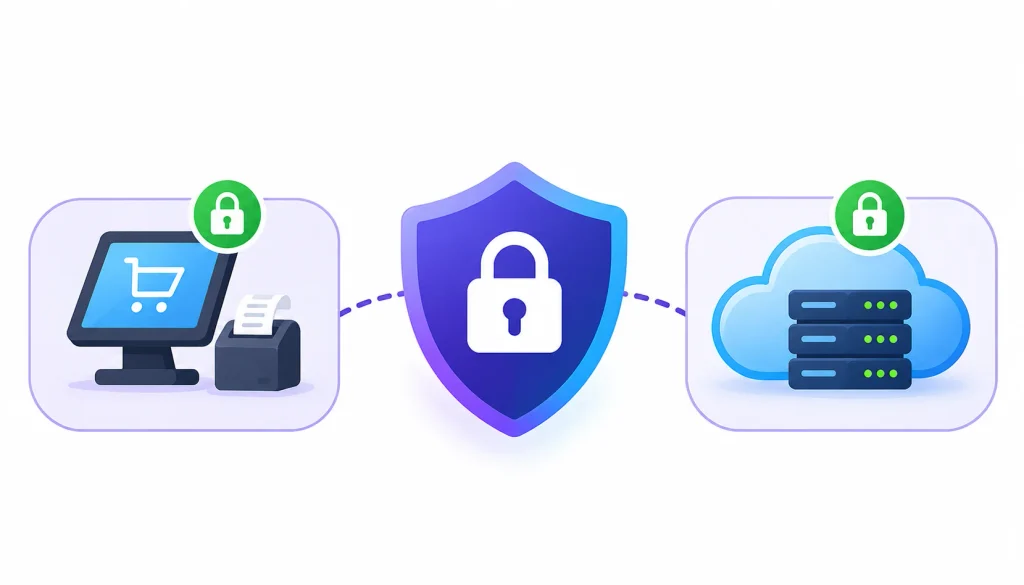
Encryption scrambles data so it is unreadable without the right key. A good cloud POS uses it in two places.
In transit means data moving between your terminal and the provider’s servers. This is normally protected with TLS, the same technology behind the padlock in your browser.
At rest means data sitting in storage. Strong algorithms such as AES-256 are common here, though you should confirm what your provider actually uses.
The weak point is often the keys, not the math. Ask how the provider stores and rotates encryption keys.
2. Automatic cloud backups reduce the risk of data loss
Imagine the server under your counter fails on a Saturday. With no recent backup, weeks of sales and stock records may be gone.
Cloud providers typically copy your data automatically and store it in more than one location. Choosing a reliable cloud storage solution also requires evaluating encryption, backup frequency, access controls, and data recovery capabilities to keep important business information protected. Two terms are worth knowing. RPO (recovery point objective) is how much recent data you can afford to lose. RTO (recovery time objective) is how long you can afford to be offline.
A backup only counts if it restores. Ask how often the provider tests recovery, and how long a full restore takes.
3. Multi-factor authentication stops stolen passwords from being enough
Multi-factor authentication (MFA) asks for a second proof of identity, such as a code from an authenticator app. A stolen password alone no longer opens the door.
This matters most for owner and manager accounts, because they can reach reports, refunds, and settings from anywhere. Switch MFA on for every admin login, even if it feels like a hassle.
4. Role-based access control limits what each employee can do
A cashier needs to ring up sales. They do not need to see profit reports or change tax settings.
Role-based access control lets you give each person only the permissions their job needs, often called least privilege. It also gives you a clean exit process: when someone leaves, you disable one account and their access ends.
Many small shops share a single manager login for years. When a staff member leaves, nobody knows who still has the password. Individual accounts and activity logs fix that.
5. Centralized security updates help close vulnerabilities
Outdated software is one of the most common ways attackers get in. On a local system, someone has to remember to install patches on every machine.
With a cloud POS, the provider updates the platform once, and every store gets the fix. For multi-store owners, that removes the risk of one forgetting till running old software.
6. Secure cloud infrastructure protects the servers
Reputable providers host your data in professional data centers with controlled physical access, redundant power, and network monitoring. Many build on large platforms such as AWS, Microsoft Azure, or Google Cloud.
Be careful with that last point. Hosting on a big cloud platform does not make a POS application secure on its own. The provider still has to configure and operate its own software safely.
7. Tokenization and P2PE strengthen payment security
Tokenization swaps a sensitive value, like a card number, for a harmless stand-in called a token. If someone steals the token, it has no use outside the tokenization system. Wikipedia’s tokenization entry covers the concept in more depth.
Point-to-point encryption (P2PE) encrypts card data inside the payment terminal, so it stays unreadable until it reaches a secure decryption environment. See the PCI Security Standards Council for how validated solutions are assessed.
The difference is simple. Encryption scrambles data and can be reversed with a key. Tokenization replaces data with a substitute that has no mathematical link to the original. Strong payment setups often use both.
A customer taps their card. With validated P2PE, the terminal encrypts the details immediately. Your POS software never handles the readable card number.
8. Monitoring and disaster recovery improve resilience
Good providers log activity and watch for odd behavior, such as logins from unusual places or repeated failed attempts. Audit logs also let you answer “who did what, and when” after an incident.
As a business owner, ask what happens when something goes wrong. A trustworthy provider has a written incident response plan and a disaster recovery plan with stated recovery targets.
How Does Cloud POS Protect Against Common Cybersecurity Threats?
Security features only matter if they stop real attacks. Here is how the controls above line up against the threats retailers actually face.
1. POS malware
Malware can sit on a till and capture data as it passes through. Cloud platforms reduce the risk with managed software, regular patching, and payment terminals that encrypt card data before the POS ever sees it. You still need to protect the devices in your store.
2. Ransomware
Ransomware locks your files and demands payment. The best defense is a clean backup the attacker cannot reach. Ask your provider whether backups are isolated from the main system, and whether a restore has been tested.
3. Phishing and credential theft
Scammers pose as support staff and ask for login codes. One report from a POS industry blog describes restaurant owners on Reddit reporting account takeovers and fake “support” calls in 2025. I could not verify those posts directly, so treat the account as a warning, not proof. The lesson holds anyway: MFA helps, and no real support agent should ask you to read out a one-time code.
4. Insider threats
Not every risk comes from outside. Role-based permissions, audit trails, and quick account removal limit what a careless or unhappy employee can do.
5. Unauthorized remote access
Remote access is useful, but it is also an open door. Strong authentication, session logs, and restrictions on who can log in from where all shrink that risk.
Is Cloud-Based POS More Secure Than Traditional POS?
Often yes, but it depends on how each system is run. The table shows typical patterns, not guarantees.
| Security factor | Cloud-based POS | Traditional on-premise POS |
| Data storage | Central provider infrastructure | Local servers or devices |
| Backups | Often automated | Often managed by you |
| Security updates | Deployed centrally | May need manual installs |
| Access control | Managed from one dashboard | Depends on local setup |
| Physical security | Professional data centers | Your premises |
| Disaster recovery | Can use separate locations | Depends on your own plan |
| Remote monitoring | Common | Depends on the system |
Where cloud POS has the edge
The main advantages are central management, automatic updates, managed infrastructure, and backup options that do not rely on one machine in your shop. Smaller retailers also get protections that would be expensive to build alone.
Where traditional POS struggles
Local systems depend on hardware you must keep patched, backed up, and physically safe. Settings drift between stores, and a fire, theft, or power surge can take the only copy of your data with it.
Can an on-premise POS be secure too?
Yes. A well-managed local system with tested backups, current patches, and tight access control can be very secure. Hosting location matters less than discipline. Cloud POS simply makes the disciplined path easier, especially for businesses without an IT team.
Does Cloud-Based POS Meet PCI DSS Security Requirements?
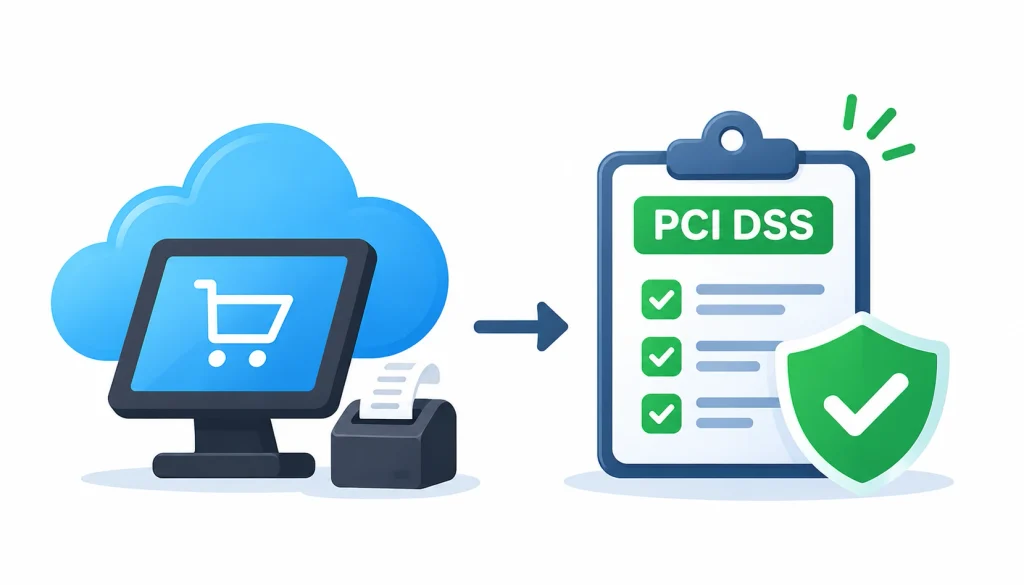
It can support compliance, but it does not deliver it automatically. Using cloud POS software does not make your business PCI DSS compliant on its own.
1. What is PCI DSS?
The Payment Card Industry Data Security Standard (PCI DSS) is a set of security rules for any organization that stores, processes, or transmits payment card data. It is run by the PCI Security Standards Council, which the major card brands formed in 2006. The card brands and acquiring banks enforce it, as Wikipedia’s PCI DSS article explains.
2. How does PCI DSS help protect payment information?
The standard covers secure network configuration, protection of stored and transmitted card data, access restrictions, strong authentication, logging and monitoring, and regular security testing. In short, it asks businesses to prove they handle card data carefully. The council’s own PCI DSS page has the current requirements.
3. What should you verify with your POS provider?
- Whether the provider holds PCI DSS validation for the parts of the service it runs.
- Which PCI duties stay with you, and which sit with your payment processor.
- Whether card terminals use a validated P2PE solution, if the provider says so.
- How terminals are set up, updated, and replaced.
Compliance is also not the same as complete security. It sets a baseline. You still need good habits on top of it.
Who Is Responsible for Cloud POS Security?
Both sides. This is called the shared responsibility model: the provider secures the platform, and you secure how you use it. CSO Online notes that most cloud security incidents trace back to customer error rather than vendor failure. See its explainer on the shared responsibility model.
1. What the provider handles
Cloud infrastructure, platform maintenance, security patches, hosting security, contracted backups, and the monitoring it has promised in its agreement.
2. What you handle
Employee accounts, strong passwords, MFA, device protection, store Wi-Fi, staff training, and regular reviews of who has access.
3. The shared responsibility model at a glance
| Security area | Provider’s role | Your role |
| Infrastructure | Protects servers and hosting | Chooses a vetted provider |
| Software updates | Updates the platform | Keeps devices and apps current |
| Encryption | Offers and runs it | Uses it correctly |
| User permissions | Supplies access controls | Assigns the right permissions |
| Backups | Runs contracted backups | Confirms recovery meets your needs |
| Network | Secures its own network | Secures store networks |
| Accounts | Supplies MFA and login tools | Uses strong passwords and MFA |
The exact split depends on the architecture and your contract, so read the service agreement. The UK’s National Cyber Security Centre publishes practical guidance on using cloud platforms securely.
How to Choose a Secure Cloud-Based POS System: 10-Point Checklist
Use this list when you compare providers. Ask for written answers, not sales promises. Before making a decision, businesses can compare cloud POS systems based on their features, pricing, inventory management capabilities, payment options, and security requirements.
- Check the provider’s security certifications, such as SOC 2 or ISO/IEC 27001, and ask for the reports.
- Confirm what encryption is used in transit and at rest.
- Get PCI DSS responsibilities in writing.
- Make sure MFA is available for every account type.
- Look for role-based permissions you can fine-tune.
- Review backup frequency and retention.
- Ask about disaster recovery, including RPO and RTO.
- Look for audit logs and suspicious-activity alerts.
- Review how third-party integrations connect and authenticate.
- Understand where data is stored, who owns it, and how you can export or delete it.
Questions to ask a POS provider before you buy
- Where is my data hosted?
- How is customer information encrypted?
- How often are backups taken, and how fast can you restore?
- Is MFA supported and enforced for admins?
- How do you notify customers of a security incident?
- Who is responsible for PCI DSS compliance, and for which parts?
- Can I export all of my data if I leave?
A provider that answers these clearly and in writing is usually a safer bet than one that answers with slogans.
Best Practices for Maintaining Cloud POS Data Security
Buying a secure system is step one. Keeping it secure is a habit.
1. Use strong passwords and MFA
Give every person their own login. Use a password manager if you can, and turn on MFA for all admin accounts.
2. Review employee access regularly
Once a quarter, check who has access and what they can do. Remove old accounts the same day someone leaves.
3. Keep devices and networks secure
Keep tablets, tills, and terminals updated. Run your payment devices on a separate, password-protected network, not your guest Wi-Fi.
4. Watch for suspicious activity
Read your login alerts and audit logs. Unexpected refunds, new admin users, or logins at odd hours deserve a quick look.
5. Test backups and recovery
Ask your provider for a restore test, or run one yourself on a sample. A backup you have never restored is only a hope.
6. Train your staff
Most attacks start with a person, not a machine. Teach your team to spot fake support calls and phishing messages, and to never share one-time codes.
Frequently Asked Questions
Is a cloud-based POS system secure?
It can be very secure when the provider uses encryption, backups, MFA, and monitoring, and when you manage accounts well. No system is risk-free. Security depends on both the provider’s setup and your own habits.
Can cloud-based POS systems be hacked?
Yes, any connected system can be targeted. Attackers often go after weak passwords, phishing victims, or unpatched devices rather than the cloud itself. MFA, least-privilege access, and staff training lower that risk considerably.
How does cloud POS protect customer information?
It encrypts data in transit and in storage, limits access by role, logs activity, and keeps backups. Good providers also store as little sensitive data as possible, such as using tokens instead of card numbers.
Does cloud POS encrypt payment data?
Reputable systems do, often with validated payment terminals using P2PE, so card details are encrypted at the device. Ask your provider which encryption and payment protections it uses, and get the answer in writing.
Is cloud POS safer than traditional POS software?
Often, because updates, backups, and infrastructure are managed centrally. A carefully maintained on-premise system can also be secure. The deciding factor is how well the system is maintained, not only where it runs.
What happens to POS data if the internet goes down?
Many systems have an offline mode that stores sales on the device and syncs them when the connection returns. Features vary, so ask how your provider handles offline payments and how that stored data is protected.
Final Thoughts
For most retailers and restaurants, yes, as long as you pick the provider carefully and run the system well. That is the honest version of why a cloud-based POS system guarantees data security: it does not promise perfection, but it gives you stronger, more consistent protection than most small businesses can build alone.
The pieces work together. Encryption protects data in motion and at rest. Backups let you recover. MFA and role-based access keep the wrong people out. Monitoring and a tested recovery plan help you respond when something goes wrong.
Start with the checklist above, ask your shortlisted providers for written answers, and switch on MFA the day you go live. If you are weighing options right now, a short call with a provider’s security team will tell you a lot about how seriously they take this.
