
Podcasting has evolved beyond recording conversations and publishing audio episodes. Many creators now produce video podcasts, interview shows, educational discussions, and live conversations that can be repurposed into content for YouTube, Instagram, TikTok, and other platforms.
However, producing a podcast involves several stages beyond recording. Editors need to synchronize camera angles, remove unnecessary pauses, improve voice quality, balance background music, add captions, and prepare shorter clips for social media. Managing all these tasks manually can take several hours, particularly when episodes involve multiple speakers and recording tracks.
AI-powered podcast editors are changing this process by automating repetitive editing tasks and making post-production more accessible. Some platforms focus on transcript-based editing, while others specialize in audio cleanup, multicamera synchronization, or creating social media highlights.
The right choice depends on whether you primarily produce audio podcasts, video interviews, or complete podcast episodes with multiple content formats.
Here are six AI podcast editors worth considering in 2026.
How We Selected These AI Podcast Editors
We considered the editing capabilities, AI automation, audio enhancement, video support, multicamera functionality, and content repurposing features of each platform.
We also looked at how much manual control creators retain after using AI features. A useful podcast editor should help reduce repetitive work without making it difficult to correct edits, adjust audio, or refine the final episode.
The list includes full podcast editing environments as well as specialized tools that handle important parts of audio post-production.
Best AI Podcast Editors at a Glance
| Tool | Best for | Main strength |
| Invideo Podcast Editor | Audio and video podcast editing | AI-assisted editing on a multitrack timeline |
| Descript | Transcript-based editing | Edit audio and video by editing text |
| Riverside | Remote podcast recording | Local recording and AI-assisted editing |
| Adobe Podcast | Audio enhancement | AI speech cleanup |
| Podcastle (now Async) | Recording and editing | Browser-based podcast production |
| Cleanvoice | Audio cleanup | Removing fillers, silences, and unwanted sounds |
1. Invideo Podcast Editor: AI Audio and Video Podcast Editing
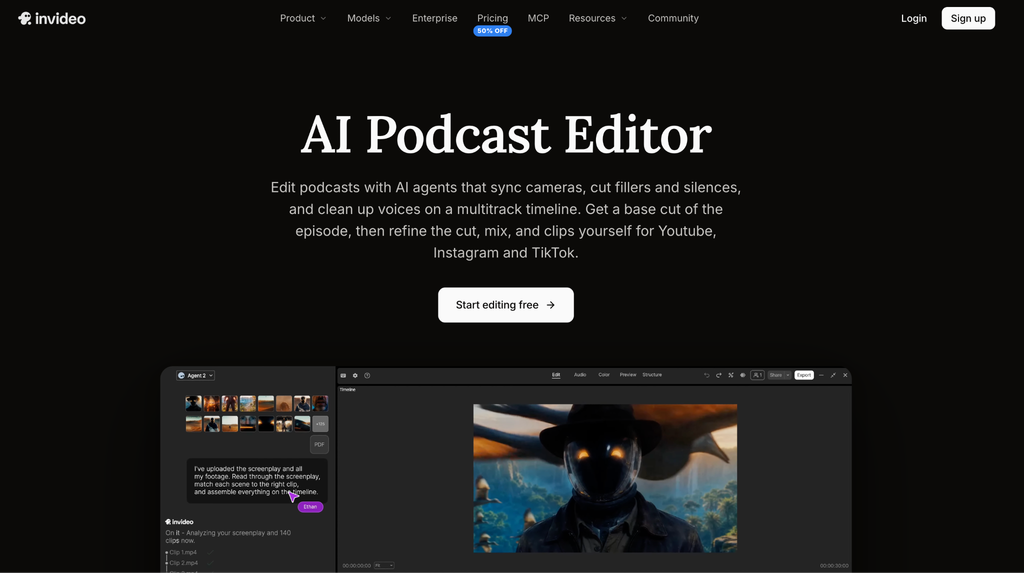
Invideo’s Podcast Editor combines AI editing agents with a professional multitrack timeline, helping creators manage different parts of podcast production within one editing environment. Instead of manually reviewing every recording, users can upload their podcast footage and microphone audio files, describe the edit they want, and let an AI agent assemble an editable first cut.
One of its useful capabilities is multicamera synchronization. The agent can align different camera recordings with a selected audio source and switch between camera angles based on who is speaking. It can also remove fillers, silences, and repeated lines while allowing creators to review and restore individual cuts whenever needed.
Audio editing is another important part of the platform. Creators can use voice isolation and noise reduction to clean speaker tracks, while automatic leveling helps balance different voices. Background music can also be lowered beneath speech, with loudness metering available to check audio levels before export.
For video podcasters, the editor can create social media highlights based on requested topics, clip lengths, and formats. It also supports editable captions, guest name titles, topic cards, and B-roll placement. Once the AI agent completes the initial work, creators can adjust camera switches, trims, and audio levels directly on the timeline.
The broader invideo editor environment also provides professional editing controls, including color grading, keyframes, and transitions. This makes it useful for creators who want to continue refining their podcast footage rather than relying only on automated edits.
Key features:
- AI-assisted episode assembly
- Multicamera synchronization
- Filler and silence removal
- Voice isolation and audio leveling
- Editable captions and chapter markers
- Social media highlight creation
- Manual multitrack timeline editing
Best for: Podcasters, interview creators, and video production teams that want AI assistance with editing full episodes and preparing social media clips.
2. Descript: Best for Transcript-Based Podcast Editing
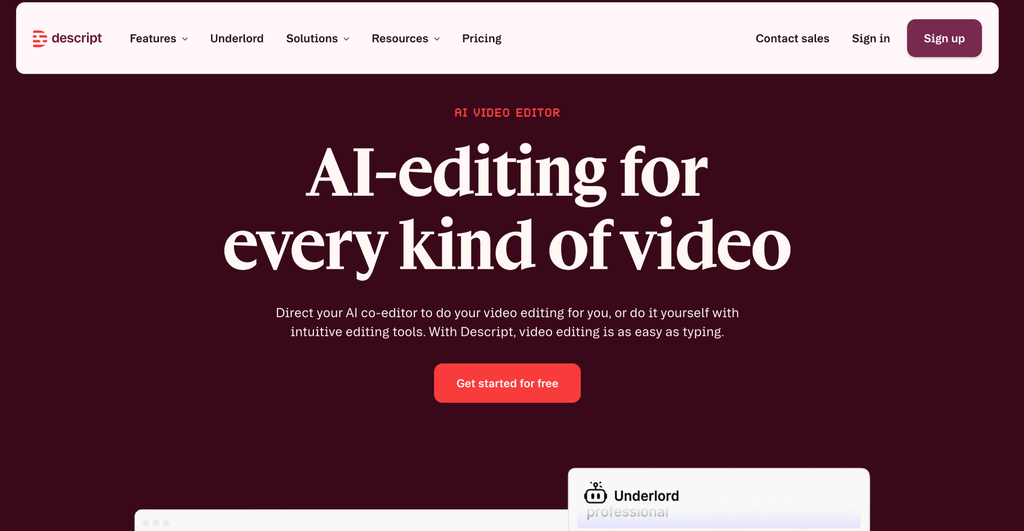
Descript offers a different approach to podcast editing by allowing creators to edit audio and video through text transcripts. After uploading a recording, the platform generates a transcript that users can modify like a document. Removing a sentence from the transcript also removes the corresponding section from the recording.
Its AI features include filler-word removal, silence editing, and Studio Sound, which helps improve voice clarity by reducing background noise and echo. Descript also offers Underlord, its AI co-editor, which can perform editing tasks based on instructions and help generate shorter clips from longer recordings.
This approach is particularly useful for interview-based podcasts, educational discussions, webinars, and talking-head videos where the spoken conversation is the main focus. Creators can search transcripts, locate specific statements, remove unwanted sections, and prepare content without constantly scrubbing through the timeline.
Descript also supports video editing, captions, and social content creation. However, creators who prefer working primarily through a traditional multitrack timeline may need time to adjust to its transcript-first approach.
Key features:
- Transcript-based audio and video editing
- AI filler-word removal
- Studio Sound audio enhancement
- AI-assisted clip creation
- Captions and transcription
- AI co-editor through Underlord
Best for: Podcasters, educators, and interview creators who want to edit spoken content directly through transcripts.
3. Riverside: Best for Remote Podcast Recording and Editing

Riverside is designed for creators who record podcasts and interviews with remote guests. Its main strength is local recording, which captures each participant’s audio and video on their own device rather than relying entirely on the quality of the internet connection during the conversation.
This approach helps preserve recording quality even when participants experience connection problems. Once recording is complete, creators can use its editing and AI-assisted features to prepare episodes, generate transcripts, and create shorter content from longer conversations.
Riverside also offers Magic Clips, which helps identify interesting moments in recordings and turn them into short social media videos. Its editing environment supports text-based changes, captions, and other content preparation tasks.
For podcast creators who regularly interview guests from different locations, having recording and post-production capabilities in one platform can simplify the production process. However, its primary strength is remote recording, so creators looking for extensive manual audio mixing or advanced video finishing may still need additional editing software.
Key features:
- Local audio and video recording
- Separate participant tracks
- Automatic transcription
- AI-assisted social clip creation
- Captions and text-based editing
- Remote guest recording
Best for: Interview podcasters, remote production teams, and creators who regularly record conversations with guests online.
4. Adobe Podcast: Best for AI Audio Enhancement
Adobe Podcast is a browser-based platform focused on improving spoken audio and making podcast production more accessible. One of its best-known features is Enhance Speech, which uses AI to reduce background noise and improve voice clarity in recordings.
The platform also includes Podcast Studio, where creators can record, edit, and enhance audio and video content. Its transcript-based editing allows users to make changes to recordings by working with the text rather than manually locating every section in the audio.
Adobe has also expanded its audio enhancement capabilities with options to adjust speech, music, and ambience separately in supported workflows. This gives creators more control when cleaning recordings that contain background noise or distracting music.
Adobe Podcast is particularly useful when voice quality is the main concern. For example, creators recording interviews in untreated rooms or using less-than-ideal microphones can improve dialogue clarity without spending hours on manual audio processing.
However, it is important to distinguish Adobe Podcast from a complete professional video editing application. Creators working on complex multicamera videos or detailed visual timelines may need another editor for the final production.
Key features:
- AI speech enhancement
- Background noise and echo reduction
- Browser-based recording and editing
- Transcript-based editing
- Audio and video file support
- Separate recording tracks with supported plans
Best for: Audio podcasters, interview creators, and video producers who need cleaner dialogue and accessible audio editing.
5. Podcastle (Now Async): Best for Browser-Based Podcast Production
Podcastle, now operating under the Async name, provides a browser-based environment for recording and editing podcasts. It combines recording capabilities with audio enhancement and editing features, making it useful for creators who want to manage several production tasks without installing complex desktop software.
Its AI-assisted features include Magic Dust for improving audio quality, noise reduction, transcription, and tools for creating spoken content. The platform also supports recording remote interviews and working with audio and video content.
For independent podcasters and small teams, this combination can simplify the process of recording conversations, cleaning audio, and preparing episodes for publishing. Its accessible interface also makes it suitable for creators who are still learning podcast production.
However, its feature availability and usage limits depend on the current plan. Creators who need detailed professional audio mixing or more advanced multicamera editing should check whether the available controls meet their production requirements.
Key features:
- Browser-based podcast recording
- Audio and video editing
- AI audio enhancement through Magic Dust
- Noise reduction
- Transcription
- AI voice and content tools
Best for: Independent podcasters and small teams looking for an accessible recording and editing environment.
6. Cleanvoice: Best for Removing Fillers and Unwanted Audio
Cleanvoice is an AI-powered audio and video editing platform designed to reduce the manual work involved in cleaning podcast recordings. It focuses on identifying and removing unwanted elements such as filler words, mouth sounds, breathing, stutters, long pauses, and background noise.
Creators can upload their recordings and let the platform process the audio automatically. It can also generate transcripts, summarize podcast episodes, and provide social content suggestions, making it useful for creators who want to prepare recordings for further editing and distribution.
Its main advantage is that it focuses on repetitive audio cleanup tasks. For example, an interview containing frequent filler words and long pauses can be processed without manually listening to every section and making individual cuts.
However, Cleanvoice is more specialized than a complete multitrack podcast production environment. Creators who need to synchronize multiple camera angles, arrange complex video sequences, or perform detailed visual editing may need to combine it with a separate editor.
Key features:
- Filler-word removal
- Silence and pause detection
- Mouth sound and breath removal
- Background noise reduction
- Audio transcription
- Podcast summaries and social content suggestions
Best for: Audio podcasters and editors who want to automate repetitive cleanup before completing the final edit.
How to Choose the Right AI Podcast Editor
The best podcast editor depends on the type of show you produce and which part of production takes the most time.
If you record video podcasts with multiple cameras, look for an editor that supports camera synchronization, multitrack editing, and social clip creation. If your episodes are primarily audio-based, transcription, filler removal, and voice enhancement may be more important.
Creators who work with interviews and spoken content may prefer transcript-based editing, while teams producing complete video podcasts may benefit from an editor that combines AI assistance with a professional timeline.
It is also worth considering whether the platform supports exporting separate audio tracks, editable projects, and social media versions. These options can make a difference when your podcast needs to be reused across multiple platforms.
Final Thoughts
AI podcast editors are making audio and video production more manageable by reducing the time spent on repetitive post-production tasks. From cleaning dialogue and removing filler words to synchronizing camera angles and creating social media highlights, these tools support different parts of the podcast production process.
Each platform has a different focus. Descript is useful for transcript-based editing, Riverside is strong for remote recording, Adobe Podcast focuses on speech enhancement, and Cleanvoice specializes in audio cleanup.
For creators who want to manage both audio and video podcast editing within an editable timeline, invideo’s podcast editor offers a combination of AI-assisted assembly, multicamera synchronization, audio cleanup, and social clip creation. Its approach allows creators to delegate repetitive editing work while continuing to refine the episode manually.
The right choice ultimately depends on your production requirements, the amount of automation you need, and how much control you want over the finished podcast.
Frequently Asked Questions
1. What is the best AI podcast editor in 2026?
The best option depends on your production needs. Invideo’s podcast editor is worth considering for AI-assisted audio and video editing with multicamera synchronization and timeline control. Descript is useful for transcript-based editing, while Riverside is particularly suited to remote podcast recording.
2. Can AI automatically edit an entire podcast episode?
Some AI podcast editors can assemble an initial cut, remove filler words and silences, and organize footage based on instructions. However, creators should review the result and make further adjustments to preserve context, pacing, and audio quality.
3. Which AI podcast editor is best for video podcasts?
Invideo’s podcast editor is a relevant option for video podcasts because it supports multicamera synchronization, speaker-based camera switching, audio cleanup, editable captions, and social highlight creation within a multitrack timeline.
4. Can AI podcast editors remove filler words and long pauses?
Yes. Several platforms, including invideo podcast editor, Descript, and Cleanvoice, provide features for detecting and removing unnecessary fillers or silences. The level of automation and manual control varies between products.
5. Can I create social media clips from a full podcast using AI?
Yes. Some podcast editors can identify interesting moments and prepare shorter clips for platforms such as YouTube, Instagram, and TikTok. Creators can specify topics, preferred clip lengths, and formats, depending on the platform’s capabilities.
6. What is the difference between AI podcast editing and traditional podcast editing?
Traditional editing requires creators to manually review recordings, make cuts, clean audio, and arrange different tracks. AI podcast editing automates or assists with some of these operations, allowing creators to focus more on reviewing content and refining the final episode.
7. Can AI podcast editors improve audio quality?
Yes. AI-powered features can reduce background noise, improve voice clarity, remove unwanted sounds, and balance speaker levels. However, the results depend on the original recording quality and the capabilities of the particular platform.
8. Are AI podcast editors suitable for beginners?
Yes. Many AI podcast editors offer browser-based interfaces and automated features that make common editing tasks easier to manage. Beginners can start with basic recording cleanup and gradually explore transcription, multicamera editing, and content repurposing.
