AI video editors are changing how creators approach post-production. Instead of handling every cut, caption, transition, and adjustment manually, editors can now rely on AI to speed up repetitive tasks and make it easier to turn raw footage into polished content.
The best tools are not necessarily the ones with the most AI features. A good AI video editor should combine useful automation with enough creative control to let users shape the final result. Some focus on timeline editing, others are built around text-based workflows, and some combine AI generation with traditional editing.
Here are five AI video editors worth considering in 2026, each suited to a different type of workflow.
1. Invideo Editor
Best for: Creators and teams that want AI-assisted timeline editing.
Invideo editor combines a professional timeline with AI editing agents that can take on repetitive parts of the editing process. Creators can bring in raw footage and give the agents instructions for tasks such as reviewing footage, selecting usable takes, removing unnecessary sections, and assembling a starting cut.
The resulting timeline remains editable, so users can inspect the AI-assisted changes, replace shots, adjust timing, and refine the sequence manually. This makes it useful for interviews, podcasts, documentaries, social content, and projects involving large amounts of raw footage.
Key features: AI editing agents, editable timeline, footage review, take selection, first-cut assembly, timeline editing, collaboration
Pros: Reduces repetitive editing work; speeds up first cuts; keeps AI changes editable; useful for footage-heavy projects
Cons: Less focused on specialized professional post-production than some desktop editors; users may need time to adapt to AI-assisted workflows
Pricing: Free editing access with paid plans available for additional usage and capabilities
2. Adobe Premiere Pro
Best for: Professional editors and production teams that need detailed editing control.
Adobe Premiere Pro combines a traditional professional timeline with AI-powered features designed to speed up specific editing tasks. Its AI tools can assist with transcription, text-based editing, audio enhancement, masking, and other parts of post-production.
Premiere Pro is particularly strong for editors working on complex productions because it offers extensive control over video, audio, effects, color, and project organization. It also connects with other Adobe applications and Frame.io for broader creative and review workflows.
Pros: Extensive professional controls; strong Adobe ecosystem; advanced editing and finishing capabilities; regular feature updates
Cons: Steeper learning curve; desktop-focused workflow; subscription required for full access
Pricing: Paid subscription plans, with Premiere available separately or through eligible Creative Cloud plans
3. DaVinci Resolve
Best for: Filmmakers and editors who need editing, color, effects, and audio in one application.
DaVinci Resolve brings several stages of post-production into a single desktop application. Its AI-powered features can assist with tasks such as object isolation, tracking, transcription, audio processing, and other editing operations.
The software is particularly well known for its color grading capabilities, but it also includes dedicated environments for editing, visual effects, motion graphics, and audio post-production. This makes it suitable for projects that require detailed finishing as well as standard editing.
Pros: Powerful professional toolkit; excellent color tools; strong audio and VFX capabilities; capable free version
Cons: Large feature set can be overwhelming; demanding projects require capable hardware; some advanced features require the paid Studio version
Pricing: Free version available; DaVinci Resolve Studio is available as a paid upgrade
4. Descript
Best for: Podcasts, interviews, tutorials, and other dialogue-heavy videos.
Descript approaches video editing through text. The platform transcribes recordings so creators can edit the video by changing the transcript. Removing a section of text can also remove the corresponding portion of the video, making dialogue-heavy editing faster.
Its AI features can help with tasks such as removing filler words, improving audio, generating captions, and creating clips from longer recordings. The workflow is particularly convenient for creators who spend more time editing spoken content than complex visual sequences.
Pros: Simple approach to dialogue editing; fast transcription-based workflow; useful for podcasts and interviews; accessible to beginners
Cons: Less suited to complex cinematic editing; text-based workflow may not fit every project; advanced visual work may require another editor
Pricing: Free plan available with paid plans for additional features and usage
5. CapCut
Best for: Social media creators producing short-form videos quickly.
CapCut combines a timeline editor with a wide range of AI-powered and automated features. Creators can generate captions, remove backgrounds, apply effects, enhance footage, and prepare videos for social platforms without needing advanced editing experience.
Its workflow is particularly suited to short-form content for platforms such as TikTok, Instagram, and YouTube. Templates and automated features make it easy to create visually engaging videos quickly, although professional editors may find its controls less extensive than those of dedicated desktop applications.
Key features: AI captions, background removal, effects, templates, text-to-speech, video enhancement, social formats
Pros: Easy to learn; strong short-form workflow; large collection of templates and effects; useful AI automation
Cons: Less suited to advanced post-production; some features vary by region or plan; template-driven workflows may offer less creative control
Pricing: Free version available with paid features and plans
How We Evaluated These AI Video Editors
The tools were compared based on how effectively they combine AI assistance with practical editing control. Rather than focusing only on the number of AI features, the comparison considers how each editor helps creators complete real production tasks.
Key factors include AI-assisted editing, timeline control, footage organization, ease of use, professional capabilities, collaboration, and suitability for different types of content.
This matters because an editor designed for a filmmaker may not be the best choice for someone producing daily social media videos. The best option depends on where AI can save the most time in your particular workflow.
Which AI Video Editor Should You Choose?
There is no single AI video editor that works best for everyone.
Choose invideo editor if you want AI agents to handle repetitive timeline work and help turn raw footage into an editable starting cut.
Choose Adobe Premiere Pro if you need detailed professional editing and already work within the Adobe ecosystem.
Choose DaVinci Resolve if advanced color grading, audio, visual effects, and professional finishing are important to your workflow.
Choose Descript if most of your editing involves interviews, podcasts, tutorials, or other spoken content.
Choose CapCut if your priority is creating short-form social content quickly with accessible AI features and templates.
Final Thoughts
AI video editing is moving beyond simple automation. The newer generation of tools can help creators find footage, organize projects, remove repetitive sections, edit dialogue, enhance visuals, and build starting sequences faster.
The right choice depends on how much work you want AI to handle and how much manual control you need. For creators working with large amounts of footage, AI-assisted timeline workflows can remove much of the repetitive work that comes before creative refinement. For professional post-production, established editors such as Premiere Pro and DaVinci Resolve still offer deeper control across specialized areas.
The most useful AI video editor is ultimately the one that fits naturally into your workflow and gives you more time to focus on the story, rather than the mechanics of editing.
Video editing can involve hundreds or even thousands of individual decisions. Editors may need to adjust timing, remove unwanted frames, clean up footage, track objects, fix visual issues, and make precise changes across a timeline. For detailed work, frame-by-frame editing gives editors complete control, but it can also be one of the most time-consuming parts of post-production.
AI tools are changing this process by handling many repetitive adjustments automatically. Instead of manually inspecting every frame for certain tasks, editors can describe what needs to change and let AI analyze the footage, identify relevant frames, and apply adjustments across a sequence.
This does not remove the need for detailed editing. Rather, it reduces the amount of manual work required to reach a clean starting point, allowing editors to spend more time on creative decisions.
What Is Frame-by-Frame Editing?
Frame-by-frame editing means making changes at the individual frame level rather than applying an adjustment to an entire clip.
Editors may work frame by frame when they need to:
Remove a specific visual element
Correct a brief visual error
Track an object
Adjust a transition
Fix timing
Refine animation
Clean up individual frames
This level of precision is useful when a small change can affect how an entire sequence looks. However, manually checking hundreds of frames can take considerable time.
Why Is Manual Frame-by-Frame Editing Time-Consuming?
A video contains many individual images played in rapid succession. A five-minute video at 30 frames per second contains 9,000 frames.
An editor does not necessarily need to adjust every one of those frames manually, but some tasks require inspecting a large number of them. Repeating the same operation across multiple frames can quickly become tedious.
For example, removing a moving object from a shot may require the editor to track its position over time. Correcting a visual issue across several clips can involve similar repetitive adjustments.
AI can reduce this workload by recognizing patterns across frames instead of requiring the editor to treat each frame as a separate task.
AI Can Detect Objects Across Multiple Frames
One of the most useful applications of AI in video editing is object detection and tracking.
Instead of manually identifying an object in every frame, AI can recognize the object and follow its movement through a sequence. This can help with tasks such as applying effects, blurring specific elements, replacing backgrounds, or isolating subjects.
The editor can then review the tracking result and correct any areas where the AI loses accuracy.
This approach is much faster than manually selecting the same object frame by frame.
AI-Assisted Object Removal
Removing an unwanted object from a video traditionally requires significant manual work. If the object moves through the scene, the editor may need to adjust a mask or selection repeatedly as its position changes.
AI-powered removal tools can analyze the surrounding frames and determine how the background should appear after the object is removed.
The editor can provide the initial selection, and the AI can propagate the change across the relevant portion of the video.
This is particularly useful for removing temporary distractions, unwanted objects, or other elements that appear throughout a shot.
AI Can Automate Rotoscoping Tasks
Rotoscoping involves isolating subjects or objects from their backgrounds. It can be used for compositing, background replacement, visual effects, and other creative work.
Traditional rotoscoping can require an editor or VFX artist to create and adjust masks across many frames. AI-powered segmentation can identify a person or object and track its boundaries through the shot.
The result may still need manual refinement, particularly around hair, transparent objects, fast movement, or complicated backgrounds. However, AI can create a much faster starting point than drawing every mask manually.
AI Can Help With Motion Tracking
Motion tracking is another task that often involves detailed frame-level work.
An editor may need to attach text, graphics, effects, or other elements to a moving object. Traditionally, tracking points are created and adjusted across the timeline to keep the added element aligned.
AI can identify movement patterns and follow objects automatically. This allows editors to spend less time adjusting individual frames and more time deciding what should be added to the shot.
AI-Assisted Frame Interpolation
AI can also generate intermediate frames between existing frames.
This is useful when creators want to create smoother slow-motion footage or change the apparent frame rate of a clip. Instead of manually creating intermediate frames, an AI model can analyze the movement between existing frames and generate new ones.
The technology can be helpful when footage needs to be slowed down without making the motion appear excessively choppy.
However, generated frames can sometimes contain visual artifacts, especially with complex movement, fast action, or overlapping objects. Editors should therefore review the result rather than assuming every generated frame is perfect.
AI Can Find and Remove Unwanted Sections
Not all frame-level editing involves visual effects. AI can also reduce the need for manual timeline cleanup.
For example, AI can identify long pauses, repeated phrases, filler words, mistakes, or sections of silence in dialogue-heavy footage. Instead of manually searching through the timeline and cutting each section, editors can start with an automated cleanup pass.
Invideo editor applies this broader approach to timeline editing by combining AI editing agents with a traditional editable timeline. Its agents can review raw footage, identify usable takes, remove unnecessary material, and create a starting cut that editors can then refine.
This is useful because editors often spend considerable time preparing footage before they even reach the detailed creative editing stage.
AI Can Apply Changes Across a Sequence
Another benefit of AI is that an instruction can sometimes be applied to an entire sequence rather than repeated manually.
For example, an editor may need to remove a particular type of unwanted element across several clips. AI can analyze the footage and apply the requested change wherever it detects the relevant element.
This does not mean every result will be perfect. Complex footage may require corrections, and editors still need to check the output. But the initial pass can significantly reduce repetitive work.
How AI Changes the Editor’s Workflow
AI does not necessarily remove detailed editing from the workflow. Instead, it changes when and how editors perform it.
A traditional workflow might look like:
Find the problem → inspect frames → create a mask → adjust the mask → repeat → review
An AI-assisted workflow can look more like:
Identify the problem → describe or select it → let AI process the sequence → review → correct specific areas
The difference is important. Editors spend less time performing repetitive operations and more time reviewing the results and making creative decisions. This shift is also visible in tools such as invideo Editor, where AI editing agents can take on broader timeline tasks rather than requiring creators to perform every operation manually. The editor can provide direction, review the resulting sequence, and then make precise changes where creative judgment is needed.
Why Human Review Still Matters
AI tools are not equally reliable in every situation. Fast-moving subjects, reflections, transparent objects, complicated backgrounds, motion blur, and unusual camera movements can all create problems.
An AI-generated result may look correct for most of a sequence but contain a few frames where the subject’s edges break down or an object is incorrectly identified.
This is why human review remains important. AI can handle the initial work, but editors need to check the result and correct areas where precision matters.
How AI Tools Improve Editing Efficiency
The biggest benefit of AI-assisted frame editing is not simply that it makes individual operations faster. It reduces the amount of repetitive attention required from the editor.
Instead of spending hours making small adjustments across hundreds of frames, editors can focus on:
Deciding what the audience should see
Improving pacing
Shaping visual style
Refining performances
Checking continuity
Making creative choices
The technology effectively moves the editor’s role further away from repetitive execution and toward creative direction and quality control.
Where Manual Editing Still Makes Sense
There are situations where frame-by-frame editing remains the better option.
Highly detailed visual effects, complex compositing, animation, precision retouching, and difficult tracking shots may require direct manual control. Professional editors and VFX artists may also prefer manual adjustments when a specific visual result cannot be reliably described to an AI system.
The best workflow is often a combination of both approaches. AI can handle the first pass, and the editor can take over when precision or creative judgment is required. This balance is central to the workflow in invideo Editor as well. AI can handle repetitive editing and timeline preparation, but creators can still take over for detailed adjustments when a specific frame, cut, or visual decision requires closer control.
The Future of Frame-Level Video Editing
AI is gradually changing frame-level editing from a process dominated by repetitive manual adjustments into one where editors can delegate more of the technical work.
Object tracking, segmentation, removal, interpolation, cleanup, and timeline organization can increasingly be assisted by AI. As these systems become better at understanding motion and visual context, they should require fewer manual corrections.
The role of the editor will still matter. AI can identify patterns and execute instructions quickly, but creative decisions about timing, storytelling, visual style, and quality remain human responsibilities.
For creators working with large amounts of footage, the biggest advantage is simple: less time spent controlling individual frames and more time spent shaping the finished video.
If you’ve searched “work from home business ideas,” you’ve probably already found a dozen lists. What most of them skip is the harder question: which one is actually right for you, what it costs to start, and how long before you land your first paying customer.
This guide covers 50 work-from-home business ideas, organized by cost, skill level, and business model. More importantly, it gives you a framework for choosing one instead of leaving you with a bookmark you’ll never open again.
Quick answers, if you’re short on time:
Best for beginners: virtual assistant work
Lowest startup cost: freelance writing
Best long-term scalability: digital products
Best for hands-on creatives: graphic design or content creation
Best if you want to sell physical products: e-commerce or print-on-demand
Best if you already have deep experience: consulting
What Counts as a Work-From-Home Business?
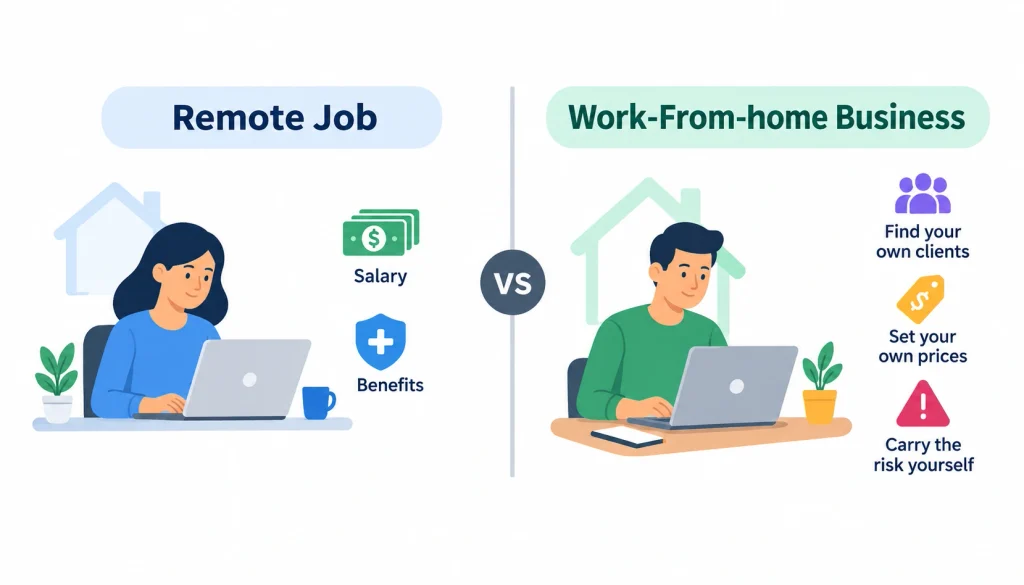
A work-from-home business is one you own and run yourself from your house, rather than a remote job where an employer pays you a salary. The distinction matters. A remote job gives you a paycheck and (usually) benefits. A home business means you find your own clients, set your own prices, and carry the risk yourself.
A side hustle is really just a home business run part-time, alongside another job. Plenty of the ideas below started that way before becoming someone’s main income. And “online” doesn’t mean the same thing as “work from home”, a home bakery or a pet-sitting service is run from your house but depends on local customers, not the internet.
Best Work-From-Home Business Ideas at a Glance
Before you scroll through 50 options, here’s a shortcut. This table compares the broad categories on the factors that actually determine whether you’ll stick with one.
Business type
Startup cost
Skill level
Time to first customer
Scalability
Freelance writing
Under $100
Beginner to intermediate
Days to weeks
Medium
Virtual assistant
Under $100
Beginner
Days to weeks
Medium
Graphic/web design
$100–$500
Intermediate
Weeks
Medium
Online tutoring
Under $100
Intermediate
Days to weeks
Medium
Bookkeeping
$100–$500
Intermediate
Weeks to months
Medium
Consulting
Varies
Advanced
Weeks
Medium to high
Digital products/courses
$100–$500
Intermediate
1–3 months
Very high
Print-on-demand
Under $100
Beginner
Weeks
High
Handmade products
$100–$1,000
Beginner to intermediate
Weeks
Medium
Local services (cleaning, pet care)
Under $500
Beginner
Days to weeks
Low to medium
Costs and timelines are typical ranges, not guarantees — your actual numbers depend on your market, your pricing, and how much time you can put in each week.
Low-Cost Service Businesses You Can Start From Home
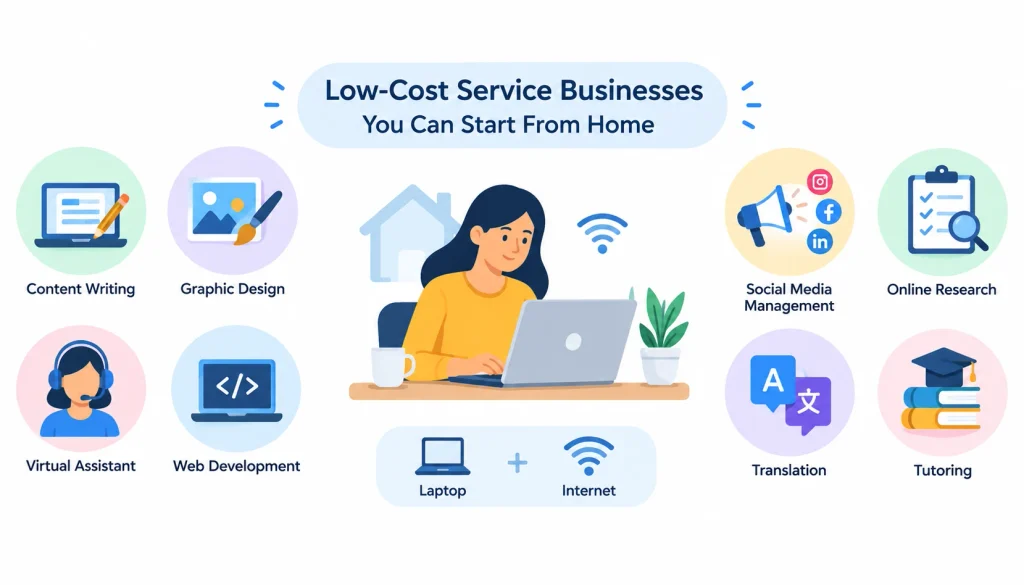
These lean on skills you already have, or can learn fairly quickly. Most require nothing beyond a laptop and internet connection.
1. Freelance writing. You sell articles, blog posts, or copy to businesses that need content but don’t want to hire in-house. A portfolio of three to five sample pieces matters more than a degree. New writers typically find their first paying gig through freelance platforms like Upwork, then move to direct outreach once they have testimonials.
2. Virtual assistant services. You handle email, scheduling, data entry, or customer support for busy business owners. This is one of the easiest entry points because clients care more about reliability than credentials. Many VAs start on retainer with a single client and add more as they build capacity.
3. Social media management. You plan, create, and post content for small businesses that don’t have time to run their own accounts. Expect to show a client results, not just activity — engagement and follower growth are what get contracts renewed.
4. Online tutoring. You teach a subject you know well, from math to a foreign language, over video call. Platforms like iTalki connect language tutors with students directly, and demand tends to spike around exam seasons.
5. Bookkeeping. You manage a small business’s day-to-day finances using software like QuickBooks or Wave. This one rewards accuracy and discretion since you’re handling someone’s money. A basic bookkeeping certificate can help you land your first few clients faster.
6. Graphic design. You create logos, social media graphics, or marketing materials for businesses and creators. A tight portfolio in one style beats a scattered one — clients hire designers whose past work already looks like what they want.
7. Web design. You build and maintain websites, often on WordPress or Shopify, for small businesses that don’t have technical staff. Offering ongoing maintenance as a monthly retainer, not just one-off builds, is where the real recurring income sits.
8. SEO consulting. You help businesses rank higher in search results through content, technical fixes, and link building. UnderstandingSEO for business can help you develop a stronger service offering and explain the value of SEO to potential clients.
9. Translation services. You convert written or spoken content between languages for businesses, publishers, or individuals. Fluency alone isn’t enough — clients also want subject-matter familiarity, whether that’s legal, medical, or marketing content.
10. Video editing. You cut and polish footage for YouTubers, businesses, or podcasters. Turnaround speed is often the deciding factor for repeat clients, since creators are usually working against a publishing schedule.
11. Voice-over work. You record narration, ads, or character voices for clients who find you through casting platforms or direct outreach. A decent home setup (a quiet room and a good microphone) matters more than expensive studio gear when you’re starting out.
12. Career coaching. You help clients with resumes, interview prep, or career transitions, usually over video calls. Credibility here often comes from your own career background, so lead with that experience when marketing yourself.
13. Business consulting. You advise companies on strategy, operations, or a specific area where you have real expertise. This is the one idea on this list where “no experience” genuinely doesn’t work — clients are paying for judgment built on a track record.
Online Business Ideas You Can Run Entirely From Home
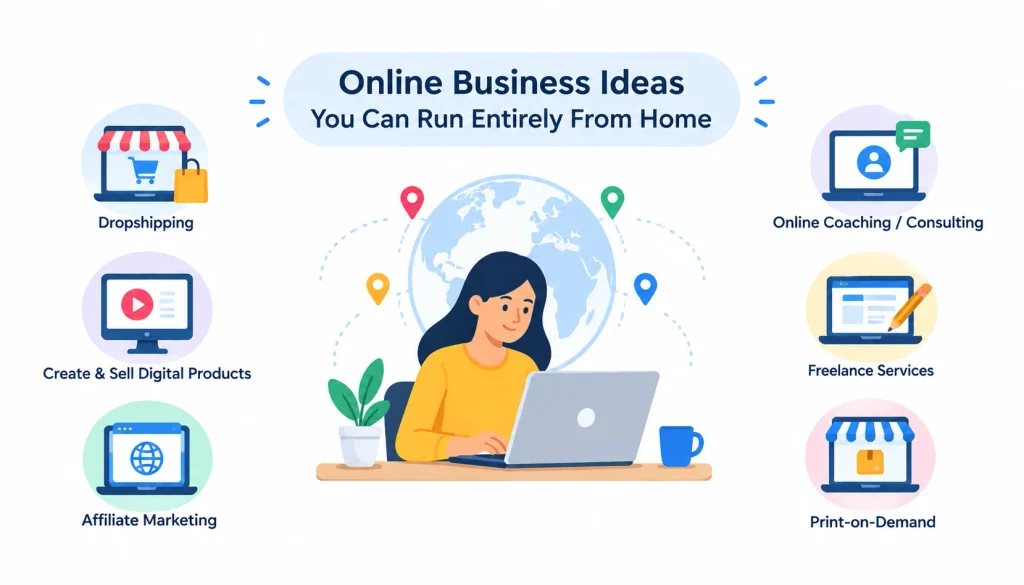
These businesses live mostly or entirely online, which means your customer base isn’t limited by geography.
1. Affiliate marketing. You recommend products through content and earn a commission on resulting sales. It rarely pays off quickly, building the traffic and trust needed to convert readers usually takes months of consistent content.
2. Blogging. You publish articles around a specific topic and monetize through ads, affiliate links, or your own products. Think of it less as a business on its own and more as a foundation other income streams get built on top of.
3. YouTube channel. You create video content and earn through ads, sponsorships, or product sales. Consistency beats production quality in the early stages — channels that post on a schedule tend to outgrow ones that wait for the “perfect” video.
4. Podcasting. You produce audio content and monetize through sponsorships, listener support, or by using the show to promote another business. Most podcasts take a year or more to build a monetizable audience, so treat it as a long game.
5. Online courses. You package your expertise into a paid course, hosted on a platform like Teachable or Thinkific. This has one of the higher ceilings on this list, but it also demands real upfront work to validate that people will actually pay before you build it.
6. Digital products. Templates, printables, spreadsheets, or simple tools you build once and sell repeatedly. Margins are strong because there’s no per-unit cost, but you still need an audience or marketing channel to find buyers.
7. Membership or subscription community. You charge a recurring fee for ongoing access to content, coaching, or a community you run. This works best once you already have an audience — it’s hard to launch cold.
8. Newsletter business. You build a paid or ad-supported newsletter around a niche topic. This has grown quickly as a category over the past few years, largely because it’s cheaper to start than a full media outlet and easier to monetize directly through subscriptions.
Product-Based Businesses You Can Run From Home
These involve making or sourcing physical goods, so factor in supplies, storage, and shipping.
1. Print-on-demand. You design graphics that get printed on shirts, mugs, or other products only after someone orders, so you never hold inventory. Margins per item are thin, which means volume and design quality both matter.
2. Handmade products. You make and sell items like candles, jewelry, or home decor, often through Etsy or your own online store. Pricing is the most common early mistake — new sellers routinely underprice their time.
3. Vintage or thrift reselling. You source secondhand items and resell them at a markup through platforms like eBay or Poshmark. This rewards people who genuinely enjoy hunting for finds, since sourcing takes real time.
4. Subscription boxes. You curate a themed box of products that customers receive on a recurring basis. Customer retention is the whole game here — acquiring a subscriber is expensive, so keeping them matters more than the first sale.
5. Dropshipping. You sell products online without holding inventory; a supplier ships directly to your customer. Margins tend to be thinner than people expect once you factor in ad costs, and supplier reliability makes or breaks the customer experience.
6. Online boutique. You curate and sell a focused product line, usually clothing or accessories, through your own store rather than a marketplace. Once your store is live, an ecommerce SEO checklist can help you improve its search visibility and organic traffic.
Creative Work-From-Home Business Ideas
1. Photography. You shoot portraits, products, events, or real estate, depending on your niche. A focused niche usually books faster than a generalist portfolio, because clients searching for “newborn photographer” skip past a photographer who lists ten specialties.
2. Illustration. You create custom artwork for books, brands, or products. Licensing your existing work for reuse, rather than only doing custom commissions, can add a second income stream on top of client work.
3. Interior design consulting. You advise clients on room layouts, color schemes, and furnishings, often through virtual consultations. Before-and-after photos of past projects do most of the selling for you.
4. Home organization services. You help clients declutter and organize their living spaces, sometimes in person, sometimes through virtual coaching. This one has grown alongside home-organization content on social media, which has made it easier to market with simple before-and-after posts.
5. Craft business. You make and sell items like knitwear, pottery, or woodworking pieces. Selling at local markets alongside an online shop is a common way to build initial traction before relying purely on online traffic.
6. Music lessons. You teach an instrument or vocal technique, in person or over video call. Referrals from current students are usually the strongest source of new ones.
Local Businesses You Can Operate From Home
Work from home doesn’t have to mean fully online. These depend on a local customer base but are still run and managed from your house.
1. Personal chef or catering. You cook meals for clients or small events. Local health department rules on home kitchens vary widely, so check your local licensing authority before you take your first booking.
2. Home baking business. You sell baked goods directly to local customers or through farmers markets. Many regions have “cottage food” laws that allow limited home food sales without a commercial kitchen — worth checking before you start.
3. Cleaning business. You clean homes or offices, either solo or by building a small team over time. Liability insurance is worth the cost here, since you’re working inside other people’s property.
4. Pet care. You offer dog walking, pet sitting, or boarding, often coordinated through apps like Rover. Reliability and trust drive repeat bookings more than anything else in this category.
5. Childcare. You provide in-home childcare, subject to local licensing and safety requirements that vary significantly by state or country. Confirm the legal requirements in your area before you accept your first client, this is one of the more heavily regulated ideas on this list.
6. Delivery services. You run local deliveries, whether independently or through an existing platform. Margins are thin per delivery, so this usually works better as a volume business or a bridge income while you build something else.
7. Fitness coaching. You train clients one-on-one or in small groups, in person or over video call. A certification (from a body like NASM or ACE) builds trust with clients even where it isn’t legally required.
Best Work-From-Home Businesses by Budget
Under $100: freelance writing, virtual assistant work, tutoring, social media management, affiliate marketing.
$100–$500: graphic design, bookkeeping, print-on-demand, a simple online course, a small handmade product line.
$500–$1,000: web design (with paid tools and templates), a starter e-commerce store, professional photography equipment.
$1,000+: larger inventory-based product businesses, catering with commercial-grade equipment, a fully built course platform with paid marketing.
Best Work-From-Home Businesses With No Experience
If you’re starting from zero, these tend to have the shortest learning curve:
Virtual assistant work, clients value organization and reliability over credentials.
Freelance writing, a few practice samples can substitute for a portfolio.
Reselling, sourcing and listing skills develop as you go.
Social media management , most of what you need can be learned from free content and trial and error.
Print-on-demand, no inventory risk while you learn what sells.
Online tutoring, subject knowledge you already have is the main requirement.
Each of these still has a learning curve. Expect your first month or two to involve more learning than earning.
Which Work-From-Home Business Is Most Profitable?
This is the question everyone wants a straight number for, and no honest answer gives you one. Profitability depends on your pricing, your margins, how much demand exists for what you’re offering, and how efficiently you can serve customers, not on which category you picked.
That said, some patterns hold up. Digital products and online courses tend to have the strongest margins because there’s no cost to produce another copy once the first one exists. Consulting and coaching can charge high hourly rates but are capped by your available hours unless you build a team. Product businesses can scale revenue quickly but usually carry thinner margins once you account for materials, shipping, and returns.
Model
Margin potential
What limits it
Digital products/courses
High
Building an audience to sell to
Service/freelance work
Medium
Your available hours
Consulting
High per hour
Your capacity, unless you hire
Product/e-commerce
Medium to low
Materials, fulfillment, ad costs
Local services
Medium
Geographic reach
Be skeptical of any article, including this one, that gives you a specific monthly income figure for a business idea. No legitimate home business guarantees a specific income, earnings depend on your skills, pricing, demand, and how consistently you show up.
How to Choose the Right Work-From-Home Business
Work through these questions in order rather than picking whatever sounds most exciting.
Start with your skills. What do people already ask you for help with, or pay you to do in a job? That’s usually your fastest path to a first customer.
Define your budget. Decide what you can afford to lose, not just spend, since early experiments don’t always work out.
Decide how much time you actually have. Ten hours a week supports a different kind of business than forty. Be honest about this before you commit.
Identify a real customer problem. Businesses that solve a specific problem for a specific person are easier to sell than vague “I offer everything” services.
Check the legal requirements. Licensing, zoning, and insurance rules vary by location and by business type. A quick check with your local government website before launch saves headaches later.
Consider scalability. Some businesses trade your time directly for money and have a ceiling. Others can grow without you personally doing more hours. Neither is wrong, just know which one you’re picking.
How to Validate a Work-From-Home Business Idea Before Spending Money
Most failed home businesses fail because the founder skipped this step and built first, then went looking for customers.
Research who else is already doing something similar and how they’re pricing it.
Talk to five to ten potential customers about the problem you think you’re solving — before you build anything.
Search for existing demand: are people already asking for this in forums, Facebook groups, or on Reddit?
Put together a minimum viable offer, the smallest version of your service or product you could deliver this week.
Try to land one paying customer with that minimum offer.
Use what you learn from that first sale to refine the offer before you invest further.
A quick, honest gut check on Reddit’s r/smallbusiness is a genuinely useful step here, searching whether others have tried something similar, and what went wrong for them, can save you months.
How to Start a Work-From-Home Business, Step by Step
Choose your niche. Narrower is usually better than broader when you’re starting out.
Define your target customer. Know exactly who you’re selling to before you write a word of marketing copy.
Validate the idea using the process above.
Create your offer. Be specific about what’s included and what isn’t.
Set your pricing. Base it on the value delivered, not just your hours.
Handle registration, licenses, and taxes. Requirements vary by country and state, so check your local Small Business Administration or equivalent authority.
Set up a simple website. It doesn’t need to be elaborate, it needs to explain what you do and how to contact you. Learn more about creating abusiness website and why it matters for your online presence.
Set up payments and basic bookkeeping so money coming in is tracked from day one.
Find your first customers through the channels that match where they already spend time.
Build repeatable systems so the business doesn’t depend entirely on you reinventing the process every time.
Tools You Need to Run a Home Business
You don’t need every tool on this list before you start. Add them as the business actually requires them.
Website and domain: a basic site (WordPress or a simple site builder) so customers can find and vet you.
Payments: Stripe or PayPal to accept money without building your own payment system.
Accounting: QuickBooks or Wave to track income, expenses, and taxes from the start.
Communication: email and a scheduling tool like Calendly so clients can book time without back-and-forth.
Project management: something simple to track deliverables once you have more than one client at a time.
Marketing: a presence on whichever platform your customers already use, not every platform at once.
Cybersecurity and backups: basic password management and cloud backup, since losing client data is a real business risk, not just an inconvenience.
How AI Is Changing Work-From-Home Businesses in 2026
AI tools have shifted what’s efficient to do from home, and it’s worth understanding both sides before you pick a business.
Business AI can be more efficient: content drafting, customer support responses, scheduling, basic research, and data entry. If your business involves a lot of repetitive writing or admin work, AI tools can meaningfully cut the time each task takes.
Businesses more exposed to AI commoditization: generic content writing at scale, basic logo design, and simple translation are all areas where AI tools have gotten good enough that clients increasingly try the free option first. This doesn’t mean these businesses are dead — it means differentiation matters more than it used to.
Human skills that remain valuable: original judgment, relationship-based trust (bookkeeping, consulting, coaching), physical services (cleaning, pet care, childcare), and anything requiring taste or a personal point of view. These are harder for AI to replace because the value isn’t purely in output speed.
Practical ways to use AI in your business: drafting first versions of content you’ll edit, researching competitors, answering routine customer questions, summarizing meeting notes, and automating repetitive admin tasks. Treat it as a way to free up your time for the parts of the business only you can do, not as a replacement for your judgment.
Common Work-From-Home Business Mistakes
Choosing an idea because it looks profitable online, rather than because it fits your skills or actual market. Popularity in a YouTube video doesn’t mean there’s room for another seller in your specific niche.
Spending money before validating demand. Buying inventory or building a course before confirming anyone wants to pay for it is the single most common way people lose their startup budget.
Underpricing services, especially in the first few months. Low prices attract price-sensitive clients who are hardest to keep and rarely refer you to better ones.
Trying to serve everyone. A narrow, specific offer converts better than a vague one, even though it feels like it limits you.
Depending entirely on one platform for customers, whether that’s a single freelance marketplace or a single social app. Platforms change their algorithms and policies without warning.
Ignoring taxes and legal requirements until it becomes a problem. Set aside money for taxes from your very first sale.
Confusing revenue with profit. Money coming in isn’t the same as money you keep after materials, fees, software, and taxes.
Expecting passive income immediately. Almost everything on this list takes active, consistent work for months before it starts to feel less demanding.
Frequently Asked Questions
What is the best work-from-home business to start?
There’s no single best option, it depends on your existing skills, budget, and available time. Virtual assistant work and freelance writing are strong starting points because they need little money and few specialized tools.
What business can I start from home with no money?
Services that trade your existing skills for income, like virtual assistant work, tutoring, or freelance writing, can start with just a laptop and internet connection you likely already have.
What is the easiest home business to start?
Virtual assistant work is often considered the easiest entry point because clients prioritize reliability and communication over formal credentials.
What home businesses make the most money?
Digital products, online courses, and consulting tend to have the highest profit margins, largely because they don’t require materials or inventory. Actual income still depends on demand and how well you market yourself.
Can I start a home business with no experience?
Yes. Virtual assistant work, reselling, tutoring, and print-on-demand all have a shorter learning curve than fields like consulting or bookkeeping, which usually require established expertise.
Conclusion
Fifty business ideas won’t get you anywhere on their own. What actually moves you forward is choosing one real problem, one specific audience, and one clear offer, then testing whether people are willing to pay for it before you invest serious time or money. Start small, get your first customer, listen closely to their feedback, and use what you learn to improve the offer.
Once you know what works, focus on creating simple, repeatable systems for marketing, sales, customer service, and delivery. Only then does it make sense to think about hiring, expanding your services, or scaling the business.
That’s the real answer to “work from home business ideas.” You don’t need an endless list of possibilities. You need one practical idea, a clear customer, a problem worth solving, and the willingness to test, learn, and improve. Start with what you can manage today, prove that it works, and build from there.