
Running a small business involves juggling many responsibilities, and inventory management is one of the most critical. Whether you run a retail store, an online shop, a warehouse, or a small manufacturing unit, knowing exactly what products you have in stock can make the difference between smooth operations and costly mistakes.
This is where an inventory sheet template becomes extremely useful. It helps small business owners track products, monitor stock levels, prevent shortages, and maintain accurate records without investing in expensive software.
In this ultimate guide, you’ll learn everything you need to know about using an inventory sheet template for small business, including what it is, why it’s important, how to create one, and best practices to manage your inventory effectively.
What Is an Inventory Sheet Template?
An inventory sheet template is a structured document used to record and track inventory items in a business. It typically includes important details such as product names, item numbers, quantities, purchase dates, suppliers, and stock levels.
Inventory sheets are commonly created in tools like:
- Microsoft Excel
- Google Sheets
- Printable PDF formats
These templates allow businesses to easily monitor stock levels and maintain organized records of their inventory.
For small businesses, an inventory management sheet template offers a simple and cost-effective way to manage stock without using complex inventory software.
Why Small Businesses Need an Inventory Sheet Template

Many small businesses initially track inventory manually or rely on memory. However, this can lead to errors, lost sales, and financial losses.
Using a simple inventory sheet template provides several important benefits.
1. Better Stock Control
An inventory sheet helps you track how much stock you currently have. This prevents situations where you run out of popular products or overstock items that do not sell.
2. Improved Organization
Keeping a structured inventory sheet ensures that all product details are recorded in one place. This makes it easier to find product information when needed.
3. Accurate Financial Records
Inventory directly affects your business finances. An inventory tracking spreadsheet helps you maintain accurate cost records and calculate profit margins.
4. Prevents Stockouts
Running out of inventory can damage customer trust. With an inventory tracking template, you can set minimum stock levels and reorder products before they run out.
5. Saves Time
Instead of manually checking every item in your store or warehouse, an inventory sheet helps you quickly monitor stock levels and make faster business decisions.
Types of Inventory Sheet Templates
Different businesses require different types of inventory tracking systems. Below are some common types of inventory sheet templates for small businesses.
1. Basic Inventory Sheet Template
This template is simple and ideal for small shops or startups. It includes columns such as:
- Item name
- Item ID
- Quantity in stock
- Purchase price
- Supplier
It is best suited for businesses with a limited number of products.
2. Retail Inventory Sheet Template
A retail inventory template helps store owners track items sold in physical shops. It often includes:
- Product name
- SKU number
- Category
- Quantity available
- Selling price
Retailers use this template to manage stock efficiently and track product movement.
3. Warehouse Inventory Template
Businesses with large storage facilities need a warehouse inventory sheet template to manage inventory across different storage locations.
Key fields include:
- Warehouse location
- Item code
- Quantity received
- Quantity shipped
- Remaining stock
This template helps warehouse managers maintain accurate stock records.
4. Inventory Tracking Spreadsheet
A stock tracking spreadsheet is usually created in Excel or Google Sheets and automatically calculates stock levels.
It may include formulas for:
- Total stock value
- Stock movement
- Inventory turnover
This type of template is useful for growing businesses.
Essential Columns in an Inventory Sheet Template
An effective inventory sheet template for small business should include specific columns that provide complete information about each product.
Here are the most important fields to include.
a. Item Name
This column records the name of the product. Clear naming helps avoid confusion when managing inventory.
b. Product ID or SKU
A unique SKU (Stock Keeping Unit) helps identify products quickly and prevents duplicate entries.
c. Category
Grouping items by category makes inventory management easier, especially for businesses with many products.
d. Quantity in Stock
This shows how many units of the product are currently available.
e. Purchase Price
The cost at which the product was purchased from the supplier.
f. Selling Price
The price at which the product is sold to customers.
g. Supplier Information
Recording supplier details helps businesses reorder products quickly when stock runs low.
h. Reorder Level
The minimum stock level that triggers a new order.
i. Total Inventory Value
This calculates the total value of the available stock.
How to Create an Inventory Sheet Template in Excel
Creating an inventory sheet template in Excel is simple and requires only a few steps.
Step 1: Open Excel or Google Sheets
Create a new spreadsheet where you will build your inventory template.
Step 2: Create Column Headers
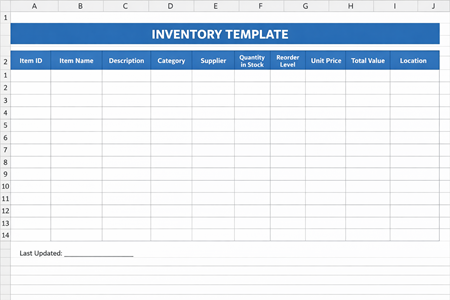
Add the following headers in the first row:
- Item ID
- Product Name
- Category
- Quantity in Stock
- Purchase Price
- Selling Price
- Supplier
- Reorder Level
- Last Updated
These columns will form the structure of your inventory tracking sheet.
Step 3: Add Inventory Data
Enter details for each product in separate rows. Ensure that each item has a unique product ID. You can also save time by taking pictures of handwritten inventory records and converting them directly into Excel sheets using a JPG to Excel Converter.
Step 4: Add Formulas
You can include formulas such as:
Total Inventory Value = Quantity × Purchase Price
This allows you to quickly calculate the value of your stock.
Step 5: Save the Template
Once your template is ready, save it as an inventory sheet template so you can reuse it whenever needed.
Best Practices for Using an Inventory Sheet Template
Simply creating an inventory sheet is not enough. To get the best results, you need to use it correctly.
1. Update Inventory Regularly
Always update your inventory sheet whenever new stock arrives or products are sold.
2. Use Unique Product Codes
Assigning unique SKUs to products helps prevent confusion and ensures accurate tracking.
3. Perform Regular Stock Audits
Conduct physical inventory checks periodically to ensure your records match actual stock levels.
4. Set Reorder Alerts
Use reorder levels to avoid running out of stock.
5. Keep Backup Copies
Always maintain backup copies of your inventory spreadsheet to prevent data loss.
Common Inventory Management Mistakes
Even with an inventory sheet template, businesses sometimes make mistakes that lead to inaccurate records.
Here are some common errors to avoid.
Not Updating the Sheet Daily
Failing to update inventory regularly can cause inaccurate stock counts.
Duplicate Entries
Entering the same product multiple times creates confusion and incorrect stock totals.
Ignoring Reorder Levels
Not paying attention to minimum stock levels can lead to unexpected stockouts.
Lack of Standardization
Using inconsistent product names or categories makes inventory tracking difficult.
When Should You Upgrade to Inventory Software?
An inventory sheet template works well for small businesses, but as your business grows, manual tracking may become difficult.
You may need inventory software when:
- Your product catalog becomes very large
- You manage multiple warehouses
- You need real-time inventory updates
- Your business operates across multiple sales channels
However, many small businesses successfully use Excel inventory templates for years before needing advanced tools.
Inventory Sheet Template Example
Benefits of Using Google Sheets for Inventory
Many small business owners prefer Google Sheets inventory templates because they provide several advantages.
1. Cloud Access
You can access your inventory sheet from anywhere using any device.
2. Collaboration
Multiple team members can update the inventory sheet simultaneously.
3. Automatic Saving
Google Sheets automatically saves your changes, reducing the risk of losing data.
4. Integration
It can integrate with other tools and apps used by your business.
Tips to Improve Inventory Efficiency
Managing inventory efficiently helps businesses reduce costs and improve profitability.
Here are some practical tips.
a. Use the FIFO Method
FIFO (First In, First Out) ensures older stock is sold before new stock.
b. Track Fast-Moving Products
Identify best-selling products and maintain adequate stock levels.
c. Remove Dead Stock
Products that do not sell should be discounted or discontinued.
d. Analyze Inventory Data
Use your inventory sheet to identify trends and improve purchasing decisions.
Final Thoughts
An inventory sheet template is one of the simplest and most effective tools for managing stock in a small business. It helps you organize products, track inventory levels, and maintain accurate records without needing expensive software.
Whether you operate a retail store, an online business, or a warehouse, a well-designed inventory tracking spreadsheet can streamline your operations and reduce costly inventory mistakes.
By using the tips and strategies in this guide, small business owners can create a reliable inventory system that supports business growth and improves efficiency.
Start by creating your own inventory sheet template in Excel or Google Sheets, customize it to suit your business needs, and update it regularly to keep your inventory under control.