Day: July 17, 2025

  • DeepAI for Business: Unlocking Smarter Workflows with AI

    DeepAI for Business: Unlocking Smarter Workflows with AI

    Every business wants faster output with fewer resources. But not every team has time—or budget—for complex AI setups. DeepAI changes that. It gives access to powerful AI tools like image generation and natural language processing through simple APIs, helping teams automate repetitive tasks, enhance content creation, and speed up delivery.

    Understanding How AI Fits into Your Business Operations

    Artificial Intelligence (AI) is no longer just a futuristic concept—it’s a practical tool that businesses are leveraging to make their operations more efficient and impactful. But you might be wondering, “How exactly can AI fit into my business operations?”. Great question! The key is understanding what AI can do for you and where it can make the most difference.

    At its core, AI is about processing large amounts of data to recognize patterns and make predictions faster and more accurately than a human ever could, especially when paired with chatbot automation, enabling smarter, always-on customer service.. But what makes it truly game-changing for businesses is how it can be tailored to suit your specific needs, no matter the industry. Let’s break it down a bit more:

    The Custom Fit of AI

    Every business has a unique structure and workflow, right? This is where AI really shines. Rather than being a “one-size-fits-all” solution, modern AI platforms like DeepAI can adapt to different industries. With the right AI development services, businesses can customize solutions to fit their unique needs.

    For a retail business, AI might optimize your inventory management by predicting demand trends. For a manufacturer, AI in supply chain can help businesses forecast logistics needs, reduce delays, and maintain smoother end-to-end operations. For a SaaS company, AI could enhance customer service through chatbots or improve visual marketing with image generation tools that create engaging visuals automatically. The secret is identifying where your current processes could use a boost and applying AI specifically in those areas.

    Key Areas Where AI Makes an Impact

    So, which parts of your business are prime candidates for AI integration? Here are some go-to examples:

    • Data Analysis: AI can process enormous datasets at lightning speed and deliver actionable insights. This is a lifesaver for companies dealing with customer behavior, sales trends, or marketing campaign performance.
    • Decision-Making: AI tools can provide predictive insights by using historical data, helping you make smarter choices—like forecasting market fluctuations or detecting risks before they become problems.
    • Customer Engagement: From AI-powered recommendation engines to conversational AI chatbots, engaging with your customers has never been more efficient and personalized. Many companies choose to hire AI developers to build personalized recommendation engines, smarter chatbots, or automated decision-making systems tailored to their goals.

    Understanding the AI Workflow

    It’s also important to think of AI not as a distant “machine overlord” but as a collaborative tool in your team’s arsenal. It doesn’t replace humans—instead, it works alongside them to enhance productivity and free up time for more strategic, creative, or complex tasks. Think of it like having a superpowered assistant that handles the heavy lifting, so your team can zero in on what they do best.

    DeepAI for Business

    Breaking Down Workflow Automation with DeepAI

    Everyone has heard the buzz about workflow automation, but what exactly does it mean when we add – or more accurately, supercharge it – with AI? Workflow automation with DeepAI is all about using advanced technologies to streamline, simplify, and enhance repetitive or complex tasks in your business processes.

    Put simply, it’s like having a tireless assistant working behind the scenes so you and your team can focus on high-impact activities. During this phase, many organizations also rely on process intelligence software such as KYP to uncover how work truly flows across teams and identify where inefficiencies may be slowing down results.

    What Does Workflow Automation Actually Do?

    Think of workflow automation as a tool that helps businesses save time and reduce human error by automating repetitive tasks.

    However, with DeepAI, this isn’t just about following pre-set sequences or rules. It’s smarter than that! DeepAI uses machine learning and predictive analytics to enhance workflows by learning, adapting, and even proactively suggesting solutions in ways traditional automation simply can’t match.

    Whether it’s sorting customer service emails, auto-generating reports, or improving your supply chain logistics, DeepAI helps elevate every aspect of the way your business operates.

    How Can DeepAI Supercharge Your Current Processes?

    You might already have workflows in place – after all, productivity is the backbone of every successful business. But take a moment to imagine this: a system that gets smarter with each task, saving even more time as it learns your processes and identifies bottlenecks. Here’s how DeepAI makes this possible:

    • Real-Time Data Analysis: DeepAI can instantly analyze massive amounts of data flowing into your system to make faster, data-driven decisions. This is perfect for businesses with heavy customer insights needs or finance-related operations.
    • Predictive Actions: Instead of waiting for a problem to arise, DeepAI analyzes trends to help you identify potential issues before they even happen. Think customer complaints flagged before they escalate or supply-chain disruptions anticipated weeks in advance.
    • Smart Task Allocation: With DeepAI, tasks can be intelligently assigned to the right person or even automated completely based on historical performance or availability. No more guesswork or unnecessary meetings to figure out who should do what!

    Benefits for Your Team

    Here’s where the magic happens—workflow automation with AI isn’t just about cutting costs (although that’s undeniably a bonus). It’s about transforming how your team operates. By automating repetitive tasks like data entry or document creation, your people can focus more on creative problem-solving, strategic planning, and initiatives that drive growth.

    DeepAI in Action

    Let’s say your business relies on customer inquiries and support tickets. Using workflow automation powered by DeepAI, incoming tickets can be categorized automatically—urgent matters prioritized, and common queries responded to with AI-driven chatbots that work 24/7. Meanwhile, your team handles high-value, customer-centric issues that require human empathy.

    Or imagine your marketing team: equipped with DeepAI, they can analyze campaign performance in real-time, forecasting success metrics and making adjustments on-the-fly. DeepAI provides the tools to act faster, smarter, and with precision.

    Addressing Common Myths About AI in the Workplace

    When it comes to Artificial Intelligence (AI) in the workplace, you’ve probably heard it all: “AI is going to replace everyone’s job,” “Only big tech companies can afford AI,” or “AI is too ‘sci-fi’ for my industry.”

    While these myths may have gained traction, they can create unnecessary fear or hesitation about adopting AI into your business operations. Let’s tackle these misconceptions head-on and uncover the truth so you can make informed decisions about AI adoption.

    Myth 1: AI Will Replace Human Jobs

    One of the most common fears surrounding AI is that it’s here to make human jobs obsolete. The truth? AI is meant to enhance human efforts, not eliminate them. Think of AI as your reliable teammate that handles repetitive and time-consuming tasks so that your human staff can focus on activities that require creativity, critical thinking, and emotional intelligence.

    For example, AI-powered tools like chatbots might handle frequently asked customer support queries, but complex or high-stakes inquiries still rely on skilled human agents. Similarly, AI can help analyze data faster than ever, but the final strategic decisions still depend on human expertise. Far from replacing jobs, AI often creates opportunities for new roles centered around creativity, decision-making, and AI optimization.

    Myth 2: AI Is Only for Large Companies

    It’s easy to think that AI is only accessible to large corporations with deep pockets and in-house tech teams. In reality, AI development solutions are increasingly affordable and scalable for businesses of all sizes. Whether you’re running a small business or a mid-sized operation, AI can be customized to fit your unique needs and budget.

    • AI-based tools for email marketing, such as generating personalized campaign content, are affordable and easy to integrate.
    • Project management software with AI features, like task prioritization or deadline forecasting, allows even small teams to benefit from smoother workflows.
    • Freelance platforms and SaaS companies often provide AI-powered tools without requiring advanced technical expertise to use.

    The democratization of AI means that with the right partner or platform, you don’t need a Silicon Valley budget to take advantage of smarter workflows and automations. Whether you’re partnering with an ai development company in brazil or other regions, this accessibility is now reality.

    Myth 3: AI Is Too Complicated to Implement

    Many businesses think that integrating AI requires a full overhaul of systems and significant technical expertise, but that’s far from true. In most cases, AI platforms are designed to integrate seamlessly into existing tools, with intuitive dashboards and user-friendly interfaces.

    Practical Examples of AI Enhancing Day-to-Day Tasks

    Artificial intelligence (AI) isn’t just a futuristic concept reserved for tech giants or research labs anymore. It’s here, now, transforming how businesses of all sizes operate—especially when it comes to everyday tasks. Let’s dive into some practical, real-world ways AI can step in and simplify those repetitive, time-consuming workflows, so your team has more time to focus on what truly matters.

    1. AI in Customer Service: Chatbots that Never Sleep

    If your team spends hours answering basic customer queries, AI-powered chatbots could be a game-changer. These bots are designed to handle repetitive but essential tasks, like providing order updates, resolving account issues, or even recommending products. For example:

    • 24/7 Availability: Chatbots stay active around the clock, ensuring customers never have to wait for answers, even at 3:00 am.
    • Personalization: Using customer data, AI can tailor responses, making the experience feel personal and engaging.

    Of course, this frees your human teammates to focus on higher-value problems that a machine can’t solve, like building relationships with VIP clients or developing innovative strategies.

    2. AI Streamlining Administrative Tasks

    We’ve all been there—spending way too much time on scheduling meetings, sifting through emails, or organizing files. AI tools like smart calendars, email assistants, and document classification systems can handle much of this grunt work. Some excellent examples include:

    • Scheduling Optimization: Tools like AI-driven calendar assistants analyze everyone’s availability and propose the best times to meet.
    • Email Triage: AI can sort through email inboxes, flagging important messages while filtering out irrelevant clutter.
    • Document Management: AI workflow solutions can automatically categorize, tag, and store files, making them easy to retrieve later.

    Imagine if just 20% of your team’s admin tasks were handled by an AI assistant—how much more productive could your business be with those hours reclaimed?

    3. Smarter Marketing Campaigns with AI

    Marketing isn’t just about creativity—it’s also about data. AI tools can analyze customer behavior, predict trends, and even help craft personalized campaigns. Here are some ways it’s being used:

    • Content Suggestions: AI tools like Jasper or others generate topic ideas or full blog posts tailored to your audience preferences.
    • Ad Optimization: AI-driven platforms test multiple ad versions, automatically identifying and running the ones that perform best.
    • Audience Insights: Tools like Google Analytics and DeepAI can process huge datasets and extract meaningful patterns, helping you target the right audience with pinpoint precision.
    • Video Creation: Marketing teams can create AI videos from scripts or briefs in minutes — no production team or editing skills needed.

    In short, AI isn’t just a helper—it’s a strategic partner that takes your campaigns to the next level.

    4. Inventory and Supply Chain Management

    Retailers and manufacturers know the pain of managing inventory—too little stock, and customers leave disappointed; too much, and resources go to waste. AI solves this balancing act with predictive analytics. For instance:

    • Demand Forecasting: AI tools can predict which products will be in demand based on sales history, seasonal trends, and more.
    • Efficiency Boost: Some systems optimize warehouse layouts or recommend reorder points, reducing inventory headaches.

    This isn’t just for the big players; even small-to-mid-sized businesses stand to gain huge advantages from these insights.

    DeepAI for Business

    5. AI-Driven Employee Assistance

    AI doesn’t just help customers—your team benefits in big ways, too. For example:

    • Training and Onboarding: AI-powered learning platforms provide tailored training programs that adapt to individual employees’ needs.
    • Workload Management: AI tools can prioritize and delegate tasks effectively, ensuring no one is overwhelmed.

    Your team members will feel empowered when they see technology working to make their lives easier—not replacing them, but amplifying their skills.

    Analyzing Cost and Time Savings with Smarter AI Decisions

    Imagine this: your business is running at peak efficiency, and you’re saving time and cutting costs—all thanks to smarter decisions driven by Artificial Intelligence (AI). Sounds exciting, right? Let’s dive into how AI can help analyze costs, streamline workflows, and liberate your team to focus on creative and impactful work. By the end of this, you’ll see why adopting AI might just be one of the smartest decisions your business makes.

    Why Smarter Decisions Are the Key to Success

    Every business owner and manager knows the importance of making informed decisions. But the reality is, humans are prone to errors. That’s where AI steps in as a powerful ally. **AI doesn’t guess—it calculates, predicts, and recommends based on real-time data.** This makes it a game-changer in reducing inefficiencies and highlighting areas where you can save money without compromising on quality.

    Real Benefits of AI in Cost and Time Analysis

    Let’s break it down into tangible benefits. Here’s what AI can do for your business:

    • Optimize Resource Allocation: AI can assess how resources like money, time, and labor are being used and suggest ways to maximize their potential. For instance, if a project budget is inflated, AI tools can recommend cost adjustments based on market trends and historical data.
    • Reduce Errors: Mistakes can be expensive. Whether it’s a misplaced decimal point in financial analysis or a miscalculated delivery schedule, errors cost both time and money. AI minimizes these risks by taking the guesswork out of the equation.
    • Forecast with Confidence: Through predictive analytics, AI can help you prepare for what’s ahead. Whether it’s changes in supply chain demands or customer behavior, having foresight leads to smarter planning and fewer last-minute crisis situations.
    • Automate Time-Consuming Tasks: AI tools excel at handling repetitive and mundane tasks like expense tracking, report generation, and data entry. This means your team is free to take on innovative, high-impact work instead.

    Is AI Really Cost-Effective?

    One of the biggest hang-ups businesses have is whether investing in AI is worth it initially. Here’s the truth: AI is an investment that pays off over time—and often much faster than you’d think. For example:

    1. Reduced Hiring Costs: Task automation means fewer human resources are needed for certain operational roles.
    2. Energy Efficiency: AI-powered systems often help businesses track and conserve energy use.
    3. Fewer Errors = Fewer Redos: Minimizing mistakes means cutting down on the extra time and money spent on revisions, refunds, or damage control.

    How Do You Measure the Impact?

    The beauty of AI is that it equips you with data to measure its own success. Tools often provide real-time dashboards or reports on cost savings, time reductions, and workforce efficiency. By tracking these metrics, you can identify areas where AI is excelling and areas where adjustments could make it even more effective.

    Choosing the Right AI Features for Optimal Results

    Artificial intelligence (AI) is revolutionizing the way businesses operate, but with so many features and tools available, how do you choose the right ones for your needs? Don’t worry—we’ve got you covered! Let’s break it down so you can make informed, strategic decisions that yield optimal results for your business.

    1. Start with Your Goals – Why Do You Need AI?

    Before diving into AI platforms, take a step back and ask yourself, “What specific problems am I trying to solve?” AI isn’t a one-size-fits-all solution. Are you aiming to improve customer service, streamline internal processes, or optimize inventory management? Determining your business goals allows you to focus on the features and functionalities that will have the most impact on your operations.

    For example, if customer engagement is your top priority, look for AI with robust natural language processing (NLP) capabilities, such as chatbots or sentiment analysis tools. If it’s about forecasting or decision-making, predictive analytics is where you should focus your efforts.

    2. Evaluate the Scalability of the Features

    An important consideration when selecting AI features is scalability. Think about how your business might grow in the future and whether the AI tool can adapt to your evolving needs. A feature that works for a small team today should also support a larger team or handle more complex operations tomorrow. Cloud-based tools, for instance, often offer the flexibility to scale up or down as required.

    Ask vendors or service providers about how their AI solutions handle scaling. Can additional features or functions be added on demand? Does performance remain consistent as data volumes expand? These are key questions to keep in mind.

    3. Leverage User-Friendly Interfaces

    Advanced AI doesn’t mean it has to be overcomplicated. One of the easiest ways to expedite the adoption of AI tools is by choosing solutions that have a user-friendly interface. Your team is more likely to embrace the technology if they can navigate it easily without needing to be data scientists or coders.

    Seek out platforms that emphasize simplicity and offer training or tutorials to help your team get started. Some AI tools even come with drag-and-drop functionality or pre-built templates to make customization painless. Remember, the goal is to empower your team, not overwhelm them.

    4. Beware of Overloading on Features

    When choosing AI tools, it’s easy to get dazzled by platforms loaded with every bell and whistle. While comprehensive systems can be impressive, you don’t want to pay for features you’ll never use. Excessive complexity can also slow down your workflow rather than enhancing it.

    To stay on track, prioritize the features that align with your immediate goals. You can always expand capabilities later as your team gains confidence in using AI and your business needs shift.

    5. Investigate Vendor Support and Integration

    One aspect that’s often overlooked is the level of support provided by the AI vendor. Transitioning to AI-powered systems is a journey, and having reliable support in place makes all the difference. Choose vendors that offer excellent customer service, ongoing technical assistance, and clear documentation.

    Additionally, consider integration with your current tools. The AI solution should complement your existing platforms, not require a complete overhaul. Seamless integration ensures data flows smoothly and eliminates redundancies in your systems.

    6. Test Before You Commit

    Finally, always take advantage of demos or free trials to evaluate if the AI features meet your expectations. A hands-on experience provides clarity on usability, performance, and compatibility with your business, allowing you to make a confident decision.

    Preparing Your Team for an AI-Optimized Workflow

    So, you’ve decided to integrate AI into your business operations—great choice! But before diving into the deep end, let’s talk team preparation. After all, change isn’t just about implementing new tools; it’s about bringing people on the journey with you. In this section, we’ll explore how to properly get your team ready to embrace and thrive in an AI-enhanced workflow.

    1. Begin with Open Communication

    The word “AI” can sound intimidating to many. For some, it might conjure images of futuristic robots or even fears about job displacement. Start by having an open dialogue with your team. Explain what AI means for your company and clarify that it’s not about replacing people but empowering them to work smarter.

    Use accessible language—skip the complex tech jargon—and focus on how AI solves specific challenges. For example, will it automate repetitive tasks so your team can concentrate on more meaningful work? Highlight the benefits they’ll personally experience and how their roles may evolve in exciting ways. When people see what’s in it for them, they’ll be much more receptive to change.

    2. Address Concerns and Build Trust

    Change, even positive change, often comes with fear or resistance. That’s normal! Create a safe environment where your team feels comfortable expressing concerns or asking questions. Some team members may be worried about AI monitoring their productivity, while others may feel unsure about learning new tools.

    Proactively bring up these topics. Offer reassurance that AI is a supportive partner, not a snooping overseer. Provide examples of how it can make their day-to-day lives easier. If you can, pair this step with stories of other companies where AI has boosted morale and results!

    3. Offer Training Opportunities

    Nobody loves being thrown into new systems without support, right? The good news is that training your team on AI tools doesn’t have to be overwhelming. In fact, consider offering bite-sized workshops or on-demand tutorials catered to different roles in your organization.

    • Provide hands-on learning sessions where team members can experiment with the AI tools without fear of making mistakes.
    • Use examples and case studies relevant to your industry, so employees see how these tools apply to their work.
    • Promote a culture of ongoing learning—AI is evolving, and your team can grow with it!

    Most importantly, emphasize that no prior technical knowledge is required. AI platforms like DeepAI are designed to be user-friendly for everyone, not just tech wizards.

    4. Create AI Champions

    There’s a good chance that at least a few team members will be especially enthusiastic about embracing AI. Leverage their energy by turning them into your AI champions. Task them with becoming the go-to resources for others who may need a little extra help navigating the new workflow.

    This not only helps the rest of the team feel supported, but it fosters a sense of teamwork and collaboration. Plus, when employees see their peers thrive with the AI tools, they’re more likely to follow suit.

    5. Monitor Progress and Celebrate Wins

    As your team begins to engage with their AI-enhanced workflow, make it a habit to check in. Ask for feedback—what’s working, and what could be improved? Listening to their experience shows you value their input and are committed to improvement.

    Finally, don’t forget to celebrate the wins, small or big. Whether it’s saving time on a weekly task or completing a major project faster than before, acknowledge those victories. This boosts morale and solidifies the idea that AI isn’t just another tool—it’s a positive force for change.
  • 8 Highly Rated Voice of Customer Software  – Pros and Cons

    8 Highly Rated Voice of Customer Software  – Pros and Cons

    You are gathering feedback, but it is all over the place. Surveys and support tickets in one place, and some messages floating around in DMs. And yet, somehow, you keep missing what the customers feel.

    This is exactly where the voice of customer (VoC) software can help. It helps you gather, collect, and work on those actual customer perceptions. However, there are probably dozens of tools all vying to do the same job, so your hardest challenge is not even finding a tool, but choosing the right one.

    This guide breaks down eight top-rated VoC tools, clearly outlining their pros and real limitations, as well as the best fit for each. It refines your choices so you won’t spend on features you’ll never use or insights you can’t act upon. Let’s dive in.

    Highly Rated Voice of Customer Software to Try in 2025 

    No tools are the same. Everyone is good on their own, but it all depends on your business needs. Here, we have handpicked the top-rated voice of customer software and tools that are worth checking out in 2025: 

    1. Crescendo.ai

    Crescendo.ai has a robust AI-powered Voice of Customer (VoC) platform for customer support tickets received via chat, e-mails, SMS, and voice. Its unique power is its capacity to analyse all the conversations and calculate CSAT, and perform sentiment analysis in real-time using AI without the need for manual surveys. 

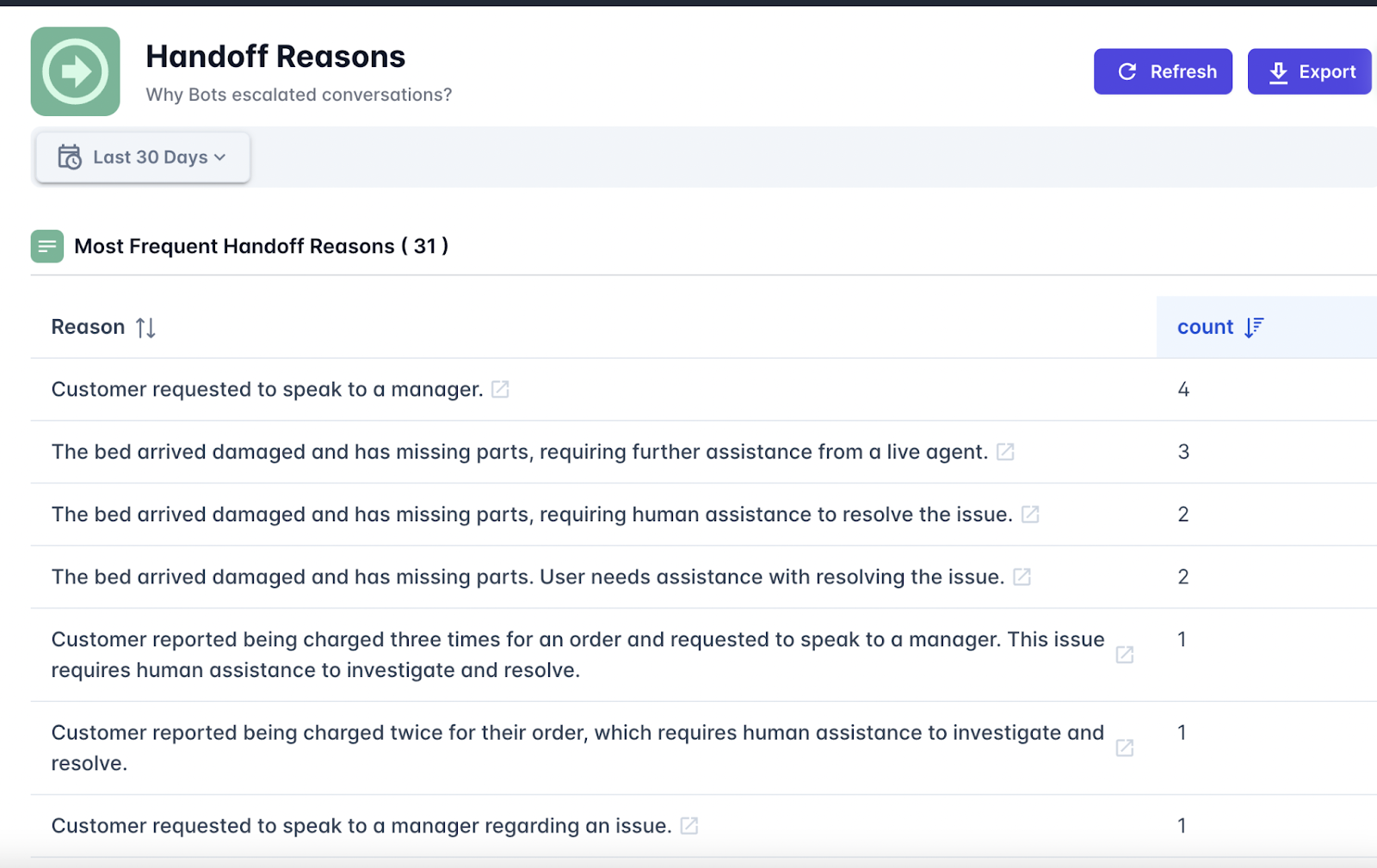
    So, say goodbye to scattered feedback and unreliable surveys with Cresendo.ai. It is an entirely automated and AI-powered Voice of the Customer platform that provides you with deep and instant insights. Whether sorting queries or drilling down into the reasons behind handoffs, it does all the work of converting raw conversations into actionable information, hands down for you, all without ever asking for a bit of physical effort. 

    On the other hand, it is a full-fledged CX support platform in itself, offering helpdesk software, AI-powered support agents, and outsourcing service with real human agents.

    Image source: Crescendo.ai

    Pros 

    • Auto-calculates CSAT and sentiment for 100% of conversations without surveys.
    • Categorizes issues like billing, refunds, or tech errors for actionable insights.
    • Flags reasons for human handoffs to improve workflows and agent training.
    • Detects critical issues like fraud, duplicate accounts, or failed transactions.
    • CX leaders get an opportunity to measure the surges in specific customer issues across categories.
    • Offers multilingual support with seamless integration of translation across 50+ languages.
    • It combines AI and human-backed outsourcing services to provide high empathy and context-aware accuracy.
    • Starts from $2.99, which is a cost-efficient pricing without sacrificing quality.
    • Achieves up to 90% instant resolution rate with 99.8% accuracy, which is the highest in the industry.

    Cons 

    • No social listening and employee review capacity. Its VoC is made just for customer support queries.
    • Though the dashboard is easy to navigate, it might be overwhelming if you are unfamiliar with AI-driven analytics.
    1. Zonka Feedback

    Zonka Feedback is an AI Voice of Customer platform that converts multi-channel unstructured customer feedback into crystal-clear and actionable intelligence. It ingests data from surveys, chats, reviews, tickets, and other sources. It organizes all the information into a single dashboard. Thematic analysis, sentiment scoring, impact mapping, and role-based dashboards are some of the features that help teams go very deep in identifying root causes, align on actions, and close the feedback loop with practically zero manual work. Zonka brings clarity across locations, teams, and touchpoints.

    Pros

    • Auto-tags feedback by location, team, service type, or issue owner so that they can be routed faster.
    • Role-based dashboards show only the most important insights to stakeholders.
    • AI-driven insights highlight performance drivers linked to NPS, CSAT, CES, and churn.
    • Smart workflows automatically assign tasks, escalate issues, and trigger follow-ups.
    • Built-in case management tracks progress on resolution and accountability.

    Cons 

    • Delays in syncing large datasets from third-party platforms.
    • Some of the advanced AI capabilities are locked behind a premium tier, which may be prohibitive for smaller teams.
    1. Medallia

    Being one of the leading Voice of Customer and experience management platforms, Medallia captures feedback signals from a multitude of channels — surveys, social media, contact centers, and web — and turns those inputs into real-time, AI-driven insights. Its built-in AI engine, Athena, allows businesses to deliver experiences akin to personalization at scale, automate workflows, and predict behaviors. Medallia allows front-line and internal teams to close the loop faster, drive retention improvements, and tie feedback into real revenue or cost-savings outcomes across journeys and touchpoints.

    Pros

    • Offers real-time AI-driven coaching to front-line teams based on conversation analysis.
    • Strong role-based reporting ties every stakeholder to actionable CX steps.
    • Gives organizations the power to orchestrate hyper-personalized customer journeys using behavior data.
    • Includes industry-specific modules strong in execution and insight (e.g., healthcare, retail, telecom).
    • ROI-proven with an application to directly link CX improvements to revenue and cost savings. 

    Cons 

    • A long and winding initial setup and onboarding process for large organizations.
    • Some dashboard customizations can only be completed by the vendor rather than being completed through self-service.
    1. Qualtrics

    Qualtrics is an Experience Management (XM) or Voice of Customer (VoC) platform used to collect and analyze feedback from customers, employees, and markets and act thereupon. Format-wise, Qualtrics holds tools for CX, EX, and market research to knit together signals across channels to optimize every single touchpoint. Its AI engine can identify sentiments, pinpoint issues, and empower teams to realize context-specific actions, thus making experiences personal, measurable, and scalable throughout your organization.

    Pros

    • Industry-specific CX, EX, and research modules in one platform.
    • Insight generation uses AI-based and role-specific criteria for managers, agents, and product teams.
    • Integrates voice, text, survey, and behavioral data for 360-degree visibility of feedback.
    • Has excellent dashboarding and reporting capabilities powered by advanced, customizable analytics.
    • Trusted by over 20,000 enterprises across the globe and proven in domains such as retail, airlines, and finance.

    Cons 

    • Learning curve for non-technical users, especially when dealing with complex logic.
    • It feels laggy sometimes to load all the info within dashboards or to navigate among them, and its performance drops when handling big data from multi-country setups.
    1. SentiSum

    SentiSum is a real-time Voice of Customer platform designed for fast-paced teams requiring instant, lucid insights from customer feedback. Employing advanced AI, it scrutinizes every ticket, chat, review, and survey to identify burgeoning concerns, classifies them automatically, and sets up alerts for brands to act before problems escalate. It brings data together from across channels with minimal setup and high adoption due to its intuitive design. SentiSum allows businesses to repair problems today and build customer loyalty for tomorrow, without complicated setups.

    Pros

    • Real-time scanning of support tickets, chats, and reviews
    • Automated alerting to identify unexpected issues (product, service, delivery)
    • Consolidates feedback from every touchpoint into one transparent dashboard
    • Setup is done in anywhere 2 weeks, with adoption from more than 90% of teams
    • Minimal training needed because it’s all very intuitive

    Cons

    • Heavy focus on support channels, limited CX journey tools
    • A limited number of integrations outside of support platforms such as Zendesk or Intercom
    1. UserTesting

    UserTesting is an enterprise-grade, top-rated VoC software enabling organizations to rapidly test digital experiences, marketing campaigns, or product ideas and tune them according to real customer feedback. In the broader landscape of enterprise testing, having access to the most robust global participant network and an AI-powered analytical suite means teams can validate and de-risk decisions and launches, working alongside their users in real time. From product to marketing, and to CX, UserTesting helps make faster and wiser decisions, which improves customer satisfaction, enhances revenue, and builds brand loyalty, all without traditional research that takes months. 

    Pros

    • Feedback from actual customers and target users in real-time
    • Good for validating messages, product designs, and digital flows
    • Increases speed of decision-making by up to 5x
    • 6x ROIs have been recorded according to some customers’ (Microsoft, Walmart) studies
    • Used by multiple teams such as marketing, UX, CX, and production.

    Cons

    • Deep UX-level research capabilities are mostly utilized by enterprises
    • Live testing formats can add friction to high-speed development cycles
    1. AskNicely

    AskNicely is a customer loyalty platform optimized for NPS-powered frontline engagement. It, powered by conversational AI, surveys people over email, SMS, and web, then turns the responses into actionable insights with suggestions for next steps and leaderboards. Real-time feedback is featured, from which frontline teams can set priorities. Designed to fit in the regular flow of work, it connects with Salesforce, Slack, or Microsoft Teams. AskNicely assists customer-facing teams in prioritizing problems, retention, and improving online reviews—all with little effort and great involvement.

    Pros

    • The conversational style of the survey helps in getting more responses.
    • Real-time dashboards and leaderboards keep teams motivated. 
    • Suggested follow-up actions help reps to close the feedback loop.
    • Good CRM and collaboration tools integrations – e.g., Salesforce, Slack.
    • AI-driven insights automatically highlight key themes.

    Cons 

    • Integration issues: Users have reported glitches, or at times, they have had to use workarounds. 
    • Analytics: Reporting does not support strong trend analysis or dashboard customization.
    1. SurveySparrow 

    SurveySparrow is an omnichannel Voice of Customer platform that provides businesses with multiple ways to collect feedback through conversational surveys, WhatsApp, emails, social media, and website spot checks. It has AI-powered smart analytics (CogniVue) that interprets sentiment, key themes, and brand reputation, whereas ticketing, reviews, and reputation management tools close the feedback loop. Its elegant designs and conversational formats promise strong engagement and response rates.

    Pros

    • Integrated ticketing and reputation management tools close the feedback loop.
    • Over 2,000 integrations make the platform flexible to embed into your existing tech stack.
    • Strong white-labeling features to ensure brand consistency.
    • The Wings AI assistant helps managers with survey creation and review responses.
    • Supports multilingual surveys and sentiment tagging in real time.

    Cons 

    • Somewhat limited customization options (especially in lower-tier and free plans) 
    • The learning curve can be a little steep for beginners in conversational and AI-powered survey logic.

    Wrapping Up on VoC Software

    All these great VoC platforms provide an opportunity for brands to tap customer sentiment, close feedback loops, and really effect change. They make listening, learning, and responding easy for businesses, from real-time alerts to insights generated by AI. Choose the platform that not only hears your customers but also truly understands them.

  • What is a VAT number

    What is a VAT number

    Let’s dive into the basics—what exactly does VAT stand for, and why does it matter? VAT, or Value Added Tax, is a consumption tax added to goods and services at various stages of production or distribution. Think of it as the tax component of the price you pay when you purchase something, but with an important difference: it’s charged at each stage of the supply chain.

    Sounds straightforward enough, right? But let’s break it down further to really understand its purpose. The goal of a VAT system is to ensure that tax is collected incrementally as value is added to a product or service. Essentially, at every step of the process—from raw material suppliers to manufacturers, wholesalers, retailers, and finally, to consumers—VAT ensures a slice for the government. Simply put, everyone chips in a bit.

    Why is it Called “Value Added” Tax?

    Great question! The “value added” part refers to the extra worth created at any particular stage of production or service delivery. Imagine a simple example: a furniture maker buys wood from a supplier, builds a chair, and sells it to a retailer. At each step, value is being added—the wood supplier provides the raw material, the carpenter transforms it into a usable product, and the retailer makes it available to customers. VAT is calculated and applied to the value added at each of these steps.

    What makes this special is that each business in the supply chain can usually claim back the VAT they’ve paid, as long as they have a registered VAT number (more on that in another section). This mechanism prevents “double taxation” and keeps the system fair. Ultimately, the end user—the consumer—is the one who bears the full tax cost, since they can’t reclaim VAT.

    VAT vs. General Tax: Why Should You Care About the Difference?

    Unlike income taxes or corporate taxes that are based on earnings, VAT is all about spending. In fact, when you see VAT listed on a receipt, it’s a clear example of a tax you are directly contributing to, rather than a behind-the-scenes deduction. The process is often a lot more visible if you’ve ever looked closely at the breakdown of costs on an international invoice or receipt.

    Some Fun (and Useful!) Points About VAT:

    • It’s nearly global: Over 160 countries use VAT in some form. So, knowing about this tax system can give you a leg up when traveling or conducting international business.
    • Not every country calls it VAT: For instance, Canada uses something called GST (Goods and Services Tax) in a similar way, and some U.S. states operate on a sales tax model instead.
    • Businesses acting as tax collectors: Whether you’re a small business or a multinational, if you charge VAT, you’re essentially collecting taxes on behalf of your government. Kind of cool, right?

    A Closer Look: The Difference Between VAT and Sales Tax

    If taxes were people at a party, VAT and sales tax would be the two guests everyone mixes up. Sure, they’re both consumption taxes, but their styles and “personalities” couldn’t be more different. Let’s break it down and demystify the key differences between these two commonly misunderstood contenders.

    What is a VAT number

    It’s All About How They Get Collected

    Picture this: you’re buying your favorite new gadget. If you’re in a place with **sales tax**, the tax gets tacked on at the end of your purchase—you see it on your receipt, plain and simple. Businesses collect that extra bit from the customer and then pass it along to the government.

    With **VAT (Value Added Tax)**, it’s a little more intricate. VAT is applied at every stage of the supply chain whenever value is added—hence the name! Producers, suppliers, wholesalers, and retailers all play a role in collecting and paying VAT based on value added at their level. By the time your gadget reaches you, the consumer, the VAT has been built into the price you pay. No extra math at checkout for you!

    Sales Tax: Straightforward, But Limited

    Sales tax keeps things simple. It’s applied only at the final point of sale to the end consumer. For businesses, it’s clear-cut: they don’t pay sales tax on items they buy for resale. However, simplicity has its weaknesses. Sales tax is more prone to evasion since it largely depends on retailers properly reporting and remitting the tax.

    VAT: Complex, Yet Comprehensive

    The VAT system, though more complex, closes many loopholes. Each party in the chain applies VAT on their sales and claims credits for VAT paid on their purchases. This step-by-step system ensures compliance while creating a transparent paper trail for tax agencies. Businesses don’t just act as collectors—they’re also taxpayers themselves in the process.

    Who Uses What?

    • Many countries, especially in Europe (e.g., the UK, Germany, France), thrive on VAT systems. It’s the go-to tax model for large parts of the world.
    • Sales tax is mostly a North American phenomenon, used extensively in the United States. (Fun fact: the U.S. doesn’t have a federal VAT system!)

    Which is “Better”?

    Good question! It really depends on the perspective. Consumers might favor sales tax for its “add it once and done” simplicity. Governments and tax authorities, however, often favor VAT for its reduced potential for tax evasion and its broader reach. Businesses? Well, they might find VAT a bit more of a headache due to its administrative demands, but it evens the playing field by spreading tax responsibilities across the system.

    Who Needs a VAT Number? Clarifying the Criteria

    Let’s get straight to it: a VAT number isn’t something every business owner needs to worry about, but for some, it’s an absolute must. Whether you’re just starting out or scaling your operations, knowing whether you need a VAT number is crucial for compliance and success. So, who exactly needs a VAT number? Let’s break it down into clear, digestible bits.

    1. Businesses Exceeding the VAT Threshold

    For starters, if your business is based in a country with Value Added Tax (VAT) regulations—like those in the European Union (EU)—you’ll typically need a VAT number if your annual turnover exceeds a specific threshold. This threshold varies by country. For example:

    • In the UK, the VAT registration threshold as of 2023 is £85,000.
    • In Germany, it’s €22,000.
    • Other countries may have much lower or higher limits, so always check your local rules.

    If your sales figures cross this threshold, registering for a VAT number isn’t optional; it’s a legal requirement.

    2. Businesses Selling Across Borders

    It gets a little more complex with international trade. If you’re a business owner selling goods or services to other countries, particularly within the EU or areas that require VAT collection, you’ll likely need a VAT number. This applies if:

    • You sell products or services to customers in the EU, even if you’re based outside of it.
    • You store goods in a foreign country and sell them locally.
    • You engage in distance selling. For instance, if you sell online and exceed a country’s VAT threshold, you’ll need to register in that country.

    International business can be tough to navigate, but having the right VAT setup in place helps smooth the transaction process and makes you compliant with the local tax authorities. No one wants to face hefty fines for skipping this step!

    3. Freelancers or Small Businesses Might Also Need It

    Even if you’re not earning bucketloads of revenue just yet, you may voluntarily register for a VAT number as a freelancer, consultant, or small business. Why? Registering could make your business appear more legitimate to clients, especially if it’s in a B2B (business-to-business) space. Plus, it may allow you to reclaim VAT on expenses for goods or services you’ve purchased, which could save you money in the long run!

    4. E-commerce and Digital Service Providers

    If you’re an e-commerce wizard or offer digital services—like selling software, online courses, or subscriptions—you might fall under a new category that is required to register for VAT. Digital businesses often face rules like the EU’s VAT MOSS (Mini One-Stop Shop), where you collect and remit VAT based on your customer’s location rather than your company’s. If this sounds like you, it’s worth checking the specifics for your industry and marketplace.

    5. Businesses in Certain Industries with No Threshold

    In some sectors, the VAT threshold does not apply at all. This often includes industries dealing with high-value goods (e.g., art or precious metals) or professional services. If your business falls into one of these niches, double-check whether you need to register immediately, even at low turnover levels.

    Your Checklist: Do You Need a VAT Number?

    If you’re still unsure after all that, here’s a quick checklist to help:

    • Are you exceeding your country’s VAT threshold?
    • Do you sell goods or services internationally?
    • Do you sell digital products to customers in other countries?
    • Would voluntarily registering be beneficial for your business?

    If you answered “yes” to any of the above, it’s time to dig a little deeper into the process of registration (don’t worry, we’ll get to that in another section!).

    How VAT Numbers Work: Breaking Down the Process

    VAT numbers might sound like a dry, complicated topic—but don’t worry; they’re not as scary as they seem! Let’s break it down in simple terms so that you can clearly understand how they work and why they’re so important for businesses.

    What Exactly Is a VAT Number?

    First things first: a VAT number is a unique identification number assigned to businesses that are registered for Value Added Tax (VAT). Think of it like a tax ID for VAT purposes—it’s used by governments to track businesses and the VAT they collect or reclaim.

    Businesses use VAT numbers when dealing with other companies, customers, or revenue authorities. The number ensures that the right amount of VAT is charged, collected, and paid—or refunded—at every step of the process. Without a VAT number, a business would quickly run into issues when conducting taxable activities.

    How Does the Process Work?

    In essence, VAT is applied at every stage of the supply chain where value is added to a product or service. Here’s a quick breakdown:

    1. A Business Registers for VAT
      Businesses apply for a VAT number with their local tax office once they surpass a certain revenue threshold (this varies by country). Once registered, they’re issued a unique VAT identification number.
    2. Charging VAT on Sales
      When the business sells its goods or services, it adds VAT to the price. For example, if the VAT rate is 20%, a product priced at $100 would have an additional 20% VAT added, making the final price $120.
    3. Reclaiming VAT on Purchases
      Here’s where things get interesting. Businesses can reclaim VAT they’ve paid on their own purchases (as long as those purchases are used for business purposes). Essentially, they deduct the VAT they’ve paid from the VAT they’ve collected.
    4. Filing a VAT Return
      At regular intervals (monthly, quarterly, or annually, depending on the country), businesses file a VAT return. This return shows:

      • How much VAT was charged to customers
      • How much VAT was paid on business-related purchases

      If the business collected more VAT than it paid, it owes the difference to the tax authorities. If it paid more VAT than it collected, it gets a refund!

    Why Is the VAT Number Such a Big Deal?

    The VAT number is what makes this entire process run smoothly. It provides clear identification and ensures transparency in transactions between businesses. For example:

    • Business-to-business (B2B) transactions: If two VAT-registered companies are trading with each other, the seller doesn’t charge VAT as long as the buyer provides their valid VAT number. This system prevents double taxation.
    • Compliance: The VAT number ensures that businesses are complying with their legal obligations. Failing to register for VAT, or using an incorrect VAT number, could result in penalties.

    Fun Fact: VAT Numbers Are Like Fingerprints!

    Did you know that VAT numbers are unique across countries and regions? Each VAT number contains specific information, such as a country code and digits that identify the business. For example, in the UK, VAT numbers start with “GB,” while in Germany, they start with “DE.” It’s like a fingerprint for your business in the world of taxes!

    VAT Numbers Across Borders: What to Know for International Business

    Running a business internationally? That’s exciting! But when it comes to taxes, things can get tricky, particularly with Value Added Tax (VAT) numbers. If you’re dealing with customers or suppliers across borders, you’ll want to ensure you understand what a VAT number means in the global context. Let’s dive into the essentials, so you’re ready to seize those international opportunities without the fear of tax-related hiccups!

    1. What is a VAT Number in an International Setting?

    In simple terms, a VAT number is a unique identifier issued to businesses for tax purposes. When you cross borders, this number becomes even more crucial, as it helps track and manage the VAT associated with cross-border transactions. Governments across countries use VAT numbers to ensure compliance, facilitate fair taxation, and prevent fraud.

    For example, if your business is based in the European Union (EU) and you engage in transactions with businesses or customers in other EU countries, your VAT number plays a central role in managing VAT reporting. Similarly, for non-EU businesses trading with the EU, a VAT number may be required to register and remit VAT on goods or services.

    2. VAT Systems Vary by Country

    Not all countries handle VAT in the same way. While around 160 countries globally use some form of VAT or a GST (Goods and Services Tax) system, the rules and requirements can differ quite a bit.

    • In the EU: Each member state has its standard VAT rates and policies for cross-border transactions. Purchases between VAT-registered businesses often fall under the reverse charge mechanism, meaning the buyer accounts for VAT rather than the seller.
    • Non-EU Countries: Countries like Canada (GST) or Australia (GST) have their distinct regimes. Importantly, places like the United States don’t use VAT at all. Instead, they rely on a sales tax system—which means no VAT numbers there!
    • Thresholds Vary: Some countries set a revenue threshold before requiring VAT registration for foreign businesses, while others need you to register as soon as you trade on their turf.

    3. Why International Businesses Need a VAT Number

    So, why exactly do international businesses need VAT numbers? Here are a few reasons:

    1. Compliance: Many countries require businesses, including foreign ones, to register for VAT to avoid fines or penalties.
    2. Reputation: A VAT registration number signals professionalism and compliance, which can improve trust with partners and clients across borders.
    3. Reclaiming VAT: With a valid VAT number, you can often reclaim VAT paid on qualifying expenses in foreign countries, boosting your bottom line.

    4. Tips for Navigating VAT Across Borders

    Here are some friendly tips to help you get VAT right for global business:

    • Do Your Homework: Research the tax rules in each country where you operate. You may need to hire a tax expert or use software to simplify compliance.
    • Keep Records Organised: When dealing with multiple VAT systems, track invoices, payments, and VAT numbers meticulously to ensure accurate reporting.
    • Communicate Clearly: If you’re working with clients abroad, let them know if VAT applies to your transactions or if they’re responsible for accounting for VAT.

    Common Misconceptions About VAT Numbers

    Let’s get right to it—VAT numbers often get a bad rap for being confusing, overly complex, or even downright intimidating. But don’t worry, we’re here to clear up some common misconceptions about VAT numbers and make things a lot less daunting. By the end, you’ll see that they’re not so scary after all!

    1. Only big businesses need a VAT number.

    One of the biggest myths about VAT numbers is that they’re exclusively for giant corporations with sprawling international operations. Not true! In many areas, small businesses are required to register for a VAT number if their taxable turnover exceeds the local VAT threshold, which varies depending on the country you’re operating in. Even sole proprietors or freelancers may need a VAT number if they meet the criteria. So, it’s not just about size—it’s about taxable activity.

    2. Once I have a VAT number, I’ll always have to charge VAT.

    False! While having a VAT number allows you to handle VAT transactions, the obligation to charge VAT depends on the specific circumstances of each sale. For instance, if you’re selling goods or services to VAT-exempt entities or outside the scope of VAT regulations (such as specific exports), you may not have to charge VAT. It’s not a one-size-fits-all rule. Knowing when and how to apply VAT is key, and your VAT number is just a tool in that process.

    3. VAT numbers and tax IDs are the same thing.

    Confusing them is quite common, but they’re not the same. Tax identification numbers (TINs) are more general and are typically used for overall tax purposes, while a VAT number is specifically linked to VAT-related transactions. If you’re running a business, think of your VAT number as a specialized ID for handling VAT obligations. Same family, but different jobs!

    4. A VAT number is only relevant in my home country.

    Not exactly. If you’re engaging in cross-border trade, especially in the European Union or other regions with VAT frameworks, your VAT number becomes essential. Many laws require you to exchange and validate VAT numbers when working with other businesses internationally. In these cases, your VAT number can save you headaches, time, and potentially penalties, especially when it comes to avoiding VAT charges or proving your exempt status. So yes, it travels with you (or your business) across borders!

    5. I’ll get penalized immediately if I make a mistake with VAT.

    This one’s scary-sounding but isn’t entirely true. While it’s important to comply with VAT laws, the vast majority of tax authorities understand that mistakes happen, especially for businesses new to the system. Often, errors can be corrected without penalties, provided they’re not evidence of intentional fraud or gross negligence. The key here is honesty—if something goes wrong on a VAT return, reach out to the relevant authorities to fix it as soon as possible.

    What is a VAT number

     How to Apply for a VAT Number: Step-by-Step Guide

    So, you’ve realized you need to apply for a VAT number—awesome! Whether you’re a business owner expanding your horizons or launching a new venture, securing this number is a key step in staying compliant and thriving in the world of taxes. Don’t worry; while applying for a VAT number may sound complicated, it’s actually quite manageable if you follow each step carefully. Let’s break it down together!

    Step 1: Determine If You Really Need a VAT Number

    Before diving into the application process, double-check your eligibility. Typically, businesses are required to register for VAT if their taxable turnover exceeds a certain threshold set by their local authorities. This includes many industries — for example, construction businesses that may need to register for Construction VAT. For instance, in the UK, this limit is £85,000, but it varies from country to country. For smaller businesses or sole traders, VAT registration might be optional unless you operate internationally.

    Tip: If you’re unsure, reach out to a tax advisor or consult your national tax authority’s website—you’ll find plenty of straightforward information to help you out.

    Step 2: Have the Necessary Documents Ready

    Like with any official process, applying for a VAT number means you’ll need to provide the right paperwork. Here’s a handy checklist of what you may need:

    • Your company’s legal name and address.
    • Your business registration details (e.g., company registration number).
    • Details of your taxable supplies, which are essentially the goods and services your business provides.
    • Estimated turnover figures (if applicable).

    Having this info at your fingertips will make the application process smoother and quicker.

    Step 3: Decide How You’ll Apply

    Most countries offer multiple ways to register for VAT—online, via mail, or even through a tax consultant. For instance, platforms like HMRC (in the UK) or similar portals allow businesses to register online. Many find this to be the simplest and fastest method. If you’re a bit old-school or find comfort in detail-heavy forms, mail-in applications are also an option.

    Pro Tip: Double-check if your national tax authority offers a VAT helpline. These are usually free services where you can ask about specific questions during your registration process.

    Step 4: Fill Out the Application

    When it’s time to complete the VAT application form, pay close attention and take it step by step. Ensure all your business details, taxable supply info, and contact information are accurate. Mistakes can delay the approval process, so it’s better to err on the side of caution here.

    Some typical areas you’ll need to complete include:

    • The date when your business started trading.
    • An estimate of VAT-taxable activities (goods or services you’ll supply).
    • The bank account where tax refunds (if eligible) will be processed.

    Step 5: Submit and Wait

    Once you’ve double-checked everything, hit submit (or pop the form in the mail) and let the tax authorities take over. Processing times vary—online applications may receive VAT numbers within days, while paper forms can take longer. Be patient, but don’t hesitate to follow up if you feel there’s been a delay.

    Step 6: Keep Your VAT Number Handy

    The finish line is finally in sight! Once your VAT number is issued, you’ll receive official confirmation, either via email or letter. This number is like your business tax ID badge—it’s unique to you, and you’ll need it for invoices, filing VAT returns, and other transactions.

  • Operating profit margin

    Operating profit margin

    Let’s dive into the heart of what Operating Profit Margin really is—and don’t worry, we’ll keep it simple and engaging. Think of this metric as the ultimate business health check-up. It’s the figure that reveals, in percentage terms, how much profit a company makes from its core operations after covering operating expenses. Intrigued? Let’s break it down further!

    When you hear “Operating Profit Margin,” don’t be scared off by the financial lingo. At its core, it’s a measure of how efficiently a company is running its primary business activities. It’s calculated using this straightforward formula:

    A Metric with Many Stories to Tell

    But wait—it’s not just about numbers. Your operating profit margin tells a broader story of strategic choices. For example:

    • Pricing Power: Companies with higher margins often have strong pricing power. This could stem from brand recognition or a unique product offering that customers are willing to pay a premium for.
    • Cost Management: It also reflects a company’s ability to keep expenses in check. Are they finding cost-efficient ways to manufacture products? Are they avoiding unnecessary overheads?
    • Business Model: Different industries operate differently. A software company (which relies on digital products) often boasts higher margins than a grocery chain (which deals with physical goods and tight competition).

    How to Measure Operational Efficiency Through This Metric

    Measuring operational efficiency is critical for any business, large or small. One of the best tools to analyze this is the operating profit margin. Why? Because it gives you a direct insight into how well your company is managing its core operations to generate profitability. So, let’s break down how you can use this metric effectively.

    Understanding the Formula

    The first step to measuring operational efficiency through the operating profit margin is understanding and applying its formula:

    Operating Profit Margin = (Operating Income ÷ Revenue) × 100

    Operating profit margin

    Here’s what that really means: Take your operating income—the profit left after deducting expenses directly tied to your business operations like salaries, rent, and production costs. Then, divide it by your total revenue and multiply by 100 to express it as a percentage. Easy, right?

    The higher the operating profit margin, the more efficient your business is in converting revenue into actual profit.

    Why Does Operational Efficiency Matter?

    Operational efficiency isn’t just a buzzword; it’s the beating heart of a successful business. Here’s why this matters:

    • Your ability to consistently generate profit indicates strong management and sound financial health.
    • It helps you spot inefficiencies that might be eating into your earnings, like excessive costs or poor pricing strategies.
    • An efficient operation gives you a competitive edge, meaning you can invest in growth, innovation, or even weather economic uncertainties.

    What Does This Metric Reveal?

    When you calculate your operating profit margin, it reveals two major things:

    1. How well you’re controlling costs: A declining margin might hint at bloating expenses that need attention.
    2. The effectiveness of your revenue generation: A solid margin suggests that your pricing strategies and sales performance are on point.

    Setting Benchmarks

    An important part of measuring operational efficiency is having a benchmark to compare your margin against. While these benchmarks vary by industry, tracking your own historical data is equally critical. Regularly monitoring trends can help you identify whether your efficiency is improving, deteriorating, or staying consistent.

    Making Sense of Fluctuations

    Fluctuations in your operating profit margin are natural—don’t panic if the percentage changes slightly here and there. The key is to investigate major shifts. A sudden drop? Time to dig into your expenses and revenue streams. A big increase? Awesome! But it’s also worth understanding why—you might have stumbled upon a winning strategy you can replicate elsewhere.

    The Role of Operating Profit Margin in Financial Health Assessment

    Let’s take a moment to zoom in on one of the most telling indicators of a company’s financial well-being: the operating profit margin. More than just a number on a financial report, this metric is like a health check for your business — revealing just how efficiently it’s running and how strong it truly is. Whether you’re an investor, a business owner, or someone fascinated by finance, understanding its role gives you clarity and confidence in assessing financial health. Let’s break it all down!

    What Is Operating Profit Margin Telling You?

    At its core, the operating profit margin showcases how much money a company is keeping as profit from its core operations, after covering operational costs like labor, utilities, and materials — but before accounting for taxes and interest. Think of it as a snapshot of a company’s ability to generate profit while keeping its daily operations humming smoothly.

    If a company has a strong operating profit margin, it signals that it runs efficiently. Expenses are in check, and the business generates healthy profits on each dollar of revenue. Alternatively, a low or declining margin serves as a caution flag: operational inefficiencies, market competition, or rising costs could be eroding profitability.

    Why Is Operating Profit Margin Vital for Financial Health?

    Imagine a business as a living organism, and operating profit margin is one of its vital signs. It offers insights that go beyond a company’s revenue figure. After all, just because a business has high revenues doesn’t mean it’s financially healthy — it’s the profitability of those revenues that truly counts. Here’s why:

    • Operational Excellence: Businesses with higher operating profit margins demonstrate a streamlined operation, where resources are used wisely, waste is minimized, and costs are well-managed. This reflects outstanding planning and execution.
    • Resilience During Tough Times: In economic downturns or highly competitive markets, companies with robust margins are better equipped to withstand setbacks. They have a cushion to absorb shocks like price pressure or rising input costs.
    • Attracting Investment: Smart investors watch operating profit margins to gauge a company’s long-term potential. A consistently high margin suggests that the company isn’t only surviving — it’s thriving and likely to continue doing so.

    How to Use Operating Profit Margin in Decision-Making

    So, how does one interpret operating profit margin to assess financial health practically? Here are some key points to consider:

    1. Trend Analysis: Look at changes over time. Is the margin improving, holding steady, or slipping? Growth in the margin usually indicates positive momentum, whereas a declining trend could be a red flag.
    2. Benchmarking Against Competitors: Compare the margin to industry peers. Some industries naturally have higher or lower operating profit margins (more on that under Heading IV), so context matters!
    3. Understanding Cost Structures: Dive deeper into operational costs. Identify and control areas where inefficiencies may be dragging down margins — think bloated overhead costs or supply chain inefficiencies.

    Industry Variations: Why Context Matters for Margins

    Ever heard the saying, “It’s all relative”? Well, it couldn’t be truer than when talking about operating profit margins! You see, not all industries are created equally, and understanding the context around margins is key to interpreting them properly. Let’s dive into why the numbers shouldn’t be reviewed in isolation and how industry nuances play a massive role in shaping what’s considered a “healthy” margin.

    Why Industry-Specific Context Is Critical

    First things first, operating profit margins are the result of how a business manages its revenue and operational expenses. But here’s the kicker: Not every industry functions under the same cost structure or competitive environment. For example:

    • Retail or Grocery Chains: Think massive sales volume but slim profit margins, often hovering between 1%-5%. Why? Because of fierce competition and thin markups. Even names like Walmart keep operating profit margins on the low end!
    • Technology and Pharmaceuticals: On the flip side, industries characterized by innovation often hit higher margins, like 20%-40%. Their output (software, patented drugs, etc.) has high value but relatively low production costs.
    • Manufacturing: Margins tend to fall somewhere in between, as this sector faces significant costs around materials, labor, and logistics.

    So, comparing the operating profit margin of, say, a grocery chain to a pharmaceutical company would be like comparing apples to oranges. The key takeaway? Always analyze margins within the context of industry standards before making any sweeping judgments.

    The Impact of Market Dynamics

    Next up, let’s sprinkle in some nuance. Market dynamics—like the level of competition, customer demand, and supplier relationships—can significantly sway operating profit margins within a particular industry. For instance:

    1. Highly Competitive Markets: Industries like airlines or fast food often set razor-thin margins because businesses race to attract price-sensitive customers.
    2. Specialized Niches: A luxury brand in fashion can maintain high operating profit margins thanks to perceived exclusivity and high price points. Customers are willing to pay a premium!
    3. Economic Cycles: During economic booms, margins often improve across industries. But in a recession, businesses in discretionary spending markets (like tourism) might see margins shrink as demand drops.

    By understanding these dynamics, you can better assess whether a business’s operating profit margin reflects peak performance or room for improvement.

    Don’t Forget the Global Perspective

    In today’s interconnected economy, geography matters too! For example, margins in industries like automotive manufacturing may vary widely between businesses operating in high-cost regions like Europe versus low-cost areas like Southeast Asia. Labor costs, taxes, and even cultural preferences can all play a role in shaping profitability.

    For companies with international operations, analyzing margins may even get trickier as currency exchange rates can impact costs and revenues, further muddying the waters.

    An Expert Tip: Use Benchmarks Wisely

    The best way to assess whether an operating profit margin is strong? Compare it to industry benchmarks. Industry reports, financial advisors, or online tools often provide average or top-performing margin figures broken down by sector.

    For instance, if you’re analyzing a restaurant chain and see it has a margin of 8%, but the industry standard is 15%, something might be off. Is the chain overpaying on ingredients? Are operating costs like rent too high? These insights help frame strategic decisions.

    Analyzing the Influences: Key Factors Affecting Margins

    Operating profit margin is an essential metric for evaluating a company’s efficiency, but have you ever wondered why these margins fluctuate so much? Various factors can have a profound impact, and understanding these influences is the secret to decoding the true story behind the numbers. Let’s dive in and explore some of the key drivers.

    1. Revenue Growth and Pricing Power

    At its core, operating profit margin is a simple calculation: operating income divided by revenue. That means how much money is coming in plays a big role. Companies with strong pricing power—think luxury brands or tech innovators—can command higher price tags, boosting margins. However, when pricing competition gets fierce, as it often does in saturated industries, margins can shrink.

    Tip: **If your pricing power is limited, consider differentiating your product or service to justify higher prices without alienating your customers.**

    2. Cost of Goods Sold (COGS)

    COGS refers to the direct cost of producing goods or services sold by your business. As you’d expect, if production costs rise but sales prices stay the same, margins will take a hit. Factors like raw material price volatility, supply chain inefficiencies, or higher labor costs all feed into this equation. For instance, rising energy prices might unexpectedly crank up production costs for manufacturers.

    What can you do about it? **Keep an eye on supplier contracts and look for ways to streamline operations. Bulk purchasing or renegotiating terms can make a considerable difference over time.**

    3. Economies of Scale (or Lack Thereof)

    Economies of scale can be either a friend or a foe. When businesses grow, they often find that fixed costs get spread over a wider revenue base, helping to widen profit margins. Conversely, smaller businesses or startups might struggle in the beginning, as they’re unable to take advantage of these efficiencies.

    4. Industry-Specific Dynamics

    Not all industries are created equal when it comes to operating profit margins. For example, grocery retailers operate with notoriously slim margins due to high competition and low pricing, while tech firms might see margins soar thanks to high-value offerings with relatively low variable costs.

    To level-set your expectations, **compare your margins against industry benchmarks rather than against other sectors. This ensures you’re being fair to your business and making actionable comparisons.**

    5. Economic and Regulatory Factors

    Macroeconomic trends, from inflation to currency exchange rates, can nudge margins up or down. Meanwhile, rising regulation or changes to tax laws might add compliance costs that eat into profits. For instance, if new environmental policies require companies to adopt green technologies, businesses may need to spend more on compliance, temporarily tightening their margins.

    6. Operational Decisions and Strategies

    The choices you make about operations, from staffing levels to marketing spend, also weigh heavily on your operating profit margin. Overspending on non-essential areas? That’ll leave your bottom line gasping for air. On the flip side, cutting too much in critical areas might harm customer satisfaction or product quality, hurting revenue.

    Operating profit margin

    Common Missteps in Interpreting Operating Profit Margins

    Operating profit margin is a fantastic tool for evaluating a business’s efficiency and profitability, but let’s be honest – it’s not immune to misinterpretation. Even seasoned pros can trip up when interpreting this metric if they’re not careful. Here, we’ll take a deep dive into the most common mistakes people make when looking at operating profit margins and how to avoid falling into these traps yourself.

    1. Assuming Bigger is Always Better

    Let’s start with the most classic misconception: thinking that a higher operating profit margin is always a sign of success. Sure, who wouldn’t want a big, shiny number on their financial statements? But context matters! A business operating in an industry with low margins (think supermarkets) will naturally have a lower operating profit margin than, say, a software company with high pricing power. Comparing these two directly without considering the industry norms is like comparing apples to oranges – both are delicious, but they taste completely different.

    2. Ignoring the Bigger Picture

    It’s easy to zoom in on one number and neglect the story behind it. A rising operating profit margin can look fantastic at first glance – but is it sustainable? Maybe it increased because of drastic cost-cutting measures, like layoffs or deferred maintenance, which could hurt the company in the long run. Similarly, a drop in the margin might not be disastrous if it’s due to strategic investments that’ll pay off later.

    Pro Tip: Always analyze operating profit margins alongside other metrics, such as revenue growth or investment spending, to paint a balanced picture.

    3. Overlooking Non-Recurring Items

    Sometimes, an unusual event (such as selling off assets or winning a legal settlement) can give the appearance of a healthy operating profit margin. These one-time windfalls can inflate the numbers for a while but don’t represent the company’s true performance. Failing to strip out these anomalies can lead to an overly optimistic interpretation.

    4. Ignoring Scale and Growth Phases

    Young, fast-growing companies often have slim operating margins because they’re heavily investing in growth. By contrast, mature companies may enjoy larger margins due to their established operations. Comparing these directly could cause you to unfairly criticize early-stage companies or overvalue stable ones – both approaches being missteps.

    Pro Tip: Assess the stage of the company’s growth cycle before forming conclusions about their operating margins.

    5. Forgetting External Factors

    A company’s operating profit margin doesn’t operate in a vacuum – it’s influenced by external factors like raw material prices, supply chain disruptions, and even currency fluctuations. For instance, an increase in commodity prices could hit a manufacturer’s margin hard, with no fault of poor management. Ignoring these outside elements could lead to unfair assessments.

    Pro Tip: Stay informed about external economic trends and factor them into your analysis.

    6. Over-relying on Single Period Data

    Another frequent mistake? Analyzing operating profit margins for just one financial period. A single quarter or year doesn’t tell the full story. A one-time issue could skew the results, making the margin look worse (or better) than it actually is over time.

     Real-world Strategies to Improve Operating Profit Margin

    So, you’re interested in learning how to boost your Operating Profit Margin? Great move! This key financial metric provides insights into your business’s profitability and operational efficiency, which can greatly influence your future success. The good news is, there are plenty of practical ways to enhance it, and we’re here to break it down for you in a simple and approachable way.

    1. Streamline Your Operational Costs

    If you’re trying to improve your margins, the first place to look is at your operating costs. Sometimes, businesses let small inefficiencies slip through the cracks, and over time, these can add up to big expenses. Identify areas where costs can be cut without sacrificing quality. For example:

    • Switch to more cost-effective suppliers.
    • Negotiate better rates with existing vendors.
    • Automate repetitive tasks to reduce labor costs.

    Remember, trimming the fat doesn’t mean cutting corners—it’s all about being smarter with your expenses.

    2. Adjust Your Pricing Strategy

    Could it be time to rethink how you price your products or services? If your offerings are underpriced, you might be leaving money on the table. At the same time, overpricing could drive away customers. A sweet balance is key.

    1. Analyze your competitors: Check what similar businesses charge and understand how your pricing compares.
    2. Highlight value over cost: If you offer premium quality, emphasize that to justify a reasonable price hike.

    Even small percentage increases in product or service prices can lead to a noticeable improvement in your profit margin without drastically impacting your customer base.

    3. Focus on Upselling and Cross-Selling

    Boosting your revenue doesn’t always mean finding new customers—it can also come from getting more out of your existing ones. Enter upselling and cross-selling. Let me explain:

    • Upselling: Convince customers to upgrade to a higher-tier product or service.
    • Cross-selling: Suggest complementary items that enhance the main purchase (like a phone case for a smartphone).

    These strategies foster customer satisfaction (since they’re getting more value) and simultaneously improve your margins.

    4. Improve Your Inventory Management

    Inventory can be one of the sneakiest contributors to lower operating profit margins—too much stock ties up cash, while too little may lead to missed sales opportunities. Consider these tips:

    • Adopt inventory management tools to track stock more accurately.
    • Reduce excess inventory through promotions or discounts on slow-moving items.
    • Implement just-in-time (JIT) inventory practices, if suited for your business model.

    When managed well, your inventory becomes a profit booster rather than a cost burden.

    5. Invest in Employee Training

    Your people are your most valuable resource. Employees equipped with better skills are more efficient, make fewer costly errors, and can sometimes even find innovative ways to save money or work smarter. Regular training sessions, skill-building opportunities, and clear communication go a long way in improving productivity—which, in turn, positively impacts margins.

    6. Keep a Close Eye on Profitability Metrics

    This may sound obvious, but tracking your Operating Profit Margin consistently is a habit you can’t afford to skip. By reviewing performance regularly, you can quickly spot red flags and address inefficiencies before they spiral. Make it a point to leverage financial tools or accounting software that presents this data clearly so you can make informed decisions.


  • How Cloud-Based Solutions Can Make Healthcare Data More Accessible

    How Cloud-Based Solutions Can Make Healthcare Data More Accessible

    cloud based solutions

    Today’s healthcare environment demands access to timely, accurate data, as it can make the difference between good and poor outcomes. Hospitals, clinics, and private practices all rely on information to manage diagnoses, treatment plans, and medications. Yet too often, this data is fragmented, outdated, or simply unavailable when it’s needed most.

    Cloud-based solutions are quietly changing that. A $752.44 billion global industry, cloud computing and solutions can help make healthcare data more readily accessible to the public and healthcare providers.

    Here’s how. 

    Bridging the Information Gap Between Patients and Providers

    For decades, many patients had to request physical copies of their records from various clinics and departments. These files could take days or weeks to transfer, often arriving too late to inform crucial treatment decisions. Cloud systems eliminate those delays.

    The global healthcare cloud computing market alone is a $19.6 billion industry. A cloud-based platform can give patients access to their health history in seconds.

    Whether it’s routine lab results, detailed diagnostics such as an NGS report from genetic testing, vaccination status, or current prescriptions, all patient information is available instantly through the cloud. For any healthcare software development company, integrating advanced data management solutions has become essential to support this. Modern LIMS software platforms play a critical role here by organizing, tracking, and securely sharing laboratory data in real time, ensuring that clinicians can access accurate test results without delays.

    This means a clinician can review a patient’s genomic data alongside other health records in real time, enabling more precise, personalized treatment decisions without waiting days for physical reports.

    It also means fewer errors. When information is centralized, different doctors no longer work in isolation. Allergies, pre-existing conditions, and past treatments are visible to every healthcare provider involved in a patient’s care. This reduces the risk of misdiagnoses and helps avoid harmful drug interactions.

    Medications

    Transparency on Medications is Now Possible

    Too often, patients start a new drug without understanding its full list of side effects. They rely on brief conversations during appointments or hard-to-read labels that don’t tell the whole story.

    With cloud access, healthcare providers can attach detailed medication profiles to each patient record. This includes known side effects, risk categories, studies, and patient-reported outcomes. By partnering with a reputable healthcare software consultancy, providers can implement and optimize cloud-based solutions that integrate seamlessly with electronic health records, enabling informed decision-making and personalized patient care.

    When a new medication is prescribed, patients can view this information immediately. As providers modernize their digital infrastructure, healthcare software development plays a key role in creating secure, interoperable tools that enhance data accessibility and support clinical workflows. Providers, too, can easily compare options and make more informed decisions. This level of visibility is long overdue, particularly in cases where a lack of transparency has caused harm. One such example is Depo-Provera, an injectable form of birth control.

    According to TorHoerman Law, many users were not fully warned about the serious risks linked to long-term Depo-Provera use. In recent years, Depo-Provera lawsuits have surfaced across the country, with former users seeking compensation for bone density loss and other health problems. People were left to suffer without knowing the full scope of what they were taking. 

    Some have now chosen to join the Depo lawsuit in the hope of receiving justice and compensation. The Depo-Provera lawsuit settlements underscore what happens when manufacturers withhold essential safety data from healthcare providers and patients. Cloud-based tools offer a path forward by storing and sharing these warnings with every prescription, making blind trust a thing of the past.

    Improving Continuity of Care for Chronic Conditions

    For patients with long-term illnesses like asthma, arthritis, or cancer, seeing multiple specialists is normal. But those appointments often happen in different locations and at different times. Without cloud integration, test results can fall through the cracks, and treatment plans may conflict.

    Cloud-based healthcare platforms solve this. A rheumatologist in one city can review imaging ordered by a general practitioner elsewhere. An oncologist can adjust chemotherapy based on a scan taken the week before. Everyone involved is working with the same information at the same time.

    This continuity doesn’t just improve care; it saves time and lowers costs. There’s no need to repeat tests or guess about previous procedures. Patients get answers faster and avoid redundant or harmful interventions. Patient reminder software built into cloud platforms helps maintain this continuity by automatically notifying patients about upcoming appointments, medication refills, and follow-up tests across all their providers, reducing missed visits that can disrupt carefully coordinated treatment plans. For clinics, choosing the right appointment reminder software ensures GDPR compliance alongside automated patient notifications. It also relieves families from the burden of managing stacks of paperwork or repeating medical histories at every visit.

    Accessing Care in Rural and Underserved Areas

    Healthcare in rural America is still in a poor state. For people in such remote or underserved regions, traveling for care is not always feasible. Specialist care may require hours of driving, lost wages, or childcare arrangements. In some cases, patients delay appointments or give up entirely.

    Cloud-based solutions can help bridge this divide. Doctors can review charts, lab work, and progress reports without the patient being physically present. 

    Through telemedicine paired with cloud data, a nurse in a rural clinic can connect with a specialist hundreds of miles away. This gives the patient access to expert care close to home.

    This doesn’t just help in emergencies. It allows for long-term monitoring, medication management, and follow-up care for people who otherwise wouldn’t get it. It brings equity to healthcare in a way that wasn’t possible before the rise of digital recordkeeping.

    Protecting Privacy

    Protecting Privacy While Expanding Access

    Of course, access doesn’t mean a compromise on privacy. Cloud systems are built with secure encryption, authentication layers, and constant monitoring. Patients can control who sees their data, for how long, and for what purpose. A provider must request access, and those logs are recorded.

    This level of transparency builds trust. People know their records aren’t being misused or handed off without consent. At the same time, patients benefit from the collaborative, real-time nature of cloud storage. The balance between privacy and access is finally starting to tip in the patient’s favor.

    However, healthcare data breaches in the US have recently been on the rise. Hence, cloud providers must also take extra precautions in protecting patient data. Cloud-based systems allow healthcare providers to securely store and access patient information from multiple locations. When integrated with on-site technologies such as a healthcare kiosk, these systems can further streamline patient check-ins and real-time data retrieval.

    Frequently Asked Questions (FAQs)

    Why does healthcare data need to be accessible?

    Accessible healthcare data through a modern hospital management system ensures that doctors, nurses, and specialists can provide timely, accurate, and coordinated care. With integrated healthcare software, it helps prevent medical errors, supports personalized treatment, and improves patient outcomes.
    When patient records flow efficiently between providers and digital hospital systems, patients benefit from quicker diagnoses, better continuity of care, and reduced duplication of tests or procedures.
    Such medical data management solutions drive safer, smarter, and more connected digital hospital solutions for improved healthcare delivery. When combined with operational tools such as queue management systems like WaitWell or digital self-check-in hospital solutions from Axel Health, these platforms can further improve patient flow, reduce wait times, and enhance the overall care experience.

    How can healthcare data be exploited?

    Healthcare data can be exploited through breaches, unauthorized sharing, or data mining without consent. This approach has proven to convert to high client satisfaction for Registered Dietitians (RD), who benefit from streamlined documentation, easier follow-ups, and more efficient use of digital tools when delivering nutrition care. Hackers may sell personal medical records on the dark web, and some companies might use data for targeted ads or insurance discrimination. Misuse erodes trust in the system and puts patients’ privacy, safety, and financial well-being at risk.

    Do pharmaceutical companies misuse patient data?

    Pharmaceutical companies have faced criticism for using patient data without full transparency or consent, especially when partnering with tech firms or data brokers. While not always illegal, such practices can raise ethical concerns. Responsible data use requires clear privacy policies, patient consent, and strong regulation to prevent exploitation for profit-driven motives.

    Cloud-based healthcare is reshaping how we share, understand, and act on medical information. Whether it’s providing clarity or bringing care to remote communities, these solutions are helping healthcare systems serve people more completely.

    In a world where too many have suffered because of miscommunication and hidden risks, transparent, accessible data is not just a convenience. It’s a necessity. With the right technology and ethical commitment, we can make healthcare more open, more inclusive, more connected, and far more human.